WAF, GA, and GTM for access security and high availability
Use cases
Deploy your services on Alibaba Cloud's global network to reduce latency and packet loss while ensuring security and high availability. With multiple origin servers, GTM monitors each server IP and isolates faulty ones to maintain business continuity.
Why use these products together?
-
Layered defense:
-
WAF (Web Application Firewall): Protects the application layer against SQL injection, XSS, and CC attacks.
-
GA (Global Accelerator): Optimizes the network layer through nearest-point routing and TCP/UDP acceleration.
-
GTM (Global Traffic Manager): Routes traffic at the DNS layer, directing requests to the optimal node based on health checks and geographic location.
-
-
Complementary capabilities:
-
WAF alone does not resolve cross-border network latency.
-
GA or GTM alone lacks sufficient security protection.
-
Together, they provide integrated security protection, performance optimization, and traffic routing.
-
-
Business continuity:
-
GTM monitors node health in real time and switches traffic from faulty nodes.
-
GA optimizes link quality to reduce packet loss.
-
WAF blocks malicious traffic to prevent service interruptions from attacks.
-
Solution architecture

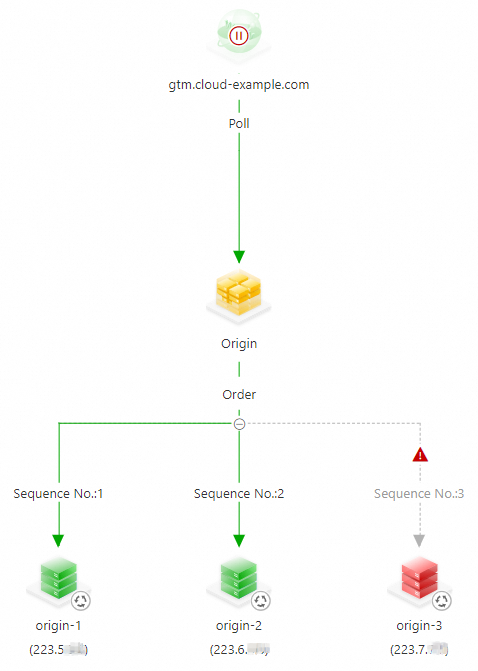
By default, GTM routes traffic to origin server 1. If origin server 1 fails, traffic shifts to origin server 2. If both fail, traffic goes to origin server 3. When origin server 1 recovers, GTM routes traffic back to it.
Prerequisites
-
Your domain name is managed by Alibaba Cloud DNS.
NoteIf your domain is not managed by Alibaba Cloud DNS, you can still use GTM by adding a CNAME record with your DNS provider pointing your business domain to the GTM access domain name.
-
A GTM instance is available. If not, purchase a subscription instance.
-
WAF 3.0 is activated. Purchase a WAF 3.0 subscription instance.
-
A Global Accelerator instance is available. Create and manage a standard Global Accelerator instance.
Procedure
This example uses the domain www.cloud-example.com.
If you encounter red or orange alerts during setup, investigate the health check status of the address.
1. Configure GTM
-
Go to the Alibaba Cloud DNS - Global Traffic Manager console.
-
On the Access Domain tab, click Create Access Domain. In the Select Scenario dialog box, select Custom Scenario.
-
On the Create Access Domain page, click the access domain name icon and configure it. In this example, the access domain name is
gtm.cloud-example.com. Configure an access domain name. -
On the Access Domain page, click the address pool icon to add addresses. Configure an address pool.
ImportantDo not set the GTM access domain name as an A record when the address pool type is Domain Name. This may cause WAF to return 502 errors.
-
On the Access Domain page, configure load balancing policies. Configure an address pool and Configure a load balancing policy between address pools. In this example, select Global Availability (Preemptive Mode) and Round Robin.
-
Configure monitoring and alerts. Configure alerts.
-
On the Access Domain page, click the access domain name icon and select Enable. In the Confirm Access Domain Enabling dialog box, verify the domain name and click OK.
Important-
If a DNS record with the same name and type exists in authoritative DNS, GTM policies take priority for intelligent routing, enabling traffic routing and failover for that domain.
-
If you disable or delete the GTM instance, Alibaba Cloud DNS handles resolution for that domain.
-
2. Configure WAF
Log on to the Web Application Firewall 3.0 console. In the top navigation bar, select the resource group and region (Chinese Mainland or Outside Chinese Mainland) for the WAF instance. Add a domain to WAF 3.0 in CNAME mode. Set the protected Domain to www.cloud-example.com and the origin server to the GTM access domain name gtm.cloud-example.com.
3. Configure GA
Log on to the Global Accelerator console. In the left-side navigation pane, choose Instances, and then click Create Instance. Follow Create and manage a standard Global Accelerator instance to complete the Basic Instance Configuration, Configure acceleration areas, Configure listeners, Configure endpoint groups, and Review sections. Set the endpoint to the CNAME provided by WAF, such as www.cloud-example.com.**.aliyunwaf.com.
4. Connect the business domain to GA
On the Alibaba Cloud DNS - Public DNS console, configure a CNAME record. Point your business domain www.cloud-example.com to the CNAME of the GA instance, such as ga-bp1fmarxs5wifowc49f2z.aliyunga**17.com.