Bot management
If your business faces threats from automated tools such as scripts and emulators, including data scraping, business fraud, credential stuffing, spam registration, malicious flash sales, and SMS API abuse, we recommend enabling bot management. By configuring targeted protection policies, this feature mitigates the risks of core data asset leaks and marketing campaign abuse, while reducing server load and bandwidth costs.
The new version of bot management is being gradually released and is enabled by default for new users. This topic applies only to the new version of bot management.
How to identify your version: Log on to the WAF console. In the left-side navigation pane, choose . You can identify your version based on the page style.
Legacy version access: A small number of users still use the legacy version. If you are using the legacy UI, where the Bot Management option does not have a "New" tag, see the Bot management (legacy) documentation.
Legacy bot management:

New bot management:
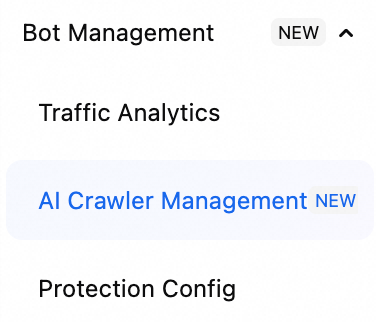
Features
Bot management provides the following core features to help you identify bot traffic and defend against crawler-related risks:
Traffic Analytics: You can view risk data for your APIs in traffic analytics without enabling bot management. This data includes traffic trends and information about at-risk clients, which helps you quickly identify and locate potentially vulnerable APIs. After you activate the official version, you can access more detailed information to help security and operations teams identify anomalous traffic and configure more granular protection policies.
AI Crawler Control: Automated programs, such as AI crawlers, intelligent agents, and search requests, frequently scrape web content for model training, knowledge base construction, and AI application operations. AI crawler control lets you accurately identify and manage this type of traffic. This protects your intellectual property and core business data while preventing excessive server bandwidth consumption.
Web Protection/App Protection: For web or app business scenarios, you can use the default bot management protection policies to quickly enable basic protection. For optimal results, continuously analyze rule-hit data and adjust protection actions accordingly.
Advanced Custom Rules: You can customize access control rules, frequency control rules, and rule categories to block requests that match specific rule conditions. Advanced custom rules provide a wider range of match conditions, such as Client ID, JA3/JA4 fingerprints, and data collected by Web/App SDKs. They also support deduplicated statistics based on these conditions.
Prerequisites
-
You have completed Web service provisioning on the Onboarding page.
You have activated a WAF 3.0 instance. The instance must be a pay-as-you-go, Subscription Premium, Enterprise, or Ultimate edition. The Basic edition does not support bot management.
Activate bot management
-
Log on to the Web Application Firewall 3.0 console. From the top menu bar, select the resource group and region (Chinese Mainland or Outside Chinese Mainland) for the WAF instance.
-
In the navigation pane on the left, choose .
Request a trial
Premium, Enterprise, and Ultimate edition WAF instances support a 7-day free trial of the bot management feature. After the trial ends, the system clears all policy configurations. To retain your trial data, activate the official version before the trial ends.
Go to the Bot Management Template or Advanced Custom Rules page and click Request a Free 7-Day POC.
In the 7-day Free Trial dialog box, click OK.
Premium, Enterprise, and Ultimate edition instances are eligible for a one-time trial of the bot management feature per Alibaba Cloud account.
The trial period is 7 days. After the trial expires, WAF automatically deletes all bot policy configurations. To keep your data and continue using the feature, activate the official version before the trial ends.
Activate the official version
Subscription
On the Bot Management Template or Advanced Custom Rules page, click Purchase Now.
On the Purchase Now panel, enable Bot Management - Web Protection or Bot Management - App Protection, and then complete the payment.
Pay-as-you-go
Go to the Bot Management Template or Advanced Custom Rules page.
In the dialog box that appears, select the assets you want to protect, and then click Enable Now.
NoteAfter you click Enable Now, the system creates protection templates for the selected assets and you will incur additional fees. For pricing details, see the Pay-as-you-go billing description. If you no longer need the bot management feature, delete all bot management protection templates.
Get started
traffic analytics: Review traffic analytics data to identify at-risk assets and sources of anomalous traffic for your services.
AI crawler control: View an overview and detailed data for AI requests, and manage the traffic with a single click.
Web Protection/App Protection: Configure and enable protection rules based on your business type. Enable Web Protection for webpages and H5 pages, and enable App Protection for native iOS or Android applications.
advanced custom rules: For fine-grained protection, configure rules based on dimensions such as Client ID and JA3/JA4 fingerprints to precisely identify and manage bot traffic.
How protection modes work
The following sequence diagram illustrates the working principles and request processing flow of the JavaScript Validation and Token-based Authentication protection modes.
JavaScript Validation
A client sends a request that matches a rule configured with the JavaScript Validation action.
WAF returns an HTML page that contains a JavaScript challenge generation algorithm.
The browser loads the JavaScript challenge page, generates an encrypted parameter, adds it to a cookie, and resends the request.
WAF receives the request and verifies the parameter:
If the parameter is valid, WAF determines that the request is from a legitimate user, forwards the request to the origin server, and returns the origin server's response.
If the client does not provide the challenge cookie or its value is invalid, WAF considers the request a potential script and returns the JavaScript challenge page.
Token-based Authentication
A client sends a request that matches a rule configured with the Token-based Authentication action.
WAF returns an HTML page containing a dynamic token to the client.
The browser loads the HTML page containing the dynamic token, generates an encrypted parameter, adds it to the request URL, and resends the request.
WAF receives the request and verifies the parameter:
If the parameter is valid, WAF considers the request legitimate, forwards it to the origin server, and returns the origin's response.
If the client does not provide the parameter or it is invalid, WAF considers the request a potential script and returns the dynamic token page.