Onboarding management FAQ
This article lists common issues you may encounter when onboarding websites to Web Application Firewall (WAF) 3.0.
Overview
Pre-onboarding capabilities and configuration inquiries
What is the difference between an origin IP address and a back-to-origin IP address in WAF?
Can the same domain use both cloud product onboarding and CNAME onboarding at the same time?
Does WAF protect multiple origin server IPs under a single domain?
Does WAF support cross-account use of CDN + Anti-DDoS Proxy + WAF architectures?
How does WAF obtain the client source IP and record the client IP through a custom header?
During CNAME onboarding, how does WAF load balance a domain-type origin (such as CNAME)?
The same domain name resolves to multiple cloud product instances. How should I onboard?
Multiple domain names resolve to the same cloud product instance. How should I onboard?
What domain name suffixes are supported for CNAME onboarding?
Does WAF support websites that use NTLM protocol authentication?
Is the WAF QPS limit applied to the entire WAF instance or to each domain individually?
Does a purchased WAF instance support smooth migration to another Alibaba Cloud account?
Issues you may encounter during onboarding
How to view the WAF back-to-origin IP ranges and the CNAME provided by WAF?
For the origin IP address in WAF, should I use the public or private IP of an ECS instance?
Why does adding multiple extended certificates fail during cloud product onboarding?
After onboarding a cloud product to WAF, do I still need to configure protected objects?
Why does the error InvalidTLS occur when onboarding a CLB instance via cloud product onboarding?
Does the Subscription Basic Edition support MLPS compliance?
Issues you may encounter after onboarding
How to batch export the list of domain information that has been onboarded via CNAME?
After cloud product onboarding, can the origin server get the real client IP?
My website is protected by WAF, but it doesn't appear in the domain list
Why does the upstream_addr field show "-" in logs after onboarding?
What is the difference between an origin IP address and a back-to-origin IP address in WAF?
WAF back-to-origin IP: The IP range that WAF uses to forward protected traffic to your origin server. These IPs are allocated by Alibaba Cloud and identify WAF as the source when making requests to your origin.
The back-to-origin IP range is typically a fixed set of IP addresses.
From the origin server's perspective, all client requests are intercepted and forwarded by WAF. The real client IP is recorded in an HTTP header field such as
X-Forwarded-Foror a custom header.
Origin IP: The public IP address of the backend server that actually hosts your business, or the IP address resolved from your domain. It is the destination that ultimately receives requests and returns responses when users access the website.
An origin IP can be a single IP address or multiple IP addresses (supporting load balancing).
The origin IP is the actual service address of your website, which may be deployed on Alibaba Cloud ECS, SLB, OSS, or another cloud provider.
Can the same domain use both cloud product onboarding and CNAME onboarding at the same time?
Not recommended. Each domain can only use one onboarding mode — either cloud product onboarding or CNAME onboarding. Onboarding the same domain twice causes forwarding conflicts and disables protection. If you need to switch a domain that is already protected by WAF through CNAME onboarding to cloud product onboarding, you must first delete the CNAME onboarding configuration for that domain, then re-onboard it in cloud product mode.
Does WAF protect multiple origin server IPs under a single domain?
Yes. You can configure up to 20 origin IP addresses for a single WAF domain.
Does WAF perform health checks on origin servers?
WAF enables health checks by default. WAF checks the accessibility of all origin IPs. If an origin IP becomes unresponsive, WAF forwards requests to other healthy origin IPs.
When an origin IP becomes unresponsive, WAF automatically sets a silence period for that IP. After the silence period ends, new requests may still be forwarded to it for testing.
Can an exclusive IP in WAF mitigate DDoS attacks?
An exclusive IP prevents a situation where a large-volume DDoS attack on one domain makes all other onboarded domains inaccessible. For more information, see Value of exclusive IP addresses.
Can WAF be integrated with CDN or Anti-DDoS Proxy?
WAF is fully compatible with CDN and Anti-DDoS Proxy services. When used together, simply configure the WAF CNAME address as the origin for your Anti-DDoS Proxy or CDN. This enables traffic to be forwarded through Anti-DDoS Proxy or CDN to WAF, and then through WAF to the origin server, providing comprehensive security for your origin. For more information, see Protect a website service by using Anti-DDoS Proxy and WAF and Protect a CDN-accelerated domain with WAF.
Does WAF support cross-account use of CDN + Anti-DDoS Proxy + WAF architectures?
Yes. You can use CDN, Anti-DDoS Proxy, and WAF across different Alibaba Cloud accounts to build a security architecture against DDoS attacks and web application attacks.
How does WAF ensure the security of uploaded certificates and private keys? Does WAF decrypt HTTPS traffic and log request content?
When protecting HTTPS traffic, Alibaba Cloud WAF requires you to upload the corresponding SSL certificate and private key to decrypt HTTPS traffic and detect attack signatures. We use a dedicated Key Server to store and manage certificates and keys. The Key Server is built on Alibaba Cloud Key Management Service (KMS), ensuring data security, integrity, and availability of your certificates and keys in compliance with regulatory and classified protection requirements. For details about KMS, see What is Key Management Service?.
WAF uses your uploaded SSL certificate and private key to decrypt HTTPS traffic for real-time detection only. We only record the portions of requests that contain attack signatures (payloads) for attack reporting and statistical analysis. We do not record full request or response content without your authorization.
Alibaba Cloud WAF has obtained multiple international authoritative certifications, including ISO 9001, ISO 20000, ISO 22301, ISO 27001, ISO 27017, ISO 27018, ISO 27701, ISO 29151, BS 10012, CSA STAR, Classified Protection Level 3, SOC 1/2/3, C5, HK Finance, OSPAR, and PCI DSS. As a standard Alibaba Cloud product, WAF has the same security compliance qualifications as the Alibaba Cloud platform at the cloud platform level. For details, see Alibaba Cloud Trust Center.
My website is protected by WAF, but it doesn't appear in the domain list
Your domain's ICP filing may have expired, making it non-compliant with onboarding requirements, and WAF has automatically removed it. You must complete ICP filing for the domain and re-onboard it to WAF. For information about Alibaba Cloud ICP filing, see ICP filing process.
Before onboarding your website to a WAF instance in the Chinese mainland, you must ensure the domain has a valid ICP filing. To comply with applicable laws and regulations, WAF instances in the Chinese mainland periodically purge domains with expired ICP filings.
How does WAF obtain the client source IP and record the client IP through a custom header?
Obtain the client source IP from a custom header: If your website business has other Layer 7 proxy services (such as Anti-DDoS Proxy or CDN) before WAF, to prevent attackers from forging the XFF field to evade WAF detection rules and improve business security, you can use a custom header to carry the client IP. Place the client source IP in a custom header field (for example, X-Client-IP or X-Real-IP), and configure WAF to read from that header field. WAF uses the value from the specified header field as the client source IP. If you configure multiple header fields, WAF attempts to read the client IP from them in order.
Record the client IP in a custom header: When adding a website to WAF, enable traffic marking so that WAF writes the client IP into a custom header in the client request. The backend server can then read the client IP from the specified header field in the back-to-origin request. This applies to scenarios where the backend server needs to obtain the client IP from a specified custom header for business analysis.
What is the difference between Anti-DDoS and WAF Protection for an ALB instance? Should you enable both?
Web Application Firewall (WAF) and Anti-DDoS protection are two independent and complementary security features. Their core differences are as follows:
WAF: Primarily protects against application layer (L7) threats, such as SQL injection, cross-site scripting (XSS) attacks, and CC attacks. To enable this protection, you can upgrade the ALB instance to "ALB WAF Enhanced Edition". This action incurs additional charges. For more information, see Enable WAF protection for an ALB instance.
Anti-DDoS protection: Primarily protects against volumetric attacks at the network and transport layers (L3/L4). ALB instances provide free, basic Anti-DDoS protection by default. If attack traffic exceeds the blackhole threshold, you can purchase and attach an Anti-DDoS (Enhanced) EIP. For more information, see Associate an Anti-DDoS (Enhanced) EIP with an ALB instance.
You can configure these features based on the security risks that your application faces. For comprehensive defense in depth at the network and application layers, you can enable both protection features.
Does WAF support onboarding for Layer 4 TCP protocol?
WAF supports enabling WAF protection for HTTP and HTTPS protocol traffic listened on by Layer 4 CLB (TCP) and ECS instance ports. It does not support forwarding and protecting traffic on ports that use other non-HTTP/HTTPS protocols.
As a web application firewall, WAF primarily protects web traffic, that is, HTTP and HTTPS traffic. Therefore, when the traffic monitored by a Layer 4 CLB (TCP) or ECS instance port is web traffic, WAF can provide forwarding protection. However, if the Layer 4 cloud product instance carries other application layer protocol traffic (such as FTP, SMTP, etc.), WAF cannot forward such traffic.
How to batch export the list of domain information that has been onboarded via CNAME?
You can call the DescribeInstance API to obtain your WAF instance ID, and then call the DescribeDomains API to query the list of all domains onboarded via CNAME.
During CNAME onboarding, how does WAF load balance a domain-type origin (such as CNAME)?
In CNAME onboarding mode, when your origin has multiple server addresses, you can select different Load Balancing Algorithm options so that WAF forwards back-to-origin requests to the corresponding servers, achieving load balancing.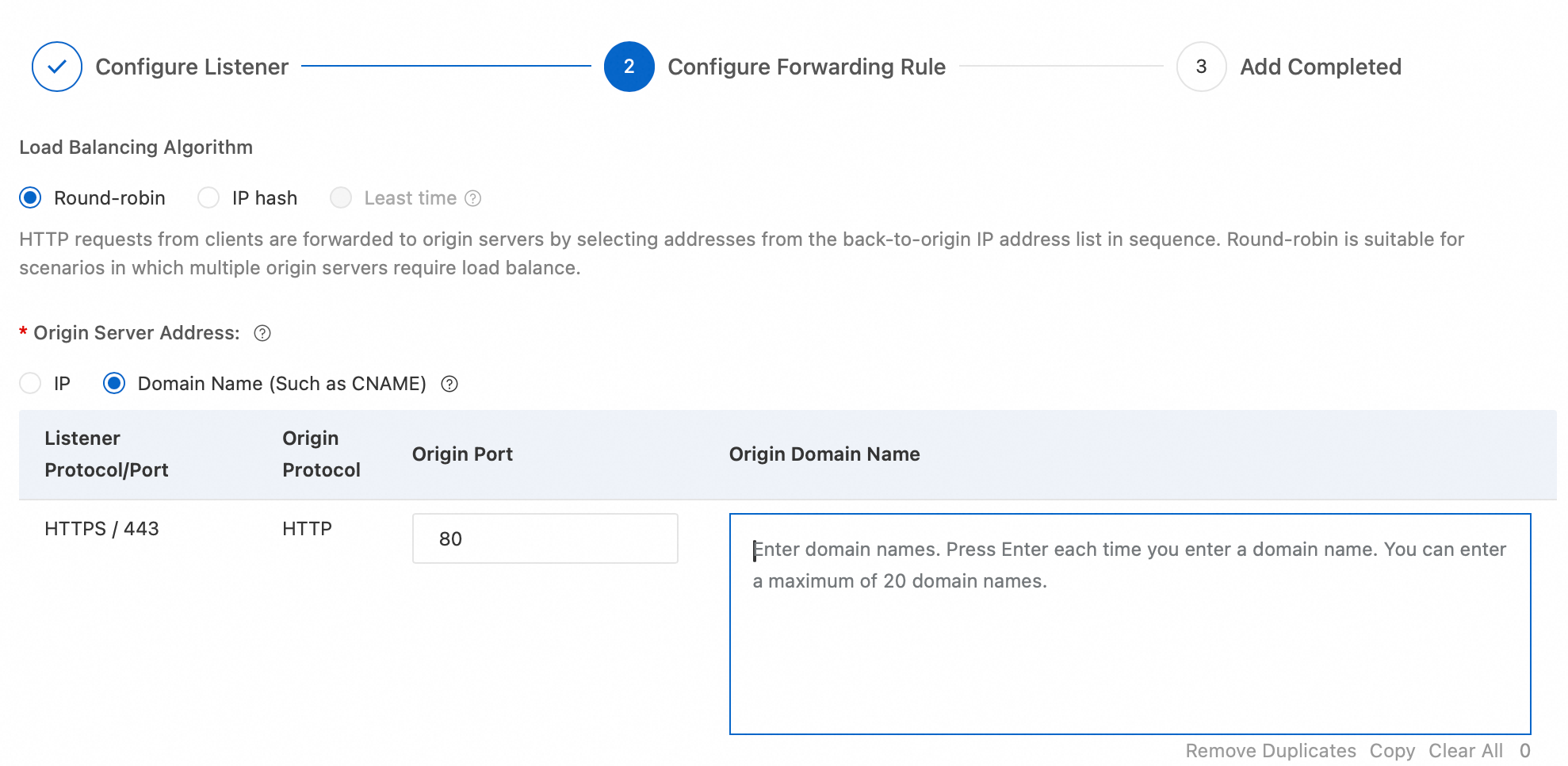
When Server Address is set to Domain Name (Such as CNAME), if resolving this domain returns multiple IP addresses, WAF load balances client requests across the resolved IP addresses. If you enter multiple domains, WAF expands all resolution results and load balances across them.
However, if you enter only one domain and each domain resolution returns only one IP address, WAF does not perform load balancing and only forwards back-to-origin to the single resolved result.
The same domain name resolves to multiple cloud product instances. How should I onboard?
Use cloud product onboarding: You must onboard all of these cloud product instances simultaneously (for example, the service ports of a CLB instance) so that WAF redirects traffic to all of them.
Use CNAME onboarding: After onboarding the domain via CNAME, all cloud product instances are protected by the WAF default protection policy.
Multiple domain names resolve to the same cloud product instance. How should I onboard?
Use cloud product onboarding: After onboarding the cloud product instance, all domains on that instance are automatically protected by the WAF default policy. However, if you want to configure separate protection rules for individual domains, you must manually add each domain as a protected object. For details, see Manually add a protected object.
Use CNAME onboarding: Onboard each domain individually.
What domain name suffixes are supported for CNAME onboarding?
WAF 3.0 supports most domain name suffixes, including Chinese domain name suffixes. For the full list of supported Chinese suffixes, see iana.org.
WAF 3.0 supports more domain suffixes than WAF 2.0. If a domain suffix is unsupported in WAF 2.0, we recommend upgrading to WAF 3.0.
Does WAF support HTTPS mutual authentication (mTLS)?
CNAME onboarding and transparent onboarding do not support HTTPS mutual authentication. The service-based onboarding solution in WAF 3.0 does support it. Currently, cloud products that support service-based onboarding include ALB, MSE, FC, and SAE. You can configure this in the cloud product onboarding section of the WAF console.
Does WAF support WebSocket, HTTP/2, or SPDY protocols?
WebSocket protocol: Traffic forwarding is supported. No security protection is provided.
HTTP/2 protocol: Listening and back-to-origin are supported.
SPDY protocol: Not supported.
To prevent attackers from using HTTP/2 cleartext smuggling (h2c) to bypass WAF, you can create a custom rule to intercept requests where the Header name is Upgrade and the value is h2c. For details, see Create a custom rule to defend against specific requests.
Does WAF support websites that use NTLM protocol authentication?
No. If a website uses NTLM protocol authentication, access requests forwarded by WAF may fail NTLM authentication at the origin server, causing repeated authentication prompts on the client. We recommend using a different authentication method for your website.
Is the WAF QPS limit applied to the entire WAF instance or to each domain individually?
The WAF QPS limit applies to the entire WAF instance.
For example, if you configure three domains on a WAF instance, their combined QPS must not exceed the specified limit. If the QPS exceeds the limit of your purchased WAF instance, the instance may enter a sandbox. When the actual QPS exceeds the specification or the instance enters a sandbox, WAF no longer guarantees compliance with the Service Level Agreement (SLA).
Does a purchased WAF instance support smooth migration to another Alibaba Cloud account?
WAF instances do not support direct smooth migration to other Alibaba Cloud accounts. If you need to use WAF across accounts, use one of the following alternative solutions:
Unsubscribe and repurchase: Unsubscribe to release the WAF instance under the current account, then repurchase it under the target account.
Unified multi-account management: Use the Multi-account management feature to manage the target account under the WAF system of the current account.
Does the Subscription Basic Edition support MLPS compliance?
No. China's Multi-Level Protection Scheme (MLPS) has strict requirements for log retention, but the WAF Subscription Basic Edition doesn't include a log service, so it can't meet this standard. To be MLPS-compliant, please upgrade to the Subscription Advanced Edition or above, or choose the Pay-As-You-Go edition.
How to view the WAF back-to-origin IP ranges and the CNAME provided by WAF?
You can find the WAF back-to-origin IP ranges and the CNAME addresses provided by WAF for each onboarded domain at the location shown in the following figure on the onboarding list page.
Troubleshooting when the CLB instance, NLB instance, or ECS instance you want to onboard is not found on the onboarding configuration page
Possible cause | Related action |
The CLB instance, NLB instance, or ECS instance you want to onboard does not meet the onboarding conditions. | Check the instance against the onboarding conditions. For details, see CLB instance onboarding conditions, NLB instance onboarding conditions, and ECS instance onboarding conditions. |
The CLB instance you want to onboard does not have the corresponding listener configured. |
|
WAF has not synced the CLB, NLB, or ECS instance. | For steps to manually sync assets, see Manually sync assets. |
When adding an HTTPS traffic redirection port, the message "CLB certificate is incomplete" is displayed. How to handle this?
Symptom
When you add an HTTPS traffic redirection port, WAF validates the certificate source for that port. After adding the port, the following message may appear: The CLB certificate for port XXX is incomplete. Please reselect a certificate from the SSL Certificate Service in the CLB console.
Possible causes
The certificate was not purchased through Alibaba Cloud Certificate Management Service (Original SSL Certificate) and has not been uploaded to Alibaba Cloud Certificate Management Service (Original SSL Certificate).
The certificate for the HTTPS port listener on the CLB instance was uploaded through the CLB console. However, this upload method does not automatically sync the certificate information to the Digital Certificate Management Service (formerly SSL Certificate Management). Since WAF only retrieves certificate information from the Digital Certificate Management Service, this causes the certificate is incomplete message.
A certificate that was previously uploaded to the Digital Certificate Management Service has been manually deleted, and Certificate Management Service (Original SSL Certificate) no longer contains your certificate.
Solution
Upload your certificate to Certificate Management Service (Original SSL Certificate). For steps, see Upload an SSL certificate.
In the CLB console, create a certificate and select Alibaba Cloud-issued certificates as the certificate source. For steps, see Use a certificate from Alibaba Cloud SSL Certificates Service.
In the CLB console, select the uploaded server certificate. For steps, see Step 2: Configure the SSL certificate.
For the origin IP address in WAF, should I use the public or private IP of an ECS instance?
Use the public IP. WAF performs back-to-origin over the public network and does not support private IP addresses.
Why does adding multiple extended certificates fail during cloud product onboarding?
A possible cause is that one of the certificates is invalid. When adding multiple extended certificates, ensure that each certificate you select is valid. Expired certificates will cause the addition to fail.
After onboarding a cloud product to WAF, do I still need to configure protected objects?
By default, after a cloud product is onboarded to WAF, WAF automatically generates a protected object, and no additional configuration is required. However, if multiple domains resolve to the same cloud product instance and you want to configure separate protection rules for each domain, you must manually add each domain as a protected object. For details, see Add a protected object.
After adding protected objects, select the corresponding domain as the effective object when configuring protection rules to achieve fine-grained protection for multiple domains.
During CNAME onboarding, why is ERR_TOO_MANY_REDIRECTS prompted after configuring HTTP back-to-origin?
HTTP back-to-origin means WAF uses the HTTP protocol to forward back-to-origin requests to the origin server, with the default back-to-origin port being 80. After enabling this feature, regardless of whether the client accesses WAF on port 80 or 443, WAF defaults to using the HTTP protocol and port 80 for back-to-origin. If port 80 on your origin server has no actual business, enabling this feature will cause website access issues.
If port 80 on the origin server has no actual business and a redirect is configured for port 80 (for example, returning a 301 status code to redirect to port 443), client access will continuously redirect, prompting ERR_TOO_MANY_REDIRECTS.
Why does the error InvalidTLS occur when onboarding a CLB instance via cloud product onboarding?
When onboarding a CLB instance via cloud product onboarding, the error Waf.Pullin.InvalidTLS (invalid TLS) may appear. This is likely because the CLB instance is a shared-performance instance. WAF does not support obtaining TLS configuration information for shared-performance instances. You must change the instance to a guaranteed-performance instance before cloud product onboarding is supported. For more information, see CLB instance types.
The public IP of my origin server is exposed. How do I prevent attackers from bypassing WAF by directly attacking the origin public IP?
Method 1: In CNAME onboarding mode, configure your origin server to accept traffic only from WAF back-to-origin IP ranges, ensuring that only WAF can communicate with the origin server. For details, see Allow WAF back-to-origin IP ranges.
Method 2: Use cloud product onboarding.
Multiple scenarios for 502 errors after onboarding to WAF
Symptom
After onboarding to WAF, accessing the backend service returns a 502 status code, or logs show requests with a 502 status code.
Causes and solutions
Scenario 1: 502 in CNAME onboarding mode
Scenario 2: Intermittent 5XX with a Layer 7 CLB in cloud product onboarding mode
Detailed cause analysis
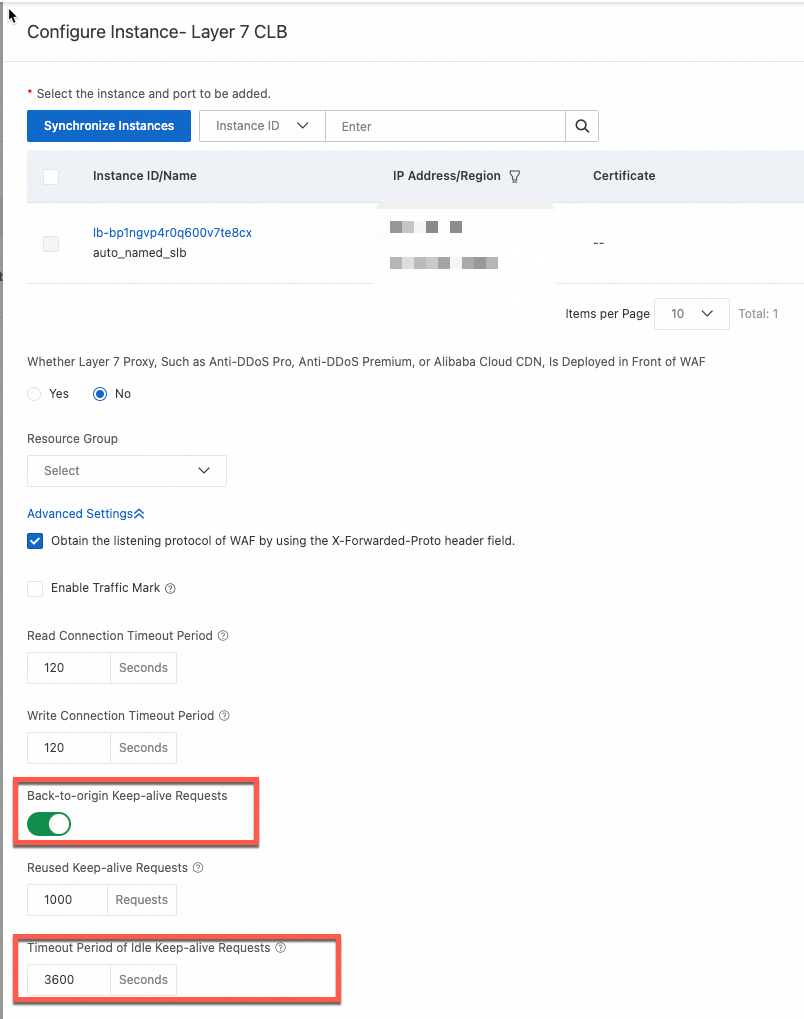
WAF back-to-origin connection idle timeout: 3,600 seconds (1 hour)
Description: When the connection between CLB and WAF has no data transmission for 1 hour, WAF automatically closes the connection.
CLB client-facing connection idle timeout: 15 seconds
Description: When the connection between the client (WAF instance in this case) and CLB has no data transmission for 15 seconds, CLB automatically closes the connection.
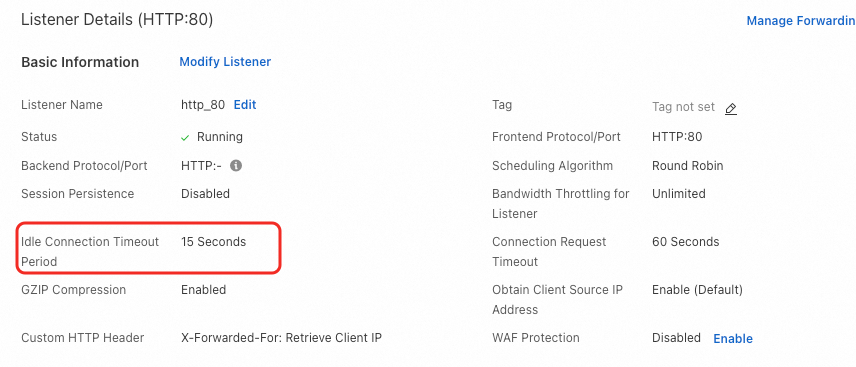
In extreme cases, at the moment a persistent connection ages out on the CLB side (no data transmission for more than 15 seconds), WAF reuses that connection to send a new back-to-origin request to CLB. Since CLB no longer has the connection state, it sends a RST packet to terminate the request. This results in a 502 status code log on the WAF side.
Solution
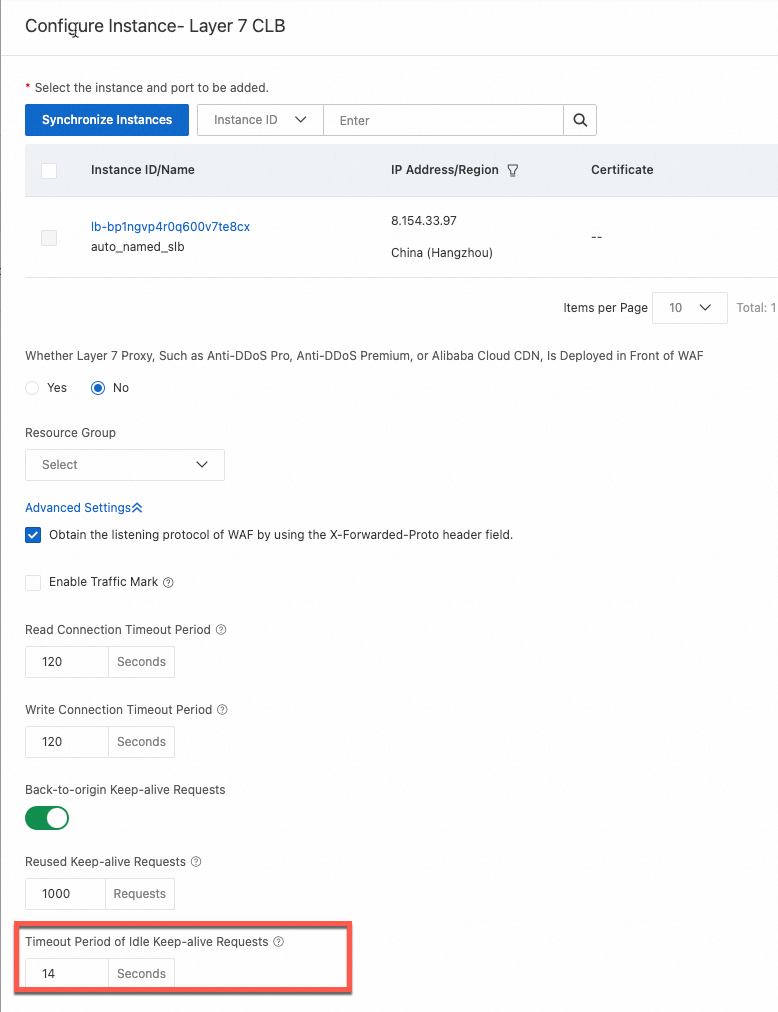
Adjust the Idle persistent connection timeout in the Layer 7 CLB cloud product onboarding configuration to a value less than the CLB client-facing connection idle timeout — for example, 14 seconds.
Scenario 3: Intermittent 502 due to an overly long URI
Scenario 4: Intermittent 502 when WAF sends back-to-origin requests to multiple Layer 4 CLBs
Current network architecture

In the current architecture, WAF is onboarded in reverse proxy mode with back-to-origin to multiple Layer 4 CLB instances. The backend RealServer (RS) listens on the same port and is mounted behind multiple Layer 4 CLB instances.
Detailed cause analysis
When an ECS instance serves as a backend server for multiple Layer 4 (TCP protocol) CLB instances configured with the same backend service port, the following issues may occur: If requests from the same WAF node are sent back-to-origin to CLB instances using the same WAF instance node IP address concurrently, some connections may fail or time out.
Case 1: 5-tuple conflict, TCP stream collision
When WAF protects multiple CLB nodes, requests from those nodes may originate from the same WAF back-to-origin IP address.
When the WAF node sends back-to-origin requests to CLB1, the connection (WIP:CPORT->VIP1:VPORT1) is converted to (WIP:CPORT->DIP:DPORT) when it reaches the backend ECS.
When the WAF node sends back-to-origin requests to CLB2, the connection (WIP:CPORT->VIP2:VPORT2) is also converted to (WIP:CPORT->DIP:DPORT) when it reaches the backend ECS.
Because the sequence numbers and states of the two TCP connections conflict on the backend server, connection establishment fails. Specifically, both TCP connections initiated are seen as having the same 5-tuple (TCP:WIP:CPORT:DIP:DPORT) on the backend server. This 5-tuple conflict may cause SYN packets to be dropped.
Case 2: Response packet routing errors
In a complete request path, the CLB node that initiates the request differs from the CLB node that receives the response packet.
WAF sends the SYN packet back-to-origin through CLB2, with the 5-tuple WIP:CPORT->VIP1:VPORT1. When it reaches the backend ECS2, it is converted to WIP:CPORT->DIP:DPORT.
If ECS2 has a TIME-WAIT connection at this point, the 5-tuple is TCP:WIP:CPORT:DIP:DPORT. Upon receiving the SYN packet from step 1, ECS2 determines the SYN is valid and responds with a SYN-ACK packet.
Because ECS2 is mounted behind multiple SLB instances, it may send the SYN-ACK packet back to CLB1. If CLB1 does not have a session for this 5-tuple, CLB1 sends a two-way Reset packet, causing WAF to return a 502.
Solutions
Solution 1 (Recommended)
Modify the network architecture, for example, use multiple Layer 7 CLB instances as origin servers, to avoid multiple different Layer 4 CLB load balancer nodes forwarding requests to the same port on the same backend service.
Solution 2
Migrate from CLB to NLB and disable Client IP Affinity in the NLB configuration to resolve the 5-tuple conflict. Deploy Proxy Protocol on the backend service to obtain the real client IP. For details, see Use Proxy Protocol.

Steps
Log on to the Network Load Balancer (NLB) console.In the top navigation bar, select the region where the NLB instance is deployed.
In the left-side navigation pane, choose .
Select your server group, and in the Actions column, click Modify Basic Information. In the Modify Basic Information dialog box, disable Client IP Preservation and save the changes.
Solution 3 (Not recommended)
You can submit a Tickets to enable FULLNAT mode. When multiple CLB instances forward requests to the same port on the same backend server, FullNAT modifies the source address, making each connection's 5-tuple unique and avoiding conflicts. Enable FULLNAT mode on CLB listeners to avoid 5-tuple conflicts.
Scenario 5: Linux kernel parameter issues cause requests to return 502
File upload fails after onboarding to WAF
This may occur because the file upload exceeds the 2 GB maximum limit. WAF currently supports file uploads up to 2 GB. When the request body exceeds 2 GB, WAF returns a 413 status code. You can use the returned status code to determine whether the file transfer size limit has been reached.
How to update a certificate that is about to expire?
The update method varies depending on your onboarding mode:
For CNAME onboarding, see Update a domain certificate.
For cloud product onboarding with ECS instances, see Update the certificate bound to an ECS traffic redirection port.
For cloud product onboarding with CLB instances, see Update the certificate bound to a CLB traffic redirection port.
For cloud product onboarding with NLB instances, see Update the certificate bound to an NLB traffic redirection port.
For cloud product onboarding with ALB instances, no update is needed in the WAF console. Simply deploy the certificate to the ALB instance from the Digital Certificate Management Service (formerly SSL Certificate) console. For steps, see Overview of SSL certificate deployment methods.
After cloud product onboarding, can the origin server get the real client IP?
Yes. WAF provides the real client IP directly to the cloud product instance.
A weak cipher suite is reported when scanning a domain onboarded to WAF. How to configure the TLS protocol version and cipher suite to meet security requirements?
To ensure that HTTPS websites onboarded to WAF meet security and compliance requirements, we recommend configuring high-version TLS protocols and strong cipher suites.
High-security TLS protocols and cipher suites may reduce client compatibility. After configuration, users with old clients (such as Internet Explorer) may be unable to access the website. Please fully evaluate client compatibility before enabling.
Step 1: Determine the configuration location
The configuration entry for the TLS protocol version and cipher suite depends on the WAF onboarding mode.
CNAME onboarding
In CNAME onboarding mode, the configuration location depends on the scan target. Please configure it in the corresponding location based on the specific scan target.
Scan the onboarded domain: On the CNAME Record tab, find the target domain and click Edit in the Actions column. On the Edit Domain Name page, in the Protocol Type > HTTPS section, expand Advanced Settings, and locate TLS Version and HTTPS Cipher Suite.
Scan the WAF VIP: On the CNAME Record tab, click Default SSL/TLS Settings on the right side, upload the default certificate, and configure TLS Version and HTTPS Cipher Suite.
Cloud product onboarding
In cloud product onboarding mode, for ECS instances, Layer 4 CLB instances (listening protocol is TCP), and NLB instances, configure on the WAF side. For other cloud product onboarding scenarios, the configuration must be completed in their respective product consoles.
When onboarding a Layer 7 CLB instance via cloud product onboarding, custom cipher suites are not supported. You can only select system-provided TLS security policies.
When onboarding an ALB instance via cloud product onboarding, if you need to customize the cipher suite, you must manually create a TLS security policy. For more information, see TLS security policy.
ECS, Layer 4 CLB (listening protocol is TCP), NLB: On the Cloud Native tab, locate the target instance, click the
icon, select the target port, and click Actions in the Actions column, then select Modify. Configure at the TLS Version and Cipher Suite locations.ALB: In the ALB console, after locating the target instance, go to the Listener tab, locate the target listener, and configure TLS Security Policy.
Layer 7 CLB (listening protocol is HTTPS): In the CLB console, after locating the target instance, go to the Listener tab, locate the target listener, click Manage Certificates, and configure TLS Security Policy in the dialog box that appears.
FC, MSE, APIG, SAE: Configure in the corresponding product console.
 icon, select the target port, and click Actions in the Actions column, then select Modify. Configure at the TLS Version and Cipher Suite locations.
Step 2: Select the TLS protocol version
To avoid security risks from old TLS protocol versions, we recommend selecting TLS 1.2 or later. If your website supports TLS 1.3, select Support TLS 1.3.
When you select Support TLS 1.3, WAF provides the following three default TLS 1.3 cipher suites: TLS_AES_128_GCM_SHA256, TLS_AES_256_GCM_SHA384, and TLS_CHACHA20_POLY1305_SHA256. You cannot customize these cipher suites.
Step 3: Select the cipher suite
To avoid security risks from weak cipher suites, we recommend selecting strong cipher suites from the following list.
Strong cipher suites | Weak cipher suites |
|
|
Cipher suite security recommendations: The ECDHE-RSA-AES128-SHA256 and ECDHE-RSA-AES256-SHA384 cipher suites use ECDHE for key exchange, RSA for authentication, and AES-CBC encryption mode. Compared to cipher suites that use authenticated encryption modes such as AES-GCM, these suites offer lower security and performance. Some security scanning tools may identify them as weak cipher suites. If this occurs, select custom cipher suites and manually exclude these two suites.
Cipher suite naming conventions: Because cipher suite naming conventions differ, WAF displays cipher suites in OpenSSL format, while some scanning tools may use the IANA standard. For example, ECDHE-ECDSA-AES256-SHA384 in OpenSSL corresponds to TLS_ECDHE_ECDSA_WITH_AES_256_CBC_SHA384 in IANA. To quickly look up the mapping, visit ciphersuite.info or use other TLS lookup tools.
Why does the upstream_addr field show "-" in logs after onboarding?
When the upstream_addr field in logs shows -, it means WAF did not send a back-to-origin request to the origin server — for example, when the request was blocked by WAF. We recommend checking other fields such as upstream_status and upstream_response_time for further analysis.
Why are requests blocked by WAF still recorded in ALB logs in cloud native mode?
In cloud native mode, WAF 3.0 uses an embedded SDK to integrate security detection capabilities directly into the Application Load Balancer (ALB) data plane. When a request reaches an ALB instance and enters the data processing flow, ALB generates an access log. If WAF then blocks the request, it returns a block page to the client, and the request is not forwarded to the backend server. The access log record is not revoked because it is generated before WAF blocks the request.
In cloud native mode, do SSL certificates need to be configured on both WAF and the source ECS instance?
Yes. In cloud native mode, both WAF and the source ECS instance must have a valid SSL certificate. This mode does not support a configuration where only WAF has a certificate. To offload SSL to WAF, which allows WAF to communicate with the source server over HTTP, you must use the CNAME mode.