Network architecture disaster recovery
Networks underpin every application. When a network fails, services go down and the impact is immediate. A well-designed network architecture that prioritizes high availability (HA) and disaster recovery lets you recover quickly and limit business disruption when an incident occurs.
Cloud network planning and design
Design your cloud network around three principles: security, scalability, and high availability. Apply the following practices from the start, because retrofitting address space or topology changes after deployment is costly.
Reserve IP address space for growth:
Reserve IP address space for network scaling
Within a region, reserve address space for additional VPCs you may need later.
Within a VPC, reserve address space for new vSwitches.
Within a vSwitch, monitor the remaining available IP address count to catch exhaustion early.
Plan address spaces across regions, zones, and workloads:
Plan IP address spaces for different regions, zones, and business systems
Assign each VPC within a region its own non-overlapping address space.
Plan vSwitch zones and address spaces within each VPC to match your workload distribution.
Some Alibaba Cloud services temporarily consume large numbers of IP addresses. Dedicate separate vSwitches to those services to prevent them from exhausting shared address pools.
Cloud network interconnection design
Large enterprises typically run separate VPCs for development, testing, and O&M teams across multiple departments. While VPC isolation is good for security, teams often need to reach each other's services. Alibaba Cloud provides two methods to connect VPCs.
VPC peering connections connect two VPCs directly. Each pair of VPCs that needs to communicate requires its own peering connection. This works well for small topologies, but the number of connections grows quickly as you add VPCs, increasing management overhead.
Cloud Enterprise Network (CEN) creates a full-mesh topology. Attach all resources that need to communicate — VPCs, Virtual Border Routers (VBRs), and VPNs — to a single CEN instance, which acts as a hub. Traffic between any two attached instances flows through CEN automatically, eliminating the need to manage individual peering connections. CEN also provides routing policies and rate-limiting rules to meet complex enterprise networking requirements.
Internet egress design
Exposing compute resources directly to the Internet increases your attack surface and complicates access control. Follow these principles when designing your Internet egress.
Minimize Internet exposure:
Avoid unnecessary Internet exposure
If an Elastic Compute Service (ECS) instance has a static public IP address or an elastic IP address (EIP), use security groups to restrict port exposure to only what is needed.
Route Internet traffic through Server Load Balancer (SLB) or Internet NAT gateways rather than assigning public IP addresses directly to ECS instances.
Use Internet NAT gateways for outbound access:
Use Internet NAT gateways for cloud Internet access
In environments with strict security requirements, configure Source Network Address Translation (SNAT) rules at the instance level rather than the vSwitch level for finer-grained control.
All EIPs within the same SNAT rule must share the same bandwidth limit.
Use different EIPs for different SNAT rules when workloads have different traffic profiles.
Verify that the maximum concurrent connections supported by the EIPs in each SNAT rule meet your traffic requirements.
Optimize bandwidth with Internet Shared Bandwidth:
Use Internet Shared Bandwidth to improve cloud Internet access
Use separate Internet Shared Bandwidth instances for workloads with different traffic patterns to apply different billing methods and reduce costs.
Use dedicated Internet Shared Bandwidth instances for workloads that require isolated public bandwidth.
Hybrid cloud interconnection HA design
Most enterprises run a hybrid architecture: new and public-facing workloads on the cloud, legacy systems in on-premises data centers, and sometimes resources from multiple cloud providers for cross-cloud redundancy. Each of these connections is a potential single point of failure. Build redundancy into every layer.
-
Link redundancy: A hybrid cloud network requires at least two links — either dual active or active-standby. The main options are:
Dual Express Connect circuit redundancy: Connect your data center or another cloud provider using two Express Connect circuits. If one fails, traffic automatically switches to the other. For maximum HA, use two different access points. If latency requirements force you to use the same access point, connect the two circuits to different access devices so that a single device failure does not take down both links.
Express Connect circuit with VPN active-standby: When both the Express Connect circuit and an IPsec-VPN connection are active with Border Gateway Protocol (BGP) dynamic routing, the VPC learns routes to the on-premises data center over both paths. Routes learned through the Express Connect circuit take priority by default, so traffic flows over it under normal conditions. If the Express Connect circuit fails, BGP withdraws its routes and traffic automatically fails over to the IPsec-VPN connection. When the circuit recovers, traffic reverts to it and the VPN returns to standby. This option costs less than dual Express Connect circuits because IPsec-VPN connections are less expensive, but throughput is typically capped at 1 Gbps. Use this option for low-bandwidth workloads.
VPN redundancy: If your on-premises data center has multiple gateway devices, each with a public IP address, connect two of them to your Alibaba Cloud VPC using separate IPsec-VPN connections, each associated with a different VPN Gateway. The on-premises data center learns VPC routes through both gateways and can load-balance outbound traffic across them. If one VPN Gateway fails, traffic routes through the other automatically. From the VPC side, only one gateway is active at a time (the one with the smaller instance ID takes priority), so traffic from the VPC to the data center has link-level HA but does not load-balance. If the active gateway fails, the system switches to the standby gateway automatically.
Bandwidth capacity planning: Size each link so that a single link failure does not overload the surviving links. Keep the utilization of each redundant circuit below 50%. At 50% utilization on both circuits, a single failure pushes all traffic to the remaining circuit at 100% utilization — a level that will degrade or break your services. Scale out bandwidth before utilization reaches this threshold. For large enterprises with multi-Gbps or even hundreds of Gbps of hybrid cloud traffic, dual Express Connect circuits are typically necessary.
-
Fast link switchover: Redundant links alone are not enough — you also need fast automated switchover when a failure occurs.
Dual Express Connect circuit redundancy: Use BGP with Bidirectional Forwarding Detection (BFD) for millisecond-level failure detection and route withdrawal, directing traffic to the healthy circuit immediately. If you use static routing instead, configure health checks on the cloud side — health checks continuously monitor Express Connect circuit quality and trigger an immediate switchover when a check fails.
Express Connect circuit with VPN active-standby: In this topology, load balancing is not supported — only the Express Connect circuit as primary and the VPN as standby. Both use BGP to learn routes from the data center. When the primary link fails, BGP withdraws the Express Connect circuit route and traffic fails over through the VPN.
VPN redundancy: Similar to the Express Connect circuit approach — BGP route withdrawal triggers the switchover to a healthy link when a failure occurs.
Business service HA design
Physical hardware fails, applications crash, and networks experience transient issues — these are facts of operating at scale. A service backed by a single ECS instance has no protection against any of these events, and recovery time is unpredictable. Server Load Balancer (SLB) solves this by acting as a proxy in front of a pool of backend servers, keeping them off the public network and automatically routing traffic away from failed instances.
SLB instances run in a cluster with session synchronization, eliminating single points of failure within the load balancer tier itself. Layer 4 load balancing is implemented using Linux Virtual Server (LVS) and keepalived. Layer 7 load balancing uses Tengine, a high-traffic web server based on Nginx, developed by Taobao. Incoming traffic from the Internet reaches the LVS cluster via equal-cost multi-path (ECMP) routing. Each LVS server synchronizes session state with its peers via multicast, and the LVS cluster health-checks the Tengine cluster, removing faulty servers automatically.
High availability for a single CLB instance
Alibaba Cloud deploys Classic Load Balancer (CLB) with multi-zone support in most regions, providing cross-data-center disaster recovery within the same region. If the primary zone fails, CLB switches to the secondary zone within approximately 30 seconds and reverts automatically when the primary zone recovers.
Create CLB instances in regions that support multiple zones.
When selecting primary and secondary zones, align them with your ECS instance distribution. Place the majority of ECS instances in the primary zone to minimize latency under normal conditions. Deploy a smaller number of ECS instances in the secondary zone so that requests continue to be processed if the entire primary zone becomes unavailable and CLB switches over.
High availability for multiple CLB instances
A single CLB instance's HA mechanism handles zone-level failures but does not protect against instance-level failures from causes such as network attacks or configuration errors — these do not trigger a zone-level failover. For higher availability, deploy multiple CLB instances across zones within a region or across multiple regions, and use Alibaba Cloud DNS or Global Traffic Manager (GTM) to distribute and schedule traffic across them.
High availability of backend ECS instances
SLB health checks continuously test backend ECS instance availability. When an instance fails a health check, SLB stops sending new requests to it and distributes traffic to healthy instances. When the instance recovers, SLB automatically returns it to the pool.
Health checks must be enabled and correctly configured for this mechanism to work. Misconfigured health checks can cause SLB to treat healthy instances as failed (or vice versa), undermining the HA you designed.
Traffic disaster recovery and scheduling
Active zone-redundancy and active geo-redundancy are now standard for enterprises that need continuous high availability. Managing traffic across multiple service centers introduces challenges that DNS alone cannot handle:
Route users to the nearest service center to minimize latency.
Distribute traffic across multiple IP addresses within a service center while maintaining overall load stability.
Detect a failed IP address quickly, isolate it automatically, and restore it to the resolution list when it recovers — without manual intervention.
When an entire center fails, switch traffic to other centers immediately to minimize service interruption.
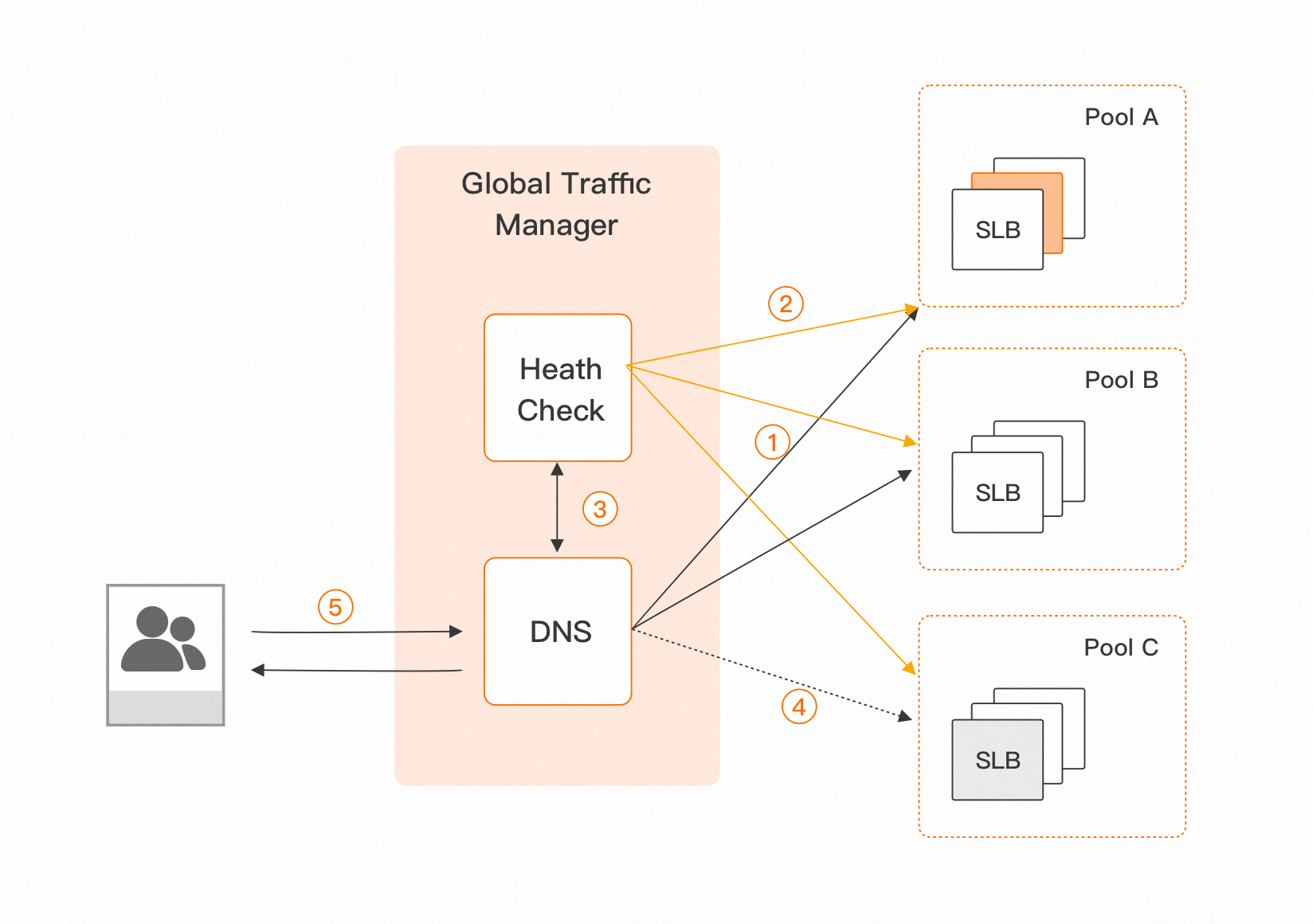
Alibaba Cloud Global Traffic Manager (GTM) addresses these challenges. GTM combines Alibaba Cloud DNS scheduling with distributed cloud monitoring to provide nearest-access routing, high-concurrency load balancing, and application service health checks. Based on health check results, GTM isolates faults and switches traffic automatically, enabling both active zone-redundancy and active geo-redundancy.
GTM extends traditional DNS with three key capabilities:
Address pools: Where traditional DNS resolves to a single IP address, GTM groups addresses into address pools — collections of IP addresses or domain names that provide the same service with the same ISP or regional characteristics. GTM resolves end-user requests to an address pool (PoolA, PoolB, PoolC in the diagram below), enabling load distribution and custom traffic allocation across the pool. If an entire address pool becomes unavailable, GTM automatically switches to a backup pool.
Health checks: GTM's HealthCheck module uses Cloud Monitor's distributed monitoring infrastructure to probe each IP address in a pool from multiple regions simultaneously. It supports HTTP/HTTPS, TCP, and ping. When an address fails a health check, HealthCheck interacts with DNS to remove the faulty address from the resolution list. Clients automatically resolve to a remaining healthy address. When the address recovers, it is restored to the list automatically.
Access policies: Access policies control which address pool handles requests based on the request source and pool health. This provides intelligent resolution at the pool level and automatic failover between pools. When an entire pool fails, GTM switches to an alternate pool within minutes based on your configured policies and switches back when the pool recovers.
Active geo-redundancy
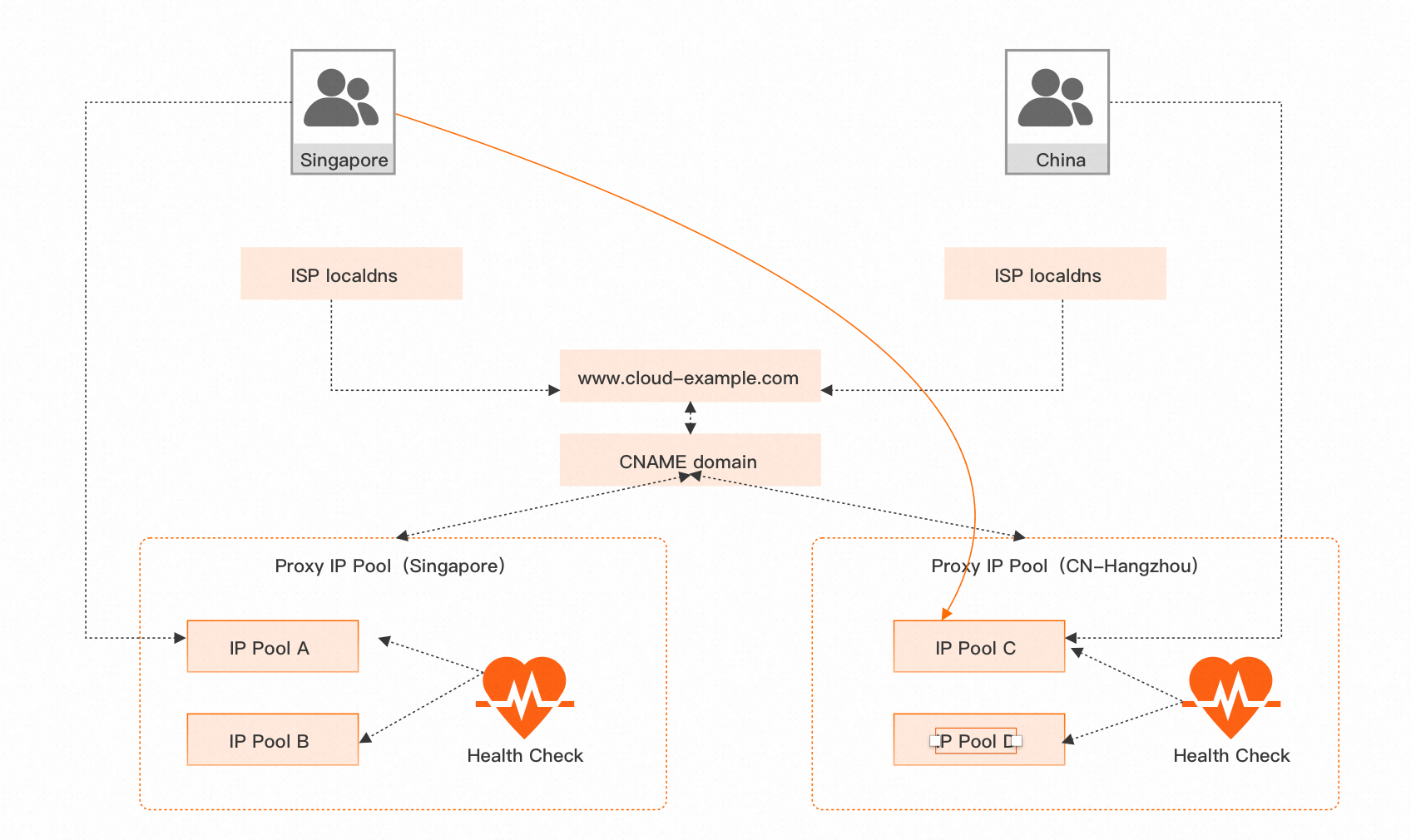
The following example shows how to use GTM for active-active geo-redundancy with fast disaster recovery. In this scenario, users are split into two groups: users outside China and users in the Chinese mainland. GTM routes each group to the nearest service center — users outside China go to the Singapore center, and users in the Chinese mainland go to the CN-Hangzhou center. If either site experiences a disaster, the other site takes over, maintaining business availability.
Configure GTM for active geo-redundancy in five steps:
Global configuration: Set the load balancing policy, global TTL, and alert contact group.
Address pool configuration: Create address pools for Singapore and CN-Hangzhou. Add the service IP addresses for each region to the corresponding pool, and set the minimum number of healthy addresses required for the pool to remain active. If the active address count drops below this threshold, the pool is considered unavailable and GTM distributes traffic per your global load balancing policy.
Health check configuration: Enable health checks for the IP addresses in each pool. Health checks monitor address availability in real time, automatically isolate failures, and notify the configured alert contact group. Recovered addresses are automatically returned to the resolution list. When an entire pool fails, GTM triggers an automatic failover between the default and standby pools — 90% of traffic switches within 5 minutes.
Access policy configuration: Define which pool handles requests from each source region. In this example, set the request source to regions outside China, the default pool to Singapore, and the standby pool to CN-Hangzhou. Under normal conditions, users outside China reach the Singapore center. If Singapore fails, GTM switches traffic to CN-Hangzhou automatically.
CNAME configuration: CNAME your primary domain to the GTM instance domain name. This is the final step that activates disaster recovery and intelligent routing for your service. For example, CNAME
www.cloud-example.comto the access domain name provided by GTM.
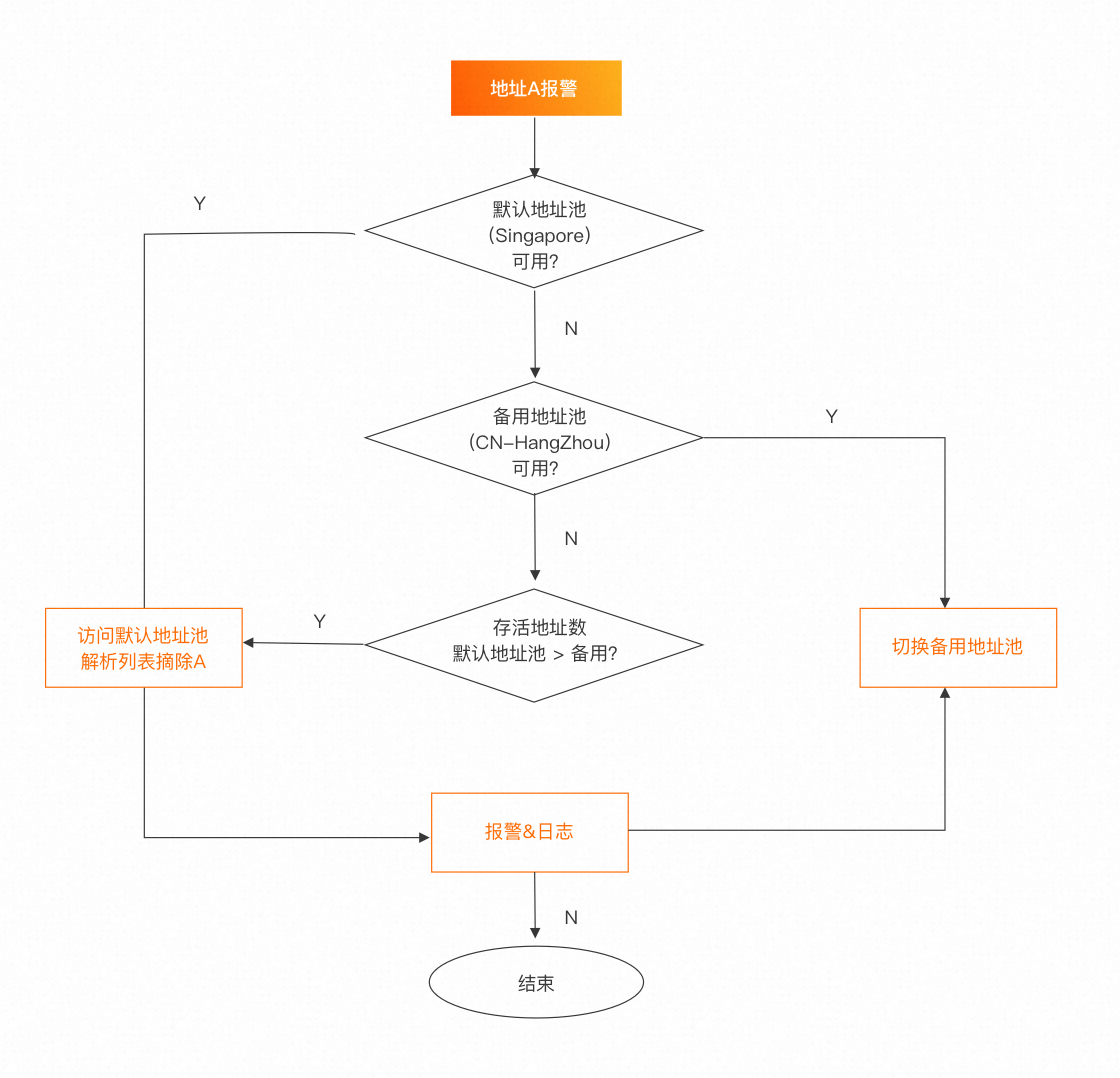
After configuration, GTM continuously probes address pool members based on your health check settings. When an address triggers an alert, GTM evaluates the pool state and acts accordingly: if the default pool (Singapore) is still available, it removes only the failing address from the resolution list; if the entire default pool becomes unavailable, it switches all traffic to the standby pool (CN-Hangzhou). The switchover is automatic and completes within minutes.
Disaster recovery plans
GTM's disaster recovery plan feature lets you run routine drills or trigger an emergency traffic switchover when a service fails. Disaster recovery plans support batch simulation of address pool failures and rollback, letting you validate whether your switchover policies behave as expected before a real incident occurs.