Application orchestration principles
This topic describes how to use the application orchestration feature of Apsara Devops AppStack to deploy environments.
Application orchestration principles
Apsara Devops AppStack uses application orchestration to define your deployment architecture. It supports both Kubernetes and host deployment scenarios. The orchestration works as follows:
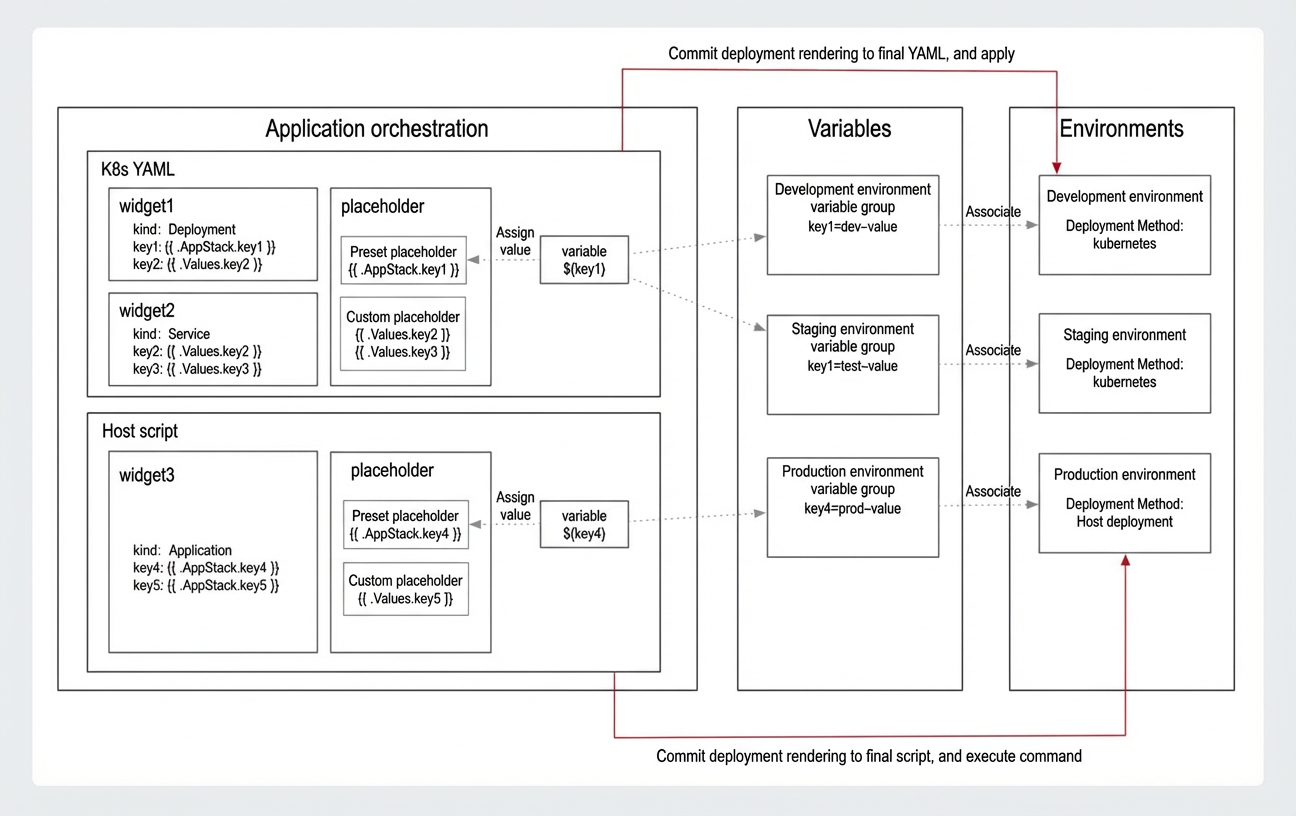
Apsara Devops AppStack defines deployment configurations using a desired state approach. When you deploy an environment, AppStack reads the orchestration file for that environment type. It then replaces placeholders with deployment parameters to render a final YAML file for Kubernetes deployments or a script for host deployments. This file is then sent to the associated cluster or host to execute the deployment.
Application orchestration: Defines the deployment architecture of an application. It supports deployment architectures based on Kubernetes YAML files and host scripts.
Orchestration component: In a Kubernetes scenario, it is an independently deployable resource that corresponds to a Kubernetes YAML file. In a host scenario, it is an independently deployable service that corresponds to the configuration for one or more software packages and their dependencies.
Placeholder: A fixed location in an application orchestration file used for dynamic content replacement.
Variable: A key-value pair.
Variable group: A collection of variables.
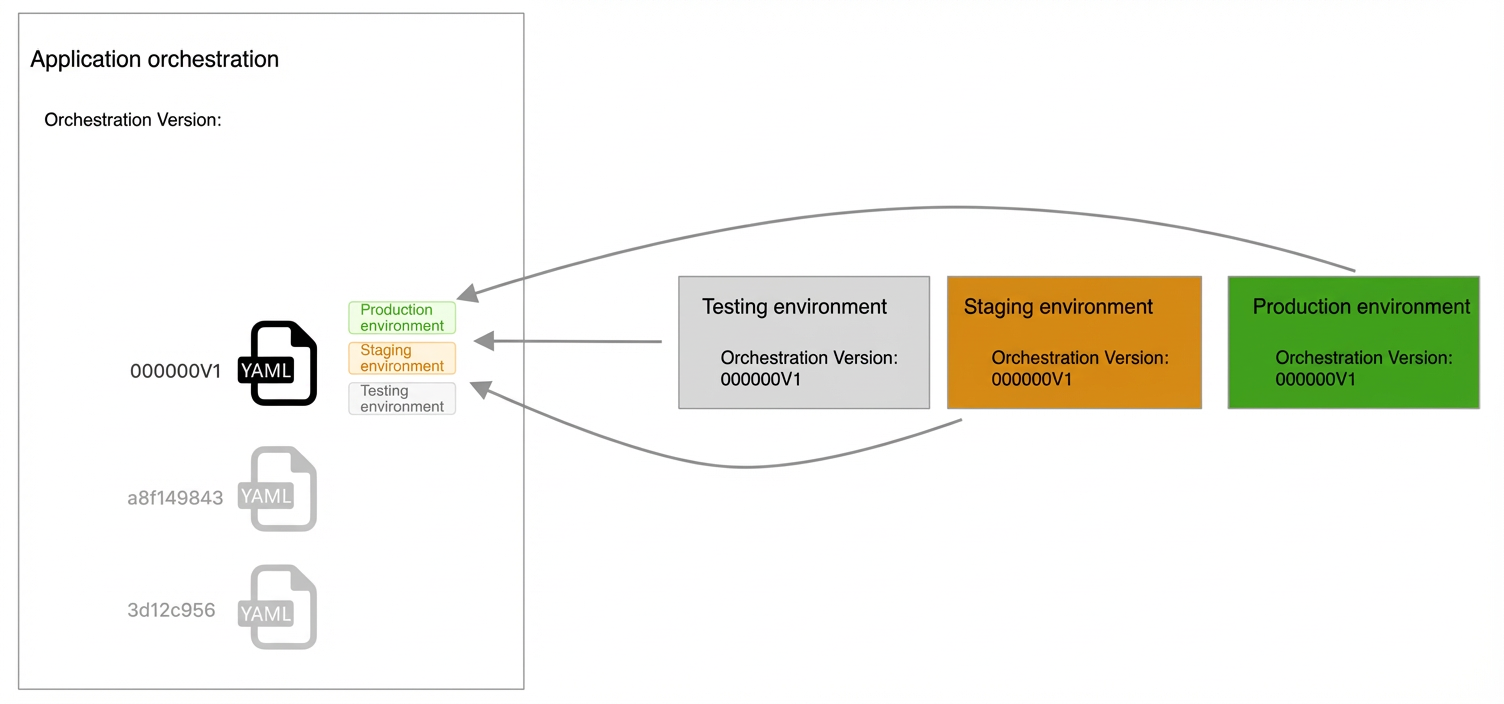
Application orchestration version: Each time you modify an orchestration file, a new version is generated. This makes it easy to review changes and perform rollbacks.
Apsara Devops AppStack provides placeholders and variable groups. You can use placeholders to replace keywords in orchestration files. This lets you create different deployments for multiple environments. AppStack includes several common placeholders by default. You can also add custom placeholders as needed.
Scenario examples
Use multiple Kubernetes namespaces to isolate multiple environments
In a Kubernetes deployment scenario, non-production environments often share the same cluster. To isolate these environments, you can use multiple namespaces. For example, you can use the `dev` namespace for the development environment and the `test` namespace for the testing environment, while the production environment uses a separate cluster. To achieve this, you can replace the `namespace` keyword in the YAML file with the placeholder
{{ .Values.namespace }}. Then, you can assign the variable${namespace}to this placeholder and set its value to `dev` for the development environment and `test` for the testing environment. When you submit the deployment, the variable is replaced with the correct value, and the application is deployed to the specified Kubernetes namespace.Start services on different ports for non-production and production environments
In a host deployment scenario, you may need to start services on different ports for non-production and production environments. To do this, you can define the port number in the host startup script as the placeholder
{{ .Values.port }}. You can then assign the variable${port}to this placeholder and set its value to `8080` for the development environment and `8081` for the testing environment. When you submit the deployment, the variable is replaced, and the application starts the service on the specified port.
Deployment methods
Apsara Devops AppStack application orchestration supports three deployment methods:
Kubernetes deployment (for cloud-native scenarios). For more information, see Kubernetes deployment orchestration.
Host deployment (for traditional host scenarios). For more information, see Host deployment orchestration.
Kubernetes and host hybrid deployment (for migration scenarios).
In the application Settings > Application Settings > Orchestration Configuration page, select both Kubernetes Deployment and Host Deployment, and then click Confirm.
When you migrate your application architecture, you can add or remove an orchestration method to ensure a smooth migration.
Orchestration configuration changes and environment deployment
You must verify changes to deployment configurations in each environment before you publish them to the production environment. Apsara Devops AppStack lets you add environment tags when you update an orchestration. These tags identify the modified version. When you deploy to an environment, you can select a specific orchestration version without affecting your production release.
The following example shows the process for changing an orchestration configuration for an application named myapp. The myapp application uses a Kubernetes YAML file for orchestration and has three environments: testing, staging, and production. The goal is to update the configuration from V1 to V2 by changing the `containerPort` from 80 to 8080.
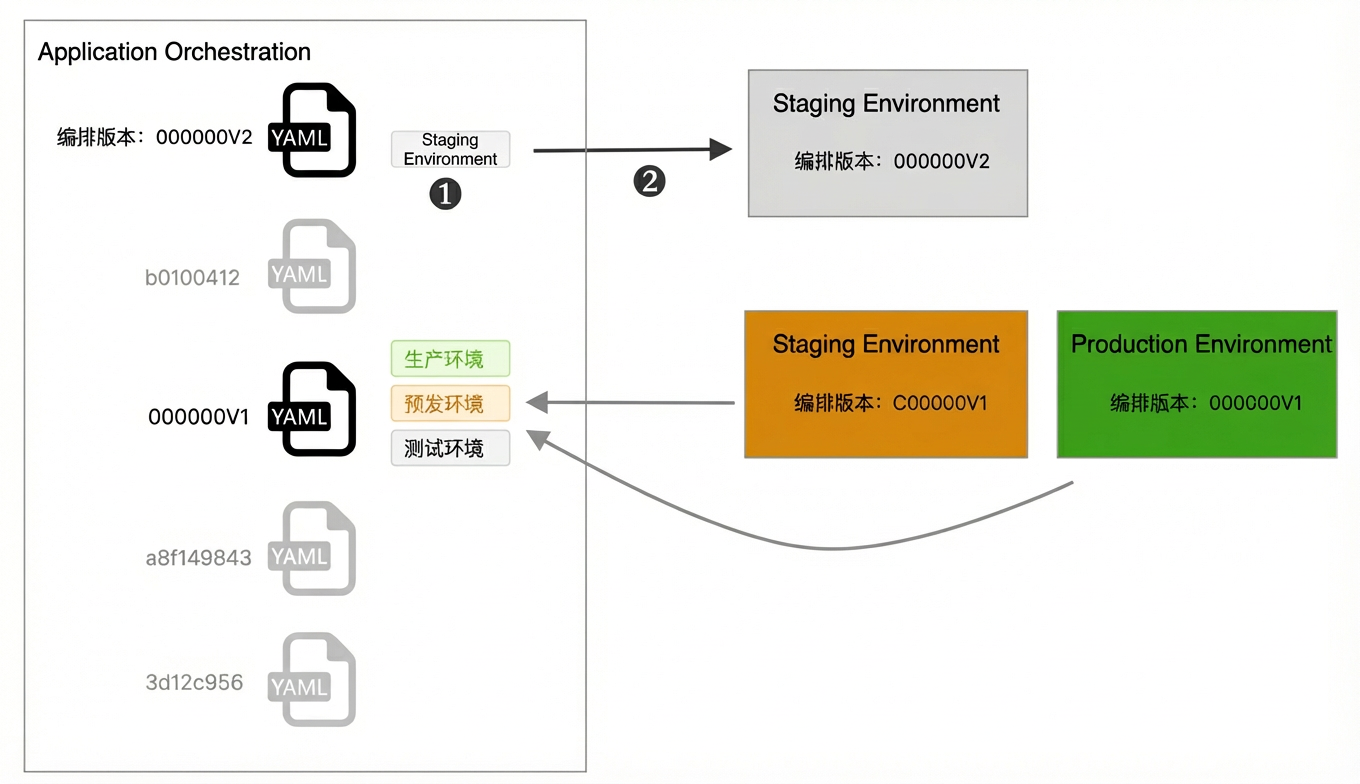
In Application Orchestration, modify the YAML file to create version V2. After you confirm the changes, tag the version for the testing environment.
Deploy to the testing environment and select version V2 to run tests.
In the Orchestration Verification Passed dialog box, enable Associate Variable Group and select the corresponding variable group, enter the Revision Log, select the target environment from the Tag drop-down list, and then click OK and Save Orchestration.
In the Orchestration Version drop-down list, select the latest available version tagged with Testing Environment (such as 202ebe66).
You can deploy the staging environment and select the V2 version for validation.
After validation passes, the version is tagged for the Staging Environment.
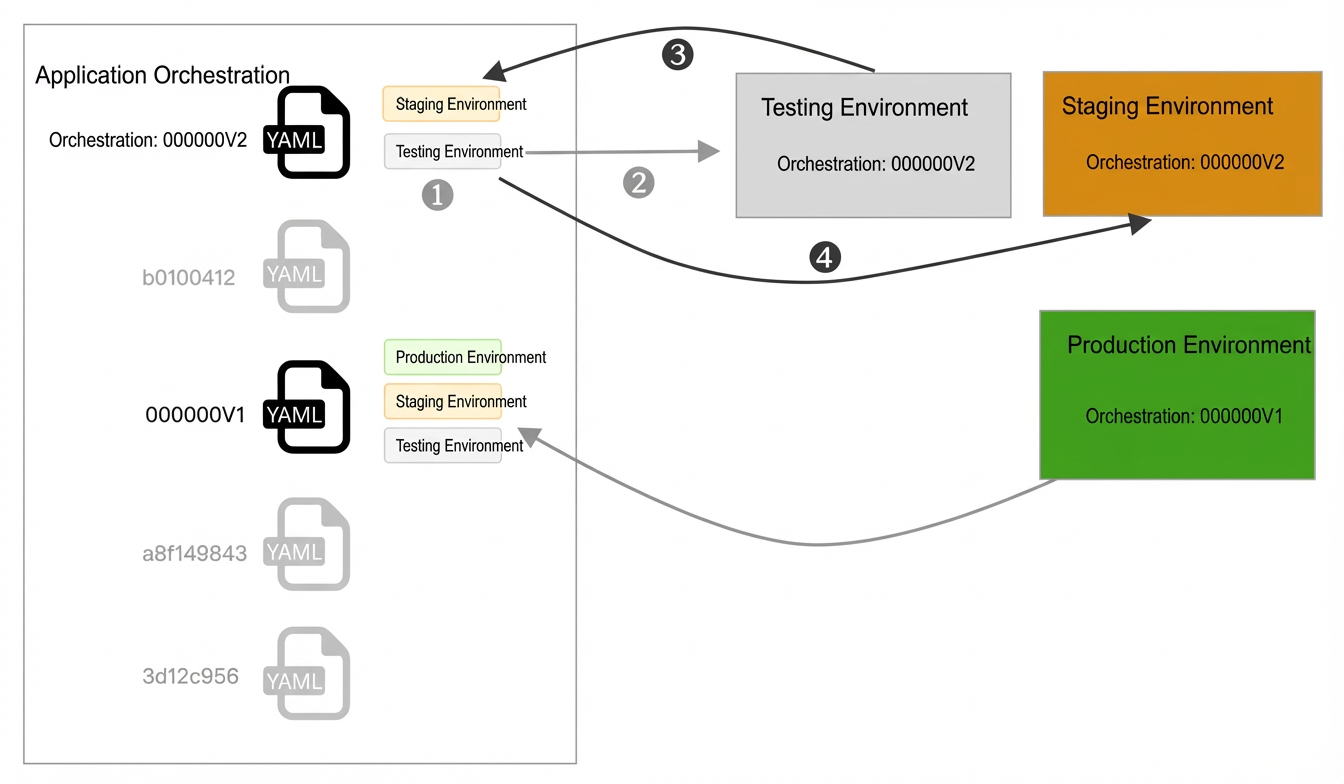
After validation in the staging environment is successful, tag the version for the production environment.
When you are ready to deploy to production, you will receive a notification that a new version is available. You can then manually create a deployment order and select version V2 to publish it to the production environment.
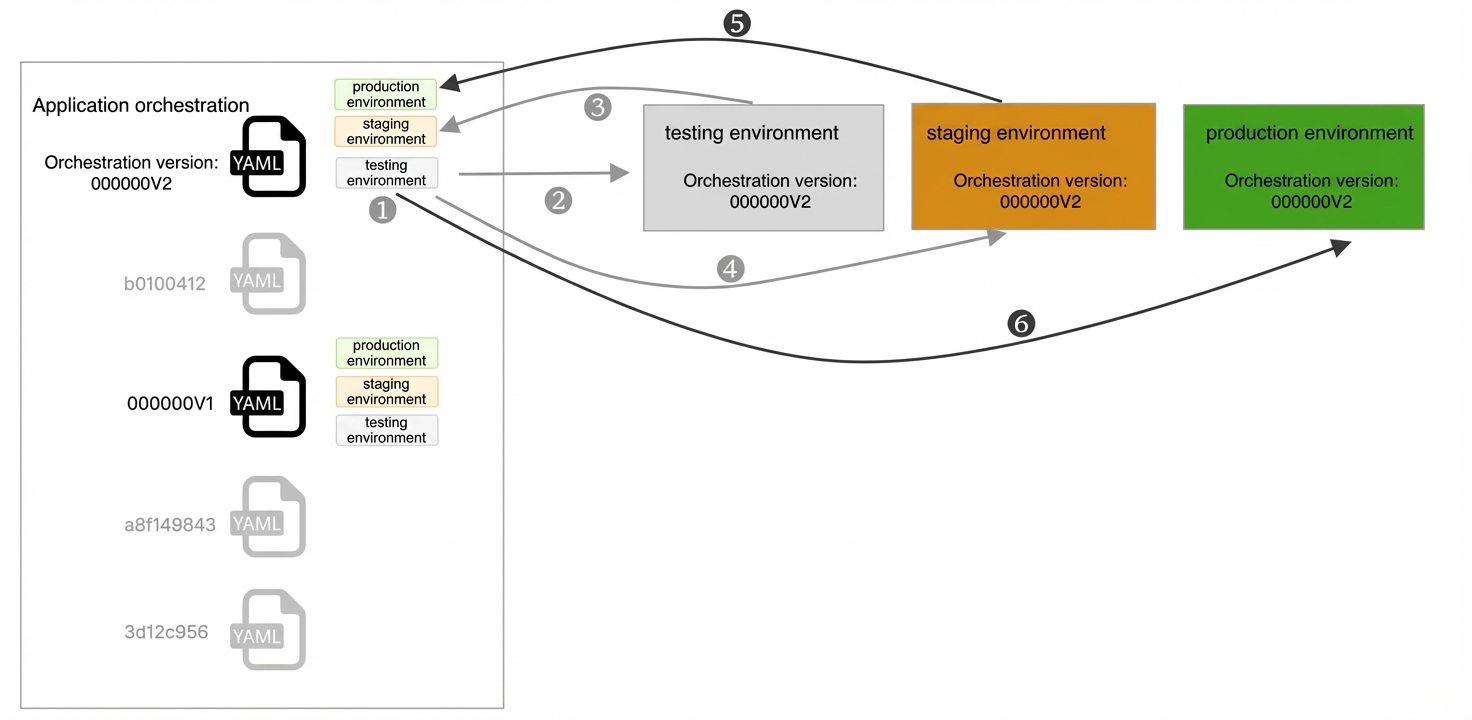
This completes the process of changing an orchestration configuration, from deployment in the testing and staging environments to the final production release.