Create a custom build environment
If the pre-configured build environments in Flow do not meet your requirements, you can create a custom image to tailor your build environment.
Create a custom image
-
Write a Dockerfile for your build environment to install required software and set environment variables. Here is an example:
FROM registry.cn-beijing.aliyuncs.com/rdc-builds/base:1.0 RUN cd /tmp && \ wget http://rdc-public-software.oss-cn-hangzhou.aliyuncs.com/jdk-7u80-linux-x64.tar.gz && \ mkdir -p /srv/java && \ tar xf jdk-7u80-linux-x64.tar.gz -C /srv/java && \ ln -s /srv/java/jdk* /srv/java/jdk ENV JAVA_HOME=/srv/java/jdk \ PATH=${PATH}:/srv/java/jdk/bin:/srv/javaNoteIf you do not use
registry.cn-beijing.aliyuncs.com/rdc-builds/base:1.0as your base image, make sure that your image includes jq and bash, and that the default user is root. -
Build your custom image, debug it in your local environment, and then push the image to Alibaba Cloud Container Registry or another publicly accessible registry.
docker build -t myimage:latest -f /path/to/a/Dockerfile .NoteThis command builds an image. You can customize the image name
myimageand the taglatest. The.specifies the context path. If you run the command from the same directory as the Dockerfile, you can omit the-foption, which specifies the path to the Dockerfile. -
Run the following command to verify that a container starts correctly from the image. If successful, you can use the image in the Flow build environment.
docker run -w /root/workspace --entrypoint=/bin/bash -it $image
Configure a custom image build node
-
In Pipeline Orchestration, configure a custom image build node.
In a pipeline stage, click + New Task. In the Select Task Group panel that appears, select the Run Command category, and then click the Custom Image Execution task card.
-
Enter your custom image address and build command. If your image is not public, you can also use a private build image.
You must also set Execution User (for example,
root) and Command Execution Mode (for example, Linux Shell). Example custom image address:registry.cn-beijing.aliyuncs.com/hub-mirrors/maven. Example build command:java --version.
Error "Failed to pull image" when you run a custom image build step
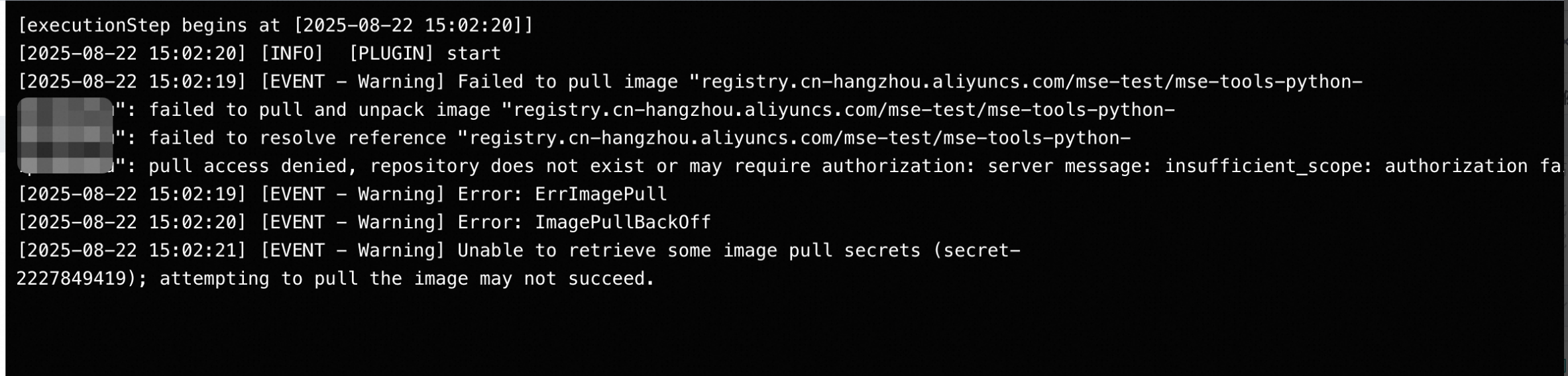
-
Check whether the image exists in the private registry.
-
Check whether the service connection or authentication key configured for the step is correct.
No run logs are generated when you run a custom image build step
-
Check whether jq is installed in the private image.
-
Make sure that the default user of the private image is root.