How code repository encryption works
This article explains an innovative approach to code repository encryption.
What is code encryption?
The encrypted code service is a proprietary product from the Alibaba Cloud DevOps team. It is the first code hosting service in the Chinese mainland to support code encryption and the first in the world to implement an encryption solution based on native Git.
Encrypting code repositories on Codeup at rest prevents anyone other than the data owner from accessing plaintext data, thereby mitigating the risk of data leakage in the cloud. The encryption process is entirely transparent to you. You can use any standard Git client, such as Git, JGit, and libgit2, to access your code repositories on Codeup.
Linux community security incident
In late August 2011, several servers used to maintain and distribute the Linux operating system were infected with sophisticated malware. The malware could gain root access, modify system software, and alter login credentials. However, the community maintainers stated that the Linux source code was not affected by the breach because it was managed by Git. For the nearly 40,000 files in the Linux kernel, each file is hashed to ensure its uniqueness. This makes it difficult to alter older versions without detection.
 Although Git can solve the problem of source code tampering that concerns open-source communities, it does not address the issue of data leakage that concerns enterprises. For enterprise-level code hosting, today's challenges include not only data security but also reliability and cost.
When an enterprise is small and has low reliability requirements, a self-hosted code hosting service might seem sufficient. However, as the enterprise grows and the codebase expands, better server configurations are required to support large-scale collaboration. You may also need dedicated personnel to maintain the service and ensure reliability. At this point, cost becomes a major consideration. Cloud-based code hosting services offer higher reliability and lower costs than self-hosted solutions. However, because they do not provide direct access to the underlying storage, they can cause security concerns for users. Code encryption addresses this concern by giving users control over the underlying storage, which removes their hesitation to move code to the cloud.
Self-hosting vs. cloud security
To answer this question, you need to understand the basics of Git's storage layout.
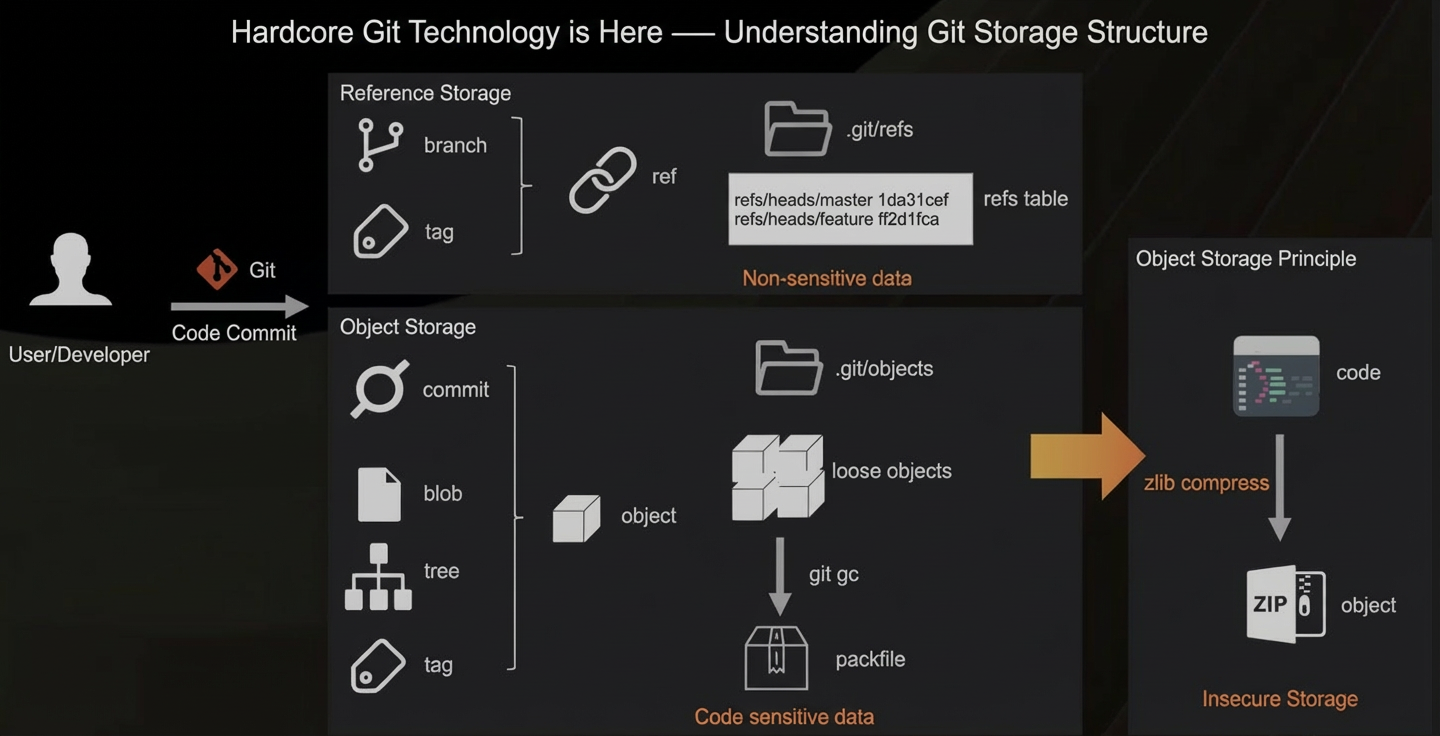
When you commit code using Git, you first interact with commits and branches. Branches or tags can be collectively called a reference. A reference is stored in a single file where the file path is the reference name and the content is the corresponding version hash. Since branch names are usually unrelated to business logic, we can assume that they do not contain sensitive data.
In addition to commit objects, code files are stored in blob objects. Filenames and directory structures are stored in tree objects. Tags with extra metadata are stored in tag objects.
Objects are the basic units of data storage in Git. Typically, an object is stored as a single file named after its content hash. This is known as a loose object. After you run garbage collection (gc), these objects are bundled together to generate a packfile. Because the content of your code and filenames are stored in blob and tree objects, these objects contain sensitive data.
To reduce disk usage, Git's object storage compresses data using zlib. Because the data can be accessed simply by decompressing it, the content is effectively stored in plaintext.
Trust issues from plaintext storage
To answer the question posed earlier, Git's insecure storage model means that a self-hosted code hosting service must defend against both external attacks and internal threats. This is because data leakage in enterprises often originates from within.
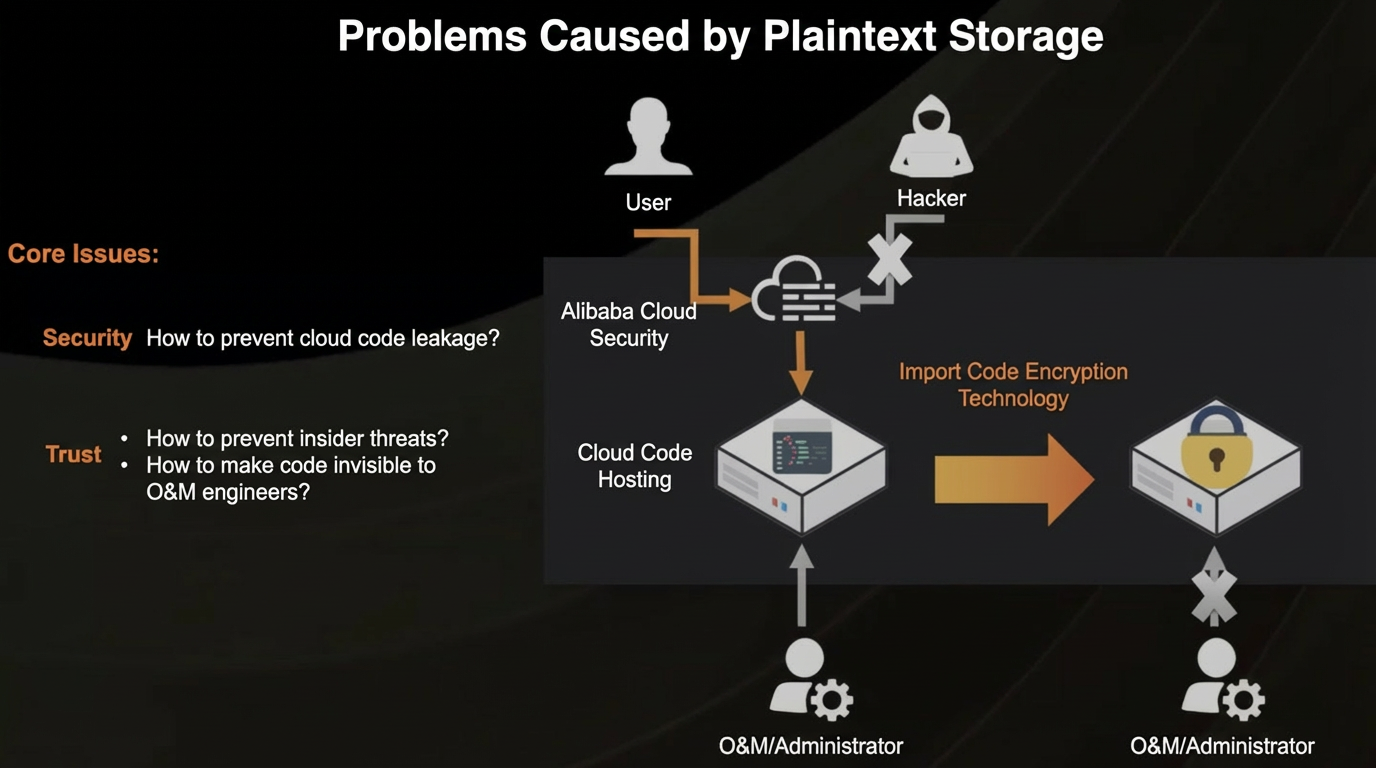 For a cloud-based code hosting service, you can leverage Alibaba Cloud's security features to effectively prevent external hacker attacks. So, how can we solve users' trust issues with cloud code hosting services and make code invisible to operations personnel?
Using customer keys to encrypt code data in the cloud increases the security of data at rest and blocks code visibility for operations personnel. This helps eliminate user concerns about moving code to the cloud.
How code encryption works
We can break this down into three parts:
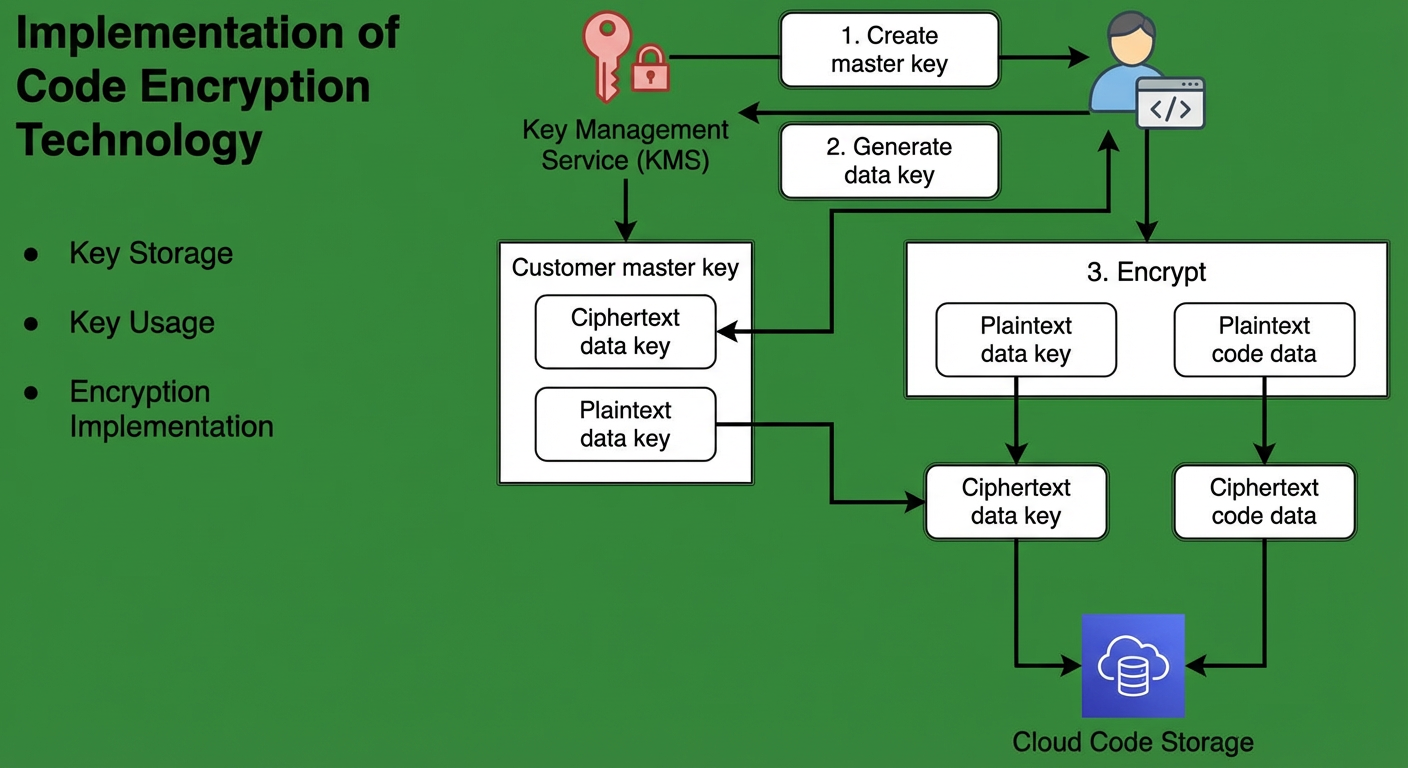
Key management: Secure and compliant key management is essential for encryption security. You can use Alibaba Cloud's Key Management Service (KMS) for this purpose.
Key usage: Git is a compute-intensive service. If you rely directly on the encryption and decryption capabilities of a key management service, the performance may be unsatisfactory. Therefore, envelope encryption is used. This method uses a data key to encrypt the plaintext code, and the data key itself is encrypted. Because only the encrypted data key and code are stored, decrypting the code requires user authorization, which prevents operations personnel from directly accessing data at rest.
Encryption based on native Git: An encryption patch added to native Git provides these capabilities while retaining the advantages of native Git.
Native Git has a top-down layered architecture, similar to common application architectures:
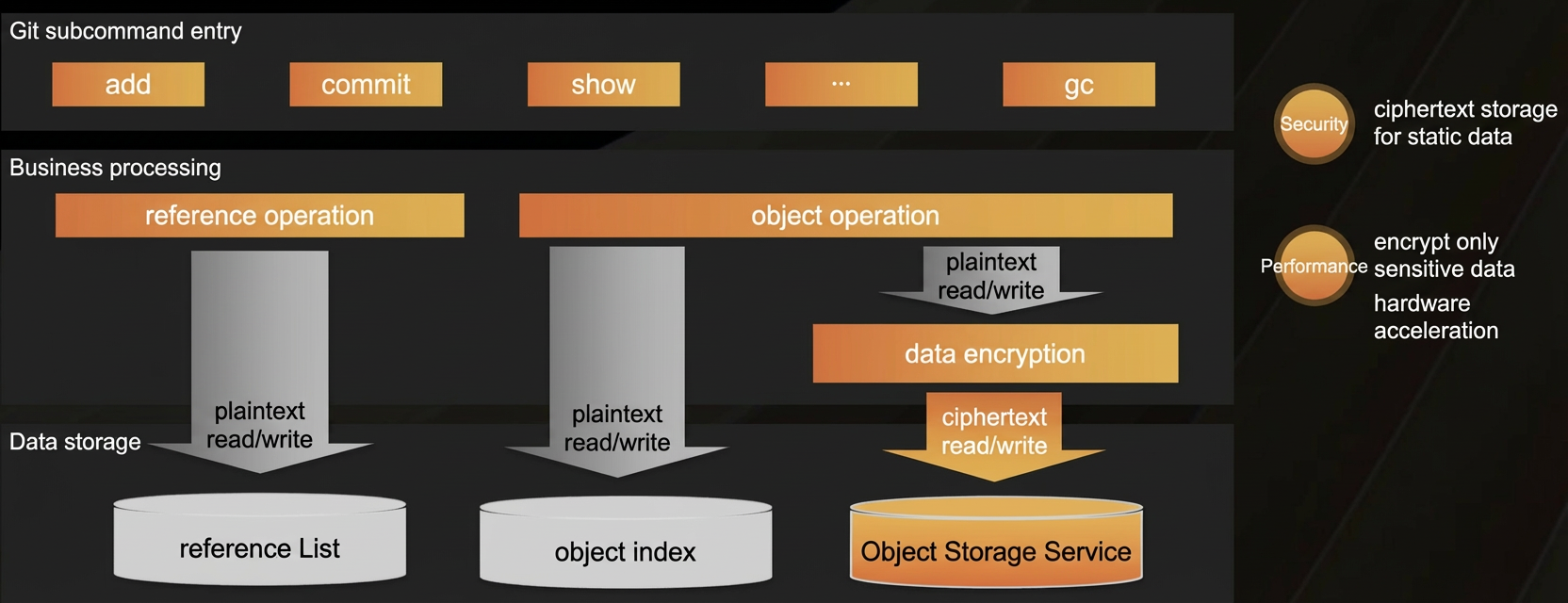
The top layer is the presentation layer, which contains various command-line interfaces that application services call directly.
The middle layer is the business logic layer. From a data content perspective, this layer can be divided into reference operations and object operations. An added encryption and decryption module encrypts data in memory before writing the ciphertext to disk. This ensures the security of data at rest.
To maximize performance, only object data is encrypted and stored. Data such as reference lists and object indexes are stored in plaintext. Using hardware acceleration keeps the performance overhead from code encryption to around 10%, making it nearly unnoticeable to users.
Local Git code encryption demo
First, prepare an empty code repository with code encryption configured. Add a file to it. Using hexdump -C to view the binary content of this file, you can see that it starts with the bytes 78 01. This is a typical zlib-compressed file header.
→ demo git:(master) tree .git/objects
.git/objects
├── info
└── pack
2 directories, 0 files
→ demo git:(master) echo "hello world" >> README.md
→ demo git:(master) ✗ git add --all
→ demo git:(master) ✗ tree .git/objects
.git/objects
├── 3b
│   └── 18e512dba79e4c8300dd08aeb37f8e728b8dad
├── info
└── pack
3 directories, 1 file
→ demo git:(master) ✗ head -c 32 .git/objects/3b/18e512dba79e4c8300dd08aeb37f8e728b8dad| hexdump -C
00000000  78 01 4b ca c9 4f 52 30  34 62 c8 48 cd c9 c9 57  |x.K..OR04b.H...W|
00000010  28 cf 2f ca 49 e1 02 00  44 11 06 89              |(./. I...D...|
0000001c
→ demo git:(master) ✗
Next, enable encryption and use git commit to create an encrypted commit. When you view the binary content of the saved commit object again, you will notice that the created object data no longer starts with 78 01, but with a specified encryption marker.
Note that due to time constraints, this demo does not show a direct comparison of the same object in encrypted and unencrypted states. Instead, it uses the change in the file header to determine whether the object is encrypted.
After encrypting the loose objects, you can use git gc to convert them into a packfile. As shown in the figure, the version in the encrypted packfile header is no longer the original 00 00 00 02, but the specially marked 82 00 00 02. The header is also expanded from 12 bytes to 24 bytes to include a 12-byte NONCE for enhanced security.
.git/objects
├── 39
│   └── 8f209f1658af9730a04f0d746d08b887e174e3
├── 3b
│   └── 18e512dba79e4c8300dd08aeb37f8e728b8dad
├── 43
│   └── b71c903ff52b9885bd36f3866324ef60e27b9b
├── info
└── pack
5 directories, 3 files
→ demo git:(master) head -c 32 .git/objects/39/8f209f1658af9730a04f0d746d08b887e174e3| hexdump -C
00000000  45 4e 43 00 82 00 00 00  cd ea 85 00 72 da 7f 16  |ENC.........r...|
00000010  7c 12 4a 58 77 23 1c ec  16 19 bf aa 40 bb 05 5f  ||.JXw#......@.._|
00000020
→ demo git:(master) git gc
Enumerating objects: 3, done.
Counting objects: 100% (3/3), done.
Writing objects: 100% (3/3), done.
Total 3 (delta 0), reused 0 (delta 0), pack-reused 0
→ demo git:(master) head -c 64 .git/objects/pack/pack-90735f3867e4b4fd93de5168c77a67db5420faa1.pack| hexdump -C
00000000  50 41 43 4b 82 00 00 02  00 00 00 03 93 a4 38 98  |PACK..........8.|
00000010  78 da 7f 16 08 1f 48 58  f8 76 19 38 d7 0f 00 a3  |x.....HX.v.8....|
00000020  f7 e4 72 86 8e 85 66 c9  e3 ee 41 13 ed e8 ee e7  |..r...f...A.....|
00000030  3a f2 63 e8 30 ab 07 2d  53 e0 96 a6 78 8e 99 f3  |:.c.0..-S...x...|
00000040
When the key configuration is removed, you can no longer access this code repository. If you try to view the current version by using git show HEAD without the key, you will get an error message indicating that no key was provided. This error comes from a custom encryption patch for native Git. Without this patch, an encrypted packfile would trigger a message that the current Git version is too low and needs to be upgraded. An encrypted loose object would trigger an invalid file header error because it is not a zlib compression header.