Partial clone
Partial clone downloads only the Git objects you need, reducing clone time and disk usage. Git Large File Storage (LFS) provides an alternative for managing large repositories.
Partial clone
Concept
Git is a distributed version control system. By default, when you clone a repository by using the git clone command without specifying any parameters, Git downloads the full historical data of all files in the repository.
This distributed design enables effective code collaboration. However, as developers continuously commit code, the repository size grows, increasing local disk space usage and clone time. The partial clone feature of Git addresses these issues. Partial clone is available on Alibaba Cloud Codeup, helping you improve development efficiency.
Partial clone uses the --filter option to filter clone objects for on-demand download. On-demand download significantly reduces data transfer volume, clone time, and local disk space usage. When necessary, Git automatically downloads missing files on demand, allowing seamless continuation of work without additional setup.
Scenarios
Partial clone is useful in the following scenarios:
Large repositories
For a large repository, partial clone can significantly improve development efficiency. For example, the Linux kernel repository has more than 1 million commits and contains more than 8.3 million objects, totaling around 3.3 GB.
A full clone at a rate of 2 MB/s takes about 26 minutes. The clone time may increase with unstable network connections.
$ git clone --mirror gi*@codeup.aliyun.com:6125fa3a03f23adfbed12b8f/linux.git linux
Cloning into bare repository 'linux'...
remote: Enumerating objects: 8345032, done.
remote: Counting objects: 100% (8345032/8345032), done.
remote: Total 8345032 (delta 6933809), reused 8345032 (delta 6933809), pack-reused 0
Receiving objects: 100% (8345032/8345032), 3.26 GiB | 2.08 MiB/s, done.
Resolving deltas: 100% (6933809/6933809), done.
The following code shows the result of enabling the blob:none option for partial clone:
$ git clone --filter=blob:none  --no-checkout git@codeup.aliyun.com:6125fa3a03f23adfbed12b8f/linux.git
Cloning into 'linux'...
remote: Enumerating objects: 6027574, done.
remote: Counting objects: 100% (6027574/6027574), done.
remote: Total 6027574 (delta 4841929), reused 6027574 (delta 4841929), pack-reused 0
Receiving objects: 100% (6027574/6027574), 1.13 GiB | 2.71 MiB/s, done.
Resolving deltas: 100% (4841929/4841929), done.
The result shows that after the blob:none option is enabled, the number of objects to be downloaded has been reduced from around 8.34 million to around 6.02 million, and the data volume to be downloaded has decreased from 3.26 GB to 1.13 GB. With a download speed of 2MB/s, the time required for a partial clone process is just about 9 minutes, roughly one-third of the time required for a full clone process.
Partial clone in treeless mode further reduces the download size and time but may trigger more frequent downloads during development. Therefore, treeless mode is not typically recommended for daily use. Nonetheless, partial clone provides significant time savings and reduces the number of objects to download.
Monorepo for microservices
An increasing number of projects adopt a microservice architecture that breaks down large, monolithic services into cohesive microservices. Each service is managed by a small team, enabling parallel development without interference and reducing the complexity of team collaboration. However, this architecture can complicate the reuse of shared code, lead to dependency confusion across repositories, and pose challenges in aligning process specifications among teams.
To address these issues, the monorepo approach manages sub-services with Git, using a single root repository for all services:
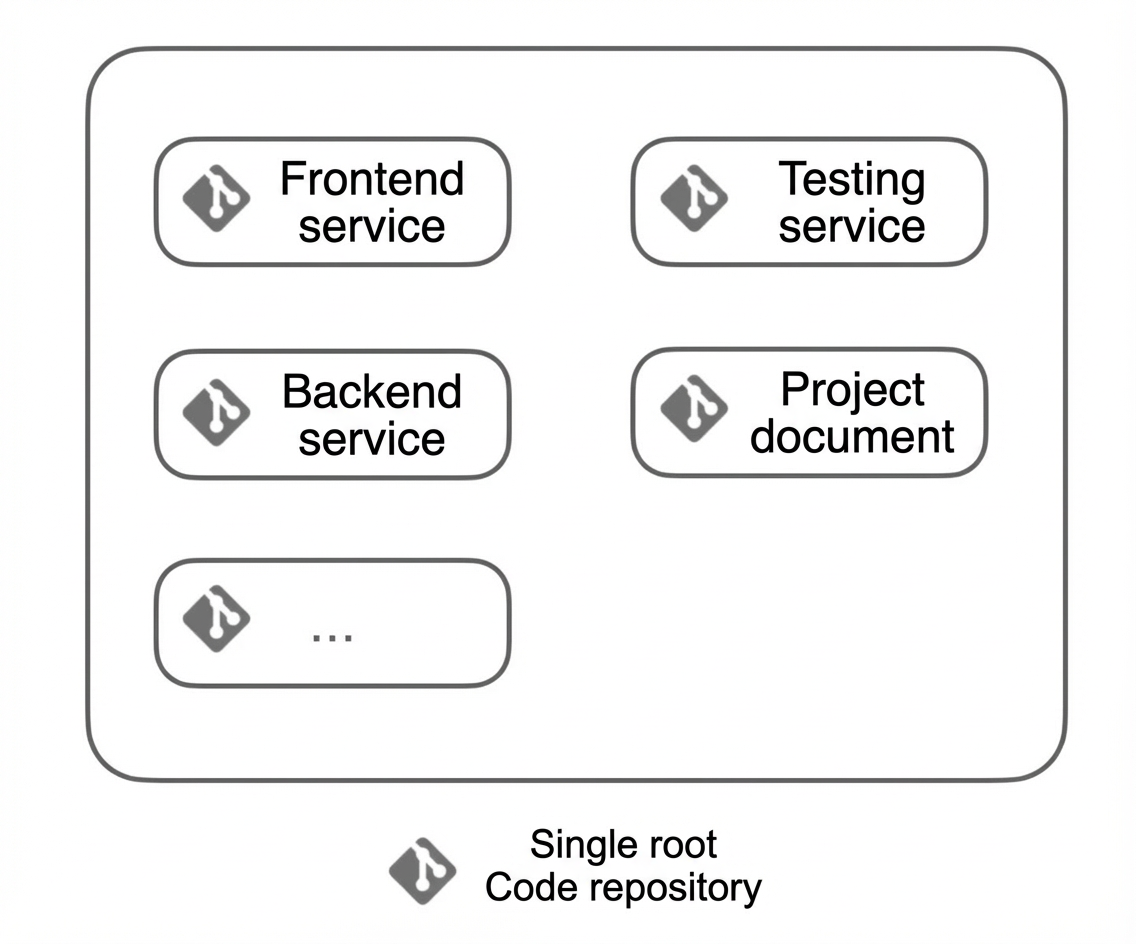
A monorepo facilitates code sharing, centralizes project documentation and process specifications, and simplifies continuous integration. However, developers must clone the entire repository even if they work on only a specific part of the project.
Partial clone in conjunction with sparse checkout can address this issue. First, enable partial clone and use the --no-checkout option to prevent automatic checkout after cloning, which avoids downloading all files in the current branch during checkout. Then, utilize the sparse checkout feature to download and check out files from a specified directory as needed.
For example, a project is created with the following structure:
monorepo
├── README
├── backend
│   └── command
│       └── command.go
├── docs
│   └── api_specification
├── frontend
│   ├── README.md
│   └── src
│       └── main.js
└── libraries
    └── common.lib
As a backend developer, you focus only on the code within the backend directory, and prefer not to spend time downloading code from other directories. Therefore, you can execute:
$ git clone --filter=blob:none  --no-checkout https://codeup.aliyun.com/61234c2d1bd96aa110f27b9c/monorepo.git
Cloning into 'monorepo'...
remote: Enumerating objects: 24, done.
remote: Counting objects: 100% (24/24), done.
remote: Total 24 (delta 0), reused 0 (delta 0), pack-reused 0
Receiving objects: 100% (24/24), 2.62 KiB | 2.62 MiB/s, done.
Next, enter the project, enable sparse checkout, and specify to download only the files within the backend directory:
$ cd monorepo
$ git config core.sparsecheckout true
$ echo "backend/*" > .git/info/sparse-checkout
Finally, execute git checkout and run the tree command to fetch the directory structure. You can notice that only the files within the backend directory have been downloaded.
$ tree .
.
└── backend
    └── command
        └── command.go

2 directories, 1 file
Application building
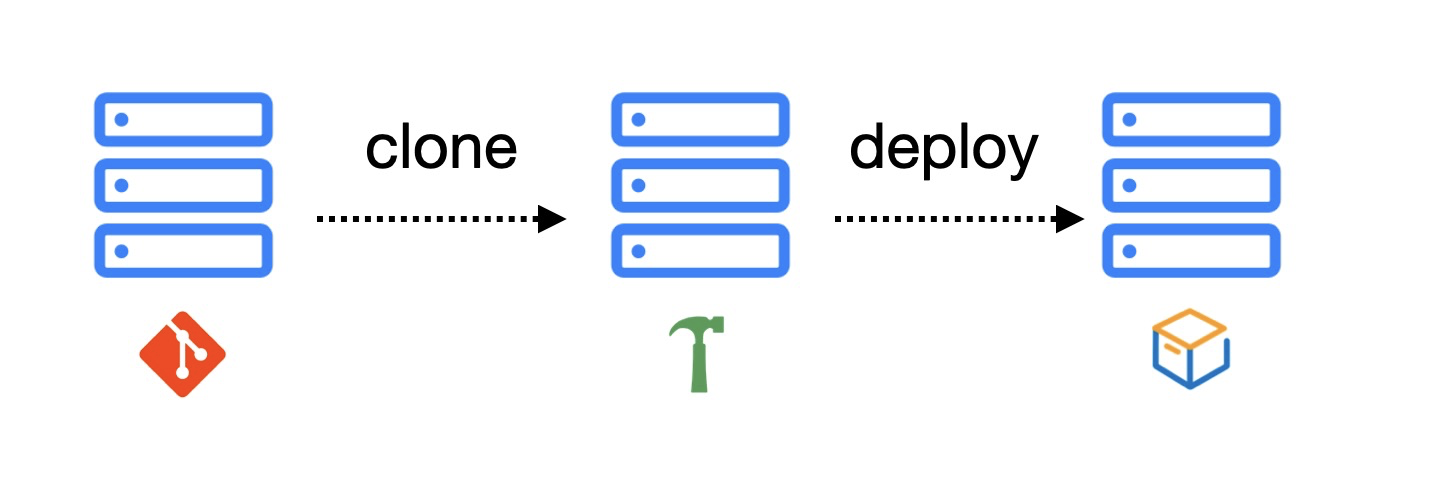
When building an application, a server fetches the code from a Git repository, runs the build, and publishes the application. The build process requires only the latest code version, not the full history. To reduce the number of objects downloaded, use the tree:0 option for a partial clone.
You can also use the Git shallow clone feature to selectively filter historical commit objects. For more information about Git shallow clone, see git-clone.
Use and principles
Git underlying object types
To effectively use partial clone, you should understand Git underlying storage principles, including blob, tree, and commit objects.
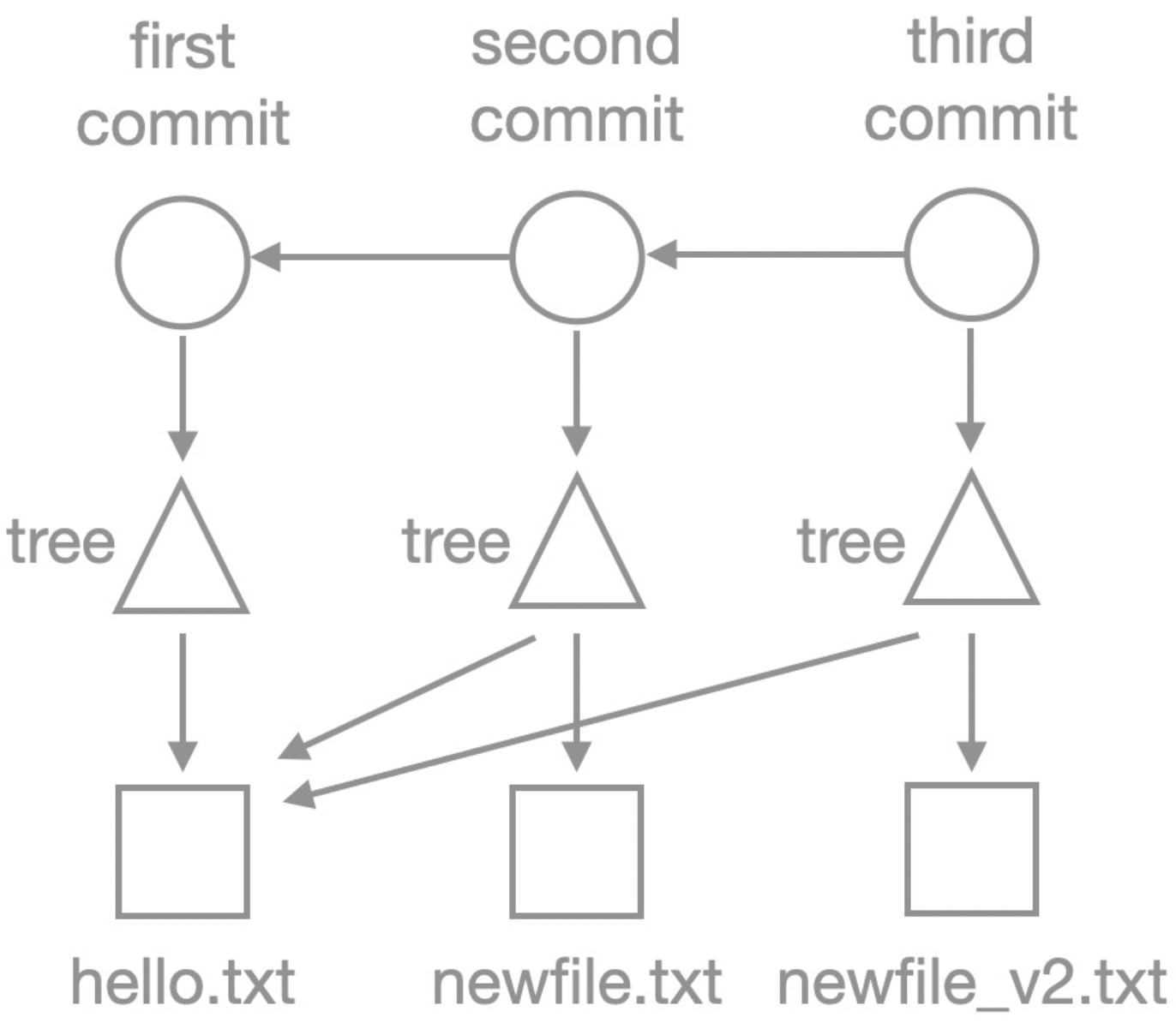
The following figure shows the structure of a Git repository in terms of its underlying objects:
-
Circles represent
commitobjects.Commitobjects store commit information and point to the parentcommit(if exists) and theroot treeobject. The use ofcommitobjects helps you trace back the historical versions of the code. -
Triangles represent
treeobjects.Treeobjects store file names and directory structure information and point toblobobjects or othertreeobjects, forming a nested directory structure. -
Squares represent
blobobjects.blobobjects store the actual file content.
Partial clone limits
-
Client limits: The local Git version must be 2.22.0 or later.
-
Server filtering limits: Codeup supports two types of
--filteroptions for partial clone.-
Blobless clone:
--filter=blob:none. -
Treeless clone:
--filter=tree:<depth>.
-
If your local client meets the requirements, you can use partial clone to improve development efficiency.
Partial clone use
Use one of the following methods to enable partial clone:
-
Run the git clone command to enable partial clone:
git clone --filter=blob:none <repository URL> -
Run the git fetch command to enable partial clone:
git init . git remote add origin <repository URL> git fetch --filter=blob:none origin git switch master -
Run the git config command to enable partial clone for a repository:
git init .
git remote add origin <repository URL>
git config remote.origin.promisor true
git config remote.origin.partialclonefilter blob:none
git fetch origin
git switch master
These methods achieve the same result. Choose the one that best suits your requirements. The following sections explain the principles of blobless and treeless clones.
Blobless clone
To perform a blobless clone on a repository, use the --filter=blob:none option. In this case, the historical commit and tree objects of the repository are downloaded but not blob objects. The following example demonstrates the repository structure after cloning with this option.
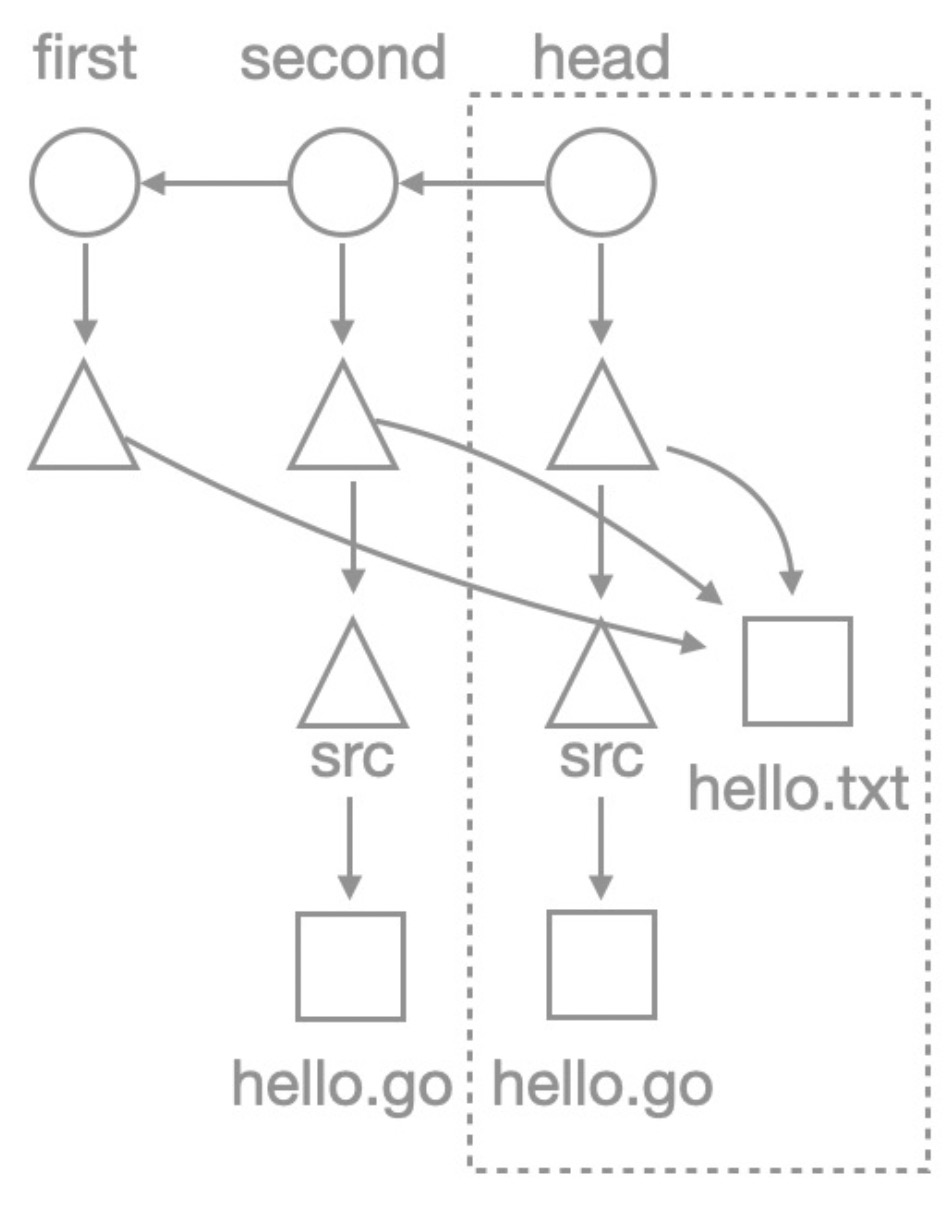
Create a test repository with the following commits:
-
First commit: Create a file named hello.txt with the content "hello world!"
-
Second commit: Create a file named src/hello.go with the content "hello world".
-
Third commit: Modify a file named src/hello.go to output it as"hello codeup".
The following figure shows the repository structure.
Run the following command to perform a partial clone in blobless mode:
git clone --filter=blob:none \
https://codeup.aliyun.com/61234c2d1bd96aa110f27b9c/partial-clone-tutorial.git
After cloning, go to the repository and run the git rev-list command to review its objects. The following output is returned:
$ git rev-list --missing=print --objects HEAD
18990720b6e55a70ba9f9877213dad948e0973a2
e18cc4e7890e6ec832f683c1a0f58412b4a37964
2f7478bda13e73e1e1eaab6fae3d0dfd35e50b32
e7c719df0874ebd3b2ec02666d65879e986d537d
a0423896973644771497bdc03eb99d5281615b51 hello.txt
98a390b9c8b5ba25e9444c8b5a487634795d7c72 src
02a9d16faa87c68bd6fc2af27cbe3714e53af272 src/hello.go
b7458566de2bf5e1011142ef5fe81ccaa4c9e73e
3f2157b609fb05814ba0a45cf40a452640e663c3 src
6009101760644963fee389fc730acc4c437edc8f
?f2482c1f31b320e28f0dea5c4e7c8263a0df8fec
In the last line ID, the first character is a question mark, indicating that the object does not locally exist. Partial clone achieves this result.
To determine the f2482c1f31b320e28f0dea5c4e7c8263a0df8fec object, run the following command:
$ git cat-file -p f2482c1f31b320e28f0dea5c4e7c8263a0df8fec
remote: Enumerating objects: 1, done.
remote: Counting objects: 100% (1/1), done.
remote: Total 1 (delta 0), reused 0 (delta 0), pack-reused 0
Receiving objects: 100% (1/1), 109 bytes | 109.00 KiB/s, done.
package main
import "fmt"
func main() {
    fmt.Println("hello world")
}
The output shows that the object was downloaded on demand and contains the content fmt.Println("hello world"), corresponding to the version from the second commit.
The preceding analysis shows that after cloning with the blob:none option, only the hello.go file from the second commit is missing.
The following figure shows the repository structure with missing objects represented as hollow and existing objects as solid.

This figure shows that the historical commit and tree objects exist, but the historical blob objects are missing. The following figure shows a general blobless clone structure for more complex repositories.
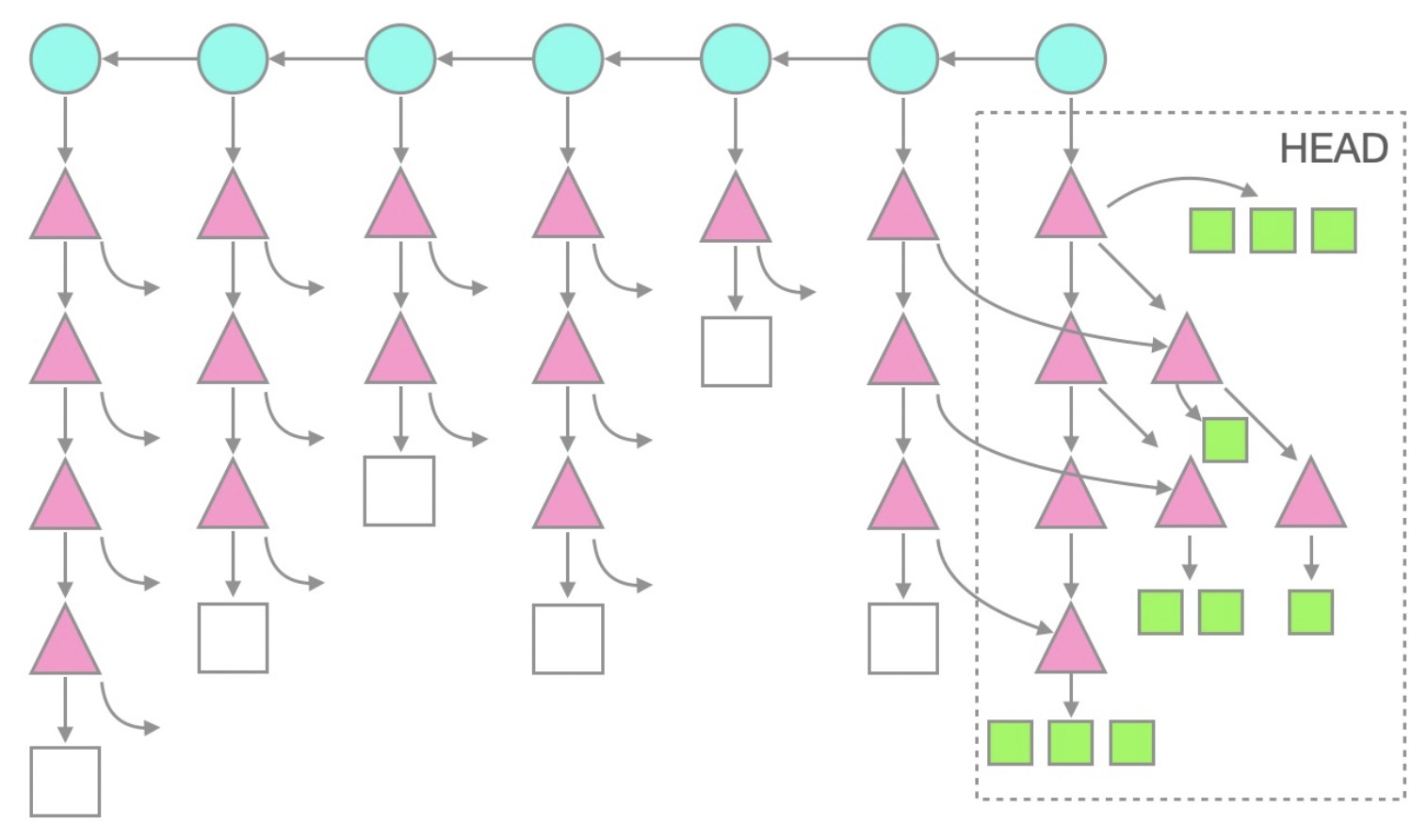
Note that in the current HEAD branch, all tree and blob objects exist because they are automatically checked out after cloning. You can modify and commit code, and proceed with your work. For historical commits, commit and tree objects exist, but only blob objects are missing. This saves clone time and disk space usage by not downloading these historical blob objects.
When you check out a historical commit, your Git client automatically downloads the missing blob objects in batches. Moreover, the client initiates the download for blob objects when their content is required. However, the download is not necessary when only their OID is needed. Consequently, commands such as git merge-base and git log perform comparably to those in full clone mode.
Treeless clone
To perform a treeless clone, use the --filter=tree:<depth> option, where depth is a number representing the depth from the commit object. The treeless clone mode downloads only the tree and blob objects within a specified depth.
Reaccess the test repository, use --filter=tree:0 for a treeless clone, and utilize rev-list to inspect local objects.
$ git clone --filter=tree:0 \
https://codeup.aliyun.com/61234c2d1bd96aa110f27b9c/partial-clone-tutorial.git
$ cd partial-clone-tutorial

$ git rev-list --missing=print --objects HEAD
18990720b6e55a70ba9f9877213dad948e0973a2
e18cc4e7890e6ec832f683c1a0f58412b4a37964
2f7478bda13e73e1e1eaab6fae3d0dfd35e50b32
e7c719df0874ebd3b2ec02666d65879e986d537d
a0423896973644771497bdc03eb99d5281615b51 hello.txt
98a390b9c8b5ba25e9444c8b5a487634795d7c72 src
02a9d16faa87c68bd6fc2af27cbe3714e53af272 src/hello.go
?b7458566de2bf5e1011142ef5fe81ccaa4c9e73e
?6009101760644963fee389fc730acc4c437edc8f
Two object IDs are prefixed with a question mark. Run the following command to query these objects:
$ git cat-file -p HEAD^^
tree 6009101760644963fee389fc730acc4c437edc8f
author yunhuai.xzy <yunhuai.***@alibaba-inc.com> 1631697940 +0800
committer yunhuai.xzy <yunhuai.***@alibaba-inc.com> 1631697940 +0800

first commit
$ git cat-file -p HEAD^
tree b7458566de2bf5e1011142ef5fe81ccaa4c9e73e
parent 2f7478bda13e73e1e1eaab6fae3d0dfd35e50b32
author yunhuai.xzy <yunhuai.***@alibaba-inc.com> 1631698032 +0800
committer yunhuai.xzy <yunhuai.***@alibaba-inc.com> 1631698032 +0800
add hello.goIn the second line, the b74585 and 600910 objects are the root trees referenced by the second and first commits respectively. The following figure shows the repository structure.
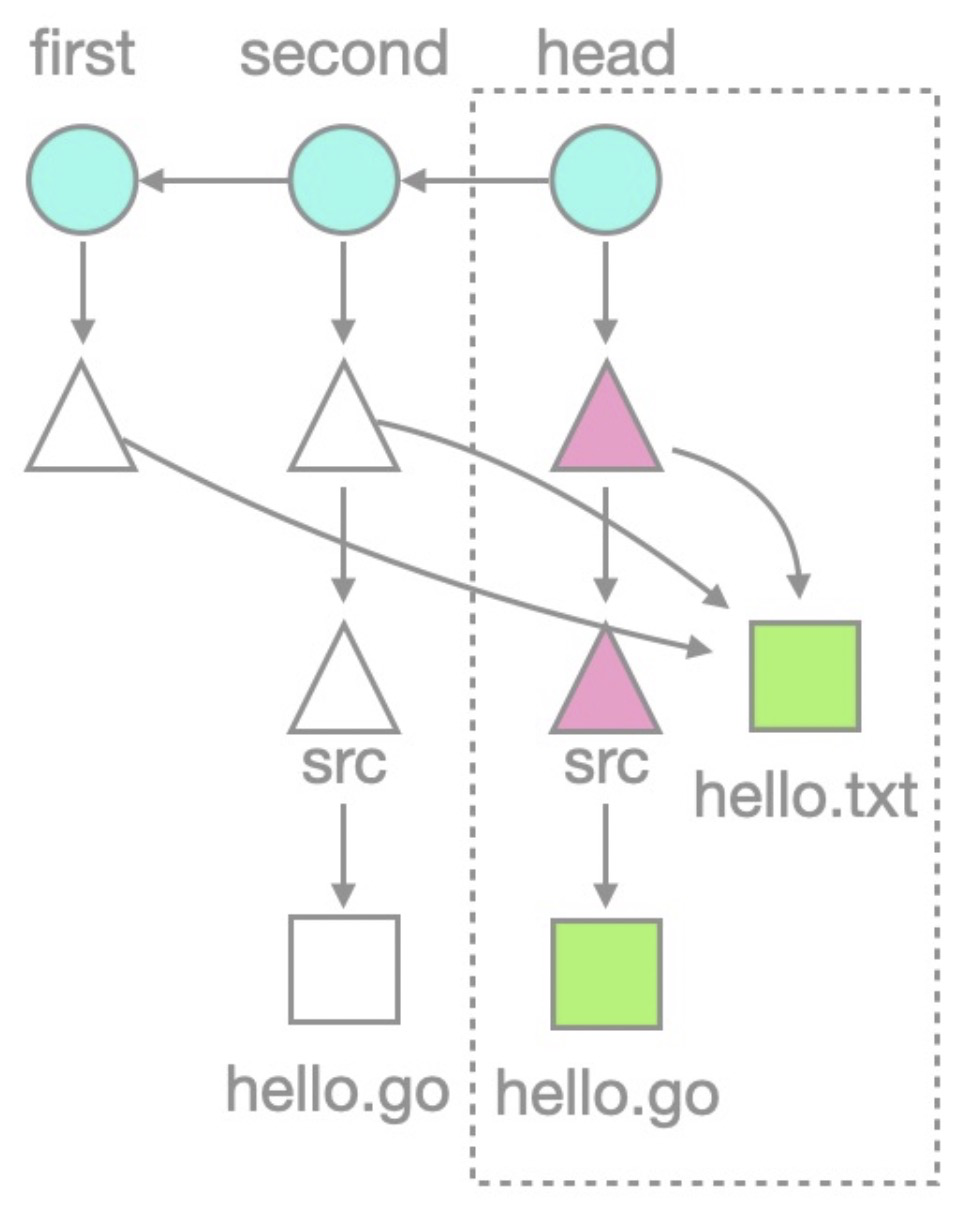
The following figure shows a treeless clone structure for more general Git repositories.
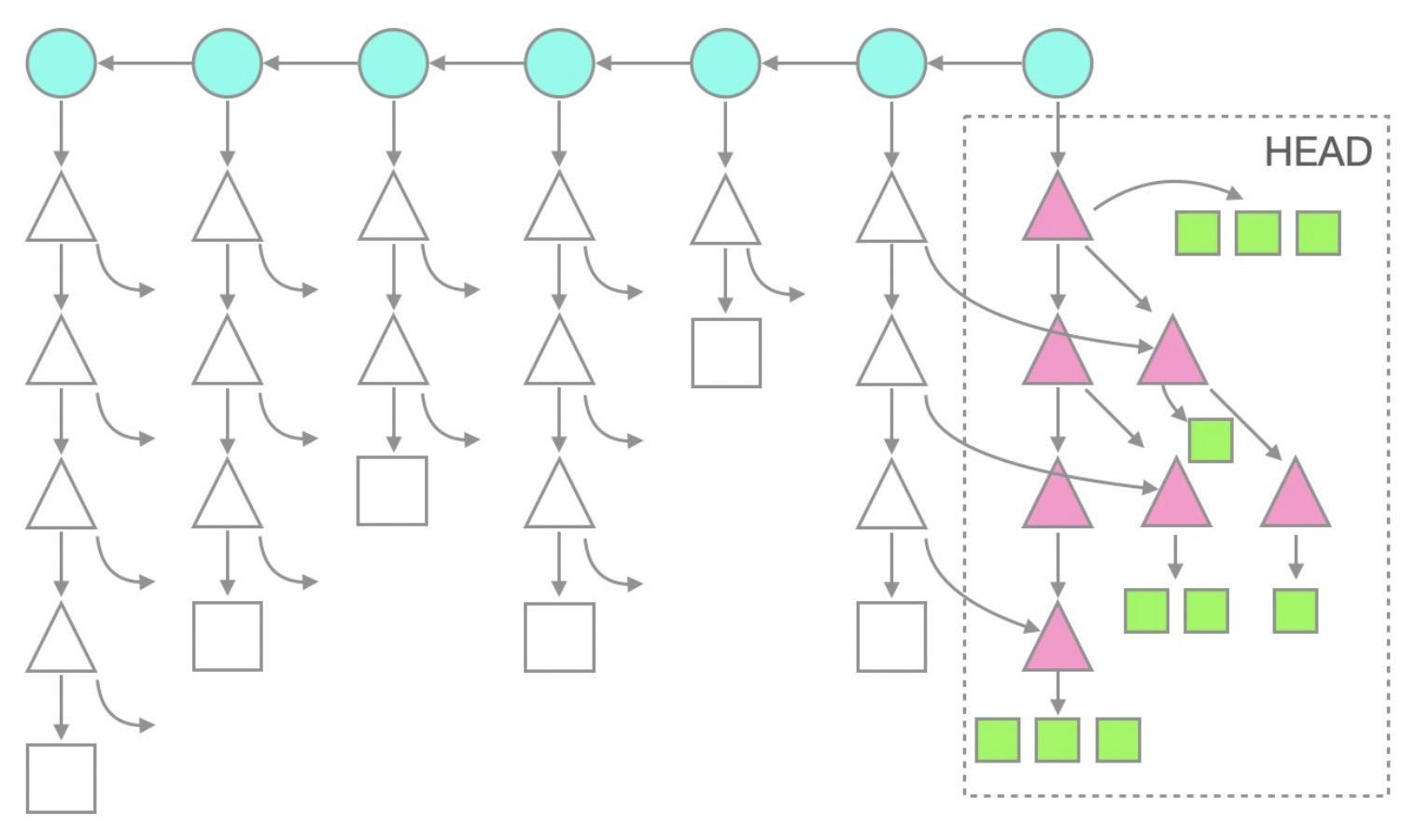
This figure shows that all commit information and objects under the HEAD branch exist due to automatic checkout, but historical tree and blob objects are missing.
Compared with blobless mode, treeless mode downloads fewer objects, resulting in a shorter clone time and less disk space usage. However, treeless mode may trigger more frequent data downloads during subsequent work. For example, when a Git client requests trees, it also fetches all their subtrees from the server. The client does not indicate which trees already exist locally, so the server sends all trees. The client then sends batch requests for missing blob objects.
To illustrate treeless clone, the following figure uses the --filter=tree:1 option, showing that tree objects with a depth of 1 are also downloaded, while deeper tree or blob objects are not:
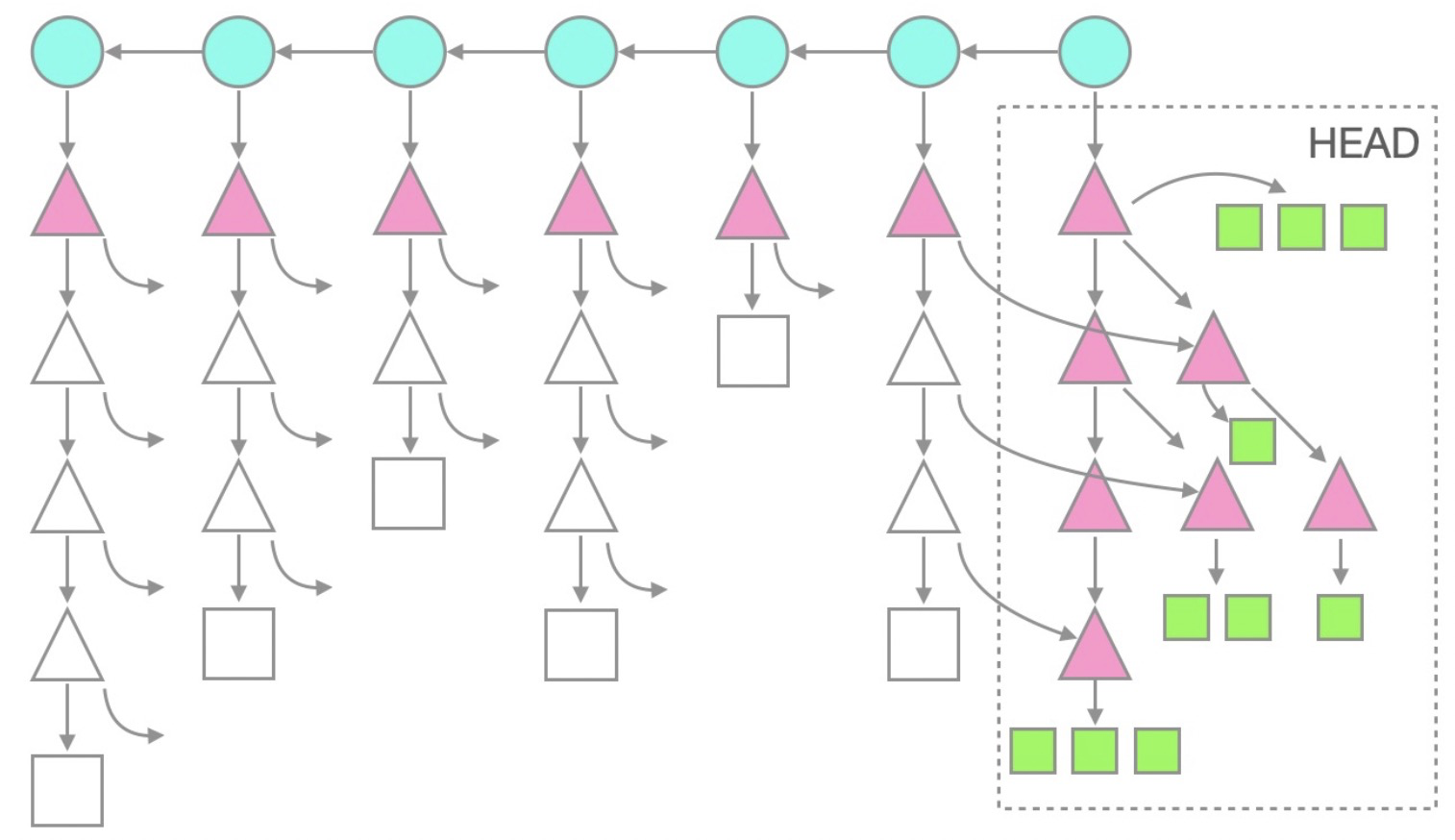
We do not recommend treeless clone for daily development. Treeless clone is ideal for automated build scenarios where a repository is quickly cloned, built, and then deleted.
Additional partial clone options
Other options are available for partial clone. For more information, see the --filter=<filter-spec> section from Git rev-list documentation.
Performance deficiencies of partial clone
Partial clone reduces the initial data transfer volume by downloading only a portion of a repository, thus shortening the clone time. However, subsequent work may require the on-demand download of historical objects, which affects performance depending on the command executed.
|
Command |
Performance |
Description |
|
Good |
These commands support the batch downloading of missing objects, resulting in good performance. |
|
Poor |
These commands download the required objects one by one, resulting in poor performance. |
Moreover, when using the git rev-parse --verify "<object-id>^{object}" command to verify the existence of an object, the client triggers a git fetch to download it if the object does not exist locally. If the missing object is a commit, the client may re-download all related historical commits and tree objects, even if many already exist locally. This occurs because the client uses the -c fetch.negotiationAlgorithm=noop parameter with git fetch, skipping negotiation of commit information between the client and the server.
Methods to avoid performance issues
Commands such as git clone, git checkout, git switch, git archive, git merge, and git reset support batch downloads of missing objects, ensuring good performance.
For commands that do not support batch downloads, the following optimization methods are available:
-
Identify the necessary objects that are missing in a repository.
-
Initiate a
git fetchprocess to download the missing objects in batches.
To find missing objects, run the git rev-list command in conjunction with the --missing=print parameter. Missing objects are prefixed with a question mark when displayed.
The following command returns the objects that are missing between v1.0.0 and v2.0.0:
git rev-list --objects --missing=print v1.0.0..v2.0.0 | grep "^?"Pipe the list of missing objects to a git fetch process to fetch the missing objects in batches:
 git -c fetch.negotiationAlgorithm=noop \
     fetch origin \
     --no-tags \
     --no-write-fetch-head \
     --recurse-submodules=no \
     --filter=blob:none \
     --stdin
Other solutions to enhance the user experience of large repositories
Git LFS
In addition to partial clone, Codeup also offers Git LFS. For more information, see Git-LFS large file storage.
Similarities and differences between partial clone and Git LFS
|
Solution |
Objective |
Scenario |
Implementation mechanism |
Advantage |
Disadvantage |
|
Partial clone |
Addresses the increase in repository size issues due to large amounts of historical data or numerous files. |
Ideal for scenarios where a repository has large amounts of historical data or many files, particularly when only the latest code version is needed. |
Specifies filter options to selectively download historical objects or files during cloning, reducing data transfer volume and local disk space usage. |
|
May lead to incomplete historical records, affecting traceability and debugging. |
|
Git LFS |
Address the repository bloat issues due to the continuous commit of numerous binary files. |
Ideal for scenarios where you need to manage a repository containing binary files, such as images, videos, audio, and design files. |
Replaces large files with pointer files and stores them in a repository, stores the actual files on a third-party server. Actual files are replaced by pointer files during checkout. |
|
|
Partial clone and Git LFS can be used together for a better code collaboration experience. For example, partial clone reduces historical object downloads, while Git LFS manages large files. Codeup supports both features, allowing you to choose and combine them based on your requirements to optimize the management of large repositories.