Manage files
Browse the file tree, view blame information, check commit history, and access raw file content in Codeup.
View the file list
Codeup displays files in a tree structure. You can create, upload, and search for files from the tree list.
Click a tree node, then click a file to view its content:
<?xml version="1.0" encoding="UTF-8"?>

    4.0.0

    com.example
    spring-boot-hello-world
    0.0.1-SNAPSHOT
    jar

    spring-boot-hello-world
    Demo project for Spring Boot


        org.springframework.boot
        spring-boot-starter-parent
        1.5.9.RELEASE
        <relativePath/> <!-- lookup parent from repository -->


        <project.build.sourceEncoding>UTF-8</project.build.sourceEncoding>
        <project.reporting.outputEncoding>UTF-8</project.reporting.outputEncoding>


            org.springframework.boot
            spring-boot-starter-web


            org.projectlombok
            lombok
            1.16.22
            provided


            org.springframework.boot
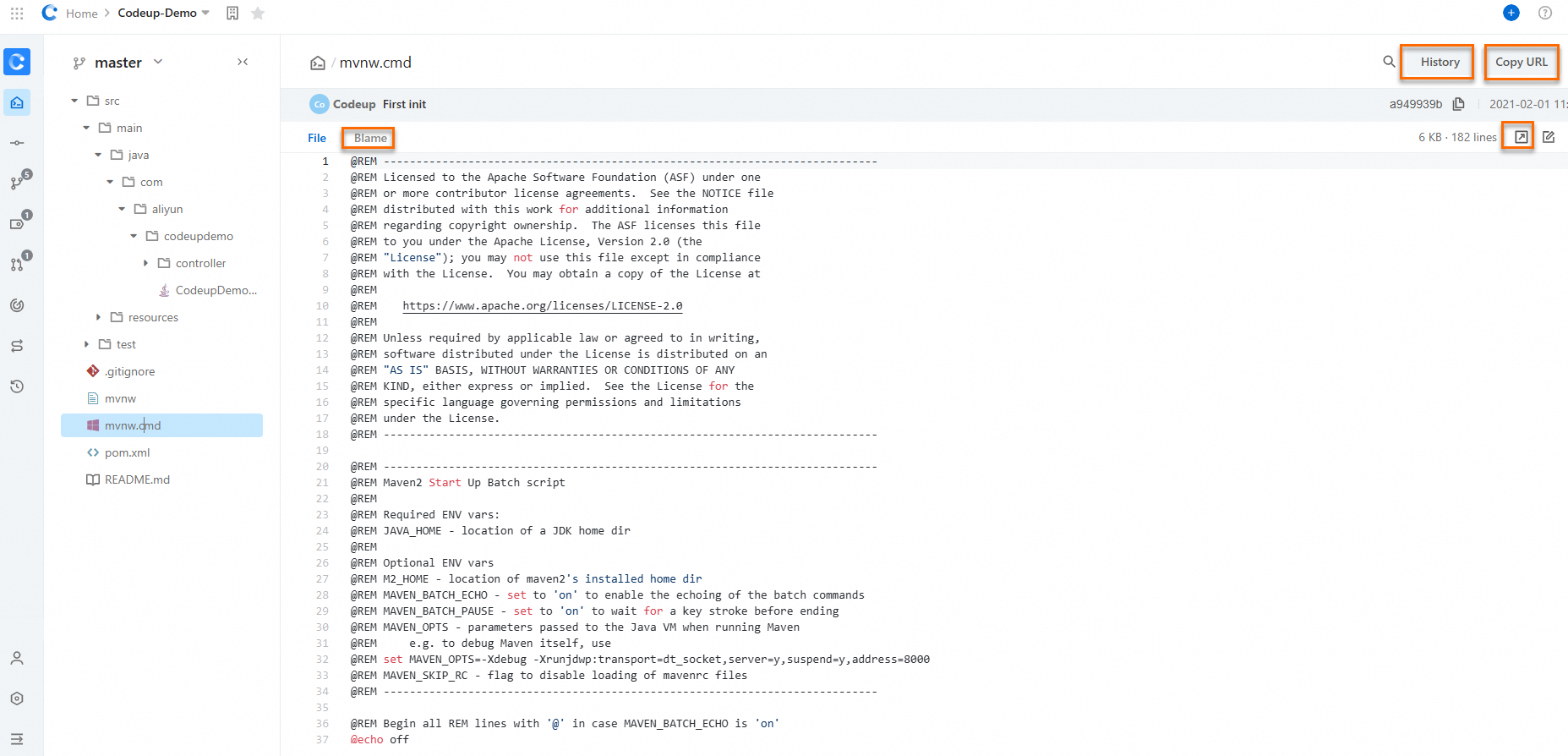
File operations
View blame information, commit history, raw file content, and the fixed URL of a file in the Web IDE.
View files in the Web IDE
In the Web IDE, the Explorer pane on the left lists the source tree of the repository under the repository node, showing folders such as app-configs, configs, gradle, infra, and src, along with files such as .env.gitignore, build.gradle, deploy.sh, Dockerfile through Dockerfile5, gradlew, pom.xml, README.md, settings.xml, spring-boot.release, and version. Selecting a file in this tree, for example pom.xml, opens its contents in an editor tab on the right so that the source code can be viewed directly in the browser.
Blame information
<?xml version="1.0" encoding="UTF-8"?>

    4.0.0

    com.example
    spring-boot-hello-world
    0.0.1-SNAPSHOT
    jar

    spring-boot-hello-world
    Demo project for Spring Boot


        org.springframework.boot
        spring-boot-starter-parent
        1.5.9.RELEASE
        <relativePath/> <!-- lookup parent from repository -->


        <project.build.sourceEncoding>UTF-8</project.build.sourceEncoding>
        <project.reporting.outputEncoding>UTF-8</project.reporting.outputEncoding>


            org.springframework.boot
            spring-boot-starter-web
Commit history
On the master branch of the spring-boot-demo repository, select the pom.xml file to view its commit history. The page lists the commit records of the file in a list, including the following four commits:
-
2020-10-30, commit message
add lombok, commit IDce811a23 -
2020-04-14, commit message
Merge remote-tracking branch origin/master, commit ID4cbaf418 -
2020-04-14, commit message
add jacoco, commit IDc5a893f3 -
2019-10-15, commit message
init, commit ID5593878a
Raw file
<?xml version="1.0" encoding="UTF-8"?>

    4.0.0

    com.example
    spring-boot-hello-world
    0.0.1-SNAPSHOT
    jar

    spring-boot-hello-world
    Demo project for Spring Boot


        org.springframework.boot
        spring-boot-starter-parent
        1.5.9.RELEASE
        <relativePath/> <!-- lookup parent from repository -->


        <project.build.sourceEncoding>UTF-8</project.build.sourceEncoding>
        <project.reporting.outputEncoding>UTF-8</project.reporting.outputEncoding>


            org.springframework.boot
            spring-boot-starter-web


            org.projectlombok
            lombok
            1.16.22
            provided


            org.springframework.boot
            spring-boot-starter-test
            test


        application


                org.springframework.boot
                spring-boot-maven-plugin


                org.apache.maven.plugins
                maven-jar-plugin
                2.4
Folder commits
On the file browsing page of a repository, the file tree on the left expands the directory structure of the project. After you click the main folder, the content area on the right displays the subdirectories under the src/main path and their commit messages, including the two subdirectories java/com/example/demo and resources.