Notes on upgrading from the old version of project collaboration to the new version
Projex lets you upgrade your enterprise from the old version to the new version. Administrators can initiate the upgrade and use the new version for project collaboration and test management.
Background information
To ensure that your daily collaboration is unaffected during the upgrade, please read the following instructions.
When you initiate the upgrade, all projects in your enterprise are upgraded to the new version at once. After the migration, members who access the original projects will be redirected to the new collaboration page. Data from the new version cannot be synced back to the old version. Do not revert to the old version.
Data differences
To help you assess upgrade risks, this section provides details about data differences. Use this information to decide whether to upgrade.
The key data includes the following:
Old version | New version | Notes |
Non-workflow projects | Feature not available | Migration is not supported. |
Personal tasks (tasks not in a project) | Feature not available | Migration is not supported. |
Schedule service | Feature not available | Migration is not supported. |
Sharing service | Feature not available | Migration is not supported. |
Audience group service | Feature not available | Migration is not supported. |
File service | Feature not available | In project settings, the navigation service lets you return to the old version. |
Test plan service | Test plan | Migration is not supported. |
Private tasks | Feature not available | You can download private tasks to your mailbox. |
Knowledge base | Feature not available | The new version does not support associating the Suosi knowledge base with projects. |
For more information, see Detailed notes on upgrading the old version of project collaboration.
Instructions
The upgrade entry point is displayed on the collaboration page of the old version.
Click the entry point to open the feature introduction page for the new version. To ensure that the upgrade does not affect your collaboration, an upgrade trial is available (Entry point 1). You can use the trial version to learn about the new features and data differences. After you confirm the results, you can initiate the full upgrade (Entry point 2).
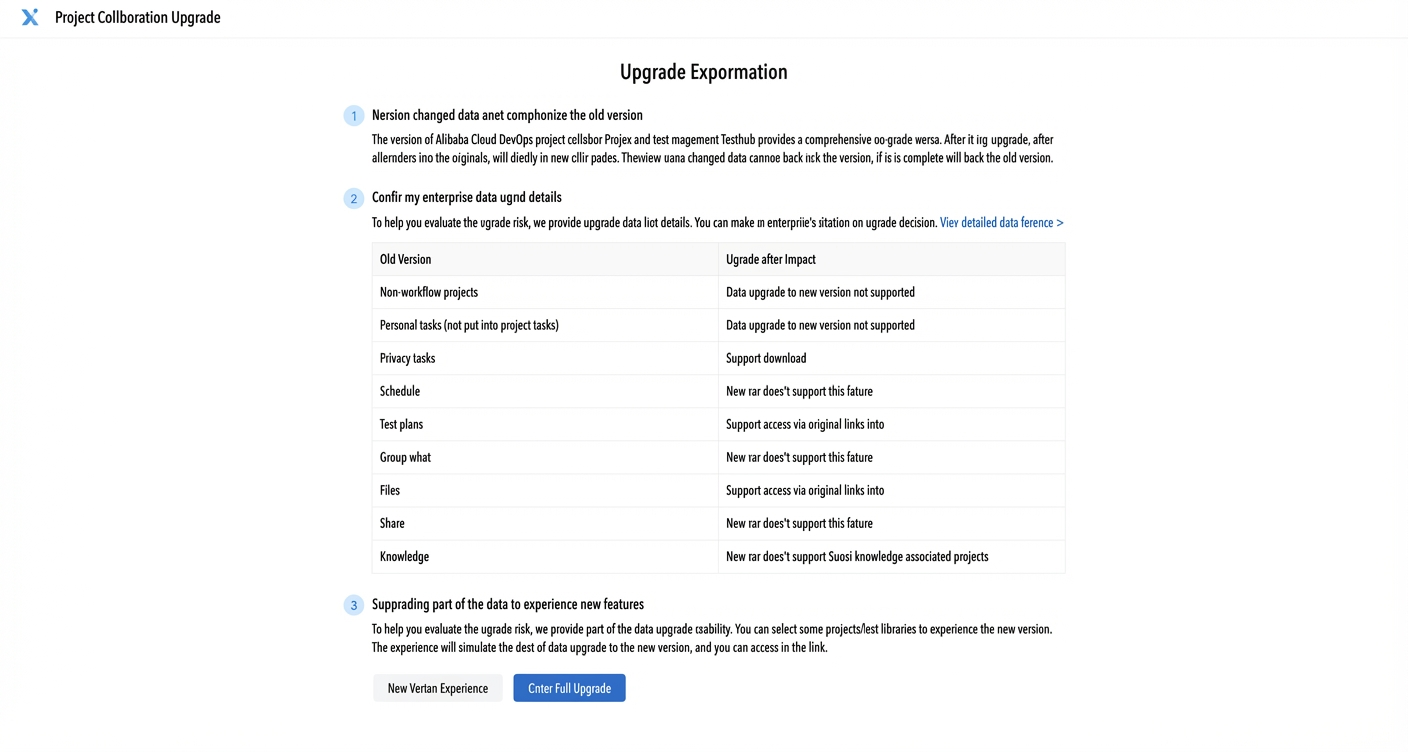
If you select the upgrade trial, regular members will be redirected to the new version by default. Administrators will be redirected to the data selection page. The trial data is purged at 8:00 every Sunday. Do not use real data in the trial environment.
After the trial data is prepared, you can view the report and access the new trial project.
You can review the trial data upgrade report to see the upgrade details.
You can go to the new version page to try the features.After you complete the trial and confirm that there are no issues, the enterprise administrator can initiate the full upgrade to the new version. The upgrade is scheduled to run between 20:00 and 04:00. After the upgrade is initiated, do not change data in the old version to ensure data consistency.You can cancel the upgrade before it begins.
After the full upgrade begins, all members of the enterprise will receive an upgrade email.
If the upgrade is canceled, all members will also receive a notification email.
When the upgrade is complete, the administrator will receive an email indicating whether the upgrade succeeded or failed. If the upgrade fails, contact the Apsara DevOps support team mentioned in the report to provide feedback.