FAQ
This topic provides a summary of common issues and their solutions when using Apsara DevOps.
Add Alibaba Cloud accounts and share resources
If your organization has multiple users, such as primary accounts or RAM users, and each user owns cloud resources under a different Alibaba Cloud account, you can add these resources (for example, ECS instances) to your organization in Apsara DevOps for use in build and deployment pipelines.
Add users to your organization. In the Apsara DevOps Workbench, go to the Enterprise Admin Console. Navigate to , and then click .
For RAM users under the current primary account: Select Add RAM User. Use Auto Sync to automatically add RAM users from the current primary account to the organization. If auto-sync fails, you can select Manual Sync to add them manually.
For users from other primary accounts or their RAM users: Select Invite via Link. Copy the invitation link and send it to the intended members. Invitees can join the Apsara DevOps organization by opening the link and accepting the invitation.
For example, to add an ECS instance to a host group:
Each member logs in to Apsara DevOps and adds their own ECS service connection in Service Connection Management. Authorize the service and select a scope based on your needs. Authorization is based on the member's primary account. Once authorized, the service connection can access all ECS instances under that account.
ImportantIf a member is a RAM user (sub-account), authorization may fail. In this case, contact the primary account owner to grant the
AliyunRAMFullAccesspermission policy to the RAM user. For more information, see Manage RAM user permissions.After the service connections are created, go to Host Group Management and select an existing host group or create a new one. In the host group, click Add New Host and select the service connections created by each user to add the ECS instances from their corresponding accounts.
Manual approvals in DingTalk
Apsara DevOps pipelines support the task. You can add this task to a pipeline to require approvals in DingTalk before a release. You can then manage approvals directly from the DingTalk client.
Step 1: Bind your DingTalk organization and account
Bind your organization.
Bind your personal account.
Step 2: Add a manual review
In the pipeline editor, add the Manual Review component.
Select the verification method, verifier type, and specific verifiers. Save the changes and run the pipeline.
You will receive an approval notification in DingTalk. Complete the approval.
Troubleshoot redline parsing errors
This section describes how to troubleshoot and resolve redline parsing errors.
Copy the error message
Click the error message to open a dialog box, and then copy the contents.
Double-click to copy the redline information.
Run the debugging script
Paste the redline data into the following script to debug the issue. The sample code used for troubleshooting is as follows:
import com.alibaba.fastjson.JSON;

import java.io.Serializable;
import java.lang.reflect.Field;
import java.util.*;
import java.util.regex.Matcher;
import java.util.regex.Pattern;

public class StatInfoTest {

    private static Pattern STAT_INFO_TITLE_PATTERN = Pattern.compile("^STAT_INFO_TITLE:\\s*(.+)\\s*");
    private static Pattern REDLINE_INFO_PATTERN = Pattern.compile("^REDLINE_ITEM_LINE:\\s*(.+)\\s*");
    private static Pattern STAT_PATTERN = Pattern.compile("^STAT_(VALUE|NAME|TITLE|URL|STYLE)_([^:]+):\\s*(.*)\\s*");


    public static void main(String[] args) {
        // The following is a sample of failed data
        //String statOutMapStr = "{\"10_1682051393916__10_1682051404781\":[\"STAT_INFO_TITLE: \"\"\",\"STAT_NAME_Total: defects\",\"STAT_VALUE_Total: ww\",\"STAT_STYLE_Total: Error\",\"STAT_NAME_Blocker: vulnerabilities\",\"STAT_VALUE_Blocker: ww\",\"STAT_STYLE_Blocker: Warning\",\"REDLINE_ITEM_LINE: {\\\"key\\\":\\\"Blocker\\\",\\\"threshold\\\":43,\\\"checkVal\\\":ww,\\\"type\\\":\\\"LE\\\",\\\"checked\\\":true,\\\"checkResult\\\":false}\",\"STAT_NAME_Critical: Code Smells\",\"STAT_VALUE_Critical: ww\",\"STAT_STYLE_Critical: Warning\",\"REDLINE_ITEM_LINE: {\\\"key\\\":\\\"Critical\\\",\\\"threshold\\\":34,\\\"checkVal\\\":ww,\\\"type\\\":\\\"LE\\\",\\\"checked\\\":true,\\\"checkResult\\\":false}\",\"STAT_NAME_Major: Coverage\",\"STAT_VALUE_Major: ww0\",\"STAT_STYLE_Major: Default\",\"REDLINE_ITEM_LINE: {\\\"key\\\":\\\"Major\\\",\\\"threshold\\\":4,\\\"checkVal\\\":ww0,\\\"type\\\":\\\"LE\\\",\\\"checked\\\":true,\\\"checkResult\\\":false}\",\"STAT_URL__REPORT: 127.0.0.1/dashboard?id=13212323%3A31313213213\"]}";
        String  statOutMapStr="Please copy the data from the card here for debugging";
        parseStatInfo(statOutMapStr);
    }

    public static void parseStatInfo(String statOutMapStr) {
        Map<String, List<String>> statOutMap = JSON.parseObject(statOutMapStr, new HashMap<String, List<String>>().getClass());
        List<StatGroup> statGroups = new ArrayList<>();
        statOutMap.forEach((k, params) -> {
            StatGroup statGroup = new StatGroup<StatInfo>();
            Map<String, StatInfo> statInfoMap = new LinkedHashMap<>(64);
            List<RedlineResultItem> redlines = new ArrayList<>(64);
            Optional.ofNullable(params).orElse(new ArrayList<>())
                    .forEach(str -> {
                        Matcher matcher = STAT_PATTERN.matcher(str);
                        if (matcher.find()) {
                            String fieldName = matcher.group(1).toLowerCase();
                            String key = matcher.group(2);
                            String value = matcher.group(3);
                            StatInfo statInfo = statInfoMap.get(key);
                            if (statInfo == null) {
                                statInfo = new StatInfo();
                                statInfo.setKey(key);
                            }
                            statInfo.setField(fieldName, value);
                            statInfoMap.put(key, statInfo);
                        }
                        // check redlines
                        Matcher redlineMatcher = REDLINE_INFO_PATTERN.matcher(str);
                        if (redlineMatcher.find()) {
                            String redlineResult = redlineMatcher.group(1);
                            RedlineResultItem redlineItem = JSON.parseObject(redlineResult, RedlineResultItem.class);
                            // check if valid redline item
                            if (redlineItem.getKey() != "" && redlineItem.getThreshold() != null) {
                                redlines.add(redlineItem);
                            }
                        }
                    });
            statGroup.setTitle(getStatInfoTitle(params));
            statGroup.setStatInfoMap(statInfoMap);
            statGroup.setRedlineResult(redlines);
            statGroups.add(statGroup);
        });
        System.out.println(JSON.toJSONString(statGroups));
    }

    private static String getStatInfoTitle(List<String> params) {
        String title = null;
        if (params != null) {
            for (String param : params) {
                Matcher matcher = STAT_INFO_TITLE_PATTERN.matcher(param);
                if (matcher.find()) {
                    title = matcher.group(1);
                    break;
                }
            }
        }
        return title;
    }

    static class StatGroup<T> {
        private String title;
        private Map<String, T> statInfoMap;
        private List<RedlineResultItem> redlineResult;

        public String getTitle() {
            return title;
        }

        public void setTitle(String title) {
            this.title = title;
        }

        public Map<String, T> getStatInfoMap() {
            return statInfoMap;
        }

        public void setStatInfoMap(Map<String, T> statInfoMap) {
            this.statInfoMap = statInfoMap;
        }

        public List<RedlineResultItem> getRedlineResult() {
            return redlineResult;
        }

        public void setRedlineResult(
                List<RedlineResultItem> redlineResult) {
            this.redlineResult = redlineResult;
        }
    }

    public static class RedlineResultItem {

        private String key;
        private Integer threshold;
        private Integer checkVal;
        private String type;
        private Boolean checked;
        private Boolean checkResult;

        public String getKey() {
            return key;
        }

        public void setKey(String key) {
            this.key = key;
        }

        public Integer getThreshold() {
            return threshold;
        }

        public void setThreshold(Integer threshold) {
            this.threshold = threshold;
            }

        public Integer getCheckVal() {
            return checkVal;
        }

        public void setCheckVal(Integer checkVal) {
            this.checkVal = checkVal;
        }

        public String getType() {
            return type;
        }

        public void setType(String type) {
            this.type = type;
        }

        public Boolean getChecked() {
            return checked;
        }

        public void setChecked(Boolean checked) {
            this.checked = checked;
        }

        public Boolean getCheckResult() {
            return checkResult;
        }

        public void setCheckResult(Boolean checkResult) {
            this.checkResult = checkResult;
        }
    }

    static class StatInfo implements Serializable {
        private static final long serialVersionUID = -7424772230982171781L;

        private String key;
        private String value;
          private String name;
        private String title;
        private String style;
        private String url;


        public String getKey() {
            return key;
        }

        public void setKey(String key) {
            this.key = key;
        }

        public String getValue() {
            return value;
        }

        public void setValue(String value) {
            this.value = value;
        }

        public String getName() {
            return name;
        }

        public void setName(String name) {
            this.name = name;
        }

        public String getTitle() {
            return title;
        }

        public void setTitle(String title) {
            this.title = title;
        }

        public String getStyle() {
            return style;
        }

        public void setStyle(String style) {
            this.style = style;
        }

        public String getUrl() {
            return url;
        }

        public void setUrl(String url) {
            this.url = url;
        }

        public void setField(String fieldName, String value) {
            try {
                Field field = getClass().getDeclaredField(fieldName);
                field.set(this, value);
            } catch (Exception e) {
            }
        }
    }
}
Troubleshoot 403 errors in Jenkins tasks
This section describes the causes of and solutions for 403 errors that occur in Jenkins task steps.
Symptom
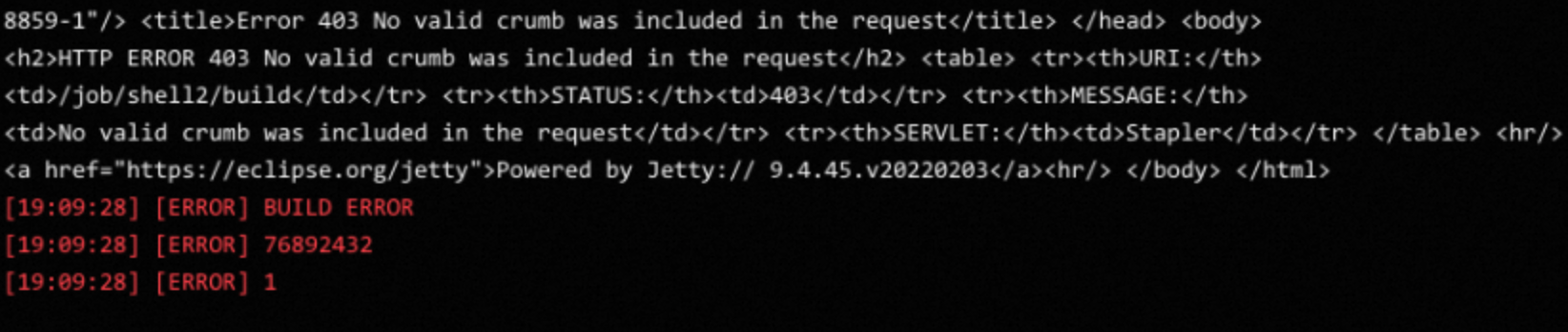
Cause
The Jenkins API supports authentication by using either a password or an API token. However, newer Jenkins versions reject password-based API calls with a 403 error. For this reason, using an API token is the recommended method for Jenkins tasks.
Solution
To create an API token, open http://Jenkins_IP:8080/user/admin/configure. Make sure to replace
Jenkins_IP:8080with your actual Jenkins address. If you are not using the admin user, you must also replace admin with an existing username. For example, the URL may be http://localhost:8080/user/wangli/configure. In the API Token section, click Add new Token, enter a name, click Generate, copy the generated token for later use, and then click Save.Use the API token in the pipeline. When selecting the credential type, choose Service Connection. Then, create a new service connection. In the service authorization/credential creation step, enter the service URL, your username, and the API token you just generated.
Troubleshoot Alibaba Cloud API errors
This section describes common issues related to API errors.
Troubleshooting steps
Log on with the primary account and verify that the AliyunRDCDefaultRole role has not been deleted. If the role has been deleted, re-authorize it.
If AliyunRDCDefaultRole exists, check whether its associated permission policy, AliyunRDCRolePolicy, is configured correctly.
If AliyunRDCDefaultRole has multiple permission policies attached, remove all policies except AliyunRDCRolePolicy.
If AliyunRDCRolePolicy does not exist, first delete AliyunRDCDefaultRole, and then follow Step 1 to re-authorize.
If AliyunRDCRolePolicy exists but API calls still fail, first detach AliyunRDCRolePolicy, then delete the AliyunRDCDefaultRole role, and finally follow Step 1 to re-authorize.
GetPipelineRun actions
Action | API | Description | Example | Parameters |
PassPipelineValidate | PassPipelineValidate | | disable: Whether you have permission to call the operation. validators: The AliyunPKs of users who have permission to approve manual reviews. | |
RefusePipelineValidate | RefusePipelineValidate | Rejects a manual review. | |
|
RetryPipelineJobRun | RetryPipelineJobRun | Retries a job run. | |
|
StopPipelineJobRun | StopPipelineJobRun | Cancels a job run. | |
|
SkipPipelineJobRun | SkipPipelineJobRun | Skips a failed job. | |
|
LogPipelineJobRun | LogPipelineJobRun | Views the job execution log. | |
|
GetVMDeployOrder | GetVMDeployOrder | Retrieves the details of an ECS deployment order. | |
|
GetPipelineEmasArtifactUrl | GetPipelineEmasArtifactUrl | Retrieves a temporary download URL for an EMAS build artifact. | |
|
GetPipelineArtifactUrl | GetPipelineArtifactUrl | Retrieves a temporary download URL for a pipeline build artifact. | |
|
GetPipelineScanReportUrl | GetPipelineScanReportUrl | Retrieves a temporary download URL for a scan report. | {"disable":false,"type":"GetPipelineScanReportUrl","params":{"reportPath":"assets/1xxx/1xxx/05e0edb9xxxxxxxx/index.html","reportInfo":{"Major":{"name":"issue","style":"text-danger","title":"Major","value":"6","key":"Major",}"Total":{"name":"issue","style":"text-danger","title":"Total","value":"6","key":"Total"}"Critical":{"name":"issue","style":"text-danger","title":"Critical","value":"0","key":"Critical"}"Blocker":{"name":"issue","style":"text-danger","title":"Blocker","value":"0","key":"Blocker"}"_REPORT":{"title":"report","value":"link","key":"_REPORT","url":"https://flow.aliyun.com/assets/2xxxxx/1xxxx/21212xxxxxxxxxxx/index.html"}"File":{"name":"issue","style":"text-danger","title":"File","value":"4","key":"File"}}}} |
|
Troubleshoot API permission errors
Issue:
An API call returns an HTTP 401 error:
com.aliyun.tea.TeaException: code: 401, InvalidParam.NoPermission request.Solution:
This error occurs because the current account does not have permission to call Apsara DevOps APIs. If you authenticate with an AccessKey pair (AK/SK) and the calling account is a RAM user (sub-account), attach the AliyunRDCFullAccess permission policy to the sub-account.