监控ACK集群下的Java应用

更新时间:
复制为 MD 格式

通过本教程,您将学习如何将ACK集群下的Java应用接入云监控2.0应用监控,体验应用性能分析和调用链分析等功能,并配置告警。

前提条件

  • 您已开通阿里云云监控2.0服务

  • 创建Kubernetes集群。具体操作,请参见创建ACK托管集群

  • 创建Java应用,如果您没有可以使用的Java应用,可以参考以下示例YAML创建。具体操作,请参见创建无状态工作负载Deployment

    说明
    • JDK版本要求,请参见ARMS应用监控支持的Java组件和框架。进程最大堆内存需大于256 MB。

    • 示例YAML创建了以下资源:

      • 空间名称:arms-demo。以下所有资源均创建在arms-demo命名空间下。

      • 无状态应用:arms-springboot-demoarms-springboot-demo-subcomponent

      • 服务:arms-demo-component

      • 数据库:arms-demo-mysql

    展开查看完整示例YAML文件(Java)

    apiVersion: v1
    kind: Namespace
    metadata:
      name: arms-demo
    ---
    apiVersion: apps/v1 # for versions before 1.8.0 use apps/v1beta1
    kind: Deployment
    metadata:
      name: arms-springboot-demo
      namespace: arms-demo
      labels:
        app: arms-springboot-demo
    spec:
      replicas: 2
      selector:
        matchLabels:
          app: arms-springboot-demo
      template:
        metadata:
          labels:
            app: arms-springboot-demo
        spec:
          containers:
            - resources:
                limits:
                  cpu: 0.5
              image: registry.cn-hangzhou.aliyuncs.com/arms-docker-repo/arms-springboot-demo:v0.1
              imagePullPolicy: Always
              name: arms-springboot-demo
              env:
                - name: SELF_INVOKE_SWITCH
                  value: "true"
                - name: COMPONENT_HOST
                  value: "arms-demo-component"
                - name: COMPONENT_PORT
                  value: "6666"
                - name: MYSQL_SERVICE_HOST
                  value: "arms-demo-mysql"
                - name: MYSQL_SERVICE_PORT
                  value: "3306"
    ---
    apiVersion: apps/v1 
    kind: Deployment
    metadata:
      name: arms-springboot-demo-subcomponent
      namespace: arms-demo
      labels:
        app: arms-springboot-demo-subcomponent
    spec:
      replicas: 2
      selector:
        matchLabels:
          app: arms-springboot-demo-subcomponent
      template:
        metadata:
          labels:
            app: arms-springboot-demo-subcomponent
        spec:
          containers:
            - resources:
                limits:
                  cpu: 0.5
              image: registry.cn-hangzhou.aliyuncs.com/arms-docker-repo/arms-springboot-demo:v0.1
              imagePullPolicy: Always
              name: arms-springboot-demo-subcomponent
              env:
                - name: SELF_INVOKE_SWITCH
                  value: "false"
                - name: MYSQL_SERVICE_HOST
                  value: "arms-demo-mysql"
                - name: MYSQL_SERVICE_PORT
                  value: "3306"
    ---
    apiVersion: v1
    kind: Service
    metadata:
      labels:
        name: arms-demo-component
      name: arms-demo-component
      namespace: arms-demo
    spec:
      ports:
        # the port that this service should serve on
        - name: arms-demo-component-svc
          port: 6666
          targetPort: 8888
      # label keys and values that must match in order to receive traffic for this service
      selector:
        app: arms-springboot-demo-subcomponent
    ---
    apiVersion: apps/v1 # for versions before 1.8.0 use apps/v1beta1
    kind: Deployment
    metadata:
      name: arms-demo-mysql
      namespace: arms-demo
      labels:
        app: mysql
    spec:
      replicas: 1
      selector:
        matchLabels:
          app: mysql
      template:
        metadata:
          labels:
            app: mysql
        spec:
          containers:
            - resources:
                limits:
                  cpu: 0.5
              image: registry.cn-hangzhou.aliyuncs.com/arms-docker-repo/arms-demo-mysql:v0.1
              name: mysql
              ports:
                - containerPort: 3306
                  name: mysql
    ---
    apiVersion: v1
    kind: Service
    metadata:
      labels:
        name: mysql
      name: arms-demo-mysql
      namespace: arms-demo
    spec:
      ports:
        # the port that this service should serve on
        - name: arms-mysql-svc
          port: 3306
          targetPort: 3306
      # label keys and values that must match in order to receive traffic for this service
      selector:
        app: mysql
    ---

使用流程

  1. 为应用安装探针。

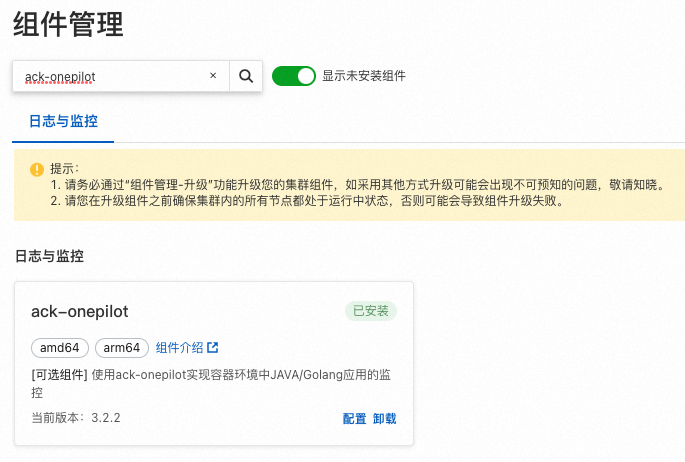
    1. 安装ack-onepilot组件:ack-onepilot是阿里云容器服务Kubernetes提供的系统组件,可以让部署在容器服务Kubernetes中的JavaGolang应用接入云监控2.0。

    2. 更新YAML:通过在应用的YAML中添加labels,开启监控并配置应用在云监控2.0中的展示名称。

  2. 查看监控数据。

  3. 为监控数据配置告警。

为应用安装探针

1. 安装ack-onepilot组件

  1. 容器服务管理控制台集群列表页面单击目标集群名称。

  2. 在左侧导航栏选择运维管理 > 组件管理,然后在右侧页面通过关键字搜索ack-onepilot

  3. ack-onepilot卡片上单击安装,然后在弹出的对话框单击确定

    image

2. 更新YAML

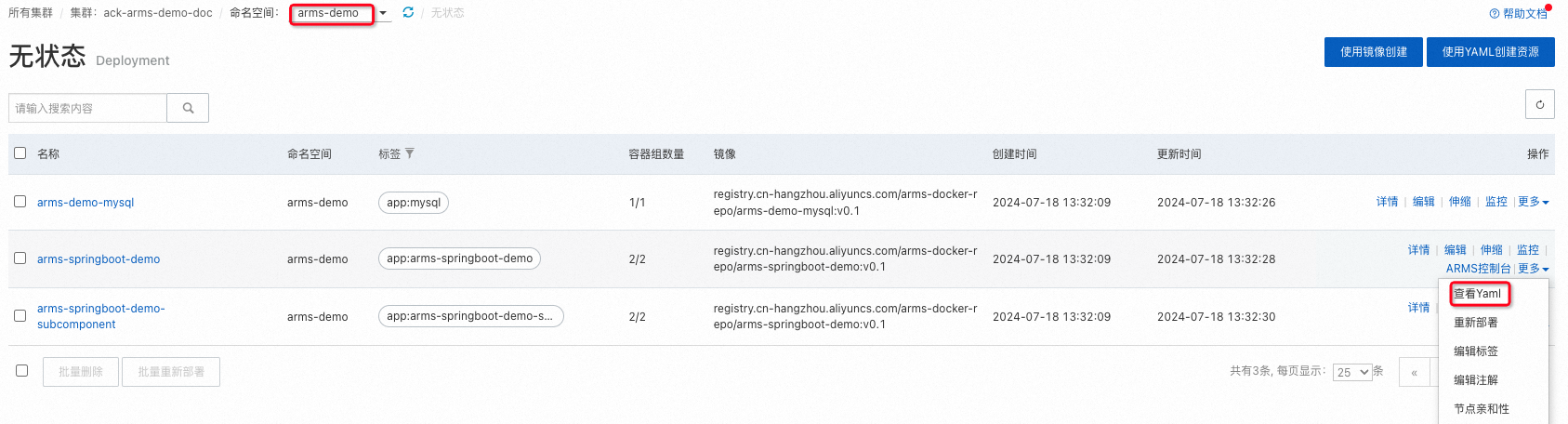
  1. 工作负载 > 无状态页面选择应用所在的命名空间,然后在目标应用右侧选择更多 > 查看Yaml

    image

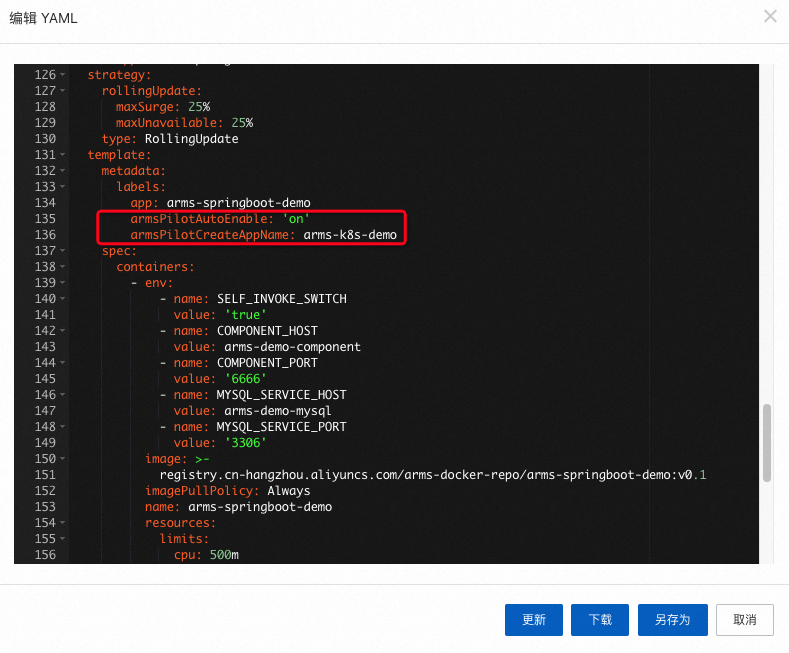
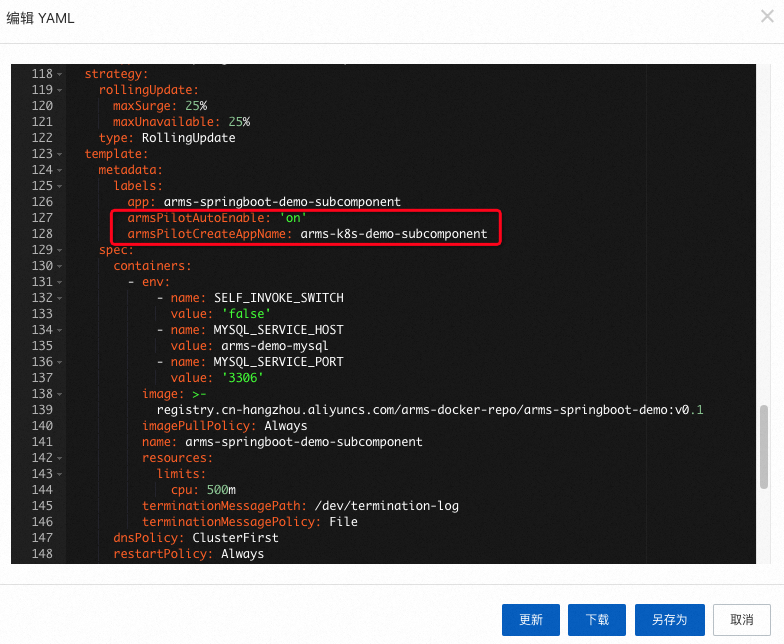
  2. 编辑 YAML中将以下labels添加到spec.template.metadata层级下,然后单击更新

    labels:
      armsPilotAutoEnable: "on"
      armsPilotCreateAppName: "<your-deployment-name>"    #应用在ARMS中的展示名称。

    例如,在arms-springboot-demoarms-springboot-demo-subcomponent应用的YAML中添加配置,开启监控并配置在ARMS中的展示名称分别为arms-k8s-demoarms-k8s-demo-subcomponent

    arms-springboot-demo应用

    image

    arms-springboot-demo-subcomponent应用

    image

  3. 待容器完成自动重新部署后,等待1~2分钟,选择云监控2.0控制台的左侧导航菜单所有功能 > 应用,在应用列表页面单击目标应用名称,查看应用的监控指标。更多信息,请参见查看监控详情(新版)

查看监控详情

调用链分析

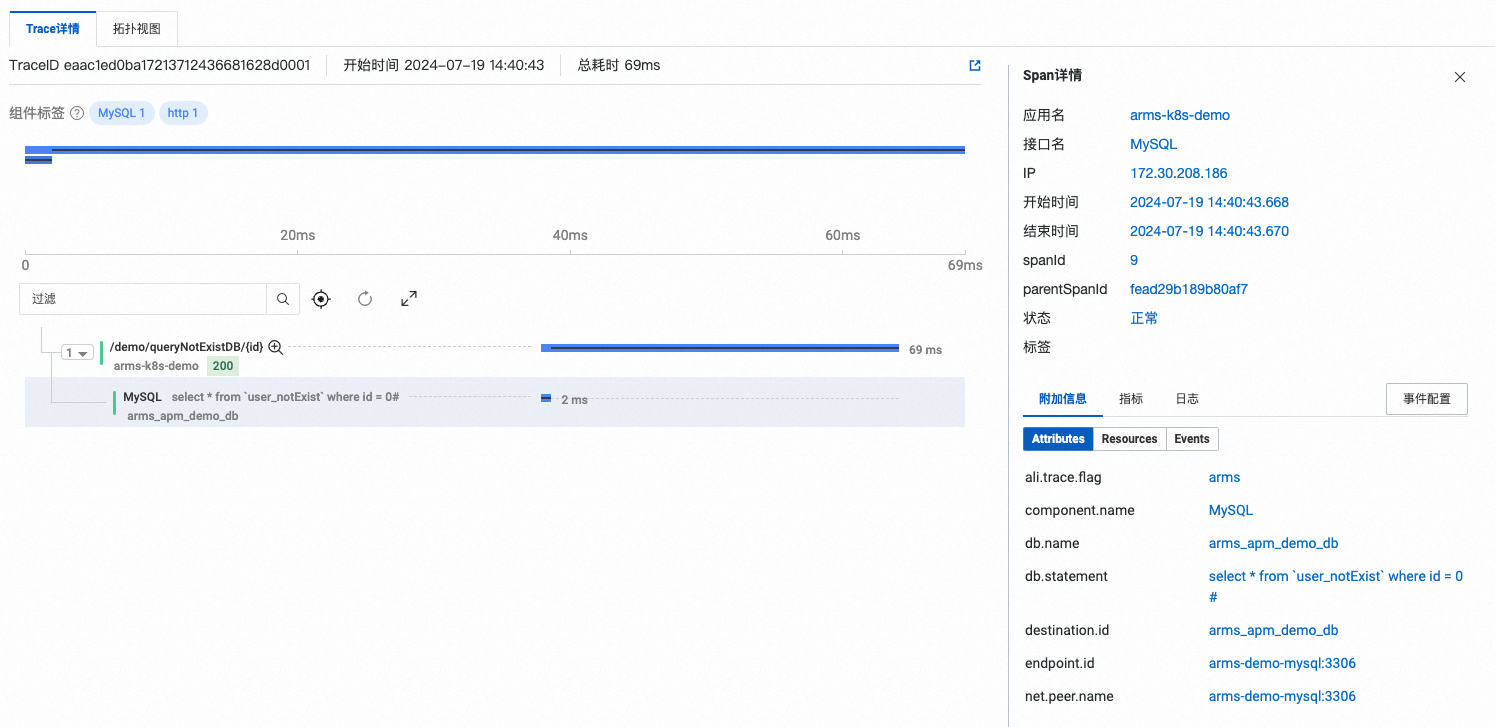
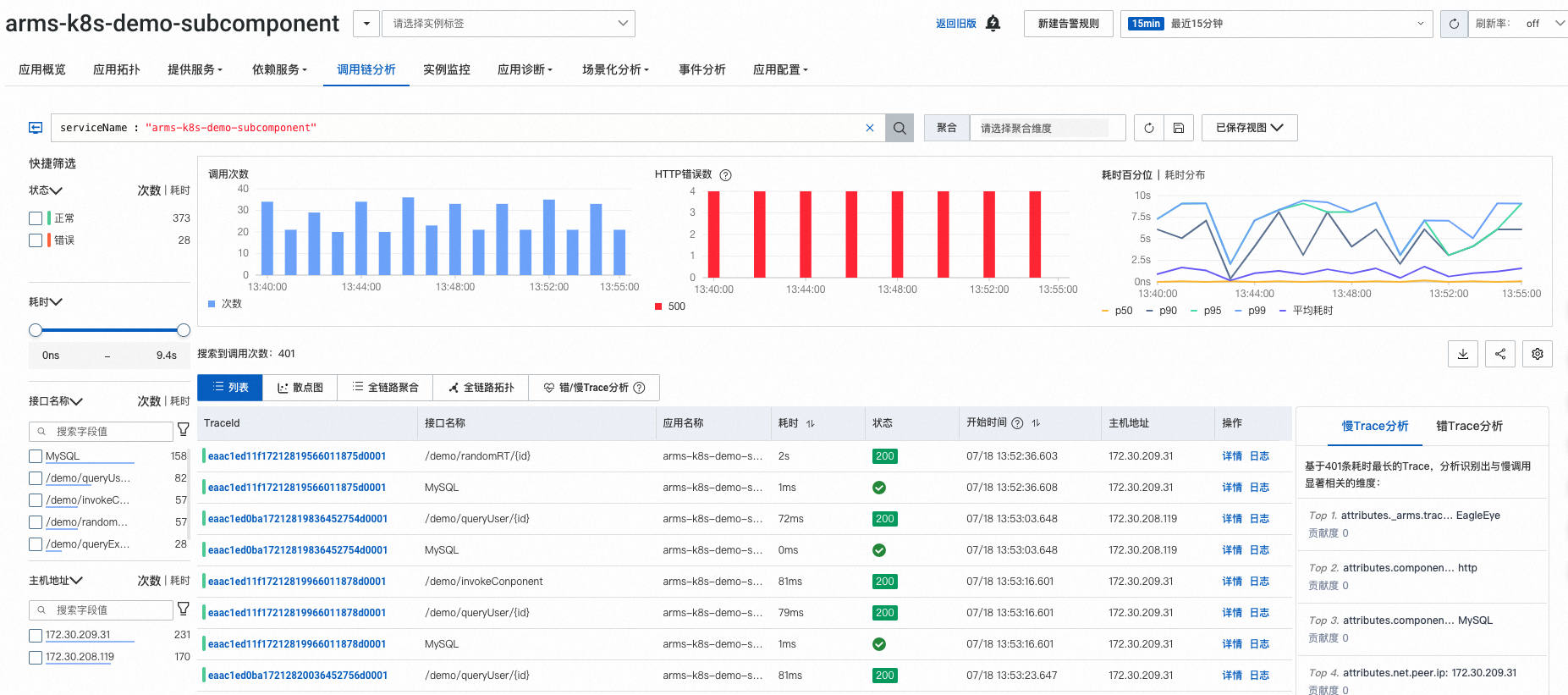
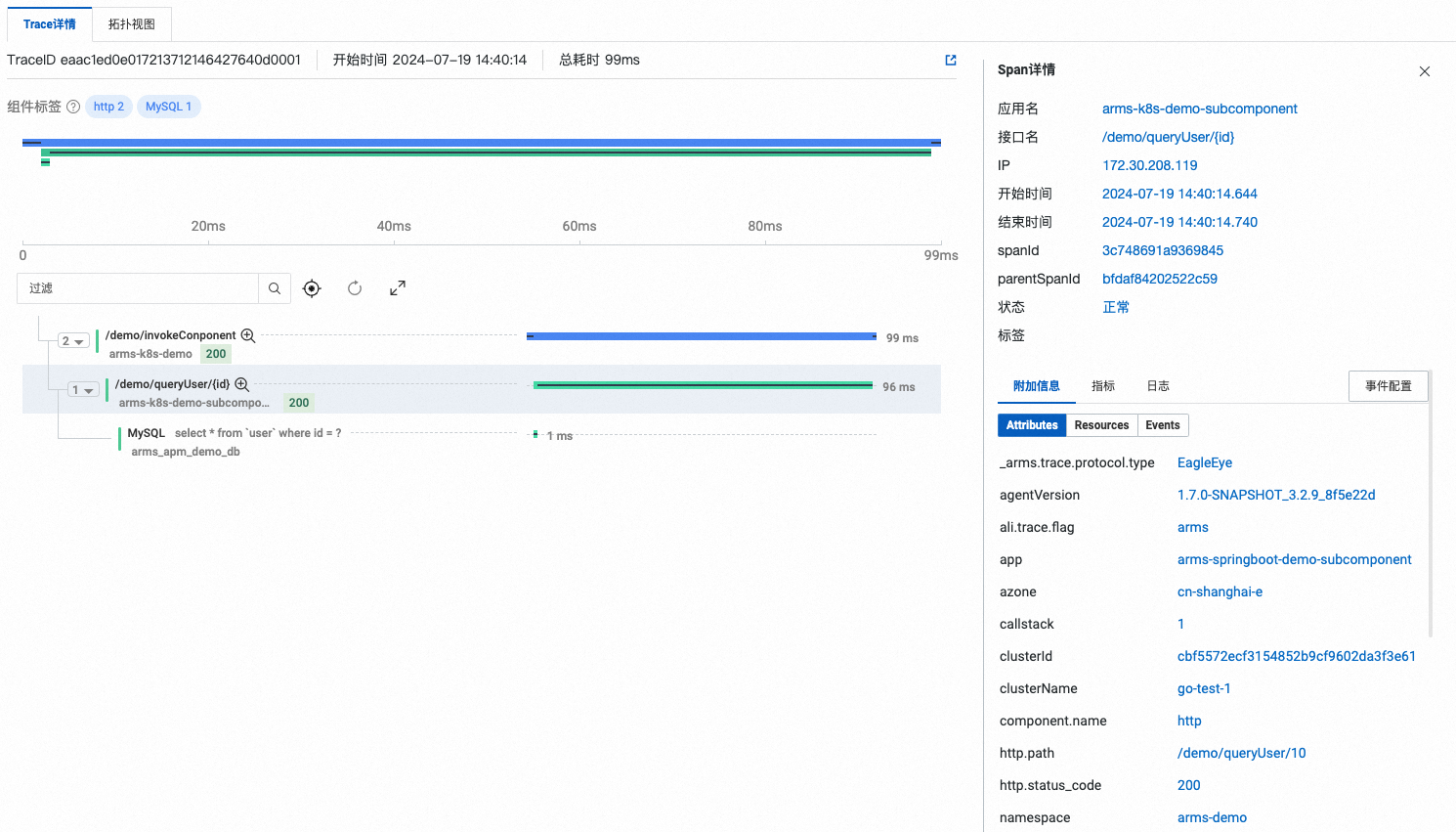
调用链分析功能可以通过自由组合筛选条件与聚合维度进行实时分析,并支持通过错/慢Trace分析功能,定位系统或应用产生错、慢调用的原因。

arms-k8s-demo应用
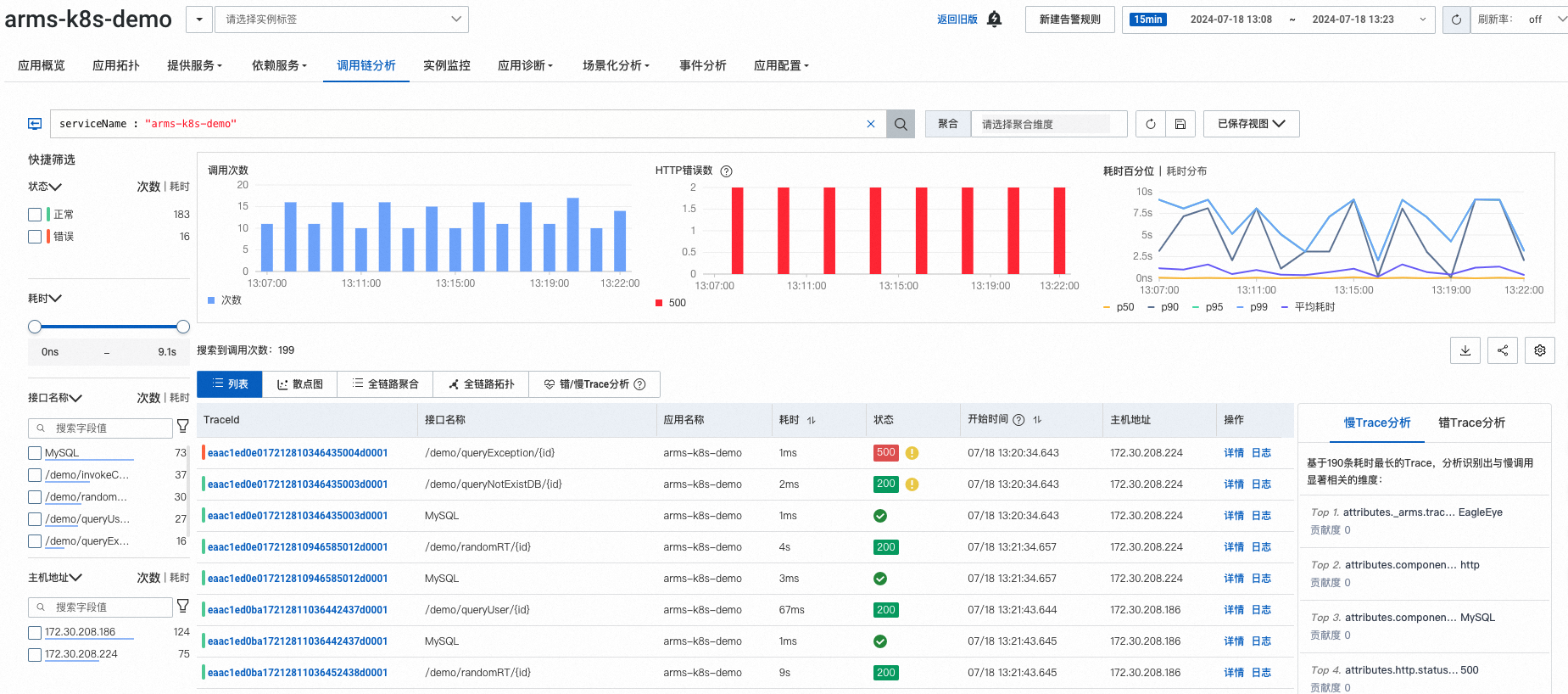
image

调用链详情:

image

arms-k8s-demo-subcomponent应用

image

调用链详情:

image

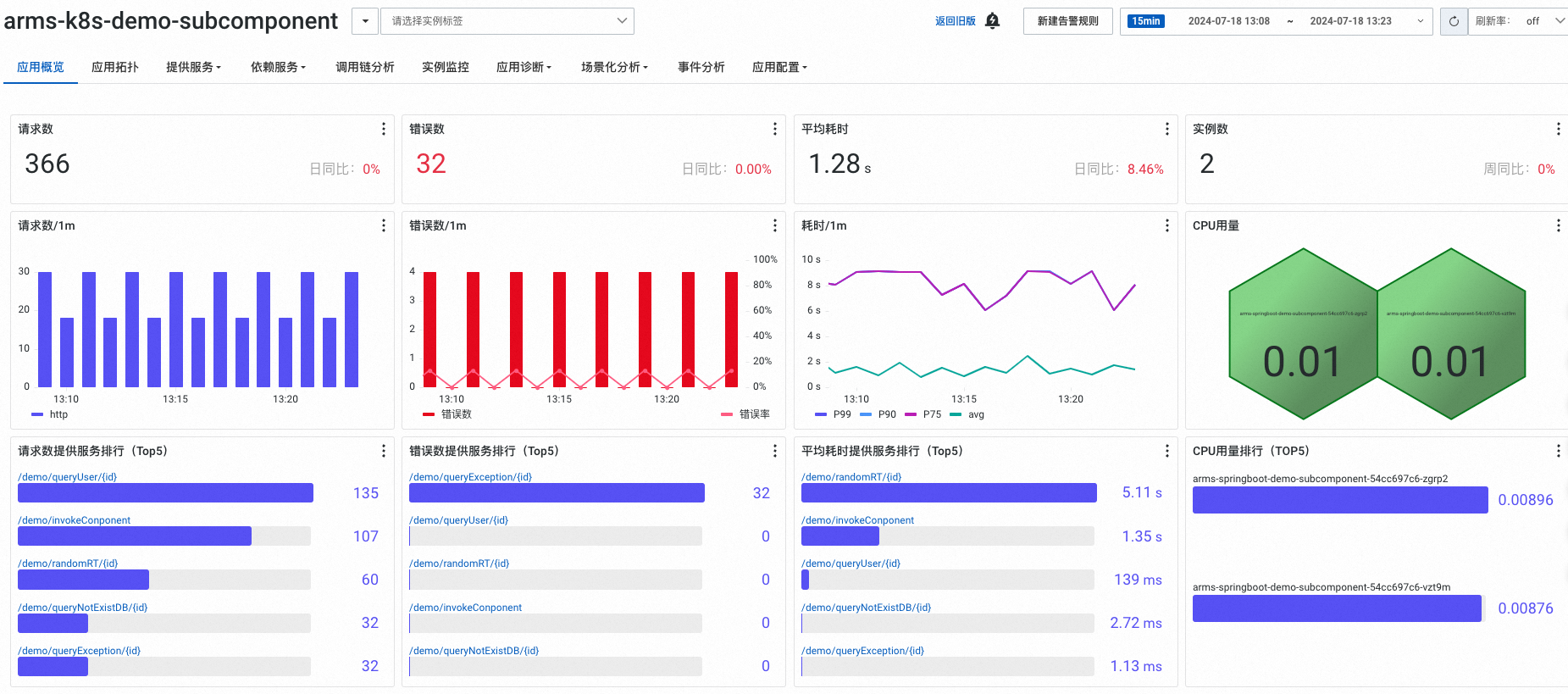
监控指标

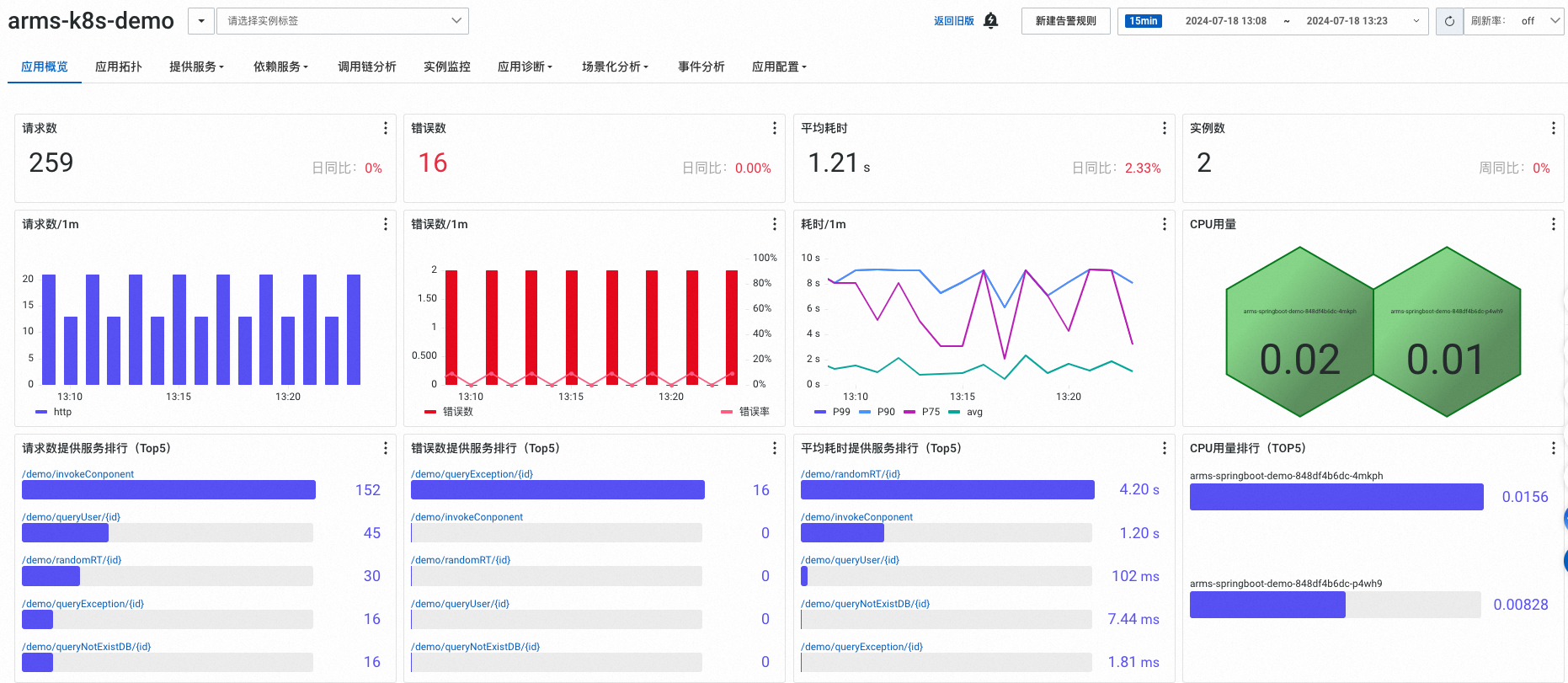
  • 应用概览

    arms-k8s-demo应用

    image

    arms-k8s-demo-subcomponent应用

    image

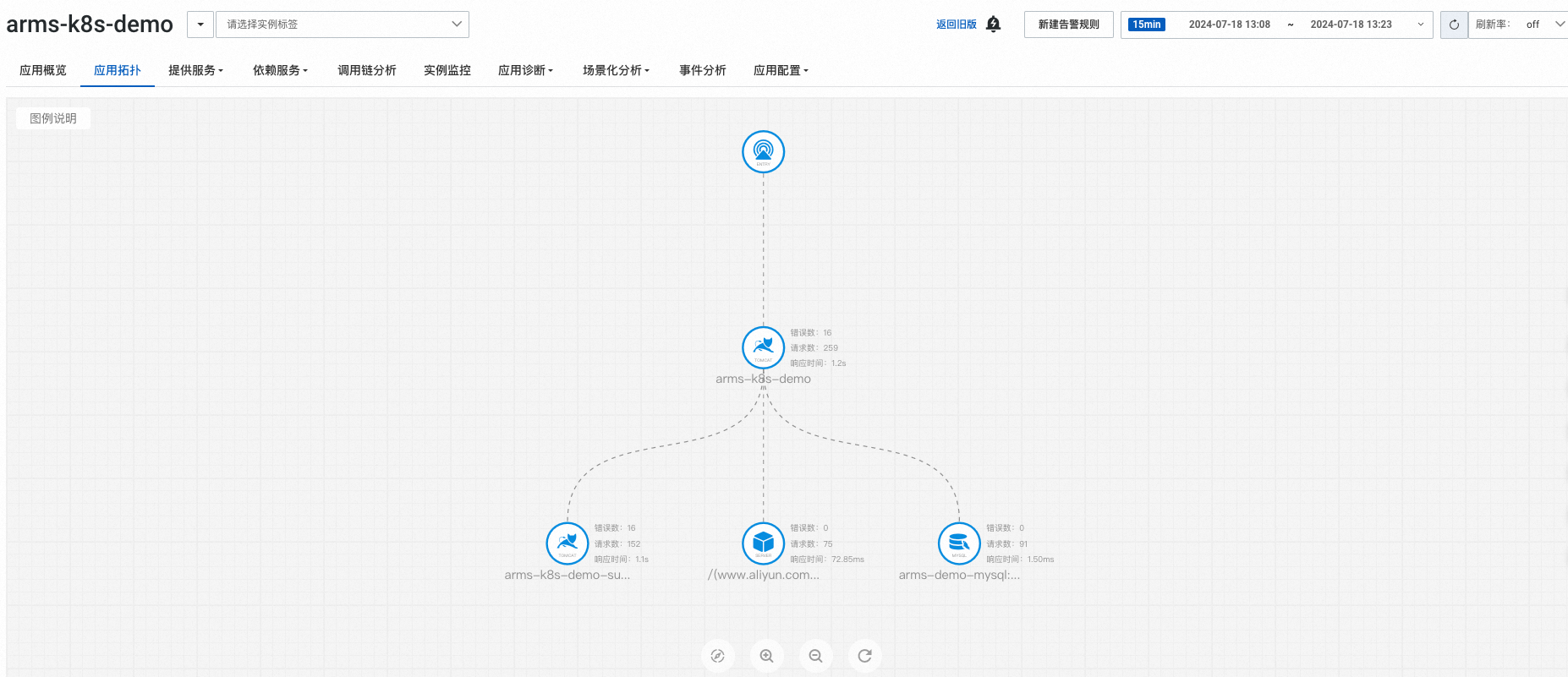
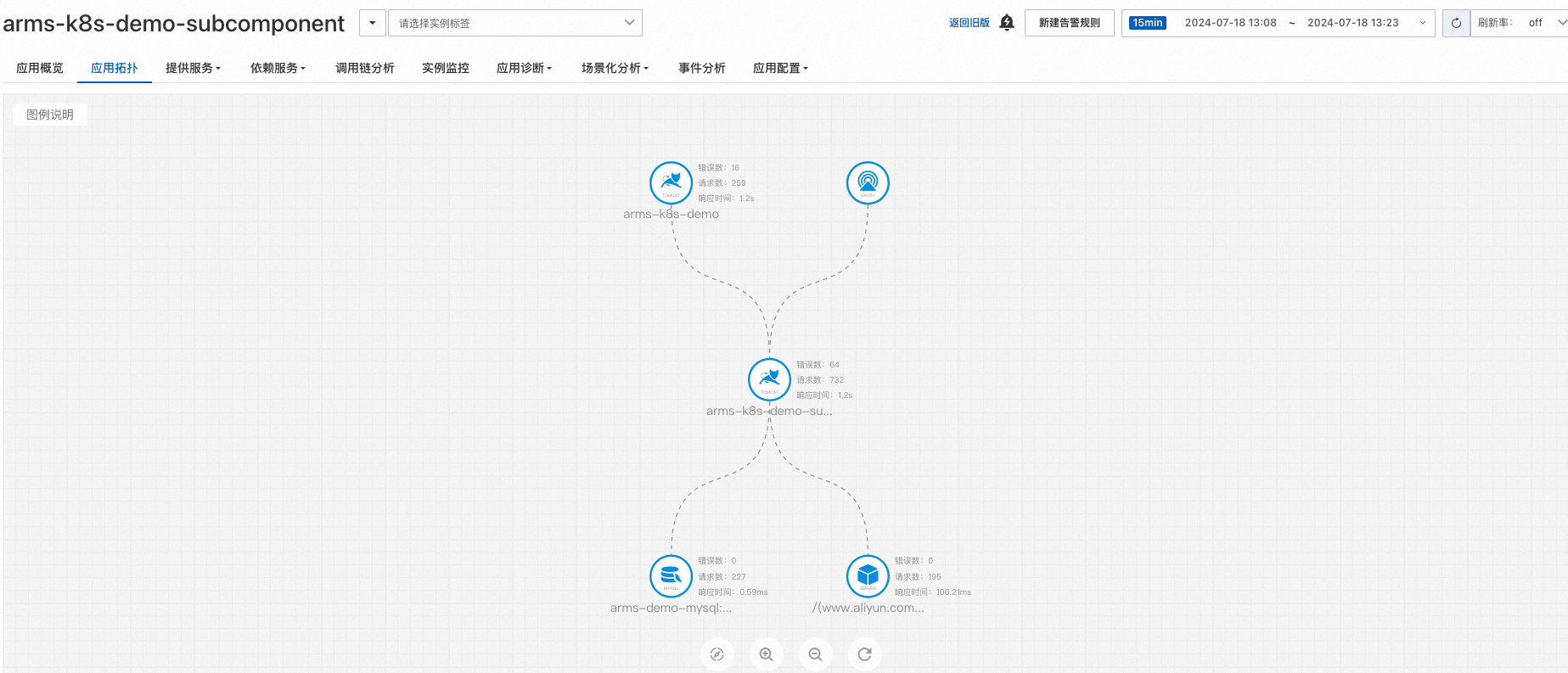
  • 应用拓扑

    arms-k8s-demo应用

    image

    arms-k8s-demo-subcomponent应用

    image

配置告警

通过配置告警,您可以制定针对特定应用的告警规则。当告警规则被触发时,系统会以您指定的通知方式向告警联系人或钉群发送告警信息,以提醒您采取必要的解决措施。具体操作,请参见告警管理

释放资源

完成教程后:

  • 如果仍需要继续监控当前应用,请确保账户不要欠费。

  • 如果无需继续监控当前应用,请卸载探针。具体操作,请参见卸载Kubernetes环境中的探针