
acext使用指南 (v1.6.1)
为了保持行文逻辑的完整性,文中保留了源代码的内网链接,外部用户将无法访问,如有问题请联系您的客户经理(PDSA)。
acext提供PPU版本的高性能算子实现(目前主要是量化算法相关算子),以Wheel包形式发布,同时acext也会以开源方式发布给客户和合作伙伴。可以在做PPU适配时,将这些算子应用于业务中。
开源代码路径:
https://code.alibaba-inc.com/ppu_open_source/acext1. acext使用方式介绍
1.1. vLLM/SGLang 使用acext Wheel Package
PPU_SDK 1.6 版本开始,acext不再随PPU_SDK发布,转而使用Python Wheel包发布形式。针对依赖acext的框架(vLLM/SGLang),在安装acext Wheel包后(pip install acext),有以下两种使用ACEXT的方式:
SGLang >= 0.4.10, vLLM >= 0.10.0,在框架中完成acext的加载,无需额外操作;
SGLang < 0.4.10, vLLM < 0.10.0,通过环境变量的形式寻找动态库,需要设定四个环境变量:
### Append shared library load path
export LD_LIBRARY_PATH="${LD_LIBRARY_PATH}:$(python -c "import sysconfig; print(sysconfig.get_path('purelib'))")/lib"
### Config ACEXT LUT path
export ACEXT_GEMM_CONFIG_DIR="$(python -c "import sysconfig; print(sysconfig.get_path('purelib'))")/include/acext/lut/"
### for vllm with version < 0.10.0
export ACEXT_OP_PATH="$(python -c "import sysconfig; print(sysconfig.get_path('purelib'))")/lib/libacext_op.so"
### for sglang with version < 0.4.10
export ACEXT_THOP_LIB_PATH="$(python -c "import sysconfig; print(sysconfig.get_path('purelib'))")/lib/th_op/libth_op.so"注:考虑到兼容性,当前PTG Image中PPU_SDK仍然包含acext动态库和头文件,因此在PTG Image使用acext, vLLM, SGLang目前不会有问题,但后续可能视情况修改为Wheel包安装形式;
1.2 支持的API
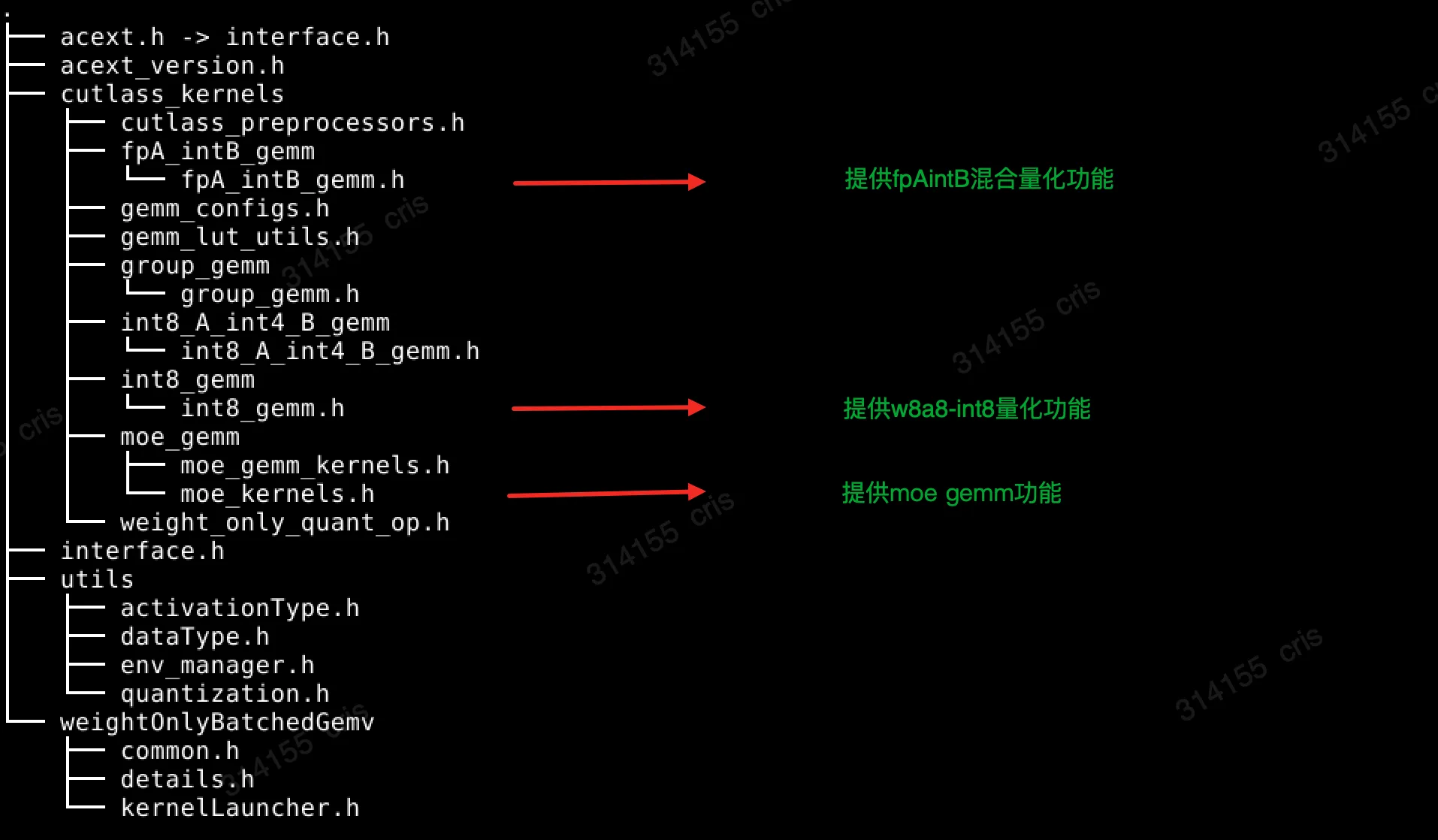
acext通过头文件和库的方式提供量化算法功能。头文件的结构如下,目前支持fpAintB混合量化功能、w8a8量化功能、moe gemm功能。用户在使用acext的功能时,需要接口头文件acext.h,以及链接libacext.so库。
1.2.1 fpAintB Gemm
其中fpA_intB_gemm.h提供fpAintB的混合精度量化,其中A是浮点型,B是整型,通过三个模板参数可以指定fpAintB量化算法中A和B具体的类型,以及需要使用的量化算法。
template <typename T, typename WeightType, cutlass::WeightOnlyQuantOp QuantOp>
class CutlassFpAIntBGemmRunner : public virtual CutlassFpAIntBGemmRunnerInterface
{
public:
    CutlassFpAIntBGemmRunner();
    ~CutlassFpAIntBGemmRunner();

    void gemm(const void* A, const void* B, const void* weight_scales, void* C, int m, int n, int k,
        tkc::CutlassGemmConfig gemmConfig, char* workspace_ptr, const size_t workspace_bytes,
        cudaStream_t stream) override;

    void gemm(const void* A, const void* B, const void* weight_scales, const void* weight_zero_points,
        const void* biases, void* C, int m, int n, int k, const int group_size, tkc::CutlassGemmConfig gemmConfig,
        char* workspace_ptr, const size_t workspace_bytes, cudaStream_t stream) override;

    // Returns desired workspace size in bytes.
    size_t getWorkspaceSize(const int m, const int n, const int k) override;

    tkc::CutlassGemmConfig getChosenConfig(const void*          A,
                                           const void* B,
                                           const void*          weight_scales,
                                           const void*          weight_zero_points,
                                           const void*          biases,
                                           void*                C,
                                           int               m,
                                           int               n,
                                           int               k,
                                           const int         group_size,
                                           char*             workspace_ptr,
                                           const size_t      workspace_bytes,
                                           cudaStream_t      stream) override;
};

template <typename ActType, WeightOnlyQuantType QType, cutlass::WeightOnlyQuantOp QuantOp>
std::shared_ptr<CutlassFpAIntBGemmRunnerInterface> createFpAIntBGemmRunner();
1.2.2 w8a8 Gemm
int8_gemm.h提供A和B都是整型的量化算法,模板参数T可以指定输出的数据类型。
template <typename T>
class CutlassInt8GemmRunner : public virtual CutlassInt8GemmRunnerInterface
{
public:
    CutlassInt8GemmRunner();
    ~CutlassInt8GemmRunner();

    void gemm(const void* A, const void* B, tk::QuantMode quantOption, const float* alphaCol, const float* alphaRow,
        void* C, int m, int n, int k, tkc::CutlassGemmConfig gemmConfig, char* workspacePtr,
        const size_t workspaceBytes, cudaStream_t stream) override;

    // Returns desired workspace size in bytes.
    size_t getWorkspaceSize(const int m, const int n, const int k) override;

    std::vector<tkc::CutlassGemmConfig> getConfigs() const override;

    tkc::CutlassGemmConfig getChosenConfig(const void* A, const void* B, tk::QuantMode quantOption,
        const float* alphaCol, const float* alphaRow, void* C, int m, int n, int k, char* workspacePtr,
        const size_t workspaceBytes, cudaStream_t stream);
};
1.2.3 Moe Gemm
moe_kernel.h提供了调用moe gemm所需要的API
template<typename T,          /*The type used for activations/scales/compute*/
         typename WeightType, /* The type for the MoE weights */
         cutlass::WeightOnlyQuantOp QuantOp,
         typename Enable = void>
class CutlassMoeFCRunner: public CutlassMoeFCRunnerInterface {
public:
    CutlassMoeFCRunner()           = default;
    ~CutlassMoeFCRunner() override = default;
    //for rtp-llm
    void runMoe(const void* input_activations_void, const float* gating_output, const float *gating_output_with_bias,
        const void* fc1_expert_weights_void, const void* fc1_scales_void, const void* fc1_zeros_void, const void* fc1_expert_biases_void,
        ActivationType fc1_activation_type, const void* fc2_expert_weights_void, const void* fc2_scales_void, const void* fc2_zeros_void,
        const void* fc2_expert_biases_void, const int num_rows, const int hidden_size, const int inter_size,
        const int num_experts, const int k, const int group_size, char* workspace_ptr, void* final_output_void, void* fc2_result_void,
        const bool* finished, const int active_rows, void* expert_scales_void,
        int* expanded_source_row_to_expanded_dest_row, int* expert_for_source_row, MOEParallelismConfig parallelism_config,
        MOEExpertScaleNormalizationMode normalization_mode, cudaStream_t stream) override;
    // for vllm
    void fused_moe(const void* input_activations_void, const float* gating_output, const float* gating_output_with_bias,
                   const void* fc1_expert_weights_void, const void* fc1_scales_void, const void* fc1_zeros_void, const void* fc1_expert_biases_void,
                   void* a1_scale_void, ActivationType fc1_activation_type, const void* fc2_expert_weights_void, const void* fc2_scales_void,
                   const void* fc2_zeros_void, const void* fc2_expert_biases_void, void* a2_scale_void, const int num_tokens, const int hidden_size,
                   const int inter_size, const int num_experts, const int k, const int group_size, char* workspace_ptr, void* final_output_void,
                   void* fc2_result_void, const bool* finished, const int active_rows, const void* expert_scales_void,
                   int* expanded_source_row_to_expanded_dest_row, const int* expert_for_source_row, MOEParallelismConfig parallelism_config,
MOEExpertScaleNormalizationMode normalization_mode, cudaStream_t stream) override;acext也提供了moe相关的torch ops:
torch.ops.moe_unit_ops.gating_softmax
torch.ops.moe_unit_ops.grouped_gemm_bias
torch.ops.moe_unit_ops.run_moe_fc
使用示例见acext/tests/th_moe.py
1.2.4 DeepGemm
torch ops:
torch.ops.moe_unit_ops.grouped_gemm_nt_contiguous
torch.ops.moe_unit_ops.grouped_gemm_nt_masked
使用示例见:acext/tests/th_group_gemm.py
C++接口:参看对应的python接口实现。
1.3 支持的量化算法
量化算法主要实现的通过量化的方法来实现大模型推理中权重W和输入A的矩阵乘法,达到减少内存和提高性能的目的。根据W和A的数据精度不同可以区分为不同的kernel,这些kernel会运用到不同的量化算法中。下面对这些量化算法进行一个简单的介绍,以及他们在acext中的支持情况。
以下的代码片段假设实现的是A为MxK, W为KxN,结果为MxN的矩阵乘算法。
1.3.1 Int8 weight-only(W8A16)
Int8 weight-only是最基础的量化算法,它的基本原理是在列的方向上对权重矩阵进行量化,最终权重数据会从浮点型转换为int8类型,并且每一列会得到一个缩放因子。假如以原始的权重数据类型为fp16,这种量化算法相对于原始权重内存减少为原来的一半,而且由于需要加载的权重数据减少,量化算法的性能在memory-bound的情况下相对于原来的fp16运算会有提升。
具体代码示例:
//准备数据act, weight, scales,以及结果out
......

// 创建A为half,B为Int8,量化算法为PER_COLUMN_SCALE_ONLY的FpAIntBGemmRunner
auto runner = createFpAIntBGemmRunner<half, WeightOnlyQuantType::Int8b, cutlass::WeightOnlyQuantOp::PER_COLUMN_SCALE_ONLY>();

// 对weight数据进行离线预处理重排
preprocess_weights_for_mixed_gemm(preprocessed_quantized_weight, row_major_quantized_weight, {k, n}, QuantType::INT8_WEIGHT_ONLY);

// 准备Workspace
char* ws_ptr = nullptr;
const int ws_bytes = runner->getWorkspaceSize(m, n, k);
cudaMalloc(&ws_ptr, ws_bytes);

// 选择运行Kenrel需要的config
gemmConfig = runner->getChosenConfig(p_act, p_weight, p_scales, nullptr, nullptr,
                                    p_out, m, n, k, k, reinterpret_cast<char*>(ws_ptr),
                                    ws_bytes, stream);

// 运行量化算法,结果存储在out
runner->gemm(p_act, p_weight, p_scales, p_out, m, n, k, gemmConfig, ws_ptr, ws_bytes, stream);
1.3.2 Int4 weight-only(W4A16)
Int4 weight-only和int8 weight-only的算法是一样的,区别是权重矩阵使用的是4bit来存储,精度比int8 weight-only要差很多。权重的内存进一步减少为原来的1/4,性能进一步提升。
具体代码示例:
//准备数据act, weight, scales,以及结果out
......

// 创建A为half,B为Int4,量化算法为PER_COLUMN_SCALE_ONLY的FpAIntBGemmRunner
auto runner = createFpAIntBGemmRunner<half, WeightOnlyQuantType::Int4b, cutlass::WeightOnlyQuantOp::PER_COLUMN_SCALE_ONLY>();

// 对weight数据进行离线预处理重排
preprocess_weights_for_mixed_gemm(preprocessed_quantized_weight, row_major_quantized_weight, {k, n}, QuantType::PACKED_INT4_WEIGHT_ONLY);

// 准备Workspace
char* ws_ptr = nullptr;
const int ws_bytes = runner->getWorkspaceSize(m, n, k);
cudaMalloc(&ws_ptr, ws_bytes);

// 选择运行Kenrel需要的config
gemmConfig = runner->getChosenConfig(p_act, p_weight, p_scales, nullptr, nullptr,
                                    p_out, m, n, k, k, reinterpret_cast<char*>(ws_ptr),
                                    ws_bytes, stream);

// 运行量化算法,结果存储在out
runner->gemm(p_act, p_weight, p_scales, p_out, m, n, k, gemmConfig, ws_ptr, ws_bytes, stream);
1.3.3 Int4 Groupwise(W4A16)
Int4 weight-only虽然对内存减少和性能提升都非常的友好,但是它的精度较差(在数据表示范围只有4bit的情况下,量化误差相对于原来的fp16会差很多)。为了解决这一个问题,引入了groupwise的方式来避免精度太差而导致不可用。基本的原理是在原来weight-only算法的基础上,不是每一列共享一个scale,而是将每一列按照一定的大小分成不同的group,每个group共享一个scale,其中groupsize一般为64或者128。
在具体的实现中(AWQ/GPTQ),一般需要通过数据集对模型权重进行微调得到量化后的int4权重,同时假如是非对称量化也会有零点的偏移(zeros & bias)。
具体代码示例:
//准备数据act, weight, scales,以及结果out
......

// 创建A为half,B为Int4,量化算法为FINEGRAINED_SCALE_ONLY的FpAIntBGemmRunner
auto runner = createFpAIntBGemmRunner<half, WeightOnlyQuantType::Int8b, cutlass::WeightOnlyQuantOp::FINEGRAINED_SCALE_ONLY>();

// 对weight数据进行离线预处理重排
preprocess_weights_for_mixed_gemm(preprocessed_quantized_weight, row_major_quantized_weight, {k, n}, QuantType::PACKED_INT4_WEIGHT_ONLY);

// 准备Workspace
char* ws_ptr = nullptr;
const int ws_bytes = runner->getWorkspaceSize(m, n, k);
cudaMalloc(&ws_ptr, ws_bytes);

// 选择运行Kenrel需要的config
gemmConfig = runner->getChosenConfig(p_act, p_weight, p_scales, p_zeros, p_bias,
                                    p_out, m, n, k, groupsize, reinterpret_cast<char*>(ws_ptr),
                                    ws_bytes, stream);

// 运行量化算法,结果存储在out
runner->gemm(p_act, p_weight, p_scales, p_zeros, p_bias, p_out, m, n, k, groupsize, gemmConfig, ws_ptr, ws_bytes, stream);
1.3.4 SmoothQuant(W8A8)
fpAintB实现的还是混合精度量化算法,虽然权重是int类型的,但是在模型推理的过程中,需要先将权重反量化为浮点类型,然后在进行矩阵运算,最终调用的还是浮点的TensorCore。W8A8实现输入和权重都是int类型,这样可以调用设备上的整型TensorCore(算力更好)进行运算。
具体的实现中,使用到W8A8量化kernel的是SmoothQuant这个量化算法。https://github.com/mit-han-lab/smoothquant
其中对于A是否使用PerToken(每一行共享一组量化参数,默认是整个矩阵共享一组量化参数),B是否使用PerChannel(每一列共享一组量化参数,默认是整个矩阵共享一组量化参数),W8A8又可以区分为PerTensorPerTensor,PerTensorPerChannel,PerTokenPerTensor,PerTokenPerCHannel四种变种:
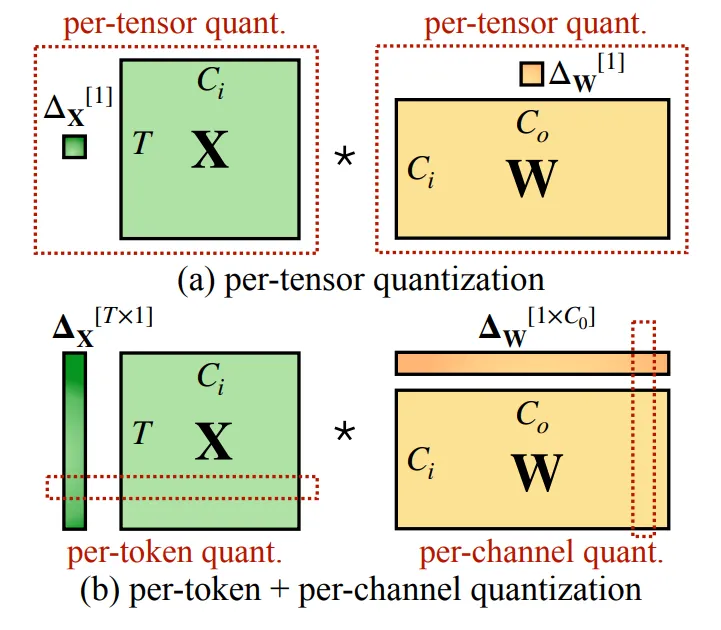
acext实现了这四种W8A8的量化kernel,具体的调用方式如下:
// 定义使用哪种W8A8的变种,可以从下面四种中任选一种:
QuantMode quant_mode = QuantMode::fromDescription(false, false, false, false);  // A_PerTensor_W_PerTensor
QuantMode quant_mode = QuantMode::fromDescription(false, false, false, true); // A_PerTensor_W_PerChannel
QuantMode quant_mode = QuantMode::fromDescription(false, false, true, false); // A_PerToken_W_PerTensor
QuantMode quant_mode = QuantMode::fromDescription(false, false, true, true); // A_PerToken_W_PerChannel

// 准备数据act, weight, scales, out
......

// 创建W8A8的Runner
auto runner = std::make_shared<acext::kernels::cutlass_kernels::CutlassInt8GemmRunner<half>>();

// 准备Workspace
int ws_bytes = runner->getWorkspaceSize(m, n, k);
char* ws_ptr = nullptr;
if (ws_bytes)
    cudaMalloc(&ws_ptr, ws_bytes);

// 选择kernel执行时需要的config
const auto gemmConfig = runner->getChosenConfig(p_act, p_weight, quant_mode,
                    reinterpret_cast<const float*>(p_scales_channels),
                    reinterpret_cast<const float*>(p_scales_tokens),
                    p_out, m, n, k, ws_ptr, ws_bytes, stream);

// 执行kernel,结果存储在out中
runner->gemm(p_act, p_weight, quant_mode,
                    reinterpret_cast<const float*>(p_scales_channels),
                    reinterpret_cast<const float*>(p_scales_tokens),
                    p_out, m, n, k, gemmConfig, ws_ptr, ws_bytes, stream);
1.4 量化kernel性能
以下的性能数据,我们选取了22个大模型的N K shape,并且选取不同的M对这些N K Shape做矩阵乘,计算时间,得到不同的量化算法相对于基础的Cublas Fp16的性能加速。
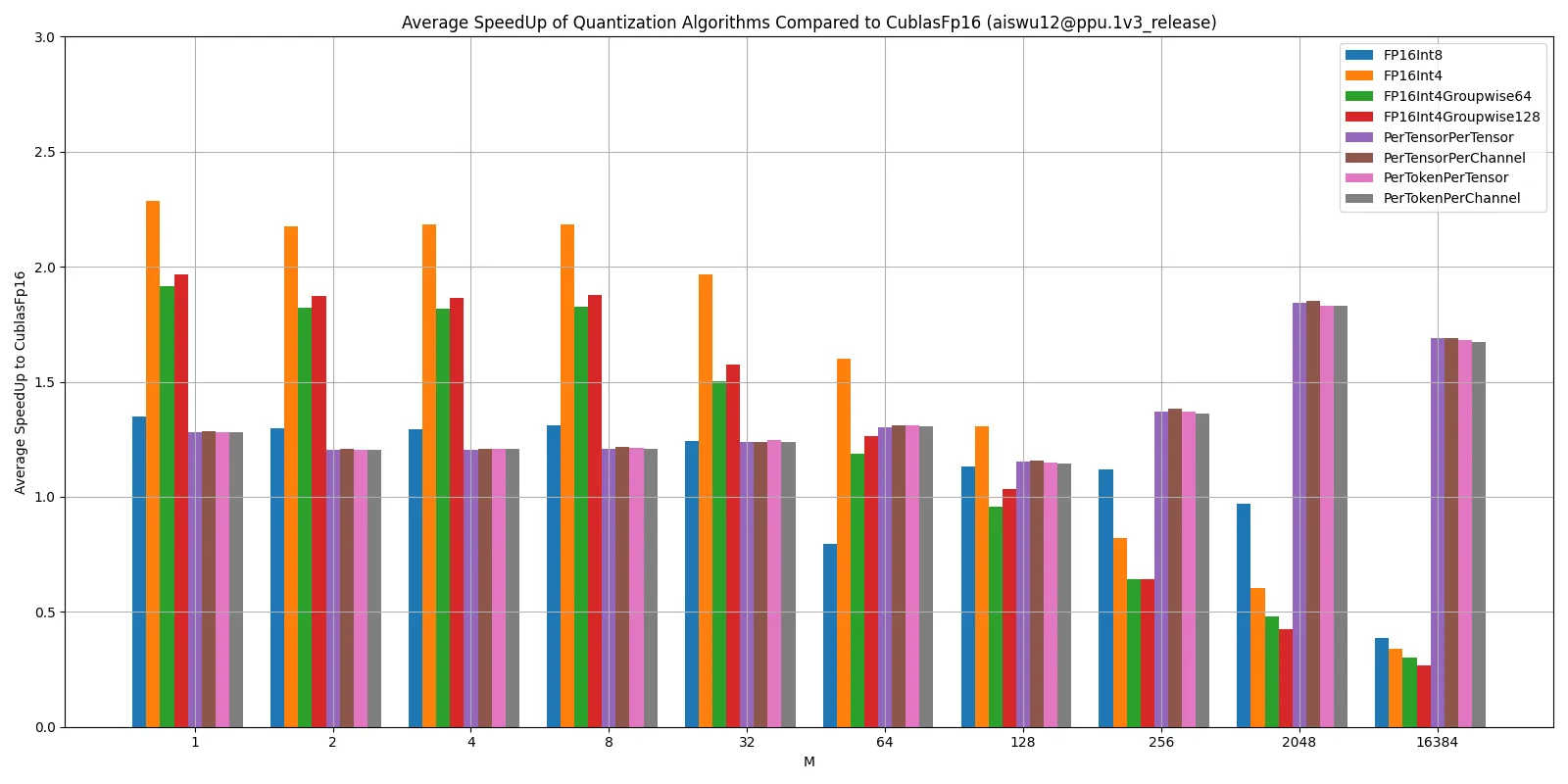
性能数据说明:
FpAintB量化算法属于weight-only量化算法,weight-only量化算法降低了Weight的访存量,优化Memroy Bound的场景。但从Kernel计算角度考虑,相较于普通GEMM,它还额外多了一步反量化的操作。所以在大batchsize下,我们的任务变成一个Compute Bound,这时候量化模式的性能就可能会比非量化模式的性能差。
W8A8调用Int8的Tensor Core,在大batchsize下会发挥Int8 TensorCore的算力优势。
2. acext量化应用(VLLM)
我们在vllm中,使用PPU acext库,增加了对不同量化算法的支持。
vllm 0.4.2具体实现代码:
https://code.alibaba-inc.com/ppu_open_source/vllm/tree/v0.4.2/vllm 0.3.3具体实现代码:
https://code.alibaba-inc.com/ppu_open_source/vllm/tree/v0.3.3/以下的性能和精度数据,都是以vllm0.4.2运行大模型得到的数据。
2.1 增加Int8 WeightOnly量化支持
2.1.1 AutoWOQ
使用量化算法,我们需要将大模型原本的权重从原本的fp16/bf16格式转换为int8格式。
这里我们使用我们开发的AutoWOQ来进行转换,WOQ具体组成部分如下:
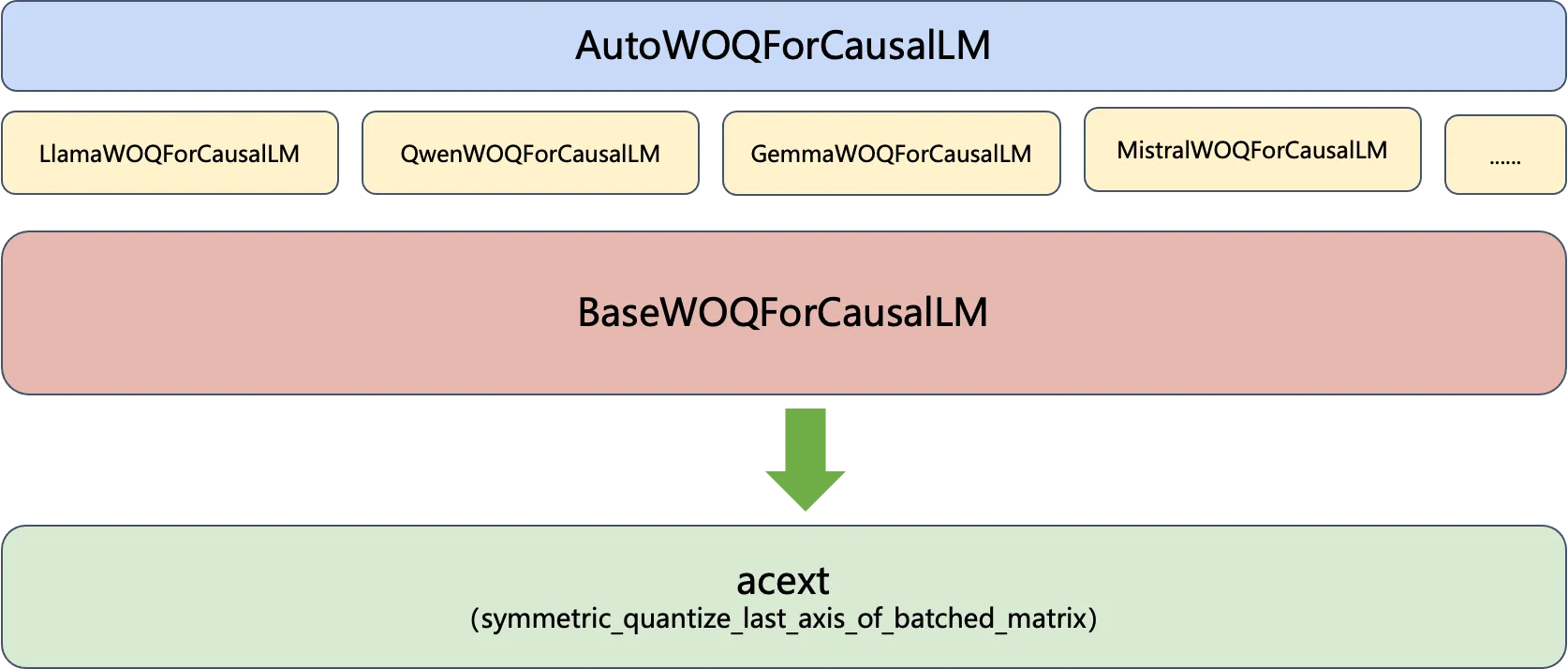
AutoWOQForCausalLM为所有的大模型提供一个统一的入口,和Huggingface的Auto类作用相似,接受的参数是模型权重的路径,AutoWOQForCausalLM会自动识别当前是的大模型的类型,并且初始化不同的WOQForCausalLM实例。这些实例都是BaseWOQForCausalLM的子类。具体的量化流程会在BaseWOQForCausalLM中实现,主要做的事情就是调用acext中实现的对称量化算法。
使用AutoWOQ量化模型代码流程如下:
# 设置量化参数,支持8bit or 4bit的量化
quantize_config = BaseQuantizeConfig(
    bits=8,  # quantize model to 8-bit
)

# 加载未量化的权重(Huggingface格式),model_path即为模型权重的路径,默认会将模型加载到CPU上
model = AutoWOQForCausalLM.from_pretrained(model_path, quantize_config, trust_remote_code=args.trust_remote_code)
tokenizer = AutoTokenizer.from_pretrained(model_path, trust_remote_code=True)

# 模型量化,会根据模型类型不同,针对模型中的linear层进行对称量化
model.quantize()

# 保存量化后的模型和Tokenizer到指定位置
quant_path = args.output
model.save_quantized(quant_path)
tokenizer.save_pretrained(quant_path)
2.1.2 支持WOQ量化
有了WOQ量化后的权重后,我们给VLLM增加一种weightonly的量化算法。用户在使用WOQ量化权重时,需要显示的指定量化算法为weightonly。也就是创建LLM对象时,我们需要初始化参数quantization为weightonly。
# Create an LLM.
llm = LLM(model=model_path, quantization="weightonly")这样vllm在加载这个量化后的模型时,会自动将需要量化的linear层创建量化类型的参数Tensor,并且运行时调用混合量化算法。
如下图所示,LLM大模型中一个Transformer Block在VLLM会表示如下,其中绿色的部分是Linear层,使用WeightOnlyQuant量化算法。
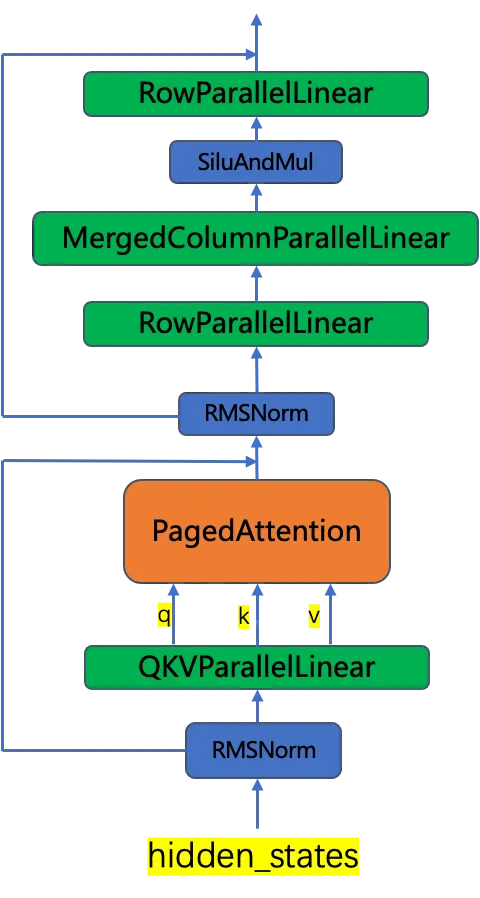
这些linear层需要使用WeightOnlyLinearMethod来进行初始化,加载量化权重,并且运行时调用acext的量化算法。由于acext使用cutlass进行kernel加速,对权重有一定的要求,而且由于这个重排需要考虑卡数,目前是在系统启动时进行的一次重排。
class WeightOnlyLinearMethod(LinearMethodBase):
    # 设置量化配置
    def __init__(self, quant_config: WeightOnlyConfig):
        self.quant_config = quant_config

    # 初始化Weight时,创建Int类型的权重参数,并且加载从WOQ处理后的量化权重
    def create_weights(self, input_size_per_partition: int,
                       output_size_per_partition: int, input_size: int,
                       output_size: int,
                       params_dtype: torch.dtype) -> Dict[str, Any]:
        qweight = Parameter(
            torch.empty(
                input_size_per_partition,
                output_size_per_partition,
                device="cuda",
                dtype=torch.int8,
            ),
            requires_grad=False,
        )
        scales = Parameter(
            torch.empty(
                output_size_per_partition,
                device="cuda",
                dtype=params_dtype,
            ),
            requires_grad=False,
        )

        // 实例化一个acext的WeightOnlyQuantMatmul类,后续可以通过它来调用混合精度kernel
        try:
            self.weightOnlyMatmul = ops.WeightOnlyQuantMatmul()
        except AttributeError as e:
            raise AttributeError(
                "WeightOnlyQuantMatmul kernels could not be imported. If you built vLLM "
                "from source, make sure BUILD_WEIGHTONLY_KERNELS=1 env var "
                "was set.") from e
        woq_state = WOQState.UNINITIALIZED
        ......

    # 运行时,调用acext的量化算法进行矩阵运算
    def apply_weights(self,
                      weights: Dict[str, torch.Tensor],
                      x: torch.Tensor,
                      bias: Optional[torch.Tensor] = None) -> torch.Tensor:
        //在线的权重预处理,系统启动时会处理一次
        if weights["woq_state"] == WOQState.UNINITIALIZED:
            qweight_cpu = weights["qweight"].cpu()
            qweight_cpu = preprocess_weights_for_mixed_gemm(qweight_cpu, torch.int8, False, False)
            weights["qweight"] = qweight_cpu.cuda()
            weights["woq_state"] = WOQState.READY
        qweight = weights["qweight"]
        scales = weights["scales"]
        return self.weightOnlyMatmul.weightonly_gemm(x, qweight, scales, bias)
2.1.3 WOQ模型推理
使用下面的命令编译vllm,设置BUILD_WEIGHTONLY_KERNELS=1会在编译时支持WeightOnly量化算法。
# 编译vllm
cd vllm
BUILD_WEIGHTONLY_KERNELS=1 python setup.py develop

# 运行vllm大模型推理任务, 假设我们已经将模型进行量化
python examples/offline_inference.py --model /path/to/Llama-2-7b-hf-woq/ -q weightonly --trust-remote-code
运行结果:

2.2 awq/gptq量化支持(优化)
2.2.1 优化awq/gptq量化推理
awq和gptq是vllm原生就支持的两种量化算法,他们都是int4的量化。
https://docs.vllm.ai/en/latest/quantization/auto_awq.html
但是目前VLLM中的AWQ/GPTQ量化实现,使用的不是一种高效的实现,它目前只是实现了降低模型的内存占用,但是性能可能还没有FP16的性能好。
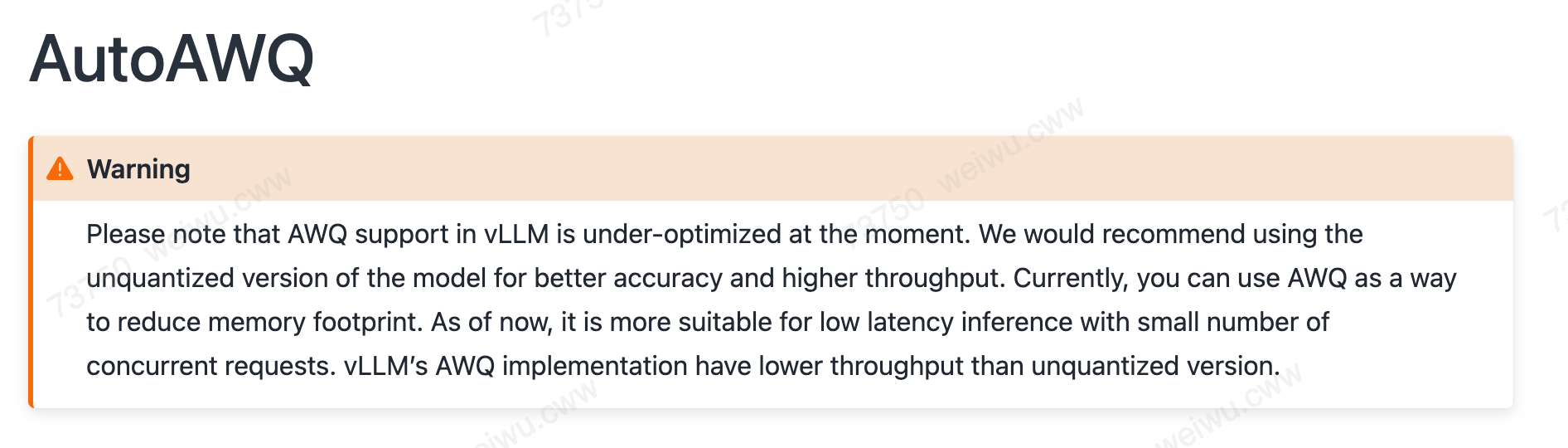
我们在vllm上通过acext的混合精度量化,可以实现更高效的量化kernel,相对于原来的AWQ/GPTQ有性能加速。但是由于acext的混合量化,对权重的排列有一定的要求,所以对于原来的AWQ权重,在调用acext前,需要对权重做一次预处理。
也就是我们通过对vllm中增加对acext weightonly_groupwise_gemm的支持,可以加速awq的量化推理(使用的还是原来的AWQ权重),只是在权重第一次被使用前,需要做一次预处理。具体的流程如下所示:
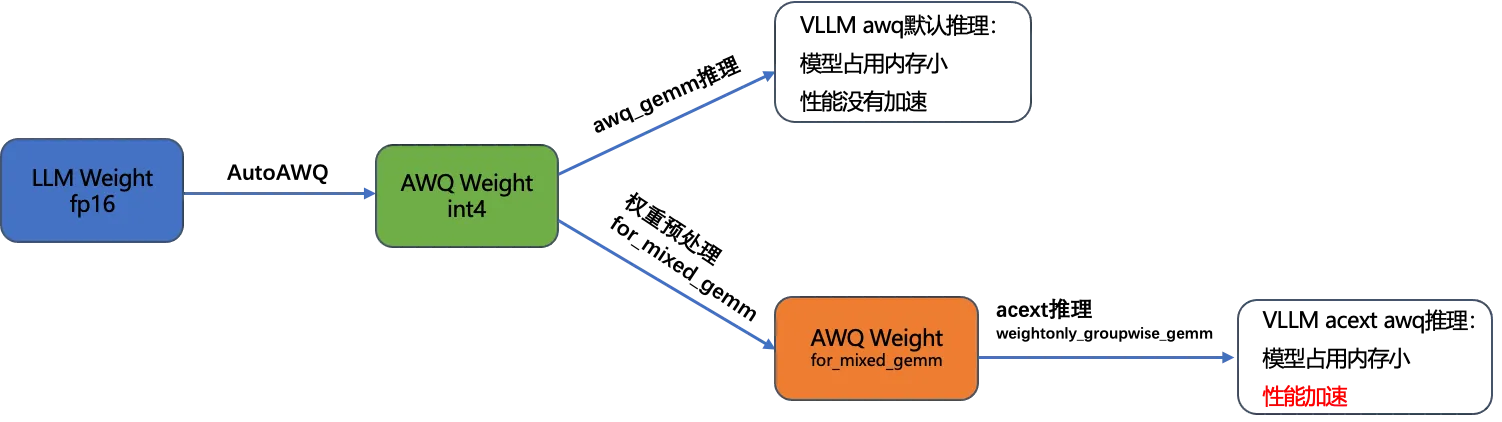
正对GPTQ量化,也有同样的流程。
和WOQ一样,目前的权重处理是在线处理的,vllm在启动时会有较长的延迟,后面会增加离线处理的形式。
2.2.2 Fast AWQ/GPTQ推理
由于目前这个优化的流程还在持续的迭代中,我们在vllm的实现里面,并没有默认打开使用acext加速awq/gptq的路径。需要设置环境变量USE_FAST_AWQ=1/USE_FAST_GPTQ才会调用到acext的加速推理。假如不加环境变量,默认还是使用的vllm自带的量化算法。
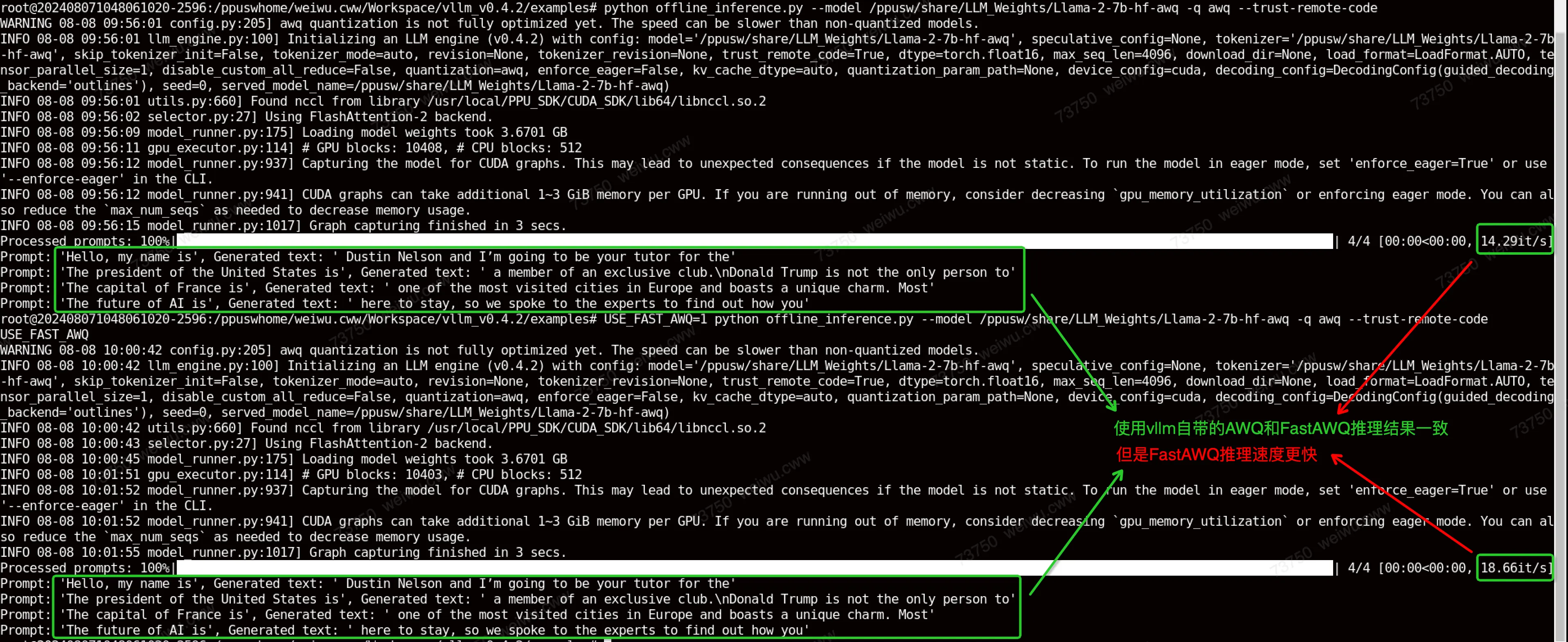
使用下面的命令行,可以调用到FastAWQ的流程,使用acext对awq量化进行加速。
USE_FAST_AWQ=1 python offline_inference.py --model /ppusw/share/LLM_Weights/Llama-2-7b-hf-awq -q awq --trust-remote-code可以看到AWQ和FastAWQ在推理结果上是一致的,但是FastAWQ的推理速度更快。
2.3 acext支持fused_moe
目前我们在vllm 0.8.3/0.8.5支持了acext的backend,包括bf16和w8a8-int8-channel两种类型。代码参考:
https://code.alibaba-inc.com/ppu_open_source/vllm/tree/v0.8.5_ppu_1v5.1_release包含以下三部分的改动
2.3.1 构造acext backend
在acext_moe_func.cu中, 我们增加了acext backend, 使用class AcextFusedMoe来调用acext库的各个API,并通过csrc/moe/moe_ops.h和csrc/torch_bindings.cpp将其注册为python API。
API | 功能 |
acext_fusedmoe_warpper | 调用acext backend执行fusedmoe功能 |
get_acext_fusedmoe_status_wrapper | 查询当前模型配置是否可以使用acext backend, 返回0为可以使用 |
acext_get_version | 返回acext库的版本(int),当前版本为1050100 |
2.3.2 修改fused moe layer
在fused_moe.py文件中增加acext的调用,包含在fused_experts_impl的实现中。首先使用ops.get_acext_fusedmoe_status()判断当前模型配置是否适合acext backend,不适合的会调用triton backend。 如果返回值acext_fusedmoe_status = 0,通过ops.acext_fusedmoe_warpper() 调用acext的fused_moe实现。
2.3.3 增加W8A8Int8MoEMethod(w8a8-Int8使用)
在compressed_tensors_moe.py文件中增加CompressedTensorsW8A8Int8MoEMethod用来load w8a8-int8-channel模型的weight并执行对应的moe layer。
2.4 支持的大模型
Model | WeightOnly | AWQ | GPTQ | N_K Shape |
Llama-2-7b-hf | Y | Y | Y | 12288 4096 4096 11008 22016 4096 4096 4096 |
Llama-2-13b-hf | Y | Y | Y | 5120 5120 27648 5120 5120 13824 15360 5120 |
Llama-2-70b-hf (8GPUS) | Y | Y | Y | 8192 3584 8192 1024 1280 8192 7168 8192 |
Meta-Llama-3-8B | Y | Y | Y | 6144 4096 4096 14336 28672 4096 4096 4096 |
Meta-Llama-3-70B (8GPUS) | N | Y | N | 8192 3584 8192 1024 1280 8192 7168 8192 |
Baichuan-7b | Y | Y | Y | 12288 4096 4096 11008 22016 4096 4096 4096 |
Baichuan-13b | Y | Y | Y | 5120 5120 5120 13696 27392 5120 15360 5120 |
Baichuan2-7b | Y | Y | Y | 12288 4096 4096 11008 22016 4096 4096 4096 |
Baichuan2-13b | Y | Y | Y | 5120 5120 5120 13696 27392 5120 15360 5120 |
Chatglm2-6b | Y | N | N | 4608 4096 4096 13696 27392 4096 4096 4096 |
Chatglm3-6b | Y | N | N | 4608 4096 4096 13696 27392 4096 4096 4096 |
Qwen-7b | Y | Y | Y | 12288 4096 4096 11008 22016 4096 4096 4096 |
Qwen-14b | Y | Y | Y | 5120 5120 5120 13696 27392 5120 15360 5120 |
Qwen-72b (8GPUS) | Y | Y | Y | 6144 8192 8192 1024 8192 3072 3072 8192 |
Falcon-7b | Y | N | N | 4544 4544 4672 4544 18176 4544 4544 18176 |
Falcon-40b (8GPUS) | Y | N | Y | 8192 4096 8192 1024 1152 8192 4096 8192 |
Gemma-7b | Y | N | N | 49152 3072 12288 3072 3072 24576 3072 4096 |
Mistral-7b | Y | Y | Y | 6144 4096 4096 14336 28672 4096 4096 4096 |
Mpt-7B | Y | N | Y | 12288 4096 4096 16384 4096 4096 16384 4096 |
Mixtral-8x7b (8GPUS) | Y | Y | N | 4096 512 8 4096 768 4096 |
Mixtral-8x22b (8GPUS) | Y | Y | N | 8 6144 1024 6144 6144 768 |
2.4.1 已知问题
2.4.1.1 权重转换问题
WOQ模型转换存在的问题:
model | Comments |
Chatglm2-6b | 使用AutoWOQ对ChatGLM的权重做量化后自动产生的权重文件里面, tokenizer_config.json 需要使用原始权重里面的 tokenizer_config.json,否则会有兼容性问题,这是社区的已知问题。可以转换完权重后手动操作一下 |
Chatglm3-6b |
AWQ模型转换存在问题:
model | Comments |
Chatglm2-6b | TypeError: chatglm isn't supported yet. |
Chatglm3-6b | TypeError: chatglm isn't supported yet. |
Falcon-7b | TypeError: FalconDecoderLayer.forward() missing 1 required positional argument: 'alibi' |
Falcon-40b | TypeError: FalconDecoderLayer.forward() missing 1 required positional argument: 'alibi' |
Mpt-7B | AttributeError: 'NoneType' object has no attribute 'bool' |
GPTQ模型转换存在问题:
model | Comments |
Chatglm2-6b | TypeError: chatglm isn't supported yet. |
Chatglm3-6b | TypeError: chatglm isn't supported yet. |
Falcon-7b | AssertionError assert infeatures % self.group_size == 0 |
Meta-Llama-3-70B | torch._C._LinAlgError: linalg.cholesky: The factorization could not be completed because the input is not positive-definite (the leading minor of order 27024 is not positive-definite). |
Mixtral-8x7b | ZeroDivisionError: float division by zero |
Mixtral-8x22b | ZeroDivisionError: float division by zero |
2.4.1.2 运行时问题
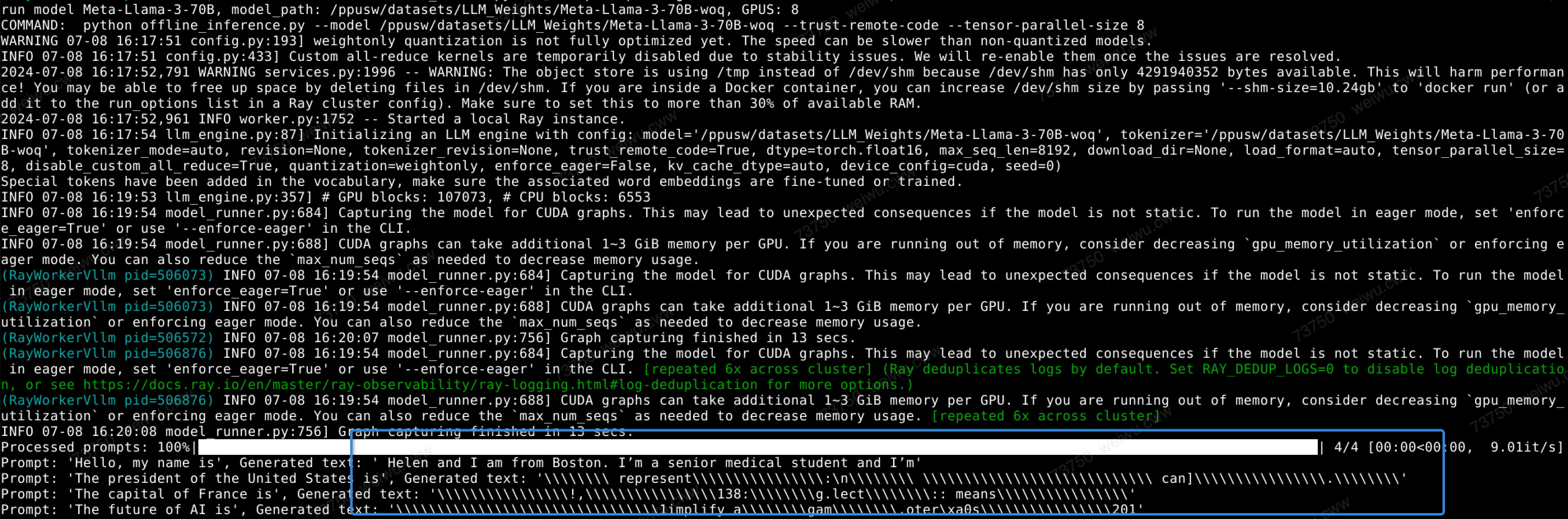
运行Meta-Llama-3-70B-woq结果有点问题。
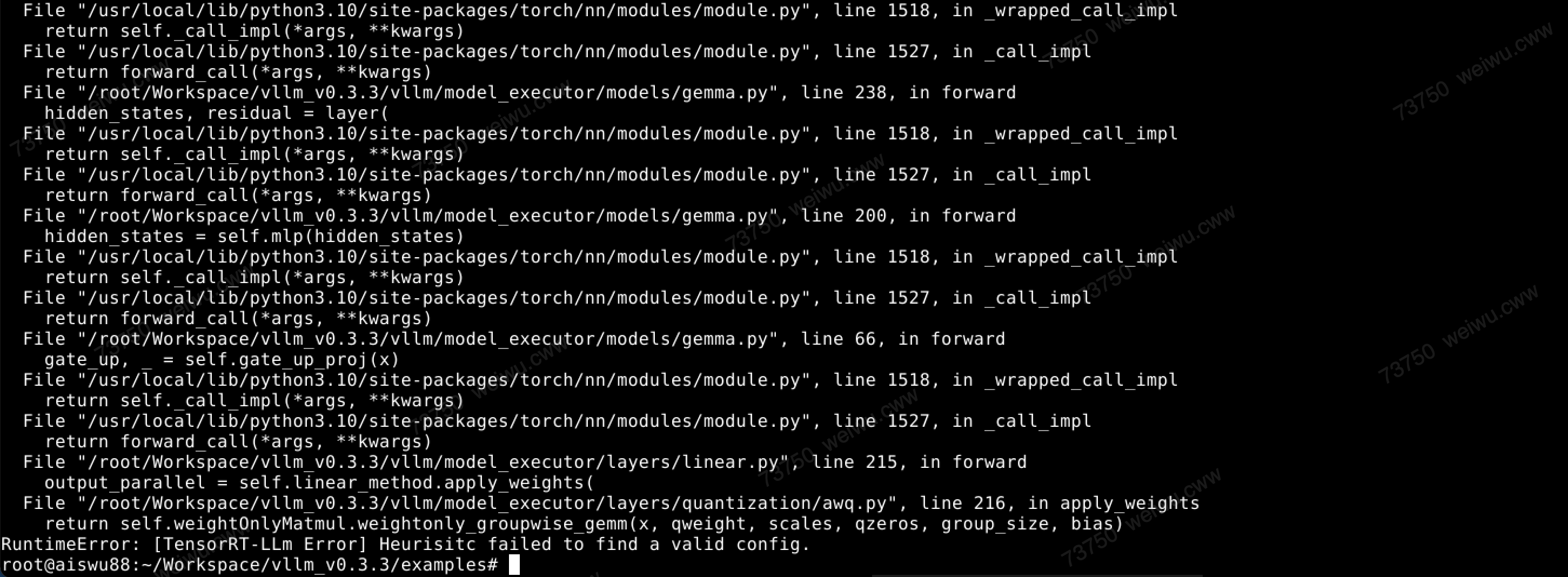
运行Gemma-7b-awq时出错。
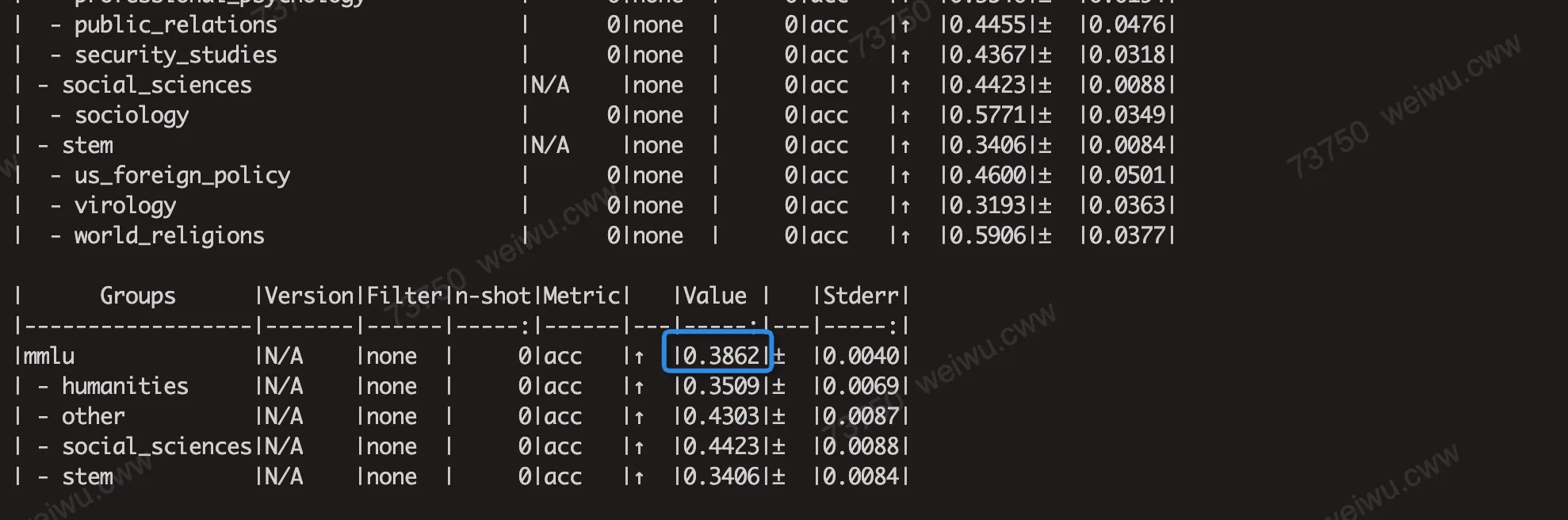
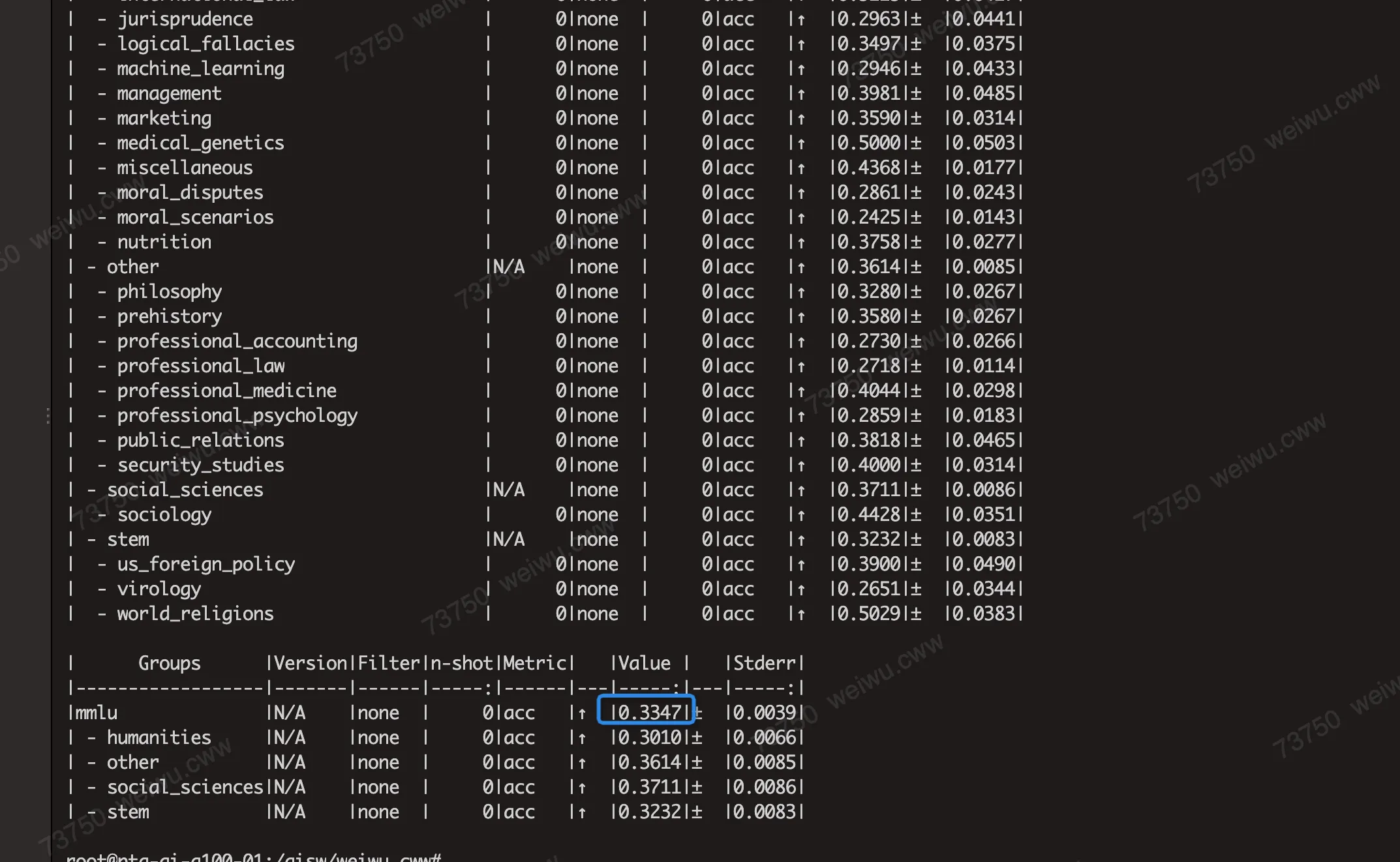
部分模型的MMLU分数在AWQ/GPTQ量化下精度损失较大,例如LLAMA2-7B模型:

经过在A100上验证,这个是由于AWQ/GPTQ量化算法在这些模型上表现不佳,A100上也测出来的MMLU的分数也是一样的精度。例如下面分别是A100上使用AWQ和GPTQ运行Llama-2-7b得到的MMLU分数,和PPU分数是一致的。
2.5 模型量化性能
衡量大模型的推理性能有多种方式,衡量指标也有多种。
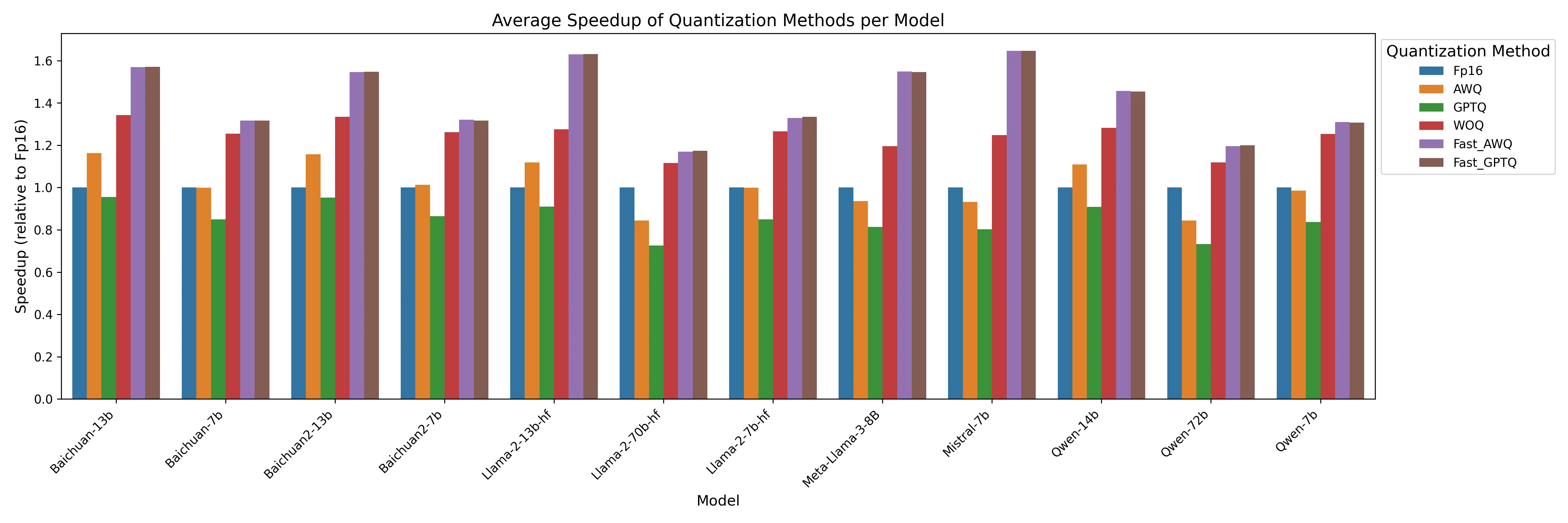
我们测试的是在特定输入下batchsize=(1, 2, 4, 8), input-len=(32, 512, 1024, 2048),output-len=128下模型generation推理阶段的吞吐,通过这个来一定程度反应量化方法可能对具体业务的性能提升,例如在线推理场景,对延迟比较敏感。
以下是不同模型在上述输入下,不同的量化算法下模型输出阶段的吞吐相对于Fp16的加速比。
2.5.1 详细性能数据
2.6 模型量化精度(MMLU)
我们通过lm-evaluation-harness这个框架来运行大模型推理,测试在数据集MMLU上的得分,来评估我们量化后模型的精度。
https://github.com/EleutherAI/lm-evaluation-harness
2.6.1 运行步骤
#假如setuptools版本太低,需要先升级
#pip3 install --upgrade pip setuptools
#又因为以下的原因,我们需要限制setuptools为69.5.1
#https://github.com/vllm-project/vllm/issues/4961

git clone https://github.com/EleutherAI/lm-evaluation-harness
# 假如你运行mmlu测试遇到问题,可能和版本有关系,可以尝试切换到这个我们测试过的commit:
# git reset --hard e5e5ee0cb629c9c88165292d1b4bf34623392d33
cd lm-evaluation-harness
pip install -e .

#使用Huggingface的代理
export HF_ENDPOINT=https://hf-mirror.com

#使用lm_eval进行mmlu推理
lm_eval --model vllm --model_args pretrained=/ppusw/datasets/huggingface/Llama-2-7b-hf --tasks mmlu --batch_size auto --num_fewshot 5

#假如使用了代理后,还是遇到了下载数据集的问题,这是由于下面这个文件写死了用Huggingface网站下载
#/root/.cache/huggingface/modules/datasets_modules/datasets/hails--mmlu_no_train/b7d5f7f21003c21be079f11495ee011332b980bd1cd7e70cc740e8c079e5bda2/mmlu_no_train.py
#我们相应的修改这个文件里面的URL指向hf-mirror
2.6.2 推理结果
通过设置num-fewshot可以控制使用fewshot的参数,设置fewshot越高,运行时间越慢,但是得到的分数可能会更高。
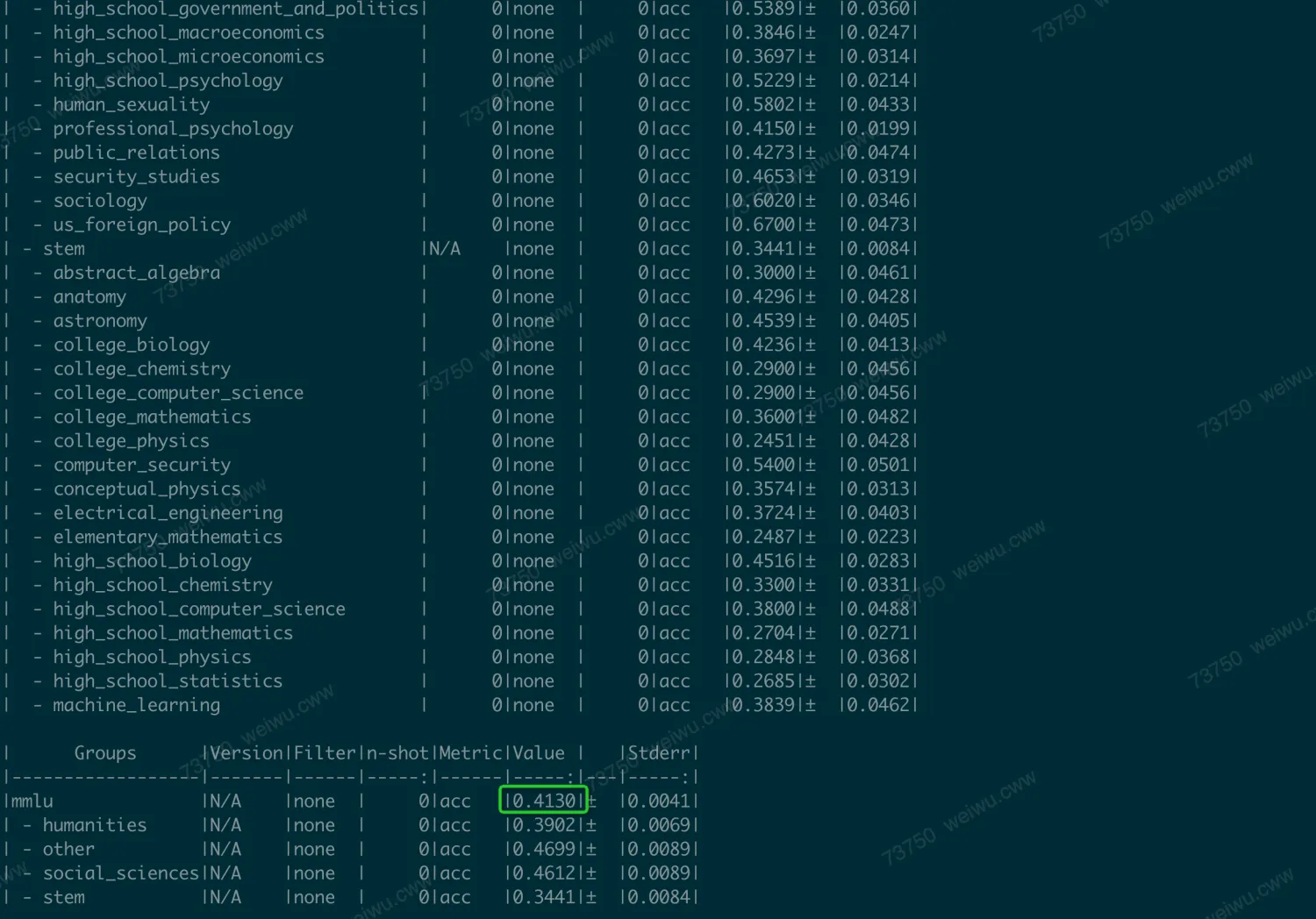
不加num_fewshot时,运行的比较快(minutes),结果为41.3。
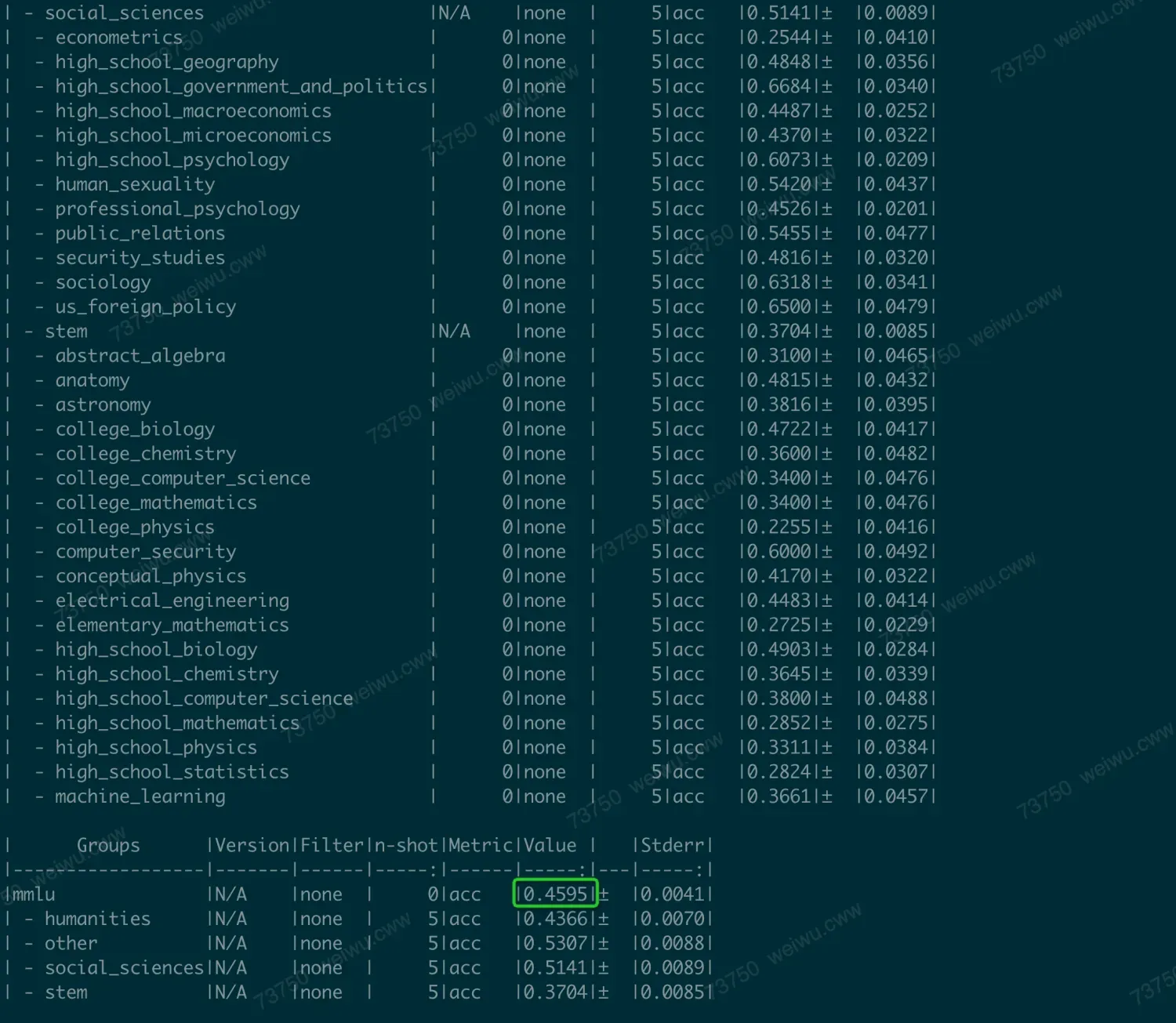
加上num_fewshot=5时,运行比较慢(hours),分数更高,结果为45.9
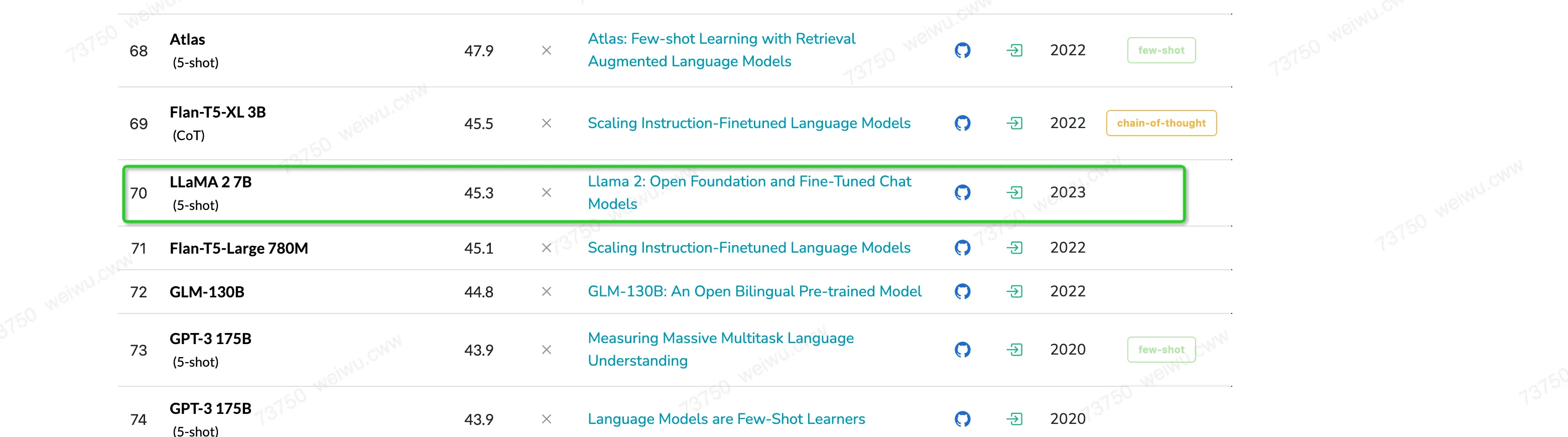
这个和网站上的结果是一致的。
2.6.3 不同量化方法MMLU精度
我们假定没有量化前的模型fp16推理得到的MMLU分数为baseline,通过设置推理时使用不同的量化方法,可以得到量化后模型的MMLU分数,并且通过跟baseline比较,得到MMLU的量化损失。
以下是不同的模型运行MMLU(few-shot 0)在不同的量化方法下得到的分数,以及相对于fp16的量化损失:
其中灰色为当前版本(PPU Release 1.3)不支持的量化方法,红色为推理结果存在Bug的量化方法。
3. 从源码编译和运行
3.1 编译
acext本身依赖PPU版本的cutlass,需要下载acext后,在下载PPU版本的cutlass
# fetch code from ppu_open_source
git clone -b sail_v1.6.1 https://code.alibaba-inc.com/ppu_open_source/acext
cd acext
git clone -b sail_v1.6.1 https://code.alibaba-inc.com/ppu_open_source/cutlass可以使用两种方式(二选一)编译安装acext。
单独编译安装acext。
# compile & install: in acext rm -rf build && mkdir build && cd build cmake .. -DCMAKE_BUILD_TYPE=Release -DBUILD_PYT=ON cmake --build . -- -j${nproc} cmake --build . --target install -j${nproc}编译安装acext Wheel包。
python -m build --wheel --no-isolation -v
pip install dist/*.whl
选择Wheel包安装形式,安装Wheel包后,如果需要进一步编译vLLM/sgl_kernel,执行下述指令将acext的动态库和头文件拷贝到PPU_SDK目录中,确保acext动态库和头文件可被vLLM/SGLang cmake找到:
cp $(python -c "import sysconfig; print(sysconfig.get_path('purelib'))")/lib/libacext.so $PPU_SDK/lib/
cp -r $(python -c "import sysconfig; print(sysconfig.get_path('purelib'))")/include/acext $PPU_SDK/include/
3.2 运行
3.2.1 运行单元测试
cd build

# a16w8/a16w4 quant gemm的单元测试
python ../tests/test_woq_gemm.py

# a8w8 quant gemm的单元测试
python ../tests/th_int8_gemm.py

# moe相关的单元测试
python ../tests/th_moe.py
3.2.2 运行性能测试
cd build
# 单独运行FpAintB的benchmark, 默认运行mnk(1, 5120, 5120),可以在命令行参数指定M N K
./benchmark/benchmark_fpAintB

# 单独运行a8w8的benchmark, 默认运行mnk(1, 5120, 5120),可以在命令行参数指定M N K
./benchmark/benchmark_w8a8

# 也遍历所有的M N K,运行benchmark,并且得到一个统一的csv报告
cd benchmark
python run_benchmark.py