
本插件为 AgentScope 提供AI安全护栏防护功能,通过调用阿里云AI安全护栏服务,实现对 AgentScope 中大模型和工具调用的输入输出的实时安全防护。
1.核心功能
适用范围:本文介绍 AgentScope 1.0 和 2.0 的主要检测点。请根据所使用的版本选择对应的集成机制和拦截点。
1.1 检测点覆盖
1.1.1 AgentScope 1.0 检测点
参考文档:https://docs.agentscope.io/versions/1.0.21/en/building-blocks/hooking-functions
|
Hook 名称 |
触发时机 |
作用 |
|
pre_reply |
Agent reply 前 |
用户输入检测 |
|
post_print |
流式 chunk 输出时 |
流式增量检测 |
|
post_reasoning |
LLM 推理完成后 |
最终输出检测 + 违规替换 |
|
toolkit middleware |
工具执行前 |
工具输入检测 |
调用链路示意:
用户输入 → [pre_reply 输入检测] → LLM 流式推理 → [post_print 增量检测] → [post_reasoning 最终检测] → 工具调用 → [toolkit middleware 工具检测] → 返回用户1.1.2 AgentScope 1.0 Hook 完整流程图
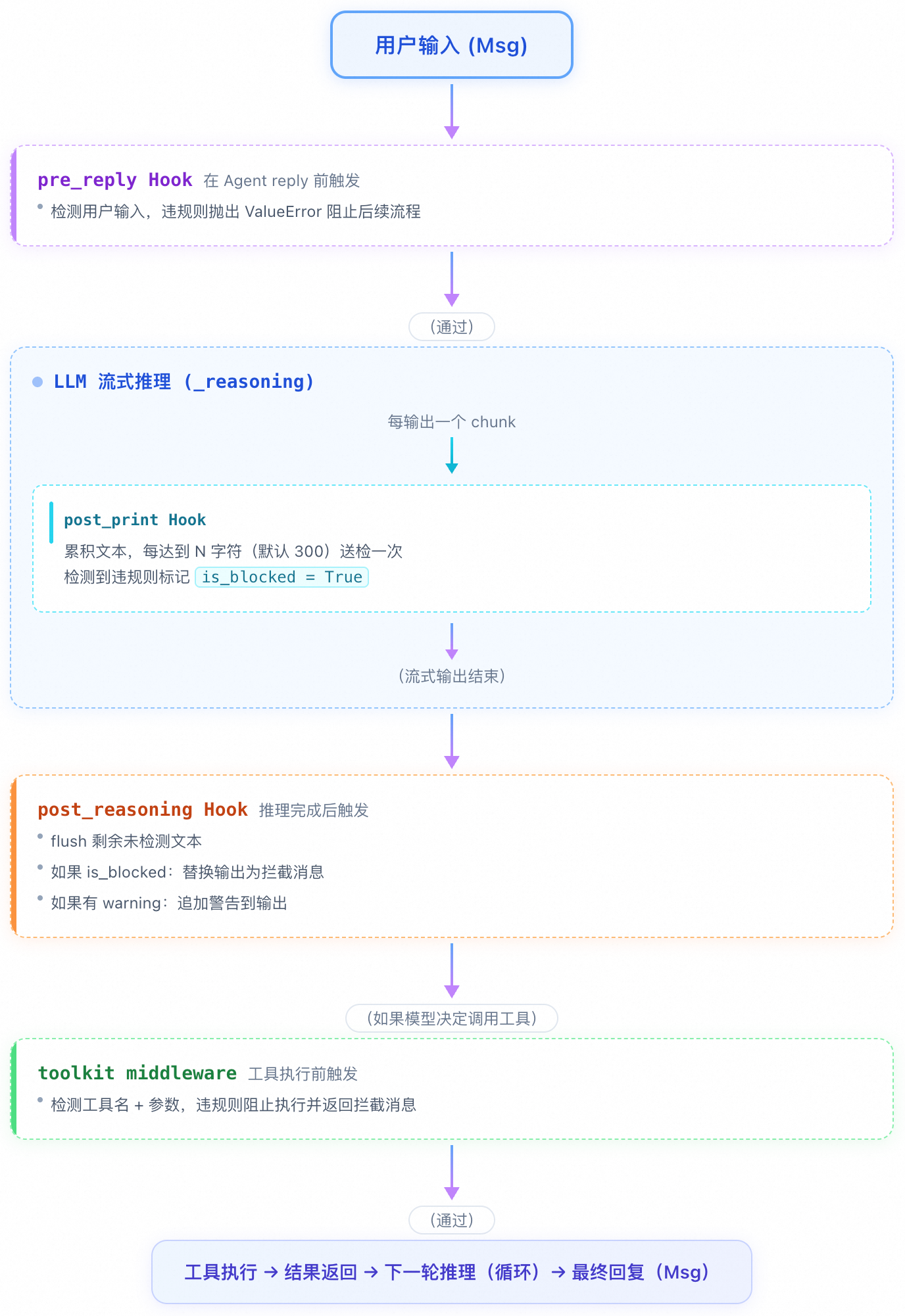
每个拦截点的作用:
|
拦截点 |
触发时机 |
输入 |
拦截方式 |
作用 |
|
pre_reply |
Agent reply 前 |
用户消息文本 |
抛出 |
检测用户输入,违规直接阻断 |
|
post_print |
每个流式 chunk 输出时 |
累积文本 |
标记 |
流式增量检测(每 N 字符送检) |
|
post_reasoning |
LLM 推理完成后 |
完整输出 Msg |
替换输出 Msg |
最终检测 + flush + 违规替换 |
|
toolkit middleware |
工具执行前 |
工具名 + 参数 |
yield 拦截消息 |
阻止危险工具调用 |
1.1.3 AgentScope 2.0 检测点
参考:https://docs.agentscope.io/versions/2.0.8/en/building-blocks/middleware
|
方法 |
触发时机 |
作用 |
|
on_reply |
Agent reply 阶段 |
用户输入检测 + 输出追加警告 |
|
on_reasoning |
LLM 推理阶段 |
流式输出增量检测(每 N 字符送检) |
|
on_acting |
工具调用阶段 |
工具输入检测 |
调用链路示意:
用户输入 → [on_reply 输入检测] → LLM 流式推理 → [on_reasoning 增量检测] → 工具调用 → [on_acting 工具检测] → 返回用户1.1.4 AgentScope 2.0 Middleware 完整流程图
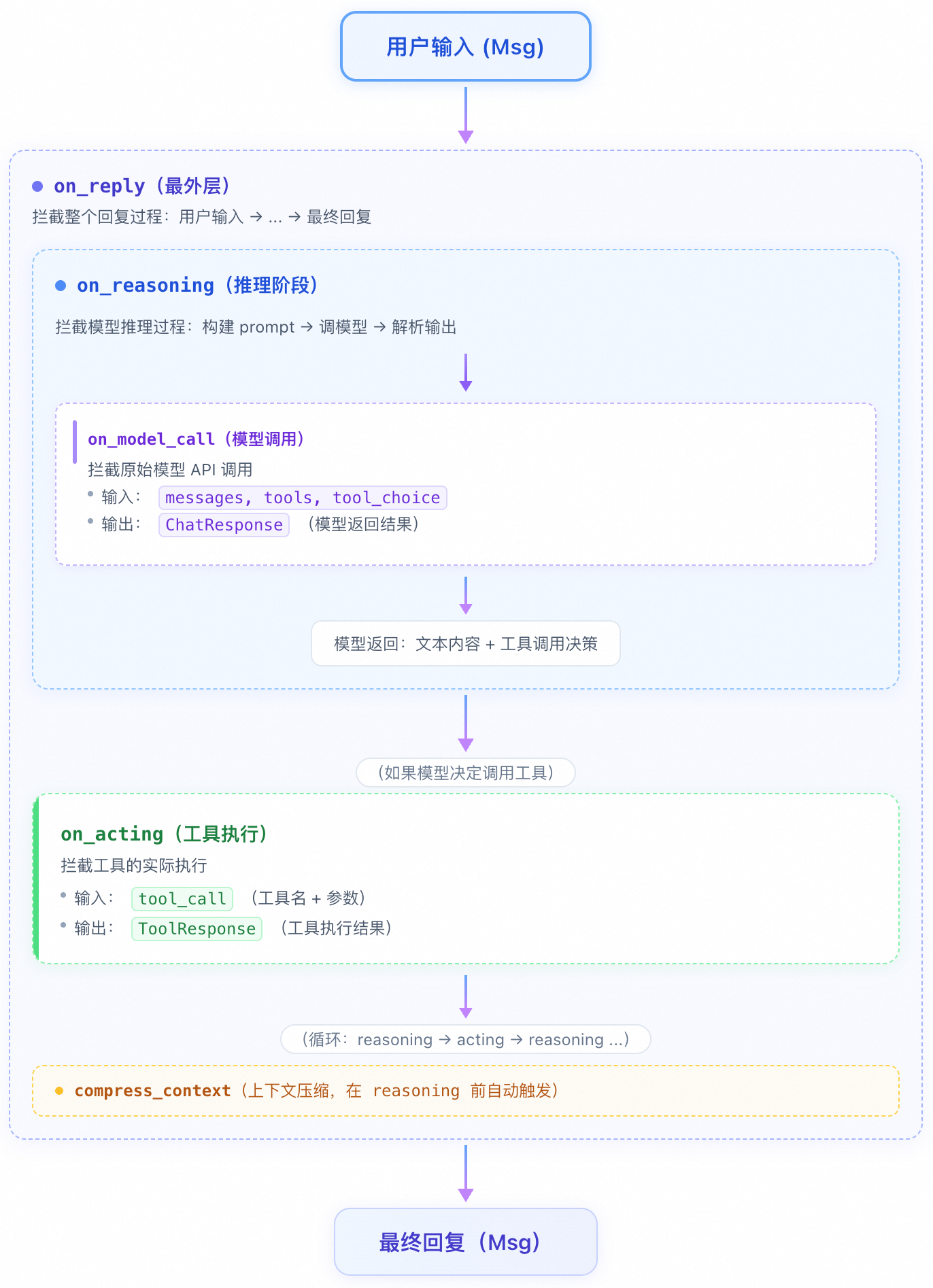
每个拦截点的作用:
|
拦截点 |
位置 |
输入 |
输出 |
作用 |
|
on_reply |
最外层 |
用户消息 |
最终回复 |
检测用户输入 / 追加警告到最终输出 |
|
on_reasoning |
推理阶段 |
tool_choice |
流式文本事件 + Msg |
检测模型生成的文本内容(流式) |
|
on_model_call |
模型 API 调用 |
messages, tools |
ChatResponse |
拦截发给模型的 prompt 和模型的原始返回 |
|
on_acting |
工具执行 |
tool_call |
ToolResponse |
检测工具调用参数,阻止危险操作 |
|
on_system_prompt |
构建 prompt 时 |
当前 prompt 字符串 |
变换后的 prompt |
动态修改 system prompt |
注:当前护栏中间件实现了on_reply、on_reasoning、on_acting三个拦截点。on_model_call和on_system_prompt为 AgentScope 框架预留的扩展点,当前流程中暂未使用。
1.2 智能拦截策略
根据护栏服务返回的 Suggestion 和 RiskLevel 字段进行决策:
|
Suggestion |
RiskLevel |
处理方式 |
说明 |
|
block |
medium/high |
拦截 |
中高风险内容直接拦截 |
|
block |
low |
提醒 |
低风险内容发出警告 |
|
pass |
- |
放行 |
安全内容正常通过 |
1.3 流式输出检测
-
threshold 模式:每累积到指定字符数(默认 300)后送检一次;
-
complete 模式:全部累积完成后一次性送检;
-
流结束时强制 flush 剩余内容;
-
支持重叠保留(默认 5 字符),防止边界处语义断裂。
1.4 大文本内容分片检测
-
超过 2000 字符的内容自动分片;
-
并发调用护栏接口(可配置并发量);
-
综合判断所有分片的检测结果;
-
支持重叠保留(默认 10 字符),相邻分片首尾重叠以保持上下文语义连贯。
1.5 重叠保留机制
为防止文本在分片或流式送检边界处被截断导致语义丢失,系统支持配置 GUARDRAIL_OVERLAP_SIZE 参数:
1.5.1 大文本分片示例
假设 GUARDRAIL_MAX_CHUNK_SIZE=2000,GUARDRAIL_OVERLAP_SIZE=10:
输入文本: 5500 字符
分片 1: text[0:2000]      ← 第一个分片正常起始
分片 2: text[1990:3990]   ← 向前保留 10 个字符
分片 3: text[3980:5500]   ← 向前保留 10 个字符
1.5.2 流式检测示例
假设 GUARDRAIL_STREAM_BUFFER_SIZE=300,GUARDRAIL_OVERLAP_SIZE=10:
第 1 次送检: text[0:300] ← 累积到 300 字符触发
第 2 次送检: text[290:590]   ← 回退 10 字符,与前次尾部重叠
第 3 次送检: text[580:880]   ← 再回退 10 字符
...
1.5.2 原理说明
|
场景 |
无重叠 |
有重叠(overlap=10) |
|
分片边界 |
|
|
|
流式边界 |
第1次“...如何” + 第2次“制作...” → 断裂 |
第2次“如何制作...” → 语义连贯 |
配置建议:重叠值不宜过大(建议 3~20,默认 10),过大会增加重复检测内容,影响性能。
1.6 工具调用检测
对 Agent 调用工具(包括 MCP 服务)进行双向安全检测:
-
输入检测:将工具名 + 参数拼接为
Tool: {name}\nArguments: {json}格式送检,违规则阻止执行。 -
输出检测:工具执行完成后,提取
ToolResponse.content文本内容送检,违规则替换为拦截消息。
1.7 Tracing 参数传递
支持传递以下追踪参数,便于问题排查和审计:
|
参数名 |
说明 |
|
request_id |
请求 ID |
|
session_id |
会话 ID |
|
user_id |
用户 ID |
|
trace_id |
链路追踪 ID |
2.代码接入与配置
使用建议:请根据 AgentScope 版本、项目架构和安全策略调整示例代码及配置,并在测试环境验证后再部署到生产环境。
项目中包含了接入AI安全护栏的基础代码和测试用例:agentscope_guardrails.zip
|
版本 |
适用框架 |
集成机制 |
目录 |
|
V1 |
AgentScope 1.0 |
Hook 注册 |
|
|
V2 |
AgentScope 2.0 |
Middleware 中间件 |
|
2.1 项目结构
├── guardrail_base.py           # 基础类:配置管理、服务调用、响应解析
├── guardrail_service.py        # 阿里云AI安全护栏 API 调用
├── guardrail_text_checker.py   # 文本检测器(支持长文本分片)
├── guardrail_stream_checker.py # 流式检测器(增量累积送检)
├── v1/
│   └── guardrail_hook.py       # 1.0 Hook 插件
├── v2/
│   └── guardrail_middleware.py # 2.0 Middleware 中间件
└── test/
    ├── guardrail_test_v1.py    # 1.0 测试
    └── guardrail_test_v2.py    # 2.0 测试
2.2 环境变量配置
创建 .env 文件:
# 阿里云 AccessKey
GUARDRAIL_AK=your_access_key_id
GUARDRAIL_SK=your_access_key_secret

# 可选配置
GUARDRAIL_SERVICE=agent_runtime_guard
GUARDRAIL_ENDPOINT=https://green-cip.cn-shanghai.aliyuncs.com
GUARDRAIL_MAX_CHUNK_SIZE=2000
GUARDRAIL_STREAM_BUFFER_SIZE=300
GUARDRAIL_OVERLAP_SIZE=10
GUARDRAIL_STREAM_CHECK_MODE=threshold
GUARDRAIL_MAX_CONCURRENT=5
GUARDRAIL_ENABLE_TRACING=true
2.3 V1:AgentScope 1.0 对接
通过 Hook 机制注册到已有 Agent,无需修改 Agent 代码:
import asyncio
import agentscope
from agentscope.agent import ReActAgent
from agentscope.formatter import DashScopeChatFormatter
from agentscope.message import Msg
from agentscope.model import DashScopeChatModel
from v1.guardrail_hook import create_guardrail_hook
async def main():
    agentscope.init(project="GuardrailTest", name="Test")
    agent = ReActAgent(
        name="TestAgent",
        sys_prompt="You are a helpful assistant.",
        model=DashScopeChatModel(
            api_key="your-api-key",
            model_name="qwen-max",
            stream=True),
        formatter=DashScopeChatFormatter()
    )
    # 创建并注册护栏 Hook    hook = create_guardrail_hook()
    hook.register_to_agent(agent)
    # 正常使用,护栏自动生效    user_msg = Msg(name="user", content="你好", role="user")
    try:
        response = await agent(user_msg)
        print(f"Agent: {response.content}")
    except ValueError as e:
        print(f"Blocked: {e.args[0].content}")
asyncio.run(main())
2.4 V2:AgentScope 2.0 对接
通过 Middleware 中间件注入到 Agent:
import asyncio
from agentscope.agent import Agent
from agentscope.credential import DashScopeCredential
from agentscope.formatter import DashScopeChatFormatter
from agentscope.message import Msg, TextBlock
from agentscope.model import DashScopeChatModel
from v2.guardrail_middleware import create_guardrail_middleware
async def main():
    middleware = create_guardrail_middleware()
    model = DashScopeChatModel(
        credential=DashScopeCredential(api_key="your-api-key"),
        model="qwen-max",
        stream=True,
        formatter=DashScopeChatFormatter(),
    )
    agent = Agent(
        name="SafeAgent",
        system_prompt="You are a helpful assistant.",
        model=model,
        middlewares=[middleware],
    )
    user_msg = Msg(
        name="user",
        content=[TextBlock(type="text", text="你好")],
        role="user",
    )
    response = await agent.reply(user_msg)
    print(f"Agent: {response.get_text_content()}")

asyncio.run(main())
2.5 运行测试
# V1 测试python test/guardrail_test_v1.py
# V2 测试python test/guardrail_test_v2.py
2.5 V1 vs V2 对比
|
维度 |
V1 (AgentScope 1.0) |
V2 (AgentScope 2.0) |
|
扩展机制 |
Hook(回调注册) |
Middleware(生命周期拦截) |
|
输入拦截 |
抛 |
yield 替代消息,优雅中断 |
|
流式处理 |
|
|
|
工具检测 |
|
|
|
集成方式 |
先创建 Agent,再注册 Hook |
构造时传入 |
4.注意事项
上线前请验证输入、输出和工具调用的拦截效果,并持续监控检测结果和告警。
-
AK/SK 安全:请勿将 AK/SK 硬编码在代码中,建议使用环境变量或密钥管理服务;
-
并发控制:默认并发数为 5,过高可能导致请求被限流;
-
异常处理:护栏服务调用失败时默认放行,建议在生产环境增加监控和告警;
-
流式检测:缓冲区大小默认 300 字符,可根据业务场景调整;
-
重叠保留:
GUARDRAIL_OVERLAP_SIZE默认 10,建议设置 3~20,过大会增加重复检测内容影响性能,过小则边界语义保持效果不明显;