
本文介绍了魔笔组件的配置项开发规范,您可参照该规范开发自定义组件库。
概述
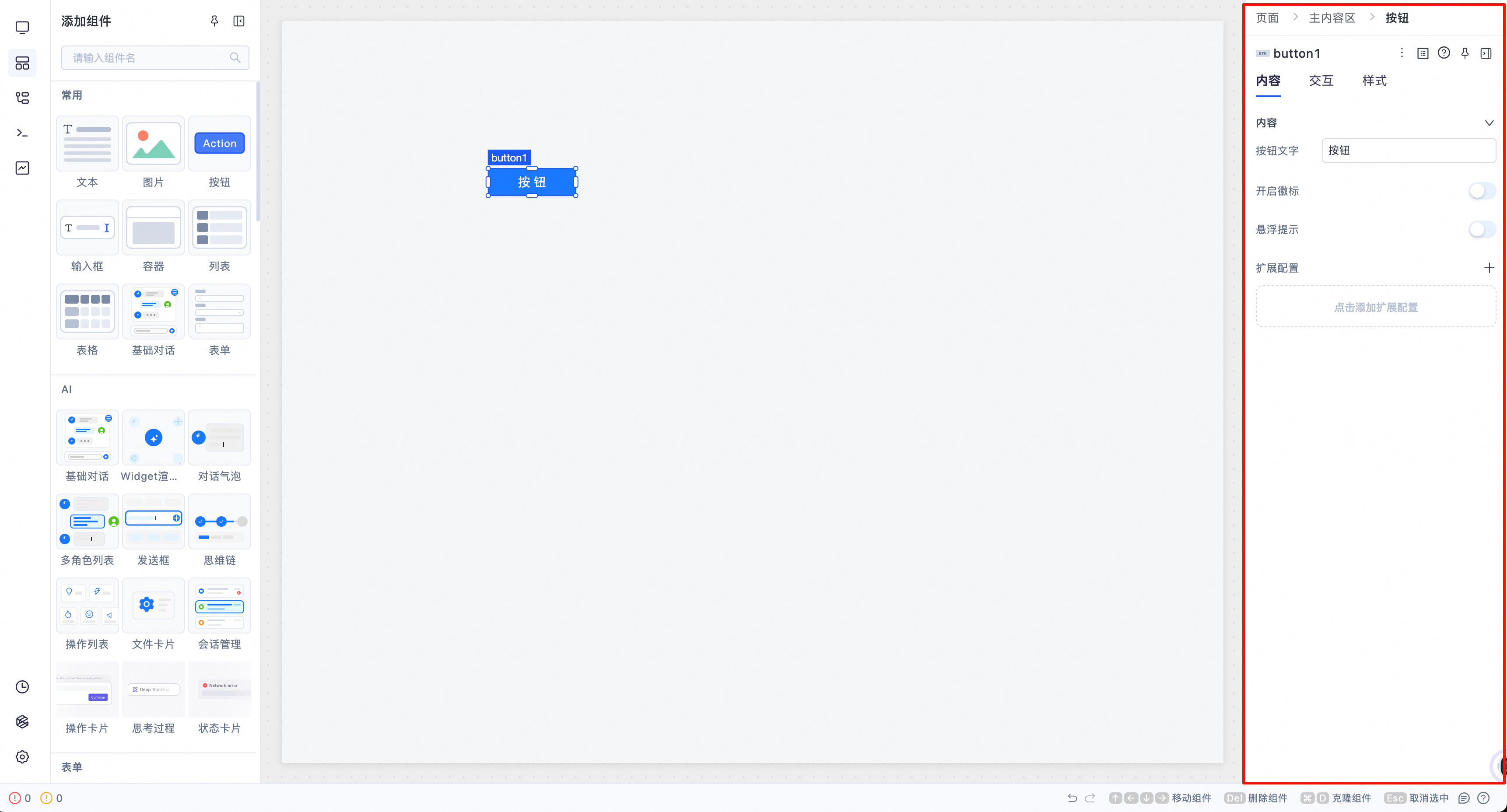
魔笔在应用搭建页面右侧的配置面板中针对每个组件提供了不同的配置项,配置项描述了组件在搭建平台中的行为、属性和样式。您可通过不同配置项的组合,使用组件多样化的行为和样式快速搭建出满足您需求的页面。
开发规范
在开发自定义组件时,配置文件是每个配置项键值对的对象集合,您可参考并遵循以下配置项开发规范进行开发:
一、基础信息
配置项键名 | 类型 | 说明 | 示例 |
|
| 组件的唯一标识符 |
|
|
| 组件在物料面板中显示的标题名称 |
|
|
| 组件的详细描述,用于说明组件的用途和功能 |
|
二、显示控制
配置项键名 | 类型 | 说明 | 示例 |
|
| 组件在左侧物料面板中所属的分类目录 |
|
|
| 组件在物料面板中显示的图标 |
|
|
| 设置为 |
|
|
| 设置为 |
|
|
| 设置为 |
|
三、容器属性
配置项键名 | 类型 | 说明 | 示例 |
|
| 标识组件是否为容器组件(可以包含子组件) |
|
|
| 作为容器时,是否默认为弹性布局 |
|
|
| 作为弹性容器时的默认排列属性 |
|
|
| 是否包含多视图容器 |
|
四、编辑行为
配置项键名 | 类型 | 说明 | 示例 |
|
| 设置后,组件禁止移动或改变大小 |
|
|
| 设置后,组件禁止删除(适用于系统级框架组件) |
|
|
| 设置后,组件禁止复制 |
|
|
| 设置后,组件的 ID 不能被修改 |
|
五、网格布局配置
配置项键名 | 类型 | 说明 | 示例 |
|
| 网格布局配置对象,所有组件都需要定义 | 见下方子属性 |
|
| 搭建时拖拽组件在网格中展示的大小(网格单位) |
|
|
| 初始化高度的计算函数,参数 |
|
|
| 支持设置的高度类型 |
|
|
| 在高度为 fixed 时,是否可以改变高度,不填写时默认为 |
|
|
| 在高度为 fixed 时可设置的最小高度(网格单位) |
|
|
| 指定外部包裹区域的溢出行为,默认为 |
|
高度类型说明:
高度类型 | 数据结构 | 说明 |
|
| 固定高度 |
|
| 自适应高度 |
|
| 自适应高度,但有最小和最大高度限制 |
|
| 自定义高度 |
六、弹性布局配置
配置项键名 | 类型 | 说明 | 示例 |
|
| 弹性布局配置对象 | 见下方子属性 |
|
| 子元素排列方向 |
|
|
| 子元素交叉轴对齐方式 |
|
|
| 子元素主轴排列方式 |
|
|
| 子元素间距(像素) |
|
|
| 子元素换行方式 |
|
|
| 子元素支持换行时交叉轴的对齐方式 |
|
|
| 指定外部包裹区域的溢出行为,默认为 |
|
|
| 子元素的 flex-shrink 属性 |
|
|
| 子元素的 align-self 属性 |
|
|
| 自身弹性尺寸设置(主轴方向) |
|
|
| 自身弹性尺寸设置(交叉轴方向) |
|
七、尺寸配置
配置项键名 | 类型 | 说明 | 示例 |
|
| 非容器组件作为弹性容器子项时的默认尺寸 |
|
八、布局类型
配置项键名 | 类型 | 说明 | 示例 |
|
| 默认布局类型 |
|
|
| 支持的布局类型 |
|
九、属性面板配置
配置项键名 | 类型 | 说明 | 示例 |
|
| 定义组件在右侧属性面板中的配置项 | 见下方详细说明 |
inspectorConfig 结构
inspectorConfig: [
  {
    title: '分组标题',  // 如 '内容'、'交互'、'样式'
    items: [/* 配置项列表 */]
  }
]
配置项通用字段
字段名 | 类型 | 说明 | 示例 |
|
| 配置项类型 |
|
|
| 配置项显示标题 |
|
|
| 属性在 props 中的键名 |
|
|
| 值类型 |
|
|
| 默认值 |
|
|
| 是否必填 |
|
|
| 是否支持表达式 |
|
control 控件配置
字段名 | 类型 | 说明 | 示例 |
|
| 控件类型(见下方常用控件类型表) |
|
|
| 显示方式 |
|
|
| 控件的额外属性 |
|
|
| 是否启用代码编辑 |
|
常用控件类型
控件类型 | 说明 | 适用数据类型 | 示例配置 |
| 文本输入框 |
|
|
| 代码编辑器 |
|
|
| 下拉选择 |
|
|
| 单选按钮组 |
|
|
| 开关 |
|
|
| 颜色选择器 |
|
|
| 图标选择器 |
|
|
| 事件配置 |
|
|
其他配置项字段
字段名 | 类型 | 说明 | 示例 |
|
| 提示信息 |
|
|
| 显示条件函数,返回值为true时显示该配置项,为false时不显示该配置项 |
|
特殊配置项类型
类型 | 说明 | 示例 |
| 附加配置分组 |
|
| antd Token 配置 |
|
| 自定义 CSS 样式 |
|
十、暴露配置
配置项键名 | 类型 | 说明 | 示例 |
|
| 定义组件对外暴露的属性、方法和事件,用于组件间交互(必填) | 见下方子属性 |
|
| 可读取的属性列表 |
|
|
| 可设置的属性列表 |
|
|
| 可调用的方法列表 |
|
示例
const ButtomExample = {
  type: 'Button',
  title: '按钮',
  description: '按钮组件是标记了一个(或封装一组)操作命令的魔笔基础组件',
  category: "按钮类组件",
  commonIndex: 3,
  isContainer: false,

  flexConfig: {
    mainSize: '30px',
    crossSize: '80px',
  },

  gridConfig: {
    dragRect: {
      w: 6,
      h: 4,
    },
    initHeight: (dragHeight) => ({ type: 'fixed', value: dragHeight }),
    supportHeightType: ['fixed'],
    fixedMinHeight: 3,
  },

  defaultSizeAsFlexItem: {
    h: '32px',
  },

  aiDefaultSizeAsFlexItemWhenParentIsColumn: {
    w: '100%',
  },

  inspectorConfig: [
    {
      title: '内容',
      items: [
        {
          agent: ['ui', 'logic'],
          type: 'control',
          title: '按钮文字',
          name: 'text',
          defaultValue: '按钮',
          valueType: 'string',
          required: false,
          isExpression: true,
          control: {
            type: 'Code',
          },
        },
      ],
    },
    {
      title: '交互',
      items: [
        {
          agent: ['logic'],
          type: 'control',
          title: '禁用',
          name: 'disabled',
          tip: {
            desc: '控制组件是否禁用。禁用的组件展示为灰色,提示用户该组件不可用。',
          },
          defaultValue: false,
          valueType: 'boolean',
          required: false,
          isExpression: true,
          control: {
            type: 'Switch',
            display: 'inline',
            enableCodeEdit: true,
          },
        },
        {
          agent: ['logic'],
          type: 'control',
          title: '事件',
          name: 'events',
          control: {
            type: 'Event',
            props: {
              options: [
                { label: '点击', value: 'click' },
              ],
            },
            display: 'block',
          },
          valueType: 'array',
          required: false,
        },
      ],
    },
  ],

  exposeConfig: {
    getter: [
      {
        type: 'string',
        label: '按钮文本',
        name: 'text',
      },
      {
        type: 'boolean',
        label: '是否禁用当前按钮',
        name: 'disabled',
      },
    ],
    setter: [
      {
        type: 'string',
        label: '按钮文本',
        name: 'text',
      },
      {
        type: 'boolean',
        label: '是否禁用当前按钮',
        name: 'disabled',
      },
    ],
    method: [
      {
        type: 'click',
        label: '点击',
        execute: (ref) => {
          ref.current.click();
        },
      },
    ],
  },
};

export default ButtomExample;