
Token Plan 支持的部分模型(qwen3.8-max、qwen3.7-plus 等)原生支持视觉理解,可直接处理图片输入。对于 glm-5.2、deepseek-v4-pro 等纯文本模型,可通过添加本地 Skill 使其获得视觉能力。
说明运行图片理解 Skill 会消耗 Token Plan Credits,无其他收费项。
前提条件
- 已订阅 Token Plan(个人版 或 团队版)。
- 已在 AI 工具中完成接入配置,且能正常对话,详情请参见接入客户端/开发工具。
视觉支持情况
套餐内各模型是否支持视觉理解,请参见 Token Plan 个人版概述 和 Token Plan 团队版概述 的支持模型表格。
方法 1:直接使用视觉模型(推荐)
qwen3.8-max、qwen3.7-plus 等模型具备视觉理解能力。如果经常需要处理图片,直接切换到这些模型是最简单、推荐的做法。
工具 | 模型切换方式 |
|---|---|
Claude Code |
|
OpenCode |
|
Qwen Code |
|
更多编程工具中的模型切换方式请参考接入客户端/开发工具。切换后可直接在对话中引用图片路径,或拖拽/粘贴图片。
方法 2:通过 Skill 或 Agent 添加视觉能力
如需使用 glm-5.2、deepseek-v4-pro 等不支持视觉的模型处理图片,可通过配置 Skill 或 Agent 实现。
Claude Code
-
添加 Skill
在项目目录下的
.claude文件夹中新建skills/image-analyzer目录:
mkdir -p .claude/skills/image-analyzer
在该目录下创建 SKILL.md 文件,并写入以下内容:
---
name: image-analyzer
description: 帮助没有视觉能力的模型进行图像理解。当需要分析图像内容、提取图片中的信息、文字、界面元素,或理解截图、图表、架构图等任何视觉内容时,使用此技能,传入图片路径即可获得描述信息。
model: qwen3.7-plus
---
qwen3.7-plus具有视觉理解能力,请直接使用qwen3.7-plus模型进行图片理解。
创建完成后的目录结构如下:
.claude/
└── skills/
    └── image-analyzer/
        └── SKILL.md
-
开始使用
-
在项目目录下运行
claude启动 Claude Code,并运行/model deepseek-v4-pro切换到deepseek-v4-pro模型。 -
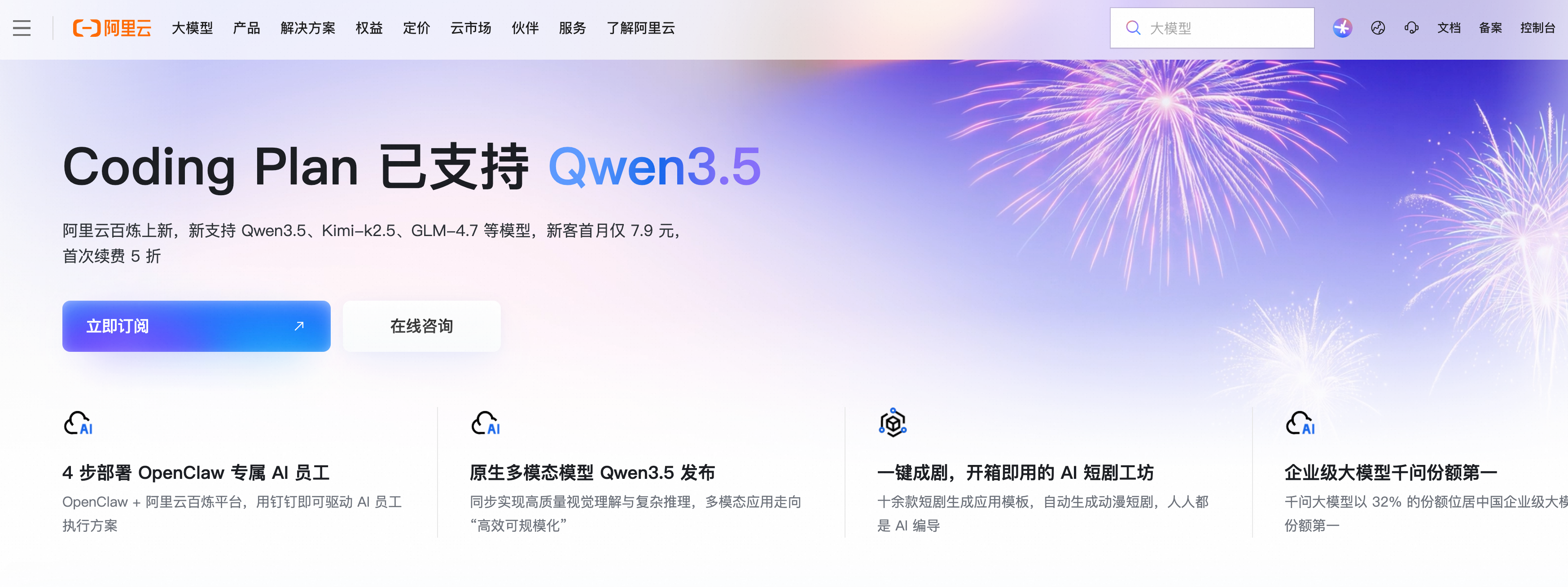
下载aliyun.png到项目目录下,并提问:
请加载image-analyzer skill,描述一下 aliyun.png banner位置是什么信息。可收到如下回复:aliyun.png 为阿里云官网首页截图,banner 区域标题为 Coding Plan 已支持 Qwen3.5,正文介绍阿里云百炼支持 Qwen3.5、Kimi-k2.5、GLM-4.7 等模型,新客首月仅 7.9 元,页面提供立即订阅和在线咨询入口。
-
OpenCode
-
添加 Agent
在项目目录下的
.opencode文件夹中新建agents目录:
mkdir -p .opencode/agents
在该目录下创建image-analyzer.md文件,并写入以下内容:
说明model 字段必须使用 OpenCode 配置文件中定义的 provider 和模型名称。参考 OpenCode 文档的配置示例,应为bailian-token-plan/qwen3.7-plus。
---
description: Analyzes images using a vision-capable model. Use this agent when the user needs to understand image content, extract information from screenshots, diagrams, UI mockups, or any visual content. Invoke with @image-analyzer followed by the image path and your question.
mode: subagent
model: bailian-token-plan/qwen3.7-plus
tools:
  write: false
  edit: false
---
You have vision capabilities. Analyze the provided image and return a clear, structured description focused on what the user is asking about.
创建完成后的目录结构如下:
.opencode/
└── agents/
    └── image-analyzer.md
-
开始使用
- 在项目目录下运行
opencode启动 OpenCode,并切换到deepseek-v4-pro模型。 - 下载aliyun.png到项目目录下,通过
@唤起image-analyzer并提问:@image-analyzer,描述一下 aliyun.png banner位置是什么信息。可收到如下回复:
- 在项目目录下运行
Banner位置包含:
左侧:
- 汉堡菜单图标
- 阿里云橙色logo和"阿里云"文字
- 导航菜单:大模型、产品、解决方案、权益、定价、云市场、伙伴、服务、了解阿里云
右侧:
- 搜索框(显示"大模型")
- 图标:蓝色圆圈、地球、耳机
- 链接:文档、备案、控制台
Build · deepseek-v4-pro · 37.0s
常见问题
OpenCode + 视觉理解模型为什么无法理解图片?
原因:OpenCode 默认不启用模型的视觉能力,需要在配置文件中显式声明 modalities 参数。
解决方案:在 OpenCode 配置文件的模型定义中添加 modalities 字段,将 input 设为 ["text", "image"],如下所示:
将sk-sp-xxx替换为Token Plan API Key。
{
  "$schema": "https://opencode.ai/config.json",
  "provider": {
    "bailian-token-plan": {
      "npm": "@ai-sdk/anthropic",
      "name": "Model Studio Token Plan",
      "options": {
        "baseURL": "https://token-plan.cn-beijing.maas.aliyuncs.com/compatible-mode/v1",
        "apiKey": "sk-sp-xxx"
      },
      "models": {
        "qwen3.6-plus": {
          "name": "Qwen3.6 Plus",
          "modalities": {
            "input": [
              "text",
              "image"
            ],
            "output": [
              "text"
            ]
          },
          "options": {
            "thinking": {
              "type": "enabled",
              "budgetTokens": 1024
            }
          }
        },
        "qwen3.8-flash": {
          "name": "Qwen3.8 Flash",
          "modalities": {
            "input": [
              "text",
              "image"
            ],
            "output": [
              "text"
            ]
          },
          "options": {
            "thinking": {
              "type": "enabled",
              "budgetTokens": 1024
            }
          }
        },
        "kimi-k2.5": {
          "name": "Kimi K2.5",
          "modalities": {
            "input": [
              "text",
              "image"
            ],
            "output": [
              "text"
            ]
          },
          "options": {
            "thinking": {
              "type": "enabled",
              "budgetTokens": 1024
            }
          }
        }
      }
    }
  }
}
OpenClaw + 视觉理解模型为什么无法理解图片?
原因:OpenClaw 需要通过配置文件中的 input 字段来判断模型是否支持视觉能力。
解决方案:
- 在
~/.openclaw/openclaw.json配置文件中,确保模型定义包含"input": ["text", "image"]字段。
{
  "models": {
    "mode": "merge",
    "providers": {
      "bailian": {
        "baseUrl": "https://token-plan.cn-beijing.maas.aliyuncs.com/compatible-mode/v1",
        "apiKey": "YOUR_API_KEY",
        "api": "openai-completions",
        "models": [
          {
            "id": "qwen3.6-plus",
            "name": "qwen3.6-plus",
            "reasoning": false,
            "input": ["text", "image"],
            "cost": { "input": 0, "output": 0, "cacheRead": 0, "cacheWrite": 0 },
            "contextWindow": 1000000,
            "maxTokens": 65536
          },
          {
            "id": "qwen3.8-flash",
            "name": "qwen3.8-flash",
            "reasoning": false,
            "input": ["text", "image"],
            "cost": { "input": 0, "output": 0, "cacheRead": 0, "cacheWrite": 0 },
            "contextWindow": 1000000,
            "maxTokens": 65536
          },
          {
            "id": "kimi-k2.5",
            "name": "kimi-k2.5",
            "reasoning": false,
            "input": ["text", "image"],
            "cost": { "input": 0, "output": 0, "cacheRead": 0, "cacheWrite": 0 },
            "contextWindow": 262144,
            "maxTokens": 32768
          }
        ]
      }
    }
  },
  "agents": {
    "defaults": {
      "model": {
        "primary": "bailian/qwen3.6-plus"
      },
      "models": {
        "bailian/qwen3.6-plus": {},
        "bailian/qwen3.8-flash": {},
        "bailian/kimi-k2.5": {}
      }
    }
  },
  "gateway": {
    "mode": "local"
  }
}
- 修改配置后,需要清除 OpenClaw 的模型缓存并重启,否则旧的配置仍会生效。
rm ~/.openclaw/agents/main/agent/models.json
openclaw gateway restart