
万相图生视频模型支持基于首帧图像、尾帧图像与文本提示词,生成平滑过渡的视频。
- 基础能力:固定视频时长(5秒)、指定视频分辨率(480P/720P/1080P)、智能改写prompt、添加水印。
- 特效模板:仅需输入首帧图片,再选择一个特效模板,生成具有特定动态效果的视频。
快速入口:API参考|Prompt指南| 万相-图生视频-视频特效列表
快速开始
| 输入提示词 | 输入首帧图像 | 输入尾帧图像 | 输出视频(无声视频) |
一个可爱且表情有些忧伤的蓝色小怪物站在雨中。镜头缓慢拉近,定格在小怪物抬头仰望天空的瞬间。 |  |  |
在调用前,先获取与配置 API Key,再配置API Key到环境变量。通过SDK进行调用,请安装DashScope SDK。
Python SDK
重要请确保 DashScope Python SDK 版本不低于1.25.8,再运行以下代码。
若版本过低,可能会触发 “url error, please check url!” 等错误。请参考安装SDK进行更新。
import os
from http import HTTPStatus
from dashscope import VideoSynthesis
import dashscope

# 以下为华北2(北京)地域的URL。请将 {WorkspaceId} 替换为您的百炼业务空间ID,各地域的URL不同,获取URL:https://help.aliyun.com/zh/model-studio/image-to-video-by-first-and-last-frame-api-reference
dashscope.base_http_api_url = 'https://{WorkspaceId}.cn-beijing.maas.aliyuncs.com/api/v1'
# 各地域的API Key不同。获取API Key:https://help.aliyun.com/zh/model-studio/get-api-key
api_key = os.getenv("DASHSCOPE_API_KEY", "YOUR_API_KEY")

print('please wait...')
rsp = VideoSynthesis.call(api_key=api_key,
                          model="wan2.2-kf2v-flash",
                          prompt="一个可爱且表情有些忧伤的蓝色小怪物站在雨中。镜头缓慢拉近,定格在小怪物抬头仰望天空的瞬间。",
                          first_frame_url="https://help-static-aliyun-doc.aliyuncs.com/file-manage-files/zh-CN/20260126/ixdxvt/wan-kf2v-blue-1.png",
                          last_frame_url="https://help-static-aliyun-doc.aliyuncs.com/file-manage-files/zh-CN/20260126/nhtdrc/wan-kf2v-blue-2.png",
                          duration=5,  # 固定为5,不可修改
                          resolution="720P",
                          prompt_extend=True,
                          watermark=True)
print(rsp)
if rsp.status_code == HTTPStatus.OK:
    print("video_url:", rsp.output.video_url)
else:
    print('Failed, status_code: %s, code: %s, message: %s' % (rsp.status_code, rsp.code, rsp.message))
Java SDK
重要请确保 DashScope Java SDK 版本不低于2.22.6,再运行以下代码。
若版本过低,可能会触发 “url error, please check url!” 等错误。请参考安装SDK进行更新。
import com.alibaba.dashscope.aigc.videosynthesis.VideoSynthesis;
import com.alibaba.dashscope.aigc.videosynthesis.VideoSynthesisParam;
import com.alibaba.dashscope.aigc.videosynthesis.VideoSynthesisResult;
import com.alibaba.dashscope.exception.ApiException;
import com.alibaba.dashscope.exception.InputRequiredException;
import com.alibaba.dashscope.exception.NoApiKeyException;
import com.alibaba.dashscope.utils.JsonUtils;
import com.alibaba.dashscope.utils.Constants;

public class Image2Video {

    static {
        // 以下为华北2(北京)地域的URL。请将 {WorkspaceId} 替换为您的百炼业务空间ID,各地域的URL不同,获取URL:https://help.aliyun.com/zh/model-studio/image-to-video-by-first-and-last-frame-api-reference
        Constants.baseHttpApiUrl = "https://{WorkspaceId}.cn-beijing.maas.aliyuncs.com/api/v1";
    }

    // 若没有配置环境变量,请用百炼API Key将下行替换为:apiKey="sk-xxx"
    // 各地域的API Key不同。获取API Key:https://help.aliyun.com/zh/model-studio/get-api-key
    static String apiKey = System.getenv("DASHSCOPE_API_KEY");

    public static void image2video() throws ApiException, NoApiKeyException, InputRequiredException {
        VideoSynthesis vs = new VideoSynthesis();
        VideoSynthesisParam param =
                VideoSynthesisParam.builder()
                        .apiKey(apiKey)
                        .model("wan2.2-kf2v-flash")
                        .prompt("一个可爱且表情有些忧伤的蓝色小怪物站在雨中。镜头缓慢拉近,定格在小怪物抬头仰望天空的瞬间。")
                        .firstFrameUrl("https://help-static-aliyun-doc.aliyuncs.com/file-manage-files/zh-CN/20260126/ixdxvt/wan-kf2v-blue-1.png")
                        .lastFrameUrl("https://help-static-aliyun-doc.aliyuncs.com/file-manage-files/zh-CN/20260126/nhtdrc/wan-kf2v-blue-2.png")
                        .resolution("720P")
                        .promptExtend(true)
                        .watermark(true)
                        .build();
        System.out.println("please wait...");
        VideoSynthesisResult result = vs.call(param);
        System.out.println(JsonUtils.toJson(result));
    }

    public static void main(String[] args) {
        try {
            image2video();
        } catch (ApiException | NoApiKeyException | InputRequiredException e) {
            System.out.println(e.getMessage());
        }
        System.exit(0);
    }
}
curl
步骤1:创建任务获取任务IDcurl --location 'https://{WorkspaceId}.cn-beijing.maas.aliyuncs.com/api/v1/services/aigc/image2video/video-synthesis' \
-H 'X-DashScope-Async: enable' \
-H "Authorization: Bearer $DASHSCOPE_API_KEY" \
-H 'Content-Type: application/json' \
-d '{
"model": "wan2.2-kf2v-flash",
"input": {
"first_frame_url": "https://help-static-aliyun-doc.aliyuncs.com/file-manage-files/zh-CN/20260126/ixdxvt/wan-kf2v-blue-1.png",
"last_frame_url": "https://help-static-aliyun-doc.aliyuncs.com/file-manage-files/zh-CN/20260126/nhtdrc/wan-kf2v-blue-2.png",
"prompt": "一个可爱且表情有些忧伤的蓝色小怪物站在雨中。镜头缓慢拉近,定格在小怪物抬头仰望天空的瞬间。"
},
"parameters": {
"resolution": "720P",
"prompt_extend": true,
"watermark": true
}
}'
将{task_id}完整替换为上一步接口返回的task_id的值。task_id查询有效期为24小时,并请将{WorkspaceId}替换为真实的业务空间ID。
curl -X GET https://{WorkspaceId}.cn-beijing.maas.aliyuncs.com/api/v1/tasks/{task_id} \
--header "Authorization: Bearer $DASHSCOPE_API_KEY"
video_url有效期24小时,请及时下载视频。
{
    "request_id": "c1209113-8437-424f-a386-xxxxxx",
    "output": {
        "task_id": "966cebcd-dedc-4962-af88-xxxxxx",
        "task_status": "SUCCEEDED",
        "video_url": "https://dashscope-result-sh.oss-accelerate.aliyuncs.com/xxx.mp4?Expires=xxx",
         ...
    },
    ...
}
适用范围
- 各地域支持的模型有所差异,且资源相互独立。各地域支持的模型请参见百炼控制台。
- 调用时,确保模型、Endpoint URL 和 API Key 均属于同一地域,跨地域调用将会失败。
说明本文的示例代码适用于北京地域。
核心能力
首尾帧生视频
支持模型:所有模型。
功能介绍:根据首帧和尾帧,生成平滑过渡的视频(无声视频)。
参数设置:first_frame_url:必填,必须传入首帧图像。last_frame_url:必填,必须传入尾帧图像。prompt:可选,推荐填写,控制视频画面的变化。
| 输入提示词 | 输入首帧图像 | 输入尾帧图像 | 输出视频(无声视频) |
写实风格,一只小黑猫好奇地仰望天空,镜头从平视角度逐渐升高,最后以俯视角度捕捉到它好奇的眼神。 | 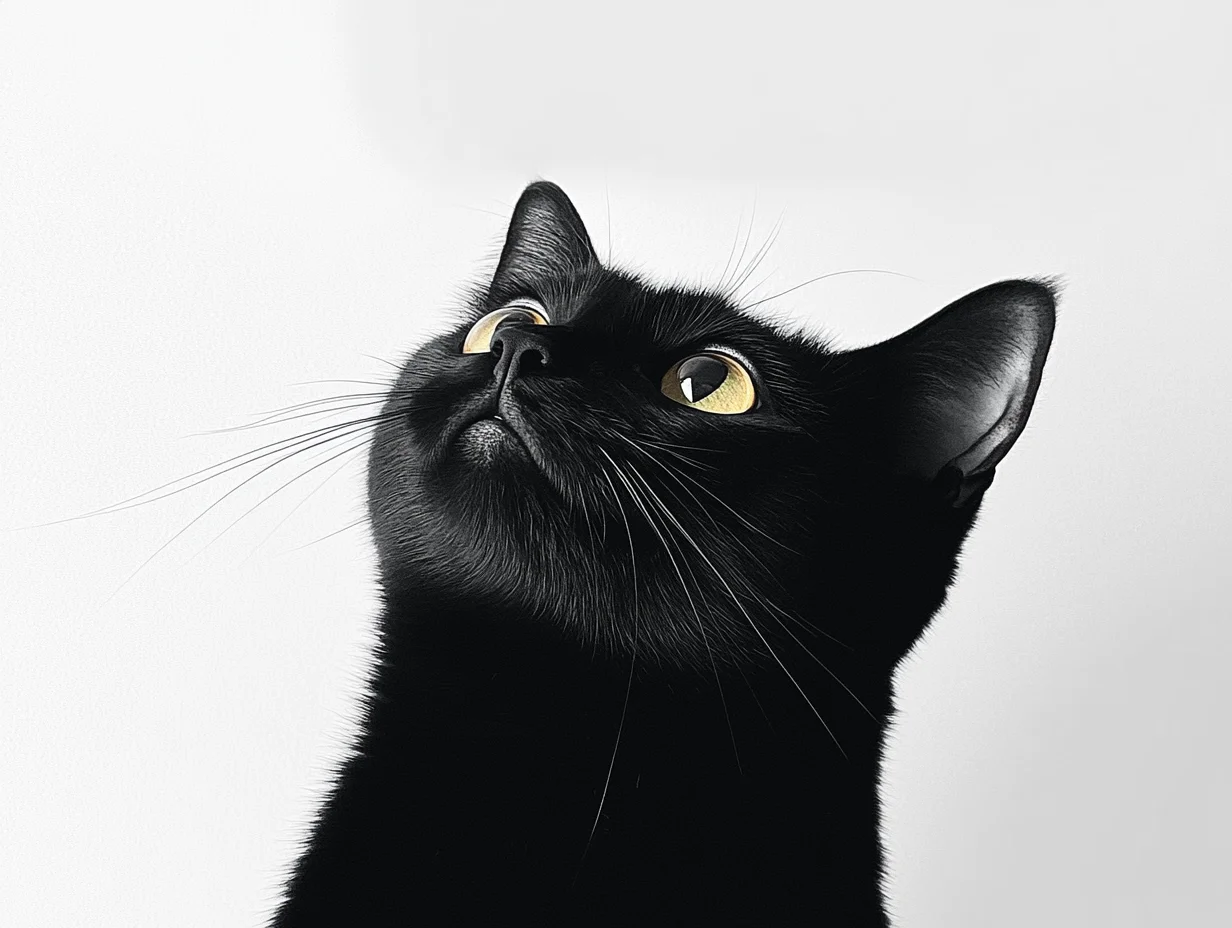 | 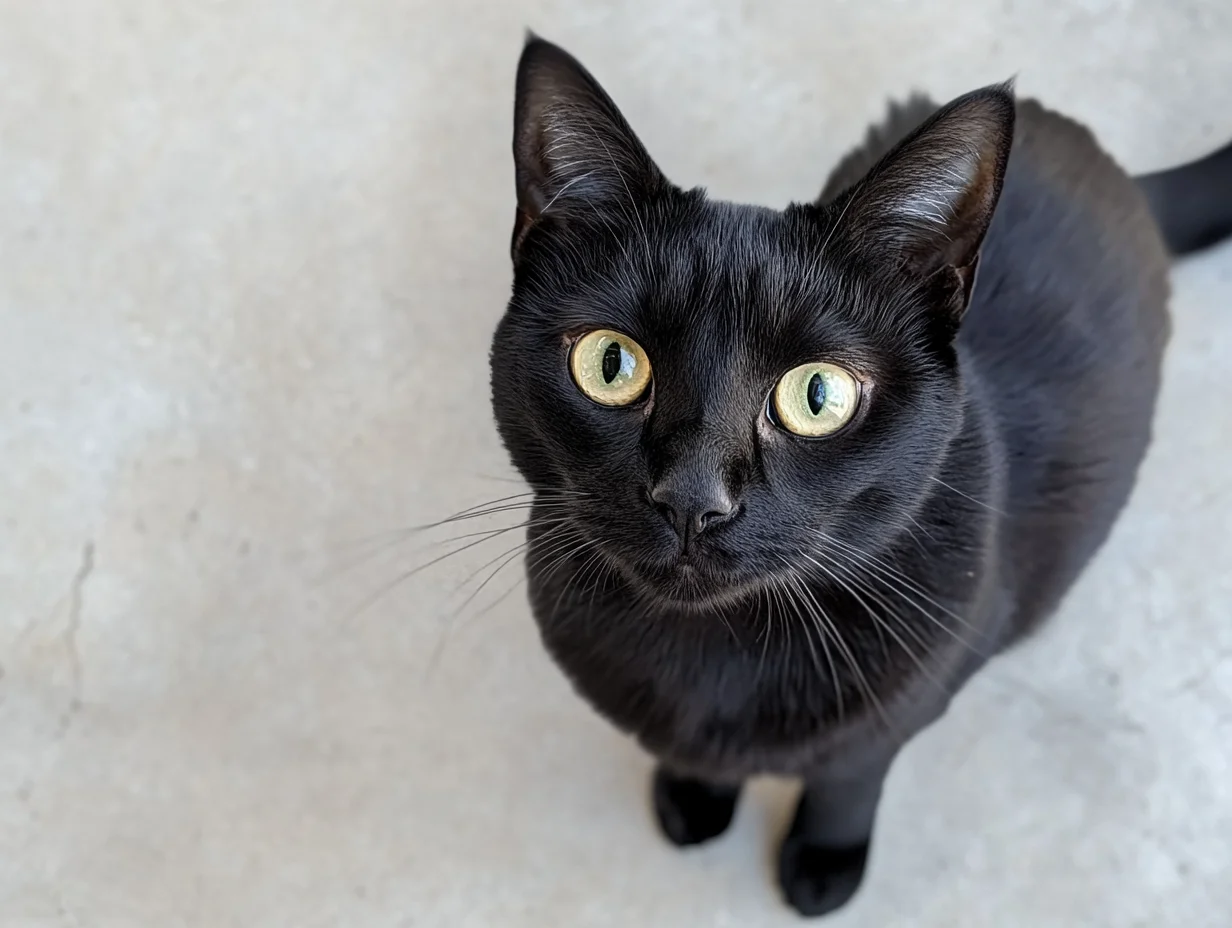 |
Python SDK
请确保 DashScope Python SDK 版本不低于
1.25.8,可参考安装SDK进行更新。
import os
from http import HTTPStatus
from dashscope import VideoSynthesis
import dashscope

# 以下为华北2(北京)地域的URL。请将 {WorkspaceId} 替换为您的百炼业务空间ID,各地域的URL不同,获取URL:https://help.aliyun.com/zh/model-studio/image-to-video-api-reference
dashscope.base_http_api_url = 'https://{WorkspaceId}.cn-beijing.maas.aliyuncs.com/api/v1'

# 若没有配置环境变量,请用百炼API Key将下行替换为:api_key="sk-xxx"
# 各地域的API Key不同。获取API Key:https://help.aliyun.com/zh/model-studio/get-api-key
api_key = os.getenv("DASHSCOPE_API_KEY")

def sample_async_call_kf2v():
    # 异步调用,返回一个task_id
    rsp = VideoSynthesis.async_call(api_key=api_key,
                                    model="wan2.2-kf2v-flash",
                                    prompt="写实风格,一只黑色小猫好奇地看向天空,镜头从平视逐渐上升,最后俯拍它的好奇的眼神。",
                                    first_frame_url="https://wanx.alicdn.com/material/20250318/first_frame.png",
                                    last_frame_url="https://wanx.alicdn.com/material/20250318/last_frame.png",
                                    duration=5,  # 固定为5,不可修改
                                    prompt_extend=True,
                                    watermark=True)
    print(rsp)
    if rsp.status_code == HTTPStatus.OK:
        print("task_id: %s" % rsp.output.task_id)
    else:
        print('Failed, status_code: %s, code: %s, message: %s' % (rsp.status_code, rsp.code, rsp.message))

    # 等待异步任务结束
    rsp = VideoSynthesis.wait(task=rsp, api_key=api_key)
    print(rsp)
    if rsp.status_code == HTTPStatus.OK:
        print(rsp.output.video_url)
    else:
        print('Failed, status_code: %s, code: %s, message: %s' % (rsp.status_code, rsp.code, rsp.message))

if __name__ == '__main__':
    sample_async_call_kf2v()
Java SDK
请确保 DashScope Java SDK 版本不低于
2.22.6,可参考安装SDK进行更新。
import com.alibaba.dashscope.aigc.videosynthesis.VideoSynthesis;
import com.alibaba.dashscope.aigc.videosynthesis.VideoSynthesisParam;
import com.alibaba.dashscope.aigc.videosynthesis.VideoSynthesisResult;
import com.alibaba.dashscope.exception.ApiException;
import com.alibaba.dashscope.exception.InputRequiredException;
import com.alibaba.dashscope.exception.NoApiKeyException;
import com.alibaba.dashscope.utils.JsonUtils;
import com.alibaba.dashscope.utils.Constants;

public class Image2Video {

    static {
        // 以下为华北2(北京)地域的URL。请将 {WorkspaceId} 替换为您的百炼业务空间ID,各地域的URL不同,获取URL:https://help.aliyun.com/zh/model-studio/image-to-video-by-first-and-last-frame-api-reference
        Constants.baseHttpApiUrl = "https://{WorkspaceId}.cn-beijing.maas.aliyuncs.com/api/v1";
    }

    // 若没有配置环境变量,请用百炼API Key将下行替换为:apiKey="sk-xxx"
    // 各地域的API Key不同。获取API Key:https://help.aliyun.com/zh/model-studio/get-api-key
    static String apiKey = System.getenv("DASHSCOPE_API_KEY");

    public static void image2video() throws ApiException, NoApiKeyException, InputRequiredException {
        VideoSynthesis vs = new VideoSynthesis();
        VideoSynthesisParam param =
                VideoSynthesisParam.builder()
                        .apiKey(apiKey)
                        .model("wan2.2-kf2v-flash")
                        .prompt("写实风格,一只黑色小猫好奇地看向天空,镜头从平视逐渐上升,最后俯拍它的好奇的眼神。")
                        .firstFrameUrl("https://wanx.alicdn.com/material/20250318/first_frame.png")
                        .lastFrameUrl("https://wanx.alicdn.com/material/20250318/last_frame.png")
                        .resolution("720P")
                        .promptExtend(true)
                        .watermark(true)
                        .build();
        // 异步调用
        VideoSynthesisResult task = vs.asyncCall(param);
        System.out.println(JsonUtils.toJson(task));
        System.out.println("please wait...");

        //获取结果
        VideoSynthesisResult result = vs.wait(task, apiKey);
        System.out.println(JsonUtils.toJson(result));
    }

    public static void main(String[] args) {
        try {
            image2video();
        } catch (ApiException | NoApiKeyException | InputRequiredException e) {
            System.out.println(e.getMessage());
        }
        System.exit(0);
    }
}
curl
步骤1:创建任务获取任务IDcurl --location 'https://{WorkspaceId}.cn-beijing.maas.aliyuncs.com/api/v1/services/aigc/image2video/video-synthesis' \
-H 'X-DashScope-Async: enable' \
-H "Authorization: Bearer $DASHSCOPE_API_KEY" \
-H 'Content-Type: application/json' \
-d '{
"model": "wan2.2-kf2v-flash",
"input": {
"first_frame_url": "https://wanx.alicdn.com/material/20250318/first_frame.png",
"last_frame_url": "https://wanx.alicdn.com/material/20250318/last_frame.png",
"prompt": "写实风格,一只黑色小猫好奇地看向天空,镜头从平视逐渐上升,最后俯拍它的好奇的眼神。"
},
"parameters": {
"resolution": "720P",
"prompt_extend": true,
"watermark": true
}
}'
将{task_id}完整替换为上一步接口返回的task_id的值。task_id查询有效期为24小时,并请将{WorkspaceId}替换为真实的业务空间ID。
curl -X GET https://{WorkspaceId}.cn-beijing.maas.aliyuncs.com/api/v1/tasks/{task_id} \
--header "Authorization: Bearer $DASHSCOPE_API_KEY"
使用视频特效
支持模型:wanx2.1-kf2v-plus。
功能介绍:输入首帧,无需输入提示词和尾帧图像,直接使用内置的特效模板,实现特定特效。
参数设置:template:必填,指定特效名称(例如 "mech1" 表示机械觉醒特效)。调用前请查阅万相-图生视频-视频特效列表,确认模型是否支持,以免调用失败。first_frame_url:必填,必须传入首帧图像。last_frame_url:忽略,在使用特效时,last_frame_url 字段无效,建议留空或不传。prompt:忽略,在使用特效时,prompt 字段无效,建议留空或不传。
| 输入首帧图像 | 输出视频(特效视频) |
 |
Python SDK
请确保 DashScope Python SDK 版本不低于
1.25.8,可参考安装SDK进行更新。
import os
from http import HTTPStatus
from dashscope import VideoSynthesis
import dashscope

# 以下为华北2(北京)地域的URL。请将 {WorkspaceId} 替换为您的百炼业务空间ID,各地域的URL不同,获取URL:https://help.aliyun.com/zh/model-studio/image-to-video-by-first-and-last-frame-api-reference
dashscope.base_http_api_url = 'https://{WorkspaceId}.cn-beijing.maas.aliyuncs.com/api/v1'

# 若没有配置环境变量,请用百炼API Key将下行替换为:api_key="sk-xxx"
# 各地域的API Key不同。获取API Key:https://help.aliyun.com/zh/model-studio/get-api-key
api_key = os.getenv("DASHSCOPE_API_KEY")

def sample_async_call_kf2v():
    # 异步调用,返回一个task_id
    rsp = VideoSynthesis.async_call(api_key=api_key,
                                    model="wanx2.1-kf2v-plus",
                                    first_frame_url="https://ty-yuanfang.oss-cn-hangzhou.aliyuncs.com/lizhengjia.lzj/tmp/11.png",
                                    resolution="720P",
                                    template="mech1",
                                    watermark=True)
    print(rsp)
    if rsp.status_code == HTTPStatus.OK:
        print("task_id: %s" % rsp.output.task_id)
    else:
        print('Failed, status_code: %s, code: %s, message: %s' % (rsp.status_code, rsp.code, rsp.message))

    # 等待异步任务结束
    rsp = VideoSynthesis.wait(task=rsp, api_key=api_key)
    print(rsp)
    if rsp.status_code == HTTPStatus.OK:
        print(rsp.output.video_url)
    else:
        print('Failed, status_code: %s, code: %s, message: %s' % (rsp.status_code, rsp.code, rsp.message))

if __name__ == '__main__':
    sample_async_call_kf2v()
Java SDK
请确保 DashScope Java SDK 版本不低于
2.22.6,可参考安装SDK进行更新。
import com.alibaba.dashscope.aigc.videosynthesis.VideoSynthesis;
import com.alibaba.dashscope.aigc.videosynthesis.VideoSynthesisParam;
import com.alibaba.dashscope.aigc.videosynthesis.VideoSynthesisResult;
import com.alibaba.dashscope.exception.ApiException;
import com.alibaba.dashscope.exception.InputRequiredException;
import com.alibaba.dashscope.exception.NoApiKeyException;
import com.alibaba.dashscope.utils.JsonUtils;
import com.alibaba.dashscope.utils.Constants;

public class Image2Video {
    static {
        // 以下为华北2(北京)地域的URL。请将 {WorkspaceId} 替换为您的百炼业务空间ID,各地域的URL不同,获取URL:https://help.aliyun.com/zh/model-studio/image-to-video-by-first-and-last-frame-api-reference
        Constants.baseHttpApiUrl = "https://{WorkspaceId}.cn-beijing.maas.aliyuncs.com/api/v1";
    }

    // 若没有配置环境变量,请用百炼API Key将下行替换为:apiKey="sk-xxx"
    // 各地域的API Key不同。获取API Key:https://help.aliyun.com/zh/model-studio/get-api-key
    static String apiKey = System.getenv("DASHSCOPE_API_KEY");

    public static void image2video() throws ApiException, NoApiKeyException, InputRequiredException {
        VideoSynthesis vs = new VideoSynthesis();
        VideoSynthesisParam param =
                VideoSynthesisParam.builder()
                        .apiKey(apiKey)
                        .model("wanx2.1-kf2v-plus")
                        .firstFrameUrl("https://ty-yuanfang.oss-cn-hangzhou.aliyuncs.com/lizhengjia.lzj/tmp/11.png")
                        .template("mech1")   /*特效模板*/
                        .resolution("720P")
                        .watermark(true)
                        .build();
        // 异步调用
        VideoSynthesisResult task = vs.asyncCall(param);
        System.out.println(JsonUtils.toJson(task));
        System.out.println("please wait...");

        //获取结果
        VideoSynthesisResult result = vs.wait(task, apiKey);
        System.out.println(JsonUtils.toJson(result));
    }

    public static void main(String[] args) {
        try {
            image2video();
        } catch (ApiException | NoApiKeyException | InputRequiredException e) {
            System.out.println(e.getMessage());
        }
        System.exit(0);
    }
}
curl
步骤1:创建任务获取任务IDcurl --location 'https://{WorkspaceId}.cn-beijing.maas.aliyuncs.com/api/v1/services/aigc/image2video/video-synthesis' \
-H 'X-DashScope-Async: enable' \
-H "Authorization: Bearer $DASHSCOPE_API_KEY" \
-H 'Content-Type: application/json' \
-d '{
"model": "wanx2.1-kf2v-plus",
"input": {
"first_frame_url": "https://ty-yuanfang.oss-cn-hangzhou.aliyuncs.com/lizhengjia.lzj/tmp/11.png",
"template": "mech1"
},
"parameters": {
"resolution": "720P",
"watermark": true
}
}'
将{task_id}完整替换为上一步接口返回的task_id的值。task_id查询有效期为24小时,并请将{WorkspaceId}替换为真实的业务空间ID。
curl -X GET https://{WorkspaceId}.cn-beijing.maas.aliyuncs.com/api/v1/tasks/{task_id} \
--header "Authorization: Bearer $DASHSCOPE_API_KEY"
如何输入图像
- 图像数量:1张首帧图像,1张尾帧图像。
- 输入方式:图像URL、本地文件路径、Base64 编码字符串。

方式二:本地文件路径(仅限SDK)
不同编程语言(Python/Java)对文件路径的要求略有不同,请严格参照下方规则拼写。
Python SDK:支持绝对路径和相对路径。文件路径规则如下:
操作系统 | 传入的文件路径 | 示例(绝对路径) | 示例(相对路径) |
|---|---|---|---|
Linux / macOS | file://{文件的绝对路径或相对路径} | file:///home/images/test.png | file://./images/test.png |
Windows | file://D:/images/test.png | file://./images/test.png |
Java SDK:仅支持绝对路径。文件路径规则如下:
操作系统 | 传入的文件路径 | 示例(绝对路径) |
|---|---|---|
Linux / macOS | file://{文件的绝对路径} | file:///home/images/test.png |
Windows | file:///{文件的绝对路径} | file:///D:/images/test.png |
方式三:Base64 编码字符串(HTTP 接口、SDK)
-
示例值:
data:image/png;base64,iVBORw0KGgoAAAANSUhEUgAABDg......(示例已截断,仅做演示)。 -
格式要求:遵循
data:{MIME_type};base64,{base64_data}的格式,其中:-
{base64_data}:图像文件经过 Base64 编码后的字符串。
-
{MIME_type}:图像的媒体类型,需与文件格式对应。
图像格式
MIME Type
JPEG
image/jpeg
JPG
image/jpeg
PNG
image/png
BMP
image/bmp
WEBP
image/webp
-
示例代码:图像的多种输入方式
import base64
import os
from http import HTTPStatus
from dashscope import VideoSynthesis
import mimetypes
import dashscope

# 以下为北京地域URL,各地域的URL不同,获取URL:https://help.aliyun.com/zh/model-studio/text-to-video-api-reference
dashscope.base_http_api_url = 'https://{WorkspaceId}.cn-beijing.maas.aliyuncs.com/api/v1'

# 若没有配置环境变量,请用百炼API Key将下行替换为:api_key="sk-xxx"
# 各地域的API Key不同。获取API Key:https://help.aliyun.com/zh/model-studio/get-api-key
api_key = os.getenv("DASHSCOPE_API_KEY")

# --- 辅助函数:用于 Base64 编码 ---
# 格式为 data:{MIME_type};base64,{base64_data}
def encode_file(file_path):
    mime_type, _ = mimetypes.guess_type(file_path)
    if not mime_type or not mime_type.startswith("image/"):
        raise ValueError("不支持或无法识别的图像格式")
    with open(file_path, "rb") as image_file:
        encoded_string = base64.b64encode(image_file.read()).decode('utf-8')
    return f"data:{mime_type};base64,{encoded_string}"

"""
图像输入方式说明:
以下提供了三种图片输入方式,三选一即可

1. 使用公网URL - 适合已有公开可访问的图片
2. 使用本地文件 - 适合本地开发测试
3. 使用Base64编码 - 适合私有图片或需要加密传输的场景
"""

# 【方式一】使用公网图片 URL
first_frame_url = "https://wanx.alicdn.com/material/20250318/first_frame.png"
last_frame_url = "https://wanx.alicdn.com/material/20250318/last_frame.png"

# 【方式二】使用本地文件(支持绝对路径和相对路径)
# 格式要求:file:// + 文件路径
# 示例(绝对路径):
# first_frame_url = "file://" + "/path/to/your/first_frame.png"  # Linux/macOS
# last_frame_url = "file://" + "C:/path/to/your/last_frame.png"  # Windows
# 示例(相对路径):
# first_frame_url = "file://" + "./first_frame.png"              # 以实际路径为准
# last_frame_url = "file://" + "./last_frame.png"                # 以实际路径为准

# 【方式三】使用Base64编码的图片
# first_frame_url = encode_file("./first_frame.png")            # 以实际路径为准
# last_frame_url = encode_file("./last_frame.png")              # 以实际路径为准

def sample_sync_call_kf2v():
    print('please wait...')
    rsp = VideoSynthesis.call(api_key=api_key,
                              model="wan2.2-kf2v-flash",
                              prompt="写实风格,一只黑色小猫好奇地看向天空,镜头从平视逐渐上升,最后俯拍它的好奇的眼神。",
                              first_frame_url=first_frame_url,
                              last_frame_url=last_frame_url,
                              resolution="720P",
                              prompt_extend=True)
    print(rsp)
    if rsp.status_code == HTTPStatus.OK:
        print(rsp.output.video_url)
    else:
        print('Failed, status_code: %s, code: %s, message: %s' %
              (rsp.status_code, rsp.code, rsp.message))

if __name__ == '__main__':
    sample_sync_call_kf2v()
// Copyright (c) Alibaba, Inc. and its affiliates.

import com.alibaba.dashscope.aigc.videosynthesis.VideoSynthesis;
import com.alibaba.dashscope.aigc.videosynthesis.VideoSynthesisParam;
import com.alibaba.dashscope.aigc.videosynthesis.VideoSynthesisResult;
import com.alibaba.dashscope.exception.ApiException;
import com.alibaba.dashscope.exception.InputRequiredException;
import com.alibaba.dashscope.exception.NoApiKeyException;
import com.alibaba.dashscope.utils.Constants;
import com.alibaba.dashscope.utils.JsonUtils;

import java.io.IOException;
import java.nio.file.Files;
import java.nio.file.Path;
import java.nio.file.Paths;
import java.util.Base64;
import java.util.HashMap;
import java.util.Map;

/**
 * 环境要求
 *      dashscope java SDK >= 2.20.9
 * 更新maven依赖:
 *      https://mvnrepository.com/artifact/com.alibaba/dashscope-sdk-java
 */
public class Kf2vSync {

    static {
        // 以下为华北2(北京)地域的URL,调用时请将 {WorkspaceId} 替换为真实的业务空间ID,各地域的URL不同。
输出视频
-
视频数量:1个。
-
视频规格:各模型的输出规格有所差异,具体请参见视频规格。
-
视频URL有效期:24小时。
-
视频尺寸:由输入首帧图像和设置的分辨率
resolution决定。- 模型将尽量保持输入首帧图像的宽高比不变,缩放总像素数接近目标值。因编码规范,输出视频的宽高必须被16整除,模型会自动微调尺寸。
- 例如:输入图像750×1000(宽高比 3:4 = 0.75),设置 resolution = "720P"(目标总像素约 92 万)。最终输出可能为 816 × 1104(宽高比 ≈ 0.739,总像素 ≈ 90 万),且宽高均为 16 的倍数。
计费与限流
API文档
常见问题
Q:如何生成特定宽高比(如3:4)的视频?
A:当前 API 不支持直接指定视频宽高比。您只能通过 resolution 参数设置视频的分辨率。
resolution 控制的是视频的总像素数量,而非严格固定宽高比。模型会优先保留首帧图像(first_frame_url)的原始宽高比,并在此基础上进行微调,以满足视频编码要求(即宽度和高度均需为 16 的整数倍)。因此,若希望输出接近 3:4 的视频,建议上传宽高比为 3:4 的首帧图像,模型将尽可能保持该比例。
例如:输入图像750×1000(宽高比 3:4 = 0.75),设置 resolution = "720P"(目标总像素约 92 万)。最终输出可能为 816 × 1104(宽高比 ≈ 0.739,总像素 ≈ 90 万),且宽高均为 16 的倍数。
Q:为什么运行SDK代码时出现 “url error, please check url!” 错误?
A:请确保:
- DashScope Python SDK 版本不低于
1.25.8。 - DashScope Java SDK 版本不低于
2.22.6。
若版本过低,可能会触发 “url error, please check url!” 的错误。请参考升级SDK进行更新。