
EasyCkpt是PAI为PyTorch大模型训练开发的高性能Checkpoint框架,通过近零开销的模型保存机制,实现训练全过程进度无损的保存与恢复。任务中断后可从最新Checkpoint继续训练,避免重复计算。目前支持Megatron和DeepSpeed框架。
背景信息
大模型训练过程中可能遇到硬件故障、系统异常等问题,频繁中断会造成大量训练进度损失。虽然Checkpoint可以保存和恢复进度,但其耗时与模型大小成正比——百亿到千亿参数的模型,Checkpoint通常需要几分钟到十几分钟,期间训练必须暂停。中断后需重新计算丢失的迭代,通常耗时数小时。以1千卡规模为例,损失将达数千卡时。

因此,需要一种低成本的方法保存最新Checkpoint,以便故障后快速恢复训练、避免重复计算。
功能介绍
PAI从大量故障案例中总结出GPU和深度学习场景的以下特点:
特点1:任务的故障是部分的。
通常,故障的根因是一到两台机器的故障,这只会影响部分Worker。对于大规模分布式训练任务而言,不会所有的Worker都出现故障。

特点2:机器的故障是部分的。
通过对众多故障失败案例的分析,对于训练集群而言:
GPU易损坏,但机器的CPU和内存通常仍可正常使用。
以节点为单位,内存的闲置空间很大(通常远大于模型状态)。
节点上所有网卡同时损坏的概率极低,即使节点故障,通常仍具备通信能力。

特点3:模型的失败是部分的。
大规模模型训练通常采用3D并行或ZeRO优化,数据并行副本数大于1,模型参数在多个副本上有备份。某个GPU故障时,可从其他机器的副本恢复。
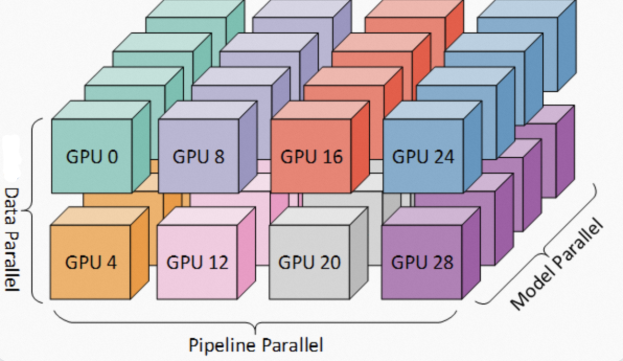
基于上述特点,PAI开发了EasyCkpt框架。EasyCkpt通过异步化层次化保存、重叠模型拷贝与计算、网络感知异步存储等策略,实现近零开销的模型保存和全过程精度无损的恢复能力。目前支持Megatron和DeepSpeed框架,只需修改几行代码即可接入。
操作入口
安装AIMaster SDK
本功能依赖AIMaster SDK,其安装方式如下:
# py36
pip install -U http://odps-release.cn-hangzhou.oss.aliyun-inc.com/aimaster/pai_aimaster-1.2.1-cp36-cp36m-linux_x86_64.whl

# py38
pip install -U http://odps-release.cn-hangzhou.oss.aliyun-inc.com/aimaster/pai_aimaster-1.2.1-cp38-cp38-linux_x86_64.whl

# py310
pip install -U http://odps-release.cn-hangzhou.oss.aliyun-inc.com/aimaster/pai_aimaster-1.2.1-cp310-cp310-linux_x86_64.whl
Megatron
改动示例
training.py文件修改后的代码如下:
from megatron.core.utils import get_model_config
from megatron import print_rank_0
from megatron import print_rank_last
# from megatron.checkpointing import load_checkpoint
from megatron.checkpointing import save_checkpoint
from megatron.model import Float16Module
from megatron.model import GPTModel
from megatron.utils import report_memory
from megatron.model.vision.knn_monitor import compute_feature_bank
from aimaster.python.torch.easyckpt.megatron import (load_checkpoint,
                                                    initialize_easyckpt,
                                                    save_checkpoint_if_needed)

def print_datetime(string):
    """Note that this call will sync across all ranks."""
    timers('interval-time', log_level=0).start(barrier=True)
    print_datetime('before the start of training step')
    report_memory_flag = True

    initialize_easyckpt(save_mem_interval=1, save_storage_interval=5, max_ckpt_num=5, log_file_path='./test.log')

    while iteration < args.train_iters:
        if args.profile and \
           iteration == args.profile_step_start and \
                                       args.micro_batch_size * \
                                       get_num_microbatches()

        save_checkpoint_if_needed(iteration, model, optimizer, opt_param_scheduler)

        # Logging.
        loss_scale = optimizer.get_loss_scale().item()
params_norm = None实际训练代码(以pretrain_gpt.py为例)修改后的代码如下:
from megatron.utils import average_losses_across_data_parallel_group
from megatron.arguments import core_transformer_config_from_args

import aimaster.python.torch.easyckpt.megatron.hook

def model_provider(pre_process=True, post_process=True):
    """Build the model."""
接口详解
适用于Megatron的EasyCkpt框架提供了以下接口,其插入位置如上所示:
load_checkpoint(model, optimizer, opt_param_scheduler, load_arg='load', strict=True, concat=False):该接口在Megatron框架原生
load_checkpoint()函数签名基础上增加了concat参数,若您使用的是Megatron2304版本,只需平替掉Megatron的load_checkpoint即可;如果您使用2305或2306版本,请参考下面注意事项的描述。initialize_easyckpt(save_mem_interval, save_storage_interval, max_ckpt_num, log_file_path=None):该接口用于初始化Easyckpt框架。其中,通过save_mem_interval指定memory copy的频率,通过save_storage_interval指定异步存储到存储设备的频率,通过max_ckpt_num指定存储设备中最多保存的Checkpoints数目。若需要保存详尽log信息可指定log路径到log_file_path里。
save_checkpoint_if_needed(iteration, model, optimizer, opt_param_scheduler):该接口用于调用EasyCkpt框架进行内存中的Checkpoint操作,其中各参数均为Megatron代码内已有的变量名,您无需额外指定。
注意:如果您使用Megatron2305或2306的稳定版本,并且您开启了distributed-optimizer。那么,当您在load的时候需要改变机器数目,或是希望合并分布式优化器参数时,您需要在training.py文件里load_checkpoint()函数被调用处设置concat参数为True。
@@ -387,7 +391,7 @@ def setup_model_and_optimizer(model_provider_func,
      if args.load is not None:
          timers = get_timers()
          timers('load-checkpoint', log_level=0).start(barrier=True)
-            args.iteration = load_checkpoint(model, optimizer, opt_param_scheduler)
+            args.iteration = load_checkpoint(model, optimizer, opt_param_scheduler, concat=True)
          timers('load-checkpoint').stop(barrier=True)
          timers.log(['load-checkpoint'])
      else:
DeepSpeed
DeepSpeed用户通常使用Transformer的Trainer启动任务,EasyCkpt兼容该方式,改动量极小。
改动示例
启动参数:EasyCkpt复用Transformer的Checkpoint参数,含义与Transformer中一致。以下配置示例表示每2个mini-batch保存一次Checkpoint,最多保留最近2个副本。
修改后的代码如下:
--max_steps=10 \
--block_size=2048 \
--num_train_examples=100000 \
--gradient_checkpointing=false \
--save_strategy="steps" \
--save_steps="2" \
--save_total_limit="2"训练代码改动:Transformer的Trainer需要用EasyCkpt提供的TrainerWrapper进行包装,并打开resume_from_Checkpoint参数。
修改后的代码如下:
import datasets
import transformers

from aimaster.python.torch.easyckpt.transformers import TrainerWrapper

logger = logging.getLogger(__name__)

    tokenizer=tokenizer,
    data_collator=transformers.default_data_collator,
  )
  trainer = TrainerWrapper(trainer)
  trainer.train(resume_from_checkpoint=True)

if __name__ = ""__main__":
  main()
接口详解
适用于DeepSpeed的EasyCkpt框架提供了以下接口,其插入位置如上所示:
save_strategy:训练过程中Checkpoint的保留方式。取值如下:
no: 训练期间不进行保存。
epoch:在每个epoch结束时进行保存。
steps:根据save_steps的设置进行保存。
save_steps:训练过程中每隔多少步保存一次Checkpoint,这里要求save_strategy必须是"steps"。
save_total_limit:最多保留多少个Checkpoint。
注意:按照Transformers官方文档,使用save_total_limit时会将过时的checkpoints文件夹删除掉,请确保过时的checkpoints文件夹是能够安全删除的。
数据安全须知
EasyCkpt会在您的存储空间中读写数据,并在控制Checkpoint数量时可能删除旧数据。以下是EasyCkpt的读写行为说明和数据安全保证。
EasyCkpt引入了以下读写动作,使用EasyCkpt即表示默认授权:
从load目录中读取Checkpoint数据,并在需要时将其拼接成新的checkpoint数据。
将checkpoints数据保存到save目录中,并在必要时根据功能设定删除save目录中具有Megatron或Transformers格式的checkpoint文件夹。
在此基础上,EasyCkpt提供以下保证:
不会对save和load目录以外的数据做任何操作。
EasyCkpt会以日志形式记录其进行的所有保存或删除的操作。
强烈建议您不要在模型的save或load文件路径下存放任何其他数据。这种设置不符合EasyCkpt的预期用法,可能影响EasyCkpt的软件能力。由此造成的数据风险和数据损失问题,使用者应自行承担责任。