
标签传播算法LPA(Label Propagation Algorithm)是基于图的半监督学习方法,其基本思路是节点的标签(community)依赖其相邻节点的标签信息,影响程度由节点相似度决定,并通过传播迭代更新达到稳定。标签传播聚类组件能够输出图中所有节点均收敛时各节点对应的组。
算法说明
图聚类是根据图的拓扑结构,进行子图的划分,使得子图内部节点的连接较多,子图之间的连接较少。
在用一个唯一的标签初始化每个节点之后,该算法会重复地将一个节点的标签社群化为该节点的相邻节点中出现频率最高的标签。当每个节点的标签在其相邻节点中出现得最频繁时,算法就会停止。
配置组件
方法一:可视化方式
在Designer工作流页面添加标签传播聚类组件,并在界面右侧配置相关参数:
参数类型 | 参数 | 描述 |
字段设置 | 顶点表:选择顶点列 | 顶点表的点所在列。 |
顶点表:选择权值列 | 顶点表的点的权重所在列。 | |
边表:选择源顶点列 | 边表的起点所在列。 | |
边表:选择目标顶点列 | 边表的终点所在列。 | |
边表:选择权值列 | 边表边的权重所在列。 | |
参数设置 | 最大迭代次数 | 最大迭代次数,默认值为30。 |
执行调优 | 进程数 | 作业并行执行的节点数。数字越大并行度越高,但是框架通讯开销会增大。 |
进程内存 | 单个作业可使用的最大内存量,单位:MB,默认值为4096。 如果实际使用内存超过该值,会抛出 |
方法二:PAI命令方式
使用PAI命令配置标签传播聚类组件参数。您可以使用SQL脚本组件进行PAI命令调用,详情请参见场景4:在SQL脚本组件中执行PAI命令。
PAI -name LabelPropagationClustering
    -project algo_public
    -DinputEdgeTableName=LabelPropagationClustering_func_test_edge
    -DfromVertexCol=flow_out_id
    -DtoVertexCol=flow_in_id
    -DinputVertexTableName=LabelPropagationClustering_func_test_node
    -DvertexCol=node
    -DoutputTableName=LabelPropagationClustering_func_test_result
    -DhasEdgeWeight=true
    -DedgeWeightCol=edge_weight
    -DhasVertexWeight=true
    -DvertexWeightCol=node_weight
    -DrandSelect=true
    -DmaxIter=100;
参数 | 是否必选 | 默认值 | 描述 |
inputEdgeTableName | 是 | 无 | 输入边表名。 |
inputEdgeTablePartitions | 否 | 全表读入 | 输入边表的分区。 |
fromVertexCol | 是 | 无 | 输入边表的起点所在列。 |
toVertexCol | 是 | 无 | 输入边表的终点所在列。 |
inputVertexTableName | 是 | 无 | 输入顶点表名称。 |
inputVertexTablePartitions | 否 | 全表读入 | 输入顶点表的分区。 |
vertexCol | 是 | 无 | 输入顶点表的点所在列。 |
outputTableName | 是 | 无 | 输出表名。 |
outputTablePartitions | 否 | 无 | 输出表的分区。 |
lifecycle | 否 | 无 | 输出表的生命周期。 |
workerNum | 否 | 未设置 | 作业并行执行的节点数。数字越大并行度越高,但是框架通讯开销会增大。 |
workerMem | 否 | 4096 | 单个作业可使用的最大内存量,单位:MB,默认值为4096。 如果实际使用内存超过该值,会抛出 |
splitSize | 否 | 64 | 数据切分的大小,单位:MB。 |
hasEdgeWeight | 否 | false | 输入边表的边是否有权重。 |
edgeWeightCol | 否 | 无 | 输入边表边的权重所在列。 |
hasVertexWeight | 否 | false | 输入顶点表的点是否有权重。 |
vertexWeightCol | 否 | 无 | 输入顶点表的点的权重所在列。 |
randSelect | 否 | false | 是否随机选择最大标签。 |
maxIter | 否 | 30 | 最大迭代次数。 |
使用示例
添加SQL脚本组件,输入以下SQL语句生成训练数据。
drop table if exists LabelPropagationClustering_func_test_edge;
create table LabelPropagationClustering_func_test_edge as
select * from
(
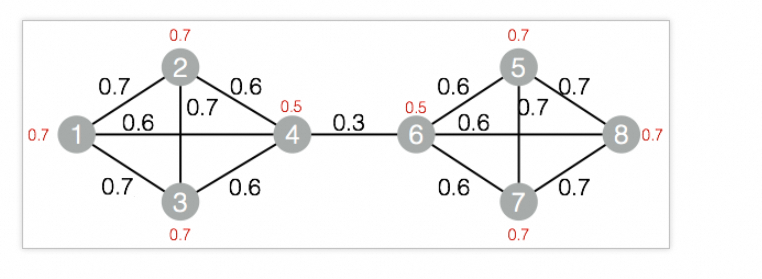
    select '1' as flow_out_id,'2' as flow_in_id,0.7 as edge_weight
    union all
    select '1' as flow_out_id,'3' as flow_in_id,0.7 as edge_weight
    union all
    select '1' as flow_out_id,'4' as flow_in_id,0.6 as edge_weight
    union all
    select '2' as flow_out_id,'3' as flow_in_id,0.7 as edge_weight
    union all
    select '2' as flow_out_id,'4' as flow_in_id,0.6 as edge_weight
    union all
    select '3' as flow_out_id,'4' as flow_in_id,0.6 as edge_weight
    union all
    select '4' as flow_out_id,'6' as flow_in_id,0.3 as edge_weight
    union all
    select '5' as flow_out_id,'6' as flow_in_id,0.6 as edge_weight
    union all
    select '5' as flow_out_id,'7' as flow_in_id,0.7 as edge_weight
    union all
    select '5' as flow_out_id,'8' as flow_in_id,0.7 as edge_weight
    union all
    select '6' as flow_out_id,'7' as flow_in_id,0.6 as edge_weight
    union all
    select '6' as flow_out_id,'8' as flow_in_id,0.6 as edge_weight
    union all
    select '7' as flow_out_id,'8' as flow_in_id,0.7 as edge_weight
)tmp
;
drop table if exists LabelPropagationClustering_func_test_node;
create table LabelPropagationClustering_func_test_node as
select * from
(
    select '1' as node,0.7 as node_weight
    union all
    select '2' as node,0.7 as node_weight
    union all
    select '3' as node,0.7 as node_weight
    union all
    select '4' as node,0.5 as node_weight
    union all
    select '5' as node,0.7 as node_weight
    union all
    select '6' as node,0.5 as node_weight
    union all
    select '7' as node,0.7 as node_weight
    union all
    select '8' as node,0.7 as node_weight
)tmp;
对应的数据结构图:
添加SQL脚本组件,输入以下PAI命令进行训练。
drop table if exists ${o1}; PAI -name LabelPropagationClustering -project algo_public -DinputEdgeTableName=LabelPropagationClustering_func_test_edge -DfromVertexCol=flow_out_id -DtoVertexCol=flow_in_id -DinputVertexTableName=LabelPropagationClustering_func_test_node -DvertexCol=node -DoutputTableName=${o1} -DhasEdgeWeight=true -DedgeWeightCol=edge_weight -DhasVertexWeight=true -DvertexWeightCol=node_weight -DrandSelect=true -DmaxIter=100;右击上一步的组件,选择查看数据 > SQL脚本的输出,查看训练结果。
| node | group_id |
| ---- | -------- |
| 1    | 3        |
| 3    | 3        |
| 5    | 7        |
| 7    | 7        |
| 2    | 3        |
| 4    | 3        |
| 6    | 7        |
| 8    | 7        |