使用命令行管理DSW内应用

更新时间:
复制为 MD 格式

DSW 新版开发机除支持在界面上安装/卸载应用外,还支持通过命令行进行安装和卸载操作。

新版开发机预装的应用列表:
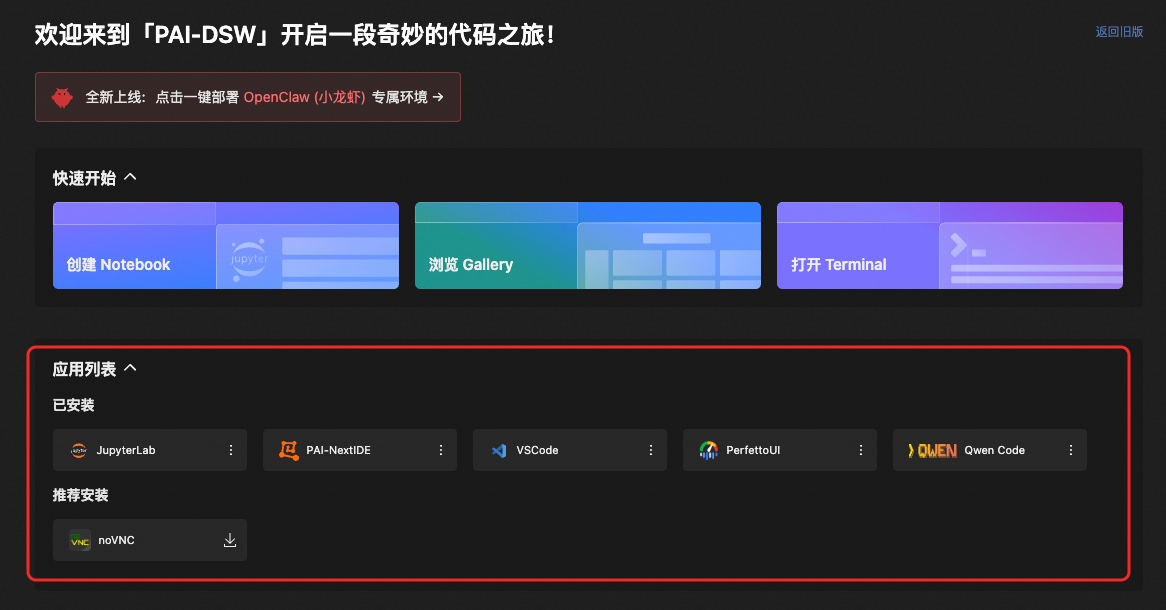
image

获取应用列表

pai-dsw runtime plugin list

可选参数

  • -o, --output-format输出结果格式。

    • -o default 默认平铺输出。

    • -o jsonjson格式输出。

命令示例

pai-dsw runtime plugin list -o json

返回结果示例

{
  "Plugins": {
    "aliyun": {
      "defaultVersion": "v3.0.307",
      "type": "command",
      "preInstall": true,
      "visible": true,
      "supportVersions": [
        "v3.0.307"
      ]
    },
    "eascmd": {
      "defaultVersion": "v1.0.0",
      "type": "command",
      "preInstall": true,
      "visible": true,
      "supportVersions": [
        "v1.0.0"
      ]
    },
    "jupyter-lab": {
      "defaultVersion": "v3.6.5",
      "type": "service",
      "preInstall": true,
      "visible": true,
      "supportVersions": [
        "v3.6.5",
        "v4.3.4"
      ]
    },
    "next-ide": {
      "defaultVersion": "v0.1.0",
      "type": "service",
      "preInstall": true,
      "visible": true,
      "supportVersions": [
        "v0.1.0"
      ]
    },
    "novnc": {
      "defaultVersion": "v1.6.0",
      "type": "service",
      "preInstall": false,
      "visible": true,
      "supportVersions": [
        "v1.6.0"
      ]
    },
    "perfetto": {
      "defaultVersion": "v52.0",
      "type": "service",
      "preInstall": true,
      "visible": true,
      "supportVersions": [
        "v52.0"
      ]
    },
    "qwen-code": {
      "defaultVersion": "v0.2.2",
      "type": "command",
      "preInstall": true,
      "visible": true,
      "supportVersions": [
        "v0.2.2"
      ]
    },
    "ttyd": {
      "defaultVersion": "v1.7.7",
      "type": "service",
      "preInstall": true,
      "visible": true,
      "supportVersions": [
        "v1.7.7"
      ]
    },
    "turbovnc": {
      "defaultVersion": "v3.1",
      "type": "service",
      "preInstall": false,
      "visible": true,
      "supportVersions": [
        "v3.1"
      ]
    },
    "vscode": {
      "defaultVersion": "v4.105.1",
      "type": "service",
      "preInstall": true,
      "visible": true,
      "supportVersions": [
        "v4.105.1"
      ]
    }
  },
  "Status": {
    "aliyun": {
      "Status": "INSTALLED",
      "Message": "",
      "Info": {
        "Port": "",
        "Command": "",
        "DefaultUrl": ""
      }
    },
    "eascmd": {
      "Status": "INSTALLED",
      "Message": "",
      "Info": {
        "Port": "",
        "Command": "/etc/dsw/runtime/export_bin/eascmd64 --help",
        "DefaultUrl": ""
      }
    },
    "jupyter-lab": {
      "Status": "RUNNING",
      "Message": "",
      "Info": {
        "Port": "8088",
        "Command": "",
        "DefaultUrl": "/dsw-1643967/lab"
      }
    },
    "next-ide": {
      "Status": "RUNNING",
      "Message": "",
      "Info": {
        "Port": "9801",
        "Command": "",
        "DefaultUrl": "/"
      }
    },
    "novnc": {
      "Status": "RUNNING",
      "Message": "",
      "Info": {
        "Port": "9803",
        "Command": "",
        "DefaultUrl": "/vnc.html"
      }
    },
    "perfetto": {
      "Status": "RUNNING",
      "Message": "",
      "Info": {
        "Port": "9805",
        "Command": "",
        "DefaultUrl": ""
      }
    },
    "qwen-code": {
      "Status": "INSTALLED",
      "Message": "",
      "Info": {
        "Port": "",
        "Command": "/etc/dsw/runtime/export_bin/qwen",
        "DefaultUrl": ""
      }
    },
    "ttyd": {
      "Status": "RUNNING",
      "Message": "",
      "Info": {
        "Port": "7681",
        "Command": "",
        "DefaultUrl": "/"
      }
    },
    "turbovnc": {
      "Status": "RUNNING",
      "Message": "",
      "Info": {
        "Port": "5901",
        "Command": "",
        "DefaultUrl": "/dsw-1643967/lab"
      }
    },
    "vscode": {
      "Status": "RUNNING",
      "Message": "",
      "Info": {
        "Port": "8082",
        "Command": "",
        "DefaultUrl": "/"
      }
    }
  }
}

安装指定应用

pai-dsw runtime plugin install xxx

对于预安装的应用,则无需再手动安装,后安装的应用,可通过该命令进行安装。

后安装应用列表

  • gemini-cli

  • llama-factory

  • novnc

  • ollama

  • open-webui

命令示例

pai-dsw runtime plugin install novnc

启动指定应用

pai-dsw runtime plugin start

对于服务类型的后安装应用(如novnc),在安装后需要手动启动,通过本命令可将应用启动在前台。

命令示例

pai-dsw runtime plugin start novnc

启动指定应用,作为守护进程在后台运行

pai-dsw runtime plugin start-daemon xxx

对于服务类型后安装应用(如novnc),在安装后需要手动启动,通过本命令可将应用作为守护进程在后台运行。

命令示例

pai-dsw runtime plugin start-daemon novnc

获取指定应用的状态

pai-dsw runtime plugin status xxx

通过执行该命令,可以获取指定应用的当前状态,目前有以下几种状态:

  • INSTALLING - 安装中

  • UNINSTALL - 未安装

  • INSTALLED - 已安装

  • RUNNING - 运行中

  • STOPPED - 已停止

命令示例

pai-dsw runtime plugin status novnc

返回结果示例

{
  "Status": "RUNNING",
  "Message": "",
  "Info": {
    "Port": "9803",
    "Command": "",
    "DefaultUrl": "/vnc.html"
  }
}

参数说明

字段

描述

Status

应用状态

Message

状态附加信息

Info

应用详细信息

Port

应用监听端口号

Command

执行应用时使用的命令

DefaultUrl

访问服务类型应用时,相对于根路径的url地址

停止指定应用

pai-dsw runtime plugin stop xxx

对于服务类型的应用,可通过该命令停止应用。

命令示例

pai-dsw runtime plugin stop novnc

停止指定应用的守护进程

pai-dsw runtime plugin stop-daemon

对于服务类型的应用,可通过该命令,停止其在后台的守护进程。

命令示例

pai-dsw runtime plugin stop-daemon novnc

卸载指定应用

pai-dsw runtime plugin uninstall

对于后安装的应用,可通过该命令,对应用进行卸载。

命令示例

pai-dsw runtime plugin uninstall novnc