快速提交DataJuicer任务

本文档介绍如何在DLC上使用开源工具DataJuicer进行大规模多模态数据处理。

背景

随着人工智能与大模型规模的持续演进,数据质量已成为制约模型准确性与可靠性的关键因素。为构建更健壮的模型,需要整合多源数据、提高多样性并实现有效融合,对文本、图像、视频等多模态数据的统一处理与协同建模提出了更高要求。高质量的数据预处理不仅可以加速训练效率、降低计算开销,更是保障模型性能的基础。当前,如何系统化实现大规模数据的采集、清洗、增强与合成,确保数据的准确性、多样性和代表性,仍构成大模型发展中的核心挑战。

DataJuicer是一款专注于处理大规模多模态数据(如文本、图像、音频和视频)的开源工具。旨在帮助研究人员和开发者高效地清洗、过滤、转换和增强大规模数据集,为大语言模型 (LLM) 提供更高质量、更丰富、更易“消化”的数据。

在此背景之下,PAI 推出的一项全新任务类型 DataJuicer on DLC,旨在为用户带来开箱即用、高性能、稳定高效的数据处理能力。

功能介绍

DataJuicer on DLC 是由阿里云人工智能平台PAI和通义实验室,联合推出的一款数据处理服务,支持用户在云上一键提交DataJuicer框架任务,高效地完成大规模数据的清洗、过滤、转换和增强, 实现LLM多模态数据处理计算能力。

  • 算子丰富:提供 100+ 核心算子,包含 aggregator、duplicator、filter、formatter、grouper、mapper、selector 等, 覆盖了数据加载和规范化,数据编辑和转换,数据过滤和去重,及高质量样本筛选的数据处理全周期。用户可根据自身业务,灵活编排算子链。

  • 性能优越:拥有卓越的线性扩展性能、数据处理速度优势。在千万级多模态数据处理中,相较于原生节点,节省24.8%的处理时间。

  • 资源预估:支持智能平衡资源限制与运行效率,自动调优算子OP并行度,显著降低内存溢出(OOM)导致的任务失败率。支持资源预估,通过智能分析数据集/算子/Quota信息,自动估算最优资源配置,降低使用门槛,保障任务的高效稳定。

  • 大规模:依托 PAI DLC 的分布式计算框架与深度硬件加速优化(CUDA/OP 融合),支持从千级样本的实验到百亿级生产数据的高效处理。

  • 自动容错:PAI DLC 本身提供节点、任务、容器维度的容错和自愈能力,同时 DataJuicer 提供算子级别的容错能力,解决服务器、网络等基础设施故障导致的中断风险。

  • 简单易用:DLC 提供直观的用户界面和易于理解的API,免部署、免运维,用户无需关注底层基础设施的部署与运维复杂性,一键提交DataJuicer任务进行AI数据处理。

使用说明

1. 选择镜像及框架

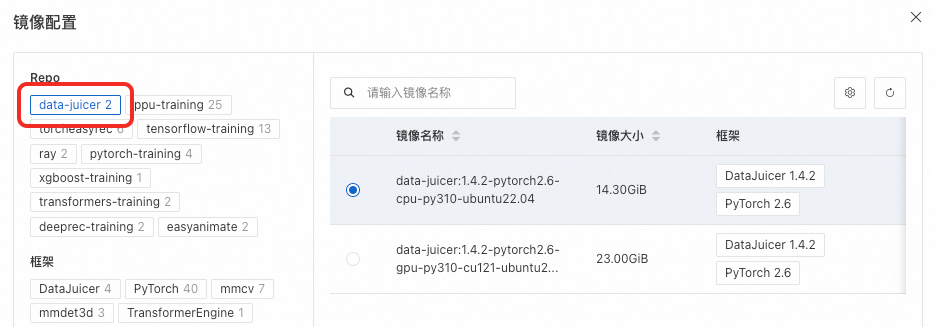
DataJuicer任务的镜像中要求预装DataJuicer环境,必须包含dj-process命令。建议使用官方提供的data-juicer Repo的镜像,或者基于官方data-juicer镜像的自定义镜像。
image

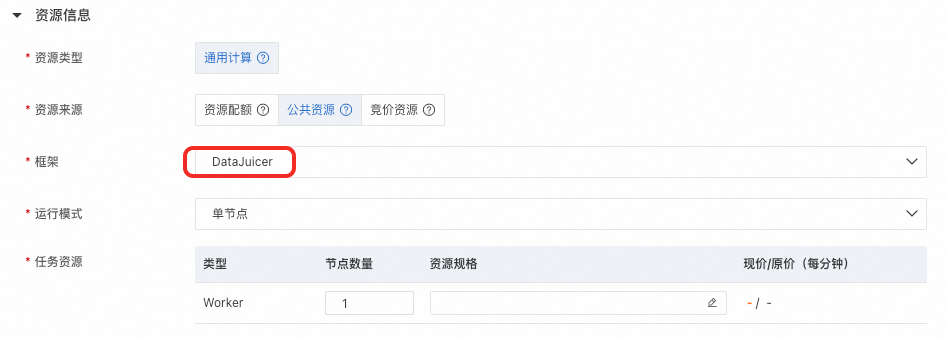
框架选择DataJuicer。

image

2. 配置运行模式

创建DLC任务时,可以选择单节点和分布式两种运行模式。注意需要与配置文件中executor_type相匹配。

  • 单节点模式

    • DataJuicer配置文件:在配置文件中,executor_type应设置为default或省略该字段。

    • DLC配置:

      • 运行模式:选择单节点

      • 节点数量:设置为1。

  • 分布式模式

    • DataJuicer配置文件:在配置文件中,executor_type必须设置为ray

    • DLC配置:

      • 运行模式:选择分布式

      • 资源预估:仅在使用资源配额时可开启。开启资源预估,系统将基于数据集/算子/Quota信息,智能估算最优资源配置,并自动运行任务,确保DJ数据处理任务高效执行。如需限制,可以设置任务最大资源限制。

        • 任务最大资源限制:如果对DataJuicer任务申请的资源有最高上限要求,可以配置此项。任务申请的资源总量将不超过配置的上限。若不填写此项,系统将根据资源预估结果,自动申请资源进行数据处理。

      • 任务资源:若不开启资源预估,则需要手动填写任务资源。

        • 节点数量Head节点数必须为1,Worker节点数至少为1。

        • 资源规格Head资源规格需8G以上内存,Worker资源规格按需使用。

      • 容错与诊断(可选):支持配置Head节点容错,用户可以选择同专有网络VPC下的Redis实例。image

3. 填写启动命令

DLC支持ShellYAML两种格式的启动命令,默认为Shell。当命令行格式为Shell时,使用方式和其他DLC任务一致。当命令行为YAML时,用户可以直接在命令行中填写DataJuicer的配置。

image

用户可以使用构建配置文件的方式来使用DataJuicer,详见:构建配置文件,完整的配置可以参考config_all.yaml。下图是DataJuicer配置示例:

image.png

关键参数说明如下:

  • dataset_path:输入数据的路径。在DLC任务中,应设置为数据存储(如OSS)挂载到容器内的路径。

  • export_path:处理结果的输出路径。对于分布式任务,此路径必须是目录而非具体文件。

  • executor_type:执行器类型。

    • default表示使用DefaultExecutor在单节点运行。

    • ray表示使用RayExecutor。RayExecutor支持分布式处理,详情请参见Data-Juicer 分布式数据处理

DLC上配置启动命令示例如下:

  • Shell格式命令示例1:将配置写到临时文件,使用dj-process命令启动。

    命令示例1

    set -ex
    
    cat > /tmp/run_config.yaml <<EOL
    # Process config example for dataset
    
    # global parameters
    project_name: 'ray-demo'
    dataset_path: '/mnt/data/process_on_ray/data/demo-dataset2.jsonl'  # path to your dataset directory or file
    export_path: '/mnt/data/data-juicer-outputs/20250728/01/process_on_ray/result.jsonl'
    
    executor_type: 'ray'
    ray_address: 'auto'                     # change to your ray cluster address, e.g., ray://<hostname>:<port>
    np: 12
    
    # process schedule
    # a list of several process operators with their arguments
    process:
      # Filter ops
      - alphanumeric_filter:                                    # filter text with alphabet/numeric ratio out of specific range.
          tokenization: false                                     # Whether to count the ratio of alphanumeric to the total number of tokens.
          min_ratio: 0.0                                          # the min ratio of filter range
          max_ratio: 0.9                                          # the max ratio of filter range
      - average_line_length_filter:                             # filter text with the average length of lines out of specific range.
          min_len: 10                                             # the min length of filter range
          max_len: 10000                                          # the max length of filter range
      - character_repetition_filter:                            # filter text with the character repetition ratio out of specific range
          rep_len: 10                                             # repetition length for char-level n-gram
          min_ratio: 0.0                                          # the min ratio of filter range
          max_ratio: 0.5                                          # the max ratio of filter range
      - flagged_words_filter:                                   # filter text with the flagged-word ratio larger than a specific max value
          lang: en                                                # consider flagged words in what language
          tokenization: false                                     # whether to use model to tokenize documents
          max_ratio: 0.0045                                       # the max ratio to filter text
          flagged_words_dir: ./assets                             # directory to store flagged words dictionaries
          use_words_aug: false                                    # whether to augment words, especially for Chinese and Vietnamese
          words_aug_group_sizes: [2]                              # the group size of words to augment
          words_aug_join_char: ""                                 # the join char between words to augment
      - language_id_score_filter:                               # filter text in specific language with language scores larger than a specific max value
          lang: en                                                # keep text in what language
          min_score: 0.8                                          # the min language scores to filter text
      - maximum_line_length_filter:                             # filter text with the maximum length of lines out of specific range
          min_len: 10                                             # the min length of filter range
          max_len: 10000                                          # the max length of filter range
      - perplexity_filter:                                      # filter text with perplexity score out of specific range
          lang: en                                                # compute perplexity in what language
          max_ppl: 1500                                           # the max perplexity score to filter text
      - special_characters_filter:                              # filter text with special-char ratio out of specific range
          min_ratio: 0.0                                          # the min ratio of filter range
          max_ratio: 0.25                                         # the max ratio of filter range
      - stopwords_filter:                                       # filter text with stopword ratio smaller than a specific min value
          lang: en                                                # consider stopwords in what language
          tokenization: false                                     # whether to use model to tokenize documents
          min_ratio: 0.3                                          # the min ratio to filter text
          stopwords_dir: ./assets                                 # directory to store stopwords dictionaries
          use_words_aug: false                                    # whether to augment words, especially for Chinese and Vietnamese
          words_aug_group_sizes: [2]                              # the group size of words to augment
          words_aug_join_char: ""                                 # the join char between words to augment
      - text_length_filter:                                     # filter text with length out of specific range
          min_len: 10                                             # the min length of filter range
          max_len: 10000                                          # the max length of filter range
      - words_num_filter:                                       # filter text with number of words out of specific range
          lang: en                                                # sample in which language
          tokenization: false                                     # whether to use model to tokenize documents
          min_num: 10                                             # the min number of filter range
          max_num: 10000                                          # the max number of filter range
      - word_repetition_filter:                                 # filter text with the word repetition ratio out of specific range
          lang: en                                                # sample in which language
          tokenization: false                                     # whether to use model to tokenize documents
          rep_len: 10                                             # repetition length for word-level n-gram
          min_ratio: 0.0                                          # the min ratio of filter range
          max_ratio: 0.5                                          # the max ratio of filter range
    EOL
    
    dj-process --config /tmp/run_config.yaml

  • Shell格式命令示例2:配置文件保存云存储中(如:对象存储OSS),挂载到DLC容器中,通过dj-process直接指定挂载后的配置文件运行。

    dj-process --config /mnt/data/process_on_ray/config/demo.yaml
  • YAML格式命令示例:命令中直接填写DataJuicer配置。

    YAML格式命令示例

    # Process config example for dataset
    
    # global parameters
    project_name: 'ray-demo'
    dataset_path: '/mnt/data/process_on_ray/data/demo-dataset2.jsonl'  # path to your dataset directory or file
    export_path: '/mnt/data/data-juicer-outputs/20250728/01/process_on_ray/result.jsonl'
    
    executor_type: 'ray'
    ray_address: 'auto'                     # change to your ray cluster address, e.g., ray://<hostname>:<port>
    np: 12
    
    # process schedule
    # a list of several process operators with their arguments
    process:
      # Filter ops
      - alphanumeric_filter:                                    # filter text with alphabet/numeric ratio out of specific range.
          tokenization: false                                     # Whether to count the ratio of alphanumeric to the total number of tokens.
          min_ratio: 0.0                                          # the min ratio of filter range
          max_ratio: 0.9                                          # the max ratio of filter range
      - average_line_length_filter:                             # filter text with the average length of lines out of specific range.
          min_len: 10                                             # the min length of filter range
          max_len: 10000                                          # the max length of filter range
      - character_repetition_filter:                            # filter text with the character repetition ratio out of specific range
          rep_len: 10                                             # repetition length for char-level n-gram
          min_ratio: 0.0                                          # the min ratio of filter range
          max_ratio: 0.5                                          # the max ratio of filter range
      - flagged_words_filter:                                   # filter text with the flagged-word ratio larger than a specific max value
          lang: en                                                # consider flagged words in what language
          tokenization: false                                     # whether to use model to tokenize documents
          max_ratio: 0.0045                                       # the max ratio to filter text
          flagged_words_dir: ./assets                             # directory to store flagged words dictionaries
          use_words_aug: false                                    # whether to augment words, especially for Chinese and Vietnamese
          words_aug_group_sizes: [2]                              # the group size of words to augment
          words_aug_join_char: ""                                 # the join char between words to augment
      - language_id_score_filter:                               # filter text in specific language with language scores larger than a specific max value
          lang: en                                                # keep text in what language
          min_score: 0.8                                          # the min language scores to filter text
      - maximum_line_length_filter:                             # filter text with the maximum length of lines out of specific range
          min_len: 10                                             # the min length of filter range
          max_len: 10000                                          # the max length of filter range
      - perplexity_filter:                                      # filter text with perplexity score out of specific range
          lang: en                                                # compute perplexity in what language
          max_ppl: 1500                                           # the max perplexity score to filter text
      - special_characters_filter:                              # filter text with special-char ratio out of specific range
          min_ratio: 0.0                                          # the min ratio of filter range
          max_ratio: 0.25                                         # the max ratio of filter range
      - stopwords_filter:                                       # filter text with stopword ratio smaller than a specific min value
          lang: en                                                # consider stopwords in what language
          tokenization: false                                     # whether to use model to tokenize documents
          min_ratio: 0.3                                          # the min ratio to filter text
          stopwords_dir: ./assets                                 # directory to store stopwords dictionaries
          use_words_aug: false                                    # whether to augment words, especially for Chinese and Vietnamese
          words_aug_group_sizes: [2]                              # the group size of words to augment
          words_aug_join_char: ""                                 # the join char between words to augment
      - text_length_filter:                                     # filter text with length out of specific range
          min_len: 10                                             # the min length of filter range
          max_len: 10000                                          # the max length of filter range
      - words_num_filter:                                       # filter text with number of words out of specific range
          lang: en                                                # sample in which language
          tokenization: false                                     # whether to use model to tokenize documents
          min_num: 10                                             # the min number of filter range
          max_num: 10000                                          # the max number of filter range
      - word_repetition_filter:                                 # filter text with the word repetition ratio out of specific range
          lang: en                                                # sample in which language
          tokenization: false                                     # whether to use model to tokenize documents
          rep_len: 10                                             # repetition length for word-level n-gram
          min_ratio: 0.0                                          # the min ratio of filter range
          max_ratio: 0.5                                          # the max ratio of filter range

实操案例

海量视频数据处理

随着多模态大语言模型(MLLM)在自动驾驶、具身智能等领域的突破性应用,海量视频数据的精细化处理已成为构建行业核心竞争力的技术高地。在自动驾驶场景中,模型需从车载摄像头持续输入的视频流中实时解析复杂路况、交通标识、行人行为等多维度信息;而具身智能系统则依赖视频数据构建物理世界动态表征,以完成机器人运动规划、环境交互等高阶任务。然而,传统数据处理方案面临三大核心挑战:

  • 模态割裂:视频数据包含视觉、音频、时序、文本描述等多源异构信息,需跨模态特征融合工具链,而传统流水线式工具难以实现全局关联分析。

  • 质量瓶颈:数据清洗需经历去重、标注修复、关键帧提取、噪声过滤等多个环节,传统多阶段处理易造成信息损失与冗余计算。

  • 工程效能:大规模视频数据(TB/PB级)处理对分布式算力调度、异构硬件适配提出极高要求,自建系统存在开发周期长、资源利用率低等问题。

PAI-DLC DataJuicer框架为上述挑战提供端到端解决方案,其技术优势体现在:

  • 多模态协同处理引擎:内置文本、图像、视频、音频等专用算子,支持视觉-文本-时序数据的联合清洗与增强,避免传统工具链的“碎片化”处理。

  • 云原生弹性架构:深度集成PAI的百GB/s级分布式存储加速、GPU/CPU异构资源池化能力,支持千节点任务自动扩缩容。

操作步骤

本案例以自动驾驶和具身智能所需的视频处理流程为例,介绍如何通过DataJuicer完成以下处理:

  1. 过滤原始数据中时长过短的视频片段。

  2. 根据NSFW得分过滤脏数据。

  3. 对视频抽帧,生成视频的文本caption描述。

数据准备

Youku-AliceMind数据集为例,抽取2000条视频数据,并将其上传至对象存储OSS

创建DLC任务

创建DLC任务并配置以下关键参数,其他参数默认即可。

  • 镜像配置选择官方镜像,搜索并选择data-juicer:1.4.3-pytorch2.6-gpu-py310-cu121-ubuntu22.04

  • 存储挂载:选择OSS

    • Uri:选择数据集所在的OSS目录。

    • 挂载路径:默认为/mnt/data/

  • 启动命令:选择YAML,并填写如下命令:

    启动命令示例

    # global parameters
    project_name: 'dj-video-demo'
    # Dataset mount path
    dataset_path: '/mnt/data/data/Youku-AliceMind/caption/validation/youku_alice_mind_dj_2k.jsonl' 
    
    executor_type: 'ray' 
    skip_op_error: false  # 调试阶段
    export_type: 'jsonl'
    export_path: '/mnt/data/outputs/video_demo/v1'
    video_key: 'videos'
    video_special_token: '<__dj__video>'
    
    eoc_special_token: '<|__dj__eoc|>'
    
    # process schedule
    # a list of several process operators with their arguments
    process:
      - video_duration_filter:
          min_duration: 0
          max_duration: 3600
          any_or_all: any
      - video_nsfw_filter:
          hf_nsfw_model: Falconsai/nsfw_image_detection
          max_score: 0.5
          frame_sampling_method: all_keyframes
          frame_num: 3
          reduce_mode: avg
          any_or_all: any
      - video_captioning_from_frames_mapper:
          hf_img2seq: 'Salesforce/blip2-opt-2.7b'
          caption_num: 1
          keep_candidate_mode: 'random_any'
          keep_original_sample: true
          frame_sampling_method: 'all_keyframes'
          frame_num: 3
  • 资源来源:选择公共资源

  • 框架:选择DataJuicer

  • 运行模式:选择分布式

  • 任务资源节点数量和规格配置如下图所示:

    image

单击确定创建任务。