任务调度实例版授权
本文提供了使用任务调度实例版进行任务调度时的权限配置指南,涵盖任务调度权限和云监控只读策略两大方面,确保系统的安全性和功能的完整性。
如果您使用的是子账号,需同时配置任务调度权限和云监控只读权限。
任务调度权限
权限说明
以下接口仅支持授权到账号级别,无法支持按实例权限筛选展示,所有账号必须要授权该权限。
Action | 权限说明 | 是否为只读类型 |
ListClusters | 查看集群列表 | 是 |
ListClusterVersions | 查看引擎版本列表 | 是 |
分为5个类型:查询、创建、更新、删除、运维操作。以下接口支持到实例级别,支持Action级别RAM权限。
类型 | Action | 权限说明 | 是否为只读 |
查询 | ListAppNames | 查询AppName列表 | 是 |
ListApps | 查询应用列表 | 是 | |
ListCalendarNames | 查询自定义日历名字列表 | 是 | |
ListExecutors | 查询执行器列表 | 是 | |
ListJobs | 查询任务列表 | 是 | |
ListJobExecutions | 查询任务执行列表 | 是 | |
ListScheduleTimes | 查询未来5次调度时间 | 是 | |
创建 | CreateCluster | 创建集群 | 否 |
CreateApp | 创建XXL-JOB应用 | 否 | |
CreateJob | 创建XXL-JOB任务 | 否 | |
更新 | UpdateCluster | 更新集群 | 否 |
UpdateApp | 更新XXL-JOB应用 | 否 | |
UpdateJob | 更新XXL-JOB任务 | 否 | |
删除 | DeleteCluster | 删除集群 | 否 |
DeleteApp | 删除应用 | 否 | |
DeleteJobs | 批量删除任务 | 否 | |
运维操作 | OperateDesignateExecutors | 任务指定机器 | 否 |
OperateDisableJobs | 批量禁用任务 | 否 | |
OperateEnableJobs | 批量启用任务 | 否 | |
OperateExecuteJob | 运行一次任务 | 否 | |
OperateRerunJob | 重刷一段时间的任务记录 | 否 | |
OperateRetryJobExecution | 重跑失败的任务执行记录 | 否 | |
OperateStopJobExecution | 停止正在运行的任务执行记录 | 否 |
自定义权限策略示例
示例1:授予RAM用户对实例xxljob-0pp1j8om80a的读写权限。
{
  "Statement": [
    {
      "Action": [
        "schedulerx3:ListClusters",
        "schedulerx3:ListClusterVersions"
      ],
      "Resource": "acs:schedulerx3:*:*:*",
      "Effect": "Allow"
    },
    {
      "Action": "schedulerx3:*",
      "Resource": "acs:schedulerx3:*:*:cluster/xxljob-0pp1j8om80a",
      "Effect": "Allow"
    }
  ],
  "Version": "1"
}示例2:授予RAM用户对实例xxljob-0pp1j8om80a的只读权限。
{
  "Statement": [
    {
      "Action": [
        "schedulerx3:ListClusters",
        "schedulerx3:ListClusterVersions"
      ],
      "Resource": "acs:schedulerx3:*:*:*",
      "Effect": "Allow"
    },
    {
      "Action": [
        "schedulerx3:List*",
        "schedulerx3:Get*"
      ],
      "Resource": "acs:schedulerx3:*:*:cluster/xxljob-0pp1j8om80a",
      "Effect": "Allow"
    }
  ],
  "Version": "1"
}示例3:授予RAM用户对所有XXL-JOB实例的只读权限。
{
  "Statement": [
    {
      "Action": [
        "schedulerx3:ListClusters",
        "schedulerx3:ListClusterVersions"
      ],
      "Resource": "acs:schedulerx3:*:*:*",
      "Effect": "Allow"
    },
    {
      "Action": [
        "schedulerx3:List*",
        "schedulerx3:Get*"
      ],
      "Resource": "acs:schedulerx3:*:*:cluster/*",
      "Effect": "Allow"
    }
  ],
  "Version": "1"
}示例4:授予RAM用户对实例xxljob-7076602169e应用testApp-prod和testApp-gray的权限。
{
  "Statement": [
    {
      "Action": [
        "schedulerx3:ListClusters",
        "schedulerx3:ListClusterVersions"
      ],
      "Resource": "acs:schedulerx3:*:*:*",
      "Effect": "Allow"
    },
    {
      "Action": [
        "schedulerx3:List*",
        "schedulerx3:Get*"
      ],
      "Resource": "acs:schedulerx3:*:*:cluster/xxljob-7076602169e",
      "Effect": "Allow"
    },
    {
      "Action": [
        "schedulerx3:Create*",
        "schedulerx3:Delete*",
        "schedulerx3:Update*",
        "schedulerx3:Operate*"
      ],
      "Resource": "acs:schedulerx3:*:*:cluster/xxljob-7076602169e",
      "Effect": "Allow",
      "Condition": {
        "StringEquals": {
          "schedulerx3:AppName": [
            "testApp-prod",
            "testApp-gray"
          ]
        }
      }
    }
  ],
  "Version": "1"
}
云监控只读策略
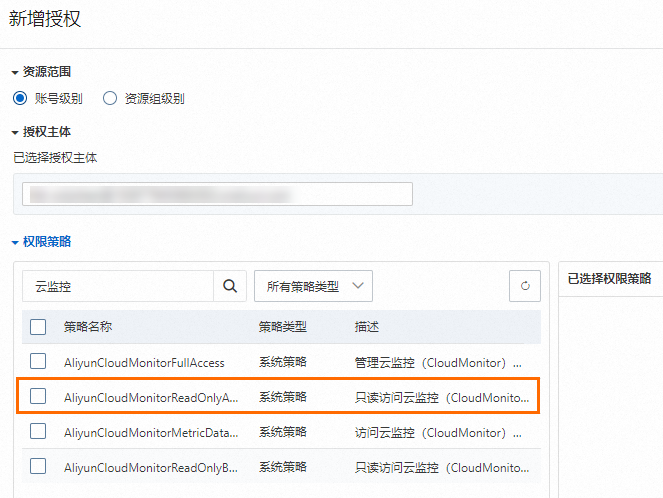
XXL-JOB默认集成了云监控,需给RAM子账号授予只读访问云监控的系统策略,否则在基本信息中无法看到调度统计大盘。
使用RAM管理员登录RAM控制台。
在左侧导航栏页面,单击新增授权,选择授权主体的RAM子账号,授权
AliyunCloudMonitorReadOnlyAccess云监控只读策略。