通过 loongsuite-util-genai 与 OpenTelemetry SDK 为调用链增加自定义埋点

更新时间:
复制为 MD 格式

接入 ARMS 应用监控以后,探针对常见的 AI 框架进行了自动埋点,因此不需要修改任何代码,就可以实现调用链信息的采集。如果您需要在调用链信息中,体现业务方法的执行情况,可以引入 loongsuite-util-genai 以及 OpenTelemetry SDK,在业务代码中增加自定义埋点。本文介绍如何通过 loongsuite-util-genai 以及 OpenTelemetry Python SDK 实现自定义埋点以及自定义 Attribute。

ARMS 探针支持的 AI 组件和框架,请参见:

前提条件

引入依赖

pip install loongsuite-util-genai

安装后提供 opentelemetry.util.genai 包及 ExtendedTelemetryHandler 等扩展接口。更多信息,请参见 loongsuite-util-genai 详细文档

使用 loongsuite-util-genai 和 OpenTelemetry SDK

通过 loongsuite-util-genai 和 OpenTelemetry SDK 主要可以实现以下操作:

  • 创建 GenAI 语义的 Span(Entry、Agent、Tool、ReAct Step等)。

  • 通过 OpenTelemetry SDK 埋点生成自定义 Span。

  • 为 Span 增加自定义 Attributes。

  • 获取当前 Trace 上下文并打印 traceId。

名词介绍

  • Span:一次请求的一个具体操作,比如一次 LLM 调用或一次工具执行。

  • SpanContext:一次请求追踪的上下文,包含 traceId、spanId 等信息。

  • Attribute:Span 的附加属性字段,用于记录关键信息,如模型名称、Token 用量等。

  • Handler:loongsuite-util-genai 提供的 ExtendedTelemetryHandler,用于创建符合 GenAI语义约定的 Span。

loongsuite-util-genai 支持的全部 Span 类型如下表所示,本文重点介绍 Entry、Agent、Tool 和 ReAct Step 的用法,其他类型(Embedding、Retrieval、Rerank、Memory等)的详细用法请参见loongsuite-util-genai 完整文档

Span 类型

操作名

说明

Entry

enter

应用入口,携带 session_id / user_id / 应用完整互动信息

Agent

invoke_agent {name}

Agent 调用,汇总 Token 用量

Tool

execute_tool {name}

工具/函数执行

Step

react

ReAct 单轮迭代标识

LLM

chat {model}

大模型对话(通常由探针自动采集)

Embedding

embeddings {model}

向量嵌入

Retriever

retrieval {data_source}

检索(RAG)

Reranker

rerank {model}

重排序

Memory

memory {operation}

记忆读写

下面分步介绍各类 Span 的埋点写法,每一步给出独立的代码片段。完整可运行的示例代码请参见本文末尾附录部分。

重要

请务必通过 get_extended_telemetry_handler() 获取 Handler 实例,而非直接实例化 TelemetryHandler。ARMS 探针仅对 get_extended_telemetry_handler() 进行了兼容适配,直接实例化 TelemetryHandler 可能导致环境变量兼容性问题。

重要

自定义埋点时请务必遵循LLM Trace字段定义说明中的语义规范。AI应用可观测能力(Token统计、会话分析等)均基于该规范中定义进行适配和渲染,若 Span 属性不符合规范,相关数据可能无法在控制台中正确展示。

1. 获取 Handler 和 Tracer

通过 get_extended_telemetry_handler() 获取 loongsuite-util-genai 的单例 Handler,通过 get_tracer(__name__) 获取 OpenTelemetry SDK 的 Tracer。两者分别用于创建 GenAI 语义 Span 和自定义业务 Span。

from opentelemetry.util.genai.extended_handler import get_extended_telemetry_handler
from opentelemetry.util.genai.extended_types import (
    ExecuteToolInvocation,
    InvokeAgentInvocation,
)
from opentelemetry.util.genai._extended_common import EntryInvocation, ReactStepInvocation
from opentelemetry.util.genai.types import Error, InputMessage, OutputMessage, Text
from opentelemetry.trace import get_tracer

handler = get_extended_telemetry_handler()
tracer = get_tracer(__name__)

Handler 提供两种使用方式:

  • 上下文管理器with handler.entry(inv) 等):推荐方式,自动管理 Span 生命周期。

  • start/stop/fail APIhandler.start_entry(inv) / handler.stop_entry(inv) / handler.fail_entry(inv, error)):适用于异步、回调或流式等无法使用 with 语句的场景。

2. 创建 Entry Span

在请求入口处创建 Entry Span,携带 session_iduser_id,并通过 input_messages 记录用户输入。流式响应完成后,将输出内容拼接设置到 output_messages,再调用 stop_entry 结束 Span。这样在控制台中能直接看到该次请求的完整输入和最终输出。

entry_inv = EntryInvocation(
    session_id=req.session_id or str(uuid.uuid4()),
    user_id=req.user_id or "anonymous",
    input_messages=[
        InputMessage(role="user", parts=[Text(content=req.topic)]),
    ],
)

def event_generator():
    handler.start_entry(entry_inv)
    output_chunks: list[str] = [ ]

    try:
        for chunk in run_agent_stream(topic=req.topic):
            output_chunks.append(chunk)
            yield f"data: {json.dumps({'content': chunk}, ensure_ascii=False)}\n\n"
        yield "data: [DONE]\n\n"
    except Exception as exc:
        handler.fail_entry(entry_inv, Error(message=str(exc), type=type(exc)))
        yield f"data: {json.dumps({'error': str(exc)}, ensure_ascii=False)}\n\n"
        return
    entry_inv.output_messages = [
        OutputMessage(
            role="assistant",
            parts=[Text(content="".join(output_chunks))],
            finish_reason="stop",
        ),
    ]
    handler.stop_entry(entry_inv)

3. 创建 Agent Span

通过 start_invoke_agent 创建 Agent Span,记录 Agent 名称、模型和描述信息。Agent Span 是整个调用链的根 GenAI Span,所有后续的 ReAct Step、LLM 调用和 Tool 调用都作为它的子 Span。

invocation = InvokeAgentInvocation(
    provider="dashscope",
    agent_name="TechContentAgent",
    agent_description="技术内容生成助手",
    request_model="qwen-plus",
)
total_input_tokens = 0
total_output_tokens = 0

handler.start_invoke_agent(invocation)
try:
    # ... Agent 核心逻辑(ReAct 循环) ...

    invocation.input_tokens = total_input_tokens
    invocation.output_tokens = total_output_tokens
    handler.stop_invoke_agent(invocation)
except Exception:
    handler.fail_invoke_agent(invocation, Error(message="agent failed", type=RuntimeError))
    raise

Agent 执行完成后,将累积的 total_input_tokenstotal_output_tokens 写入 Agent Span,实现 Token 指标汇总统计。

4. 创建 ReAct Step Span

在每一轮 ReAct 推理迭代时创建 Step Span,传入当前轮次 round。迭代结束时设置 finish_reason:需要继续迭代为 continue,最终回答为 stop。示例中每轮迭代的 LLM 调用由 ARMS 探针自动埋点,无需手动创建。

step_inv = ReactStepInvocation(round=iteration + 1)
handler.start_react_step(step_inv)

try:
    response = client.chat.completions.create(
        model="qwen-plus",
        messages=messages,
        tools=TOOL_DEFINITIONS,
    )
    # ... 处理响应 ...

    step_inv.finish_reason = "stop"  # 或 "continue"
    handler.stop_react_step(step_inv)
except Exception:
    handler.fail_react_step(step_inv, Error(message="step failed", type=RuntimeError))
    raise

5. 创建 Tool Span

当模型返回工具调用时,为每个 tool_call 创建 Tool Span,记录工具名称、调用 ID、入参和返回结果。

tool_inv = ExecuteToolInvocation(
    tool_name=tool_call.function.name,
    tool_call_id=tool_call.id,
    tool_call_arguments=tool_call.function.arguments,
    tool_type="function",
)
handler.start_execute_tool(tool_inv)
try:
    result = dispatch_tool(tool_name, tool_call.function.arguments)
    tool_inv.tool_call_result = result
except Exception as exc:
    handler.fail_execute_tool(tool_inv, error=Error(message=str(exc), type=type(exc)))
    raise
else:
    handler.stop_execute_tool(tool_inv)

6. 使用 OpenTelemetry SDK 创建自定义 Span

除了 loongsuite-util-genai 提供的 GenAI 语义 Span,还可以通过 OpenTelemetry SDK 的 tracer.start_as_current_span() 创建自定义业务 Span,与 GenAI Span 混合使用。

以下示例展示了两种典型的自定义 Span 用法:

duplicate_tool_detection — 工具重复调用检测

在每轮 ReAct 迭代前执行,通过 Counter 统计每个工具的调用次数,将检测结果写入 gen_ai.loop_detection.* 属性。若发现重复,向消息列表追加系统提示引导模型避免重复。

def _check_duplicate_tools(
    tool_usage_counter: Counter,
    messages: list[dict[str, Any]],
) -> None:
    duplicates = [name for name, count in tool_usage_counter.items() if count > 1]
    has_duplicates = len(duplicates) > 0

    with tracer.start_as_current_span("duplicate_tool_detection") as span:
        span.set_attributes({
            "gen_ai.loop_detection.detected": has_duplicates,
            "gen_ai.loop_detection.duplicate_tools": str(duplicates) if has_duplicates else "[ ]",
            "gen_ai.loop_detection.total_calls": sum(tool_usage_counter.values()),
            "gen_ai.loop_detection.unique_tools": len(tool_usage_counter),
        })

    if has_duplicates:
        details = ", ".join(f"{n}({tool_usage_counter[n]}次)" for n in duplicates)
        messages.append({
            "role": "system",
            "content": f"[系统提示] 检测到工具被重复调用:{details}。请避免重复调用。",
        })

response_loop_detection — LLM 回复循环检测

在每轮 LLM 回复后执行,通过比较当前回复与上一轮回复的文本相似度,将 is_loopoverlap_ratio 等指标写入 Span 属性。若检测到循环(文本完全相同或重叠率超过 80%),设置 finish_reasonloop_detected 并提前终止 Agent。

def _check_response_loop(
    current_content: str | None,
    previous_content: str | None,
) -> bool:
    cur = (current_content or "").strip()
    prev = (previous_content or "").strip()

    with tracer.start_as_current_span("response_loop_detection") as span:
        if not prev or not cur:
            span.set_attributes({
                "gen_ai.loop_detection.is_loop": False,
                "gen_ai.loop_detection.reason": "no_text_content",
            })
            return False

        is_identical = cur == prev
        longer = max(len(cur), len(prev))
        common_prefix_len = sum(1 for a, b in zip(cur, prev) if a == b)
        overlap_ratio = common_prefix_len / longer if longer > 0 else 0.0
        is_loop = is_identical or overlap_ratio > 0.8

        span.set_attributes({
            "gen_ai.loop_detection.is_loop": is_loop,
            "gen_ai.loop_detection.is_identical": is_identical,
            "gen_ai.loop_detection.overlap_ratio": round(overlap_ratio, 2),
            "gen_ai.loop_detection.current_length": len(cur),
            "gen_ai.loop_detection.previous_length": len(prev),
        })
        return is_loop
说明

由于自定义 Span 不属于大模型语义规范,在控制台的调用链视图中需要切换到全部视图才能查看。

查看监控详情

  1. 登录云监控2.0控制台,选择目标工作空间,在左侧导航栏选择所有功能 > AI应用可观测

  2. AI应用列表页面可以看到已接入的应用,单击应用名称可以查看详细的应用监控数据。

埋点效果展示

1. Entry Span 详情

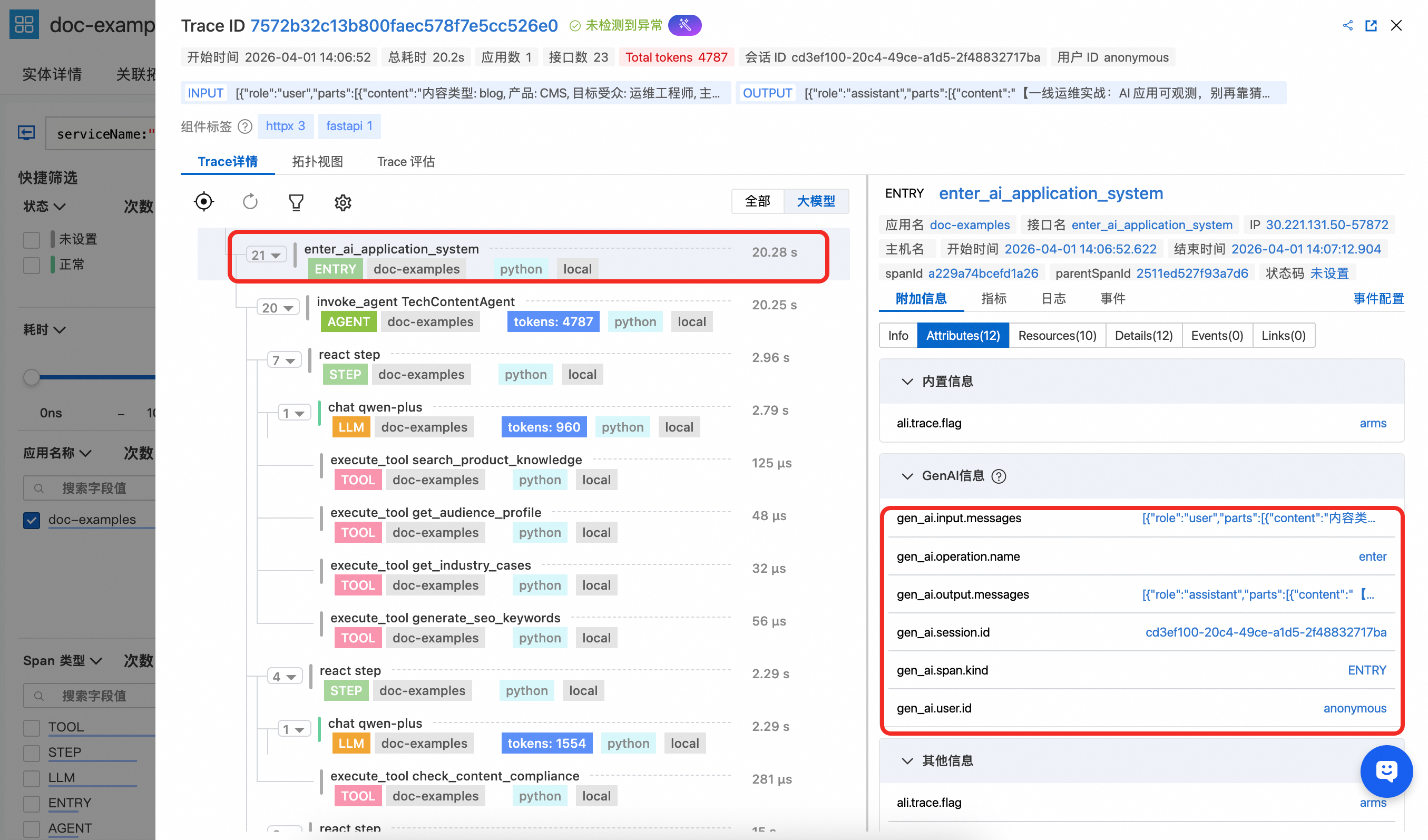
Enter Span 能看到 gen_ai.session.id、gen_ai.user.id 等关键属性,通过在函数入口处设置能自动透传到 LLM、TOOLSpan中,能用于关联会话和用户信息进行分析。同时 Entry Span 还携带 gen_ai.input.messages(用户输入内容)和 gen_ai.output.messages(最终输出内容),便于在控制台中直接查看该次请求的整体交互内容。
image

2. Agent Span 详情

Agent Span能看到该 Agent 的定义名称以及相应的描述,同时体现上述示例代码中统计的属于该 Agent 级别的 Token 用量汇总统计效果。
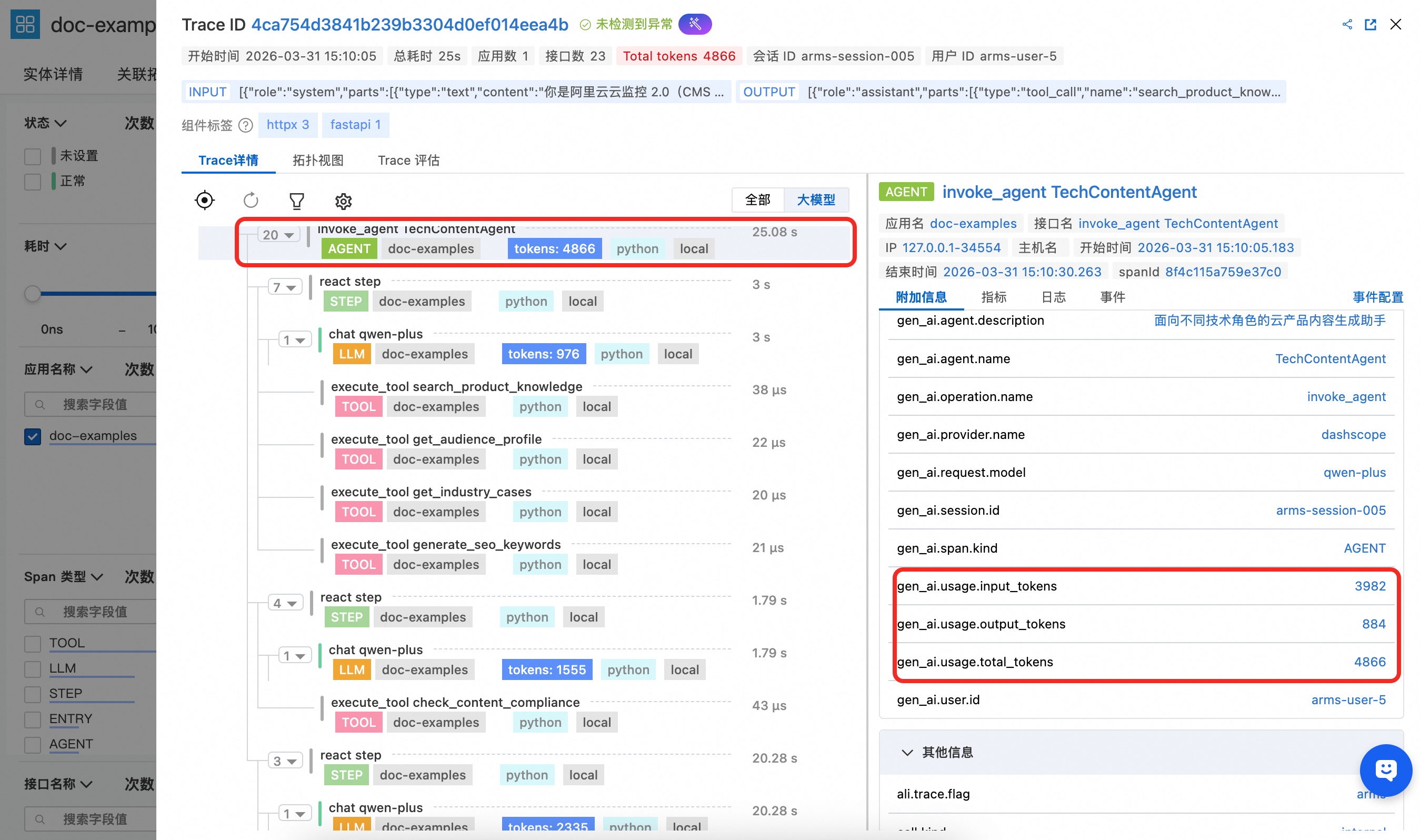
image.png

3. Tool Span 详情

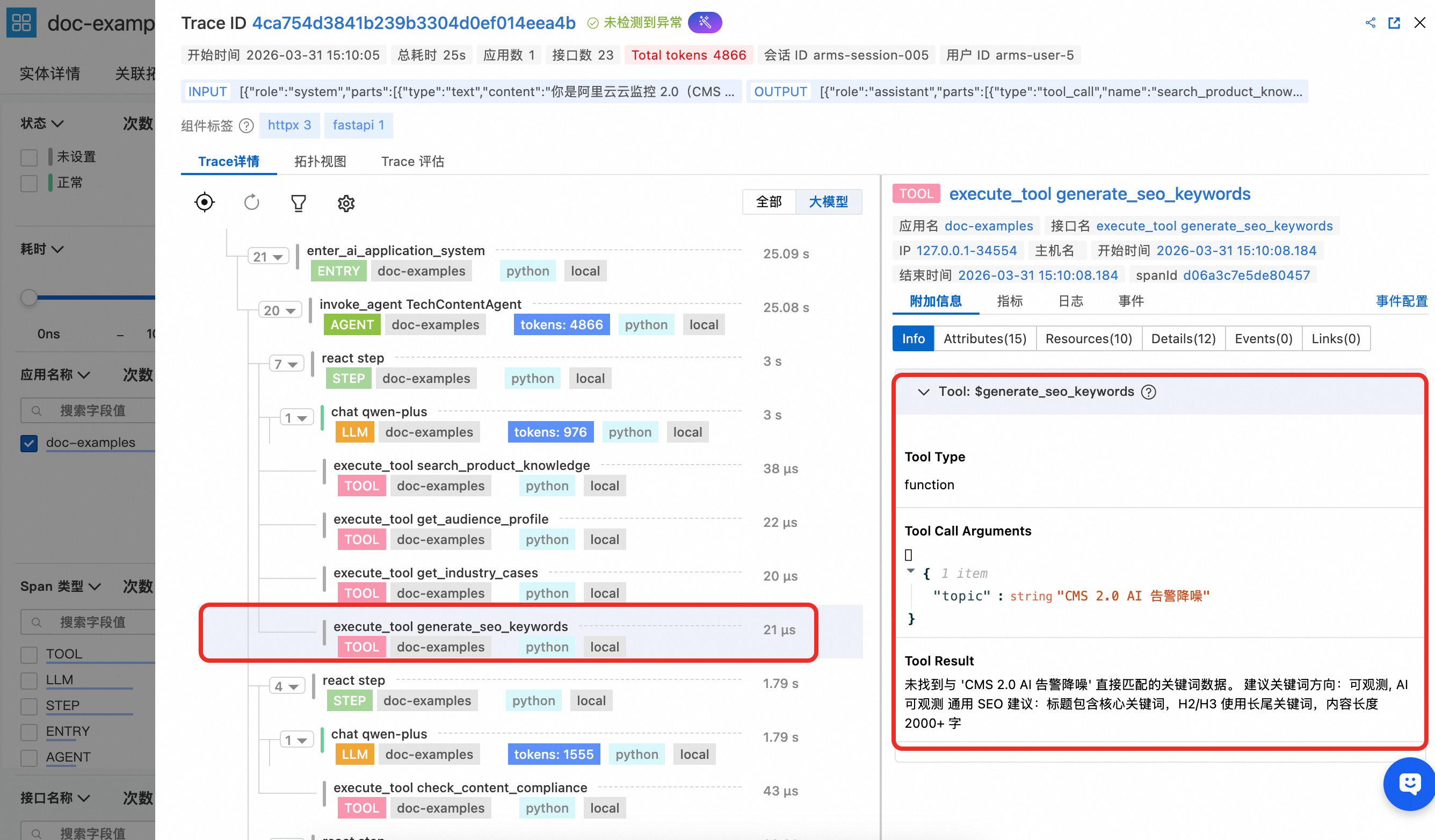
Tool Span 能看到该 Tool 的名称以及入参配置,并且展示工具调用结果。image.png
4. LLM Span 详情

LLM Span在上述示例代码中并没有进行手动埋点,由于是 openai 调用,此处全部由探针自动采集,能清晰观察到该次 LLM 调用的完整上下文信息以及 token 消耗。
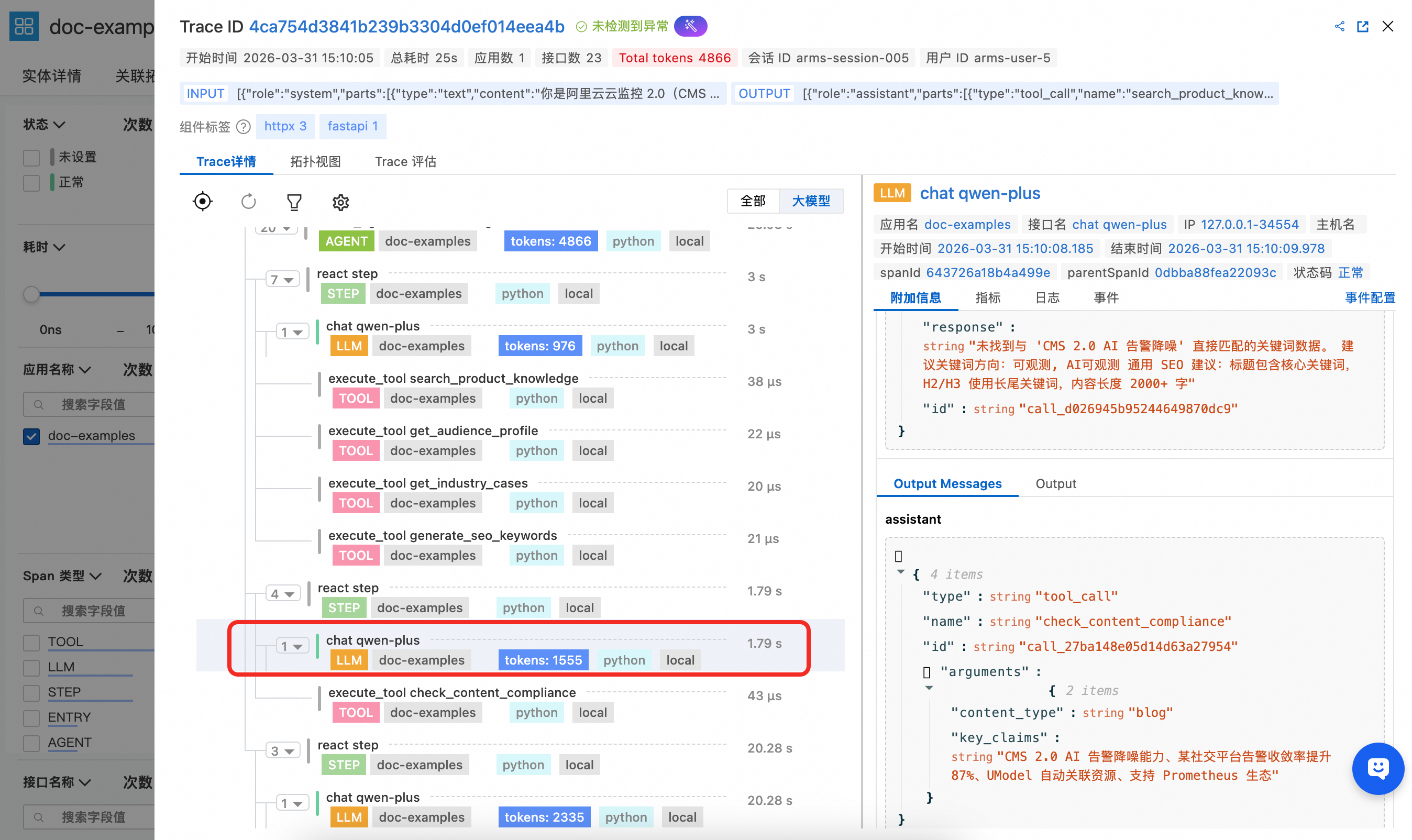
image.png

5.自定义 Span 详情

示例代码中通过 OpenTelemetry SDK 创建了两个自定义业务 Span,展示如何将自定义埋点与 GenAI 语义 Span 混合使用,由于该自定义Span并不在大模型语义中,需要打开全部视图进行查看。

  • duplicate_tool_detection:在每轮 ReAct 迭代前执行,用于检测 Agent 是否陷入工具重复调用。Span 属性中记录了是否检测到重复、重复的工具列表、总调用次数和去重工具数,便于在 ARMS 中快速定位 Agent 的工具调用循环问题。
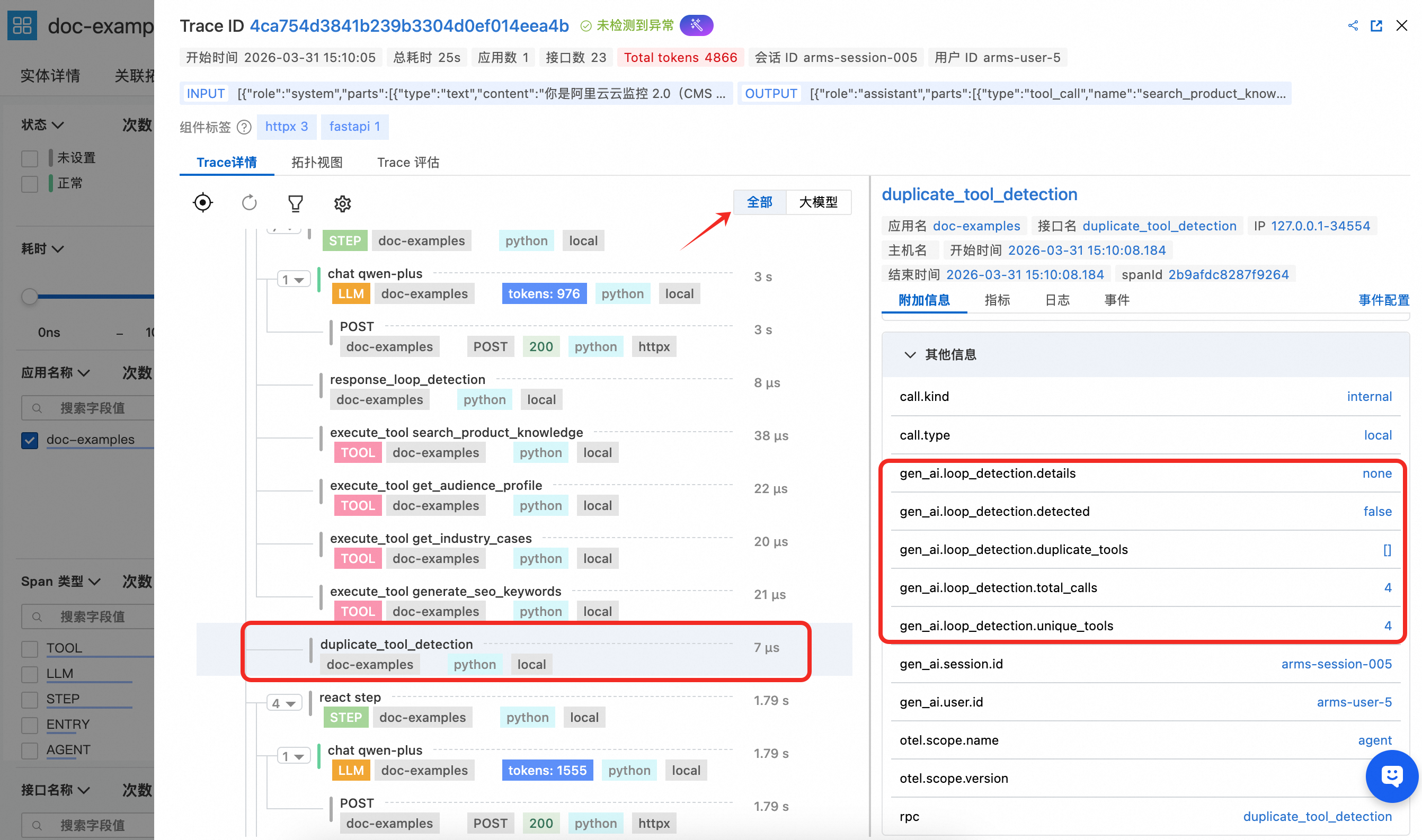
    image.png

  • response_loop_detection:在每轮 LLM 回复后执行,用于检测模型是否连续返回高度相似的内容。Span 属性中记录了是否判定为循环、文本是否完全相同、重叠率以及当前和上一轮回复的文本长度,帮助排查模型陷入重复输出的异常场景。

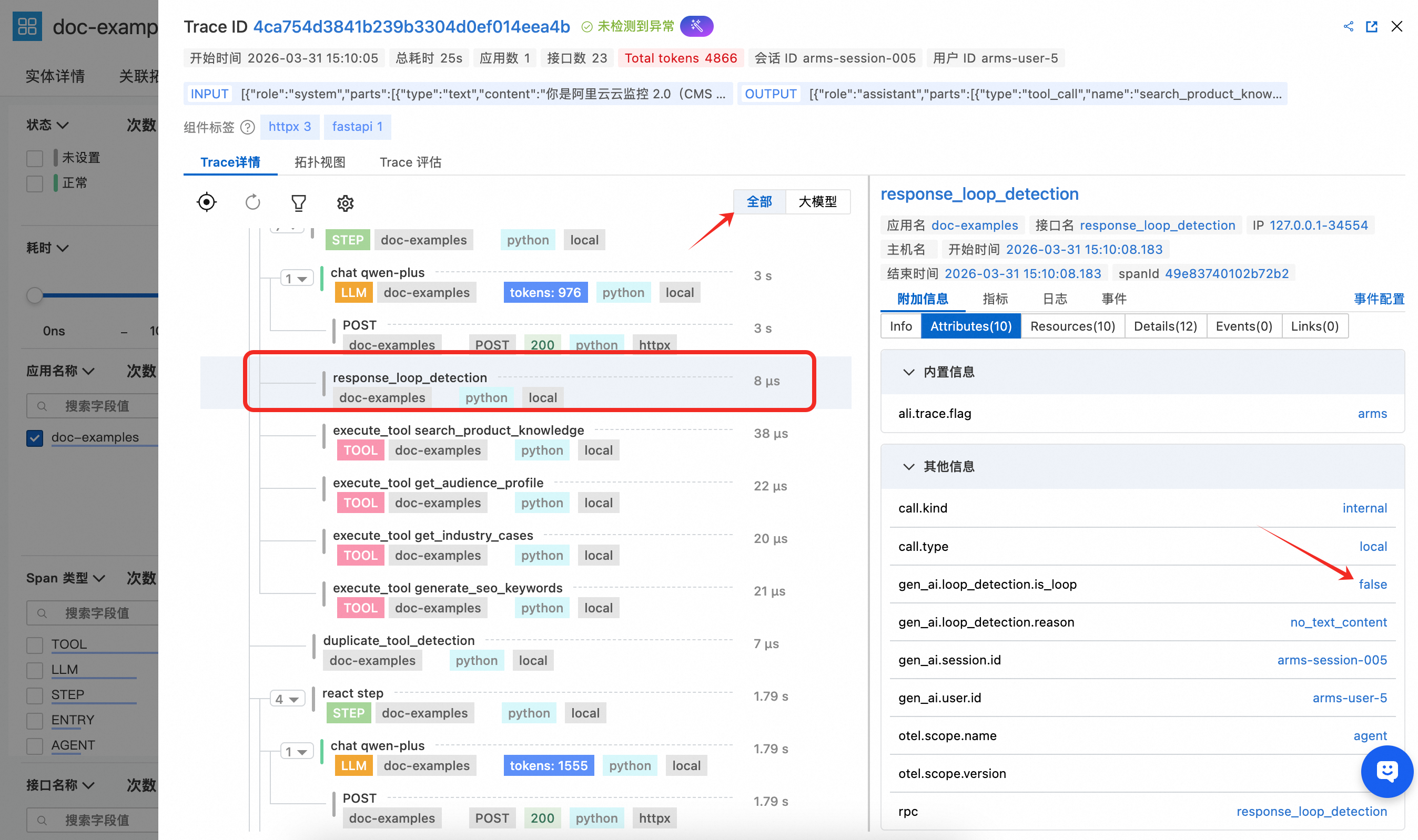
    image.png

相关文档

其他语言的自定义埋点

附录

完整示例代码

app.py

import json
import uuid

from fastapi import FastAPI
from fastapi.responses import StreamingResponse
from pydantic import BaseModel
from opentelemetry.util.genai.extended_handler import get_extended_telemetry_handler
from opentelemetry.util.genai._extended_common import EntryInvocation
from opentelemetry.util.genai.types import Error, InputMessage, OutputMessage, Text

from agent import run_marketing_agent_stream

app = FastAPI(title="云产品技术内容生成助手")


class GenerateRequest(BaseModel):
    content_type: str = "blog"
    product: str = "CMS"
    target_audience: str = "运维工程师"
    topic: str = ""
    session_id: str = ""
    user_id: str = ""


@app.post("/api/v1/generate/stream")
async def generate_stream(req: GenerateRequest) -> StreamingResponse:
    handler = get_extended_telemetry_handler()

    user_prompt = (
        f"内容类型: {req.content_type}, 产品: {req.product}, "
        f"目标受众: {req.target_audience}, 主题: {req.topic}"
    )

    entry_inv = EntryInvocation(
        session_id=req.session_id or str(uuid.uuid4()),
        user_id=req.user_id or "anonymous",
        input_messages=[
            InputMessage(role="user", parts=[Text(content=user_prompt)]),
        ],
    )

    def event_generator():
        handler.start_entry(entry_inv)
        output_chunks: list[str] = []
        try:
            for chunk in run_marketing_agent_stream(
                content_type=req.content_type,
                product=req.product,
                target_audience=req.target_audience,
                topic=req.topic,
            ):
                output_chunks.append(chunk)
                yield f"data: {json.dumps({'content': chunk}, ensure_ascii=False)}\n\n"
            yield "data: [DONE]\n\n"
        except Exception as exc:
            handler.fail_entry(
                entry_inv,
                Error(message=str(exc), type=type(exc)),
            )
            yield f"data: {json.dumps({'error': str(exc)}, ensure_ascii=False)}\n\n"
            return
        entry_inv.output_messages = [
            OutputMessage(
                role="assistant",
                parts=[Text(content="".join(output_chunks))],
                finish_reason="stop",
            ),
        ]
        handler.stop_entry(entry_inv)

    return StreamingResponse(event_generator(), media_type="text/event-stream")


@app.get("/health")
async def health():
    return {"status": "ok"}


if __name__ == "__main__":
    import uvicorn
    uvicorn.run(app, host="0.0.0.0", port=8000)

agent.py

import os
from collections import Counter
from collections.abc import Generator
from typing import Any

from openai import OpenAI
from opentelemetry.trace import get_tracer
from opentelemetry.util.genai.extended_handler import get_extended_telemetry_handler
from opentelemetry.util.genai.extended_types import (
    ExecuteToolInvocation,
    InvokeAgentInvocation,
)
from opentelemetry.util.genai._extended_common import ReactStepInvocation
from opentelemetry.util.genai.types import Error

from tools import TOOL_DEFINITIONS, dispatch_tool

tracer = get_tracer(__name__)

MODEL_NAME = os.environ.get("MODEL_NAME", "qwen-plus")
BASE_URL = os.environ.get(
    "OPENAI_BASE_URL",
    "https://dashscope.aliyuncs.com/compatible-mode/v1",
)
API_KEY = os.environ.get("DASHSCOPE_API_KEY", "")

MAX_ITERATIONS = 10

SYSTEM_PROMPT = """\
你是阿里云云监控 2.0(CMS 2.0)的技术内容生成助手。\
面向运维工程师和架构师,用其熟悉的专业语言生成高价值技术内容。

关键原则:根据目标受众调整内容的视角和语言风格——
- 运维工程师:聚焦实操步骤、排障效率、工具集成,用一线运维的日常术语
- 架构师:聚焦架构设计、标准化、可扩展性,用技术深度的专业表达

你必须严格按以下步骤执行,每一步都要调用对应的工具:

第一步:使用 search_product_knowledge 工具搜索 CMS 产品信息(features 或 comparison)
第二步:使用 get_audience_profile 工具获取目标受众的画像和痛点
第三步:使用 get_industry_cases 工具查找相关行业案例
第四步:如果是博客文章,使用 generate_seo_keywords 工具获取 SEO 关键词
第五步:根据收集到的信息生成内容
第六步:使用 check_content_compliance 工具检查合规性

内容要求:围绕产品优势和受众痛点,引用案例数据,中文撰写,800 字以内。"""


def _build_client() -> OpenAI:
    return OpenAI(base_url=BASE_URL, api_key=API_KEY)


def _build_user_message(
    content_type: str,
    product: str,
    target_audience: str,
    topic: str,
) -> str:
    type_labels = {
        "blog": "面向一线技术人员的实战技术博客",
        "email": "精准触达目标角色的技术推荐邮件",
        "case_study": "可落地参考的客户实践案例",
        "comparison": "辅助技术选型的产品对比分析",
    }
    label = type_labels.get(content_type, content_type)
    return (
        f"请为 {product} 产品生成一篇{label}。\n"
        f"目标受众:{target_audience}\n"
        f"主题/方向:{topic}\n\n"
        f"请用目标受众日常工作中熟悉的语言和视角来撰写,"
        f"严格按照步骤调用工具收集信息后再生成内容。"
    )


def _check_duplicate_tools(
    tool_usage_counter: Counter,
    messages: list[dict[str, Any]],
) -> list[str]:
    duplicates = [name for name, count in tool_usage_counter.items() if count > 1]
    total_calls = sum(tool_usage_counter.values())
    has_duplicates = len(duplicates) > 0

    duplicate_details = ", ".join(
        f"{name}({tool_usage_counter[name]}次)" for name in duplicates
    ) if has_duplicates else "none"

    with tracer.start_as_current_span("duplicate_tool_detection") as detect_span:
        detect_span.set_attributes({
            "gen_ai.loop_detection.detected": has_duplicates,
            "gen_ai.loop_detection.duplicate_tools": str(duplicates) if has_duplicates else "[]",
            "gen_ai.loop_detection.details": duplicate_details,
            "gen_ai.loop_detection.total_calls": total_calls,
            "gen_ai.loop_detection.unique_tools": len(tool_usage_counter),
        })

    if not has_duplicates:
        return []

    hint_message = (
        f"[系统提示] 检测到以下工具被重复调用:{duplicate_details}。"
        f"请避免重复调用相同的工具,直接使用已获取的信息继续执行后续步骤。"
    )
    messages.append({"role": "system", "content": hint_message})

    return duplicates


def _check_response_loop(
    current_content: str | None,
    previous_content: str | None,
) -> bool:
    """Compare consecutive LLM text responses to detect stuck loops."""
    cur = (current_content or "").strip()
    prev = (previous_content or "").strip()

    with tracer.start_as_current_span("response_loop_detection") as span:
        if not prev or not cur:
            span.set_attributes({
                "gen_ai.loop_detection.is_loop": False,
                "gen_ai.loop_detection.reason": "no_text_content",
            })
            return False

        is_identical = cur == prev

        common_prefix_len = 0
        for a, b in zip(cur, prev):
            if a == b:
                common_prefix_len += 1
            else:
                break
        longer = max(len(cur), len(prev))
        overlap_ratio = common_prefix_len / longer if longer > 0 else 0.0
        is_loop = is_identical or overlap_ratio > 0.8

        span.set_attributes({
            "gen_ai.loop_detection.is_loop": is_loop,
            "gen_ai.loop_detection.is_identical": is_identical,
            "gen_ai.loop_detection.overlap_ratio": round(overlap_ratio, 2),
            "gen_ai.loop_detection.current_length": len(cur),
            "gen_ai.loop_detection.previous_length": len(prev),
        })
        return is_loop


def run_marketing_agent_stream(
    content_type: str,
    product: str,
    target_audience: str,
    topic: str,
) -> Generator[str, None, None]:
    client = _build_client()
    handler = get_extended_telemetry_handler()

    user_message = _build_user_message(content_type, product, target_audience, topic)

    invocation = InvokeAgentInvocation(
        provider="dashscope",
        agent_name="TechContentAgent",
        agent_description="面向不同技术角色的云产品内容生成助手",
        request_model=MODEL_NAME,
    )

    total_input_tokens = 0
    total_output_tokens = 0
    tool_usage_counter: Counter = Counter()
    previous_content: str | None = None

    handler.start_invoke_agent(invocation)
    try:
        messages: list[dict[str, Any]] = [
            {"role": "system", "content": SYSTEM_PROMPT},
            {"role": "user", "content": user_message},
        ]

        for iteration in range(MAX_ITERATIONS):
            _check_duplicate_tools(tool_usage_counter, messages)

            step_inv = ReactStepInvocation(round=iteration + 1)
            handler.start_react_step(step_inv)
            try:
                response = client.chat.completions.create(
                    model=MODEL_NAME,
                    messages=messages,
                    tools=TOOL_DEFINITIONS,
                    temperature=0.7,
                )

                choice = response.choices[0]
                message = choice.message

                if response.usage:
                    total_input_tokens += response.usage.prompt_tokens
                    total_output_tokens += response.usage.completion_tokens

                current_content = message.content
                if _check_response_loop(current_content, previous_content):
                    step_inv.finish_reason = "loop_detected"
                    handler.stop_react_step(step_inv)
                    if current_content:
                        yield current_content
                    break
                if (current_content or "").strip():
                    previous_content = current_content

                if message.tool_calls:
                    messages.append(message.model_dump())

                    for tool_call in message.tool_calls:
                        tool_name = tool_call.function.name
                        tool_args = tool_call.function.arguments
                        tool_usage_counter[tool_name] += 1

                        tool_inv = ExecuteToolInvocation(
                            tool_name=tool_name,
                            tool_call_id=tool_call.id,
                            tool_call_arguments=tool_args,
                            tool_type="function",
                        )

                        handler.start_execute_tool(tool_inv)
                        try:
                            result = dispatch_tool(tool_name, tool_args)
                            tool_inv.tool_call_result = result
                        except Exception as exc:
                            handler.fail_execute_tool(
                                tool_inv,
                                error=Error(message=str(exc), type=type(exc)),
                            )
                            raise
                        else:
                            handler.stop_execute_tool(tool_inv)

                        messages.append({
                            "role": "tool",
                            "tool_call_id": tool_call.id,
                            "content": result,
                        })

                    step_inv.finish_reason = "continue"
                    handler.stop_react_step(step_inv)
                    continue

                if choice.finish_reason == "stop" or message.content:
                    if message.content:
                        yield message.content

                    step_inv.finish_reason = "stop"
                    handler.stop_react_step(step_inv)
                    break
            except Exception:
                handler.fail_react_step(
                    step_inv, Error(message="step failed", type=RuntimeError)
                )
                raise

        invocation.input_tokens = total_input_tokens
        invocation.output_tokens = total_output_tokens
        handler.stop_invoke_agent(invocation)
    except Exception:
        handler.fail_invoke_agent(
            invocation, Error(message="agent failed", type=RuntimeError)
        )
        raise

tools.py

import json
from typing import Any

PRODUCT_KNOWLEDGE: dict[str, dict[str, str]] = {
    "CMS": {
        "features": (
            "云监控 2.0(CMS 2.0)是阿里云一站式可观测平台,"
            "融合 SLS + CMS + ARMS 三大产品能力:\n"
            "1. 全栈统一监控:指标、链路、日志、事件统一视图\n"
            "2. UModel 统一建模:资源自动关联与观测图谱构建\n"
            "3. AI 智能分析:异常检测、告警降噪、对话式运维 Copilot\n"
            "4. 开放兼容:支持 Prometheus、Grafana、OpenTelemetry 生态\n"
            "5. AI 应用可观测:LLM 调用链追踪、Token 统计、模型性能分析"
        ),
        "comparison": (
            "云监控 2.0 vs 传统监控方案:\n"
            "1. 数据融合:传统方案需在 3-5 个控制台间切换;CMS 2.0 一站式融合\n"
            "2. AI 能力:传统静态阈值告警误报率 30%+;CMS 2.0 AI 降噪 80%\n"
            "3. 观测图谱:CMS 2.0 通过 UModel 自动构建依赖图谱\n"
            "4. AI 应用可观测:传统方案不支持;CMS 2.0 原生支持 LLM/Agent 全链路"
        ),
    },
}
AUDIENCE_PROFILES: dict[str, dict[str, str]] = {
    "运维工程师": {
        "role": "运维工程师 / SRE",
        "pain_points": (
            "1. 故障排查耗时长:微服务架构下定位问题平均 30-60 分钟\n"
            "2. 告警风暴:大促期间告警激增,难以区分优先级\n"
            "3. 工具碎片化:需在 5-6 个监控工具间切换\n"
            "4. AI 运维盲区:大模型调用链路不透明"
        ),
        "interests": "全链路追踪、根因分析、告警降噪、Prometheus/Grafana 集成",
        "decision_factors": "技术成熟度、社区活跃度、学习成本、集成难度",
    },
    "架构师": {
        "role": "架构师 / 技术专家",
        "pain_points": (
            "1. 微服务 + AI Agent 混合架构的可观测性挑战\n"
            "2. 开源自建 vs 商业方案选型缺乏客观对比\n"
            "3. 各团队监控方案不统一,数据格式碎片化\n"
            "4. 现有方案能否支撑业务 10 倍增长"
        ),
        "interests": "架构设计、OpenTelemetry 标准化、数据模型统一、可扩展性",
        "decision_factors": "架构先进性、标准化程度、可扩展性、开放性、社区生态",
    },
}

INDUSTRY_CASES: dict[str, list[dict[str, str]]] = {
    "金融": [
        {
            "company": "某头部股份制银行",
            "scenario": (
                "核心交易系统可观测升级:覆盖 200+ 微服务,"
                "日均处理 5000 万笔交易的全链路追踪"
            ),
            "results": (
                "故障 MTTR 从 45 分钟降至 8 分钟,降幅 82%;"
                "告警准确率从 60% 提升至 95%;"
                "运维人效提升 3 倍,等保三级合规检查一次通过"
            ),
        },
    ],
    "互联网": [
        {
            "company": "某社交平台",
            "scenario": (
                "千万 DAU 应用的全栈可观测:覆盖 App 端体验监控 → "
                "CDN → API 网关 → 2000+ 微服务 → 数据库/缓存"
            ),
            "results": (
                "用户侧 Crash 率从 0.5% 降至 0.08%;"
                "API P99 延迟优化 40%;"
                "每月节省 10 万元+ 监控成本(相比自建方案)"
            ),
        },
    ],
}

COMPLIANCE_RULES: dict[str, dict[str, Any]] = {
    "product_names": {
        "incorrect": {
            "Aliyun": "阿里云",
            "CMS2.0": "CMS 2.0",
            "云监控2.0": "云监控 2.0",
        },
    },
    "claim_rules": [
        "数据引用必须标注来源",
        "避免绝对化用语(如'最好的''唯一的''第一')",
        "对比竞品时使用客观数据",
    ],
}

SEO_KEYWORDS_DB: dict[str, dict[str, Any]] = {
    "可观测": {
        "primary": "可观测性",
        "long_tail": ["云原生可观测性方案", "微服务可观测平台选型"],
        "search_volume": "高",
    },
    "AI可观测": {
        "primary": "AI 应用可观测",
        "long_tail": ["LLM 调用链追踪", "AI Agent 可观测性"],
        "search_volume": "中(快速增长)",
    },
}


def search_product_knowledge(product: str, aspect: str) -> str:
    product_key = "CMS"
    product_data = PRODUCT_KNOWLEDGE.get(product_key)
    if not product_data:
        available = ", ".join(PRODUCT_KNOWLEDGE.keys())
        return f"未找到产品 '{product}' 的知识库。可用产品:{available}"

    aspect_lower = aspect.lower()
    aspect_data = product_data.get(aspect_lower)
    if not aspect_data:
        available = ", ".join(product_data.keys())
        return f"未找到 '{product}' 的 '{aspect}' 方面信息。可查询方面:{available}"

    return f"【{product} - {aspect}】\n{aspect_data}"


def get_audience_profile(audience_type: str) -> str:
    profile = AUDIENCE_PROFILES.get(audience_type)
    if not profile:
        available = ", ".join(AUDIENCE_PROFILES.keys())
        return f"未找到受众类型 '{audience_type}'。可用类型:{available}"

    return (
        f"受众画像 — {profile['role']}\n\n"
        f"核心痛点:\n{profile['pain_points']}\n\n"
        f"关注领域: {profile['interests']}\n\n"
        f"决策因素: {profile['decision_factors']}"
    )


def get_industry_cases(industry: str) -> str:
    cases = INDUSTRY_CASES.get(industry)
    if not cases:
        available = ", ".join(INDUSTRY_CASES.keys())
        return f"未找到 '{industry}' 行业的案例。可用行业:{available}"

    parts: list[str] = [f"【{industry}行业案例】\n"]
    for i, case in enumerate(cases, 1):
        parts.append(
            f"案例 {i}: {case['company']}\n"
            f"  场景: {case['scenario']}\n"
            f"  成效: {case['results']}"
        )
    return "\n\n".join(parts)


def check_content_compliance(content_type: str, key_claims: str) -> str:
    issues: list[str] = []

    for wrong, correct in COMPLIANCE_RULES["product_names"]["incorrect"].items():
        if wrong in key_claims and correct not in key_claims:
            issues.append(f"产品名称 '{wrong}' 应更正为 '{correct}'")

    for word in ("最好", "唯一", "第一", "最强"):
        if word in key_claims:
            issues.append(f"包含绝对化用语 '{word}',建议替换为客观表述")

    rules_text = "\n".join(
        f"  {i+1}. {rule}"
        for i, rule in enumerate(COMPLIANCE_RULES["claim_rules"])
    )

    result = "合规检查结果:\n\n"
    if issues:
        result += "发现问题:\n" + "\n".join(f"  - {i}" for i in issues) + "\n\n"
    else:
        result += "未发现明显合规问题。\n\n"
    result += f"合规规则:\n{rules_text}"
    return result


def generate_seo_keywords(topic: str) -> str:
    topic_lower = topic.lower()
    matched: list[dict[str, Any]] = []

    for key, data in SEO_KEYWORDS_DB.items():
        if key.lower() in topic_lower or topic_lower in key.lower() or any(
            w in topic_lower for w in key.lower().split() if len(w) > 1
        ):
            matched.append({"keyword": key, **data})

    if not matched:
        all_keywords = list(SEO_KEYWORDS_DB.keys())
        return (
            f"未找到与 '{topic}' 直接匹配的关键词数据。\n"
            f"建议关键词方向:{', '.join(all_keywords)}\n"
            f"通用 SEO 建议:标题包含核心关键词,"
            f"H2/H3 使用长尾关键词,内容长度 2000+ 字"
        )

    parts: list[str] = [f"SEO 关键词分析 — '{topic}':\n"]
    for item in matched:
        long_tail = "\n".join(f"    - {kw}" for kw in item["long_tail"])
        parts.append(
            f"主关键词: {item['primary']}\n"
            f"  搜索热度: {item['search_volume']}\n"
            f"  长尾关键词:\n{long_tail}"
        )
    return "\n\n".join(parts)


TOOL_REGISTRY: dict[str, Any] = {
    "search_product_knowledge": search_product_knowledge,
    "get_audience_profile": get_audience_profile,
    "get_industry_cases": get_industry_cases,
    "check_content_compliance": check_content_compliance,
    "generate_seo_keywords": generate_seo_keywords,
}


def dispatch_tool(name: str, arguments: str) -> str:
    func = TOOL_REGISTRY.get(name)
    if not func:
        return f"未知工具: {name}"
    try:
        kwargs = json.loads(arguments)
    except json.JSONDecodeError:
        return f"工具参数解析失败: {arguments}"
    return func(**kwargs)


TOOL_DEFINITIONS: list[dict[str, Any]] = [
    {
        "type": "function",
        "function": {
            "name": "search_product_knowledge",
            "description": "搜索 CMS 产品知识库,获取特性或竞品对比信息。",
            "parameters": {
                "type": "object",
                "properties": {
                    "product": {
                        "type": "string",
                        "description": "产品名称",
                        "enum": ["CMS"],
                    },
                    "aspect": {
                        "type": "string",
                        "description": "查询方面",
                        "enum": ["features", "comparison"],
                    },
                },
                "required": ["product", "aspect"],
            },
        },
    },
    {
        "type": "function",
        "function": {
            "name": "get_audience_profile",
            "description": "获取目标受众画像,包括痛点、关注领域和决策因素。",
            "parameters": {
                "type": "object",
                "properties": {
                    "audience_type": {
                        "type": "string",
                        "description": "目标受众类型",
                        "enum": ["运维工程师", "架构师"],
                    },
                },
                "required": ["audience_type"],
            },
        },
    },
    {
        "type": "function",
        "function": {
            "name": "get_industry_cases",
            "description": "获取行业客户成功案例,包括场景和成效数据。",
            "parameters": {
                "type": "object",
                "properties": {
                    "industry": {
                        "type": "string",
                        "description": "目标行业",
                        "enum": ["金融", "互联网"],
                    },
                },
                "required": ["industry"],
            },
        },
    },
    {
        "type": "function",
        "function": {
            "name": "check_content_compliance",
            "description": "检查内容合规性,包括产品名称规范和宣传用语。",
            "parameters": {
                "type": "object",
                "properties": {
                    "content_type": {
                        "type": "string",
                        "description": "内容类型",
                        "enum": ["blog", "case_study", "comparison"],
                    },
                    "key_claims": {
                        "type": "string",
                        "description": "关键宣传点和数据引用",
                    },
                },
                "required": ["content_type", "key_claims"],
            },
        },
    },
    {
        "type": "function",
        "function": {
            "name": "generate_seo_keywords",
            "description": "基于主题生成 SEO 关键词,生成博客文章时调用。",
            "parameters": {
                "type": "object",
                "properties": {
                    "topic": {
                        "type": "string",
                        "description": "文章主题或核心关键词",
                    },
                },
                "required": ["topic"],
            },
        },
    },
]

requirements.txt

openai
fastapi
uvicorn[standard]
loongsuite-util-genai