Create a stateless Deployment
A Deployment is a common type of Kubernetes workload used to manage stateless applications. It ensures that a specified number of replica Pods are always running in your cluster in your defined state. This topic describes how to create a stateless application in a Container Service for Kubernetes (ACK) cluster by using the ACK console and kubectl.
Before you begin
Before you create a workload, read Workloads to understand the basic concepts and key considerations. This topic is divided into the following sections:
Create a Deployment: Provides quick-start guides on how to create a Deployment by using the console and kubectl.
Configuration parameters: Explains the console configuration parameters and provides a sample YAML file for kubectl.
The examples in this topic use a public image. To pull a public image, your cluster or nodes must have public internet access. You can enable this in one of the following ways:
Enable public network access for a cluster (Recommended): Create a NAT gateway for the VPC where the cluster is deployed. This provides public internet access for all resources in the cluster.
Assign a static public IP address to a node: Nodes with a public IP address can pull public images. However, you must assign a public IP address to every node where you deploy the workload.
Create a Deployment
Use the console
The following steps provide a simplified process for creating a workload. Follow these steps to quickly deploy and verify your application. After you are familiar with the basic operations, see Configuration parameters to customize your workload.
Configure basic application information
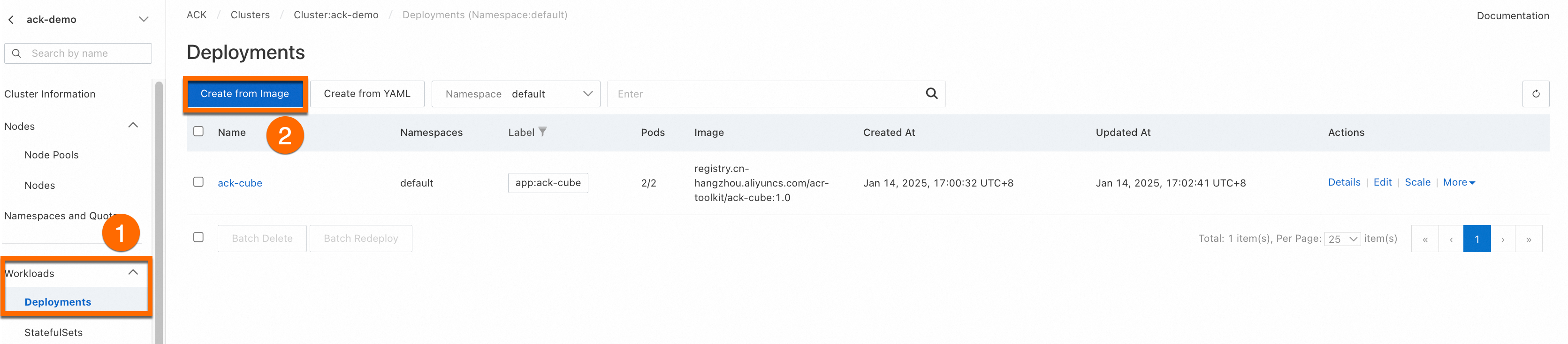
Log on to the ACK console and click Clusters in the left-side navigation pane. On the Clusters page, click the name of your cluster. In the left-side navigation pane, choose . On the Deployments page, click Create from Image.
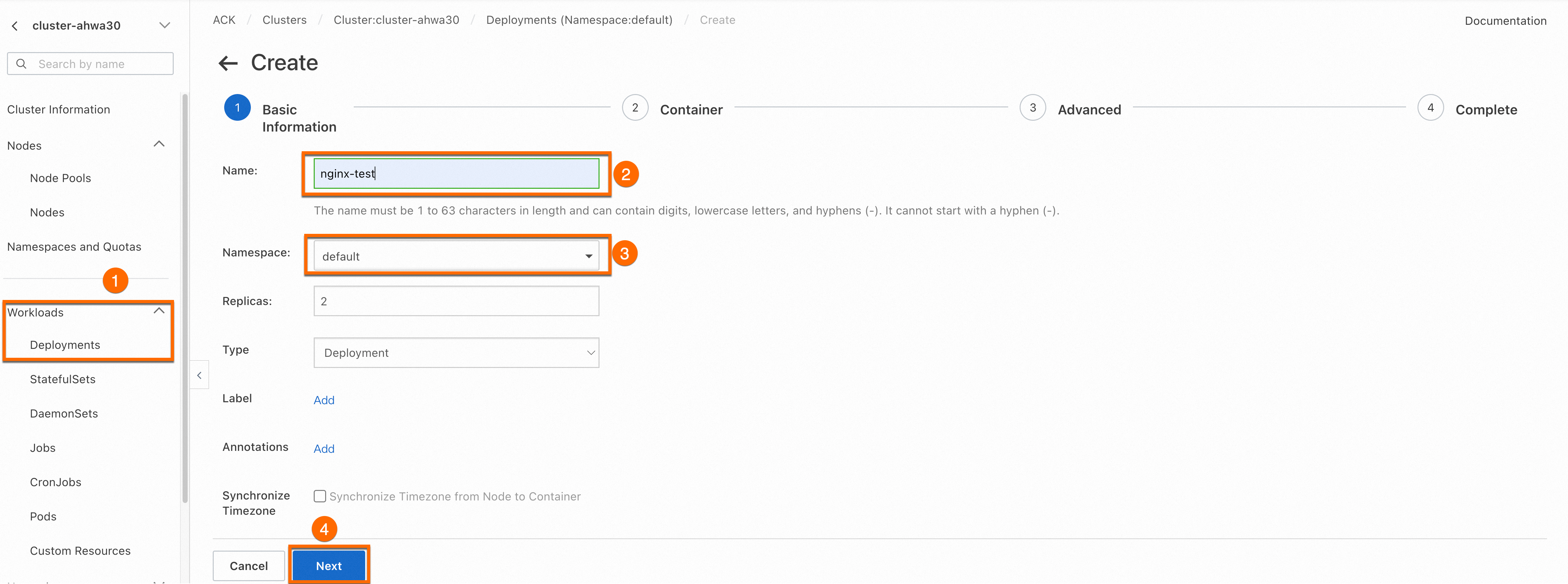
On the Basic Information page, configure the basic settings for the application. Then, click Next.
Configure the container
In the Container Configuration section, configure the Image Name and Port. The other settings are optional and you can keep the default values. Then, click Next to open the Advanced Settings wizard page. The image address is as follows.
ImportantTo pull this image, you must enable public internet access for your cluster. If you kept the Configure SNAT for VPC option selected when you created the cluster, public internet access is already enabled. If not, see Enable public network access for a cluster.
anolis-registry.cn-zhangjiakou.cr.aliyuncs.com/openanolis/nginx:1.14.1-8.6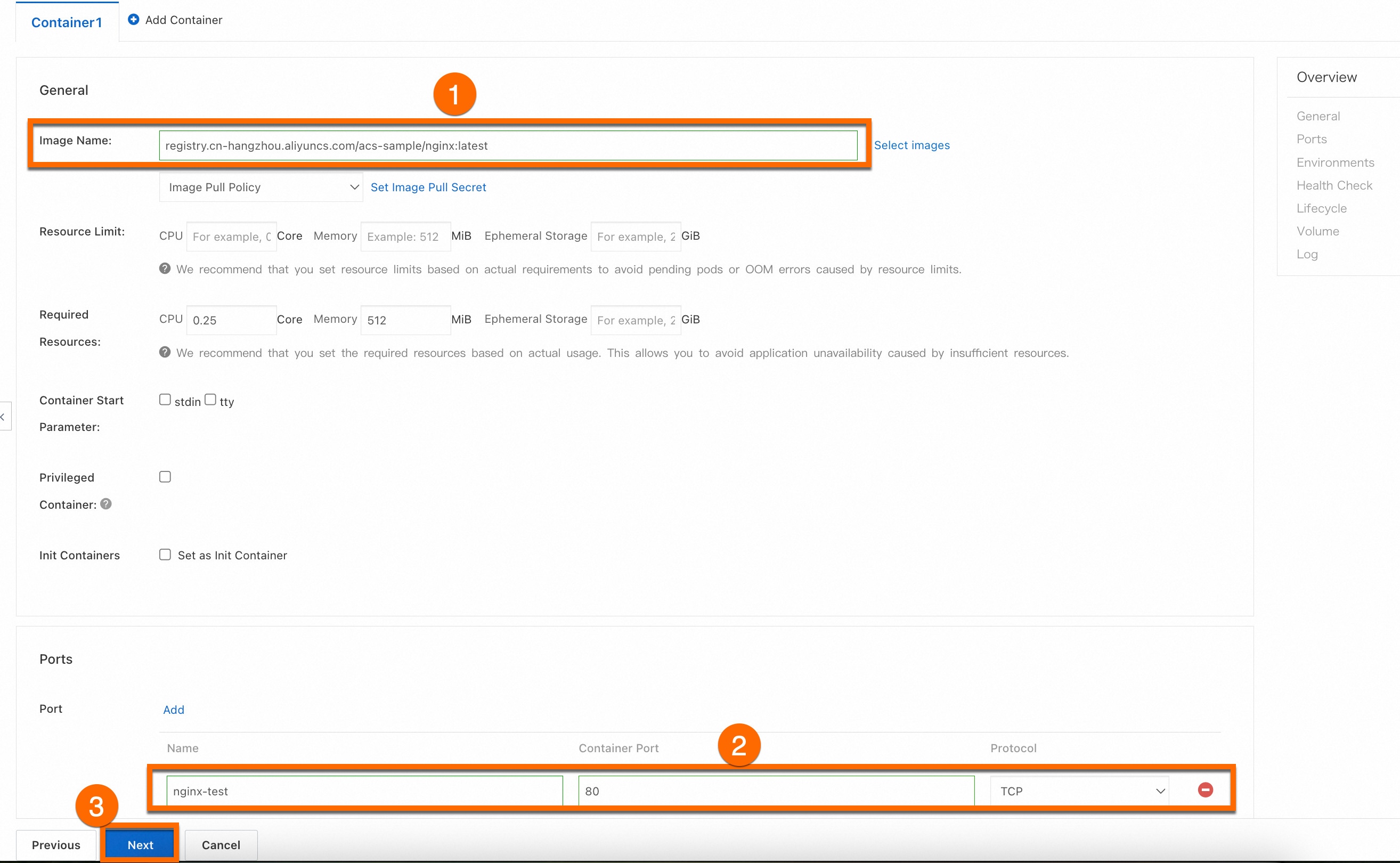
Configure advanced settings
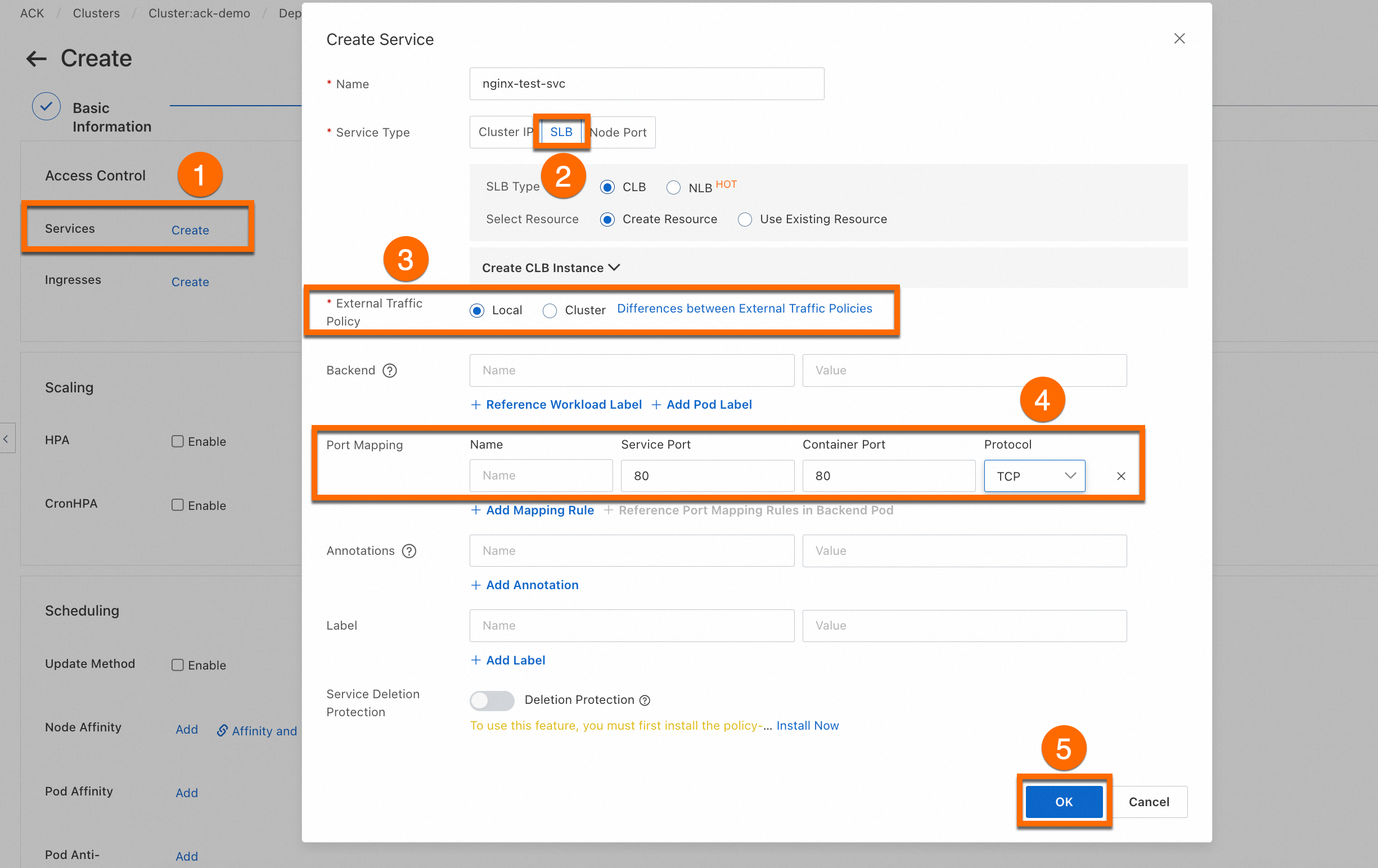
On the Advanced page, configure access control, scaling, and scheduling settings. In the Access Control section, configure how to expose the backend Pods and click OK. Then, click Create at the bottom of the page.
ImportantThis step creates a LoadBalancer-type Service to expose the workload. The associated Server Load Balancer (SLB) instance incurs fees. For more information, see Pay-as-you-go. If you no longer need the SLB instance, release it promptly to avoid unnecessary charges.
View the application
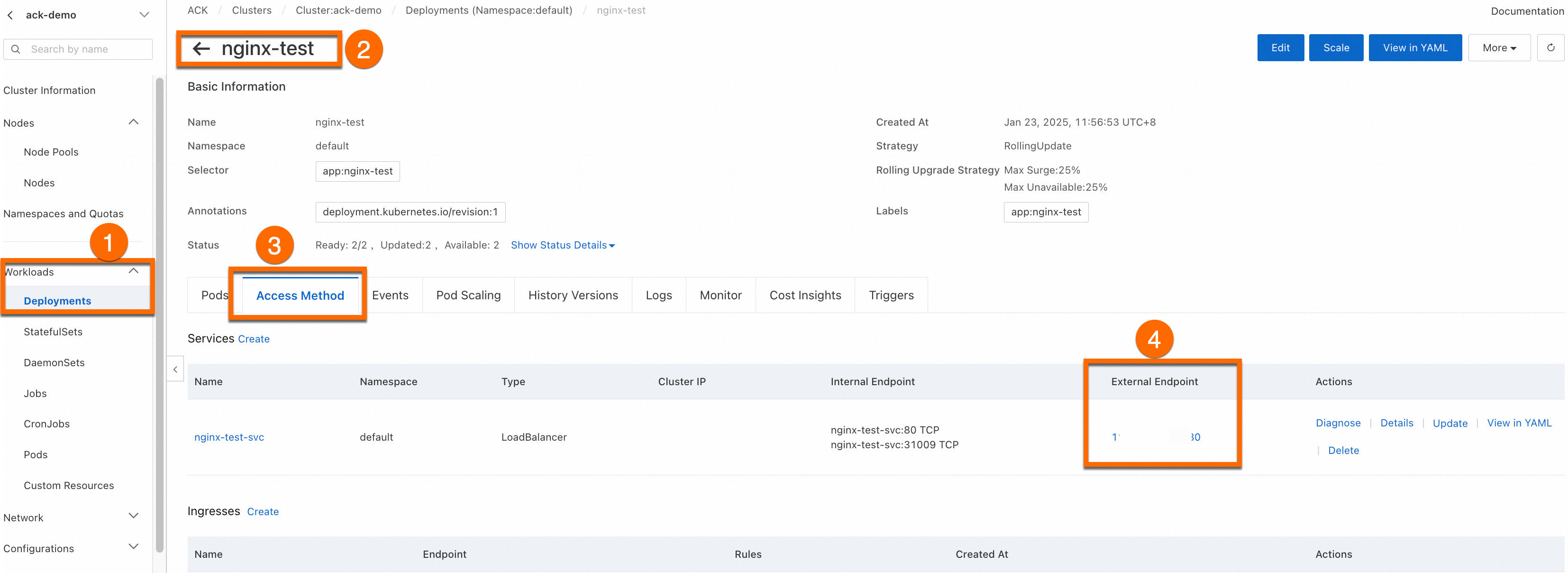
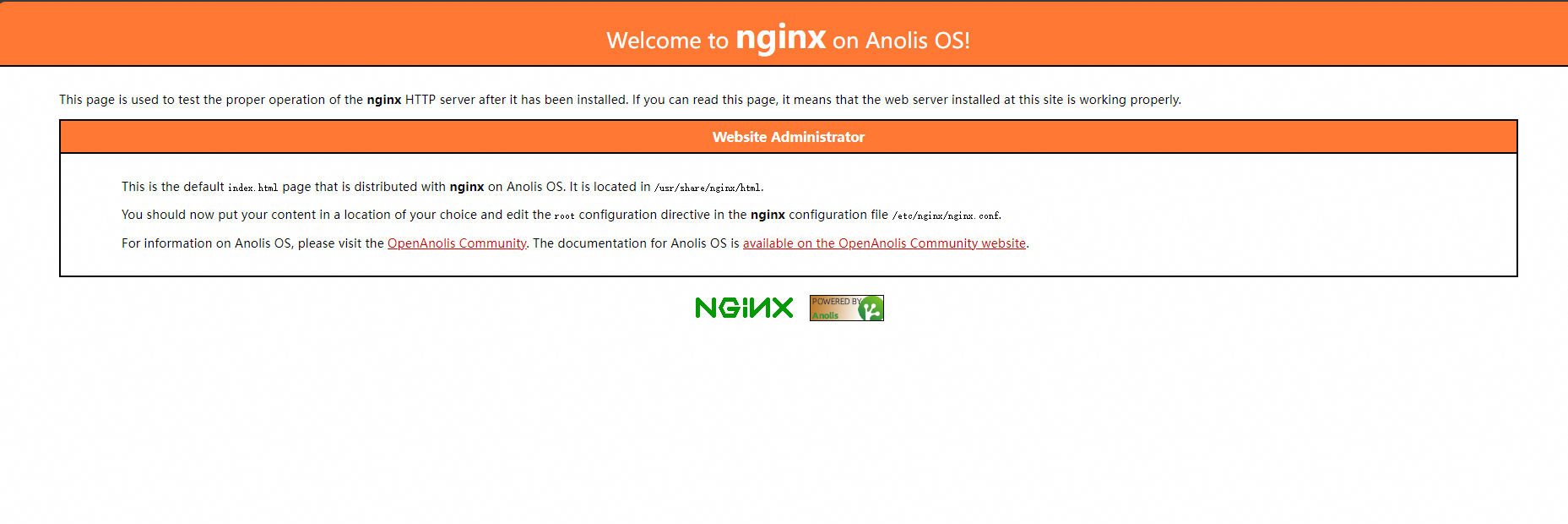
After the application is created, the Complete page appears. In the Creation Task Submitted panel, click View Details. Click the Access Method tab, find the newly created Service (nginx-test-svc), and then click the link in the External Endpoint column to access the NGINX welcome page.

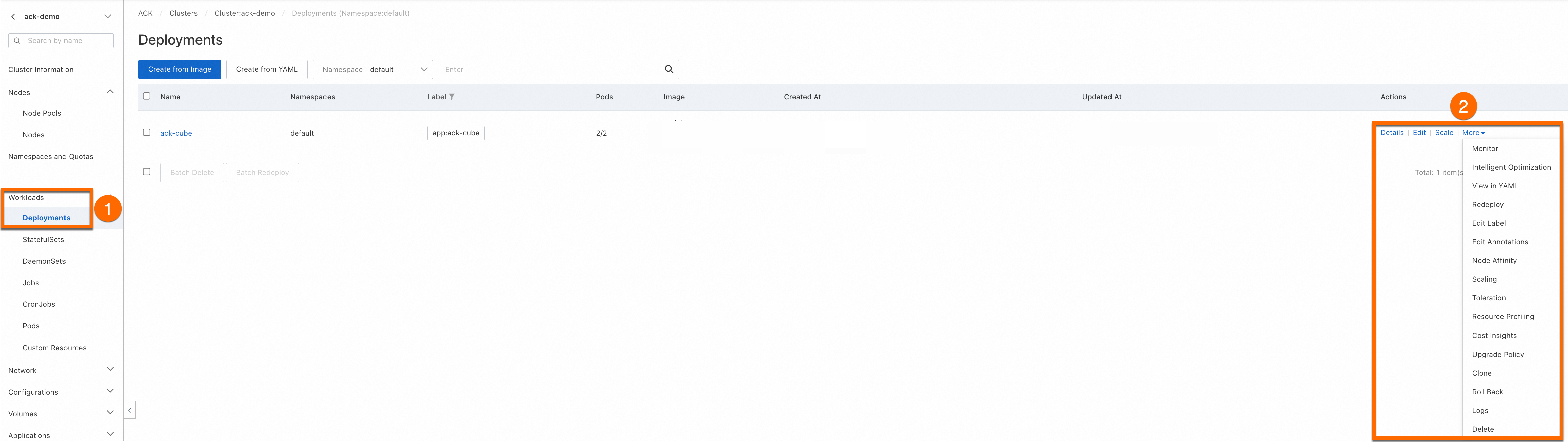
You can View, Edit, or Redeploy the created workload.
Use kubectl
Before you create a workload, connect to your ACK cluster by using kubectl. For more information, see Obtain the kubeconfig file of a cluster and use kubectl to connect to the cluster.
Copy the following YAML configuration and save it to deployment.yaml. This configuration defines a Deployment and a
LoadBalancer-type Service for external access.apiVersion: apps/v1 kind: Deployment # The type of workload. metadata: name: nginx-test namespace: default # The namespace. Change it based on your requirements. labels: app: nginx spec: replicas: 2 # The number of Pod replicas. selector: matchLabels: app: nginx template: # The Pod template. metadata: labels: # The Pod labels. app: nginx spec: containers: - name: nginx # The container name. image: anolis-registry.cn-zhangjiakou.cr.aliyuncs.com/openanolis/nginx:1.14.1-8.6 # The NGINX image and its version. ports: - containerPort: 80 # The port exposed by the container. protocol: TCP # The protocol. You can set it to TCP or UDP. Default value: TCP. --- # The Service definition. apiVersion: v1 kind: Service metadata: name: nginx-test-svc namespace: default # The namespace. Change it based on your requirements. labels: app: nginx spec: selector: app: nginx # Selects Pods with the specified label. ports: - port: 80 # The port exposed by the Service in the cluster. targetPort: 80 # The container port that the traffic is forwarded to. protocol: TCP # The protocol. Default value: TCP. type: LoadBalancer # The type of Service. Default value: ClusterIP (for internal access only).Run the following command to create the Deployment and Service:
kubectl apply -f deployment.yamlExpected output:
deployment.apps/nginx-test created
service/nginx-test-svc created
Run the following command to query the public IP address of the Service:
kubectl get svcExpected output:
NAME            TYPE           CLUSTER-IP       EXTERNAL-IP     PORT(S)        AGE
kubernetes      ClusterIP      172.16.**.***    <none>          443/TCP        4h47m
nginx-test-svc  LoadBalancer   172.16.**.***    106.14.**.***   80:31130/TCP   1h10m
Enter the public IP address of Nginx (
106.14.**.***) in a browser to access the Nginx container of the workload.
Configuration parameters
Console parameters
Basic information

Parameter | Description |
Name | The name of the workload. Pod names are derived from this name. |
Namespace | The namespace that contains the workload. |
Replicas | The number of Pod replicas. Default value: 2. |
Type | The type of the workload. For more information about how to select a workload type, see Create a workload. |
Label | The labels of the workload. |
Annotations | The annotations of the workload. |
Synchronize Timezone | Specifies whether the container uses the same time zone as its host node. |
Container configuration
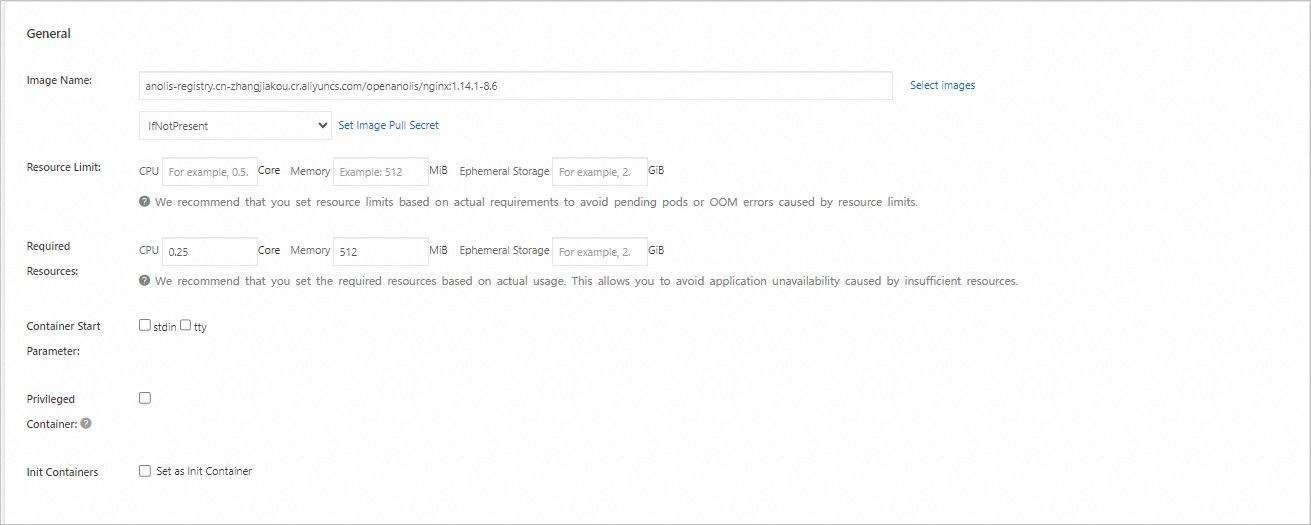
Parameter | Description |
Image Name |
|
Resource limit | The container's |
Resource requests | The |
Container start parameter |
These two options are typically used together to attach a terminal ( |
Privileged container |
Privileged mode grants a container nearly the same level of access to the host operating system as processes running on the host. This includes access to hardware devices and the ability to mount file systems. |
Init containers | Select this option to create an init container. Init containers run and complete before the main application containers start. They can be used to delay the startup of application containers until certain preconditions are met, such as waiting for a dependent service to become available. Init containers can also contain utility tools or setup scripts that are not present in the application image to initialize the runtime environment, such as setting kernel parameters or generating configuration files. For more information, see Init Containers in the Kubernetes documentation. |

Parameter | Description |
Name | The name of the container port. This is for identification purposes only and has no functional impact. |
Container Port | The port that the container exposes. The value must be an integer from 1 to 65535. A container must expose a port to be accessible from outside the Pod and to allow communication with other containers in the same Pod. All containers in a Pod share the same network namespace, so port numbers must be unique within a Pod. |
Protocol | The Layer 4 protocol used by the container port. Valid values: TCP and UDP. |
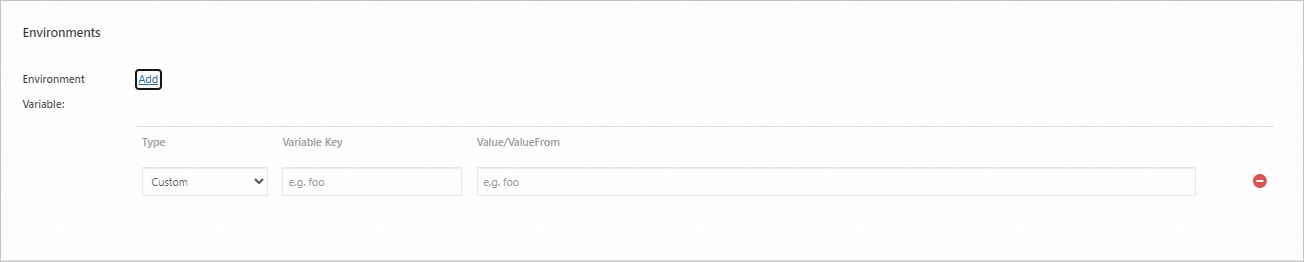
Parameter | Description |
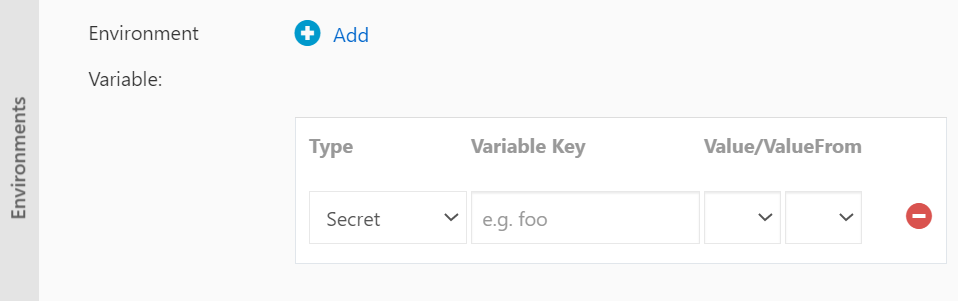
Type | The method used to set environment variables. The following types are supported:
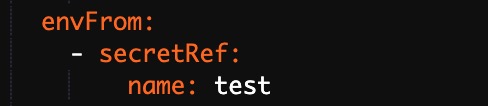
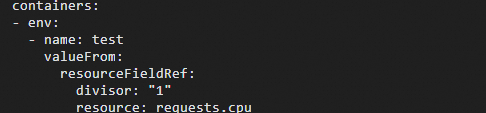
You can reference all key-value pairs from a ConfigMap or Secret. For example, to reference all data from a Secret, select the Secrets type and then select the target Secret without specifying a key. The corresponding YAML also references the entire Secret. To select a resource reference, you can use the
|
Variable Key | The name of the environment variable inside the Pod. |
Value/ValueFrom | The value of the environment variable or a reference to a value from another source. |

Parameter | Description |
Liveness probe: A liveness probe checks if a container is running. If the probe fails multiple times, the kubelet restarts the container. This can help resolve issues like deadlocks where the container is running but unable to make progress. | |
Readiness probe: A readiness probe checks if a container is ready to accept traffic. A Pod is added as a backend to a Service only after its readiness probe succeeds. | |
Startup Probes: These probes are executed only when a container starts to check if it has started successfully. The Liveness Probes and Readiness Probes are executed only after the startup probe succeeds. Note Startup probes are supported only in Kubernetes clusters that run version 1.18 or later. |
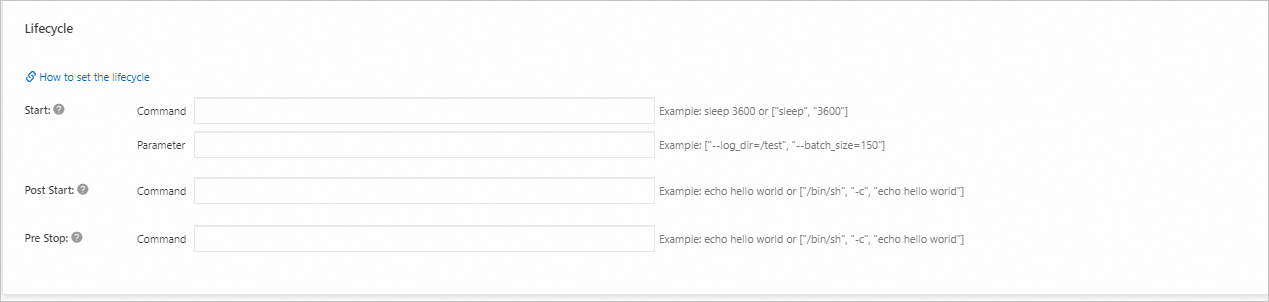
Parameter | Description |
Start | Sets the start command and arguments for the container. These define the operations that are performed when the container starts and are used to initialize the application service. This is suitable for application deployments that require specific environment variables, mount points, or port mappings. |
Post Start | Sets a command that is executed immediately after a container is created. This is useful for performing tasks such as initializing configurations or running scripts before the main process starts. |
Pre Stop | Sets a command that is executed immediately before a container is terminated. This is useful for gracefully shutting down the application process to ensure data consistency and prevent data loss or service anomalies. |
You can configure start, post-start, and pre-stop handlers for a container's lifecycle. For more information, see Attach Handlers to Container Lifecycle Events in the Kubernetes documentation. | |
Advanced configuration
Configuration card | Parameter | Description |
Access Control | Services | A Service provides a stable, unified Layer 4 (transport layer) endpoint for a group of Pods. It is a required resource for exposing a workload. Services support multiple types, including Cluster IP, Node Port, and Load Balancer. Before you configure a Service, see Service management to understand the basic concepts. |
Ingresses | An Ingress provides a Layer 7 (application layer) entry point for multiple Services in a cluster and forwards requests to different Services based on domain name matching. Before you use an Ingress, you must install an Ingress controller. ACK provides several options for different scenarios. For more information, see Comparison of NGINX Ingress Controller, ALB Ingress Controller, and MSE Ingress gateways. | |
Scaling | Horizontal Pod Autoscaler (HPA) | The Horizontal Pod Autoscaler (HPA) automatically scales the number of Pods based on container performance metrics. This helps you adjust the total resources used by your workload in response to fluctuations in business load, scaling out to handle high loads and scaling in to save resources during low loads. For more information, see Use a HorizontalPodAutoscaler to automatically scale Pods. |
Cron Horizontal Pod Autoscaler (CronHPA) | The Cron Horizontal Pod Autoscaler (CronHPA) scales workloads at scheduled times. This is suitable for scenarios with predictable, cyclical changes in business load, such as the traffic peaks on social media platforms after lunch and dinner. For more information, see Use a CronHPA to automatically scale Pods. | |
Scheduling | Upgrade strategy | The strategy used to replace old Pods with new ones when the Pod configuration changes.
|
| Affinity, anti-affinity, and tolerations are used to control how Pods are scheduled onto nodes. These operations are complex and require advance planning. For more information, see Scheduling. | |
Labels and annotations | Pod labels | Add a label to each Pod that belongs to the workload. In a cluster, resources such as workloads and Services use labels to match with Pods. By default, ACK adds a label in the format of |
Pod annotations | Adds annotations to each Pod in this workload. Some features in ACK use annotations, which you can add or modify as needed when using those features. |
Sample workload YAML
apiVersion: apps/v1
kind: Deployment    # The type of workload.
metadata:
  name: nginx-test
  namespace: default  # The namespace. Change it based on your requirements.
  labels:
    app: nginx
spec:
  replicas: 2  # The number of Pod replicas.
  selector:
    matchLabels:
      app: nginx
  template: # The Pod template.
    metadata:
      labels: # The Pod labels.
        app: nginx
      annotations: # The Pod annotations.
        description: "This is an application deployment"
    spec:
      containers:
      - name: nginx  # The container name.
        image: nginx:1.7.9  # The NGINX image and its version.
        ports:
        - name: nginx  # The port name.
          containerPort: 80  # The port exposed by the container.
          protocol: TCP  # The protocol. You can set it to TCP or UDP. Default value: TCP.
        command: ["/bin/sh"]  # The entrypoint of the container.
        args: [ "-c", "echo $(SPECIAL_LEVEL_KEY) $(SPECIAL_TYPE_KEY) && exec nginx -g 'daemon off;'"] # Prints variables and starts NGINX.
        stdin: true  # Enables standard input.
        tty: true    # Allocates a pseudo-TTY.
        env:
          - name: SPECIAL_LEVEL_KEY
            valueFrom:
              configMapKeyRef:
                name: special-config  # The name of the ConfigMap.
                key: SPECIAL_LEVEL    # The key in the ConfigMap.
        securityContext:
          privileged: true  # Enables privileged mode if set to true. Default value: false.
        resources:
          limits:
            cpu: "500m"               # The maximum amount of CPU, 500 millicores.
            memory: "256Mi"           # The maximum amount of memory, 256 MiB.
            ephemeral-storage: "1Gi"  # The maximum amount of ephemeral storage, 1 GiB.
          requests:
            cpu: "200m"               # The minimum requested amount of CPU, 200 millicores.
            memory: "128Mi"           # The minimum requested amount of memory, 128 MiB.
            ephemeral-storage: "500Mi" # The minimum requested amount of ephemeral storage, 500 MiB.
        livenessProbe:  # The configuration of the liveness probe.
          httpGet:
            path: /
            port: 80
          initialDelaySeconds: 30
          periodSeconds: 10
        readinessProbe:  # The configuration of the readiness probe.
          httpGet:
            path: /
            port: 80
          initialDelaySeconds: 5
          periodSeconds: 10
        volumeMounts:
        - name: tz-config
          mountPath: /etc/localtime
          readOnly: true
      volumes:
      - name: tz-config
        hostPath:
          path: /etc/localtime  # Mounts the /etc/localtime file from the host to the same path in the container.
---
# The Service definition.
apiVersion: v1
kind: Service
metadata:
  name: nginx-test-svc
  namespace: default  # The namespace. Change it based on your requirements.
  labels:
    app: nginx
spec:
  selector:
    app: nginx  # Selects Pods with the specified label.
  ports:
    - port: 80           # The port exposed by the Service in the cluster.
      targetPort: 80     # The container port that the traffic is forwarded to.
      protocol: TCP      # The protocol. Default value: TCP.
  type: ClusterIP        # The type of Service. Default value: ClusterIP (for internal access only).
---
# The Ingress definition.
apiVersion: networking.k8s.io/v1
kind: Ingress
metadata:
  name: nginx-ingress
  namespace: default  # The namespace. Change it based on your requirements.
  annotations:
    kubernetes.io/ingress.class: "nginx"  # Specifies the Ingress controller.
    # If you use an Alibaba Cloud SLB Ingress controller, you can add the following annotations:
    # service.beta.kubernetes.io/alibaba-cloud-loadbalancer-id: "lb-xxxxxxxxxx"
    # service.beta.kubernetes.io/alibaba-cloud-loadbalancer-spec: "slb.spec.s1.small"
spec:
  rules:
    - host: foo.bar.com  # Replace with your domain name.
      http:
        paths:
          - path: /
            pathType: Prefix
            backend:
              service:
                name: nginx-test-svc # The name of the backend Service.
                port:
                  number: 80         # The port of the backend Service.
  tls:  # Optional. Used to enable HTTPS.
    - hosts:
        - foo.bar.com  # Replace with your domain name.
      secretName: tls-secret  # The name of the Secret that contains the TLS certificate.
Reference
For applications that require stable, persistent storage, such as databases, use a StatefulSet. For more information, see Create a stateful workload (StatefulSet).
If you encounter issues when you create a workload, see Workloads FAQ.
If a Pod is in an abnormal state, see Troubleshoot Pod exceptions.
If you have any questions or suggestions when using Container Service for Kubernetes (ACK), search for DingTalk group 74560018672 to join the DingTalk group.