Use elastic training with spot instances to reduce AI model training costs
The Cloud-native AI Suite offers an elastic training solution that uses spot instances to reduce AI model training costs. This solution runs stateful workloads, such as AI training jobs, on spot instances. It reduces training costs with minimal impact on the job success rate.
Advantages and limitations
The core advantages of the elastic training solution with spot instances are:
Optimized resource management: You can set a maximum wait time to prevent jobs from holding unallocated resources for extended periods. This improves resource utilization and reduces unnecessary costs.
Training process protection: The solution uses the spot instance reclamation notification mechanism to save a model checkpoint before an instance is reclaimed. This ensures that training progress is not lost and that training can be resumed even if an instance is unexpectedly released.
Fault tolerance and recovery: The solution provides fault tolerance and failover capabilities. If some spot instances are reclaimed, the training task continues to run as long as the minimum number of workers is met. The training job automatically resumes when sufficient resources become available.
However, the solution also has some limitations:
Checkpoint timing control: The notification time before an instance is reclaimed is fixed at 5 minutes. The training task must respond quickly and perform a checkpoint operation to prevent data loss. Therefore, you must set a short interval for checkpoint detection to ensure timely checkpoint operations.
Resource supply uncertainty: The supply of resources in the cluster is not guaranteed. This may affect whether the task can run as expected. You can flexibly adjust the task's resource configuration to adapt to changes in cluster resources.
Unpredictable cost savings: Spot instance prices fluctuate significantly. Although they can greatly reduce costs in most cases, the exact amount of savings is difficult to predict. You can dynamically adjust node specifications or budget strategies based on real-time market prices to balance cost and training needs.
For more information about spot instances, see What is a spot instance?.
Prerequisites
You have created a spot instance node pool with GPU-accelerated instance types. For more information, see Best practices for spot instance node pools.
NoteFor more information about the GPU-accelerated instance families supported by ACK clusters, see GPU-accelerated instance families supported by ACK.
You have selected the Elastic Training and Arena components when installing the Cloud-native AI Suite. For more information, see Install the Cloud-native AI Suite.
You have installed Arena client version 0.9.3 or later. For more information, see Configure the Arena client.
Procedure
This topic describes how to use Arena to submit a Horovod-based elastic deep learning training job on an ACK cluster. The job is configured to use spot instances for cost optimization. To enable elastic training with spot instances, the job is configured with 8 initial workers, a minimum of 1 worker, and a maximum of 128 workers.
Run the following command to download the kubeai dependency library using pip.
pip install kubeaiDownload the sample code and dataset to run a test.
As shown in the following code, you must modify the original training script to use the kubeai elastic training component (Job-Supervisor). This modification implements a checkpoint mechanism that is triggered by the reclamation signal of a spot instance.
import kubeai.elastic as kubeai
if __name__ == '__main__':
    args = parser.parse_args()
    args.cuda = not args.no_cuda and torch.cuda.is_available()
    logging.info(f"start training job {args.name}")
    allreduce_batch_size = args.batch_size * args.batches_per_allreduce
    # Initialize the Horovod distributed training environment by calling hvd.init().
    hvd.init()
    # Initialize the connection to the kubeai elastic training component by calling kubeai.init(). This allows the script to receive reclamation signals from spot instances.
    kubeai.init()
    ...
    # 2) Resume from a checkpoint.
    if args.skip_restore == False and hvd.rank() == 0:
        for try_epoch in range(args.epochs, 0, -1):
            # Start training from the latest available checkpoint.
            if os.path.exists(args.checkpoint_format.format(epoch=try_epoch)):
                resume_from_epoch = try_epoch
                break
        if resume_from_epoch > 0:
            logging.info("load checkpoint")
            filepath = args.checkpoint_format.format(epoch=resume_from_epoch)
            checkpoint = torch.load(filepath)
            model.load_state_dict(checkpoint['model'])  # model
            optimizer.load_state_dict(checkpoint['optimizer'])  # optimizer
            train_sampler.load_state_dict(checkpoint['sampler'])  # sampler
def train(state):
    ...
    with tqdm(total=len(train_loader),
              desc='Train Epoch     #{}'.format(epoch + 1),
              disable=not verbose) as t:
        for idx, (data, target) in enumerate(train_loader):
            ...
            # 3) Before training each batch of data, call kubeai.check_alive() to check if the current training task is still running (that is, if the instance has been preempted). If the return value is False, the instance may have been released. In this case, save the current training state (checkpoint) and exit the program (sys.exit(-1)).
            if kubeai.check_alive() == False :
                save_checkpoint(state.epoch)
                sys.exit(-1)
def validate(epoch):
    ...
    with tqdm(total=len(val_loader),
              desc='Validate Epoch  #{}'.format(epoch + 1),
              disable=not verbose) as t:
        with torch.no_grad():
            for data, target in val_loader:
# 4) Before validating each batch of data, check if the current training task is still running. If the instance is preempted, save the current training state and exit the program.
                if kubeai.check_alive() == False :
                    save_checkpoint(state.epoch)
                    sys.exit(-1)
With these changes, the script checks whether to create a checkpoint after each training and evaluation step. A checkpoint is created at the next available step after a reclamation signal is received. A 5-minute buffer is provided between when the signal is received and when the instance is reclaimed. To ensure that the model training results are saved in time, you must ensure that the time required for each training step and the checkpoint operation is less than 5 minutes.
Run the following command to submit the elastic training job to the cluster using Arena.
arena submit etjob \
  --loglevel=debug \
	--spot-instance \
	--max-wait-time=600 \
	--job-restart-policy=OnFailure \
	--job-backoff-limit=3 \
	--worker-restart-policy=Always \
	--launcher-selector=instance_type=spot-launcher \
	--toleration=all \
  --namespace=default \
  --name=fine-tuning-elastic \
  --gpus=1 \
  --memory=16Gi \
  --cpu=4 \
  --workers=8 \
  --max-workers=128 \
  --min-workers=1 \
  --image=registry.cn-beijing.aliyuncs.com/acs/bert-elastic-demo:v1.5 \
  "horovodrun --log-level DEBUG --verbose
  -np \$((\${workers}*\${gpus}))
  --min-np \$((\${minWorkers}*\${gpus}))
  --max-np \$((\${maxWorkers}*\${gpus}))
  --host-discovery-script /etc/edl/discover_hosts.sh
  python /examples/elastic/pytorch/train_bert.py --epochs=5 --model=bert --batch-size 32 --log-dir /opt"
The preceding code specifies the number of workers that run on spot instances and the maximum wait time.
Maximum wait time of 600 seconds: If a spot instance is reclaimed, a worker may become unresponsive. The system waits for a maximum of 600 seconds for the worker to respond before it is considered failed.
Minimum of 1 worker: Even when resources are scarce and spot instances are reclaimed, at least one worker is guaranteed to remain to continue the training. This prevents the job from being terminated.
Maximum of 128 workers: When resources are sufficient and prices are favorable, the system automatically scales up the number of workers to the maximum limit. This elastic scaling mechanism utilizes cluster resources to accelerate the training process, balancing cost and efficiency while ensuring job stability.
Expected output:
trainingjob.kai.alibabacloud.com/fine-tuning-elastic created
secret/fine-tuning-elastic created
trainingjob.kai.alibabacloud.com/fine-tuning-elastic created
INFO[0003] The Job fine-tuning-elastic has been submitted successfully
INFO[0003] You can run `arena get fine-tuning-elastic --type etjob -n default` to check the job status
Run the following command to check the status of the submitted job.
kubectl get pod -n defaultExpected output:
NAME                           READY   STATUS    RESTARTS   AGE
fine-tuning-elastic-launcher   1/1     Running   0          44s
fine-tuning-elastic-worker-0   1/1     Running   0          46s
fine-tuning-elastic-worker-1   1/1     Running   0          3m47s
fine-tuning-elastic-worker-2   1/1     Running   0          3m47s
fine-tuning-elastic-worker-3   1/1     Running   0          3m47s
fine-tuning-elastic-worker-4   1/1     Running   0          3m47s
fine-tuning-elastic-worker-5   1/1     Running   0          3m47s
fine-tuning-elastic-worker-6   1/1     Running   0          46s
fine-tuning-elastic-worker-7   1/1     Running   0          46s
The output shows that the containers in each pod are ready and running, and no issues are detected.
If some spot instances are reclaimed, the workers on those nodes are also reclaimed. When the launcher detects that a worker connection has failed, it adds the failed worker to a blacklist. The launcher then uses the remaining active workers to establish a new communication environment and continue the training, as shown in the following output:
INFO:root:all 8 workers recorded
WARNING:root:blacklist failing host: bert-fine-tuning-worker-5
WARNING:root:blacklist failing host: bert-fine-tuning-worker-7
WARNING:root:blacklist failing host: bert-fine-tuning-worker-6
INFO:root:wait for available slots: 1
DEBUG:root:current available slots: 5
DEBUG:root:current available hosts: 5.
INFO:root:reset workers: 5
If the number of workers left after reclamation falls below the configured minimum, each worker receives a signal that it is about to be reclaimed. The worker with rank 0 then saves a checkpoint to preserve the training progress, as shown in the following output:
[0]<stderr>:[2023-03-10 11:16:31,404] train_bert.py train():72 [WARNING] kubeai is not alive
[7]<stderr>:[2023-03-10 11:16:31,406] train_bert.py train():72 [WARNING] kubeai is not alive
[6]<stderr>:[2023-03-10 11:16:31,406] train_bert.py train():72 [WARNING] kubeai is not alive
[5]<stderr>:[2023-03-10 11:16:31,405] train_bert.py train():72 [WARNING] kubeai is not alive
[4]<stderr>:[2023-03-10 11:16:31,404] train_bert.py train():72 [WARNING] kubeai is not alive
[3]<stderr>:[2023-03-10 11:16:31,408] train_bert.py train():72 [WARNING] kubeai is not alive
[2]<stderr>:[2023-03-10 11:16:31,405] train_bert.py train():72 [WARNING] kubeai is not alive
[1]<stderr>:[2023-03-10 11:16:31,407] train_bert.py train():72 [WARNING] kubeai is not alive
[0]<stdout>:[2023-03-10 11:16:31.508731: D /tmp/pip-req-build-y6cfrajf/horovod/common/operations.cc:564]
[0]: Shutting down background thread
The job is then suspended. It waits for resources to become available again to resume from the saved checkpoint.
Training result visualization
To visualize the costs in your ACK cluster, you can enable the Cost Insights feature for the cluster. For more information, see Cost Insights.
To visualize the training process, you can enable TensorBoard. You must ensure that TensorBoard and the training workers share the same persistent volume claim (PVC). This allows TensorBoard to access the training output data. For information about how to enable TensorBoard, see Submit a distributed Tensorflow job.
Cost reduction
This topic uses Horovod elastic training to analyze the pros and cons of the pay-as-you-go and spot instance billing methods from the perspectives of model quality, training duration, and training cost.
Metric | Pay-as-you-go instances | Spot instances (with scaling) | Legend | Description |
Model quality | 0.76 | 0.76 |
| There is no difference in model quality between the two billing methods. |
Training duration | 1d 15h 17m | 1d 8h 44m |
| Training with pay-as-you-go instances takes longer. Spot instances significantly reduce the training duration. |
Training cost | Unit price: 3.3 (per core-hour) Total price: CNY 10,914 | Unit price: 0.23 (per core-hour) Total price: CNY 848 |
| Pay-as-you-go instances have a higher unit price. Spot instances significantly reduce the training cost. |
Number of workers | 12 |
| None | Pay-as-you-go instances always run with 12 workers. Spot instances dynamically adjust the number of workers based on different training stages. |
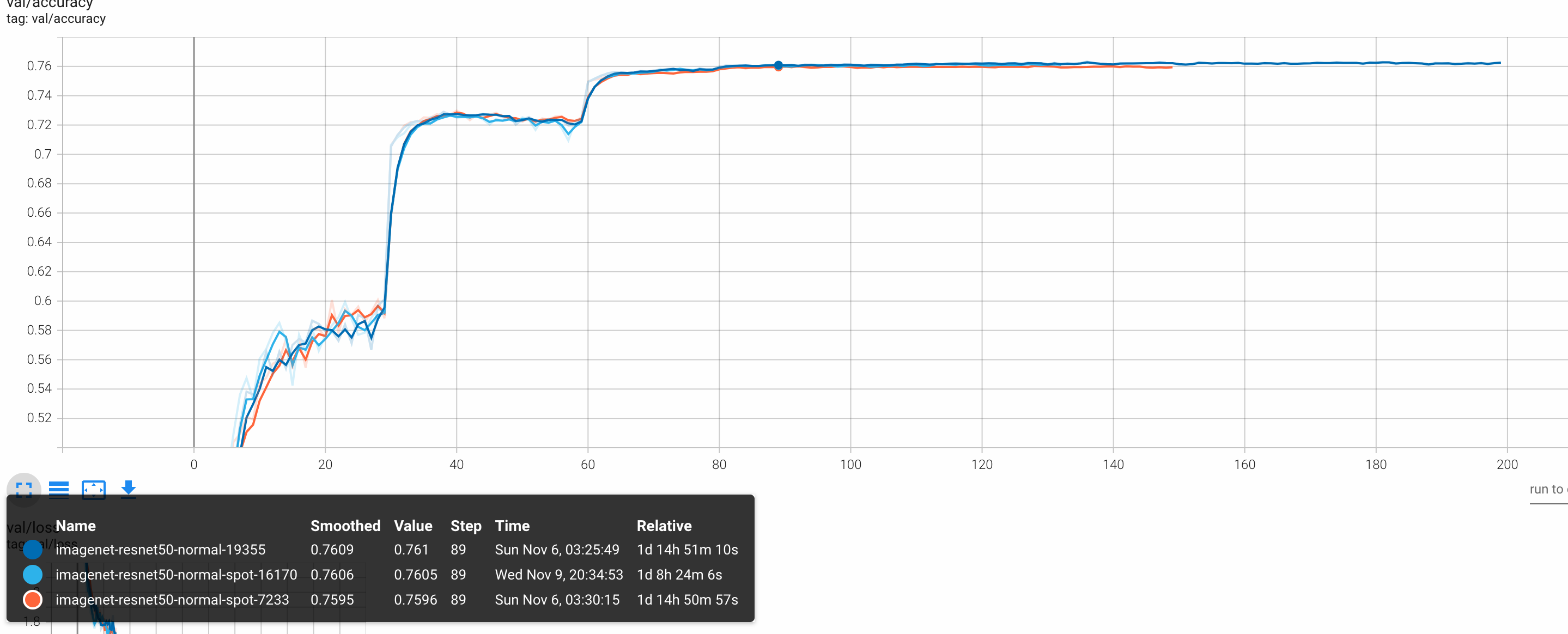
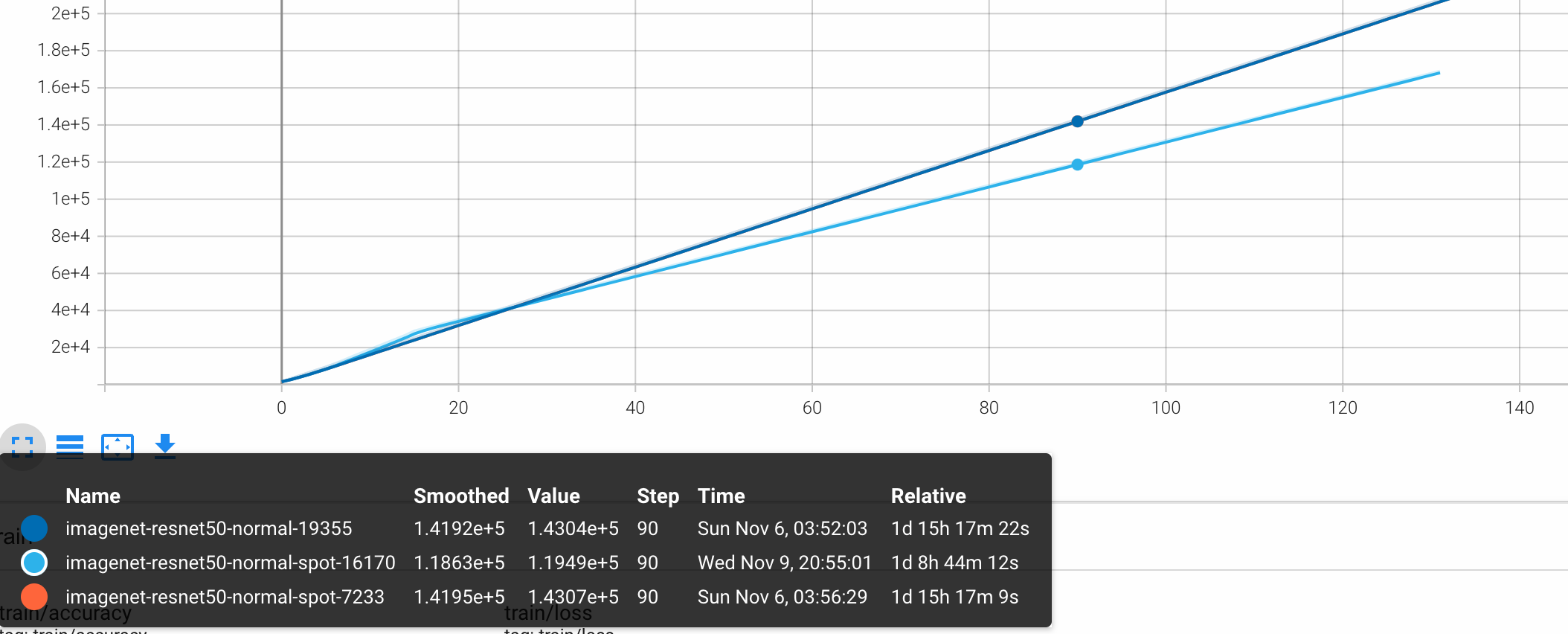
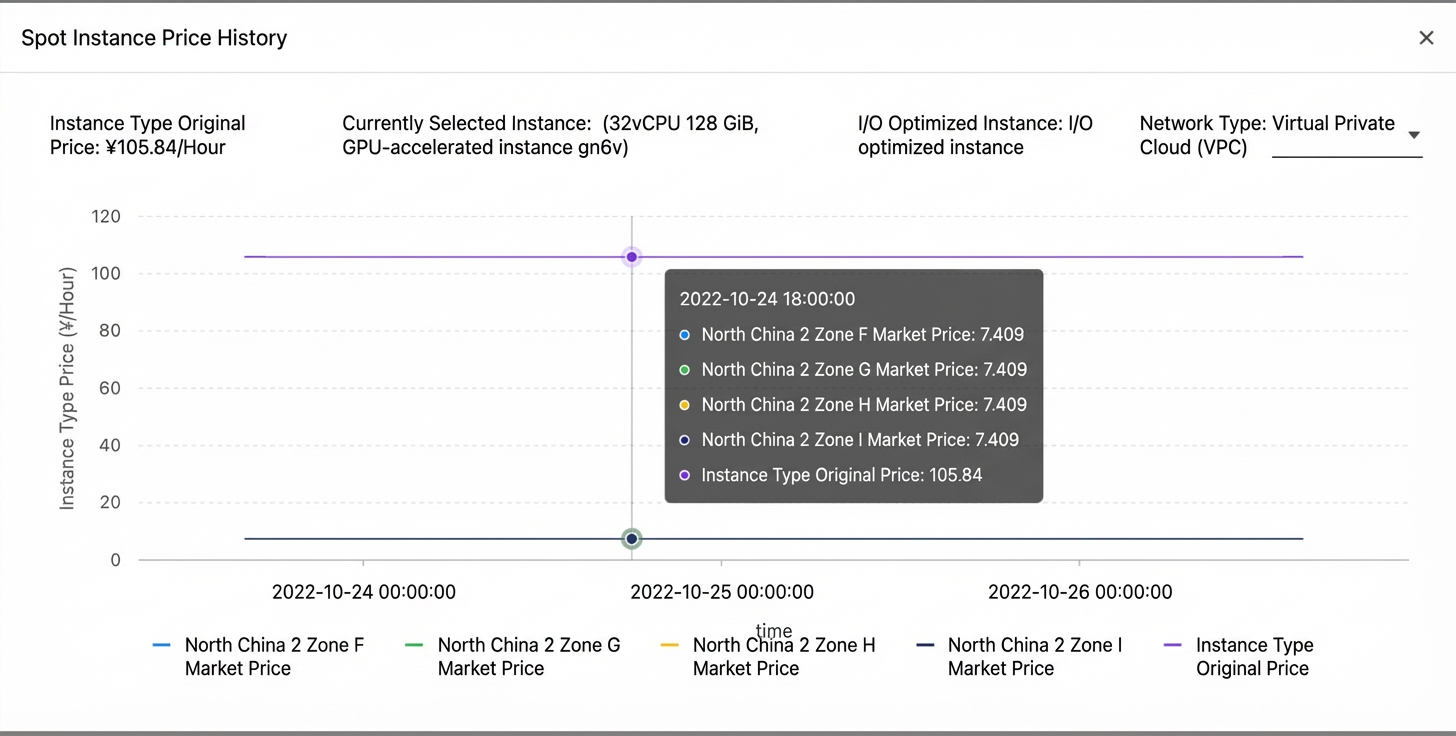
The comparison shows that using high-priced, stable pay-as-you-go instances resulted in a training duration of 1d 15h 17m, a model accuracy of 0.76, and a total cost of CNY 10,914. Using low-priced, preemptible spot instances with sufficient resources to avoid preemption, the training duration was 1d 8h 44m, the model accuracy was also 0.76, and the total cost was only CNY 848. This shows that combining elastic training with spot instances can significantly reduce costs while maintaining the availability of AI training jobs and the accuracy of the final model.
In summary, pay-as-you-go instances are suitable for time-sensitive projects that have high stability requirements and sufficient budgets. Spot instances are better for tasks with strict cost controls that can tolerate some risk of training interruption. In practice, you should weigh the pros and cons based on your specific business needs to choose the right billing method. You can also optimize training strategies, such as using checkpoints and fault tolerance mechanisms, to mitigate potential issues with spot instances.
Training efficiency improvement
You can set a larger number of workers to run on spot instances to accelerate AI training jobs.
Because the cost of spot instances is significantly lower than that of pay-as-you-go ECS instances, you can use a larger number of workers on spot instances to accelerate your AI training jobs.
The following table compares the training accuracy for jobs running with 8, 12, and 16 workers.
Metric | Number of workers | Legend | ||
8 | 12 | 16 | ||
Top-1 Acc (Train) | 0.9974 | 0.9967 | 0.9965 |
|
Loss (Train) | 0.0119 | 0.0137 | 0.0195 |
|
Top-1 Acc (Val) | 0.9664 | 0.9664 | 0.9594 |
|
Loss (Val) | 0.1185 | 0.1357 | 0.1353 |
|
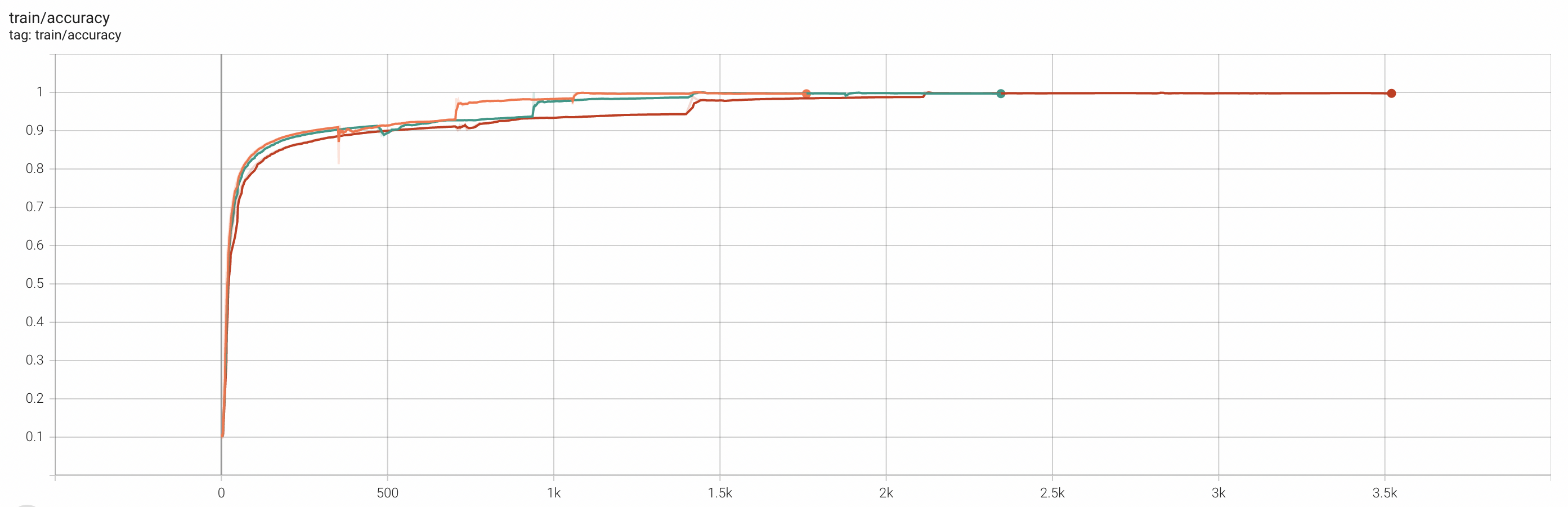
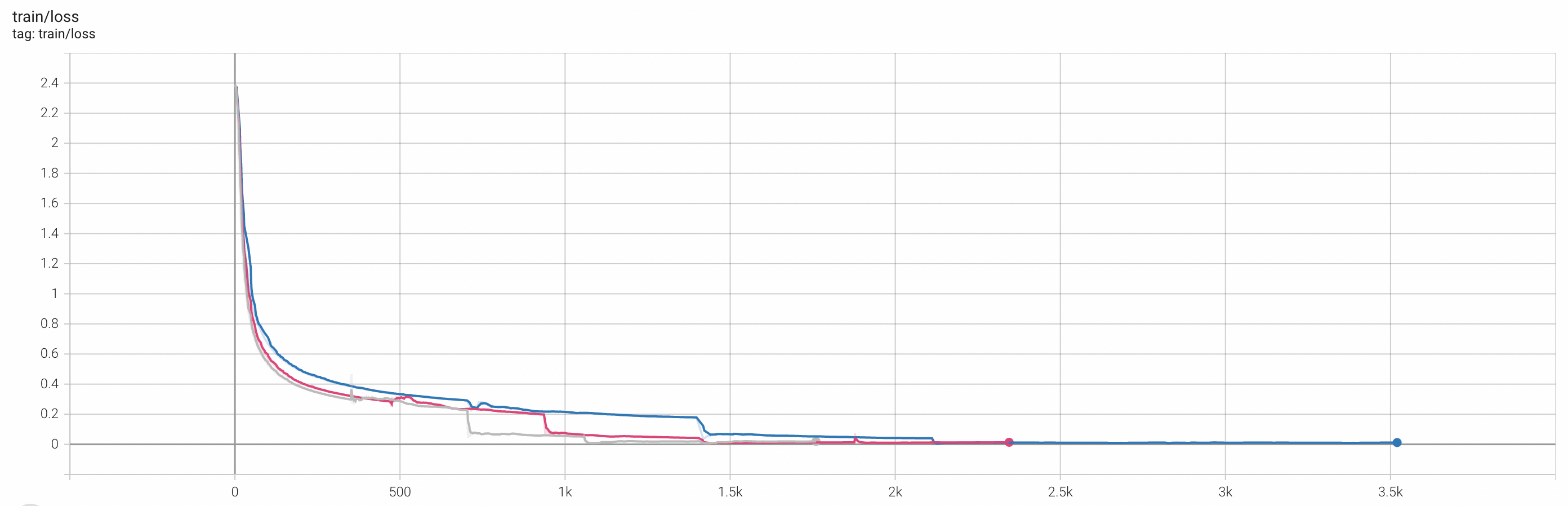
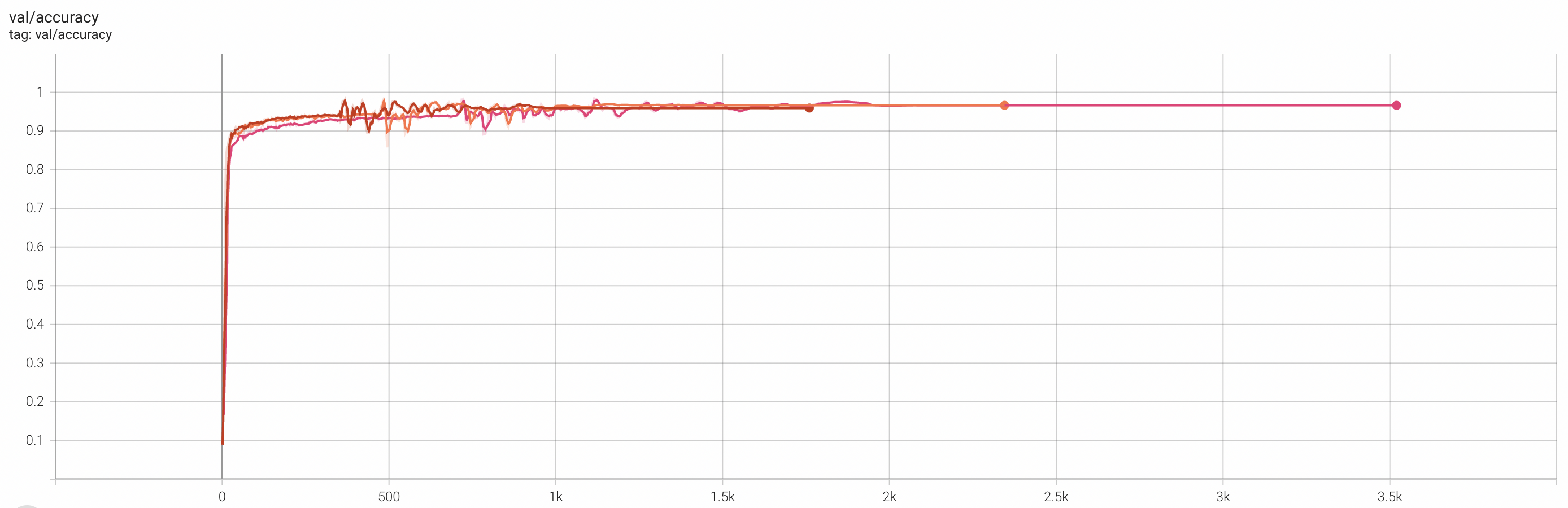
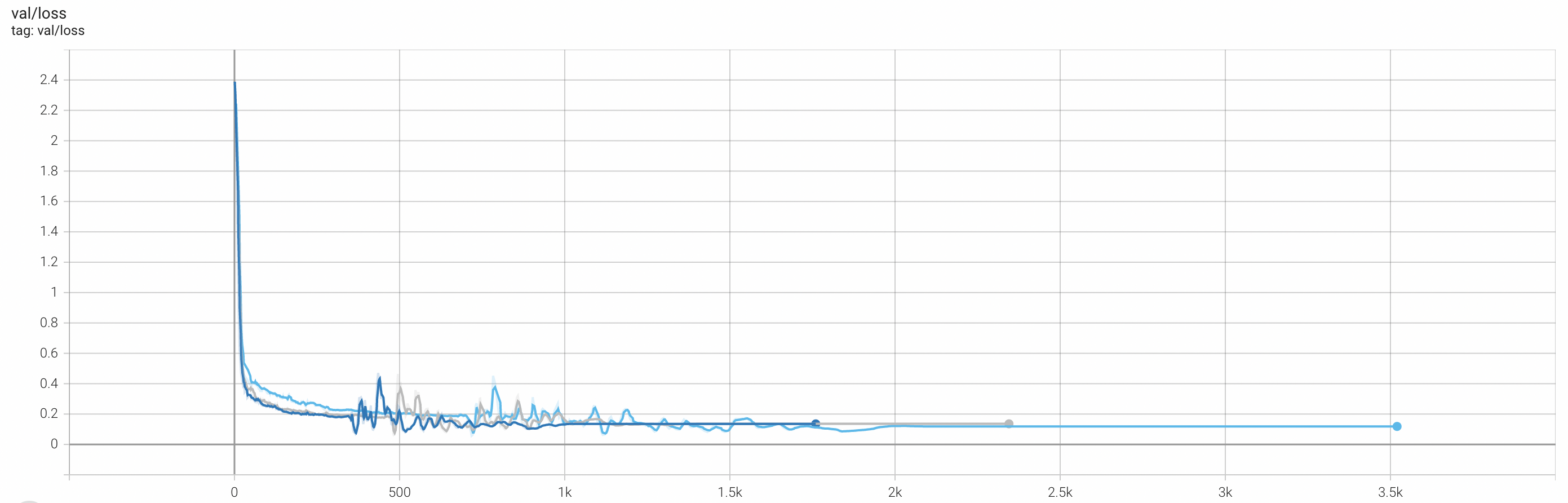
In summary, within a certain range, increasing the number of workers has a negligible impact on the model accuracy of AI training jobs. Therefore, you can use more concurrent workers to shorten the training time and improve efficiency without compromising training progress.
References
For more information about Horovod elastic training, see Use Horovod for elastic training on Kubernetes.
For more information about model training, see AI Job Management.