Harden ECS images with the Security Center agent
The Security Center agent is a lightweight control installed on Elastic Compute Service (ECS) instances. If an ECS instance does not have the agent installed, it is not protected by Security Center. The ECS console also does not display security data for the instance, such as vulnerabilities, alerts, baseline vulnerabilities, and asset fingerprints. For more information about the installation paths of the agent, see Operating systems supported by the Security Center agent.
You can perform the following operations on the Agent.
Automatically install the agent when you create an ECS instance
Log on to the ECS console.
In the left-side navigation pane, choose .
In the top navigation bar, select a region.
Create an ECS instance. In the Image section, select Free Security Hardening. The system automatically installs the agent on the new ECS instance. For more information, see Create an instance with custom settings.
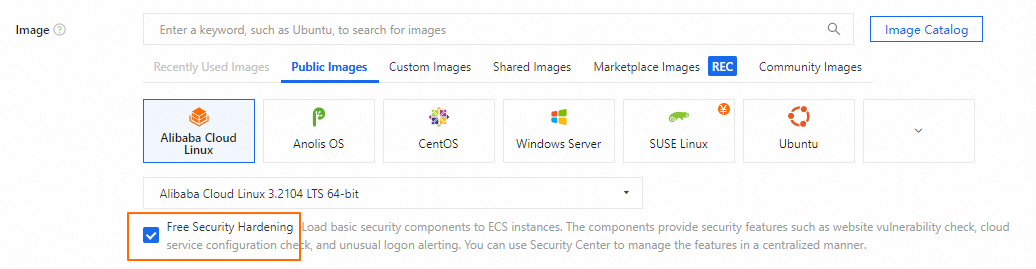
NoteTo automatically install the agent on a new ECS instance when you call the RunInstances operation, set the
SecurityEnhancementStrategyparameter to `Active`.Manually install the agent on an existing ECS instance
For more information, see Install the agent.
Uninstall the agent
For more information, see Uninstall the agent.