Application dashboard
The application overview displays applications and their call relationships. It visualizes the call topology and outlines key information, such as node resources, application protection status, and throttling events. This helps you quickly understand the system's status, service dependencies, and internal issues or alerts so you can take necessary troubleshooting measures. This topic shows how to view the application overview for an application connected to AHAS via an agent.
Prerequisites
- Activate Performance Testing Service (PTS). For more information, see What is Performance Testing Service (PTS)?.
- Your application is connected to AHAS with a Java agent or through Kubernetes. For more information, see Connect a Java application by using an agent.
View the application dashboard
This section uses an agent-connected application as an example to show you how to view the application overview. The actual call topology of the connected applications is as follows:
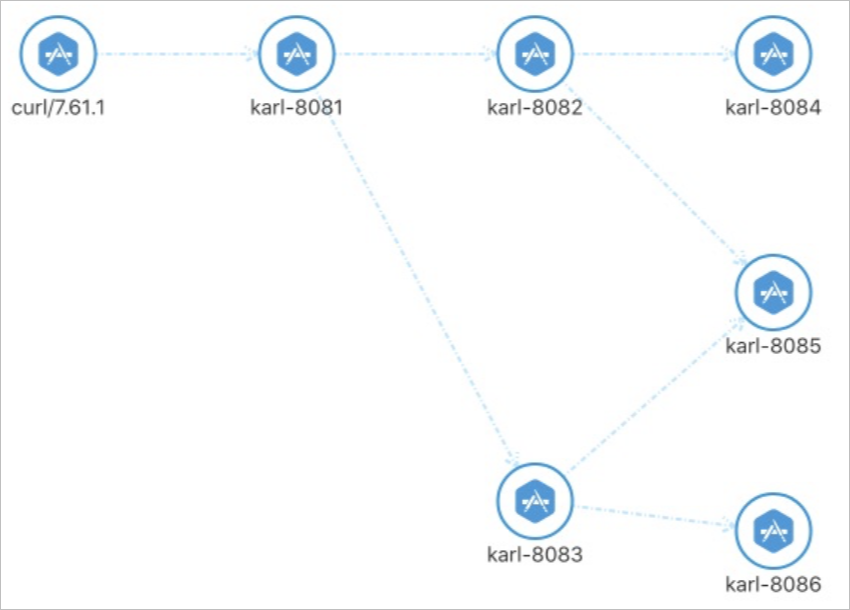
- Run the following commands to start the applications.
java -Dproject.name=karl-8084 -Dserver.port=8084 -Drequest.port=none -Drequest.interface=hello -Dahas.license=6523c21873cc41d5bexxxxxxxxxxde6 -Dahas.regionId=cn-shenzhen -javaagent:ahas-java-agent.jar -jar karl-demo.jar & java -Dproject.name=karl-8085 -Dserver.port=8085 -Drequest.port=none -Drequest.interface=hello -Dahas.license=6523c21873cc41d5bexxxxxxxxxxde6 -Dahas.regionId=cn-shenzhen -javaagent:ahas-java-agent.jar -jar karl-demo.jar & java -Dproject.name=karl-8086 -Dserver.port=8086 -Drequest.port=none -Drequest.interface=hello -Dahas.license=6523c21873cc41d5bexxxxxxxxxxde6 -Dahas.regionId=cn-shenzhen -javaagent:ahas-java-agent.jar -jar karl-demo.jar & java -Dproject.name=karl-8082 -Dserver.port=8082 -Drequest.port=8084,8085 -Drequest.interface=test -Dahas.license=6523c21873cc41d5bexxxxxxxxxxde6 -Dahas.regionId=cn-shenzhen -javaagent:ahas-java-agent.jar -jar karl-demo.jar & java -Dproject.name=karl-8083 -Dserver.port=8083 -Drequest.port=8086,8085 -Drequest.interface=test -Dahas.license=6523c21873cc41d5bexxxxxxxxxxde6 -Dahas.regionId=cn-shenzhen -javaagent:ahas-java-agent.jar -jar karl-demo.jar & java -Dproject.name=karl-8081 -Dserver.port=8081 -Drequest.port=8082,8083 -Drequest.interface=test -Dahas.license=6523c21873cc41d5bexxxxxxxxxxde6 -Dahas.regionId=cn-shenzhen -javaagent:ahas-java-agent.jar -jar karl-demo.jar &Note- You must set the
Dahas.regionIdandDahas.licenseparameters based on your actual configuration. Ensure that theDahas.licenseparameter is correctly set. Otherwise, AHAS cannot collect the call relationships between applications, and AHAS will not display the call chain. - You can click Download demo.
- You must set the
- Run the test script.
#!/bin/bash for ((;;)) do curl localhost:8081/test & sleep 2 done - View the application overview.
Log on to the AHAS console.
In the upper-left corner of the AHAS console, select your application's region.
- In the left-side navigation pane, choose .
- On the Application Protection page, click the Application Dashboard tab.
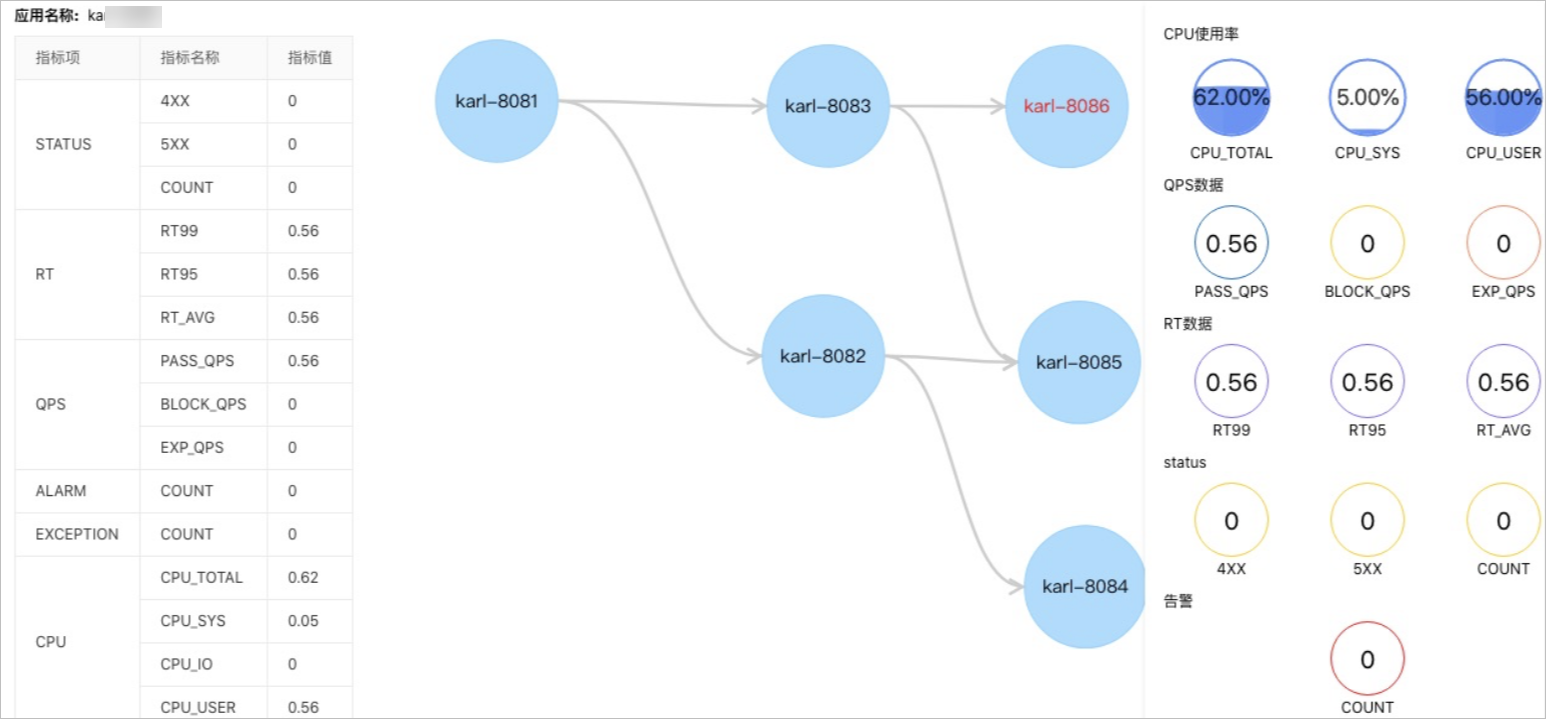 Note The call chain display may lag behind actual calls by about 10s. If an application goes offline, its call relationships are retained for only two days. To view the most up-to-date call relationships, refresh the Application Dashboard page every 10s.