Integrate Go applications
After integrating your Go application with AHAS Application Protection, you can configure throttling rules, concurrency rules, and system rules to ensure system stability. This topic describes how to integrate a Go application using an SDK-based integration.
Prerequisites
Ensure that your Go application is built with Go 1.13.0 or later and uses Go Modules for dependency management.
Integrate Dubbo, Gin Web, gRPC, and Micro applications
Log on to the AHAS console and select a region in the upper-left corner.
In the left-side navigation pane, choose .
On the Application Protection page, click New Application in the upper-right corner. On the Go Language tab, select SDK-based integration.
Click Download AHAS Go SDK and extract the installation package to a local directory.
In your Go project, add the following dependencies to the go.mod file.
Note/path/to/aliyun-ahas-go-sdk is an example path. Replace it with the path where you extracted the Go SDK.
Ensure that your Go version is 1.13.0 or later and that Go Modules support is enabled.
require github.com/aliyun/aliyun-ahas-go-sdk v1.0.0
# Replace the following path with the local path to the extracted AHAS Go SDK.
replace github.com/aliyun/aliyun-ahas-go-sdk => /path/to/aliyun-ahas-go-sdk
Add the AHAS Sentinel initialization code and ensure it runs when your application starts.
import (
    ahas "github.com/aliyun/aliyun-ahas-go-sdk"
)

// Add the following code to your application's initialization logic.
// The initialization of Sentinel core is included. If you have previously called the Sentinel initialization function, remove that call.
err := ahas.InitAhasDefault()
if err != nil {
    log.Fatalf("Failed to init AHAS: %+v", err)
}
Wrap your business logic with the framework-specific code shown in the following table.
Application
Sample code
Dubbo application
import ( _ "github.com/alibaba/sentinel-golang/adapter/dubbo")
Gin Web application
import ( sentinelPlugin "github.com/alibaba/sentinel-golang/adapter/gin" "github.com/gin-gonic/gin")r := gin.New()r.Use(sentinelPlugin.SentinelMiddleware())
gRPC application
import ( sentinelPlugin "github.com/alibaba/sentinel-golang/adapter/grpc" "google.golang.org/grpc")s := grpc.NewServer(grpc.UnaryInterceptor(sentinelPlugin.NewUnaryServerInterceptor()))
Micro application
import ( sentinelPlugin "github.com/alibaba/sentinel-golang/adapter/micro" "github.com/micro/go-micro/v2")svc := micro.NewService(micro.WrapHandler(sentinelPlugin.NewHandlerWrapper()))
NoteFor Dubbo applications, you import the Dubbo adapter as a package. Its
init()function automatically injects the required filter. Dubbo-Go version 1.3.0 or later is required. The Sentinel Dubbo adapter automatically collects statistics on all provider and consumer calls.For Gin Web applications, add the SentinelMiddleware to your Gin initialization code. Sentinel collects statistics for each API route. The resource name format is similar to GET:/foo/:id. By default, if a request is throttled, the application returns an HTTP status code of
429 (Too Many Requests).For gRPC applications, add the Sentinel-provided interceptor to your gRPC initialization code. Sentinel provides both unary and streaming interceptors for the server and client. The preceding sample code is for the server. By default, if a request is throttled, a Sentinel BlockError is returned. You can also provide custom fallback logic when you create the interceptor.
For Go-Micro applications, add the Sentinel-provided wrapper to the Go-Micro initialization code. Sentinel provides wrappers for both the Go-Micro server and client. The preceding sample code is for the server. By default, the instrumentation uses the service method as the resource name. If a request is throttled, a Sentinel BlockError is returned. You can also provide custom fallback logic when you create the wrapper.
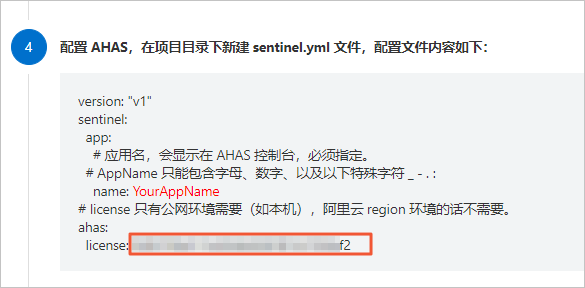
Create a sentinel.yml file in your project directory with the following content to configure AHAS.
Network type
Sample configuration
private network
version: "v1"
sentinel:
  app:
    # The application name, which is displayed in the AHAS console. This parameter is required.
    name: YourAppName   # AppName can contain only letters, digits, and the following special characters: _ - . :
ahas:
  # Specify the region where the application is deployed. This is required for private networks.
  regionId: <RegionId>
  namespace: default
public network
version: "v1"
sentinel:
  app:
    # The application name, which is displayed in the AHAS console. This parameter is required.
    name: "YourAppName"    # AppName can contain only letters, digits, and the following special characters: _ - . :
ahas:
  # The license is required only for public networks (such as a local machine).
  license: <license>
  regionId: "cn-public"
If your application is in a public network environment, you must obtain a license from the Go Language tab. This step is not required for private network environments. For details, see View License.
Restart your application.
Custom instrumentation
To integrate your Go application using custom instrumentation, follow these steps.
Log on to the AHAS console and select a region in the upper-left corner.
In the left-side navigation pane, choose .
On the Application Protection page, click New Application in the upper-right corner. On the Go Language tab, select SDK-based integration.
Click Download AHAS Go SDK and extract the installation package to a local directory.
In your Go project, add the following dependencies to the go.mod file.
Note/path/to/aliyun-ahas-go-sdk is an example path. Replace it with the path where you extracted the Go SDK.
require github.com/aliyun/aliyun-ahas-go-sdk v1.0.0
replace github.com/aliyun/aliyun-ahas-go-sdk => /path/to/aliyun-ahas-go-sdk
Import the required dependencies.
import (
ahas "github.com/aliyun/aliyun-ahas-go-sdk"
sentinel "github.com/alibaba/sentinel-golang/api"
)
Add the AHAS Sentinel initialization code and ensure it runs when your application starts.
// Add the following code to your application's initialization logic.
// The initialization of Sentinel core is included. If you have previously called the Sentinel initialization function, remove that call.

err:= ahas.InitAhasDefault()
if err!= nil{
log.Fatalf("Failed to init AHAS:%+v", err)
}
Wrap your business logic with the following code. For more information about instrumentation methods and samples, see Sentinel Go API.
import (
    sentinel "github.com/alibaba/sentinel-golang/api"
)

// Use the Entry method for instrumentation.
e, b := sentinel.Entry("your-resource-name", sentinel.WithTrafficType(base.Inbound))
if b != nil {
    // The request is throttled. You can get throttling details from the BlockError.
} else {
    // The request is allowed. Write your business logic here.
    // Ensure that Exit is called after the business logic is complete.
    e.Exit()
}
Configure AHAS Sentinel using one of the following methods.
Configure using a YAML file.
The following table describes the YAML configuration parameters supported by AHAS.
NoteIf you initialize AHAS by calling
InitAhasFromFile(path), AHAS reads configuration parameters from the YAML file specified bypath.If you initialize AHAS by calling
InitAhasDefault(), AHAS attempts to read thepathfrom theSENTINEL_CONFIG_FILE_PATHenvironment variable and then reads the corresponding file. If this variable is not set, AHAS reads the configuration from thesentinel.ymlfile in the project directory by default.If neither the environment variable nor the default file exists, AHAS reads basic configuration parameters, such as the project name, from environment variables. Other parameters use their default values. Note that environment variable settings override configuration file settings.
Key
YAML parameter
Description
Notes
SENTINEL_APP_NAMEsentinel.app.name
The project name.
Required. If not configured, the application is marked as
unknown_go_service.SENTINEL_CONFIG_FILE_PATHNone
The path to the YAML configuration file.
If not specified, configuration is read from the
sentinel.ymlfile in the project directory by default.AHAS_LICENSEahas.license
The AHAS license.
Required for public network environments. This is not required for private network environments within a region.
AHAS_NAMESPACEahas.namespace
The AHAS namespace.
The default value is
default. You must create the namespace on the console before specifying it here. Do not use an arbitrary value.SENTINEL_LOG_DIRNone
The log path.
The default path is
~/logs/csp.SENTINEL_LOG_USE_PIDNone
Specifies whether to include the process ID (PID) in log filenames.
The default value is
false.AHAS_REGION_IDahas.regionId
The AHAS region.
Specify the region where the application is deployed. This is required for private network environments but not for public network environments.
Sample configuration files:
Network type
Sample configuration
private network
sentinel:
  app: # The application name, which is displayed in the AHAS console. This parameter is required.
    name: sentinel-go-service
ahas:
  # Specify the region where the application is deployed. This is required for private networks.
  regionId: <RegionId>
  namespace: default
public network
sentinel:
  app:
    name: sentinel-go-service  # The application name, which is displayed in the AHAS console. This parameter is required.
ahas:
  # A license is required for public network environments, but not for applications in an Alibaba Cloud region.
  license: "xxx"
  regionId: "cn-public"
  namespace: default
Configure using environment variables.
Network type
Environment variables
private network
SENTINEL_APP_NAME=YourAppName; AHAS_NAMESPACE=default; AHAS_REGION_ID=YourRegionID
public network
AHAS_LICENSE=${license}; AHAS_NAMESPACE=default; SENTINEL_APP_NAME=YourAppName; AHAS_REGION_ID=cn-public
Sentinel Go API
You can use Sentinel's Entry API to wrap your business logic. This process is called instrumentation. Each instrumentation point has a resource name (resource), which represents a call or access to the resource.
The instrumentation API is located in the API package. The method signature is Entry(resource string, opts ...Option) (*base.SentinelEntry, *base.BlockError), where resource is the name of the instrumented resource and opts represents the instrumentation options. The following options are supported:
WithTrafficType(entryType base.TrafficType): Marks the traffic type of the instrumented resource.Inboundindicates inbound traffic, andOutboundindicates outbound traffic. The default isOutbound.WithResourceType(resourceType base.ResourceType): Marks the classification of the instrumented resource.WithAcquireCount(acquireCount uint32): Specifies the number of calls to count for each request, similar to a batch size.WithArgs(args ...interface{}): A list of arguments for the request, used for hotspot parameter statistics.
The following is a sample of the instrumentation API:
import (
    sentinel "github.com/alibaba/sentinel-golang/api"
)

// Use the Entry method for instrumentation.
e, b := sentinel.Entry("your-resource-name", sentinel.WithTrafficType(base.Inbound))
if b != nil {
    // The request is throttled. You can get throttling details from the BlockError.
} else {
    // The request is allowed. Write your business logic here.
    // Ensure that Exit is called after the business logic is complete.
e.Exit()
}If a call is rejected, the Entry API returns a BlockError, which indicates that Sentinel throttled the request. BlockError provides information such as the reason for throttling and the rule that was triggered, which you can use for logging and handling.
Verification
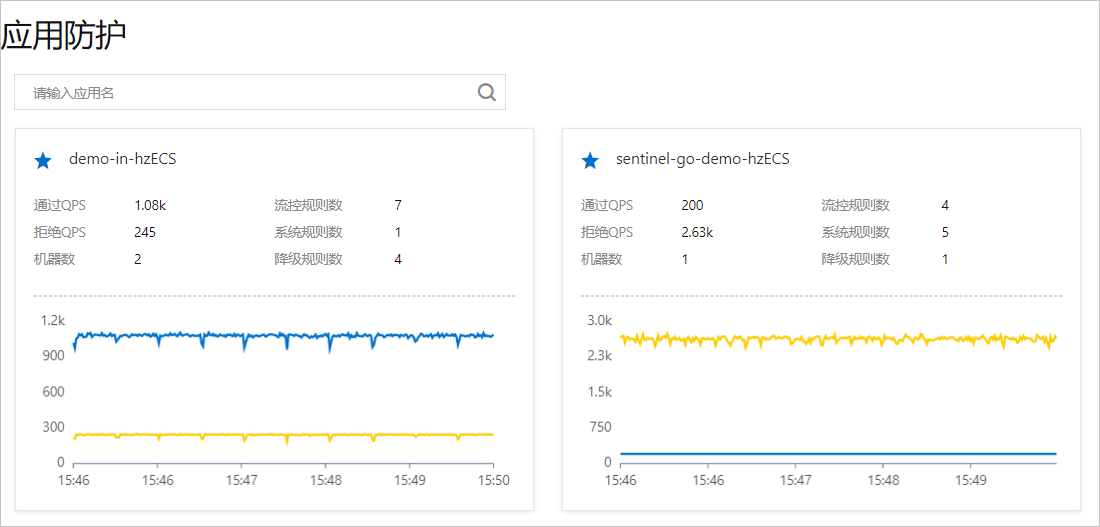
The integration is successful if the resource card for your application appears on the page and reports data. To verify this, log on to the AHAS console and in the left-side navigation pane, choose .
More operations
After integration, you can configure the following types of rules for your Go application: throttling rules (cluster-level throttling is not supported), concurrency rules, circuit breaking rules, system rules, and hotspot rules.
Configure throttling rules
Configure concurrency rules
Configure circuit breaking rules
Configure adaptive throttling