Configure RPC behavior
An RPC behavior defines a custom action executed when a rule is triggered for an RPC entry resource. For example, you can configure an RPC behavior to return a custom response when a flow control rule is triggered for an RPC API. This topic describes how to add, modify, delete, and associate RPC behaviors.
Prerequisites
- Connect your application to AHAS Application Protection. For more information, see Connect an application to AHAS.
- RPC fallback behavior is supported only on AHAS Sentinel Java SDK 1.9.5 or later and Java Agent 1.10.1 or later.
- For AHAS SDK versions from 1.9.5 to 1.10.3, RPC behavior applies only to Dubbo APIs. For AHAS SDK 1.10.4 or later, it supports Dubbo, HSF, and SOFARPC APIs.
- RPC behavior is not supported for applications that use SDKs in other languages.
Background information
Configuring a behavior primarily involves setting up a fallback behavior. A fallback behavior defines the action performed when an entry resource triggers a rule, such as a flow control, circuit breaking, or fallback rule. Currently, fallback behaviors are supported only for Web and RPC resource types. This topic describes how to configure an RPC fallback behavior.
- The return value's class name cannot be an interface or an abstract class; you must use a specific implementation class.
- If the return value contains a generic type that is not specified, you must specify its concrete type in the class name.
- The automatic detection mode is supported only for Dubbo and HSF APIs.
Add behavior
Log on to the AHAS console and select a region in the upper-left corner.
- In the left-side navigation pane, choose .
- On the Application Protection page, click the card of your target application.
- In the left-side navigation pane, choose Application Management and then click the Behavior Management tab.
- Click Add Behavior. In the Add Behavior dialog box, configure the following parameters.
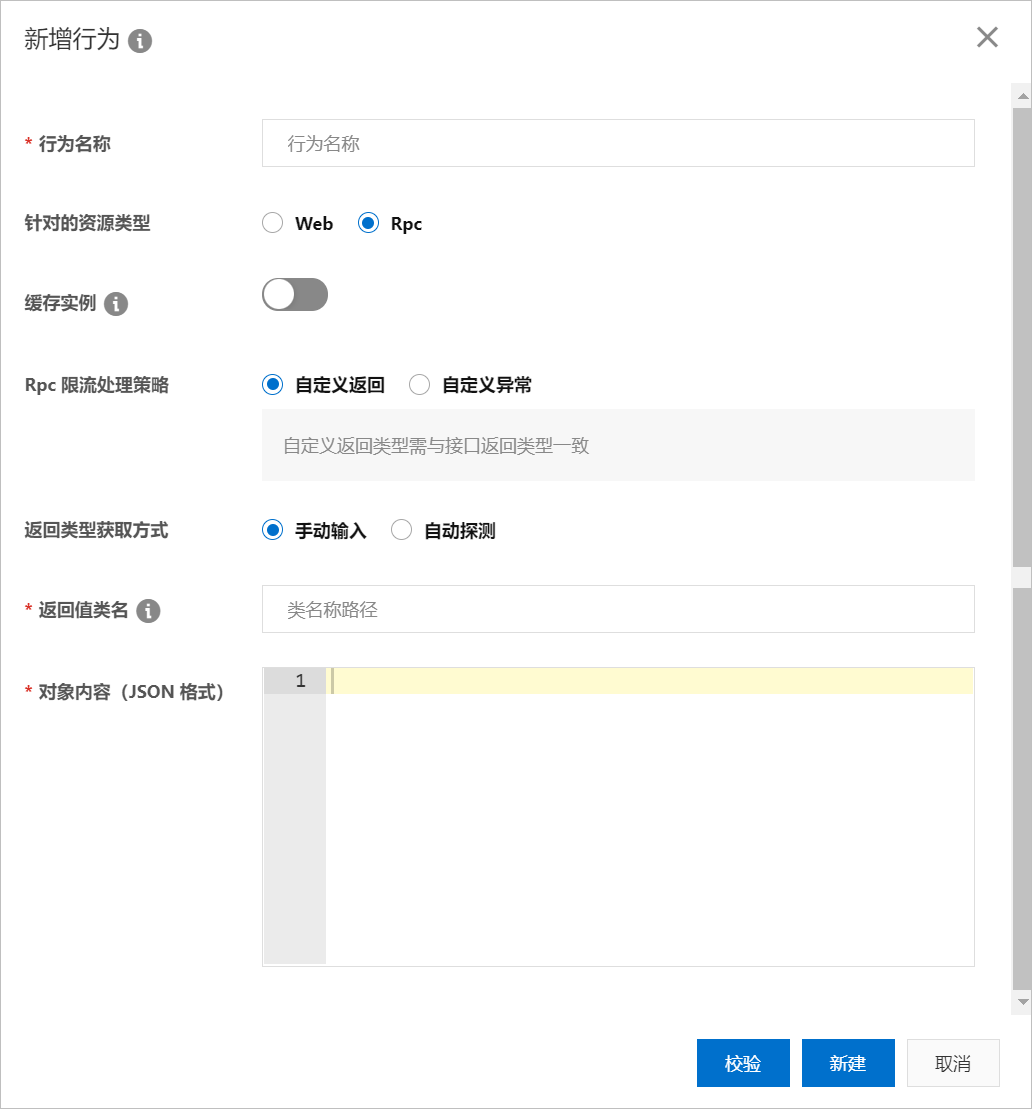
Parameter Description Example Behavior Name The name of the behavior. The name can be up to 128 characters in length and must be unique within the same application. test-behavior Resource Type The type of resource to which the behavior applies. Valid values are Web and RPC. Select RPC. RPC Cache Instance Specifies whether to cache the return value. If you enable this option, the generated fallback object is cached and reused each time this behavior is triggered. Enabled RPC Flow Control Policy Defines the action to take when an RPC call triggers a rule. The following policies are supported: - Custom Return: Returns a custom response. You must specify the return type and content. When a rule is triggered, the system returns a custom entity class.
- Custom Exception: Throws a custom exception. You must specify the exception class name and message. When a rule is triggered, the system throws the specified exception.
Custom Return Return Type Acquisition Mode The method for specifying the class name of the return value. The following modes are supported: - Manual Input: You must enter the fully qualified class name in the Return Value Class Name field and then click Validate. After successful validation, you can create the behavior.
- Automatic Detection: You must select the API method to associate with the behavior in the Behavior-associated Method field. The console automatically populates the return value class name. After you specify the Object Content (JSON), you can create the behavior. This feature requires AHAS SDK 1.10.4 or later.
Important If the return value of the API method includes an unspecified generic type, you must manually enter the concrete type for that generic parameter. You can create the behavior once validation passes.Manual Input Behavior-associated Method When Return Type Acquisition Mode is set to Automatic Detection, you must select the API method to associate with this RPC behavior. The return type of the selected method is used as the type for the custom return value. com.alibaba.demo.OrderService:getOrder(long) Return Value Class Name The fully qualified class name of the return value. This parameter is required when RPC Flow Control Policy is set to Custom Return. Note The Custom Return policy does not support object types with unspecified generic types, such asMap<K, V>orList<T>.com.alibaba.demo.RpcResult Object Content (JSON) The content of the object to be returned, in JSON format. This parameter is required when RPC Flow Control Policy is set to Custom Return. {"id": "123", "name": "test"} Exception Class Name The fully qualified name of the exception class. This parameter is required when RPC Flow Control Policy is set to Custom Exception. java.lang.RuntimeException Exception Information Text The message for the custom exception thrown when a rule is triggered. This parameter is required when RPC Flow Control Policy is set to Custom Exception. Note Currently, only exception classes that have a constructor that accepts a single String parameter are supported."Operation failed" - Click Validate.Note The data structure of the RPC behavior must match that of the corresponding API on the client. Therefore, you must validate the data type before creating the behavior. If validation fails, modify the configuration based on the error message.
- Click Create.Application ManagementBehavior ManagementThe new behavior appears on the tab of the page.
Modify or delete behavior
Log on to the AHAS console and select a region in the upper-left corner.
- In the left-side navigation pane, choose .
- On the Application Protection page, click the card of your target application.
- In the left-side navigation pane, choose Application Management and then click the Behavior Management tab.This page lists all behaviors. You can view their details and modify or delete them.
Associate behavior
Log on to the AHAS console and select a region in the upper-left corner.
- In the left-side navigation pane, choose .
- On the Application Protection page, click the card of your target application.
- Go to the Add Flow Control Rule page by using one of the following methods:
- In the left-side navigation pane, click API Details. On the RPC Service tab, click the
 icon in the upper-right corner of the target API card to open the Manage Rules page. Then, click Add Flow Control Rule.
 - In the left-side navigation pane, click Rule Management. On the Flow Control Rules tab, click Add Flow Control Rule.
- In the left-side navigation pane, click API Details. On the RPC Service tab, click the
- After you select the protection scenario and configure the protection rule, in the Configure Flow Control Behavior section, configure the following:
- Set API Type to Rpc.
- From the Associated Behavior drop-down list, select a target behavior. Alternatively, click Add Behavior to create and associate a new one.
Note- If you do not need a custom fallback behavior for flow control, you can use the default behavior. The default API type is empty.
- When you add a rule, if the API already has an associated behavior, the new behavior overwrites the existing one.
- When you select a fallback type, if you do not select an API type, the default behavior is applied. After you select an API type and associate a behavior of that type, you cannot change the API type.
- Click Next and then click Add.