Connect a Dubbo application
After connecting your Dubbo application to AHAS Application Protection, you can configure flow control, degradation, and system rules to ensure its stability. This topic describes how to connect a Dubbo application using an SDK.
Procedure
Log on to the AHAS console.
In the upper-left corner of the AHAS console, select the region where you want to connect your application.
In the left-side navigation pane, choose .
In the upper-right corner of the Application Protection page, click New Application Integration.
On the JAVA tab, click SDK Access, and then click Dubbo/HFS Application Access.
Add the dependency for AHAS Application Protection to your Dubbo application by using one of the following methods:
Add the following dependency to the pom.xml file of your Dubbo application. (SDK/Starter versions 1.8.6 and later support mainstream versions of Dubbo 2.6.x and 2.7.x.)
<dependency>
  <groupId>com.alibaba.csp</groupId>
  <artifactId>ahas-sentinel-client</artifactId>
  <!-- You can specify a version number. For the latest version, see the New Application Integration page in the AHAS console. -->
  <version>x.y.z</version>
</dependency>
On the Dubbo Application Access page, view the latest version of the POM dependency and replace
x.y.zwith the latest version number.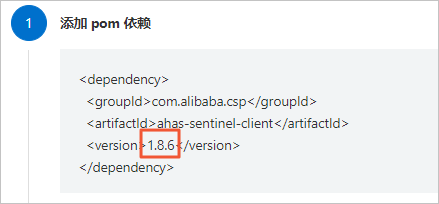 Note
NoteIf your Dubbo service is a Spring Boot application, you can connect it using the Spring Boot method. For more information, see Connect a Spring Boot/Spring Cloud application.
Add JAR package dependencies.
On the Dubbo Application Access page, click Click this link to download to download the compressed package, and then place all JAR files from the package into your classpath directory.
Configure the startup parameters for your application.
Category
Configuration example
Internal network
-Dproject.name=AppName -Dahas.namespace=default -Dahas.regionId=<RegionId>NoteReplace AppName with your custom application name.
Replace <RegionId> with the ID of the region where your application is deployed. For the mapping between regions and RegionIds, see the Region and RegionId mapping table section below.
Public network
-Dproject.name=AppName -Dahas.license=<license> -Dahas.namespace=default -Dahas.regionId=cn-publicNoteReplace AppName with your custom application name and <license> with your actual license key.
If you are in a public network region, you must view the License information. You can find this information in the Step 2: Add Instrumentation area (this is not required for internal network regions). For more information, see View License.

Restart your application.
Optional: You can customize the fallback logic for throttling, degradation, or system protection rules. To do this, implement the
DubboFallbackinterface and register it withDubboFallbackRegistry. With this configuration, AHAS wraps and throws aBlockExceptionwhen a flow control, degradation, or system rule triggers. For more information, see Dubbo Adapter.NoteIf you skip this step, the system throws a subclass of the
BlockExceptionby default when an Application Protection rule triggers. For example, aFlowExceptionis thrown for a flow control rule, and aDegradeExceptionis thrown for a degradation rule.
Verify the results
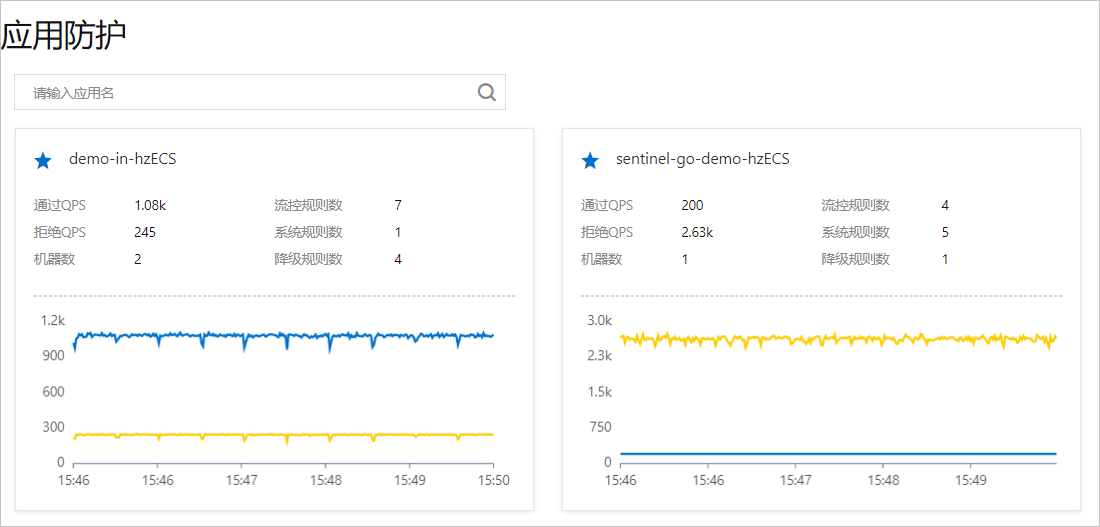
Log on to the AHAS console. In the left-side navigation pane, choose . If a resource card for your application appears on the Application Protection page and data reporting is active, the connection is successful.
Region and RegionId mapping table
Region | RegionId |
Public network | cn-public |
China (Hangzhou) | cn-hangzhou |
China (Shanghai) | cn-shanghai |
China (Beijing) | cn-beijing |
China (Zhangjiakou) | cn-zhangjiakou |
China (Shenzhen) | cn-shenzhen |
Singapore | ap-southeast-1 |
Germany (Frankfurt) | eu-central-1 |