Onboard an HSF application
After onboarding a High-speed Service Framework (HSF) application to Application High-Availability Service (AHAS), you can configure traffic control, degradation, and system protection rules to ensure its stability. This guide explains how to integrate an HSF application with Application Protection by using an SDK.
Procedure
Log in to the AHAS console.
In the upper-left corner of the AHAS console, select the region for your application.
In the left-side navigation pane, choose .
In the upper-right corner of the Application Protection page, click New Application.
On the JAVA Language tab, click SDK Onboarding, and then click Dubbo/HSF Application Onboarding.
Add the Application Protection dependency to your HSF application:
For Spring Boot applications, add the following starter dependency to your pom.xml file:
<dependency>
  <groupId>com.alibaba.csp</groupId>
  <artifactId>spring-boot-starter-ahas-sentinel-client</artifactId>
  <!-- You must specify a version. The version must be 1.7.2 or later. For the latest version, see the instructions on the New Application page in the AHAS console. -->
  <version>x.y.z</version>
</dependency>
For other applications, add the following dependency to your pom.xml file:
<dependency>
  <groupId>com.alibaba.csp</groupId>
  <artifactId>ahas-sentinel-client</artifactId>
  <!-- You must specify a version. The version must be 1.7.2 or later. For the latest version, see the instructions on the New Application page in the AHAS console. -->
  <version>x.y.z</version>
</dependency>
On the Dubbo/HSF Application Onboarding page, find the latest dependency version in the Step 1: Add Pom Dependency section. Replace
x.y.zwith the latest version number.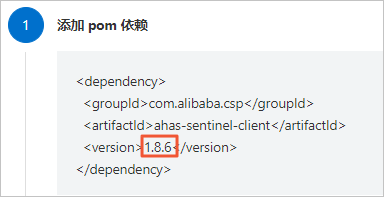
Configure the startup parameters for your application.
Category
Example
intranet
-Dproject.name=AppName -Dahas.namespace=default -Dahas.regionId=<RegionId>NoteReplace AppName with your application name.
Replace <RegionId> with your application's Region ID. For a list of regions and their IDs, see the Region and Region ID section below.
public network
-Dproject.name=AppName -Dahas.license=<license> -Dahas.namespace=default -Dahas.regionId=cn-publicNoteReplace AppName with your application name and <license> with your license key.
Applications deployed over the public network require a license key. You can find this key in the Step 2: Add Probe section. This is not required for intranet deployments. For more information, see View License.

Restart your application.
Optional:To customize the fallback logic for traffic control, degradation, or system protection rule triggers, implement the HsfFallback interface. Register your implementation by using
HsfFallbackRegistry(setProviderFallbackfor service providers andsetConsumerFallbackfor service consumers). Once registered, AHAS passes theBlockExceptionto your custom handler when a rule is triggered.NoteIf you do not provide a custom fallback, a
RuntimeException("SentinelBlockException")is thrown by default when a rule is triggered for the HSF application.
Verify the results
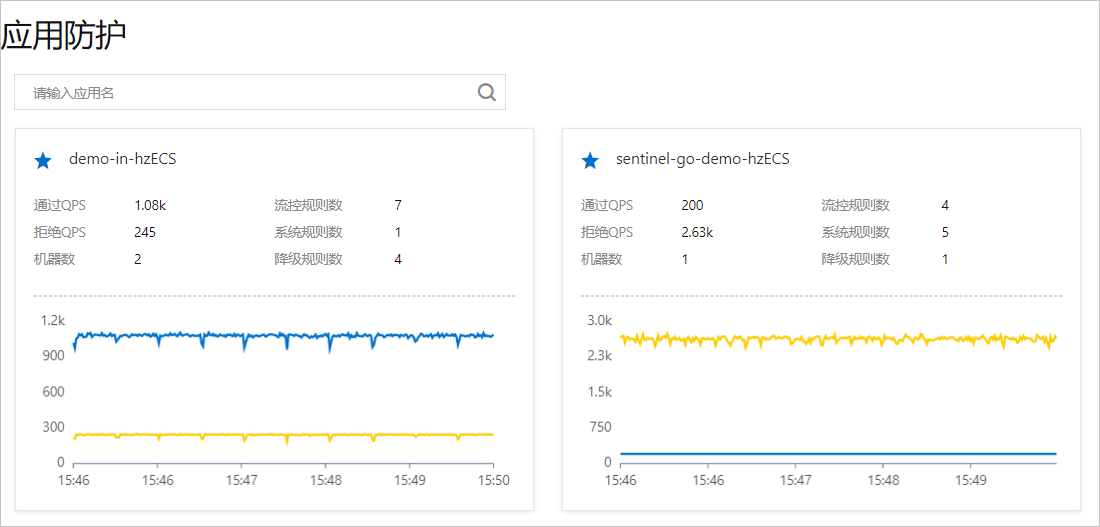
Log in to the AHAS console. In the left-side navigation pane, choose . The application is successfully onboarded if its resource card appears on the Application Protection page and reports data.
Region and Region ID
Region | Region ID |
public network | cn-public |
China (Hangzhou) | cn-hangzhou |
China (Shanghai) | cn-shanghai |
China (Beijing) | cn-beijing |
China (Zhangjiakou) | cn-zhangjiakou |
China (Shenzhen) | cn-shenzhen |
Singapore | ap-southeast-1 |
Germany (Frankfurt) | eu-central-1 |