Mesh protection
This topic explains how to connect your Istio service mesh (including Alibaba Cloud Service Mesh (ASM)) or Envoy cluster to AHAS and configure flow control rules.
Prerequisites
Ensure you have activated AHAS Professional Edition. You can do this on the activation page.Background
Alibaba Cloud Service Mesh (ASM) is a fully managed service mesh platform that is compatible with the open source Istio service mesh. It simplifies service governance. For more information, see What is ASM?. AHAS Mesh Protection uses the Envoy Global Rate Limiting Service (RLS) interface, as illustrated in the following figure.
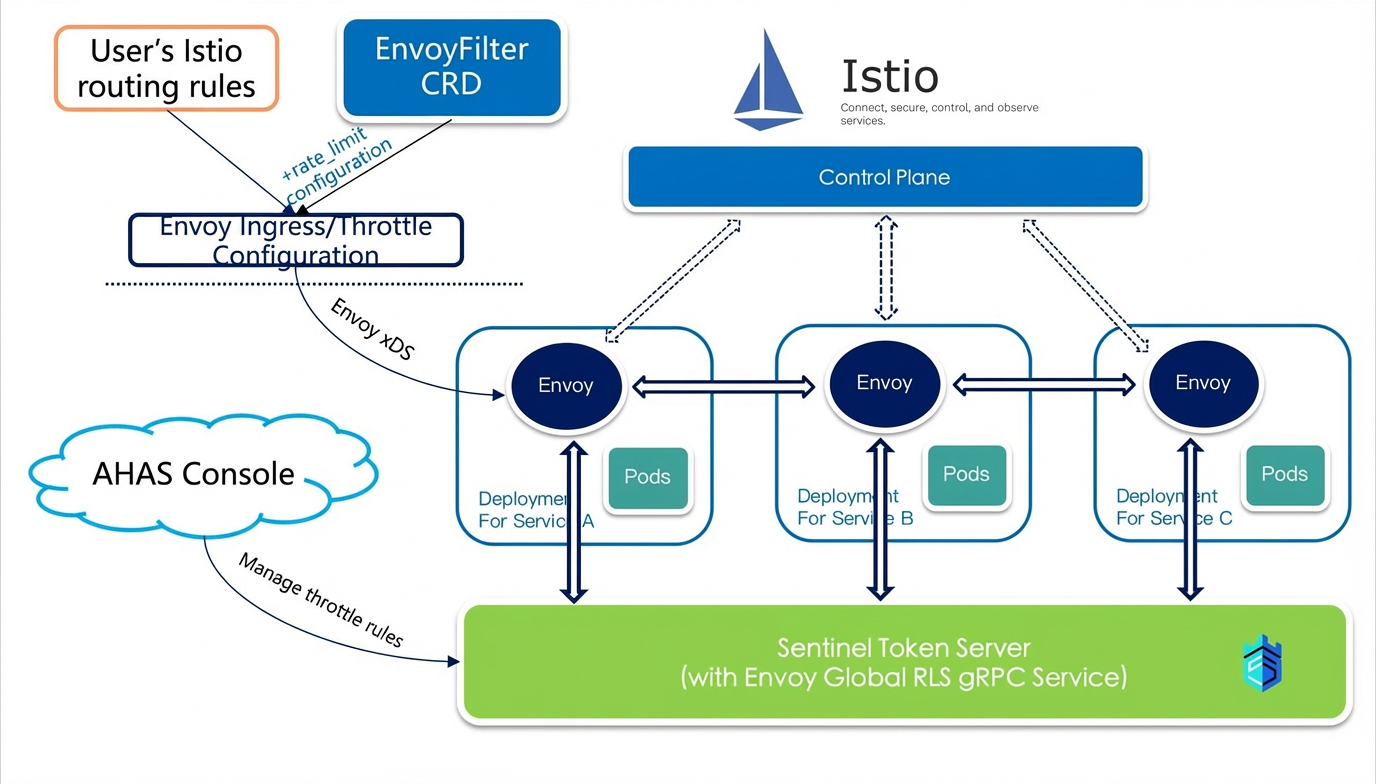
Procedure
- Log on to the AHAS console. In the left-side navigation pane, choose .
- In the upper-right corner of the page, click Apply for mesh flow control cluster.
- On the Protection details page, enter the Cluster name and other information.
Parameter Description Cluster name Enter a name for the cluster, from 1 to 63 characters long. Envoy flow control domain The domain for the flow control service. This must match the domain in the EnvoyFilter that you will configure in Step 5. Estimated cluster QPS The maximum estimated Queries Per Second (QPS) for the interfaces in the cluster that require flow control. This value represents the potential maximum traffic, not the throttling threshold. AHAS uses this value to automatically allocate Token Server resources. - Click Next to create the cluster.
- Click Mesh flow control access. You can choose to connect Istio or Envoy.
- Connect to Istio
AHAS provides cluster-level flow control for Istio service meshes. To connect an Istio cluster to AHAS Mesh Protection, create the corresponding EnvoyFilter CRD configuration for Istio.
- Click the Istio access tab.
- Copy the code and paste it into a new YAML file.
- In the Istio cluster, run the
kubectl applycommand to apply the configuration and connect the cluster.
Note Currently, Istio flow control is based on Envoy global rate limiting. It supports flow control based on request attributes such as source cluster, destination cluster, and header value. For more details, see the Envoy documentation. - Connect to Envoy
AHAS provides cluster-level flow control for Envoy HTTP traffic. To connect an Envoy cluster, edit the Envoy configuration file as described in the following steps.
- Click the Envoy access tab.
- Copy the sample code from Step 1 on the page to configure rate limits (rate_limits) for the VirtualHost where the route is located. The rate limits consist of a series of rate limit actions (rate_limit_action).Note
- The generic_key in the action must be set to the license for AHAS cluster flow control. Otherwise, flow control will not take effect. This key is not used as a matching attribute for flow control. The code sample on the page displays the license for the current cluster.
- Envoy supports flow control based on request attributes such as source cluster, destination cluster, generic key, and header value. For more details, see the Envoy documentation.
- Copy the sample code from Step 2 on the page to add the AHAS mesh flow control cluster to the Clusters section and configure the corresponding RLS token server IP address and port.
- Copy the sample code from Step 3 on the page to add the envoy.rate_limit configuration to http_filters and specify the AHAS mesh flow control cluster configured in the previous step.
- After modifying the configuration file, restart Envoy or dynamically reload the configuration file through xDS to complete the connection.
- Connect to Istio
- In the Cluster rule configuration area, click Add. In the Rule configuration dialog box, add a rule for the destination cluster.
Parameter Description Rule name A unique name to identify the rule, up to 64 characters long. Threshold The cluster threshold. Once this threshold is reached, matching requests are rejected. Statistical time window The statistical time window for cluster flow control. The value can range from 1 second to 24 hours. Matching rule Defines the request attributes used to match traffic for flow control. For example, you can set different limits for requests from different sources. The following matching rules are supported and are consistent with Envoy descriptors: - Source cluster: source_cluster.
- Destination cluster: destination_cluster.
- Generic key: generic_key.
- Custom: A custom key. The name must be unique.
- Click OK to create the rule.Result:
Trigger a service call in the service mesh and check the service's return value to verify the flow control rule. A
429 Too Many Requestsstatus code indicates that the request was successfully throttled.