Fine-grained control with resource groups
Organizing resources by resource group lets you use RAM to isolate resources and manage fine-grained permissions within a single Alibaba Cloud account. This topic summarizes Cloud-native API Gateway's support for resource groups and describes how to grant permissions at the resource group level.
-
Resource group-level authorization applies only to resource types that support resource groups and to actions that support resource group-level authorization.
-
For resource types that do not support resource groups, permissions granted at the resource group scope do not apply. To grant account-level authorization, select account level as the resource scope. For more information, see Actions that do not support resource group-level authorization.
Resource group authorization
You can use resource groups to group and manage resources in your Alibaba Cloud account. For example, you can create a resource group for each project and move the project's resources into the group. This helps you centrally manage each project's resources. For more information, see What is a resource group?.
After grouping your resources, you can grant permissions to different RAM principals (such as RAM users, RAM user groups, or RAM roles) scoped to a specific resource group. This restricts the principal to managing only the resources within that resource group. For more information, see Resource grouping and authorization.
This approach provides the following benefits:
-
Fine-grained permissions: Grants each identity only the precise permissions it needs to access resources. This keeps resources from different projects separate within a single account.
-
Scalability: When you add new resources, you just add them to the resource group. The associated RAM principals automatically gain the required permissions, eliminating the need to grant permissions again.
Grant resource group-level permissions to a RAM user
This topic describes how to grant a RAM user permissions on Cloud Native API Gateway resources within a specific resource group.
1. Prerequisites
-
Create the RAM user that you want to use. For more information, see Create a RAM user.
-
Create a resource group and transfer existing resources to it. For more information, see Create a resource group, Automatically transfer resources to a resource group, and Manually transfer resources to a resource group.
2. Grant resource group-level permissions
You can grant permissions at the resource group level by using one of the following methods.
Resource Management console
Use the permission management feature of a resource group to grant permissions to a specified RAM user. For more information, see Grant resource group-scoped permissions to a RAM identity.
-
Log on to the Resource Management console.
-
On the resource groups page, find the target resource group and click Manage Permissions in the Actions column.
-
On the Permissions tab, click add permissions.
-
In the add permissions panel, configure the principal and permission policy.
-
Principal: Select an existing RAM user.
-
Permission Policy: Select a system policy or an existing custom policy. For more information, see Create a custom permission policy.
-
-
Click Confirm.
RAM console
Grant permissions to a RAM user in the RAM console. For more information, see Manage permissions for RAM users.
-
Log on to the RAM console by using your Alibaba Cloud account (primary account) or as a RAM administrator.
-
In the left-side navigation pane, choose . On the Users page, find the target RAM user and click add permissions in the Actions column.
-
In the add permissions panel, configure the following settings for the RAM user.
-
Resource Scope: Select Resource Group.
-
Principal: Select an existing RAM user or the one created in the prerequisites.
-
Permission Policy: Select a system policy or an existing custom policy. For more information, see Create a custom permission policy.
-
-
Click Confirm.
Supported resource types for resource groups
The following table lists the resource types in Cloud Native API Gateway that support resource groups.
|
Cloud service |
Cloud service code |
Type |
|
Cloud Native API Gateway |
apig |
domain : domain |
|
Cloud Native API Gateway |
apig |
environment : environment |
|
Cloud Native API Gateway |
apig |
gateway : instance |
|
Cloud Native API Gateway |
apig |
httpapi : API |
|
Cloud Native API Gateway |
apig |
service : service |
|
Cloud Native API Gateway |
apig |
source : service source |
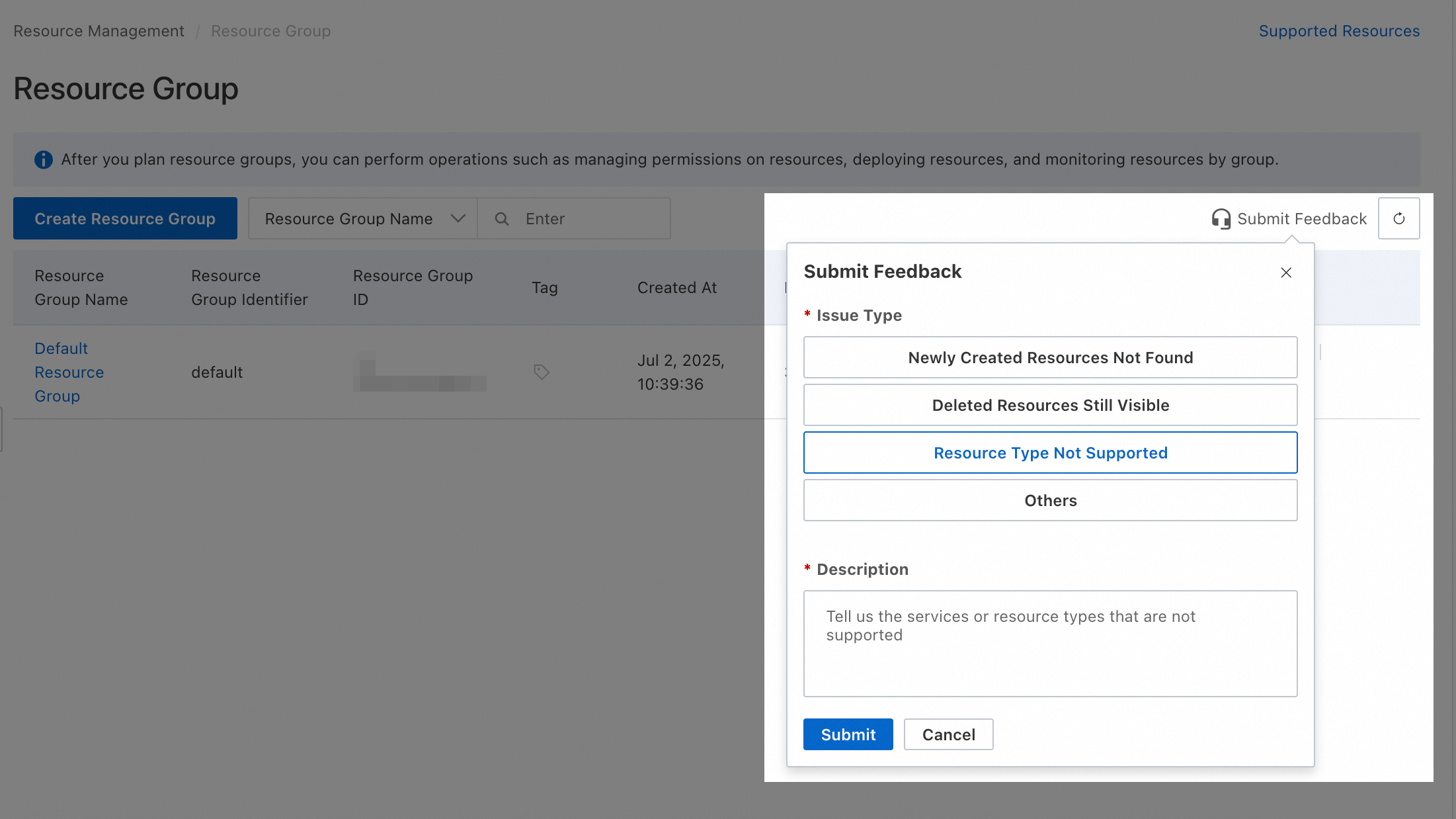
To request support for other resource types, submit feedback in the Resource Group console.
Unsupported actions
Cloud Native API Gateway does not support resource group-level authorization for the following Actions:
|
Actions |
Description |
|
apig:BatchDeleteConsumerAuthorizationRule |
Deletes multiple consumer authorization rules. |
|
apig:CancelAiGenerateTask |
- |
|
apig:CheckCommodityStatus |
- |
|
apig:CheckRegularExpressions |
- |
|
apig:CreateAiGenerateWebIde |
- |
|
apig:CreateAndAttachPolicy |
- |
|
apig:CreateConsumer |
Creates a consumer. |
|
apig:CreateConsumerAuthorizationRule |
Creates a consumer authorization rule. |
|
apig:CreateConsumerAuthorizationRules |
Creates multiple consumer authorization rules. |
|
apig:CreateMcpServer |
Creates a Model Context Protocol (MCP) server. |
|
apig:CreateMigrationTask |
- |
|
apig:CreatePluginAttachment |
Creates a plugin attachment. |
|
apig:CreatePluginClass |
- |
|
apig:CreatePluginRepository |
- |
|
apig:CreatePluginWorkspace |
- |
|
apig:CreatePolicy |
Creates a policy. |
|
apig:CreatePolicyAttachment |
Creates a policy attachment. |
|
apig:CreateSecret |
- |
|
apig:CreateWebIde |
- |
|
apig:DeleteConsumer |
Deletes a consumer. |
|
apig:DeleteConsumerAuthorizationRule |
Deletes a consumer authorization rule. |
|
apig:DeleteMcpServer |
- |
|
apig:DeleteMigrationTask |
- |
|
apig:DeletePluginAttachment |
Deletes a plugin attachment. |
|
apig:DeletePluginClass |
- |
|
apig:DeletePolicy |
Deletes a policy. |
|
apig:DeletePolicyAttachment |
Deletes a policy attachment. |
|
apig:DeleteSecret |
- |
|
apig:DeleteWebIde |
- |
|
apig:DeployDomain |
- |
|
apig:DeployMcpServer |
- |
|
apig:DetachAndDeletePolicy |
- |
|
apig:ExportCodeFile |
- |
|
apig:ExportWasmFile |
- |
|
apig:GetAiGenerateTaskStatus |
- |
|
apig:GetConsumer |
Gets a consumer. |
|
apig:GetConsumerAuthorizationRule |
Gets a consumer authorization rule. |
|
apig:GetHttpApiAttachment |
- |
|
apig:GetHttpApiInstanceByEnvId |
- |
|
apig:GetMcpServer |
- |
|
apig:GetMigrationNamespacedServices |
- |
|
apig:GetMigrationTask |
- |
|
apig:GetPluginAttachment |
- |
|
apig:GetPluginClass |
- |
|
apig:GetPluginWorkspace |
- |
|
apig:GetPolicy |
Gets a policy. |
|
apig:GetPolicyAttachment |
Gets a policy attachment. |
|
apig:GetResourceOverview |
Gets an overview of resources. |
|
apig:GetSecret |
- |
|
apig:GetSecretValue |
- |
|
apig:InstallPlugin |
Installs a plugin. |
|
apig:InvokeAIAgent |
- |
|
apig:ListConsumerAuthorizationRules |
- |
|
apig:ListConsumers |
Lists consumers. |
|
apig:ListEvents |
- |
|
apig:ListGatewayErrorAccessLogs |
- |
|
apig:ListGatewayUpgradableVersions |
- |
|
apig:ListGlobalPolicies |
- |
|
apig:ListInstallableGateways |
- |
|
apig:ListLocations |
- |
|
apig:ListMcpServers |
- |
|
apig:ListMigrationTasks |
- |
|
apig:ListPluginAttachments |
Lists plugin attachments. |
|
apig:ListPluginClasses |
- |
|
apig:ListPluginRepositories |
- |
|
apig:ListPluginWorkspace |
- |
|
apig:ListPlugins |
Lists plugins. |
|
apig:ListPolicies |
Lists policies. |
|
apig:ListPolicyClasses |
- |
|
apig:ListSecretReferences |
- |
|
apig:ListSecrets |
- |
|
apig:ListServiceQuotas |
- |
|
apig:ListSourcesInner2 |
- |
|
apig:ListSslCerts |
- |
|
apig:ListSyncMCPServer |
- |
|
apig:ListSyncedMCPServer |
- |
|
apig:ListZones |
Lists available zones for Cloud Native API Gateway in a region. |
|
apig:MCPMessaging |
- |
|
apig:MCPSSETransport |
- |
|
apig:ModifyQuotaLimitValue |
- |
|
apig:ModifyServiceQuota |
- |
|
apig:QueryConsumerAuthorizationRules |
Queries consumer authorization rules. |
|
apig:QueryTestClusterData |
- |
|
apig:QueryTestDBData |
- |
|
apig:RefreshPluginOAuthCode |
- |
|
apig:RemoveConsumerAuthorizationRule |
Deletes a consumer authorization rule. |
|
apig:RetryCreateGateway |
- |
|
apig:RunPluginPipeline |
- |
|
apig:SyncMCPServer |
- |
|
apig:SyncMCPServers |
- |
|
apig:UnDeployMcpServer |
- |
|
apig:UninstallPlugin |
Uninstalls a plugin. |
|
apig:UpdateAndAttachPolicy |
Updates and attaches a policy. |
|
apig:UpdateAuthorizationRule |
- |
|
apig:UpdateConsumer |
Updates a consumer. |
|
apig:UpdateConsumerAuthorizationRule |
Updates a consumer authorization rule. |
|
apig:UpdateEnvironment |
Updates an environment. |
|
apig:UpdateMcpServer |
- |
|
apig:UpdateMigrationTask |
- |
|
apig:UpdatePluginAttachment |
Updates a plugin attachment. |
|
apig:UpdatePolicy |
Updates a policy. |
|
apig:UpdateSecret |
- |
|
apig:UpdateServiceVersion |
Updates a service version. |
|
apig:UploadCodeFile |
- |
|
apig:VerifyMigrationTask |
- |
|
apig:test |
- |
For actions that do not support resource group-level authorization, setting the resource scope to resource group level has no effect. If a RAM user requires permissions for these actions, you must grant them at the account level via a custom policy.
 Here are two example custom permission policies that you can modify to suit your needs.
-
Allows all read-only operations that do not support resource group-level authorization:
Actionlists all such actions.{ "Version": "1", "Statement": [ { "Effect": "Allow", "Action": [ "apig:CheckCommodityStatus", "apig:CheckRegularExpressions", "apig:ExportCodeFile", "apig:ExportWasmFile", "apig:GetAiGenerateTaskStatus", "apig:GetConsumer", "apig:GetConsumerAuthorizationRule", "apig:GetHttpApiAttachment", "apig:GetHttpApiInstanceByEnvId", "apig:GetMcpServer", "apig:GetMigrationNamespacedServices", "apig:GetMigrationTask", "apig:GetPluginAttachment", "apig:GetPluginClass", "apig:GetPluginWorkspace", "apig:GetPolicy", "apig:GetPolicyAttachment", "apig:GetResourceOverview", "apig:GetSecret", "apig:GetSecretValue", "apig:ListConsumerAuthorizationRules", "apig:ListConsumers", "apig:ListEvents", "apig:ListGatewayErrorAccessLogs", "apig:ListGatewayUpgradableVersions", "apig:ListGlobalPolicies", "apig:ListInstallableGateways", "apig:ListLocations", "apig:ListMcpServers", "apig:ListMigrationTasks", "apig:ListPluginAttachments", "apig:ListPluginClasses", "apig:ListPluginRepositories", "apig:ListPluginWorkspace", "apig:ListPlugins", "apig:ListPolicies", "apig:ListPolicyClasses", "apig:ListSecretReferences", "apig:ListSecrets", "apig:ListServiceQuotas", "apig:ListSourcesInner2", "apig:ListSslCerts", "apig:ListSyncMCPServer", "apig:ListSyncedMCPServer", "apig:ListZones", "apig:QueryConsumerAuthorizationRules", "apig:QueryTestClusterData", "apig:QueryTestDBData" ], "Resource": "*" } ] } -
Allows all actions that do not support resource group-level authorization:
Actionlists all such actions.{ "Version": "1", "Statement": [ { "Effect": "Allow", "Action": [ "apig:BatchDeleteConsumerAuthorizationRule", "apig:CancelAiGenerateTask", "apig:CheckCommodityStatus", "apig:CheckRegularExpressions", "apig:CreateAiGenerateWebIde", "apig:CreateAndAttachPolicy", "apig:CreateConsumer", "apig:CreateConsumerAuthorizationRule", "apig:CreateConsumerAuthorizationRules", "apig:CreateMcpServer", "apig:CreateMigrationTask", "apig:CreatePluginAttachment", "apig:CreatePluginClass", "apig:CreatePluginRepository", "apig:CreatePluginWorkspace", "apig:CreatePolicy", "apig:CreatePolicyAttachment", "apig:CreateSecret", "apig:CreateWebIde", "apig:DeleteConsumer", "apig:DeleteConsumerAuthorizationRule", "apig:DeleteMcpServer", "apig:DeleteMigrationTask", "apig:DeletePluginAttachment", "apig:DeletePluginClass", "apig:DeletePolicy", "apig:DeletePolicyAttachment", "apig:DeleteSecret", "apig:DeleteWebIde", "apig:DeployDomain", "apig:DeployMcpServer", "apig:DetachAndDeletePolicy", "apig:ExportCodeFile", "apig:ExportWasmFile", "apig:GetAiGenerateTaskStatus", "apig:GetConsumer", "apig:GetConsumerAuthorizationRule", "apig:GetHttpApiAttachment", "apig:GetHttpApiInstanceByEnvId", "apig:GetMcpServer", "apig:GetMigrationNamespacedServices", "apig:GetMigrationTask", "apig:GetPluginAttachment", "apig:GetPluginClass", "apig:GetPluginWorkspace", "apig:GetPolicy", "apig:GetPolicyAttachment", "apig:GetResourceOverview", "apig:GetSecret", "apig:GetSecretValue", "apig:InstallPlugin", "apig:InvokeAIAgent", "apig:ListConsumerAuthorizationRules", "apig:ListConsumers", "apig:ListEvents", "apig:ListGatewayErrorAccessLogs", "apig:ListGatewayUpgradableVersions", "apig:ListGlobalPolicies", "apig:ListInstallableGateways", "apig:ListLocations", "apig:ListMcpServers", "apig:ListMigrationTasks", "apig:ListPluginAttachments", "apig:ListPluginClasses", "apig:ListPluginRepositories", "apig:ListPluginWorkspace", "apig:ListPlugins", "apig:ListPolicies", "apig:ListPolicyClasses", "apig:ListSecretReferences", "apig:ListSecrets", "apig:ListServiceQuotas", "apig:ListSourcesInner2", "apig:ListSslCerts", "apig:ListSyncMCPServer", "apig:ListSyncedMCPServer", "apig:ListZones", "apig:MCPMessaging", "apig:MCPSSETransport", "apig:ModifyQuotaLimitValue", "apig:ModifyServiceQuota", "apig:QueryConsumerAuthorizationRules", "apig:QueryTestClusterData", "apig:QueryTestDBData", "apig:RefreshPluginOAuthCode", "apig:RemoveConsumerAuthorizationRule", "apig:RetryCreateGateway", "apig:RunPluginPipeline", "apig:SyncMCPServer", "apig:SyncMCPServers", "apig:UnDeployMcpServer", "apig:UninstallPlugin", "apig:UpdateAndAttachPolicy", "apig:UpdateAuthorizationRule", "apig:UpdateConsumer", "apig:UpdateConsumerAuthorizationRule", "apig:UpdateEnvironment", "apig:UpdateMcpServer", "apig:UpdateMigrationTask", "apig:UpdatePluginAttachment", "apig:UpdatePolicy", "apig:UpdateSecret", "apig:UpdateServiceVersion", "apig:UploadCodeFile", "apig:VerifyMigrationTask", "apig:test" ], "Resource": "*" } ] }
A RAM user or RAM role with account-level permissions can operate on all resources within the account. Grant permissions with caution, always adhering to the principle of least privilege.
FAQ
Find a resource's resource group
-
Method 1: Click the resource name to open its details page to view its resource group.
-
Method 2: Log on to the Resource Management console and click . In the left-side navigation pane, select the account that owns the resource (the default is current account). Use the filters to find the target resource and view its resource group.
View product resources in a resource group
-
Method 1: Log on to the Resource Management console and click . In the left-side navigation pane, under the account that owns the resource (the default is the current account), click the name of the target resource group. Then, on the right, select a product from the Select resource type list. This shows all resources of that product in the resource group.
-
Method 2: Log on to the Resource Management console and click . Find the target resource group and click Resource Management in the Actions column. On the Resource Management page, select the product from the Product dropdown list at the top to view all resources of that product in the resource group.
Transfer multiple resources to another resource group
Log on to the Resource Management console and click . In the row for the target resource group, click Resource Management in the Actions column. Use the filters to find the target resources. Select the checkbox for each resource, and then click transfer resource group at the bottom. Follow the on-screen instructions.