Overview of zero trust security
Zero Trust means that no implicit trust exists, whether inside or outside the network perimeter. Alibaba Cloud Service Mesh (ASM) is one of the key platforms for implementing a cloud-native Zero Trust architecture. It integrates identity authentication and authorization into ASM, moving them out of application code. This provides an out-of-the-box, dynamically configurable solution that makes policy updates easy and immediately effective. This topic describes why you should use ASM to implement Zero Trust and how to use the Zero Trust architecture in ASM.
Background
Microservices offer many benefits, including scalability, agility, independent scaling, business logic isolation, independent lifecycle management, and easier distributed development. However, these distributed microservices also increase security challenges, as each microservice becomes a potential attack target. Kubernetes is an excellent platform for hosting and orchestrating microservices. By default, however, all interactions between microservices are insecure. They communicate over plaintext HTTP, which is insufficient for modern security requirements. Relying solely on network perimeters for security is inadequate because if an internal service is compromised, an attacker can use it as a pivot to move laterally and attack the internal network. Therefore, internal communication must also be secure. This is the core principle of zero trust security. The zero trust model requires explicit authentication everywhere and uses the principle of least privilege to restrict access to resources.
A key value proposition of Service Mesh technology is its ability to effectively protect application production environments without reducing developer productivity. Through Service Mesh technology, you can provide the necessary foundation for adopting a zero-trust network security model for microservices architectures. This helps achieve security goals such as strong identity authentication for all access, context-based authorization, and logging and monitoring. Using these mesh features, you can provide security controls for all applications in the mesh, such as encrypting all traffic and validating all traffic to applications through a Policy Enforcement Point (PEP).
In addition to the Layer 3 network security controls provided by Kubernetes Network Policies, ASM offers policy control capabilities, including peer authentication, request authentication, and Istio authorization policies. These capabilities in Alibaba Cloud Service Mesh (ASM) help you achieve these zero trust security objectives.
The framework for ASM's capabilities includes:
-
Workload identity: The foundation of zero trust, providing a unified identity for cloud-native workloads. ASM provides simple and easy-to-use identity definitions for each workload in the Service Mesh. It also offers a customization mechanism to extend the identity framework for specific scenarios and is compatible with the community SPIFFE standard.
-
Security certificates: The credentials of zero trust, ASM provides certificate issuance, lifecycle management, and rotation mechanisms. Identity is established using X.509 TLS certificates, which each proxy uses. ASM also handles certificate and private key rotation.
-
Policy execution: The engine of zero trust. A policy-based trust engine is core to building a zero trust architecture. ASM's Ambient mode supports Istio role-based access control (RBAC) authorization policies.
-
Visualization and analysis: The insight for zero trust. ASM provides observability mechanisms to monitor logs and metrics from policy enforcement, allowing you to verify how each policy is executed.
Why use ASM to implement zero trust
The ASM architecture offers several security benefits over building security mechanisms directly into application code:
-
The lifecycle of the Ztunnel proxy is independent of the application, making the proxies easier to manage.
-
ASM allows for dynamic configuration. Updating policies is easier, and updates take effect immediately without redeploying applications.
-
The centralized control architecture of ASM allows an organization's security team to build, manage, and deploy security policies across the entire enterprise. This ensures that business applications built by developers are secure by default, and developers can use these security policies immediately with no extra work.
-
ASM can authenticate end-user credentials attached to a request, such as JSON Web Tokens (JWT).
-
With the ASM architecture, you can deploy authentication and authorization systems as services within the mesh. Like other services in the mesh, these security systems receive security guarantees from the mesh, including in-transit encryption, identity, policy enforcement points, and end-user credential authentication and authorization.
With ASM, you can use a single control plane to implement strong identity and access management, transparent TLS encryption, authentication, authorization, and audit logging. ASM provides these features out of the box. Its simple installation and management empower developers, system administrators, and security teams to protect their microservice applications.
Using zero trust in ASM
ASM helps reduce the attack surface in cloud-native environments and provides the foundational framework for a zero trust application network. By managing service-to-service security with ASM, you can ensure end-to-end encryption, service-level authentication, and fine-grained authorization policies.
Within the ASM architecture, you can:
-
Enforce mutual TLS (mTLS) or server-side TLS authentication between services, with support for automatic certificate rotation and lifecycle management. All communication within the mesh is authenticated and encrypted.
-
Enable identity-based, fine-grained authorization. Based on role-based access control (RBAC), this supports the principle of least privilege, where only authorized services can communicate with each other according to ALLOW or DENY rules.
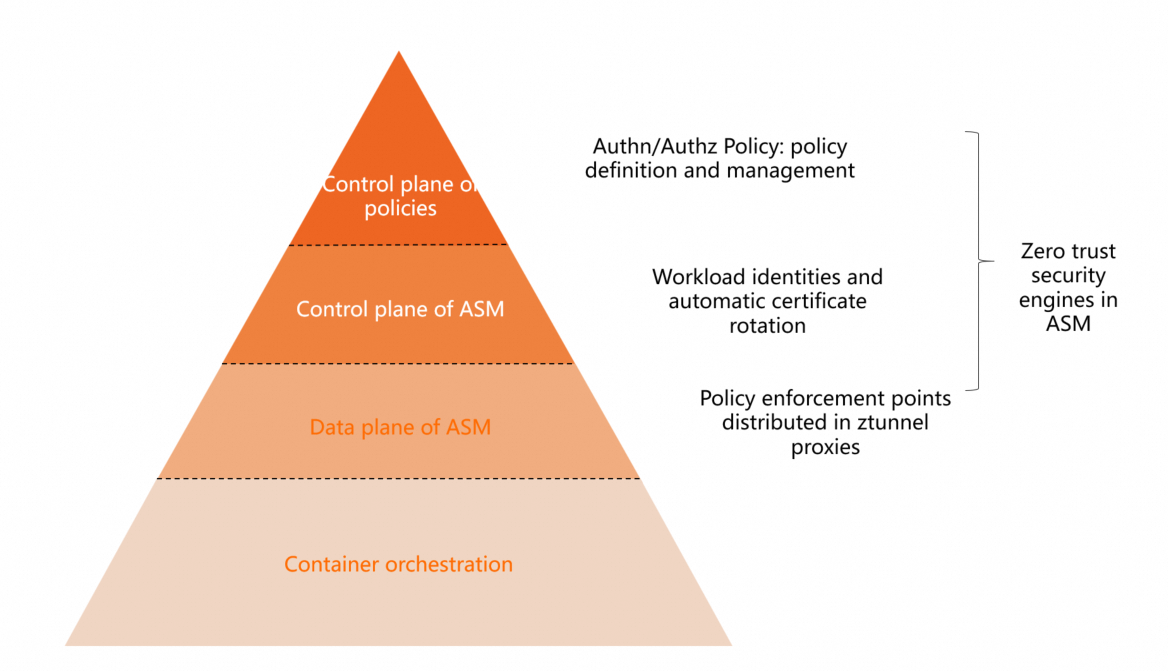
ASM currently provides fundamental zero trust security capabilities, including workload identity, peer authentication, request authentication, and authorization policies.
Workload identity
ASM provides a unique identity for each service in the mesh. This identity is used for mutual authentication and in authorization policies to control access between services.
When you use ASM to manage workloads running on Kubernetes, ASM provides a service identity for each workload. This identity is based on the workload's service account token.
The service identity in ASM conforms to the SPIFFE standard and has the following format: spiffe://<trust-domain>/ns/<namespace>/sa/<service-account>.
You can view the workload identities of services from your connected Kubernetes cluster in the ASM console.
-
Log on to the ASM console. In the left-side navigation pane, choose .
-
On the Mesh Management page, click the name of the ASM instance. In the left-side navigation pane, choose .
-
At the top of the Workload Identity page, set Data Plane to the cluster ID, and then select a Namespaces to view the workload identities.
Peer authentication
ASM provides two types of authentication: peer authentication and request authentication. Peer authentication allows you to enable mutual TLS (mTLS) for identity verification when two microservices interact.
-
If both the client and server applications have Ambient mode enabled, mTLS communication is enabled by default.
-
If only the client pod has Ambient mode enabled, the server decides whether to use mTLS based on whether it also has a mesh proxy.
-
If only the server has Ambient mode enabled, the default mTLS mode is PERMISSIVE, which accepts both plaintext and encrypted traffic. If you then configure a PeerAuthentication policy for the server and set the mTLS mode to STRICT, requests will fail.
Request authentication
Request authentication allows end-users and systems to interact with microservices, typically by using a JSON Web Token (JWT).
When a microservice is requested, you can create a request authentication policy to enforce JWT validation for requests to the service. The policy authenticates requests that contain a JWT. Only requests with a valid JWT can access the service successfully. Requests without a JWT are not validated by this policy and are permitted by default.
You can use an authorization policy along with request authentication to ensure that only requests with a valid JWT can access the service, while requests with an invalid JWT or no JWT are denied. The following example requires you to enable a waypoint for the namespace where the application resides.
-
Deploy the Bookinfo application that will receive requests. For more information, see Deploy the sample application and enable encrypted communication with Ambient mode.
-
Deploy the sleep application that will send requests.
-
In the kubeconfig environment for your ACK cluster, create a file named sleep.yaml.
-
Run the following command to deploy the sleep application.
kubectl apply -f sleep.yaml -n default
-
-
Create a request authentication policy to enforce JWT validation for inbound requests to the details service.
-
Log on to the ASM console. In the left-side navigation pane, choose .
-
On the Mesh Management page, click the name of the ASM instance. In the left-side navigation pane, choose . On the page that appears, click Create.
-
On the creation page, configure the following information to define a JWT rule for the details workload, and then click Create.
Set Namespace to default, set Name to test, and set the matching label name to
appand its value todetails.Some of the parameters are described below.
-
issuer: The issuer of the JWT. In this example, set it to testing@secure.istio.io.
-
audiences: A list of JWT audiences. This specifies which services can use the JWT to access the target service. In this example, it is left empty, which means there are no restrictions on the accessing service.
-
jwks: The JSON Web Key Set (JWKS) used to validate the JWT. In this example, use the following JWKS information. For more information, see the sample jwks.json.
{ "keys":[ {"e":"AQAB","kid":"DHFbpoIUqrY8t2zpA2qXfCmr5VO5ZEr4RzHU_-envvQ","kty":"RSA","n":"xAE7eB6qugXyCAG3yhh7pkDkT65pHymX-P7KfIupjf59vsdo91bSP9C8H07pSAGQO1MV_xFj9VswgsCg4R6otmg5PV2He95lZdHtOcU5DXIg_pbhLdKXbi66GlVeK6ABZOUW3WYtnNHD-91gVuoeJT_DwtGGcp4ignkgXfkiEm4sw-4sfb4qdt5oLbyVpmW6x9cfa7vs2WTfURiCrBoUqgBo_-4WTiULmmHSGZHOjzwa8WtrtOQGsAFjIbno85jp6MnGGGZPYZbDAa_b3y5u-YpW7ypZrvD8BgtKVjgtQgZhLAGezMt0ua3DRrWnKqTZ0BJ_EyxOGuHJrLsn00fnMQ"}]}
-
-
-
Use a JWT tool to generate a token signed with the private key corresponding to the public key in the JWKS.
{ "keys":[ {"e":"AQAB","kid":"DHFbpoIUqrY8t2zpA2qXfCmr5VO5ZEr4RzHU_-envvQ","kty":"RSA","n":"xAE7eB6qugXyCAG3yhh7pkDkT65pHymX-P7KfIupjf59vsdo91bSP9C8H07pSAGQO1MV_xFj9VswgsCg4R6otmg5PV2He95lZdHtOcU5DXIg_pbhLdKXbi66GlVeK6ABZOUW3WYtnNHD-91gVuoeJT_DwtGGcp4ignkgXfkiEm4sw-4sfb4qdt5oLbyVpmW6x9cfa7vs2WTfURiCrBoUqgBo_-4WTiULmmHSGZHOjzwa8WtrtOQGsAFjIbno85jp6MnGGGZPYZbDAa_b3y5u-YpW7ypZrvD8BgtKVjgtQgZhLAGezMt0ua3DRrWnKqTZ0BJ_EyxOGuHJrLsn00fnMQ"}]}The expected encoded token is:
eyJhbGciOiJSUzI1NiIsImtpZCI6IkRIRmJwb0lVcXJZOHQyenBBMnFYZkNtcjVWTzVaRXI0UnpIVV8tZW52dlEiLCJ0eXAiOiJKV1QifQ.eyJleHAiOjQ2ODU5ODk3MDAsImZvbyI6ImJhciIsImlhdCI6MTUzMjM4OTcwMCwiaXNzIjoidGVzdGluZ0BzZWN1cmUuaXN0aW8uaW8iLCJzdWIiOiJ0ZXN0aW5nQHNlY3VyZS5pc3Rpby5pbyJ9.CfNnxWP2tcnR9q0vxyxweaF3ovQYHYZl82hAUsn21bwQd9zP7c-LS9qd_vpdLG4Tn1A15NxfCjp5f7QNBUo-KC9PJqYpgGbaXhaGx7bEdFWjcwv3nZzvc7M__ZpaCERdwU7igUmJqYGBYQ51vr2njU9ZimyKkfDe3axcyiBZde7G6dabliUosJvvKOPcKIWPccCgefSj_GNfwIip3-SsFdlR7BtbVUcqR-yv-XOxJ3UcMI0tz3uMiiZcyPV7sNCU4KRnemRIMHVOfuvHsU60_GhGbiSFzgPTAa9WTltbnarTbxudb_YEOx12JiwYToeX0DCPb43W1tzIBxgm8NxUg -
Verify that the request authentication policy is in effect.
-
Run the following command to access the details service with the encoded JWT.
export TOKEN=eyJhbGciOiJSUzI1NiIsImtpZCI6IkRIRmJwb0lVcXJZOHQyenBBMnFYZkNtcjVWTzVaRXI0UnpIVV8tZW52dlEiLCJ0eXAiOiJKV1QifQ.eyJleHAiOjQ2ODU5ODk3MDAsImZvbyI6ImJhciIsImlhdCI6MTUzMjM4OTcwMCwiaXNzIjoidGVzdGluZ0BzZWN1cmUuaXN0aW8uaW8iLCJzdWIiOiJ0ZXN0aW5nQHNlY3VyZS5pc3Rpby5pbyJ9.CfNnxWP2tcnR9q0vxyxweaF3ovQYHYZl82hAUsn21bwQd9zP7c-LS9qd_vpdLG4Tn1A15NxfCjp5f7QNBUo-KC9PJqYpgGbaXhaGx7bEdFWjcwv3nZzvc7M__ZpaCERdwU7igUmJqYGBYQ51vr2njU9ZimyKkfDe3axcyiBZde7G6dabliUosJvvKOPcKIWPccCgefSj_GNfwIip3-SsFdlR7BtbVUcqR-yv-XOxJ3UcMI0tz3uMiiZcyPV7sNCU4KRnemRIMHVOfuvHsU60_GhGbiSFzgPTAa9WTltbnarTbxudb_YEOx12JiwYToeX0DCPb43W1tzIBxgm8NxUg
kubectl exec $(kubectl get pod -l app=sleep -o jsonpath={.items..metadata.name}) -c sleep -- curl http://details:9080/details/1 -o /dev/null --header "Authorization: Bearer $TOKEN" -s -w '%{http_code}\n'
A return code of 200 indicates that the access is successful.
-
Run the following command to access the details service with an invalid JWT.
kubectl exec $(kubectl get pod -l app=sleep -o jsonpath={.items..metadata.name}) -c sleep -- curl http://details:9080/details/1 -o /dev/null --header "Authorization: Bearer badtoken" -s -w '%{http_code}\n'A return code of 403 indicates that the access failed.
-
Run the following command to access the details service without a JWT.
kubectl exec $(kubectl get pod -l app=sleep -o jsonpath={.items..metadata.name}) -c sleep -- curl http://details:9080/details/1 -o /dev/null -s -w '%{http_code}\n'A return code of 200 indicates that the access is successful.
As expected, access succeeds with a valid JWT or no JWT, but fails with an invalid one. This confirms the request authentication policy is working correctly.
-
Authorization policy
You can use an authorization policy to restrict access based on the request's port, IP address, source, and other attributes. Only requests that meet the requirements can access the service. The following authorization policy restricts requests based on their source, requiring requests to contain a JWT from a specific issuer.
The following example requires you to enable a waypoint for the namespace where the application resides.
-
Deploy the Bookinfo application that will receive requests. For more information, see Deploy an application in a cluster associated with an ASM instance.
-
Deploy the sleep application that will send requests.
-
Create a file named sleep.yaml with the following content.
-
In the kubeconfig environment for your ACK cluster, run the following command to deploy the sleep application.
kubectl apply -f sleep.yaml -n default
-
-
Create an authorization policy.
-
Log on to the ASM console. In the left-side navigation pane, choose .
-
On the Mesh Management page, click the name of the ASM instance. In the left-side navigation pane, choose . On the page that appears, click Create from YAML.
-
-
On the Create page, select the default namespace, paste the following YAML, and then click Create.
For a description of the fields, see Authorization Policy.
apiVersion: security.istio.io/v1beta1 kind: AuthorizationPolicy metadata: name: require-jwt namespace: default spec: action: ALLOW rules: - from: - source: requestPrincipals: - testing@secure.istio.io/testing@secure.istio.io selector: matchLabels: app: details -
Run the following command to access the service with a request that does not contain a JWT.
kubectl exec $(kubectl get pod -l app=sleep -o jsonpath={.items..metadata.name}) -c sleep -- curl http://details:9080/details/1 -o /dev/null -s -w '%{http_code}\n'Expected output:
403Access to the details service without a JWT fails, which indicates that the authorization policy is in effect. The policy restricts access, requiring all requests to have a JWT issued by
testing@secure.istio.io.
Summary and use cases
In summary, ASM provides the following core security capabilities:
-
A managed certificate infrastructure with full certificate lifecycle management, which simplifies certificate issuance and CA rotation.
-
Managed control plane APIs for distributing authentication policies, authorization policies, and secure naming information to Envoy proxies.
-
Security policy enforcement by the Ztunnel proxy and waypoints in Ambient mode to ensure application security.
-
Rich observability data from the Ztunnel proxy and waypoints to help detect unauthorized access.
Each workload establishes its identity through an X.509 TLS certificate, which is used by every Ztunnel proxy. ASM provides and periodically rotates these certificates and private keys. If a specific private key is compromised, ASM quickly replaces it with a new one, significantly reducing the attack surface.
Use cases
-
Use an authorization policy on an ingress gateway to implement IP-based access control or access control based on a custom external authorization service.
-
A fintech customer used ASM authorization policies to isolate externally-facing zones from application zones to manage access control for cross-cluster, multi-language applications. Along with an egress gateway to audit mesh traffic, they also use authorization policies to control application access to third-party services.