Use custom authorization on an ASM ingress gateway
To customize access control policies, such as authorizing requests based on HTTP hostnames, paths, or methods, you can use a custom authorization service on an ASM ingress gateway. This ensures that only authorized users can access your critical services.
Prerequisites
Overview
When a client sends a request, the backend needs to verify its validity, for example, by checking if the user has permission to access the requested resource. After successful authorization, you might also need to add information to the response that was not in the original request, such as a service version number or a user ID in the header. ASM provides a custom authorization service. You can add an authorization flow on an ASM ingress gateway to ensure that critical services can be accessed only with proper authorization.
A custom authorization service is a service you develop. This topic uses a simple, pre-built authorization service as an example. It directs specific requests that arrive at the ingress gateway to the custom authorization service, which then decides whether to allow or deny the request. The ingress gateway enforces that decision. You must configure the following two parts:
-
The integration details between the ingress gateway and the custom authorization service.
-
The rules that specify which requests require custom authorization.
A custom authorization service is an advanced security feature of the Service Mesh. If you have simple requirements, consider using a gateway blacklist/whitelist or a standard authorization policy. For more complex logic, follow the steps in this topic.
Implementation flow
ASM encapsulates Istio's custom authorization feature. If you want to understand the native Istio implementation, you can inspect the native Istio resources that ASM generates. The implementation flow for an ASM custom authorization service is as follows:
-
Define a custom authorization service in ASM and associate it with the service deployed in Step 1. This allows ASM to use the service for authorization.
-
In ASM, create an authorization policy to configure the application that requires custom authorization and direct authorization to the custom authorization service configured in Step 2.
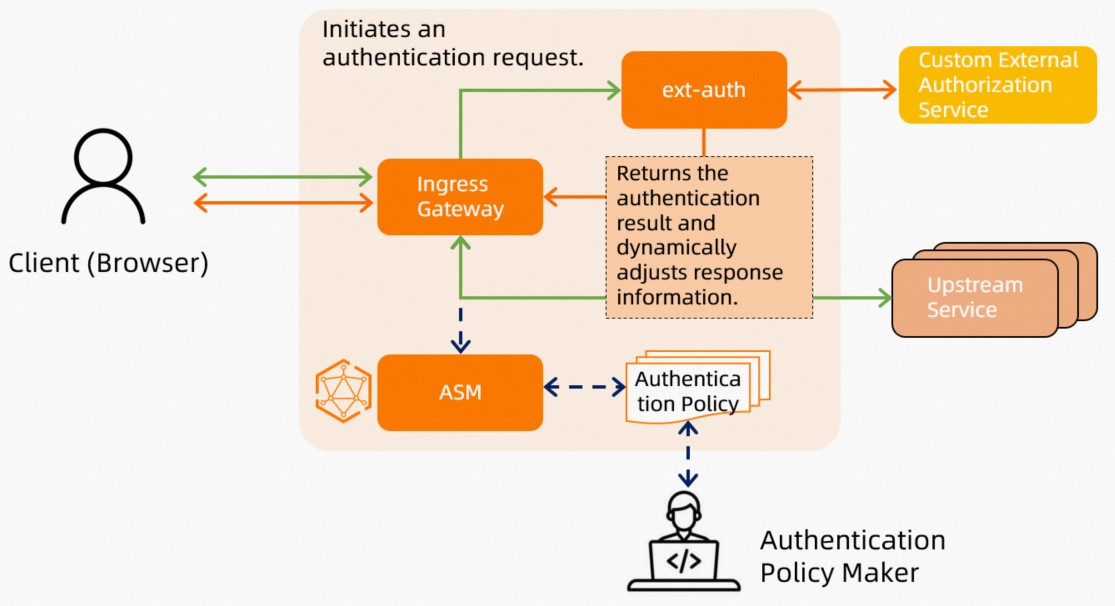
Step 1: Deploy the custom authorization service
Deploy a custom authorization service in your ACK cluster. The service must comply with the Istio custom authorization service API specification and support both HTTP and gRPC protocols to implement custom logic. The example service used in this topic requires that requests include the x-ext-authz: allow header to pass authorization.
This topic provides an example of a custom authorization service. You can use its code as a reference to create your own. For more information, see Custom authorization.
-
Create a file named ext-authz.yaml with the following content.
-
Run the following command to deploy the custom authorization service in your cluster.
To learn how to manage clusters and applications with kubectl, see Connect to a cluster by using kubectl.
kubectl apply -f ext-authz.yaml -
Run the following command to check the pod status.
kubectl get podExpected output:
NAME READY STATUS RESTARTS AGE ext-authz-6d458d5f8f-bh2m9 2/2 Running 0 1m -
Run the following command to verify that the application is running correctly.
kubectl logs "$(kubectl get pod -l app=ext-authz -n default -o jsonpath={.items..metadata.name})" -n default -c ext-authzExpected output:
2023/12/12 10:01:31 Starting HTTP server at [::]:8000
2023/12/12 10:01:31 Starting gRPC server at [::]:9000
This output confirms that the service is running correctly.
-
Obtain the gRPC and HTTP ports of the ext-authz authorization service.
Log on to the ACK console. In the left navigation pane, click Clusters.
On the Clusters page, click the name of your cluster. In the left navigation pane, click .
-
On the Services page, click ext-authz.
In the Endpoint section, you can see that the gRPC port is 9000 and the HTTP port is 8000. Therefore, the gRPC service address is ext-authz.default.svc.cluster.local:9000, and the HTTP service address is ext-authz.default.svc.cluster.local:8000.
Step 2: Configure an HTTP custom authorization service
You can configure the custom authorization capabilities of the ASM ingress gateway in the ASM console.
-
Log on to the ASM console. In the left-side navigation pane, choose .
-
On the Mesh Management page, click the name of the ASM instance. In the left-side navigation pane, choose .
-
On the Ingress Gateway page, click the name of the target gateway.
-
On the gateway overview page, click in the navigation pane.
-
In the Custom Authorization Service Configuration wizard, turn on the Enable Gateway Custom Authorization Service switch, configure the service by using one of the following methods, and then click Next.
Method 1: Create a new custom authorization service
On the Custom authorization service (HTTP or gRPC protocol) implemented based on envoy.ext_authz tab, configure the parameters. For a description of the parameters, see Connect to a custom authorization service that uses the HTTP protocol. Configure the following required parameters in the form: set Protocol to
HTTP, Service Address toext-authz.default.svc.cluster.local, Service Port to8000(valid range: 1–65535), and Timeout to10seconds. Turn on Include headers in the authorization request (includeRequestHeadersInCheck) and add the original request headers to be forwarded, includingcookie,x-forwarded-access-token,x-forwarded-user,x-forwarded-email,authorization,x-forwarded-proto,proxy-authorization,user-agent,x-forwarded-host,from,x-forwarded-for,accept, andx-ext-authz(a custom extended header). Turn on Override headers on allow (headersToUpstreamOnAllow) and add the following headers:authorization,cookie,path,x-auth-request-access-token,x-forwarded-access-token, andx-ext-authz-check-result. Turn on Override headers on deny (headersToDownstreamOnDeny) and add the following headers:content-type,set-cookie, andx-ext-authz-check-result. Thex-ext-authz-check-resultheader is a key header that must be configured in both lists. Click Next.Method 2: Import an existing custom authorization service
On the Import existing Custom Authorization Service tab, select an Existing Custom Authorization Service.
-
In the Matching Rules wizard, configure the following settings and then click Submit.
Requests that match this rule will trigger custom authorization. Set Match Mode to Selected requests must be authorized and Match Rule to Custom match rules. Turn on the HTTP Path switch and enter
/productpage. Leave the other rule options (HTTP Hostname, HTTP Method, and Port) turned off.When the configuration is complete, a message confirms that the Gateway Custom Authorization Service Created successfully.
Step 3: Verify the custom authorization service
-
Run the following command to access the resource at the
/api/v1/productspath on the gateway.To learn how to obtain the gateway address, see Obtain the IP address of an ingress gateway.
curl -I http://{YOUR_ASM_GATEWAY_ADDRESS}/api/v1/productsExpected output:
HTTP/1.1 200 OK
server: istio-envoy
date: Wed, 13 Dec 2023 02:41:20 GMT
content-type: application/json
content-length: 395
x-envoy-upstream-service-time: 1
This result indicates that authorization was not triggered. The access path is
/api/v1/products, not the configured/productpage, so the request does not match the authorization policy. -
Run the following command to access the
/productpagepath with ax-ext-authz: denyheader.curl -I -H "x-ext-authz: deny" http://{YOUR_ASM_GATEWAY_ADDRESS}/productpageExpected output:
HTTP/1.1 403 Forbidden
x-ext-authz-check-result: denied
date: Wed, 13 Dec 2023 02:42:59 GMT
server: istio-envoy
transfer-encoding: chunked
This result shows that authorization was triggered but failed. The response includes the newly defined header
x-ext-authz-check-result: denied. Because the access path is/productpage, it matches the authorization policy. -
Run the following command to access the
/productpagepath with anx-ext-authz: allowheader.curl -I -H "x-ext-authz: allow" http://{YOUR_ASM_GATEWAY_ADDRESS}/productpageExpected output:
HTTP/1.1 200 OK
server: istio-envoy
date: Wed, 13 Dec 2023 02:50:38 GMT
content-type: text/html; charset=utf-8
content-length: 5290
x-envoy-upstream-service-time: 47
This result confirms that the request was successfully authorized. The example custom authorization service adds this header to its response, and the gateway is configured to forward it to the upstream application on successful authorization.
Related documentation
-
ASM ingress gateways support configuring a blacklist/whitelist based on source IP address, HTTP hostname, and port to secure applications in the mesh. For more information, see Configure a blacklist/whitelist for an ingress gateway.
-
You can implement single sign-on (SSO) with Alibaba Cloud IDaaS or other OIDC-compliant identity providers without modifying your application. For more information, see Configure OIDC-based SSO on an ingress gateway.