A business middle platform uses an enterprise application architecture based on Domain-Driven Design (DDD) principles. A project's modeling process primarily involves technical modeling. This article provides an overview of technical modeling within the sample project.
Background
Technical modeling involves partitioning bounded contexts and defining domain models, data models, and service models. It uses DDD methodology to transform a business model into a technical model, which provides an efficient guide for developing applications on the business middle platform. For more information, see Technical modeling.
Bounded context
The sample project provides two predefined bounded contexts: the Product Context and the User Context. Both bounded contexts contain a simple domain model, data model, and application service. These are for reference only and do not represent a complete business design. This article uses the User Context as an example to explain bounded contexts and help you understand how to define and use different objects in BizWorks.
On the Bounded Context page of the sample project, you can see the two automatically created bounded contexts: Product Context and User Context. Click the User Context name to view the content of version v1.0.0. By default, the page displays a list of domain objects, which includes three objects: Account (entity object), Address (value object), and User (entity object). The left-side navigation pane provides access to features such as Domain Object, Domain Service, Data Model, and Application Service.
For more information, see Create and manage domain objects.
Domain model
On the Domain Object page for version v1.0.0 of the User Context, click Domain Model Designer to open the designer and visualize the model. The domain model for the User Context contains three objects: User (entity object and aggregate root), Account (entity object), and Address (value object). The following figure shows the model: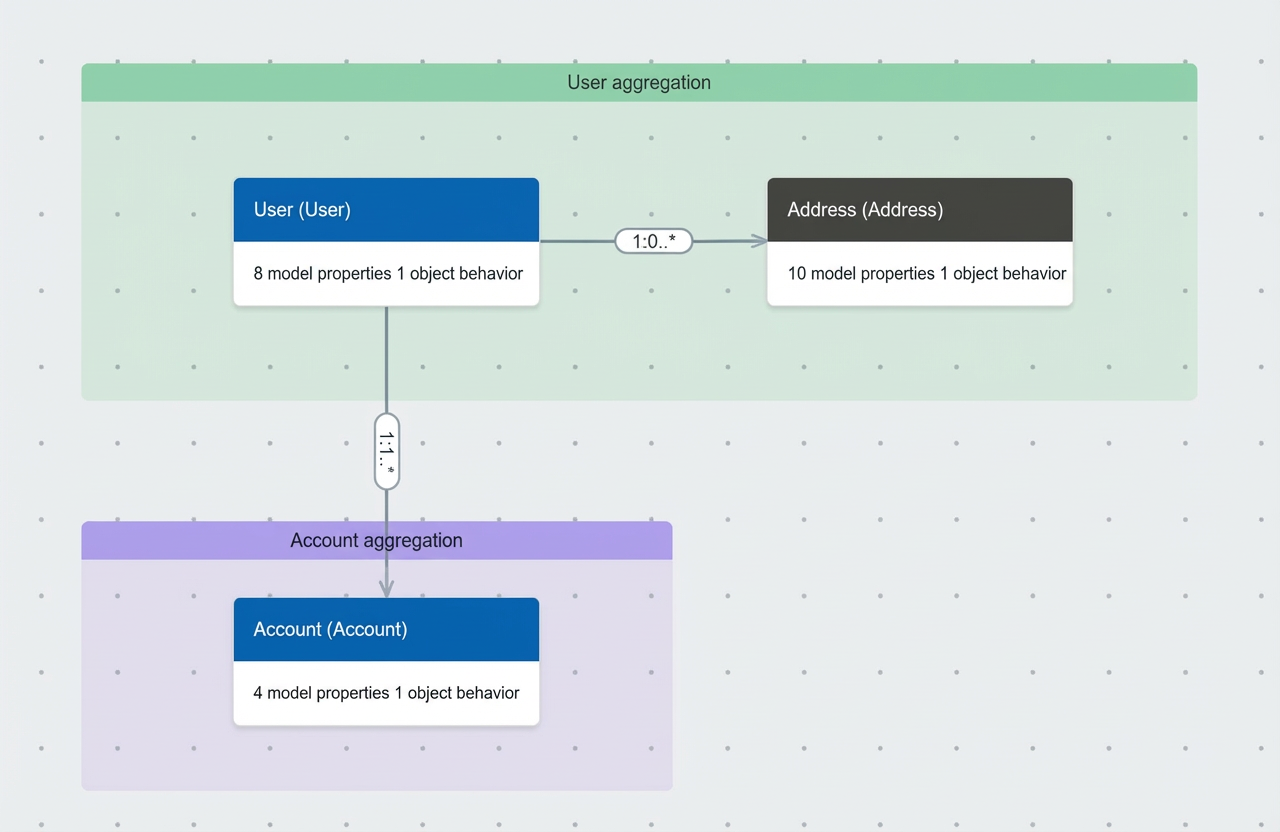
For more information, see Use the domain model designer.
The model designer lets you edit relationships between domain models. It supports association, aggregation, composition, and inheritance relationships between domain objects.
|
Object relation |
1 : 0..* |
1 : 1..* |
1 : 0..1 |
1 : 1 |
|
Association |
Applicable |
Applicable |
Applicable |
Applicable |
|
Aggregate |
Applicable |
Applicable |
Applicable |
Applicable |
|
Composition |
Applicable |
Applicable |
Applicable |
Applicable |
|
Inheritance |
Not applicable |
Not applicable |
Not applicable |
Not applicable |
For more information about domain object relationships, see Domain object relationships.
Data model
On the Data Model page of User Context v1.0.0, click Data Model Designer. On the designer page, you can visually view the data model information. The data models in User Context and their associations are as follows: The Account model contains the id, userId, accountId, and password fields. The Address model contains the id, userId, addressId, type, state, province, city, district, street, and detail fields. The User model contains the id, userId, name, sex, birthday, tenantId, gmtCreate, and gmtModified fields. These models are associated through the userId reference field.
For more information, see Use the data model designer.
A data model supports the following fields. You can use a reference field to set relationships between models. For example, an address is supplementary information for a user object, so there is an association between the address and user objects. In this case, for the User ID field in the address table, you must set the field type to reference and select userId from the user data model as the referenced object. On the Field tab of the edit page, the Table Field Name for the User ID field is user_id, and its Actual Field Type is text.
The following field types are supported in a data model:
Table 1. Data model parameters
Parameter | Description |
Field Name | A custom name for the field. |
Code | Must be unique within the data model, consist of letters and digits, be up to 80 characters long, and start with a lowercase letter. |
Table Column Name | The system automatically generates the Table Column Name based on the field Code. This name is used to generate the DDL script. To change the generation rule, return to the data model list page, click Set Table Information Generation Rules, and modify the settings in the Set Table Information Generation Rules panel. |
Field Type | Text types: Text, LongText (long text). You can set this field as a primary key, make it required or unique, and set a default value. Note If a field is set as the primary key, it is automatically marked as unique and required. |
Date types: Date, DateTime, and Timestamp. These field types cannot be used as a primary key. The default value can only be a fixed date. You cannot use relative time such as Note Setting a default value does not affect code generation or the database DDL statement. | |
Integer numeric types: Integer, Long (long). You can set this field as a primary key, make it required or unique, and set a default value. | |
Decimal numeric types: Double, Decimal. This type cannot be used as a primary key. You must specify the Decimal Places. | |
Boolean: Supports True and False values. | |
Reference: To use this type, select an associated table and field. The reference field's type matches the associated field's type. The associated table must be an existing data model in the current bounded context version, and the associated field must belong to that table. | |
Sequence: An auto-incrementing sequence. It is a Long type by default, is required and unique, and can be set as the primary key. You must set an initial value. |
For more information, see Create and manage data models.
Application service
The structure objects of an application service are similar to common Data Transfer Objects (DTOs). You can use defined structure objects as input and output parameters for application service methods. In the sample project's User Context, structure objects such as Account, User Basic Information, and User Authentication are defined. The User Basic Information and User Authentication structure objects are used as input and output parameters for the user information retrieval and user login authentication APIs.
For more information, see Create and manage structure objects.
You can group and define application service methods by business category. In the User Context, User Service, Account Service, and Address Service are defined. For example, User Service can be used to define services for retrieving and updating user information, while Account Service provides various login authentication services. The corresponding codes are AddressService, AccountService, and UserService.
For more information, see Create and manage application services.