This topic describes how to create a context version.
Create a context map version
Log in to BizWorks, in the select Platform drop-down list selected modeling Platform.
Click the
 icon or the text box in the upper-right corner of the page. From the drop-down list, click the name of the project that you want to view and click the Modeling tab. In the Modeling navigation pane, choose .
 On the Context Map page, click Create Version.
In the Create Context Map Version panel, configure version, source version, and description (optional), and then click Create.
You can click Add Bounded Context Association to select the name and version of the target bounded context from the drop-down lists.
ImportantThe name of the bounded context you add must be unique. If you use a name that is already associated with the context map, the creation of the new version fails.
After you create the version, you can view it in the context map version list.
Context map overview
On the Context Map page, click the version number of the target context map.
The Overview page of the target context map version shows the information in the following figure.
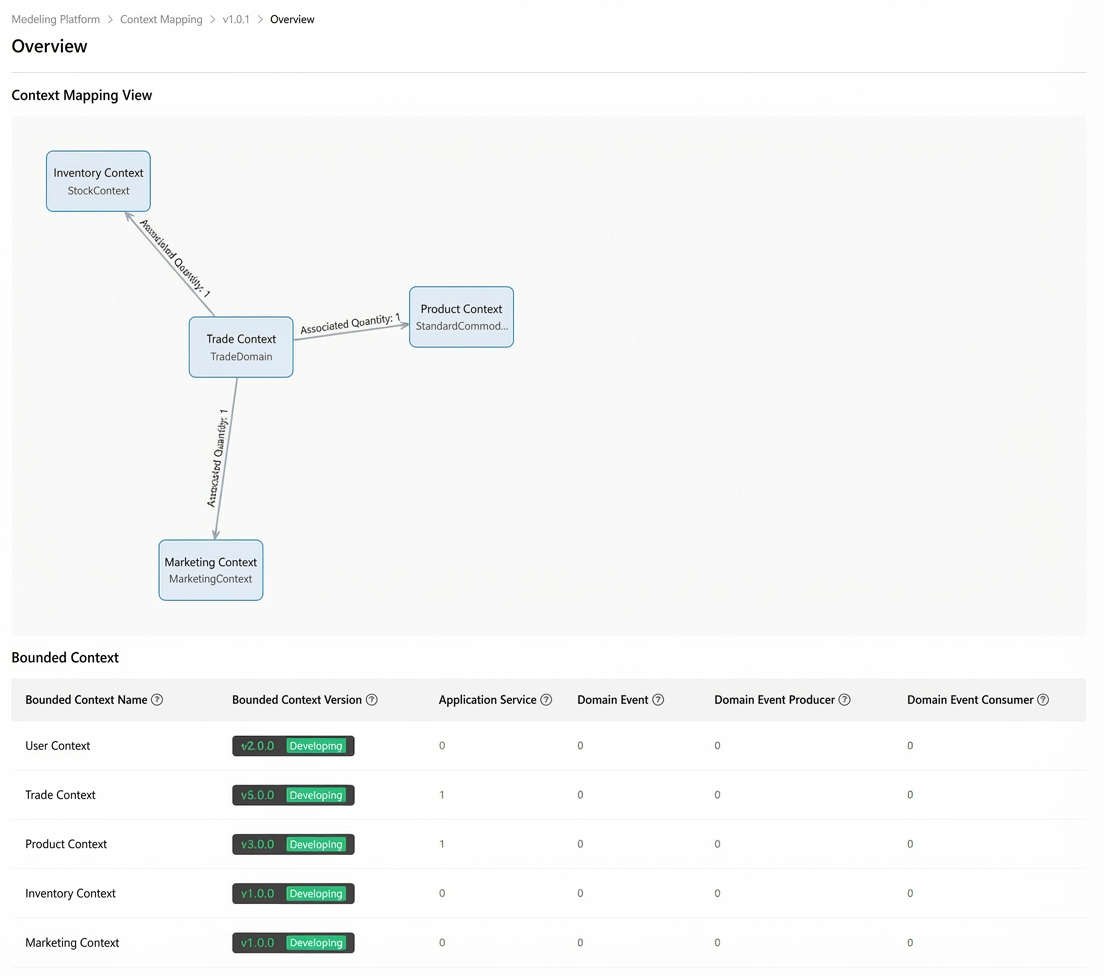
Context Map View: A view of the relationships between context maps, automatically generated from dependencies in the sequence diagrams you design.
The Bounded context section on the overview page lists the names and version details of the associated contexts. The other items are described as follows:
Application service: The number of application services derived during mapping derivation.
Domain event: The number of domain events derived during mapping derivation.
Domain event producer: The number of domain event producers derived during mapping derivation.
Domain event consumer: The number of domain event consumers derived during mapping derivation.