This document describes SIP integration.
Prerequisites
You have activated Cloud Contact Center.
You have agreed on integration fees with the product sales team.
Requirements for the customer's SIP devices
Your device must fully support the SIP protocol and loose routing.
You must ensure that the actual calling and called numbers are passed through in the SIP protocol.
Your device must have a fixed public IP address.
You must have qualified SIP O&M engineers to handle integration and ongoing operations.
You must ensure high availability (HA) of your equipment.
You must enable the OPTIONS probing mechanism. If a Cloud Contact Center server does not respond to OPTIONS, remove that server from the inbound call load to ensure new calls work normally.
Procedure
Step 1: Provide your SIP service information
Contact the Cloud Contact Center after-sales support DingTalk service account (13148375146) and provide your SIP service information to Alibaba Cloud.
Service information | Example | |
SIP service (primary) | 110.110.xx.xx | 5060 |
SIP service (backup) | 10.27.xx.xx | 5060 |
SP identifier | Weiniya | Alphabetic characters |
Number | 95566 | |
Customer's Alibaba Cloud UID | ||
Step 2: Configure SIP service information
Configure the Cloud Contact Center SIP service information on your SIP gateway.
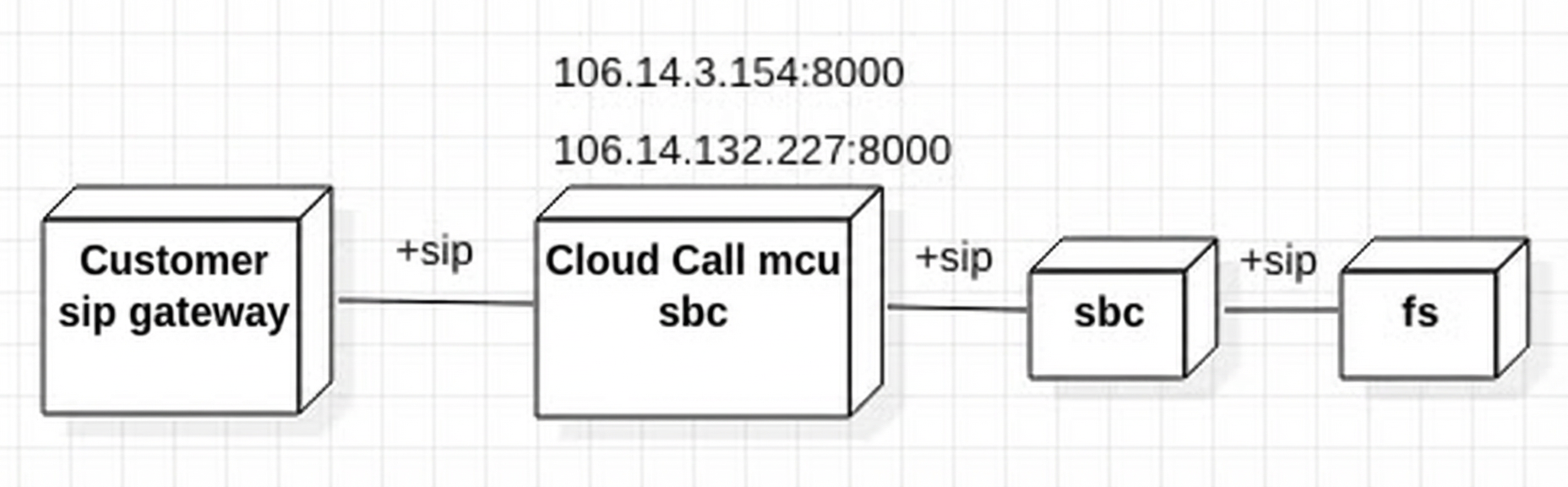
The SIP service information on the Cloud Contact Center side is as follows:
The SIP service endpoint on the Cloud Contact Center side for your gateway uses the UDP protocol:
IP: Contact the Cloud Contact Center after-sales support DingTalk service account (13148375146) to request the SIP server IP information.
Port:
Public network inbound port: 8000.
Public network outbound port: 8000.
Ensure you can access the above protocol, address, and port over the public network.
Note: Gateway signaling must be forwarded back to the SBC using the same path—that is, sent back to the SIP signaling source address (one of the addresses listed in item 1).
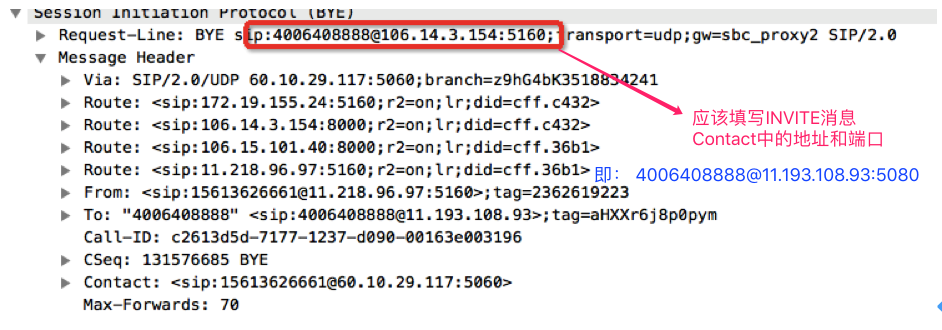
Set the req_uri value in the BYE message to the Contact header from the INVITE message (which corresponds to the FS address on port 5080).
Figure 1 INVITE message
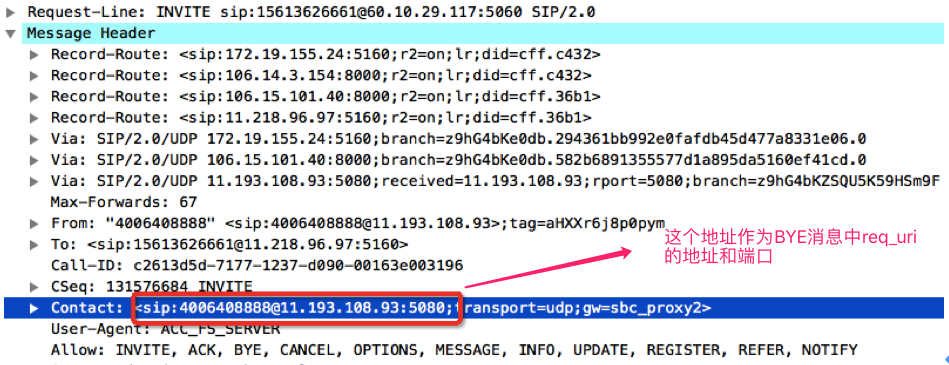
Figure 2 BYE message returned by the customer
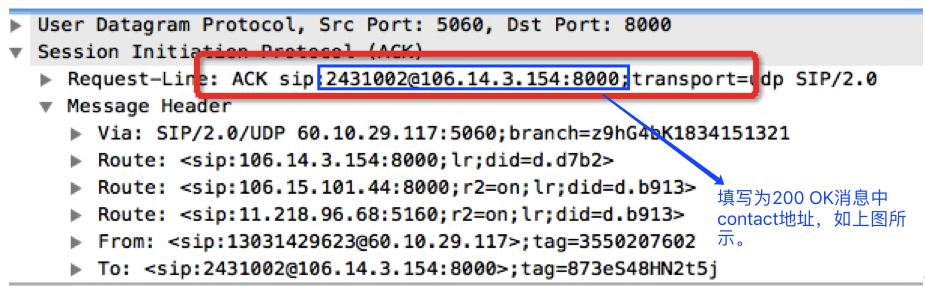
In the ACK for the 200 OK response, set the req_uri value to the Contact header from the 200 OK message (which corresponds to the FS address on port 5080).
Figure 3 200 OK message
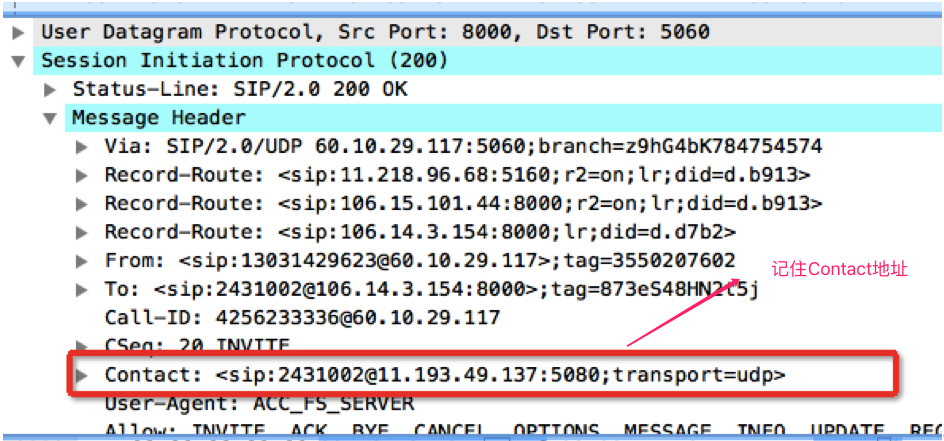
Figure 4 ACK message for 200 OK
Your SIP gateway must support loose routing.
Step 3: Complete instance configuration
Complete the Cloud Contact Center instance configuration for business testing.
Create a Cloud Contact Center instance.
In number management, assign a number to this instance and bind it to the SIP integration test IVR.
Configure skill groups and agents to accept transfer-to-agent requests from the SIP integration test IVR.
Step 4: Request integration testing
Contact the Cloud Contact Center after-sales support DingTalk service account to schedule a test time.
Both sides complete their configurations and start packet capture tools on the customer’s SIP gateway and the Cloud Contact Center side.
Run the following test cases:
1
Agent logs on to the Cloud Contact Center agent workspace using their account
2
Inbound
Mobile number
China Unicom number
Phone number
Can initiate a call
Can correctly receive single-digit DTMF input in IVR
Can correctly receive multi-digit DTMF input in IVR
Can be answered by an agent
Call remains connected for 10 minutes without abnormal disconnection
3
Outbound
Cloud Contact Center can initiate a call
Can be answered normally by the customer’s phone
Call remains connected for 10 minutes without abnormal disconnection