This topic describes how to embed the agent Workbench into a third-party system. This lets you implement features such as single sign-on (SSO) and call handling directly in your system. You can also use methods in the software development kit (SDK) to implement screen popping for incoming calls. The tasks described in this topic must be performed by your frontend engineers. This document is updated promptly to reflect any changes to the SDK.
SDK 3.x has been released. For more information, see Integrate the frontend SDK (3.x). For information about how to migrate from version 2.x, see Upgrade from version 2.x. No new features will be developed for version 2.x.
Frontend resources
Important: After you update the frontend resources, perform a comprehensive test in your local environment before you release the resources to the production environment.
<!-- IM SDK stylesheet. Do not load this file if you do not use the IM plugin. -->
<link rel="stylesheet" type="text/css" href="https://g.alicdn.com/code/npm/@ali/cc-im-sdk/{version-im-sdk}/index.css">
<!-- Softphone SDK stylesheet -->
<link rel="stylesheet" type="text/css" href="//g.alicdn.com/cloudcallcenter/web-workbench-sdk/{version-workbench}/main.min.css">

<!-- IM SDK JS file. Do not load this file if you do not use the IM plugin. -->
<script type="text/javascript" src="//g.alicdn.com/code/npm/@ali/cc-im-sdk/{version-im-sdk}/index.js"></script>
<!-- Softphone SDK JS file -->
<script type="text/javascript" src="//g.alicdn.com/cloudcallcenter-voip/web-agentbar-sdk/{version-agentbar}/index.js"></script>
<script type="text/javascript" src="//g.alicdn.com/cloudcallcenter/web-workbench-sdk/{version-workbench}/workbenchSdk.min.js"></script>
For the preceding static resources, replace {version-im-sdk}, {version-agentbar}, and {version-workbench} with the corresponding version numbers. The latest version numbers are as follows:
version-im-sdk ==>    0.5.8 // For the latest version, see the documentation for version 3.x.
version-agentbar ==>  2.4.0
version-workbench ==> 2.16.0 // For the latest 3.x version, go to update.The preceding JS files must be loaded in order because they have dependencies. If you use only the softphone SDK, you do not need to load the IM SDK files. However, if you use only the IM SDK, you must load all the files.
To ensure compatibility with Android, iOS, and Safari browsers, add a Web Real-Time Communication (WebRTC) supplementary library, such as the widely supported Adapter.js. You must load this library before you load web-agentbar-sdk.
Initialize the SDK
Before you integrate the SDK, complete the following preparations:
Use Chrome 58 or later. Calls in Cloud Contact Center are implemented using WebRTC technology, and Chrome provides the best support for WebRTC. This ensures call quality and security.
The business system where you embed the softphone SDK must use the HTTPS protocol. This is because Chrome versions 47 and later prohibit HTTP protocols from obtaining system microphone permissions, which can cause calls to fail.
If you use the softphone SDK in an iframe tag, you must add the `allow="microphone"` attribute to the iframe tag to allow the SDK to access the system microphone.
Initialize the SDK:
window.workbench = new WorkbenchSdk(config)Required config parameters
dom
The ID of the element to mount.instanceId
The domain name that you specified when you created the Cloud Contact Center instance. It is the string between workbench/ and /agentdest in the endpoint, such as xxx in https://ccc.console.aliyun.com/AccV2Instance/workbench/xxx/agentdest. See the following figure: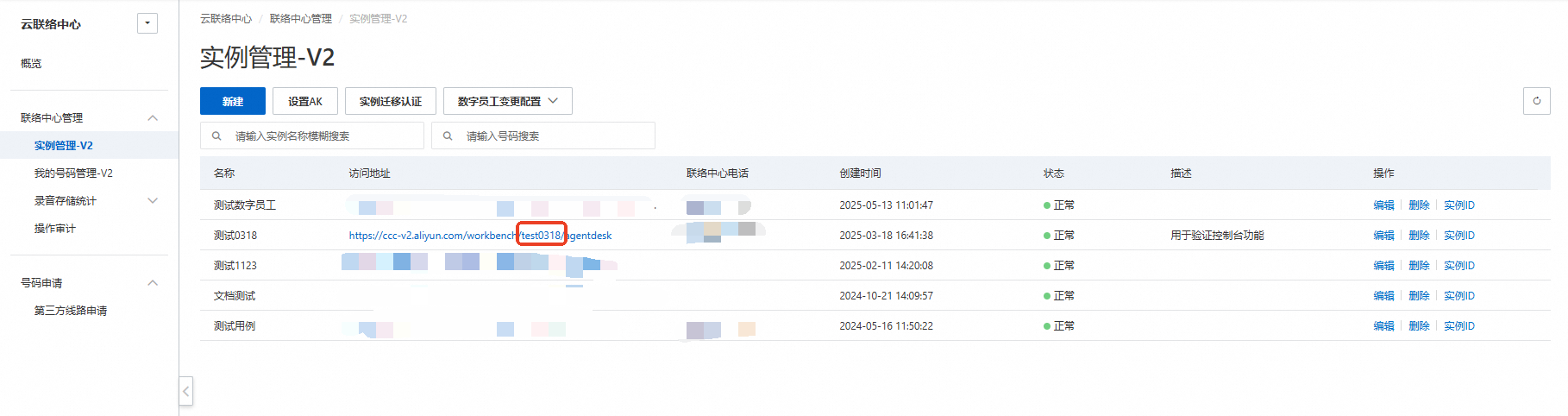
regionId
The cluster where the Cloud Contact Center server is deployed. Unless otherwise specified, the value is 'cn-shanghai'.
Optional config parameters
header
Specifies whether to display the header, which includes buttons such as Break, Offline, and Off-site Mode. Default value: true. Parameter type: Boolean.width
Specifies the width. Default value: 320px. Parameter type: Number.height
The height. Default value: 580px. Parameter type: Number. (To ensure a complete UI display, we recommend a minimum height of 580px).defaultVisible
Specifies whether to display the panel by default. Default value: true. Parameter type: Boolean.defaultMainContentVisible
Specifies whether to expand the softphone panel by default. Default value: true. Parameter type: Boolean.offlineImage
The URL of the static image to display when the agent is offline. Parameter type: String.breakImage
The URL of the static image to display when the agent is on a break. Parameter type: String.afterCallRule
The time in seconds after which an agent enters the idle state after a call ends. Default value: 15. Parameter type: Number. To require the agent to manually switch from the after-call work state to the idle state, set this parameter to "manual".autoAnswerCall
The duration in seconds after which an incoming call is automatically answered. By default, calls are answered manually. Parameter type: Number.isLoggedKeepBreak
Specifies whether to remain in the break state upon logon. You can set this to true if you do not want to answer calls immediately after going online during busy hours. By default, the agent state automatically changes from break to idle upon logon.isLoggedInvisibility [version-workbench: 2.12.2]
Specifies whether to remain in invisible mode upon logon. By default, the agent is not in invisible mode upon logon.isOutboundNotReceivedToBeProcessed
Specifies whether to enter the after-call work state even if an outbound call is not answered. Currently, if an outbound call is not connected, the agent enters the after-call work state and then immediately becomes idle.exportErrorOfApi
Specifies whether to display a toast message with the error information, ApiName, ErrorCode, and RequestId when an API call fails. This provides error information for backend troubleshooting. Default value: false. You can decide whether to display the toast message for errors as needed.moreActionList
The list of buttons in the header. Valid values: ["online", "ready", "onlyCall", "break", "offline", "adjustVolume", "changeWorkMode"]. These values correspond to [Online, End Break, Invisible, Break, Offline, Adjust Volume, Off-site Mode]. You can configure the buttons as needed. Parameter type: Array. Default value: ["break", "offline", "adjustVolume", "changeWorkMode"].NoteWhen the panel is collapsed, all the preceding values are valid. When the panel is expanded, the settings for ["online", "ready"] are invalid and not displayed. The operation buttons can be used in the panel.
useLocalStorageToCall
Specifies whether to allow making outbound calls from multiple tabs. Default value: false. Parameter type: Boolean. For more information, see step 9.pollFrequenceWithoutWS
The frequency at which the REST API is called to pull the agent state when the WebSocket connection for the agent state fails. Default value: 1000. Unit: milliseconds. Parameter type: Number.
Cloud Contact Center currently uses a dual-channel approach to ensure the real-time accuracy of agent states: WebSocket push and Rest API pull.
pollFrequenceWithWS
The frequency at which the Rest API is called to pull the agent state when the WebSocket connection for the agent state is successful. Default value: 10000. Unit: milliseconds. Parameter type: Number.pollSaveWebRtcInfoFrequence
The call frequency of the SaveWebRtcInfo (store call information) API. Default value: 10000. Unit: milliseconds. Parameter type: Number. Minimum value: 2000.sideNavList
Lets you customize the navigation pane on the left of the panel. By default, all items are displayed. After configuration, only the custom navigation items are displayed. Configuration items: Inbound, Outbound, Internal Call, Call Record, Transfer, Conference, Monitor, My Work, Device Detection, Settings.disableSaveStats
Default value: false (do not disable collection of call recording data). Parameter type: Boolean. This collects agent-side call recording data for voice troubleshooting and network analysis when issues occur. We strongly recommend that you do not disable this feature. If disabled, it will be difficult for engineers to troubleshoot problems.reducePanel
Specifies whether to display the minimize icon for the SDK panel. Default value: true. If you do not need this feature, set it to false. Parameter type: Boolean.isEnableSwitchAdapter
To improve agent voice call quality, multiple access point voice leased lines have been added. Default value: true. If an agent needs to connect directly to the Cloud Call Center server, set this to false. Parameter type: Boolean.customizedNotification
Lets you integrate custom desktop notifications for incoming calls. By default, the desktop notification configured in Cloud Call Center is displayed. Default value: false. If set to true, the default notification is not displayed. Parameter type: Boolean.allowCalleeEncryption
Specifies whether to allow the callee number to be encrypted for transmission (no restriction on the type of the callee parameter in the call method).defaultLastSelectedCallerNumber [version-workbench: 2.12.2]
Specifies whether to remember the last selected caller number (stored in the browser cache and selected by default on the next logon).imConfig
IM chat configuration. The corresponding CSS and JS files must be loaded.

{
  /**
   * Agent information. By default, the nickname and profile picture from the Workbench settings are used.
   */
  user?: {
        /**
         * Display name
         */
        nickname?: string;
        /**
         * Profile picture URL
         */
        avatarUrl?: string;
    };

  /**
   * The container where the IM is displayed.
   */
  getContainer: () => HTMLElement;

  /**
   * The session change event. If the value is null, no session is active.
   * @param conv
   * @returns
   */
  onConvChange?: (conv) => void;

  /**
   * The session invitation event.
   */
  onConvInvite?: (event) => void;

  /**
   * The event for canceling a session invitation.
   */
  onConvCancelInvite?: (event) => void;

  /**
   * The session end event.
   */
  onConvReleased?: (event) => void;

  /**
   * The message add event.
   */
  onMessageAdd?: (message) => void;

  /**
   * The queue message add event.
   */
  onClaimQueueAdd?: (event) => void;
}
The following parameters configure the API endpoint and request parameters for frontend requests to the server-side API.
The URI of the request is: ${ajaxOrigin}${ajaxPath}?${ajaxApiParamName}=${apiName}&product=CloudCallCenter&version=2020-07-01®ion=${regionId}
ajaxOrigin
The request source. By default, requests are sent to the current source (location.origin). Parameter type: String.ajaxPath
The request path. Default value: "/data/api.json".withCredentials
Specifies whether to use credentials for cross-origin requests and whether to allow cookies. Parameter type: Boolean.ajaxApiParamName
The name that distinguishes the action when ajaxType is set to param. Default value: action. Parameter type: String.ajaxMethod
The request method. Valid values: post, get. Default value: post. Parameter type: String.ajaxOtherParams
Other custom parameters at the same level as the request. Parameter type: Object.ajaxHeaders
The request header. Parameter type: Object.apiAxiosFunc
Lets you write your own method to call the API. The method must return a promise object, and the format of the returned data must be consistent with the format returned by the Cloud Call Center public cloud API.
apiAxiosFunc: (apiName, params) => {
   console.log(apiName, params);
   let promise = axios({
      method: 'post',
      url:`/aliyun/ccc/api?action=${apiName}`,
      headers: {
         'Content-Type': 'application/x-www-form-urlencoded',
      },
      data: Qs.stringify({ request: JSON.stringify(params)}),
    });
    return promise;
}

Note:
Because Cloud Contact Center uses the axios request library internally, the default returned data structure is:
{
  data: {
    code:xxx,
    data: xxx,
    httpStatusCode: xxx,
    requestId: xxxx
  }
}
If you do not use axios, make sure that the returned data has this data structure, which is wrapped in an additional data layer compared to the value returned in the HTTP request.
This concludes the API request parameter configuration.
Hook functions
The following hook functions are callbacks that are triggered by specific events. The type for all of these functions is `function`.
onInit()
Triggered when the SDK object is instantiated.onRegister(config)
Triggered when the SIP service is successfully registered.onLogIn()
Triggered on sign-in or logon.onLogOut()
Triggered on sign-out or logoff.onBreak()
Triggered when an agent takes a break.onReady()
Triggers when idle.onAgentOutboundScenario
Triggered only for outbound calls.onCallComing(callDetail)
Triggered on an incoming call. You can obtain the callDetail object in this function. The following table describes the parameters in callDetail: caller: The caller number. callee: The callee number. callType: The call type. jobId: The ID of the current call. callContext: The details of the current call.ImportantTo improve the connection rate, if an incoming call is not answered within 30 seconds, the agent is automatically put on a break. The call is then returned to the manual queue and assigned to another idle agent.
onBeforeCallDialing(payload)
Triggered before the call method is invoked. If you configure this hook function, you must execute the callback method. Otherwise, the call is not placed. The following table describes the parameters in the returned payload data:
callee: The callee number.
userId: The user ID.
callback: The callback to be invoked after the conditions are met. You can pass the callee parameter: callee prefix + callee number. If not passed, the callee number passed in the panel or the call method is used.
onCallDialing(callDetail)
Triggered when an outbound call is being placed and ringing. You can obtain the callDetail object in this function. The following table describes the parameters in callDetail:
caller: The caller number.
callee: The callee number.
callType: The call type.
jobId: The ID of the current call.
callContext: The details of the current call.
onHangUp(type)
Triggered when a call is hung up. The following table describes the values of the type parameter:
`ringing`: The hang-up occurs when an inbound call is not answered.
`dialing`: The hang-up occurs when an outbound call is not answered.
`inbound`: The hang-up occurs during an inbound call.
`outbound`: The hang-up occurs during an outbound call.
`internalcall`: The hang-up occurs during an internal call.
`agentHeld`: The hang-up occurs during a consultation call.
`meeting`: The hang-up occurs during a conference or when the agent state changes during a conference.
`consulted`: The hang-up occurs during a passive consultation call (being consulted).
`monitored`: The hang-up occurs during a monitored call.
`monitoring`: The hang-up occurs when initiating monitoring before it is successful.
`bargedIn`: The hang-up occurs during a barged-in call.
`coached`: The hang-up occurs for a coached agent during a three-way call.
onBeforeCallHangup(payload)
Triggered before the hangUp method is invoked. If you configure this hook function, you must execute the callback method. Otherwise, the call is not hung up. The following table describes the parameters in the returned payload:
callback: The callback method.
jobId: The ID of the current call.
channelId: The channel ID of this agent's call.
userId: loginInfo.userId.
onCallEstablish(callDetail)
Triggered when a call connection is established. You can obtain the callDetail object in this function. The following table describes the parameters in callDetail:
callContext: The details of the current call.
onCallRelease(callDetail)
Triggered when a call ends. You can obtain the callDetail object in this function. The following table describes the parameters in callDetail:
callContext: The details of the current call.
onErrorNotify(error)
Triggered when an error occurs. You can get the error information. The following table describes the parameters in error: errorCode: The error code. errorMsg: The response error message. errorMsgTip: The Chinese error message we defined. requestId: The request ID. apiCode: The error code of the API request.NoteDuring the development phase, we recommend that you print the parameter table in this hook function to obtain error information.
onStatusChange(codeDetail)
This function is triggered by any status change. You can listen to the change process of the current status value in this function. For the meaning of the status codes, see section 8, Status code table, in this topic. You can get the codeDetail parameter. The following table describes the parameters in codeDetail:
code: The current status code.
lastCode: The previous status code.
context: The context information.
onWorkModeChange(workMode)
By default, agents have two work modes: on-site and off-site. If a SIP phone is configured for an agent, there is also an office phone mode.
On-site mode: Answer and make calls through the browser.
Off-site mode: Answer calls through a mobile phone, which is the "Mobile Answer" mode in version 1.0.
Office phone mode: Answer and make calls through a SIP phone without using the browser.
The following table describes the workMode parameter:
"ON_SITE": On-site mode.
"OFF_SITE": Off-site mode.
"OFFICE_PHONE": Office phone mode.
onDeviceTypeChange(deviceType)
If a SIP phone is configured for an agent, the agent can choose which device to use when going online through the browser: WebRTC softphone or SIP phone.
The deviceType parameter is of type Number:
0: WebRTC softphone.
1: SIP phone.
onGetStatsData(payload)
For more information, see RTCPeerConnection.getStats().
You can subscribe to this hook function to get the voice quality of a call in progress. Data is returned once per second.
The payload contains:
callId: The callId of the current call.
sender: The sender data.
receiver: The receiver data.

Example usage:
sender && sender.forEach(report => {
 console.log('sender', report);
}
onSelectOutboundNumber(number)
/**
 * Event for selecting a caller number in the panel.
 *
 * @param {string} number The selected caller number.
 */
onSelectOutboundNumber(number: string): void
onSelectCurrentCallRecord(payload)
payload.record: For more information, see the returned parameters of the ListRecentCallDetailRecords API operation.
/**
 * The currently selected call record.
 */
onSelectCurrentCallRecord?(payload: {record: object}): void
onAfterEarlyMediaRecognized(payload)
/**
 * Hook function for intelligent hang-up of outbound calls, returns early media recognition information.
 */
onAfterEarlyMediaRecognized?(payload: {
                             /**
                              * Early media state.
                              */
                             earlyMediaState: string,
                             /**
                              * Timestamp of the start of early media (for countdown calculation).
                              */
                             earlyMediaTime: number,
                             /**
                              * Description of the early media state.
                              */
                             earlyMediaText: string,
                             /**
                              * Countdown hang-up time added in the settings.
                              */
                             releaseAfterEarlyMediaRecognized: number
                             })
Configuration example
window.workbench = new window.WorkbenchSdk({
  dom: "workbench-container",
  regionId: "cn-shanghai",
  width: "320px",
  height: "552px",
  instanceId: "XXX",
  ajaxPath: "/aliyun/ccc/api",
  ajaxMethod: "post",
  afterCallRule: 15, // After-call work time after hang-up
  header: true,
  autoAnswerCall: 8, // Automatically answer after 8s of ringing for an incoming call
  exportErrorOfApi: true,
  onInit() {
    // window.workbench.register() // Register here to implement automatic logon
  },
  imConfig: {
    getContainer() {
      return document.getElementById('im-container');
    },
  },
  onLogIn() {
    // window.workbench.renderIM(); // Render the IM component
  },
  onLogOut() {
    // window.workbench.unmountIM(); // Uninstall the IM component
  },
  onErrorNotify(error) {
    console.warn(error);
  },
  onCallComing(callDetail) {
    console.log(callDetail);
  },
  onCallDialing(callDetail) {
    console.log(callDetail);
  },
  onStatusChange(codeDetail) {
    console.log(codeDetail);
  },
  onCallEstablish(callDetail) {
    console.log("This is the callback function triggered when a call is established", callDetail);
  },
  onCallRelease(callDetail) {
    console.log("This is the callback function triggered when a call ends", callDetail);
  },
  onHangUp(type) {
    console.log(`This is the onHangUp event, type = ${type}`);
  },
});
SDK methods
You can call the following methods using the `window.workbench.methodName(parameter)` format.
Ensure that the global variable name defined during SDK initialization is consistent with the one used in this document.
isAvailBrowser()
This method checks whether the current browser supports the softphone. If the browser is not compatible, a prompt appears for 3 seconds,
and an error message is returned in the onErrorNotify hook function. If the browser is compatible, no prompt appears, and no error message is returned in onErrorNotify.
checkNetwork()
This method checks whether the current network connection can connect to the softphone service and whether it is blocked by the local firewall.changeVisible(visible)
Shows or hides the softphone panel. The visible parameter is of type Boolean.changeMainPaneVisible(visible)
Expands or collapses the softphone panel. The visible parameter is of type Boolean.changeWidth(width)
Sets the width of the softphone panel. The default value is 320px. The width parameter is of type Number.unloadWorkbench
Deletes the created Workbench instance so that it can be created again.reRender()
Remounts the SDK. This is mainly used in single-page applications (SPAs) when you switch to another page during a call or in the online state and then return to the agent Workbench interface.register(loginSkillGroupArray, accessPoint, deviceType, mode, breakReason)
/**
 * First sign-in, which includes SIP service registration, sign-in, and setting to idle. This method needs to be called for the first sign-in after the page is loaded.
 * After the call is completed, the agent enters the idle state (can only be called after the onInit hook method is executed).
 *
 * @param loginSkillGroupArray The list of skill groups for the agent, obtained from the `ListSkillGroupsOfUser` API.
 * @param accessPoint The `region` of the array object obtained from the `GetTurnServerList` API.
 * It must be consistent with the API `region`. Otherwise, the switch will fail. Automatically pass `default`, and the SDK will select the nearest access point internally.
 * @param deviceType The device type. This is an optional parameter. When a SIP phone is registered for the agent, you can set this parameter to `1` to specify that the SIP phone goes online.
 * @param mode The logon mode.
 * @param breakReason The reason for the break when going online in break mode.
 */
function register(
    loginSkillGroupArray?: any[],
    accessPoint?: string,
    deviceType?: number,
    mode?: LoginMode,
    breakReason?: string,
  ): void;

 /**
  * The state after logon.
  * `normal`: Normal logon state.
  * `invisibility`: Invisible logon state.
  * `break`: Break state.
  */
 type LoginMode = 'normal' | 'invisibility' | 'break';
logIn(loginSkillGroupArray)
/**
 * Sign-in (can be called in the signed-out state, which is `1`). Call this method to go online.
 *
 * @param loginSkillGroupArray The list of skill groups for the agent, obtained from the `ListSkillGroupsOfUser` API.
 * @param mode The logon mode.
 * @param breakReason The reason for the break when going online in break mode.
 */
logIn(loginSkillGroupArray?: any[], mode?: LoginMode, breakReason?: string): void;
logOut()
Sign-out. Call this method to go offline.ready()
Set to idle. This method can be used to change the state to idle. In the idle state, you can answer and make calls.applyForBreak(breakReason, callback)
/**
 * Apply for a break. After setting, incoming calls will not be transferred to the current agent but to other idle agents.
 *
 * @param breakReason The default is `default`. You can customize the break reason to facilitate statistics on different break types.
 * @param callback The callback function after a successful call.
 */
applyForBreak(breakReason?: string, callback?: (e?: any) => void): void;
applyForCallOnly(isCallOnly)
/**
 * Set whether to be in outbound-only mode. If true, the agent will not receive incoming calls. (Please use changeVisibility instead).
 *
 * @param isCallOnly Whether to be in outbound-only mode.
 */
applyForCallOnly(isCallOnly: boolean): void;
changeVisibility(invisible) [version-workbench: 2.12.2]
/**
 * Switch to invisible mode. If true, the agent will not receive incoming calls (same effect as outbound-only).
 *
 * @param invisible Whether to be in invisible mode.
 */
changeVisibility(invisible: boolean): void;
applyForOnSite()
Set to on-site mode. When the agent is in off-site mode, you can call this method to set to on-site mode and then call the logIn method to go online.applyForOffSite()
Set to off-site mode. When the agent is idle, you can call this method to set to off-site mode, which is mobile phone answering.applyForOffSiteDirectly()
Set to off-site mode directly without displaying a confirmation pop-up. When the agent is idle, you can call this method to set to off-site mode, which is mobile phone answering.getStatusCode()
/**
 * Get the current status code of the agent.
 */
getStatusCode(): {
  /**
   * Current state
   */
  code: number;
  /**
   * Previous state
   */
  lastCode: number;
};
hangUp(releaseJobId, releaseChannelId, callback)
/**
 * Hang up. This method can be used to end a call.
 *
 * @param releaseJobId Can hang up a specified call. If not passed, the current call is hung up.
 * @param releaseChannelId Can hang up a specified party in a specified call. If not passed, the current call is hung up.
 * @param callback The callback function after a successful call.
 */
hangUp(releaseJobId?: string, releaseChannelId?: string, callback?: (e?: any) => void): void;
answer(callback)
Answer a call. This method can be used to answer an incoming call and establish a call connection.
callback: The callback function after a successful call. Parameter type: Function.
call(callee, caller, callback, otherParams)
Places a call.
callee: The callee number. Required. Data type: String.
caller: The caller number. You can specify a caller number. You can also leave it empty or pass 'auto'. In this case, a caller number with the same area code as the outbound number is selected. If no such number exists, a number is randomly selected from the list of outbound numbers bound to the agent.
callback: The callback function after a successful call. Parameter type: Function.
otherParams: Optional parameter. You can add some parameters when making an outbound call. The currently supported parameters are:
  {
    TimeoutSeconds: The timeout period. If the call is not connected after the specified time, it is actively hung up. Parameter type: Number.
    Tags: Passthrough data. Parameter type: String.
    MaskedCallee: The masked callee number, for example, "1318888****". Parameter type: String.
  }
stayAfterCall
Remain in the after-call work state (same effect as clicking the after-call work button after a call ends).sendDtmf(number, jobId, channelId, callback)
If jobId and channelId are not passed, the second parameter can be the callback.
/**
 * DTMF key interaction, sends DTMF.
 *
 * @param number Can be 0-9, *, or #.
 * @param callback The callback function after a successful call.
 */
sendDtmf(number: string|number, callback?:(e:any) => void)

/**
 * DTMF key interaction, sends DTMF.
 * For a three-way call, jobId and channelId must be passed.
 *
 * @param number Can be 0-9, *, or #.
 * @param jobId The jobId of the current call.
 * @param channelId The channelId to which DTMF needs to be sent (can be obtained from callContext).
 * @param callback The callback function after a successful call.
 */
sendDtmf(number: string|number, jobId?: string, channelId?: string, callback?:(e:any) => void)
callHold(callback)
Hold a call. This method can be used to put a call on hold. The client hears a piece of music, and the agent's voice cannot be heard by the client.
callback: The callback function after a successful call. Parameter type: Function.
callRetrieve(callback)
Retrieve a call. This method ends the call hold state and re-establishes the call between the client and the agent.
callback: The callback function after a successful call. Parameter type: Function.
muteAgent()
Mute during a call.unMuteAgent()
Unmute during a call.changeVolumeInCall(volumeInCall)
/**
 * Change the volume during a call.
 *
 * @param volumeInCall A decimal value between [0, 1].
 */
changeVolumeInCall(volumeInCall: number): void;
changeRingToneVolume(volumeInCall)
/**
 * Change the volume of the incoming call ringtone.
 *
 * @param volumeInCall A decimal value between [0, 1].
 */
changeRingToneVolume(volumeInCall: number): void;
thirdCallTransfer(callee, caller, callback) [version-workbench: <2.13.1]
thirdCallTransfer(params) [version-workbench: >=2.13.1]
/**
 * Blind transfer during a call. A is talking to B, and the call is directly transferred to C.
 *
 * @param params.callee The callee number | The skill group ID.
 * @param params.caller The caller number.
 * @param params.callPriority The transfer priority. Can be passed when transferring to a skill group. 0-9 (default 0, highest priority).
 * @param params.strategyName The agent allocation policy name when transferring to a skill group queue.
 * @param params.strategyParams The agent allocation policy parameters when transferring to a skill group queue.
 * @param params.timeoutSeconds The timeout for blind transfer. If the transferee does not answer the call within the specified time, the call is hung up. This field is optional. Default: 30. Unit: seconds.
 * @param params.callback The callback function after a successful call.
 *
 * @description
 * ```text
 * Transfer to an agent
 * callee: Agent extension number
 * caller: ''
 *
 * Transfer to an external phone
 * callee: Mobile phone number
 * caller: 'auto'
 *
 * Transfer to a specified skill group
 * callee: Skill group ID
 * caller: ''
 * ```
 */
thirdCallTransfer(params: {
    callee: string;
    caller?: string;
    callPriority?: number;
    strategyName?: string;
    strategyParams?: string;
    timeoutSeconds?: number;
    callback?: Callback;
  }): void;
initiateAttendedTransfer(callee, caller, callback)[version-workbench: <2.13.1]
initiateAttendedTransfer(params) [version-workbench: >=2.13.1]
/**
 * Attended transfer during a call. A is talking to B, consults C, and A waits during the consultation.
 *
 * @param params.callee The callee number | The skill group ID.
 * @param params.caller The caller number.
 * @param params.callPriority The transfer priority. Can be passed when transferring to a skill group. 0-9 (default 0, highest priority).
 * @param params.strategyName The agent allocation policy name when transferring to a skill group queue.
 * @param params.strategyParams The agent allocation policy parameters when transferring to a skill group queue.
 * @param params.timeoutSeconds The timeout for blind transfer. If the transferee does not answer the call within the specified time, the call is hung up. This field is optional. Default: 30. Unit: seconds.
 * @param params.callback The callback function after a successful call.
 *
 * @description
 *
 * Transfer to an agent
 * callee: Agent extension number
 * caller: ''
 *
 * Transfer to an external phone
 * callee: Mobile phone number
 * caller: 'auto'
 *
 * Transfer to a specified skill group
 * callee: Skill group ID
 * caller: ''
 */
initiateAttendedTransfer(params: {
    callee: string;
    caller?: string;
    callPriority?: number;
    strategyName?: string;
    strategyParams?: string;
    timeoutSeconds?: number;
    callback?: Callback;
  }): void;
thirdCallRetrieve(callback)
Retrieve a three-way call. Return to the original call. A is talking to B, consults C, and after the consultation, returns to the call between A and B.
callback: The callback function after a successful call. Parameter type: Function.
thirdCallTransferFinished(callback)
Transfer a call during a three-way consultation call. A is talking to B, consults C, and after the consultation, returns to the call between A and B, establishing a call between A and C.
callback: The callback function after a successful call. Parameter type: Function.
switchToConference(jobId)
/**
 * Switch a consultation call to a conference (multi-party call).
 *
 * @param jobId The call ID.
 */
switchToConference(jobId?: string): void;
startConference(participantListJson, otherParams)
/**
 * Start a conference.
 *
 * @param participantListJson The other two parties in the conference call. For an agent, pass the agent's extension number. Parameter type: `JSON.stringify(['1234567', '7654321'])`.
 * @param otherParams Other parameters.
 *
 * @example
 * ```js
 * startConference(JSON.stringify(['1234567', '7654321']))
 * ```
 */
startConference(participantListJson: string, otherParams?: Record<string, any>): void;
monitor(userId, callback)
/**
 * Monitor method.
 *
 * @param userId The agent's ID.
 * @param callback The callback function after a successful call.
 */
monitor(userId: string, callback?: (result?: any) => void): void;
bargeIn(userId, jobId, callback)
/**
 * Barge-in method. After success, enters three-way conference mode.
 *
 * @param userId The agent's ID.
 * @param jobId The ID of the call to barge in on.
 * @param callback The callback function after a successful call.
 */
bargeIn(userId: string, jobId?: string, callback?:(result?: any) => void): void;
intercept(userId, jobId, callback)
/**
 * Intercept method. After success, the original agent is kicked out of the call, and the new agent talks to the customer.
 *
 * @param userId The agent's ID.
 * @param jobId The ID of the call to intercept.
 * @param callback The callback function after a successful call.
 */
intercept(userId: string, jobId?: string, callback?: (e?:any) => void): void;
coach(userId, jobId, callback)
/**
 * Coach method. Administrators and skill group leaders can coach an agent's call with a customer.
 * After success, the customer can only hear the initial agent's voice. The coached agent can hear both the customer and the coach. The coach can hear both the customer and the agent.
 *
 * @param userId The agent's ID.
 * @param jobId The ID of the call to coach.
 * @param callback The callback function after a successful call.
 */
coach(userId: string, jobId?: string, callback?: (e?:any) => void): void;
agentToAgent(userDN, callback)
/**
 * Internal call method.
 *
 * @param userDN The agent's extension number, which is an 8-digit number.
 * @param callback The callback function after a successful call.
 */
agentToAgent(userDN: string, callback?: (e:any) => void): void;
transferStatisfic(contactFlowId)
/**
 * Send a voice satisfaction survey or transfer to another IVR flow.
 *
 * @param contactFlowId If not passed, the configured voice satisfaction survey flow is initiated. You can also pass a specified IVR flow ID to initiate that flow. After initiating the IVR flow, the current agent is disconnected.
 */
transferStatisfic(contactFlowId?: string): void;
launchShortMessageAppraise()
Sends a text message satisfaction survey. Only available in the after-call work state.launchShortMessageMissedCall()
Sends a missed call text message. Only available in the dialing state.
launchAuthentication(contactFlowId, contactFlowVariables, callback)
/**
 * Send a specified IVR flow. The current agent is not disconnected.
 *
 * @param contactFlowId The ID of the IVR flow to initiate.
 * @param contactFlowVariables Pass parameters to the IVR flow. You can define parameters with the same name in the start node to get them.
 * @param callback The callback for a successful authentication API call.
 */
launchAuthentication(
  contactFlowId: string,
  contactFlowVariables?: Record<string, string | number>,
  callback?: (e: any) => void,
): void;
forceToPrepareSignIn()
If you receive a 7001 error during registration, meaning a device is already online, you can call this method to continue registration. After success, the original device will be kicked offline.testTurnServers(args)
Tests the time of the Cloud Call Center agent access point. The args parameter format is:
accessPoint: You can test the value of a specific access point. If not passed, all current access points are tested.
currentFrequence: The number of times to test. If not passed, it is 1. Parameter type: Number.
callback: (res) => { Get the access point result here }.
switchAccessPoint(accessPoint)
Switches the agent access point. accessPoint is the region of the turnServerListConfig array object obtained from the GetTurnServerList API.
It must be consistent with the API region. Otherwise, the switch will fail. Automatically pass "default".
getSoftPhoneDeviceId()
Gets the current softphone ID. You can use this value to call the MakeCall API.getAudioDeviceList(callbackFunction)
Gets the current microphone and headset list.setAudioInputDevice(device_id)
Sets the microphone device.setAudioOutputDevice(device_id)
Sets the headset device.cancelAutomaticCallRelease
Cancels the automatic hang-up operation configured in the intelligent outbound call hang-up settings (configured in "Settings - Agent Workbench - Agent Answering - Intelligent Outbound Call Hang-up").getRemoteMediaStream
/**
 * Get the remote media stream for custom media playback.
 */
getRemoteMediaStream(): Promise<MediaStream>;
getSkillGroups
/**
 * Get skill groups.
 */
getSkillGroups(): {
  /**
   * The list of skill groups selected at logon.
   */
  chooseSkillGroupList:  ListSkillLevelsOfUser[]
  /**
   * The list of skill groups the agent currently belongs to (returned by the ListSkillLevelsOfUser API).
   */
  allSkillGroupList:  ListSkillLevelsOfUser[]
}

interface ListSkillLevelsOfUser {
  /**
   * Skill group ID.
   */
  skillGroupId: string;

  /**
   * Skill group name.
   */
  skillGroupName: string;

  /**
   * Skill group level.
   */
  skillLevel: number;
}
renderIM
Renders the IM component. The corresponding CSS and JS files for the IM component must be loaded. Call this in the onLogin hook function and subsequent hook functions.unmontIM
Uninstalls the IM component. The corresponding CSS and JS files for the IM component must be loaded. Call this in the onLogOut hook function to uninstall the IM component.
Server-side preparations
Because the softphone SDK is embedded in your business system, it sends multiple requests to your business system's server. You can set the request address using the ajax-related configurations in the Optional config parameters section. You must forward the requests sent by the softphone SDK from your server to the Cloud Contact Center server by calling the Cloud Contact Center OpenAPI. Then, you must pass the returned result to the softphone SDK. The detailed steps are as follows:
You can use an AccessKey pair or OAuth 2.0 to call the API.
Forward requests from the SDK to the Cloud Contact Center server. Call the corresponding OpenAPI operation based on the Introduction. Then, pass the returned result to the softphone SDK. The softphone SDK requires the returned result to be in the JSON data format.
Agents, skill groups, and other settings must be configured in the Cloud Contact Center console. Otherwise, they will not work properly.
Type | API | Description |
Business API | GetLoginDetails | Gets the logon information of an agent. |
GetUser | Gets the information of an agent. | |
ListSkillLevelsOfUser | The skill group information of an agent. | |
ListOutboundNumbersOfUser | The outbound numbers of an agent. | |
ListConfigItems | The configuration information of the agent Workbench. | |
GetTurnServerList | Gets the TURN service access points provided by Cloud Call Center. | |
ListPrivilegesOfUser | The permission list of an agent. | |
GetTurnCredentials | The username and password for the TURN service. | |
ListDevices | The information of the logged-on device. | |
PickOutboundNumbers | Automatically selects an outbound number. | |
GetNumberLocation | Queries the location of a number. | |
ListRealtimeAgentStates | Queries the status list of the current agent (transfer feature). | |
ListAgentStates | Queries the current agent list (monitor feature). | |
ResetAgentState | Resets the agent state. | |
ListRecentCallDetailRecords | Queries call records. | |
ListSkillGroups | Gets skill groups. Only administrators have this permission. | |
ListBriefSkillGroups | The list of skill groups for transfer. | |
ListHistoricalAgentReport | Gets the "My Work" data for an agent. | |
SaveTerminalLog | Reports error logs to the server. | |
SignInGroup | You can log on to a skill group. | |
PollUserStatus | Polls to get the user status. | |
LaunchAuthentication | Verifies identity. | |
ChangeVisibility | Switches to invisible mode. | |
Call operation APIs | SignOutGroup | Exits. |
TakeBreak | Takes a break. | |
ReadyForService | Sets to idle. | |
MakeCall | Places a call. | |
AnswerCall | Answers a call. | |
ReleaseCall | Hangs up a call. | |
HoldCall | Call hold | |
RetrieveCall | Retrieves a call. | |
BlindTransfer | Performs a blind transfer. | |
InitiateAttendedTransfer | Initiates an attended transfer. | |
CompleteAttendedTransfer | Transfers a call after consultation. | |
CancelAttendedTransfer | Cancels a transfer. | |
SendDtmfSignaling | Sends DTMF tones. | |
MonitorCall | Initiates monitoring. | |
BargeInCall | Barges in while monitoring. | |
InterceptCall | Forced teardown in the listening state. | |
Coach | Coaches while monitoring. | |
MuteCall | Mute | |
UnmuteCall | Unmutes. | |
LaunchSurvey | Sends a voice satisfaction survey. | |
ChangeWorkMode | Switches the work mode. | |
RedialCall | Redials a call (redials using jobId, generally called when the number is encrypted). |
Development errors and logic errors
The SDK throws two types of errors: development errors and logic errors. We recommend that you configure the `onErrorNotify` hook and print the parameters during development to facilitate troubleshooting and display relevant errors to the user for problem investigation.
Development errors: These errors can be fixed by modifying your code and are consistently reproducible. Common examples include incorrect parameter types in the configuration or SDK method calls that do not comply with the status constraint table. For example, if the `onInit` configuration item requires a method but a string is passed, the SDK executes the code directly and the JS execution is interrupted. You must fix the error based on the error message.
Logic errors: These errors are caused by improper user operations in Cloud Contact Center and are not always reproducible. Common examples include the browser not being allowed to access the sound card for the current domain, the account being logged on from another location, the agent not being in any skill group, or a Cloud Contact Center network error. For these errors, the SDK calls the `onErrorNotify` method to notify the external system. The following are all possible cases in the `onErrorNotify` hook function:
  5001: 'Outbound call failed'.
  5002: 'You have not been added to a skill group and cannot use this feature. Please contact the call center administrator to add you'.
  5003: 'Skill group information is abnormal'.
  5004: 'Check whether the agent is on a call and has a voice satisfaction survey flow configured'.
  5005: 'The current WebSocket connection is slow. Please wait or refresh and go online again'.
  5006: 'Check whether the agent is on a call and has passed the IVR flow ID'.
  6001: 'No call channel information'.
  6002: 'No call channel ID'.
  6010: 'SIP session has not been established'.
  7001: 'A device is already registered, and the softphone is not initialized'. // A device is detected before SIP initialization, allowing the customer to choose whether to log on.
  7002: 'A device is already registered, and the softphone initialization is abnormal. Please refresh the page'. // After SIP initialization, the registered device is inconsistent with SIP, causing an error.
  7003: 'Unable to get access point information'.
  7004: 'Access point speed test failed'.
  7005: 'Please use the HTTP protocol'.
  7006: 'The browser does not meet the requirements'.
  7007: 'A new device is now online. Please check'.
  7008: 'The SIP phone is not online'.
  9001: 'This operation cannot be performed in the current state'.
  9002: 'Abnormal parameter'.
  9003: 'Execution failed'.
  9004: 'The softphone has been initialized'.
  9005: 'Please call the PrepareSignIn method first'.
  9006: 'Logoff failed'.
  9007: 'Network connection failed'.
  9008: 'Missing logon information'.
  9009: 'Caller is empty'.
  9010: 'No available caller'.
  9012: 'Callee is empty'.
  8001: 'Please check the sound card permissions'. // Interface prompting for device abnormality.
  8002: 'Please check the sound card permissions'. // Interface prompting for device abnormality.
  8003: 'Already on a call'.
  8011: 'The call network is disconnected. Please check the network and re-establish the call'.
  /* The following are event events for migration */
  stream_local_refused: 'The browser does not have microphone permissions. Please refresh the page'.
  get_lo_failed: 'Unable to get local media stream. Please switch the access point to Shanghai'.
  PollUserStatusErrorNotify: 'Unable to get agent status. Please log on again'.
Note:
Example of the return value for error 7001:
{
  errorCode: 7001,
  errorMsg: {
     callId: '7089e388-b2db-e3b2-e4c2-572faf77c4d7',
     contact: 'sips:80001012@100.104.xx.xxx:15646;rtcweb-breaker=yes;transport=wss',
     deviceId: 'CCC-30.240.xx.xxx-chrome99-bs82ea17f7804263c',
     extension: '80001010',
     instanceId: 'ABC',
     userId: 'abc@ABC',
     userState: 'DIALING',
  },
  errorMsgTip: 'A device is already registered, and the softphone is not initialized'
}
Metric description:
deviceId: The ID of the currently logged-on device.
userState: The state of the currently logged-on device. The current states are: {
  TALKING: 'On a call',
  DIALING: 'Dialing',
  RINGING: 'Ringing',
  WORKING: 'After-call work',
  READY: 'Idle',
  BREAK: 'Break',
  OFFLINE: 'Offline',
}
If you receive a 7001 error, you can call the `forceToPrepareSignIn` API to continue registration and force the original device offline.
For error 5001, the returned errorMsg is the SIP code corresponding to the outbound call failure, and errorMsgTip is the semantic translation of the SIP code.
The SIP codes may vary by carrier. The following table lists common SIP codes:
{
  100: 'Calling',
  180: 'Callee is ringing',
  181: 'Call is being forwarded',
  182: 'In queue',
  183: 'In progress',
  200: 'Success',
  300: 'Multiple choices, the requested address has multiple choices',
  301: 'Address permanently unavailable, call has been redirected',
  302: 'Address temporarily unavailable, call has been redirected',
  305: 'The requested resource must be accessed through the proxy server specified in the Contact header field',
  380: 'Alternative service, call was not successful, you can try another service',
  400: 'Illegal call request format or syntax error',
  401: 'User not authorized, user authentication is required',
  402: 'Payment required to complete the session',
  403: 'Server refuses to provide service',
  404: 'User does not exist, the user does not exist on the server specified in the Request-URL',
  405: 'Method not allowed',
  406: 'The requested resource only responds to certain special requests and does not accept the current request',
  407: 'User authentication is required',
  408: 'Request timed out, the server did not generate a response within the specified time',
  409: 'The request conflicts with the current resource state and cannot be processed',
  410: 'The requested resource does not exist on the server and cannot be forwarded',
  411: 'Refuse to accept requests without a defined Content-Length',
  413: 'Request too large, exceeds the server's processing limit',
  414: 'Request URL too long, server refuses the request',
  415: 'The server does not support the message body format of the request and refuses to process it',
  416: 'Unsupported URL scheme',
  420: 'The server cannot understand the extension protocol specified in the Header',
  421: 'The server requires a specific extension to process the request, but the extension is not listed in the request',
  423: 'Interval too short, the resource refresh time (or effective time) set by the server in the request is too short',
  480: 'Callee has been contacted, but is currently unavailable',
  481: 'The server has received the request, but it cannot be matched with an existing dialog or transaction',
  482: 'Loop detected, the server detected a loop',
  483: 'Too many hops, the request contains a Max-Forwards header field of 0',
  484: 'The server received the request, but the Request-URL is incomplete',
  485: 'The requested Request-URL is ambiguous',
  486: 'Callee has been contacted, but the callee or carrier is busy and cannot handle additional calls at the moment',
  487: 'Request terminated, the request was terminated by BYE or CANCEL, common in scenarios where the caller actively cancels the call',
  488: 'Callee cannot accept the request, usually due to media negotiation failure',
  491: 'Pending request, in the same session, the server received a request that has a dependent request being processed',
  493: 'Indecipherable, the server received a request containing an encrypted MIME and does not know or have the appropriate decryption key',
  500: 'Carrier server internal error',
  501: 'The carrier server has not implemented the relevant request function',
  502: 'The carrier server received an illegal response from a downstream server',
  503: 'The carrier server is temporarily unable to process the request due to overload or maintenance issues',
  504: 'Carrier server request timed out',
  505: 'The carrier server does not support the SIP protocol version used in the request',
  513: 'The carrier server cannot process messages that exceed the specified length',
  600: 'Callee has been contacted, but is busy and does not intend to answer the phone',
  603: 'Callee has been contacted, but explicitly does not want to answer or cannot join the call, common in scenarios where the callee has blacklisted the caller',
  604: 'Callee is offline, the callee does not exist on the network',
  606: 'Callee has been contacted, but some aspects of the session description are not accepted, media negotiation failed',
}
Status code table and description
Status code | Description | Operation | Allowed APIs |
-1 | Not registered | Only the register operation is allowed in this state | register |
0 | Registering | register | |
1 | Offline | Go online | logIn, applyForOffSite, forceToPrepareSignIn |
2 | Break | Set to idle, outbound only, go offline | ready, applyForCallOnly, changeVisibility, logOut |
3 | Idle | Go offline, make outbound calls, answer calls, initiate monitoring, conference | logOut, agentToAgent, call, monitor, applyForBreak, applyForCallOnly,bargeIn, intercept, coach, startConference |
4 | Outbound only | Go offline, make outbound calls, answer calls, initiate monitoring, conference, set to idle | logOut, agentToAgent, call, monitor, applyForBreak,changeVisibility, ready,bargeIn, intercept, coach, startConference |
5 | After-call work | Set to idle | logOut, applyForBreak, ready, call, launchShortMessageAppraise, applyForCallOnly, applyForOffSite |
6 | Ringing | Answer | answer |
7 | IM is working | ||
8 | Dialing | Hang up | hangUp,sendDtmf |
9 | Inbound call | Hang up | hangUp, callHold, callRetrieve, sendDtmf, muteAgent, umMuteAgent, transferStatisfic, launchAuthentication, thirdCallTransfer, initiateAttendedTransfer |
10 | Outbound call | Hang up | hangUp, callHold, callRetrieve, sendDtmf, muteAgent, umMuteAgent, transferStatisfic, launchAuthentication, thirdCallTransfer, initiateAttendedTransfer |
11 | Internal call | End call | hangUp, callHold, callRetrieve, sendDtmf, muteAgent, umMuteAgent |
12 | Call hold | Cancel call hold | callRetrieve |
16 | Initiation by third parties | Retrieve call, cancel three-way call | thirdCallRetrieve |
17 | Consultation call | Cancel consultation call, transfer consultation call | thirdCallRetrieve, thirdCallTransferFinished, sendDtmf, switchToConference |
19 | Conference | Agent initiates a conference from idle state | hangUp, sendDtmf |
20 | Passive help request | Hang up | hangUp |
21 | Monitoring | Hang up | hangUp |
24 | Initiating monitoring, not yet successful | ||
25 | Barge-in, enter three-way call | Hang up | hangUp |
26 | Whisper agent, enter three-way call | Hang up | hangUp |
30 | Agent state change during conference | For example, someone leaves or joins the conference | hangUp, transferStatisfic |
Key points for making outbound calls from multiple tabs
Scenarios
Users who have integrated a CRM system can use our SDK interface to make outbound calls. However, some users may need to make outbound calls from other pages, such as a user list or user details page, by clicking a button. In this case, the SDK must be registered on that page. Our SDK does not support registration in multiple tabs. Therefore, we provide the following solution: The tab where the SDK is registered listens for changes to the localstorage of other tabs. You can then make an outbound call by setting the localstorage in other tabs.Usage
Set the `useLocalStorageToCall` configuration item to `true`.
All tabs must be in the same browser. Only one tab can register `WorkbenchSdk`, and that tab must remain logged on.
To make a call from another tab, set a `localStorage` item. Note that if the calling page and the registration page are in the same tab, this method cannot listen for changes and the call will not be placed. The key is `workbenchSdkCall`, and the value is `{callee: '1558888****', caller: '05712823****', random: 0.234234234}`. The value for the `caller` parameter must follow the rules for the
call(callee, caller)method. After the item is set, the tab that registered `WorkbenchSdk` listens for changes to `workbenchSdkCall` in `localStorage` and automatically makes the outbound call.const value = { callee: "1558888****", caller: "05712823****", publicKey: "", useVirNumCall: true, random: Math.random(), }; localStorage.setItem("workbenchSdkCall", JSON.stringify(value));To hang up a call from another tab, set a `localStorage` item with the key `workbenchSdkHangup` and a random number as the value. The call is automatically hung up.
localStorage.setItem('workbenchSdkHangup', Math.random())You can use
localStorage.getItem('workbenchSdkStatus')to query the current workbench status code. You can make an outbound call only when the value is 3, 4, or 5. You can hang up a call only when the value is 8, 9, 10, 11, 12, or 21.
Updates compared to the 1.0 SDK document
The frontend resource address has changed.
Required config parameters:
The source of the `instanceId` data has changed. It is now the unique domain name entered for the call center.
Added the `regionId` configuration and removed the `useOpenApiSdk` parameter.
Optional config parameters:
The path for frontend resource requests is configured as: `${ajaxOrigin}${ajaxPath}${ajaxApiParamName}=${apiName}&product=CloudCallCenter&version=2020-07-01®ion=${regionId}`.
The parameters returned by the `onCallComing`, `onBeforeCallDialing`, `onCallDialing`, `onBeforeCallHangup`, `onCallEstablish`, `onErrorNotify`, and `onStatusChange` callback functions are all in object format. For more information, see the document.
Removed the `enableRecord` configuration item.
SDK methods:
The offline agent mobile phone feature has been moved to agent management. You can now modify the agent's work mode using a backend API. This feature is no longer available in the frontend SDK.
Server-side preparations: Added call-related APIs. For more information, see the document.
Error codes:
The number of error codes related to dual logon is reduced. In version 2.0, if an agent is already logged on, a message is displayed to indicate that a device is online and provides the device ID for the agent to confirm.
Status description:
The status code for break has changed to 2.
Update Log
2024-08-01
Workbench: 2.16.0 (Version 3.x has been released. To use new features, go to Integrate the frontend SDK (3.x) to upgrade).
Agentbar: 2.4.0
Bug Fixes
Adjusted flash message API parameters.
2024-05-16
Workbench: 3.0.4 (Update content for Workbench 3.x and later will not be maintained in this document. Go to Integrate the frontend SDK (3.x). To migrate from 2.x to 3.x, see Upgrade from version 2.x).
Features
Upgraded the interface style for a more modern visual effect.
The interface supports multiple logon methods: normal logon, break logon, and invisible logon.
Added features such as ticket creation, session summary, speech-to-text, and RDS Copilot. These features are available only to whitelisted users and require you to switch to the new version of Cloud Contact Center. To activate them, contact cccsupport2 on DingTalk.
Added a development log debugging feature that supports custom collection of all logs in the SDK.
Performance Improvements
Simplified the integration process, optimized resource size, and improved system stability.
Optimized separate logon for voice and network services.
Optimized the underlying publishing logic for a simpler and more efficient publishing procedure.
2024-05-15
Workbench: 2.15.0
Agentbar: 2.4.0
Features
Added a flash message feature. A switch for this feature is available on the Settings tab. To use this feature, you must add a flash message provider in the agent Workbench by choosing Settings > Flash Message Configuration.
IM SDK: 0.5.8
Features
Added a session message reference feature.
Added a feature to revoke messages sent within the last 2 minutes.
Added a feature to send satisfaction surveys.
Performance Improvements
Optimized logon logic and disconnection reconnection logic.
2024-03-01
Workbench: 2.14.1
Agentbar: 2.3.1
Bug Fixes
The system does not automatically enter an idle state when the repair status changes from 3 to 5.
Fixed an issue where clicking a browser notification focused on the current work page.
Features
Cloud Call Center is renamed to Cloud Contact Center.
Added an operation to block numbers in call records. To use this feature, you must enable the "Allow agents to block numbers" option in "Settings - Agent Workbench - Agent Configuration".
Missed call text messages now support sending a message by selecting one from multiple SMS templates.
Added the IM component, the
imConfigconfiguration item, and therenderIMandunmountIMmethods. For more information about the usage, see the preceding sections of this document.Added status
7for the IM working state.
2024-01-09
Workbench: 2.13.1
Agentbar: 2.2.0
Bug Fixes
Added the
internalcall(internal call) type to theonHangUphook function.
Features
Optimized the parameter passing method for the
thirdCallTransferandinitiateAttendedTransfermethods. Added thestrategyName,strategyParams, andtimeoutSecondsparameters.Added a setting to hide predictive outbound call variable fields on the interface. You can configure this setting in the agent console by choosing Settings > Agent Workbench Configuration.
2023-11-08
Workbench: 2.12.2
Agentbar: 2.1.2
Bug Fixes
Fixed an issue where calling `register` in `onInit` while in off-site mode did not result in logging on in on-site mode.
Features
Added the
defaultLastSelectedCallerNumberconfiguration parameter. The last selected caller number is now selected by default.The Outbound Only status is renamed to Invisible. You can switch to invisible mode from any status except offline. The effect of invisible mode is the same as that of outbound only mode. Note: Data reports still use "Outbound Only". This change currently applies only to the SDK. The data reports will be updated later.
Added the `ChangeVisibility` business API to switch to invisible mode.
Added the
changeVisibilitySDK instance method to actively switch to invisible mode.Added the
isLoggedInvisibilityconfiguration parameter to remain invisible after logon.Added the
modeandbreakReasonparameters to theregistermethod. For more information, see the description of theregistermethod.Added the
modeandbreakReasonparameters to thelogInmethod. For more information, see the description of thelogInmethod.
2023-09-20
Workbench: 2.11.0
Agentbar: 2.0.3
Bug Fixes
Fixed an issue where a call was interrupted during SIP WebSocket reconnection.
2023-08-21
Workbench: 2.11.0
Agentbar: 2.0.2 (Starting from this version, you no longer need to load SIPml resources)
Performance Improvements
Optimized the underlying SIP connection logic and removed the SIPml JS resource loading.
2023-06-30
Workbench: 2.11.0
Agentbar: 1.15.1
SIPml: 0.6.2
Bug Fixes
The number of skill groups selected at logon cannot exceed 36, which is consistent with the backend limit.
Features
You can now select a transfer policy when you transfer a call to a skill group.
Added error handling for ICE negotiation failure (error code 8011).
2023-05-25
Workbench: 2.10.1
Agentbar: 1.14.4
SIPml: 0.6.1
Bug Fixes
Fixed a compatibility issue that caused publishing to fail on some mobile clients because the
HTMLMediaElement.setSinkIdmethod was missing.Removed the Audio element when you uninstall the softphone to fix an issue where device settings did not take effect after you logged off and then logged on again.
The
umMuteAgentmethod is renamed tounMuteAgent. TheumMuteAgentmethod is still available but will be deprecated in a future version.
Features
The
changeVolumeInCallmethod can now set the volume to 0 and 1.Added the
getRemoteMediaStreammethod to obtain the remote media stream during a call.Optimized the access point speed test logic.
2023-04-11
Workbench: 2.10.0
Agentbar: 1.14.2
SIPml: 0.6.1
Bug Fixes
Fixed an issue where automatic loading of the log configuration file failed in some special environments, such as micro-frontend scenarios.
Fixed an issue where answering a call sometimes failed during a barge-in operation.
Optimized the hang-up SIP code and SIP message.
Optimized the SIP token expiration refresh mechanism to resolve the logon failure issue after being offline for a long time.
Fixed an issue where retrieving a call failed when being monitored while on hold.
The number of skill groups selected at logon cannot exceed 36, which is consistent with the backend limit.
Fixed an issue where users were repeatedly logged out when using multiple tabs in the same browser.
Features
Added priority selection when you transfer a call to a skill group.
2023-03-21
Workbench: 2.8.3
Agentbar: 1.12.1
SIPml: 0.6.0
Bug Fixes
Fixed an issue where the `errorMsg` and `errorMsgTip` parameters in the `onErrorNotify` hook function were passed incorrectly. An object was passed instead of a string. This error appeared starting from version 2.7.0 and is fixed in this version.
Features
Optimized the logging system to remove unnecessary log record uploads and reduce network bandwidth usage.
2023-02-28
Workbench: 2.8.1
Agentbar: 1.12.0
SIPml: 0.5.0
Features
Details about the sipCodes for call failures.
2022-12-13
Workbench: 2.8.0
Agentbar: 1.12.0
SIPml: 0.5.0
Features
Added the intelligent outbound call hang-up feature. You can enable this feature in the Cloud Call Center console by choosing "Settings - Agent Workbench - Agent Answering - Intelligent Outbound Call Hang-up". If this feature is enabled, the call is automatically hung up after a specified countdown. Information that is intelligently identified from the ringtone is returned in the
errorMsgTipfield of the5001error. TheonAfterEarlyMediaRecognizedhook method retrieves the early media information. You can use thecancelAutomaticCallReleasemethod to manually cancel the automatic hang-up.Added custom call hold music. You can configure this setting in the Cloud Call Center console by choosing "Settings - Agent Workbench - Agent Answering - Call Hold Music".
The
applyForCallOnlymethod can also be called in the break state.
Performance Improvements
Optimized the `reRender` method to prevent the persistence of old mounted components in some cases.
2022-11-18
Workbench: 2.7.0
Agentbar: 1.11.0
SIPml: 0.5.0
Bug Fixes
The backend automatically goes offline, and the frontend reports error 9004 when it comes back online.
Registration of the username in Chinese failed.
Features
Added an operation that allows agents to reject incoming calls. You can enable this feature in the Cloud Call Center console by choosing "Settings - Agent Workbench - Agent Answering" and enabling "Allow Rejecting Incoming Calls".
Optimized error messages for some API request errors.
Performance Improvements
Reduced the overall project size to improve loading efficiency.
2022-10-10
Workbench: 2.6.1
Agentbar: 1.10.0
SIPml: 0.5.0
Bug Fixes
The call duration is discarded if you switch tabs during post-processing.
Features
Added break state selection when an agent takes a break from the panel. You can configure this setting in the Cloud Call Center console by choosing "Settings - Agent Workbench - Agent Configuration" and setting "Break State Subdivision Configuration".
You can now select a skill group when you switch to off-site mode.
Performance Improvements
Added a fallback mechanism for the number selection logic. If the automatic number selection API fails, a random number is selected to ensure that the dialing operation is not affected.
Added fault tolerance to the AnswerCall API. AnswerCall and SIP answering are decoupled. When an agent logs on in non-SIP phone mode, the failure of the AnswerCall API call does not affect the customer's answering operation.
2022-08-31
Workbench: 2.5.0
Agentbar: 1.9.0
SIPml: 0.5.0
Features
Added the
changeRingToneVolumemethod to change the volume of the incoming call ringtone.Added a dial pad feature for consultation calls.
Optimized styles and fixed some display abnormalities.
BreakingChanges
If you hide outbound or incoming call numbers in the Cloud Call Center console by choosing "Settings - Agent Workbench - Agent Answering", the backend API returns masked numbers for users with agent permissions to ensure data security. In this case, clicking the dial button in a call record calls the RedialCall API instead of the MakeCall API. We recommend that you upgrade to this version or a later version as soon as possible. If you do not upgrade, dialing operations may fail.
2022-07-27
Workbench: 2.4.4
Agentbar: 1.8.1
SIPml: 0.4.1
Bug Fixes
Fixed an issue where the selected caller number in the outbound tab was not displayed if the navigation pane on the left was switched.
Features
Added the
onSelectCurrentCallRecordhook function, which returns the information of the currently clicked call record when the record is clicked.Added the
isOutboundNotReceivedToBeProcessedconfiguration parameter, which allows an unanswered outbound call to enter the after-call work countdown state.Added the
stayAfterCallinstance method to remain in the after-call work state. This has the same effect as clicking the after-call work button after a call ends.Optimized the
unloadWorkbenchinstance uninstallation method.
2022-06-29
Workbench: 2.4.3
Agentbar: 1.8.1
SIPml: 0.4.0
Bug Fixes
Fixed an error for the consulter when an inbound call was transferred to an external number after consultation.
2022-06-28
Workbench: 2.4.2
Agentbar: 1.8.1
SIPml: 0.4.0
Bug Fixes
Optimized the browser version detection logic.
Fixed an issue where hook functions were not triggered when a user was changed without refreshing the page in some cases.
Features
Added the
isLoggedKeepBreakconfiguration parameter to remain in the break state upon logon.
2022-06-21
Workbench: 2.4.1
Agentbar: 1.8.0
SIPml: 0.4.0
Bug Fixes
A tooltip is displayed when an inbound call skill group name is too long.
Fixed an issue where parameters were not updated if an agent switched to off-site mode and then immediately logged on in on-site mode.
Fixed some call duration accumulation issues.
Fixed an error that occurred when unsupported parameters were entered in `moreActionList`.
Fixed an issue where the caller and callee numbers were not promptly updated when the panel was collapsed.
Changed the style of the collapsed panel to accommodate long callee numbers.
Fixed an issue where the callee's location, the number of incoming calls, and the call time were not displayed during a consultation call transfer.
Fixed an error in IVRTracking when a variable node was set.
Fixed an issue where the microphone and headset selection boxes were not displayed in device detection.
Fixed an issue where the status icon was covered by a scroll bar on an incoming call.
Fixed an issue where a pop-up window still appeared when the `deviceType` parameter was passed as 0 in the `register` method.
A parameter passing error occurs when the answer button is clicked while the panel is minimized.
Updated the browser version number retrieval logic to be compatible with Chrome 100.
Optimized the interface display to improve user experience.
Features
Added the
contactFlowVariablesvariable and thecallbacksuccess callback method to thelaunchAuthenticationauthentication method.The
jobIdandchannelIdparameters are now available for thesendDtmfmethod.Added a loading state when a voice satisfaction survey is sent.
Added a field to display the incoming call skill group on the incoming call page.
Added an outbound-only configuration.
Added a configuration to determine whether any incoming calls can be received in the outbound-only state and whether transfers and internal calls can be made to the agent.
Added more logs to SIPml to facilitate troubleshooting.
Performance Improvements
Optimized the agentbar size. The JS file is reduced by 55%, which improves loading efficiency.