This topic provides a CRM demo that shows how to integrate a softphone with your system by calling API operations using an AccessKey pair.
Background information
An AccessKey pair includes an AccessKey ID and an AccessKey secret.
AccessKey ID: Identifies a user. It is abbreviated as AK.
AccessKey secret: Used to authenticate the identity of the user. It is abbreviated as SK. Keep your AccessKey secret confidential.
WarningIf the AccessKey pair of your root account is leaked, all your resources are at risk. Use the AccessKey pair of a Resource Access Management (RAM) user to perform operations. This reduces the security risks of a leaked AccessKey pair.
Sequence diagram
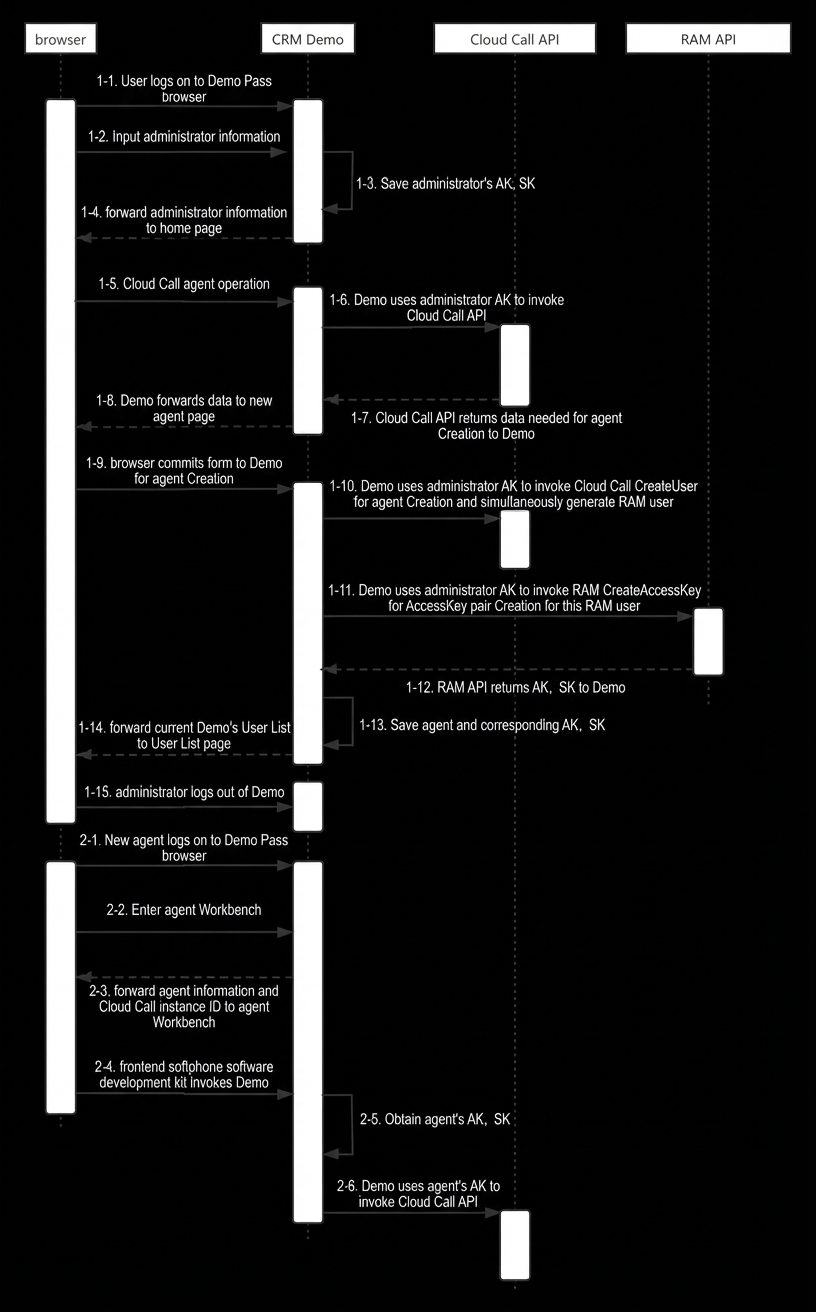
Instructions
After you download the demo, configure and run it by following the instructions in the README file. The following logon page is displayed:
Enter the administrator information when you log on for the first time.
Complete the administrator registration.
Configure the instance ID in the application.properties file of the demo to attach the Cloud Contact Center instance that you want to integrate with the CRM system.
ImportantThe user associated with the entered AccessKey ID and AccessKey secret must be an administrator of the Cloud Contact Center instance that corresponds to the configured instance ID. The user must also have the permissions to manage RAM. For more information, see the following topics:
This authorization requires you to grant the RAM user permissions to manage Resource Access Management (RAM).
After registration, the administrator can create agents, view users, or go to the agent workbench. To move an agent to the workbench, make sure the agent is attached to a skill group.