Routing policies
Transit routers use routing policies to filter and modify routes, giving you granular control over network communication in your CEN instance.
Why use routing policies
Routing policies control how routes are advertised between network instances connected to a transit router:
-
Isolating network segments: Prevent specific virtual private clouds (VPCs) from communicating with each other.
-
Controlling route advertisement scope: Restrict which routes are advertised to specific regions or network instances.
-
Influencing path selection: Modify route attributes such as AS path length, community values, or route priority to steer traffic along preferred paths.
-
Blocking unwanted routes: Reject routes from specific sources or with specific prefixes to enforce network segmentation.
How routing policies work
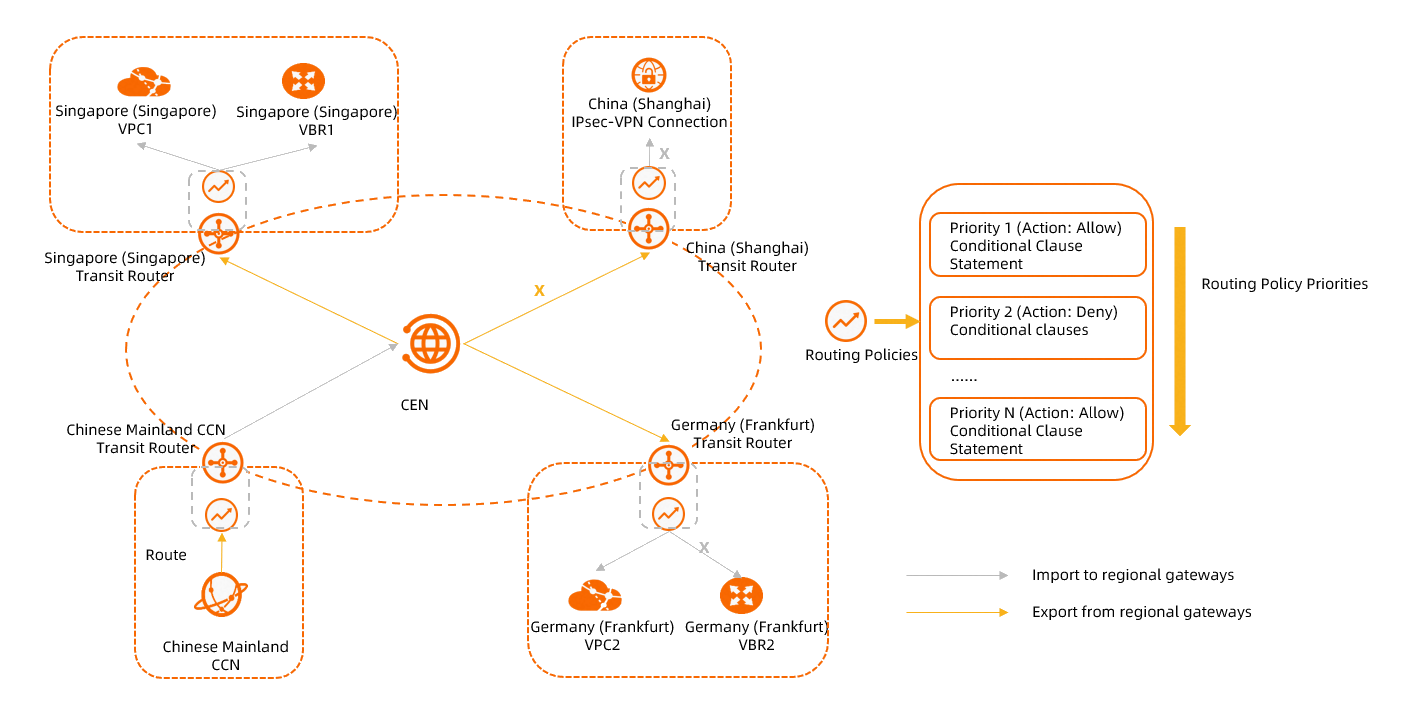
A transit router contains route tables and routing policies. Routing policies filter routes by associating with route tables.
Transit router editions
Transit routers come in two editions, which differ in how routing policies associate with route tables.
| Feature | Basic Edition | Enterprise Edition |
|---|---|---|
| Route tables | One system route table only | One system route table + custom route tables |
| Routing policy association | Automatically associated with the system route table | You choose which route table to associate (system or custom) |
| Scope | Applies to all Basic Edition transit routers in the region | Applies only to the associated Enterprise Edition transit router |
Policy direction
Routing policies apply in one of two directions:
-
Ingress Regional Gateway: Filters routes advertised to the transit router in the current region — from local network instances or remote transit routers.
-
Egress Regional Gateway: Filters routes advertised from the transit router in the current region — to local network instances or remote transit routers.
Priority
Each routing policy has a priority value from 1 to 100, where a smaller number indicates higher priority. You cannot assign the same priority to two routing policies that apply in the same region and direction.
Matching process
Routes are evaluated against routing policies in priority order (lowest number first):
-
The system evaluates the route against the highest-priority routing policy.
-
If the route meets all match conditions, the policy action is applied:
-
Allow: The route is permitted. If an associated policy priority is set, evaluation continues with that policy. Otherwise, evaluation ends.
-
Reject: The route is rejected. Evaluation ends immediately.
-
-
If the route does not meet all match conditions, evaluation moves to the next routing policy in priority order.
-
If the route does not match any routing policy, the route is allowed by default.
You can set policy values and associated policy priorities only when the policy action is set to Allow.

Routing policy components
A routing policy consists of three parts: basic information, match conditions, and policy values.
Basic information
| Parameter | Description |
|---|---|
| Routing Policy Priority | Valid values: 1 to 100. A smaller value indicates a higher priority. Priorities must be unique per region and direction. |
| Description | Description of the routing policy. |
| Region | Region where the policy applies. Basic Edition only. Applies to all Basic Edition transit routers in the region. |
| Associated Route Table | Route table to associate with the policy. Enterprise Edition only. |
| Policy Direction | Direction in which the policy applies: Ingress Regional Gateway or Egress Regional Gateway. Policy direction. |
| Action Policy | Action to perform on routes that meet all match conditions: Allow (permit the route) or Reject (reject the route). |
| Associated Route Policy Priority | Priority of a policy to chain after this one. Available only when Action Policy is Allow. The chained policy must be in the same region and direction with a lower priority (higher number). |
Match conditions
A route must meet all specified conditions to trigger the policy action.
| Condition | Description | Direction restrictions |
|---|---|---|
| Source Region | Matches routes advertised from a specified region. | None |
| Destination Region | Matches routes advertised to a specified region. | Effective only when Policy Direction is Egress Regional Gateway and the destination region is not the current region. |
| Source Instance ID List | Matches routes from specified network instances (VPC, ECR, IPsec-VPN, VBR, CCN, or SAG). Select Exclude Specified IDs to invert the match. | None |
| Destination Instance ID List | Matches routes to specified network instances. Same types as Source Instance ID List. Supports Exclude Specified IDs. | Effective only when Policy Direction is Egress Regional Gateway and destination instances are in the current region. |
| Destination Route Table | Matches routes advertised to specified route tables. | Effective only when Policy Direction is Egress Regional Gateway and the route tables belong to network instances in the current region. |
| Source Instance Type | Matches routes from specified instance types: VPC, ECR, VPN, VBR, or CCN. Source Instance Type details. | None |
| Destination Instance Type | Matches routes to specified instance types: VPC, ECR, VPN, VBR, or CCN. Destination Instance Type details. | Effective only when Policy Direction is Egress Regional Gateway and the instance types are supported in the current region. |
| IP Type | Matches routes by IP version: IPv4 or IPv6. If not specified, both are matched. | None |
| Route Type | Matches routes by type: System (auto-created), Custom (user-added from VPC or VBR route tables), or BGP (advertised over BGP). Custom does not match static routes in Enterprise Edition transit router route tables. | None |
| Route Prefix | Matches routes by prefix. Fuzzy Match: the route prefix falls within a specified prefix (for example, 10.10.0.0/16 matches 10.10.10.0/24). Exact Match: the route prefix is identical to a specified prefix. | None |
| AS Path | Matches routes by AS path. Fuzzy Match: the AS path overlaps with the specified value (for example, 65001, 65002 matches 65501, 65001 because both contain 65001). Exact Match: the AS path is identical to the specified value. AS path is a mandatory BGP attribute recording the AS numbers a route traverses. |
None |
| Community | Matches routes by BGP community. Fuzzy Match: the community overlaps with the specified value. Exact Match: the community is identical to the specified value. Community is an optional transitive BGP attribute. | None |
Source Instance Type details
When Source Instance Type is set to VPN:
-
If an IPsec connection or SSL server is associated with a VPN gateway, VPN indicates the VPN gateway. Takes effect only when the VPC associated with the VPN gateway is attached to a transit router and BGP is enabled on the VPN gateway.
-
If the IPsec connection is directly connected to a transit router, VPN indicates an IPsec connection.
Destination Instance Type details
When Destination Instance Type is set to VPN:
-
If the IPsec connection or SSL server connects through a VPN gateway, this parameter does not take effect. It takes effect only when the IPsec connection is directly connected to the transit router.
Policy values
Policy values modify attributes of allowed routes. Available only when Action Policy is Allow.
| Parameter | Description |
|---|---|
| Route Priority | Sets the priority of allowed routes. Valid values: 1 to 100. Default value: 50. A smaller value indicates a higher priority. |
| Community | Modifies community values of matched routes. Add: appends the specified value. Replace: overwrites existing values. |
| Appended AS Path | Appends AS numbers to the AS path. For Ingress Regional Gateway policies, specify source instance IDs and a source region (same as the policy region) in the match conditions. For Egress Regional Gateway policies, specify destination instance IDs in the match conditions. |
Default routing policy
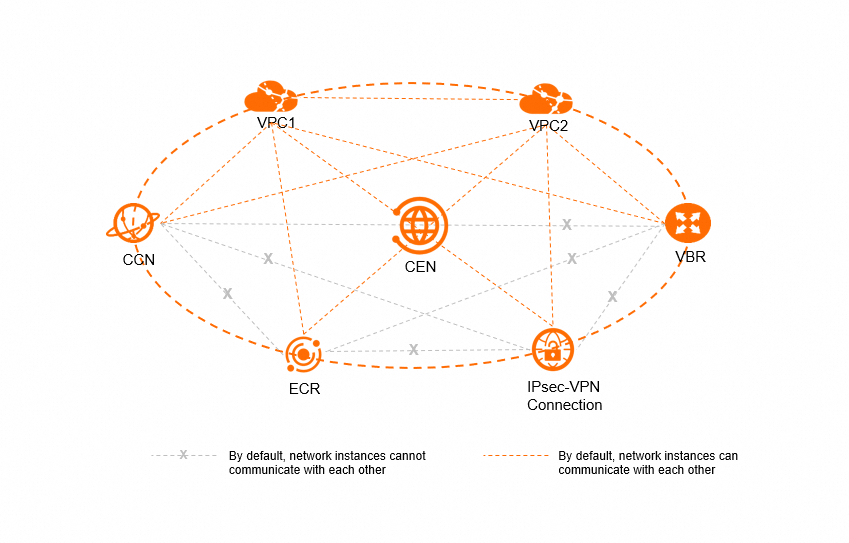
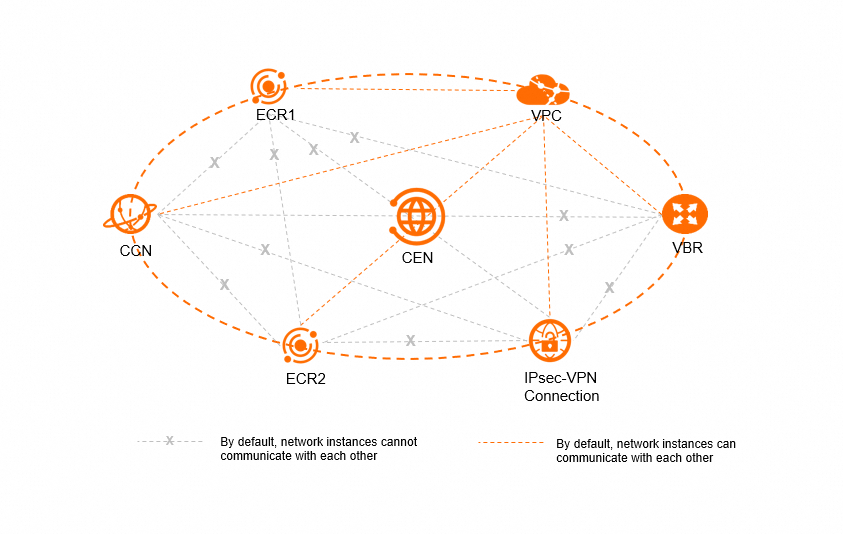
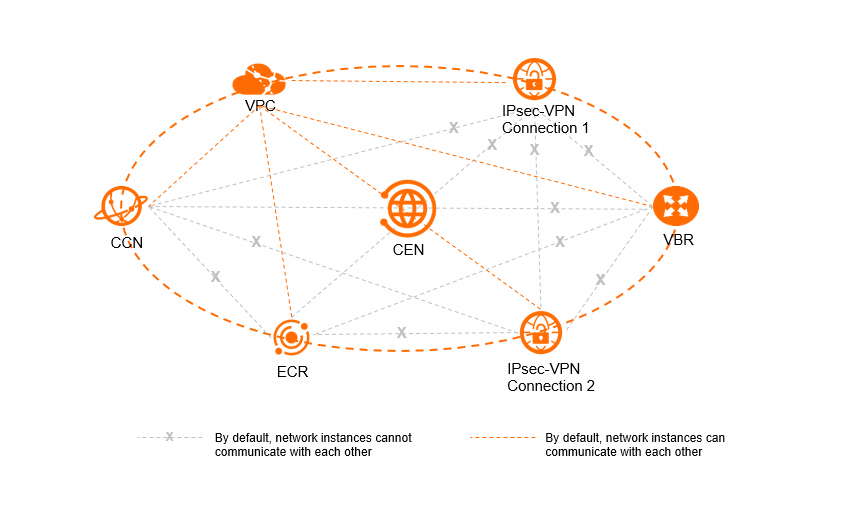
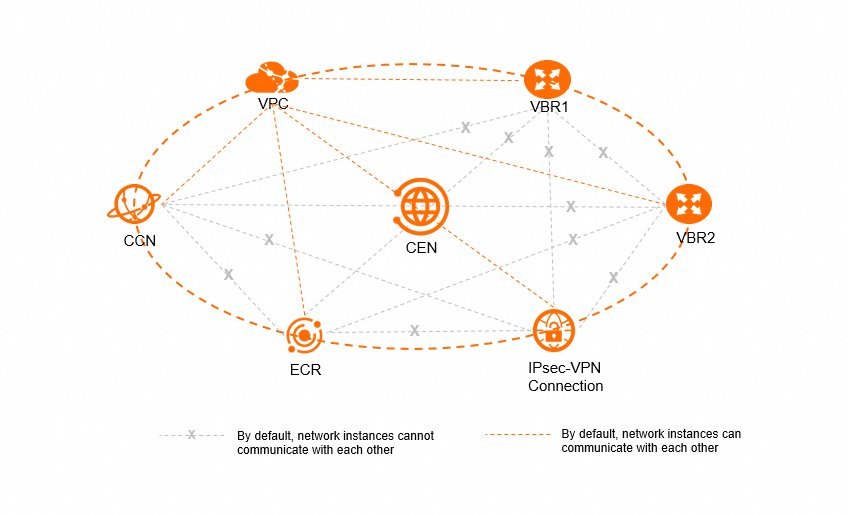
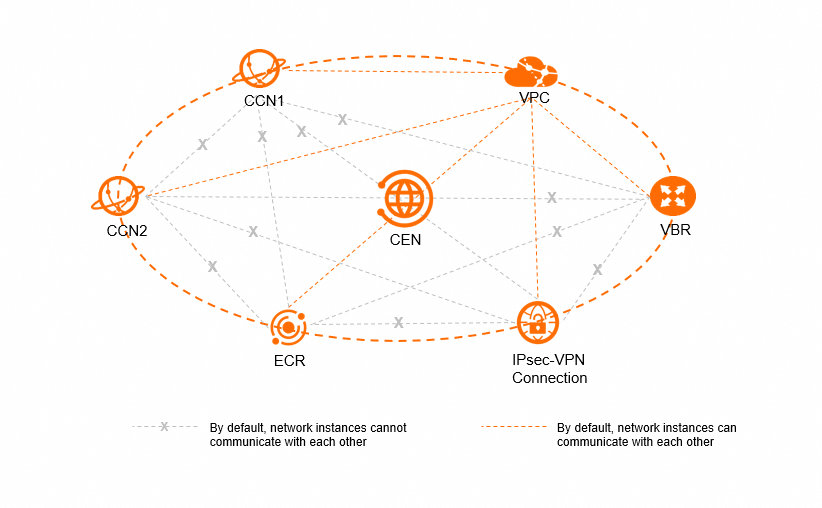
Each transit router includes a default routing policy: Egress Regional Gateway direction, priority 5000, action Reject. This policy blocks direct communication between non-VPC network instances on the same transit router.
Default communication behavior:
| Instance type | Can communicate with VPCs | Can communicate with ECRs, VBRs, CCN instances, and IPsec connections |
|---|---|---|
| VPC | Yes | Yes |
| ECR | Yes | No (blocked by default policy) |
| IPsec connection | Yes | No (blocked by default policy) |
| VBR | Yes | No (blocked by default policy) |
| CCN instance | Yes | No (blocked by default policy) |
VPCs communicate freely with all instance types by default. ECRs, VBRs, CCN instances, and IPsec connections cannot communicate with each other unless you create an Allow routing policy.
Quotas
| Item | Default value | Adjustable |
|---|---|---|
| Maximum number of routing policies in the Ingress Regional Gateway direction per transit router | 100 | No |
| Maximum number of routing policies in the Egress Regional Gateway direction per transit router | 100 | No |
Related topics
Common routing policy scenarios: