Generate and run CLI commands with OpenAPI Explorer
Use OpenAPI Explorer to generate ready-to-use Alibaba Cloud CLI commands for any API operation, then run them in Cloud Shell or your local terminal.
Before you begin
-
To run commands locally, install and configure Alibaba Cloud CLI. For more information, see the Installation guide and Configure and manage credentials.
-
Some API operations may incur charges. Activate required services and review their billing rules before running commands.
Generate a CLI command
To generate a CLI command in OpenAPI Explorer:
-
Navigate to the OpenAPI Explorer console.
-
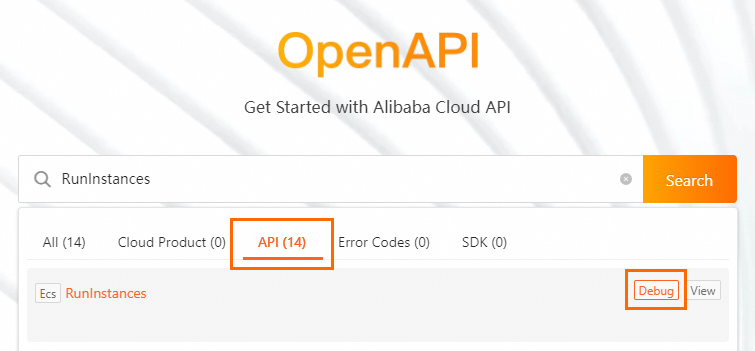
Search for a service or API operation. For example, search
ecsorRunInstancesto find ECS instance operations.ImportantAPI operations with the same name may exist in different Alibaba Cloud services. Make sure that you select the API operation of the correct service to avoid losses caused by misoperations.
-
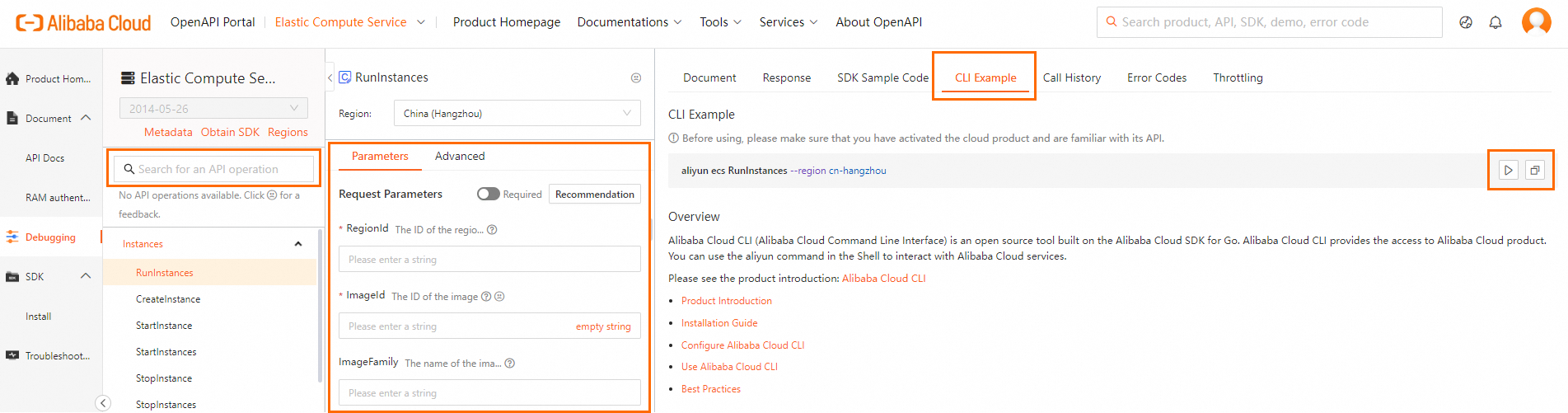
Select an API operation to open its debugging page.
-
Fill in parameters on the Parameters tab. The CLI Example tab updates automatically as you type.
-
Use the generated command:
-
Click Run in Cloud Shell to execute the command in your browser.
-
Click Copy to copy the command to your local terminal. For more information, see Understand command parameters.
OpenAPI Explorer adds the
--regionoption to generated CLI command examples by default. When you copy a command to run it locally, Alibaba Cloud CLI ignores the region information in your default credential configuration and environment variables and uses the specified region to call the command. You can remove or keep this option as needed.
-
Example: Create an ECS instance
This example creates a pay-as-you-go ECS instance using a generated CLI command.
-
Generate the command: In OpenAPI Explorer, find the
ecsservice and theCreateInstanceoperation. Set parameters such asInstanceName,RegionId,InstanceType, andSecurityGroupId. -
Run the command: Copy the command from the CLI Example tab and run it in your terminal.
aliyun ecs CreateInstance \ --RegionId 'cn-hangzhou' \ --InstanceName 'my-first-vm' \ --ImageId 'centos_8_5_x64_20G_alibase_20211228.vhd' \ --InstanceType 'ecs.g6.large' \ --SecurityGroupId 'sg-bp1abcdef12345****' \ --VSwitchId 'vsw-bp1ghijkl67890****' \ --InternetChargeType 'PayByTraffic' \ --Password 'YourPassword123!' -
Review the output: A successful response returns a JSON object with the new instance ID.
{ "InstanceId": "i-bp1abcdefg6789****", "OrderId": "1234567890", "RequestId": "473469C7-AA6F-4DC5-B3DB-A3DC0DE3****", "TradePrice": 0.165 } -
Verify the instance: Check the ECS console or run
aliyun ecs DescribeInstances.