View operation logs
Updated at:
Operation logs record the operations within your Alibaba Cloud account. You can query the operation logs and audit whether abnormal operations exist.
Background information
The logging feature of CloudBox works based on Alibaba Cloud ActionTrail. This feature helps monitor and record the operations within your Alibaba Cloud account for security analysis, behavior tracing on resource change, and behavior compliance audit. The event query mode is supported. You can query the events within 90 days in the region in which your cloud box is deployed.
Procedure
- Go to the Cloud Boxes tab.
Log on to the ECS console.
In the left-side navigation pane, choose .
In the top navigation bar, select a region.
Click the Cloud Boxes tab.
- Find the cloud box whose operation logs you want to view and click the ID of the cloud box.
- Click the Operation Audit tab.
- Set the query condition and click the
 icon.
You can set the following query conditions:
icon.
You can set the following query conditions:- Resource object: You can select an Elastic Compute Service (ECS) instance or a vSwitch.
- Time period: You can select the recent 1 hour, 3 hours, 12 hours, 7 days, 30 days, and 88 days. You can also customize the time period.
- Click Switch to Event Query and view the information about events.
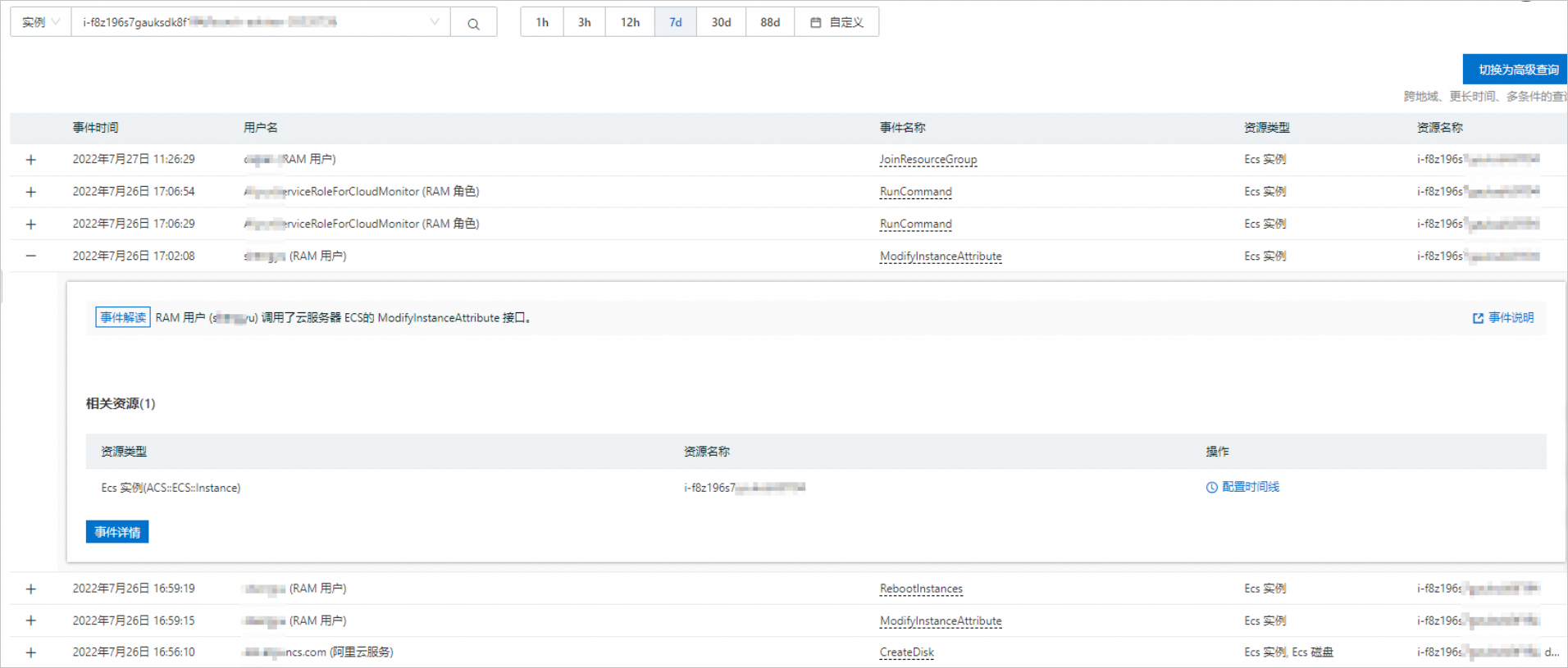
- By default, the event time, username, event name, resource type, and resource name are displayed for each event. The username indicates the operator of the event. The resource name indicates the object on which an operation is performed.
- You can click an event to view more information about the event. If you want to view the event log, click Event Detail. Note For more information about the fields in event logs, see Management event structure.
Is this page helpful?