Global network solutions
Alibaba Cloud's global network solution provides high-speed, low-latency connectivity for your cloud resources across regions and zones. This solution supports multi-branch interconnection, hybrid cloud deployments, and global business operations. It delivers stable, secure, and intelligently scheduled network services to help you expand your business worldwide.
1 Industry trends
Enterprise globalization
The main drivers of enterprise globalization include expanding market coverage, optimizing resource allocation, and enhancing competitive advantages. Globalization allows enterprises to overcome geographical limitations and promote their products and services worldwide. It also helps them reduce costs and improve efficiency using the cost advantages of different regions, such as labor and raw materials. In addition, globalization gives enterprises access to a wider range of talent and technology, which drives innovation and strengthens brand influence. To handle increasing market competition, enterprises must adopt a global strategy to achieve economies of scale and address challenges from international competitors.
Cloud computing globalization
Cloud computing provides a solid foundation for enterprise globalization in the following ways:
"Cloud-first" is the new standard: In the past, enterprises that expanded overseas had to first set up local offices or data centers. Now, enterprises are increasingly choosing the public cloud as their primary infrastructure when entering new markets. Using the Infrastructure as a Service (IaaS) and Platform as a Service (PaaS) capabilities of cloud computing, enterprises can quickly deploy applications and serve local customers. This greatly reduces initial investment and time costs.
Lowering the barrier to globalization: Cloud computing lowers technical, operational, and compliance barriers. This allows small and medium-sized enterprises to achieve global business coverage at a low cost.
Improving business agility: The elastic scaling and automated deployment capabilities of the cloud allow enterprises to quickly test new markets, iterate on products, and respond to fluctuations in demand.
Cloud network globalization
From isolated points to a unified global network: In the past, enterprises typically built separate, isolated local networks for their branches in different countries. Using the global network provided by cloud vendors, enterprises can now build a unified virtual network that covers offices, data centers, cloud regions, and edge nodes worldwide.
Providing a near-local experience for cross-border applications: With smart routing, edge nodes, and low-latency accelerated connections, business systems can be deployed in nearby regions or unified globally. The network is no longer a performance bottleneck for global business operations.
Hybrid cloud networking capabilities: A hybrid cloud integrates private and public cloud resources to meet compliance requirements and support sudden business demands. Enterprises can choose a hybrid cloud to balance flexibility, cost optimization, and technological innovation.
2 Scenarios
Online education, interactive entertainment, gaming, and internet companies
Typical scenario: Global cross-border network interconnection
Challenges and requirements: High reliability, high quality, and cross-border compliance
Traditional enterprises, such as manufacturing, retail, financial institutions, and multinational corporations
Typical scenarios: Cloud migration, global networking, and branch interconnection
Challenges and requirements: High reliability, high quality, security, and elastic deployment
Global financial services and enterprise Software as a Service (SaaS) acceleration
Typical scenario: Global SaaS acceleration and data synchronization
Challenges and requirements: Low latency, stability, high quality, security, and elastic deployment
AI and Internet of Vehicles (IoV)
Typical scenario: Cross-region data synchronization
Challenges and requirements: Ultra-high bandwidth, Quality of Service (QoS), and low cost
General enterprise requirements
Typical scenario: Migrating on-premises data centers or branches to the cloud
Challenges and requirements: Stability
3 Solution overview
What is a global network?
A global network is a service or technology that connects network infrastructures in different regions or countries through high-speed, secure, and reliable network connections. In cloud computing, a global network allows enterprises and users to access the data center resources of a cloud service provider from anywhere in the world. This enables the efficient transmission of data and applications.
A global network includes not only point-to-point connections but also various ways to connect public and private networks. It provides the necessary network foundation for global business operations.
Reduced latency: A global network provides high-speed, optimized network connections worldwide, which significantly reduces data transmission latency. This is critical for applications that require real-time or near-real-time interaction, such as online games, financial trading, and video conferencing.
Improved reliability and fault tolerance: By connecting multiple data centers globally, you can deploy data and applications with redundancy. If a service in one region is interrupted, other regions can provide backup services to ensure business continuity.
Data compliance and sovereignty: A global network allows enterprises to store data in specific geographic locations according to local regulations. This helps meet data sovereignty requirements and ensures that users can access data from the nearest node, improving the user experience while maintaining compliance.
Global business expansion: As enterprises expand globally, a global network provides the necessary network infrastructure. It allows enterprises to seamlessly connect and manage their multinational branches, employees, and customers. This promotes business growth and international collaboration.
Hybrid cloud architecture: You can connect your on-premises data centers, branches, and other network nodes to Alibaba Cloud using technologies such as Express Connect, VPN, or SD-WAN. This helps you build a unified network that spans both on-premises and cloud environments.
Solution overview
This solution helps enterprises migrate to the cloud and build a simple, flexible, secure, and manageable global network. It ensures stable, secure, and high-quality private network interconnection for core business operations worldwide.
Hybrid cloud networking: For scenarios that involve enterprise data centers, branches, mobile offices, and multicloud applications, this solution provides various hybrid cloud connection methods. These methods include Express Connect circuits, VPNs, and third-party SD-WANs to quickly build a network that connects your on-premises and cloud environments.
Intra-region communication: A transit router (TR) provides powerful routing capabilities that greatly simplify communication between multiple virtual private clouds (VPCs), between on-premises data centers and VPCs, and between other resources within the same region.
Inter-region communication: Cloud Enterprise Network (CEN) connects your on-premises data centers, branches, and Alibaba Cloud VPCs in different regions. This lets you quickly build a stable, reliable, and highly elastic private global network.
Core advantages
Flexible and elastic: Provides flexible and elastic network capabilities that can be deployed in minutes.
Simple and reliable: It uses redundant global lines and provides automatic optimization for the global network.
All-scenario access: It meets various network access requirements for on-premises data centers, local offices, and branch offices.
Solution architecture
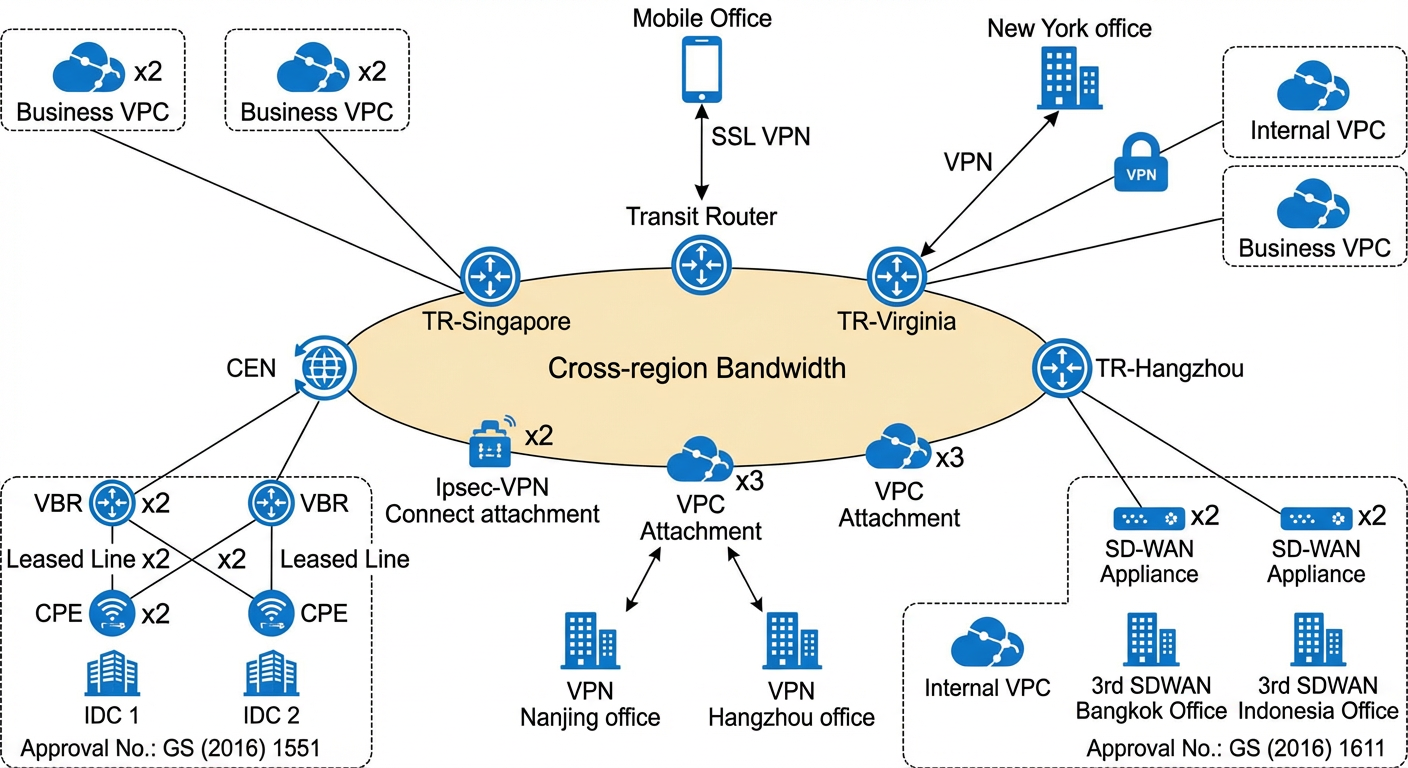
Solution 1: Build a hybrid or multicloud network with Express Connect
Overview: In scenarios that require collaboration between on-premises and cloud environments or between multiple clouds, you can use Express Connect circuits and Alibaba Cloud networking services. This helps you quickly build a secure, stable, and elastic hybrid or multicloud network to support your cloud migration.
Architecture diagram:
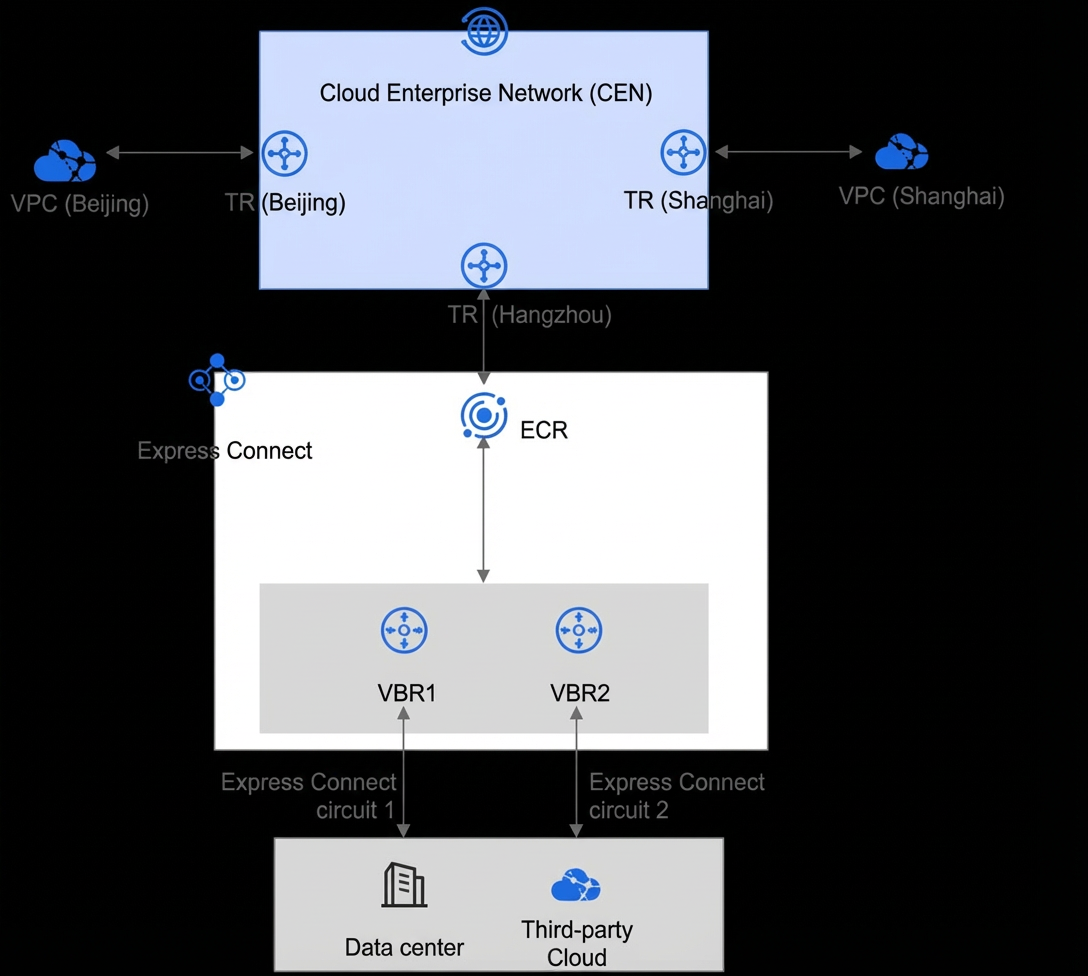
Solution Overview
1. To connect through a dedicated Express Connect circuit, select a leased line access point, contact a provider, and connect to Alibaba Cloud. For more information, see Dedicated Express Connect Circuit Connection Flow.
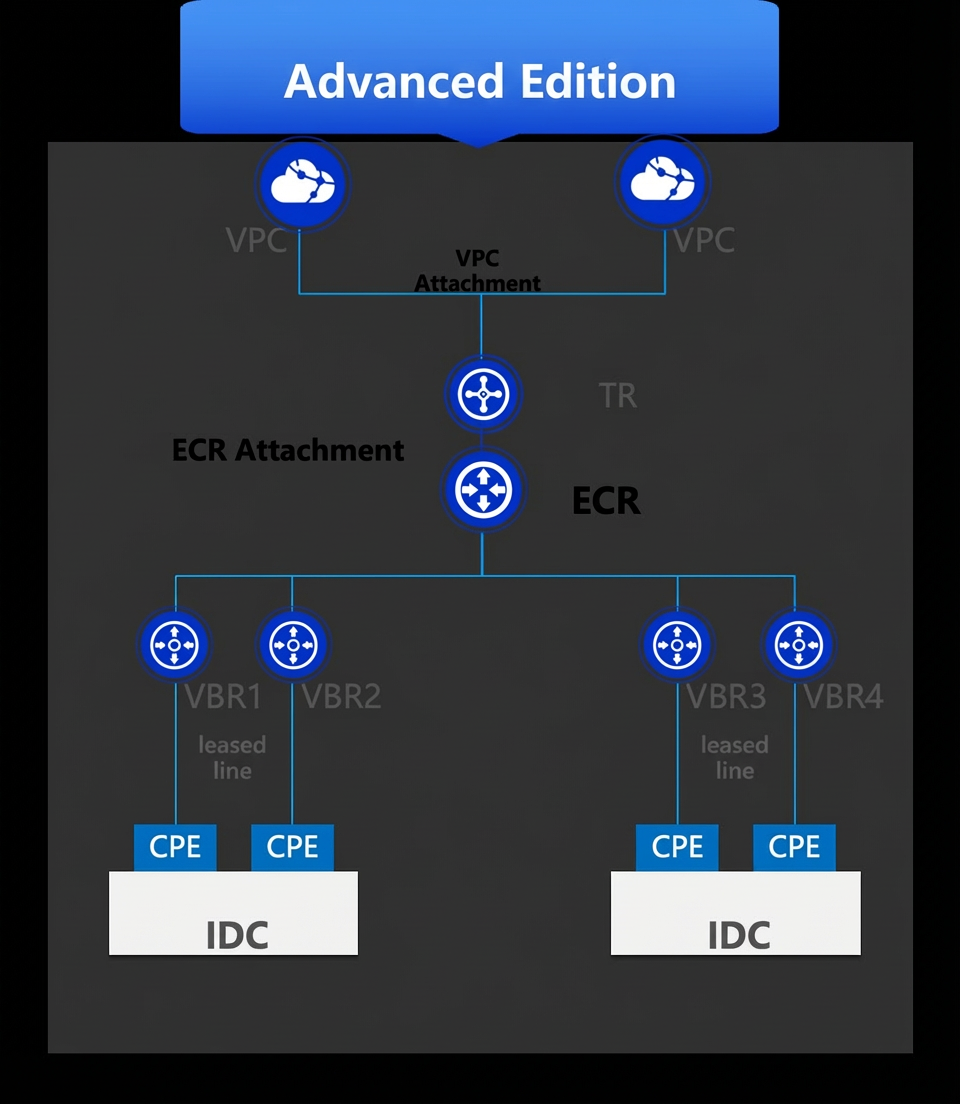
2. After the Express Connect circuit is ready, create a virtual border router (VBR) and add it to an Express Connect Router (ECR).
3. Connect the ECR, which acts as the bearer gateway for the circuit, to a transit router (TR) in the region.
4. Connect the TR to the VPC in the same region and configure the required routing rules.
5. To access resources in other regions, connect the TRs from different regions.
Design considerations:
Express Connect circuits are not elastic and require advance planning. The bandwidth should be planned to meet business growth needs for at least the next three months to avoid performance bottlenecks and business losses. Scaling out an Express Connect circuit is a time-consuming process.
You can use Express Connect QoS or VBR rate-limiting for resource allocation.
Connect to multiple access points:
Connect your on-premises data center to at least two different Alibaba Cloud access points using at least two independent Express Connect circuits. This configuration provides physical link redundancy and load balancing. If possible, choose different carriers when you use multiple access points.
Use multiple Express Connect circuits:
In addition to using multiple access points, you can add more Express Connect circuits at each access point. If possible, choose different carriers for the circuits and use different access routes and campus lines.
Use equal-cost multi-path (ECMP) routing for multiple Express Connect circuits:
Compared to the active/standby routing mode, ECMP routing offers faster fault convergence, stronger horizontal scalability, and higher resource utilization for bursty traffic. If your business does not have source-in/source-out restrictions, we recommend that you use ECMP routing for multiple Express Connect circuits.
Use a VPN as a backup for Express Connect:
In an Enterprise Edition TR scenario, a VPN can back up an Express Connect circuit. You can use a VPN Gateway to provide redundant backup for the circuit. This ensures that the hybrid cloud connection remains available even if all Express Connect circuits fail.
Use Border Gateway Protocol (BGP) and Bidirectional Forwarding Detection (BFD) as the protocols for Express Connect.
Use an ECR and a TR for the Express Connect uplink, instead of only a VBR.
Configure monitoring and alerting. You can use disaster recovery drills to test the fault detection and recovery capabilities of your Express Connect circuits.
Solution 2: Build a branch-to-cloud network with IPsec-VPN
Overview: VPN Gateway is a key product for enterprises that want to build branch-to-cloud networks using IPsec-VPN. It establishes encrypted tunnels to create secure and reliable private connections between on-premises data centers or branches and Alibaba Cloud VPCs. IPsec-VPN is a routing-based network connection technology that provides flexible traffic routing. This technology simplifies the configuration and maintenance of VPN policies and is suitable for establishing network connections between data centers, branches, clients, and VPCs.
Architecture diagram:
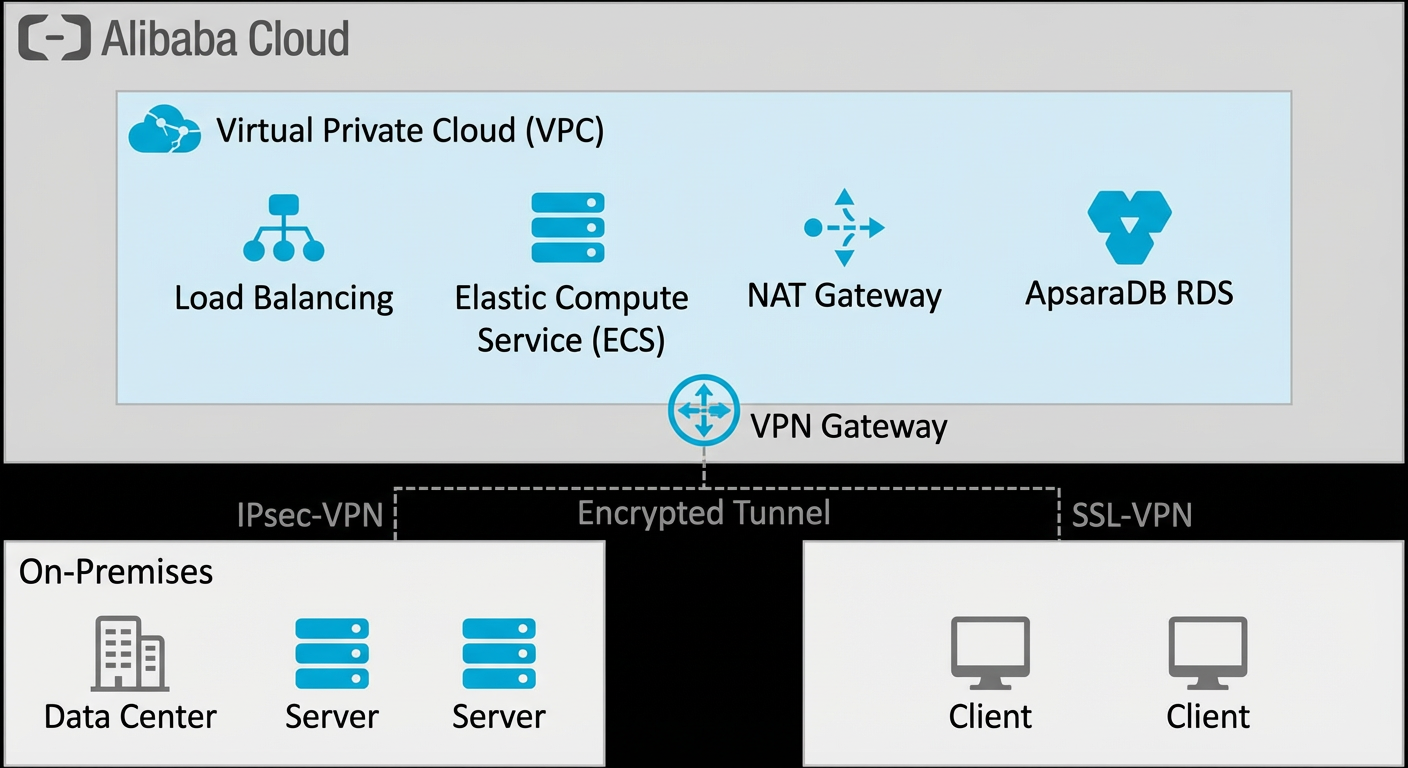
Solution overview
1. Create a VPN Gateway and specify the required configurations.
2. Configure the local VPN device to establish an IPsec connection to the cloud VPN.
For more information, see Attach a VPN Gateway.
Design considerations:
Device-level high availability: The underlying architecture of IPsec-VPN uses an active-active mode. In the event of a failure, it switches over in seconds to ensure that sessions are not interrupted and business is not affected.
Link-level high availability: All VPN gateways now support dual-tunnel mode by default, which allows for failover in seconds if a link fails. An IPsec-VPN connection that is attached to a TR can use multiple connections to provide ECMP high availability links.
User-level high availability: You can use multiple on-premises gateway devices to provide high availability. In the event of a failure, this ensures high availability on the user side.
Use an IPsec-VPN connection and an Express Connect circuit to create active/standby links to the cloud (attach a VPN Gateway): In addition to the inherent stability and high availability of the IPsec-VPN product, you can combine an IPsec-VPN connection with an Express Connect circuit to create a more stable architecture. For routing configuration, you can use static routing or the BGP dynamic routing protocol to connect the gateway device in your on-premises data center to the VPN Gateway. However, you must use the BGP dynamic routing protocol to connect the gateway device to the VBR.
Compliance: Alibaba Cloud VPN Gateway provides services in compliance with relevant Chinese policies and regulations. It supports only non-cross-border connections. For cross-border scenarios, you can use it with CEN cross-border Express Connect circuits.
High bandwidth: A single IPsec-VPN connection supports a maximum bandwidth of 1,000 Mbps. You can use the VPN connection solution with a transit router.
High packets per second (pps): In high pps scenarios, a single IPsec-VPN connection can transmit up to 120,000 pps with a packet size of 256 bytes.
Solution 3: Build a cross-region cloud network with CEN
Overview: When you need to enable communication between VPCs, VBRs, and cloud services in different regions (for scenarios such as cross-region business data synchronization, collaborative communication, active geo-redundancy, and disaster recovery), you can connect them using a TR and configuring inter-region communication bandwidth. This helps you build an interconnected network across multiple regions on the cloud.
Architecture diagram:
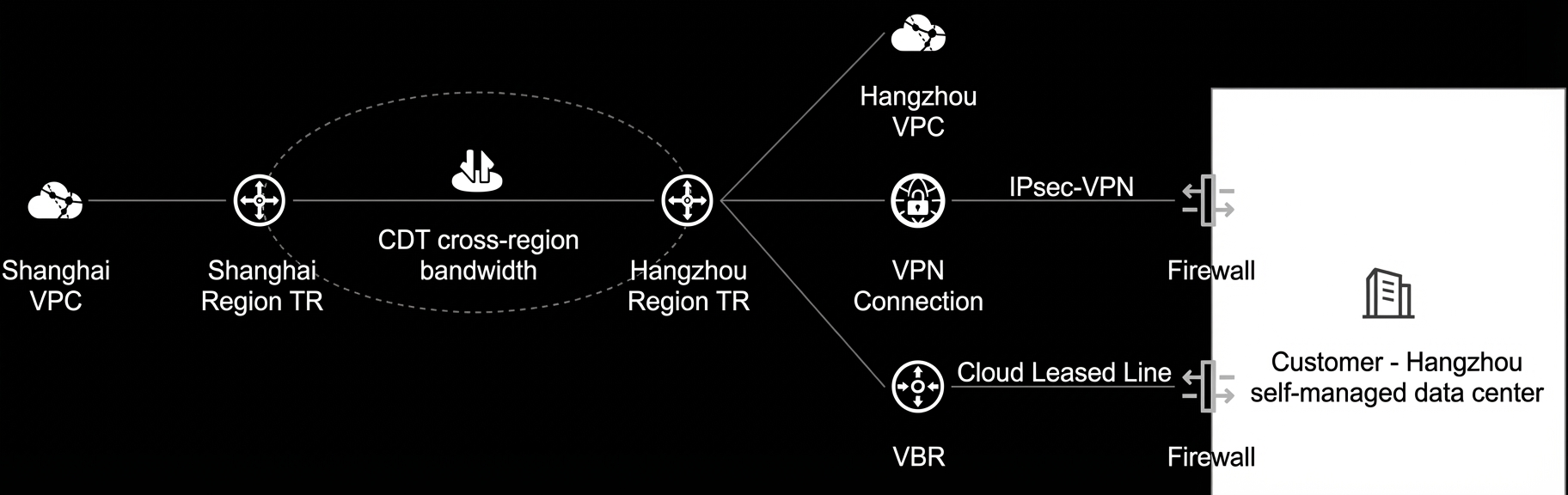
Solution overview
Connect the Express Connect circuit to the cloud network as described in Solution 1.
For more information, see the following documents:
Use the VPN connection feature of the TR to connect the TR to the on-premises IPsec device. For more information, see the section about attaching a transit router in the following document:
(For the differences between attaching an IPsec-VPN connection to a VPN gateway versus a TR, see the Product portfolio section.)
Configure inter-region connections between the local TR and TRs in other regions, and set the cross-region bandwidth. For more information, see the following document:
Design considerations:
After you connect VPC instances, VBR instances, and VPN instances to a transit router, you must create an inter-region connection and allocate bandwidth to it. This enables cross-region communication between your cloud and on-premises networks in different regions.
On-premises data center to cloud connection: Enterprises can use Express Connect and IPsec-VPN to connect their data centers to Alibaba Cloud in the China (Hangzhou) region. For redundancy, we recommend that you use dual Express Connect circuits or a combination of an Express Connect circuit and a VPN. You can configure these as active/standby or load-balanced links to improve the overall reliability of the hybrid cloud connection.
Cross-region on the cloud: You can use a TR to build a cross-region connection between Alibaba Cloud in the China (Shanghai) and China (Hangzhou) regions. You can enable the pay-by-data-transfer billing method for cross-domain bandwidth on Cloud Data Transfer (CDT) to connect the Shanghai VPC, Hangzhou VPC, and Hangzhou data center.
Bandwidth allocation for multiple services: Traffic rerouting lets you add tags to different types of cross-region traffic. You can then use these tags to set bandwidth limits for each traffic type. This ensures that each business has sufficient cross-region bandwidth and improves the overall efficiency of the network.
If your enterprise needs to connect three or more regions, you can extend this architecture by adding more inter-region connections between TRs.
Solution 4: Build a branch-to-cloud network with a third-party SD-WAN
Overview: You can use a third-party SD-WAN product with a TR to build a network that connects multiple on-premises branches to the cloud.
Architecture diagram:
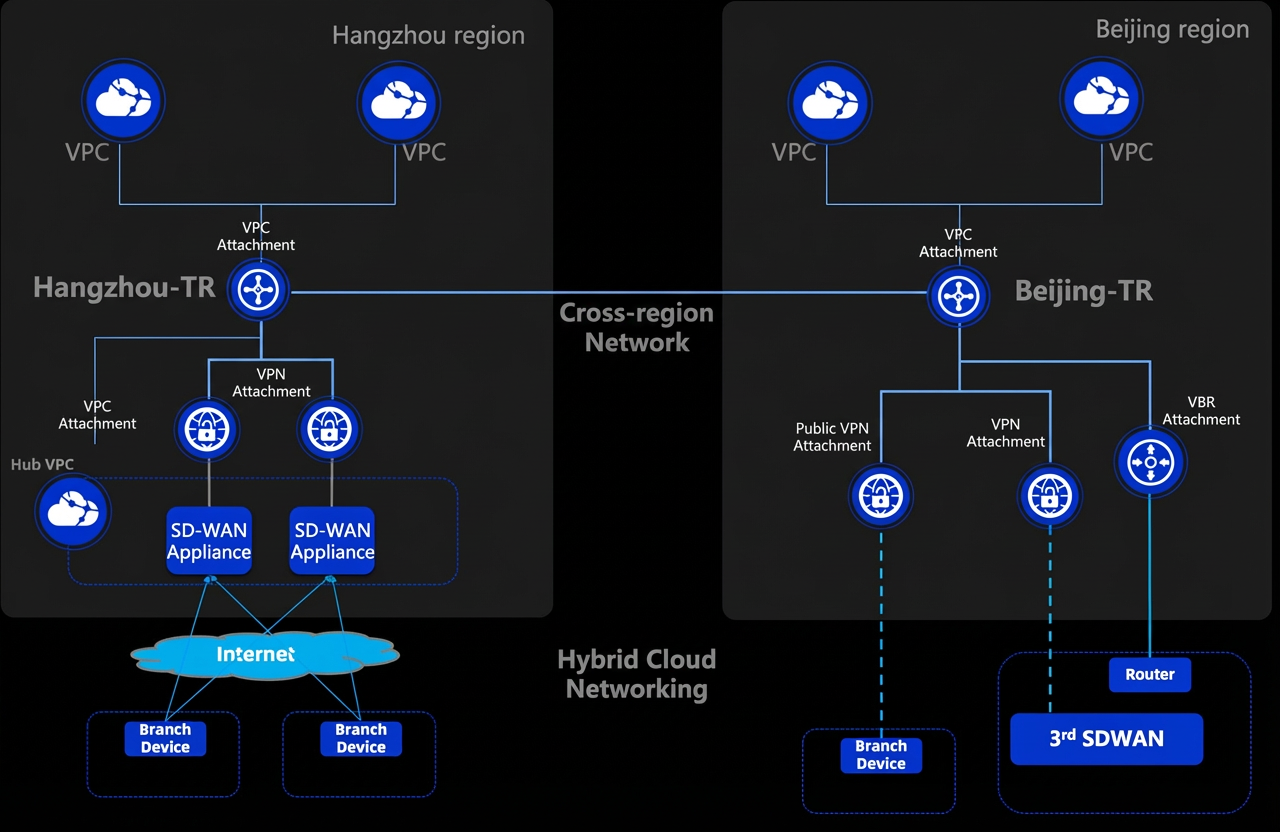
Solution Overview:
For more information about the deployment steps, see
Design considerations:
Connection method: You can install a third-party SD-WAN image in a hub VPC and connect it to the hardware devices in your offices or data centers using IPsec. Then, you can connect to the TR on the cloud through a VPN connection. You can use BGP for automated network setup.
Reliability design: You can deploy two images for high availability and use active/standby dual connections for all branches.
Wide area network (WAN) interconnection: You can use the multi-region interconnection capability of TRs to connect regions worldwide. This helps you build a single global network that spans cloud, on-premises, and cross-region scenarios.
Management and O&M: You can manage your on-premises, cloud, and global multi-region networks from a single location.
Billing options: You can choose a billing method, such as pay-by-bandwidth or pay-by-data-transfer, based on your traffic model.
4 Product portfolio
Choosing a hybrid cloud connection product
Solution category | Solution | Features | ||||
Quality | Cost | Extensibility | Epoch | Bandwidth | ||
Active/standby links | Express Connect + Express Connect | High | High | Poor | Month | High bandwidth |
Express Connect + VPN | Medium | Medium | Good | Month | Typically less than 1 Gbps | |
Third-party SD-WAN | Center | Center | Good | Week | Typically less than 1 Gbps | |
VPN | Low | Medium | Medium | Week | Typically less than 1 Gbps | |
Choosing a VPN connection product
IPsec-VPN supports two connection modes. The following table provides a comparison of the two modes.
Dimension | VPN gateway attached to a VPC | IPsec tunnel attached to a TR |
Scenarios | IPsec-VPN for connecting branch networks SSL VPN for connecting client devices | IPsec-VPN for connecting branch networks |
Billing method | Subscription (instance fee and bandwidth fee). This billing method is suitable for stable usage. | Pay-as-you-go (connection fee and traffic fee). This billing method is suitable for unpredictable or fluctuating usage. |
Encryption algorithm | Standard international commercial cryptography algorithms Chinese commercial cryptography algorithms (SM series) | Standard international commercial cryptography algorithms |
IPsec-VPN connection tunnel mode and HA | Single-tunnel mode Dual-tunnel active/standby mode | Single tunnel Bundling tunnels to create an ECMP |
IPsec-VPN connection tunnel bandwidth | Up to 1,000 Mbps for a single tunnel | Up to 1,000 Mbps for a single tunnel. Tunnels can be bundled to form an ECMP link to scale out bandwidth. |
IPsec Connection transmission rate | 120,000 pps (with a 256-byte packet size) | 120,000 pps (with a 256-byte packet size) |
SSL VPN is currently only supported by VPN Gateway.
Choosing an Express Connect uplink product
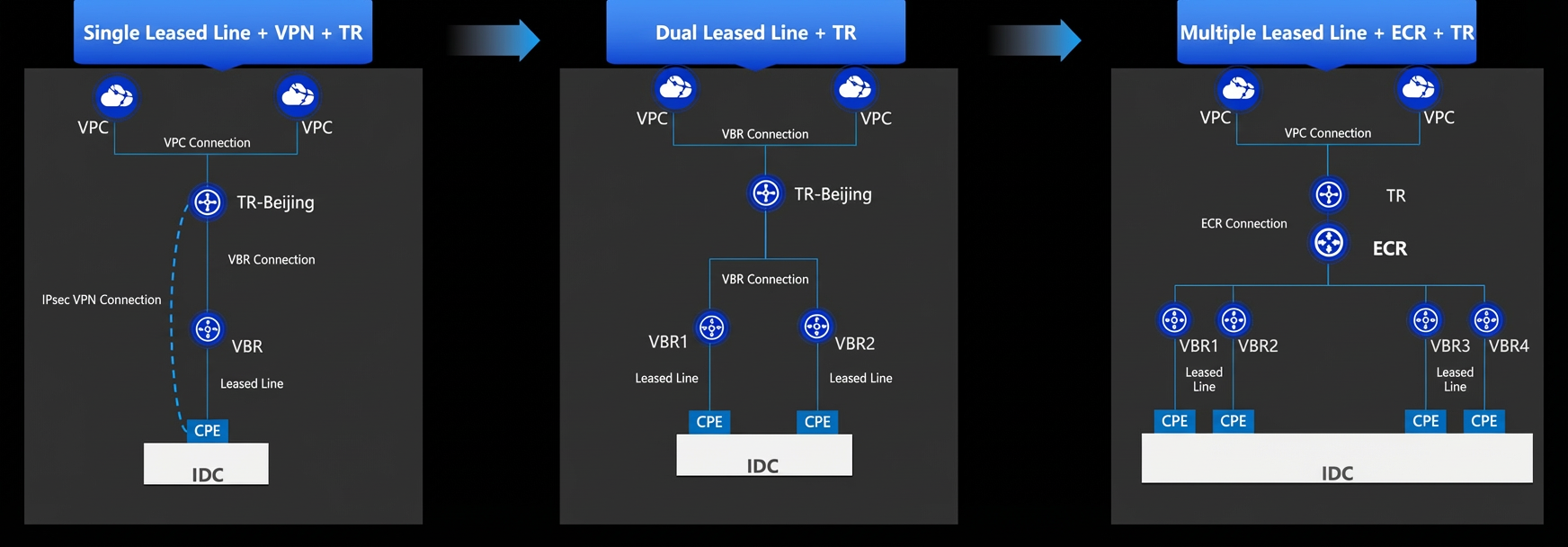
Single Express Connect + VPN + TR solution: To balance cost and stability, you can use an Express Connect circuit and a VPN in an active/standby setup. The VPN uses an IPsec connection that is attached directly to the TR. It is billed on a pay-as-you-go basis and serves as a backup link.
Dual Express Connect + TR solution: You can use two Express Connect circuits with different access points for maximum reliability. You can configure the two circuits for redundancy, active/standby, or mutual active/standby based on CIDR block granularity.
Multiple Express Connect + ECR + TR solution: This solution is based on the multiple Express Connect circuit solution. You can connect VBRs from different regions to the ECR in their respective regions. The ECR centrally manages routing to provide low-latency, nearest-point access for Express Connect circuits to the cloud.
Choosing a product for intra-region or inter-region communication
Unless you have specific requirements, we recommend that you use the Enterprise Edition TR for inter-region communication.
5 Scenarios
When to use the global network solution
Your branches, on-premises data centers, or other clouds need to connect to Alibaba Cloud.
Your VPCs in the same region need to communicate with each other.
Your VPCs in different regions need to communicate, or you have cross-region resource interaction scenarios.
Scenario 1: Global hybrid cloud network for large enterprises
Scenario: A large enterprise with branch offices and data centers in multiple regions wants to use the cloud to connect all branches, data centers, and cloud resources.
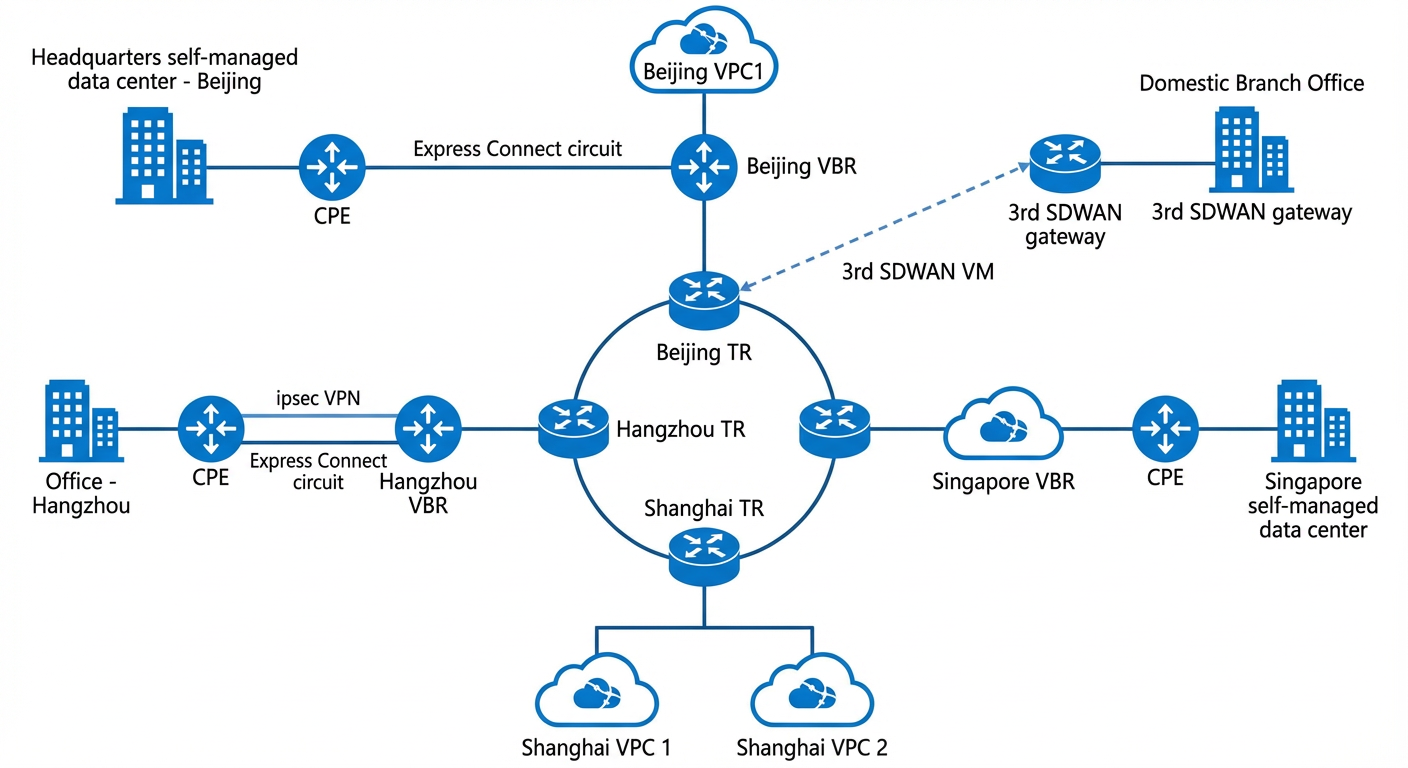
Products involved: Express Connect (for data center access), VPN or third-party SD-WAN (for branch access), TR (for on-premises to cloud and cross-region communication)
Solution:
Multiple connection methods: You can use various hybrid cloud connection methods, such as Express Connect circuits, VPN Gateway, or third-party SD-WAN, to quickly build a network that connects your on-premises and cloud environments.
Flexible combinations: You can use flexible combinations, such as dual Express Connect circuits, Express Connect + VPN, or Express Connect + third-party SD-WAN, to quickly build a stable network that connects your on-premises and cloud environments.
Inter-region communication: You can use CEN to connect your on-premises data centers, branches, and Alibaba Cloud VPCs in different regions. This lets you quickly build a stable, reliable, and highly elastic private global network.
Scenario 2: Multi-cloud connection
Scenario: Connect resources across multiple public clouds.
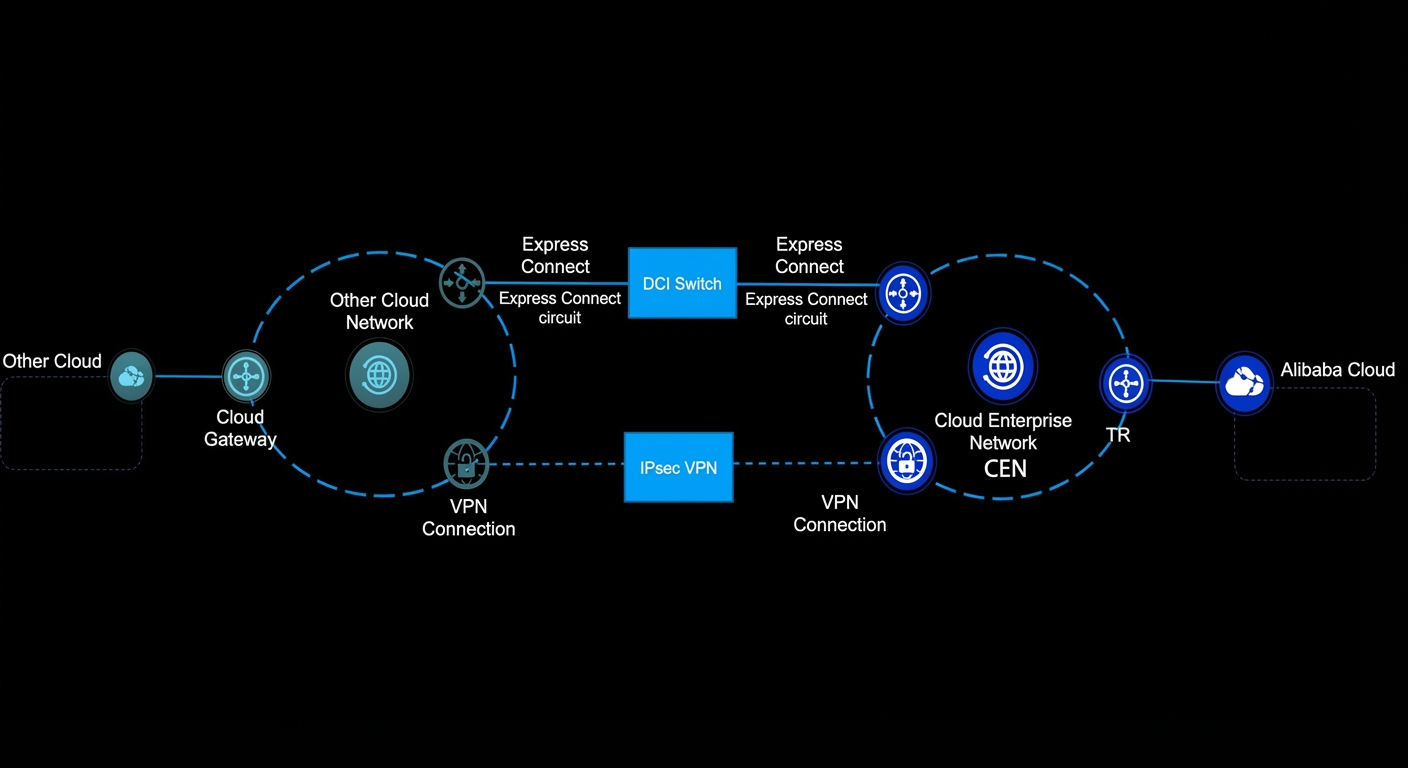
Products involved: Express Connect, VPN connection
Solution:
Multiple connection methods: You can use various hybrid cloud connection methods, such as Express Connect circuits and VPN Gateway, to quickly build a multi-cloud connection channel.
Flexible combinations: You can use flexible combinations, such as dual Express Connect circuits or Express Connect + VPN, to quickly build a stable multi-cloud connection channel.
Scenario 3: Cross-domain application acceleration
Scenario: Global users access your applications from the nearest public network entry point with network acceleration.
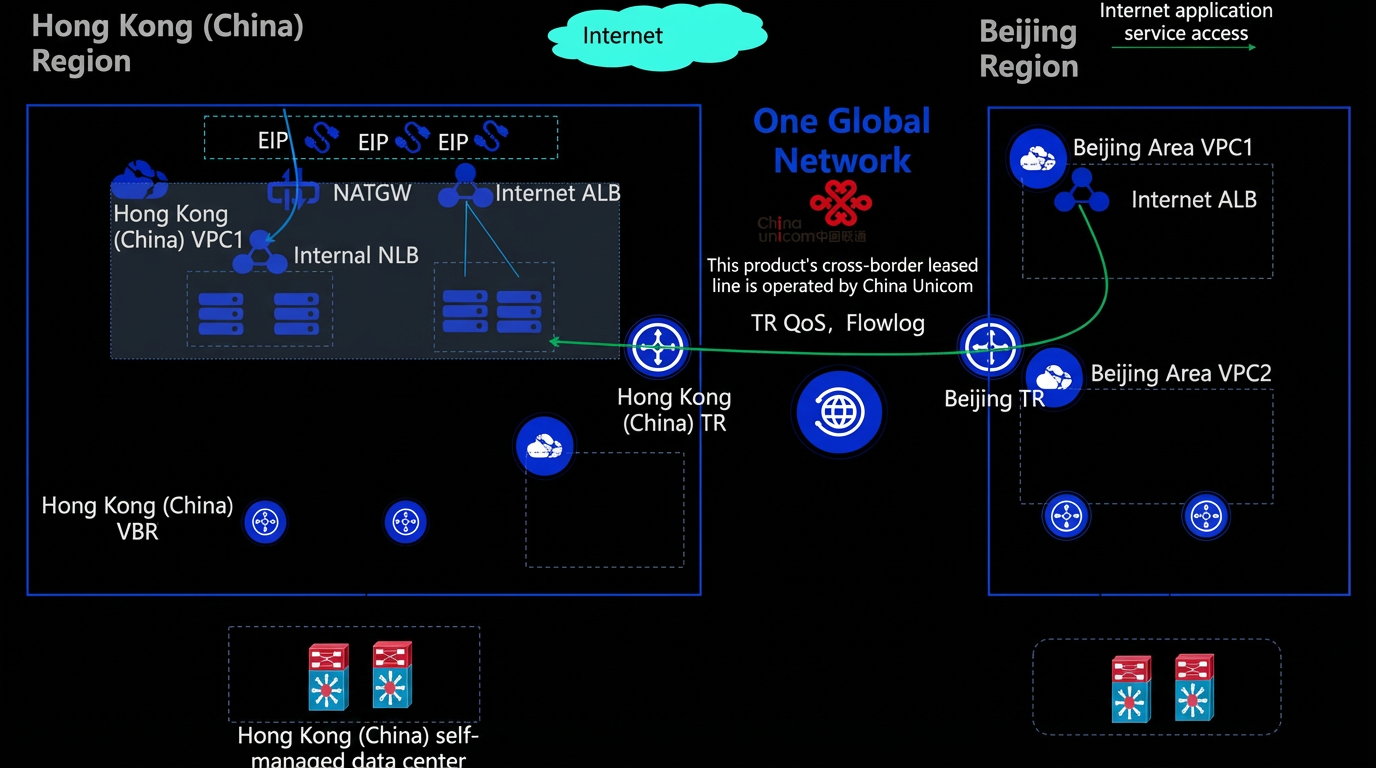
Products involved: Express Connect (for data center access), VPN or third-party SD-WAN (for branch access), TR (for on-premises to cloud and cross-region communication), Server Load Balancer (SLB), NAT Gateway, Elastic IP Address
Solution:
Application acceleration: You can use Application Load Balancer (ALB) with IP-based targets and a cross-domain TR connection to achieve flexible cross-domain application acceleration. This ensures stable, low-latency access for your business in China and globally.
On-premises data center to cloud connection: You can use Express Connect to establish a stable and secure connection between your on-premises data center and your cloud network.
Multi-region communication: You can use a TR to connect VPCs and on-premises data centers in multiple regions to build a single global network. You can also use TR features such as QoS and flow logs for fine-grained control over cross-domain bandwidth.
Cross-border compliance: You can use high-quality cross-domain lines and compliant cross-border connections to ensure that your business complies with regulations when expanding overseas.
Scenario 4: Shortest path for low latency
Scenario: Provide an end-to-end, low-latency solution for customers based on optimal cloud network resource selection and path optimization.
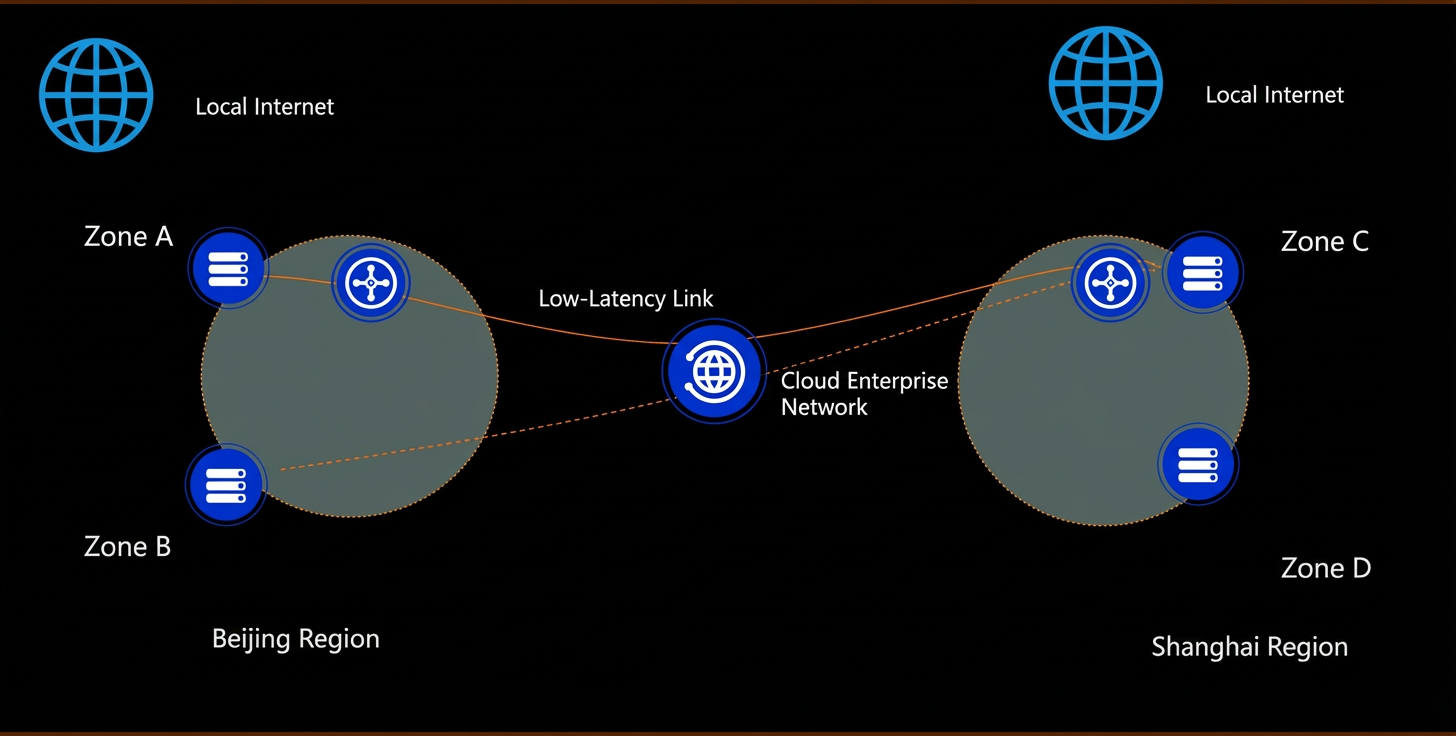
Products involved: TransitRouter (TR)
Solution:
You can use the CEN low-latency solution to provide an end-to-end low-latency link.
To use this solution, contact your account manager.
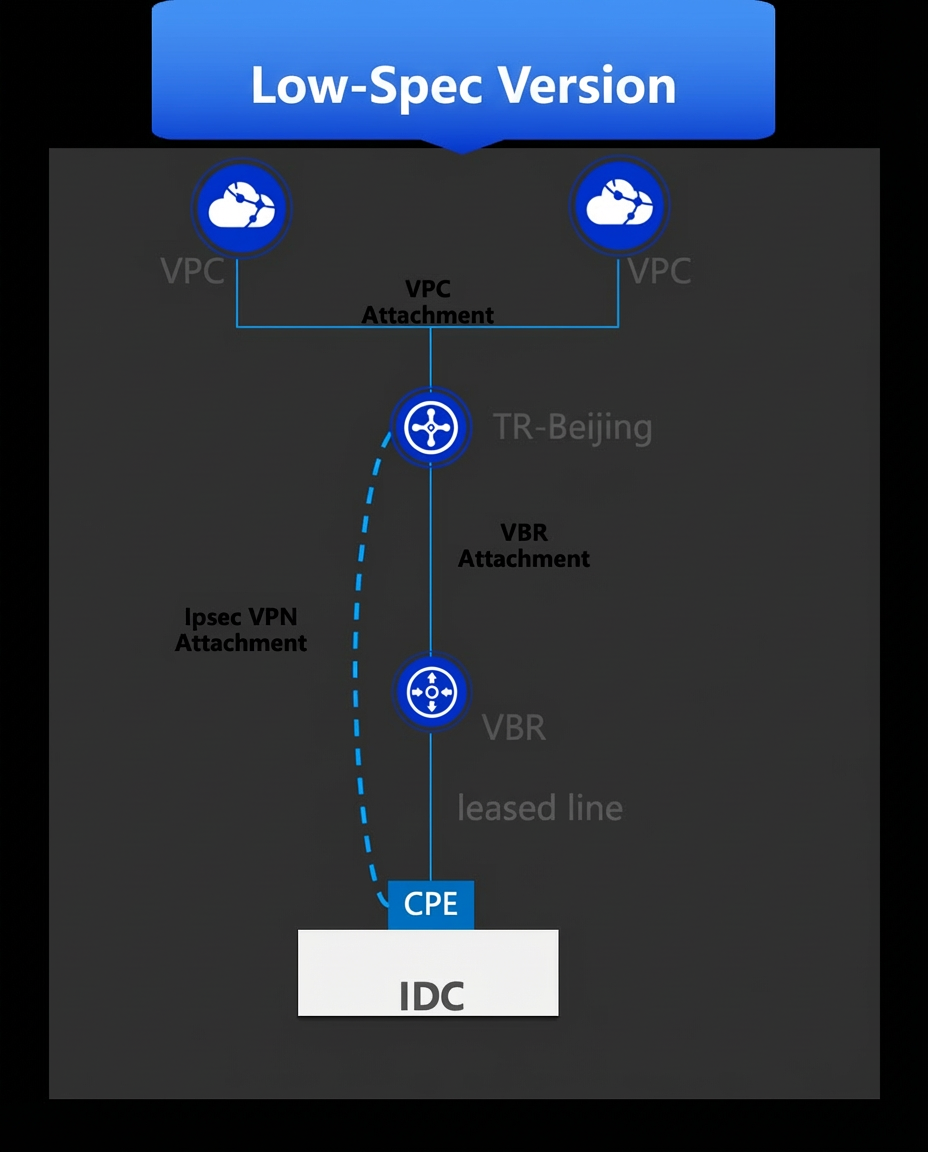
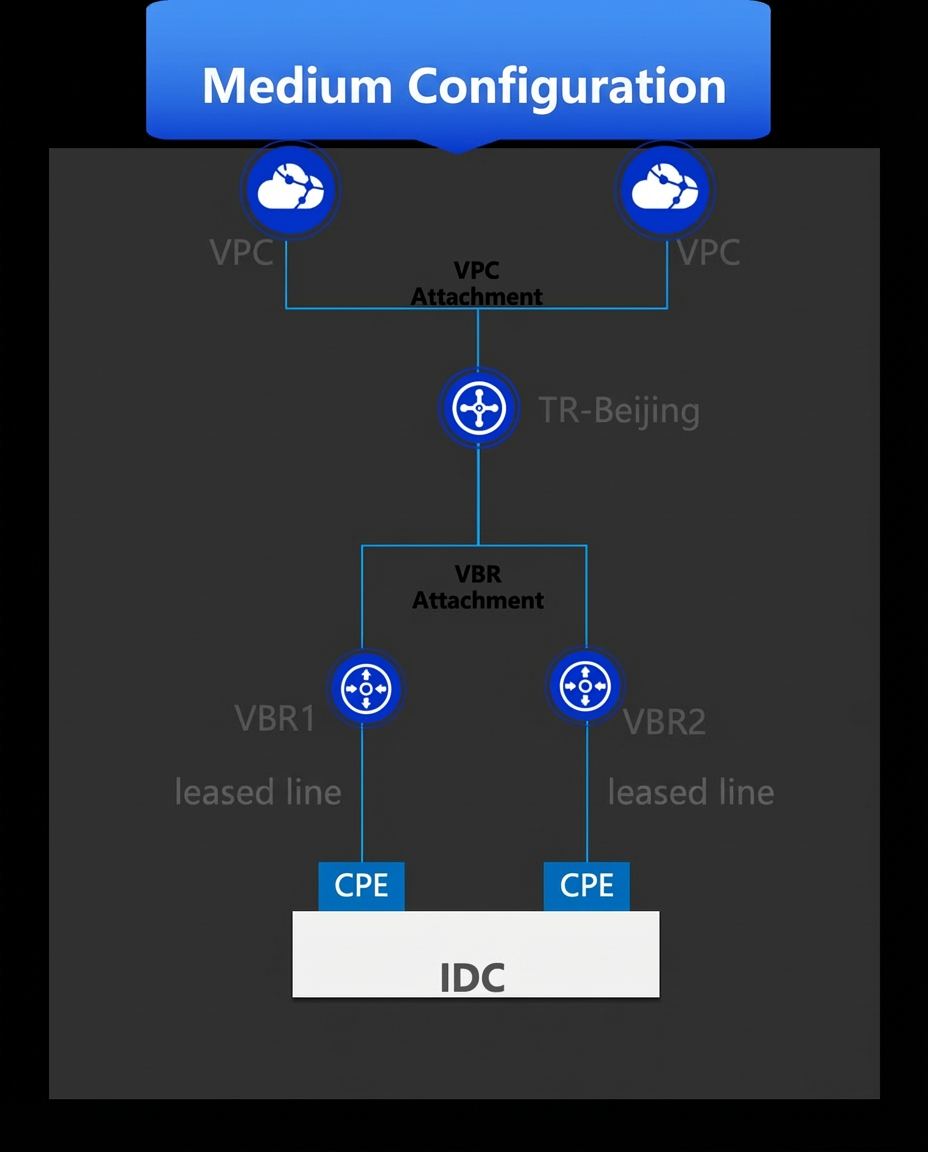
Scenario 5: Build hybrid or multicloud connectivity with Express Connect
Products involved: TR, VBR, VPN connection (VPN Attachment) Solution
|
Products involved: TR, VBR, VPN connection (VPN Attachment) Solution
|
Products involved: TR, VBR, VPN connection (VPN Attachment) Solution
|
Scenario 6: Global remote O&M network
Scenario: Allow customers to remotely access the cloud network through SSL VPN for global remote O&M.
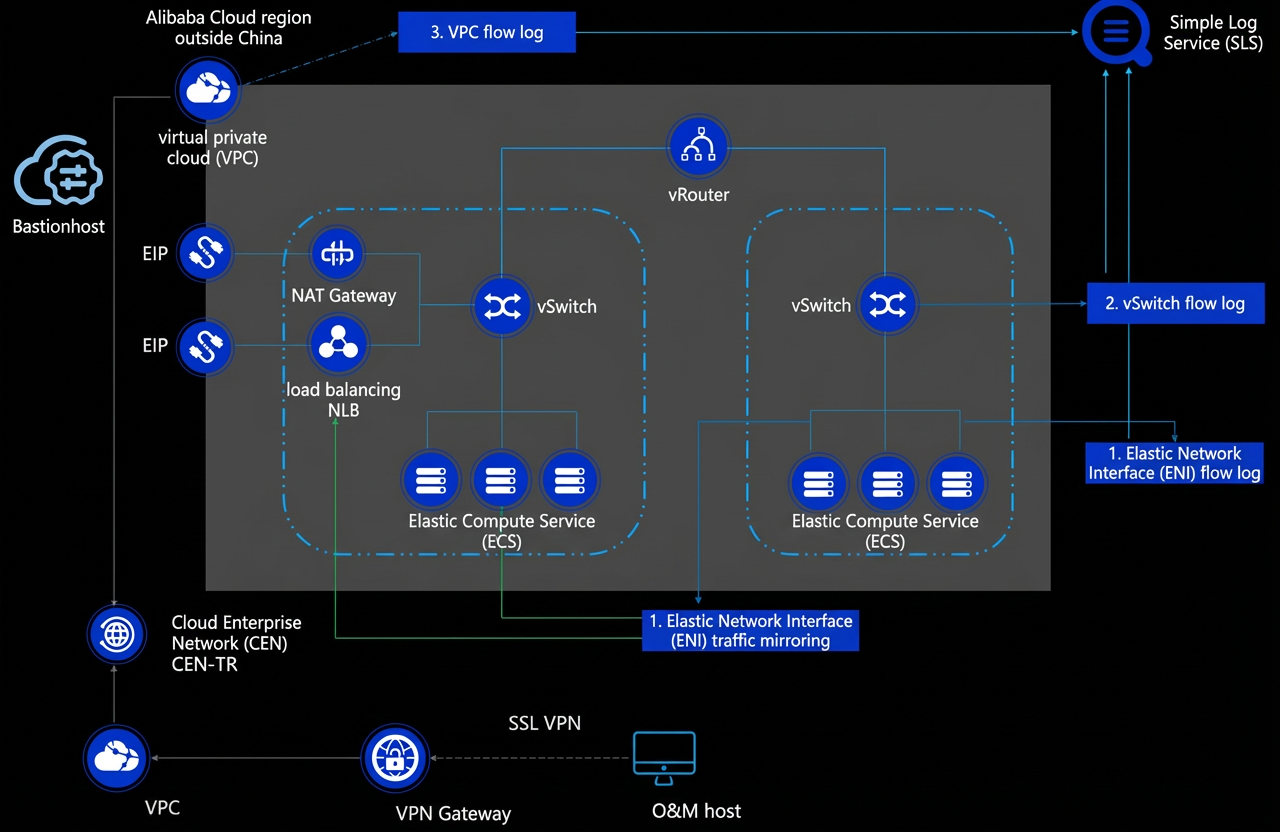
Products involved: TR, VPN Gateway
Solution:
Use SSL VPN for remote O&M network access: Enterprises can access the cloud network using SSL VPN.
Deploy Bastionhost in the cloud: If the network is reachable, you can use Bastionhost for security protection across accounts, clouds, and on-premises and cloud environments.
O&M identities are identifiable, permissions are controllable, risks can be blocked, and operations are auditable.
Flow log solution: The VPC Flow Log feature records incoming and outgoing traffic information for elastic network interfaces (ENIs). This helps you check access control rules, monitor network traffic, and troubleshoot network issues.
Traffic mirroring solution: The VPC traffic mirroring feature can mirror packets that match specified conditions and pass through an ENI. You can use traffic mirroring to copy the network traffic of an ECS instance in a VPC and forward the mirrored data to a specified ENI or internal-facing SLB instance. This is useful for content inspection, threat monitoring, and troubleshooting.