Agent self-protection
The Cloud Monitor agent (V4.1.10 and later) includes a self-protection feature that caps its own performance overhead during traffic surges, preventing stability issues and keeping container resource usage under control.
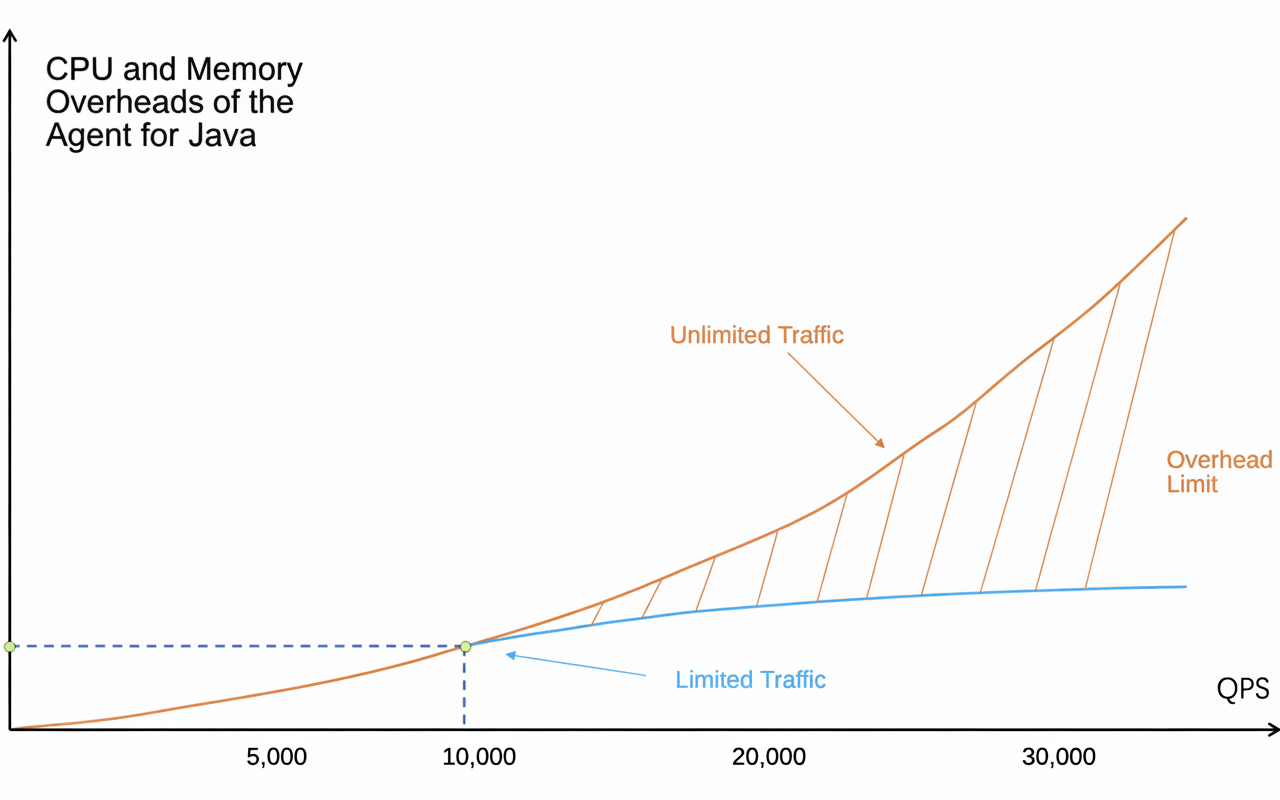
The agent counts incoming traffic at the application entry point. When queries per second (QPS) reach a predefined threshold, throttling activates: traffic within the threshold is monitored normally, while traffic that exceeds it is neither monitored nor recorded. The default threshold per application instance is 10,000 QPS. You can view the request count on the application overview or application details page in the Cloud Monitor 2.0 console.
To customize the throttling threshold, go to the Custom Configurations page in the Cloud Monitor 2.0 console and modify the maximum agent QPS threshold parameter in the agent collection configuration section.
The section contains three settings: throttling threshold (required, default: 100), the maximum requests per second for which traces are collected; maximum agent QPS threshold (default: 10,000), the limit beyond which the agent stops recording spans and generating metrics for new requests (requires agent V4.1.10 or later); and log level (default: WARN), which you can change dynamically without restarting your application.