Compute Nest retrieves cloud resource usage from bills and pushes this data to Alibaba Cloud Marketplace.
Usage notes
Push frequency: Once per day.
Service types: Private deployments and fully managed services.
Scenarios: This reporting source is applicable to most scenarios but does not provide real-time data.
Applicable metering items: Unit, Memory, VirtualCpu, NetworkIn, and NetworkOut.
How it works
-
When Compute Nest creates a service instance, it adds system tags to the resources of the instance. These system tags are also synced to the bills.
-
The billing system filters bills by tag to identify all bills that correspond to a service instance. Each bill includes cloud resource usage and cost details.
-
Compute Nest retrieves cloud resource usage from the bills and pushes this data to Alibaba Cloud Marketplace.
Due to delays in bill generation, Alibaba Cloud Marketplace orders are closed one day after the service instance is deleted.
Configure mappings
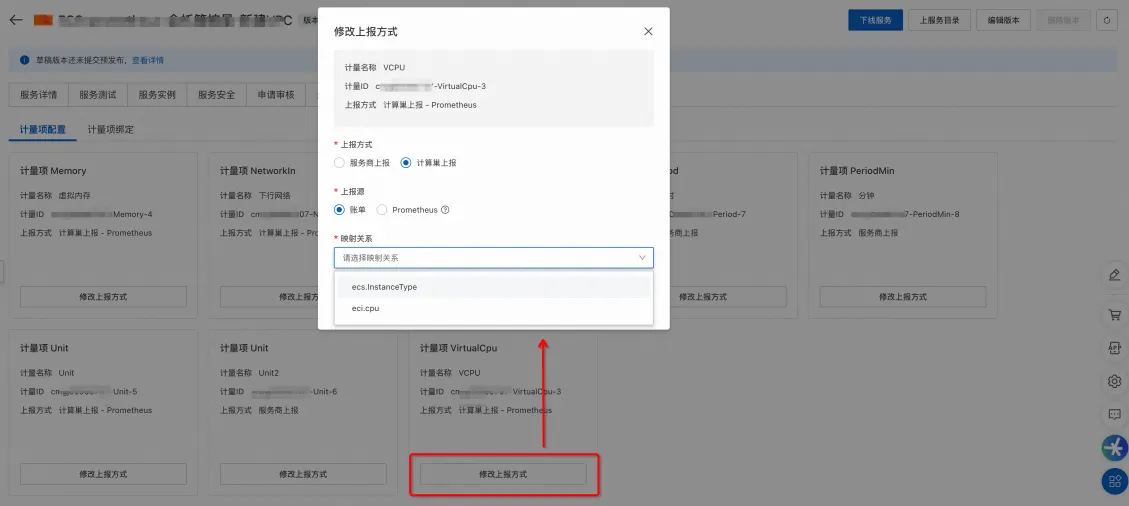
In Compute Nest, you must configure mappings between the metering items to be pushed and the products in the bills. Compute Nest reads these mappings to retrieve values from the corresponding bill items. After the values are calculated, Compute Nest pushes the results to the appropriate metering items.
-
Configure the reporting source
-
Log on to the Compute Nest console.
-
Navigate to the service details page and choose .
-
Click Modify Reporting Method, choose , and then configure the mappings. For more information, see Relational expressions for mappings.
-
-
Bind metering items
-
Return to the Sales Configuration page.
-
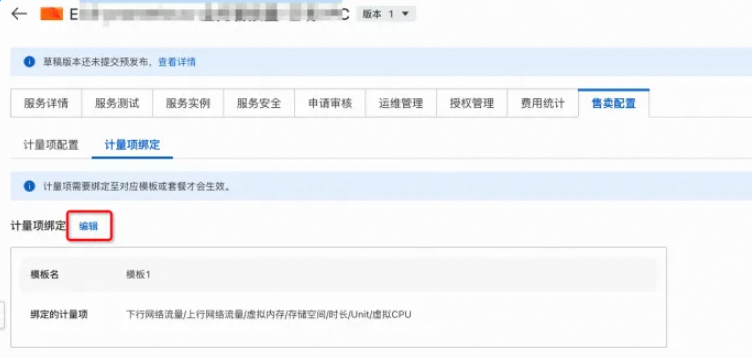
In the Associate Billable Item section, click Edit and bind the metering items to be reported.
-
Relational expressions for mappings
Compute Nest provides predefined relational expressions for mappings. If you have special requirements, contact the Compute Nest team to add more expressions.
The Alibaba Cloud Marketplace metering item `Unit` supports all mappings.
|
Alibaba Cloud Marketplace metering item |
Unit |
Bill Code (BillingItemCode) |
Unit |
Product Code (ProductCode) |
Relational expression for mapping |
|
NetworkOut |
Bit |
NetworkOut |
GB |
|
Usage × 1073741824 |
|
VirtualCpu |
None |
InstanceType |
None |
|
InstanceConfig.CPU × Usage |
|
VirtualCpu |
None |
cpu |
None |
|
Usage |
|
Storage |
Byte |
SystemDisk |
GB |
|
Usage × 1073741824 |
|
Storage |
Byte |
Disk |
GB |
|
Usage × 1073741824 |
|
Storage |
Byte |
Storage |
GB |
|
Usage × 1073741824 |
|
Memory |
GB |
mem |
MB |
|
Usage / 1024 |
In the table, Bill Code and Product Code are variables in the relational expressions. Both are return values from the DescribeSplitItemBill split bill API operation. A relational expression defines the calculation method used to map bill values to metering item values.
Example
The following code shows a partial return value from the DescribeSplitItemBill API operation. This example shows how the reported result for `VirtualCpu` is calculated.
From the table of relational expressions and the JSON code, you can determine the following:
-
The relational expression for `VirtualCpu` is
InstanceConfig.CPU × Usage. -
From the returned example, the value of this parameter is calculated as follows: 2 × 15 = 30 cores.
-
The final reported result in Alibaba Cloud Marketplace is:
[{"InstanceId":"xxxx","StartTime":"xxxx","EndTime":"xxxx","Entities":[{"Key":"VirtualCpu","Value":"30","meteringAssit":"cmapi0006xxxx-VirtualCpu-1"}]}]
{
    "Message":"Successful!",
    "Data":{
        "BillingCycle":"2023-12",
        "Items":[
            {
                "ProductName":"Elastic Compute Service",
                "InstanceConfig":"I/O optimized instance:I/O optimized instance;OS bits:64-bit;Instance family:Enterprise-level instance g6;Instance type:2-core 8 GB;OS type:Linux;Diagnostics service:Yes;Region:Ulanqab;Zone:Zone A;CPU:2-core;System disk type:Ultra Disk;Image platform:linux;Public bandwidth:10240 Kbps;Virtual switch:vsw-0jlueyydpuekou6m1s1nn;Network type:Virtual Private Cloud;System disk size:200 GB;Instance series:Series V;Operating system:centos_7_9_x64_20G_alibase_20231109.vhd;Memory:8 GB;Pay-by-traffic:Yes;OS license fee:Paid;Mount target:/dev/xvda;Housekeeper service:Yes (Housekeeper)",
                "ProductCode":"ecs",
                "ServicePeriodUnit":"Seconds",
                "ServicePeriod":"54000",
                "UsageUnit":"Instances",
                "BillingItemCode":"InstanceType",
                "CommodityCode":"ecs",
                "Usage":"15.000000"
            }
        ]
    },
    "Code":"Success",
    "Success":true
}