Troubleshoot Service issues
Learn how to diagnose and resolve LoadBalancer Service issues in ACS clusters.
Background information
When you create a Type=LoadBalancer Service, the ACS Cloud Controller Manager (CCM) automatically creates and configures SLB resources, including the instance, listeners, and backend server groups. SLB auto-update policies are detailed in Considerations for configuring a LoadBalancer Service.
Procedure
Ensure the CCM version is 1.9.3.276-g372aa98-aliyun or later. Update the CCM. CCM release notes: Cloud Controller Manager.
-
Run the following command to find the Service associated with the SLB instance:
kubectl get svc -A |grep -i LoadBalancer|grep ${XXX.XXX.XXX.XXX} #XXX.XXX.XXX.XXX is the IP address of the SLB instance. -
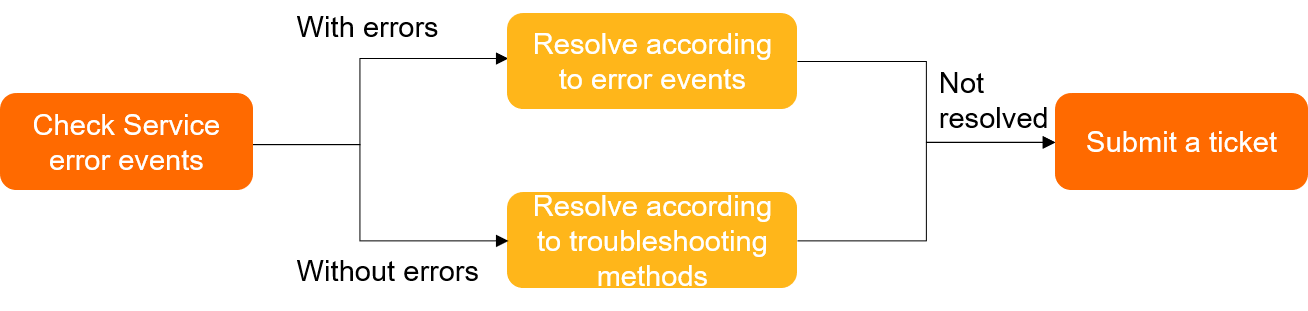
Run the following command to check for Service error events:
kubectl -n {your-namespace} describe svc {your-svc-name}ImportantIf no error events appear, verify that the CCM version is 1.9.3.276-g372aa98-aliyun or later. Update the CCM.
-
If error events exist, check Service errors and solutions.
-
If no error events exist, follow the Troubleshooting steps.
-
-
If the issue persists, contact the ACS DingTalk support group.
Service errors and solutions
The following table lists common Service errors and solutions.
|
Error message |
Description and solution |
|
|
Shared-resource SLB instances do not support ENI-type backend servers. Solution: To use ENI backend servers, create a high-performance SLB instance by adding the Important
Ensure the annotations match your CCM version. Supported annotations per version are listed in Add annotations to the YAML file of a Service to configure CLB instances. |
|
|
No backend server is associated with the SLB instance. Check whether pods are associated with the Service and running normally. Solutions:
|
|
The system cannot find the SLB instance associated with the Service. Solution: Log on to the SLB console and search for the SLB instance in the region of the Service based on
|
|
|
Your account has overdue payments. |
|
|
The account balance is less than 100 CNY. Top up your account. |
|
|
API throttling is triggered for SLB. Solutions:
|
|
|
The listener associated with the vServer group cannot be deleted. Solutions:
|
|
|
The reused internal-facing SLB instance and the cluster are not in the same VPC. Solution: Make sure that your SLB instance and the cluster are deployed in the same VPC. |
|
|
The vSwitch has no available IP addresses. Solution: Use |
|
|
The specified vSwitch does not exist. Solution:
|
|
|
The Solution: Set the |
|
|
By default, earlier CCM versions create shared-resource SLB instances, which are no longer available for purchase. Solution: Update the CCM. |
|
|
You cannot modify the resource group of an SLB instance after it is created. Solution: Delete the |
|
|
The specified IP address of the ENI cannot be found in the VPC. Solution: Check whether the |
|
You cannot change the billing method of the SLB instance used by a Service from pay-as-you-go to pay-by-specification. Solutions:
|
|
|
The SLB instance created by the CCM is reused. Solutions:
|
|
|
You cannot change the type of an SLB instance after it is created. Solution: Recreate the related Service. |
|
|
You cannot associate an SLB instance with a Service that is already associated with another SLB instance. Solution: You cannot reuse an existing SLB instance by modifying the value of the |
Troubleshooting
The following table lists common troubleshooting scenarios and solutions.
|
Category |
Issue |
Solution |
|
Issues that occur when you access an SLB instance |
The SLB instance does not evenly distribute traffic. |
|
|
The 503 error occurs when I access the SLB instance during application updates. |
The 503 error occurs when I access the SLB instance during application updates |
|
|
The SLB instance cannot be accessed from within the cluster. |
||
|
The SLB instance cannot be accessed from outside the cluster. |
The SLB instance cannot be accessed from outside the cluster |
|
|
The |
||
|
Issues related to SLB configurations |
The annotations of the Service do not take effect. |
What do I do if the annotations of a Service do not take effect? |
|
The configuration of the SLB instance is modified. |
||
|
The system fails to reuse an existing SLB instance. |
Why does the system fail to use an existing SLB instance for more than one Services? |
|
|
No listener is created when an existing SLB instance is reused. |
Why is no listener created when I reuse an existing SLB instance? |
|
|
The endpoint of the Service is different from that specified for the backend server of the SLB instance. |
What do I do if the vServer groups of an SLB instance are not updated? |
|
|
Issues related to SLB deletion |
The SLB instance is deleted. |
|
|
The SLB instance is not deleted together with the Service. |
The SLB instance does not evenly distribute traffic
Cause
The scheduling algorithm of the SLB instance is improper.
Symptom
Traffic is not evenly distributed to the backend servers of the SLB instance.
Solution
-
If long-lived connections are established to your Service, set the scheduling algorithm of the SLB instance to Weighted Least Connections (WLC) by adding the
service.beta.kubernetes.io/alibaba-cloud-loadbalancer-scheduler:"wlc"annotation.
The 503 error occurs when I access the SLB instance during application updates
Cause
Connection draining is not configured for the SLB listener or graceful shutdown is not configured for the pod.
Symptom
The 503 error occurs when you access the SLB instance during application updates.
Solution
-
Add the
service.beta.kubernetes.io/alibaba-cloud-loadbalancer-connection-drainannotation to configure connection draining for the SLB listener. Annotation details are in Common operations to manage listeners. -
Set the
preStopandreadinessProbeparameters for the pod based on the network mode of the pod.-
readinessProbechecks whether the container is ready to accept traffic. The pod is added to the endpoint only after passing the readiness probe, and then attached to the SLB instance. Set a proper probing interval, delay period, and unhealthy threshold forreadinessProbe— applications with long startup times may cause repeated restarts if thresholds are too short. -
Set
preStopto the time the pod needs to handle remaining requests. SetterminationGracePeriodSecondsto at least 30 seconds longer thanpreStop.
Pod configuration example:
apiVersion: v1 kind: Pod metadata: name: nginx namespace: default spec: containers: - name: nginx image: nginx # Liveness probe livenessProbe: failureThreshold: 3 initialDelaySeconds: 30 periodSeconds: 30 successThreshold: 1 tcpSocket: port: 80 timeoutSeconds: 1 # Readiness probe readinessProbe: failureThreshold: 3 initialDelaySeconds: 30 periodSeconds: 30 successThreshold: 1 tcpSocket: port: 80 timeoutSeconds: 1 # Graceful shutdown lifecycle: preStop: exec: command: - sleep - "30" terminationGracePeriodSeconds: 60 -
The SLB instance cannot be accessed from outside the cluster
Cause
You configured ACL rules for the SLB instance, or the SLB instance is not running properly.
Symptom
You cannot access the SLB instance from outside the cluster.
Solution
-
Run the following command to query Service events and troubleshoot errors. Service errors and solutions.
kubectl -n {your-namespace} describe svc {your-svc-name} -
Check whether ACL rules are configured for the SLB instance.
If ACL rules are configured for the SLB instance, check whether the client IP address is allowed. ACL configuration details are in Access control.
-
Check whether the SLB instance is associated with a vServer group.
If no vServer group is associated, check whether application pods are associated with the Service and running normally. If the pods are not running normally, troubleshoot them. Pod troubleshooting.
-
Check whether unhealthy backend servers are detected by the SLB listeners.
If unhealthy backend servers are detected, check whether the application pods are running normally. For SLB health check details, see Execute a health check script.
-
If the issues persist, contact the ACS DingTalk support group.
Backend HTTPS services cannot be accessed
Cause
After you specify the certificate in the SLB instance, the SLB instance decrypts HTTPS requests and forwards HTTP requests to the backend pods.
Symptom
You cannot access backend HTTPS services.
Solution
Set targetPort to an HTTP port in the Service. For example, the HTTPS port is 443 in the following NGINX Service. In this case, you must change the value of targetPort to 80.
Examples:
apiVersion: v1
kind: Service
metadata:
  annotations:
    service.beta.kubernetes.io/alibaba-cloud-loadbalancer-protocol-port: "https:443"
    service.beta.kubernetes.io/alibaba-cloud-loadbalancer-cert-id: "${YOUR_CERT_ID}"
  name: nginx
  namespace: default
spec:
  ports:
  - name: http
    port: 80
    protocol: TCP
    targetPort: 80
  - name: https
    port: 443
    protocol: TCP
    targetPort: 80
  selector:
    run: nginx
  type: LoadBalancer