LLM and CV model training on ACK clusters
This topic shows you how to use an ACS AI container image to create a workload in an ACS cluster and quickly build an LLM/CV model training environment.
Prerequisites
You have created an ACS cluster.
You have created a NAS storage volume that contains the model files.
ACS AI container images
ACS AI container images are specialized container images for ACS clusters with GPU instances. These images provide a reliable, flexible, portable, efficient, and manageable environment for AI workloads.
ACS AI container images include mainstream open-source AI frameworks, operator and networking libraries, distributed training frameworks, Python virtual machines, and other tools. They also integrate multiple in-house optimization technologies from Alibaba Cloud to help model developers accelerate their training workflows.
Use the following example to obtain an ACS AI container image to configure workloads on your ACS clusters.
ACS AI container images are standard images provided by Lingjun products and are free to use. For the latest image release information, see ACS Container Image Release Notes.
To reduce pull times, pull AI container images over a VPC.
Name | Tag | Public address | VPC address | Description |
training-xpu-pytorch | 25.03 | egslingjun-registry.cn-wulanchabu.cr.aliyuncs.com/egslingjun/training-xpu-pytorch:25.03 |
|
|
You can build custom images by extending this base image and store them in your ACR repository to increase pull speeds. Additional fees may apply.
For a list of the core AI libraries in the image, see the latest List of Image Components.
Create a training or fine-tuning task
Single-node multi-GPU training
Follow these steps to create a custom resource workload. The procedure is similar for other task types.
Log on to the ACS console. In the left navigation pane, click Clusters.
On the Clusters page, click the name of the target cluster. In the left navigation pane, choose Workloads > Custom Resources.
On the CustomResourceDefinition tab, click Create by using YAML.
Paste the following orchestration template to quickly create a model training task.
apiVersion: v1
kind: Pod
metadata:
  name: cv-demo # Modify the name as required.
  labels:
    alibabacloud.com/compute-class: gpu-hpn
    alibabacloud.com/hpn-type: "rdma"
spec:
  imagePullSecrets:
    - name: acs-image-secret # Must match the name of the Secret that you created.
  containers:
    - name: ssd-demo
      image: egslingjun-registry.cn-wulanchabu.cr.aliyuncs.com/egslingjun/training-xpu-pytorch:24.09
      env:
      - name: USE_PRETRAIN
        value: "true"
      - name: PRETRAIN_PATH
        value: "/opt/ljperf/benchmark/models/mmdetection/model_configs/ssd/"
      command: ["/bin/bash"]
      args: ["-c", "ljperf benchmark --model cv/ssd"]
      resources:
        limits: # Adjust the values based on the arguments used to run the model.
          cpu: 90
          memory: 500G
          alibabacloud.com/ppu: 16
        requests: # Adjust the values based on the arguments used to run the model.
          cpu: 90
          memory: 500G
          alibabacloud.com/ppu: 16
      volumeMounts: # Prepare the network storage (e.g., PV/NAS) and the model/data files in advance. Adjust the following mount directories as required.
        - name: dshm
          mountPath: /dev/shm
        - name: data
          mountPath: /opt/ljperf/benchmark/models/mmdetection/model_configs/ssd/
          subPath: shared/public/model_configs/ssd
        - name: data
          mountPath: /opt/ljperf/benchmark/models/mmdetection/data/coco
          subPath: shared/public/dataset/coco
  volumes:
    - emptyDir:
        medium: Memory
        sizeLimit: 1000Gi
      name: dshm
    - name: data
      persistentVolumeClaim:
        claimName: cnp
Click Create. The console shows the deployment status.
The image does not contain the checkpoint files or datasets required for model training. You must mount them to the pod by using a volume. In the sample YAML file, the mount paths are as follows:
/opt/ljperf/benchmark/models/mmdetection/model_configs/ssd/is the path to the SSD model checkpoint file. You can download the checkpoint file from model_configs.tar.gz./opt/ljperf/benchmark/models/mmdetection/data/cocois the path to the dataset required for training the SSD model. You can download the dataset from datasets.tar.gz.
The
argsfield contains the command to start model training. The core command isljperf benchmark --model cv/ssd. This command quickly starts the benchmark models built into the image. The 24.09 image supports CV models such as cv/ssd, cv/mask_rcnn, cv/fcn, and cv/mask2former. For more information about how to useljperf, see Usage of the ljperf demo application in the container image.
Multi-node multi-GPU training
A multi-node multi-GPU training task requires scheduling and orchestration support. If you have your own orchestration solution, you can use it for the training task.
If you do not have special requirements for orchestration and scheduling, you can deploy the Kubeflow community edition. The community edition of Kubeflow must be deployed for each new cluster. For deployment instructions, see Deploy the community edition of Kubeflow on ACK.
After you confirm that the platform supports the Kubeflow PyTorchJob CRD, create a PyTorchJob multi-node training task. The procedure is similar to that described in the Single-node multi-GPU training section.
The following is a sample YAML file.
apiVersion: "kubeflow.org/v1"
kind: PyTorchJob
metadata:
  name: pytorchjob-llama3-8b
  namespace: llm-training
  labels:
    alibabacloud.com/compute-class: gpu-hpn
    alibabacloud.com/hpn-type: "rdma"
spec:
  pytorchReplicaSpecs:
    Master:
      replicas: 1
      restartPolicy: Never
      template:
        metadata:
          labels:
            alibabacloud.com/compute-class: gpu-hpn
            alibabacloud.com/hpn-type: "rdma"
          annotations:
            sidecar.istio.io/inject: "false"
        spec:
          imagePullSecrets:
          - name: acs-image-secret # Must match the name of the Secret that you created.
          containers:
            - name: pytorch
              imagePullPolicy: Always
              image: egslingjun-registry.cn-wulanchabu.cr.aliyuncs.com/egslingjun/training-xpu-pytorch:24.09
              securityContext:
                privileged: true
                capabilities:
                    add:
                      - IPC_LOCK
              command: ["/bin/bash"]
              args: ["-c", "ljperf benchmark --model deepspeed/llama3-8b"]
              resources:
                limits:
                  alibabacloud.com/ppu: 16
                  cpu: "90"
                  memory: 1000Gi
                  ephemeral-storage: 1000Gi
              volumeMounts:
                - mountPath: /dev/shm
                  name: dshm
              env:
                - name: KUBERNETES_POD_NAME
                  valueFrom:
                    fieldRef:
                       apiVersion: v1
                       fieldPath: metadata.name
          hostNetwork: true
          hostIPC: true
          dnsPolicy: ClusterFirstWithHostNet
          volumes:
              - emptyDir:
                  medium: Memory
                  sizeLimit: 1000Gi
                name: dshm

    Worker:
      replicas: 1
      restartPolicy: Never
      template:
        metadata:
          labels:
            alibabacloud.com/compute-class: gpu-hpn
            alibabacloud.com/hpn-type: "rdma"
          annotations:
            sidecar.istio.io/inject: "false"
        spec:
          imagePullSecrets:
          - name: acs-image-secret # Must match the name of the Secret that you created.
          containers:
            - name: pytorch
              imagePullPolicy: Always
              image: egslingjun-registry.cn-wulanchabu.cr.aliyuncs.com/egslingjun/training-xpu-pytorch:24.09
              securityContext:
                privileged: true
                capabilities:
                    add:
                      - IPC_LOCK
              command: ["/bin/bash"]
              args: ["-c", "ljperf benchmark --model deepspeed/llama3-8b"]
              resources:
                limits:
                  alibabacloud.com/ppu: 16
                  cpu: "90"
                  memory: 1000Gi
                  ephemeral-storage: 1000Gi
              volumeMounts:
                - mountPath: /dev/shm
                  name: dshm
              env:
                - name: KUBERNETES_POD_NAME
                  valueFrom:
                    fieldRef:
                       apiVersion: v1
                       fieldPath: metadata.name
          hostNetwork: true
          hostIPC: true
          dnsPolicy: ClusterFirstWithHostNet
          volumes:
              - emptyDir:
                  medium: Memory
                  sizeLimit: 1000Gi
                name: dshm
View the successfully submitted PyTorchJob task.
kubectl get PyTorchJob -n llm-trainingIn the expected output, a
STATEofRunningmeans the task is in progress, andSucceededmeans the task is complete.
Results
After the training task completes successfully, view the logs in the Alibaba Cloud console under Workloads > Container Groups > Logs.
FAQ
Configure model checkpoints and datasets
In the NAS console, purchase a NAS file system.
Purchase the file system in the same VPC as your ACS cluster. Otherwise, the cluster cannot connect to the NAS file system.
In the Container Service console, create a PVC.
In the left-side navigation pane of the cluster management page, choose .
Select the namespace where your training task is located and click Create.
Select NAS, enter a name, specify the mount target domain, and then click Create.
Name: Must match the claimName in the task YAML file. For the mount target domain, select the domain of the purchased NAS file system.
Mount target domain: Select the purchased NAS, choose the option to mount it, and copy the mount target address.
Copy the model checkpoint and dataset to the NAS file system. The file path on the NAS file system must match the subPath in the YAML file.
Purchase an ECS instance in the same VPC.
Mount the NAS file system to the ECS instance. For more information, see Mount an NFS file system with one click.
If the file system is mounted to the /mnt directory, copy the model checkpoint and dataset to their corresponding paths in the /mnt directory on the ECS instance.
Checkpoint: /mnt/shared/public/model_configs/ssd
Dataset: /mnt/shared/public/dataset/coco
Ljperf demo application
When submitting a task, adjust the model to match the selected xPU type to prevent issues such as out-of-memory (OOM) errors.
The container image includes core AI libraries such as Transformers, Accelerate, Diffusers, OpenCV, and vLLM. If you are familiar with these libraries, you can use them directly.
For demonstrations, quick starts, or cluster performance testing, the image includes a proprietary application named
ljperf. This tool is for testing purposes only. For production scenarios, you must provide your own models. By default, you only need to add the positional argumentbenchmarkand specify a model to test using the--model cv/ssdflag. The simplest command isljperf benchmark --model cv/ssd. You can also specify other training parameters as needed. For details about the parameters, see the sample help information below.NoteThe following help information is for version 24.10. Newer versions may support more models. The available models depend on your image version.
usage: ljperf [-h]
              [--model {deepspeed/llama3-8b, deepspeed/llama2-7b, deepspeed/llama2-70b, deepspeed/qwen2-7b, deepspeed/qwen-7b, deepspeed/qwen-72b, megatron/llama3-8b, megatron/llama2-70b, megatron/mixtral-8*7b, megatron/mixtral-8*22b, megatron/mixtral-310b, cv/mask_rcnn, cv/ssd, cv/fcn, cv/yolo, cv/open-clip, cv/bevformer}]
              [--mbs MBS] [--seqlen SEQLEN] [--iters ITERS] [--dataset DATASET] [--overlap-comm] [--grad-ckpt] [--ga GA] [--zero ZERO] [--zeropp ZEROPP] [--zero-offload] [--use-pretrain]
              [--attn-impl {flash_attention_2,eager}] [--bf16] [--fp16] [--tc] [--enable-lora] [--sp SP] [--tprof] [--tprof-skip TORCH_PROFILE_SKIP] [--tprof-warmup TORCH_PROFILE_WARMUP]
              [--tprof-wait TORCH_PROFILE_WAIT] [--tprof-active TORCH_PROFILE_ACTIVE] [--tprof-dir TORCH_PROFILE_OUTPUT_DIR] [--fsdp] [--gbs GBS] [--tp TP] [--pp PP] [--ep EP] [--cp CP] [--te] [--do]
              [--ac {full,selective}]
              {benchmark}

lingjun perf toolkit command tool for AI performance testing, diagnose and profiling.
positional arguments:
  {benchmark}           Specify ljperf action, you can choose from action benchmark or healthcheck.
options:
  -h, --help            show this help message and exit
Group benchmark:
  --model {deepspeed/llama3-8b, deepspeed/llama2-7b, deepspeed/llama2-70b, deepspeed/qwen2-7b, deepspeed/qwen7b, deepspeed/qwen-72b, megatron/llama3-8b, megatron/llama2-70b, megatron/mixtral-8*7b, megatron/mixtral-8*22b, megatron/mixtral-310b, cv/mask_rcnn, cv/ssd, cv/fcn, cv/yolo, cv/open-clip, cv/bevformer}
  --mbs MBS
  --seqlen SEQLEN
  --iters ITERS
  --dataset DATASET
  --overlap-comm
  --grad-ckpt
  --ga GA
  --zero ZERO
  --zeropp ZEROPP
  --zero-offload
  --use-pretrain
  --attn-impl {flash_attention_2,eager}
  --bf16
  --fp16
  --tc
  --enable-lora
  --sp SP
  --tprof
  --tprof-skip TORCH_PROFILE_SKIP
  --tprof-warmup TORCH_PROFILE_WARMUP
  --tprof-wait TORCH_PROFILE_WAIT
  --tprof-active TORCH_PROFILE_ACTIVE
  --tprof-dir TORCH_PROFILE_OUTPUT_DIR
  --fsdp
  --gbs GBS
  --tp TP
  --pp PP
  --ep EP
  --cp CP
  --te
  --do
  --ac {full,selective}
Reducing long image pull times
The provided images, such as
egslingjun-registry.cn-wulanchabu.cr.aliyuncs.com/egslingjun/training-xpu-pytorch:24.12, use a public endpoint. Pulling images from a public endpoint is slower than pulling them over a VPC network. To improve pull speeds, create a Container Registry (ACR) instance in the ACR console, pull the publictraining-xpu-pytorchimage, and push it to your ACR instance. You can then pull the image at high speed over the VPC network.Building on this image for incremental development and storing the result in your ACR repository also improves pull speeds.
For information about ACR pricing, see Pricing.
Best-practice YAML
DeepSpeed Llama3-70B
Item | Description |
Configuration | mbs 2 / gradient_accumulation_steps 1 / seqlen 4096 / zero 3 / flash-attn 2 / bf16 |
Package dependencies | |
Model | |
Dataset | oss://lingjun-public/deepspeed/WuDaoCorpus2.0_selected_proc-llama/ |
Code | Image directory: /opt/ljperf/benchmark/models/transformers-model |
Execution command (torchrun) | |
YAML example | |
Megatron Mixtral-8x7B
Item | Description |
Configuration | mbs 1 / gradient_accumulation_steps 64 / seqlen 2048 / tp 1 / pp 4 / expert-parallel 8 / context-parallel 1 / flash-attn2 / transformer-engine / recompute-activations(selective) / bf16 (Stable throughput is typically reached after 200 iterations.) |
Package dependencies | |
Code | Image directory: /opt/ljperf/benchmark/models/megatron-model |
Dataset | oss://lingjun-public/megatron/enwiki-llama2/ |
Execution command (torchrun) | |
YAML example | |
StableDiffusion XL
Item | Description |
Package dependencies | |
Code | |
Model and dataset | Download from oss://lingjun-public/sdxl (publicly accessible) |
Execution command (torchrun) | |
YAML example | |
BEVformer
Item | Description |
Package dependencies | |
Model checkpoint | https://lingjun-public.oss-cn-wulanchabu.aliyuncs.com/cv-models/model_configs/bevformer/ |
Dataset | https://lingjun-public.oss-cn-wulanchabu.aliyuncs.com/cv-models (Subdirectory: /datasets/nuscenes/) |
Code repository | |
Parameter configuration file | BEVFormer/projects/configs/bevformer/bevformer_base.py |
After downloading, arrange the files according to the directory structure shown in the image.
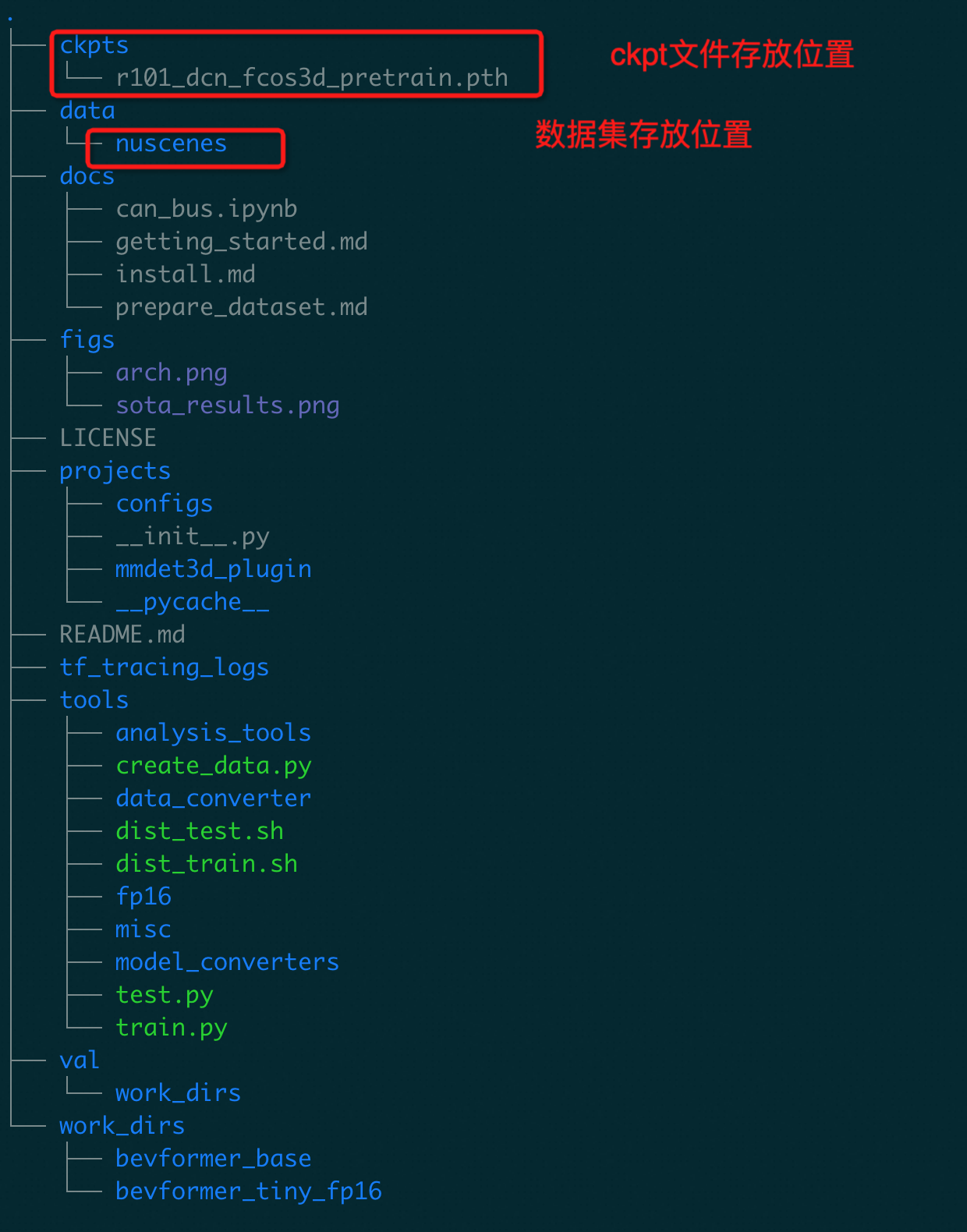
After placing the dataset and model weight files, mount the BEVFormer directory to the container. This example uses the mount path
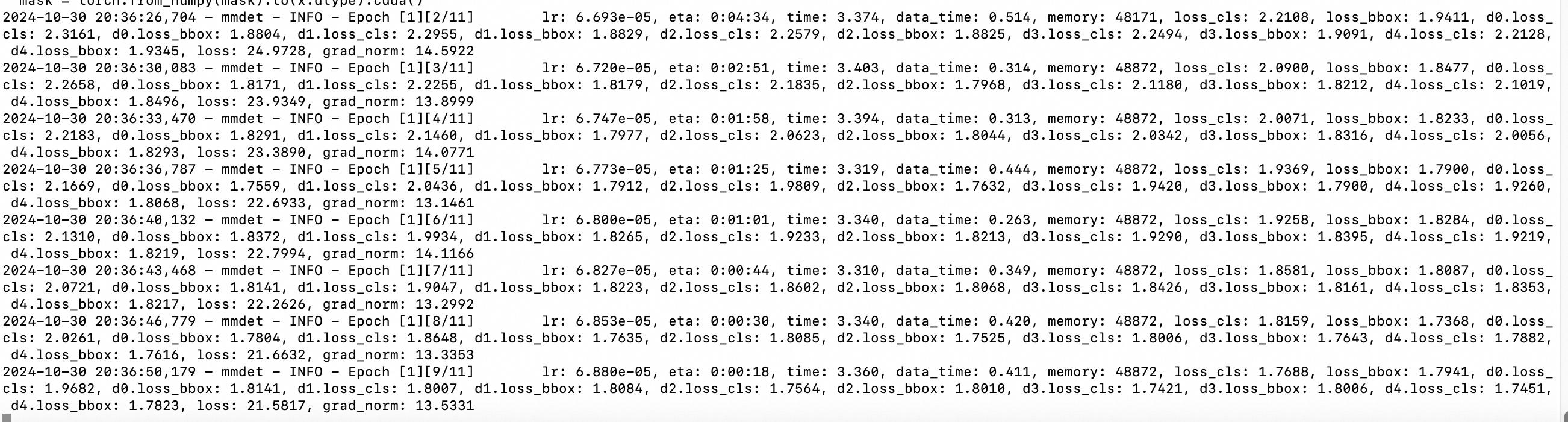
/mnt/BEVFormer.apiVersion: v1 kind: Pod metadata: name: bevformer-demo # Modify the name as needed. labels: alibabacloud.com/compute-class: gpu-hpn alibabacloud.com/hpn-type: "rdma" spec: imagePullSecrets: - name: acs-image-secret # Must match the name of the created secret. containers: - name: bevformer-demo image: egslingjun-registry.cn-wulanchabu.cr.aliyuncs.com/egslingjun/training-xpu-pytorch:24.10-nightly-20241030 command: ["/bin/bash"] args: ["-c", "cd /mnt/BEVFormer;bash tools/dist_train.sh ./projects/configs/bevformer/bevformer_base.py 16"] resources: limits: # Adjust as needed, based on the model's runtime arguments. cpu: 90 memory: 500G alibabacloud.com/ppu: 16 requests: # Adjust as needed, based on the model's runtime arguments. cpu: 90 memory: 500G alibabacloud.com/ppu: 16 volumeMounts: # Pre-provision network storage (PV, NAS) with the model and data. Adjust the mount paths below accordingly. - name: dshm mountPath: /dev/shm - name: data mountPath: /mnt/BEVFormer subPath: shared/public/BEVFormer volumes: - emptyDir: medium: Memory sizeLimit: 1000Gi name: dshm - name: data persistentVolumeClaim: claimName: lingjun-aiCheck the logs to verify a successful run.
SparseDrive
Item | Description |
Package dependencies | |
Code repository | |
Parameter configuration file | https://github.com/swc-17/SparseDrive/blob/main/projects/configs/sparsedrive_small_stage2.py |
Dataset | nuscenes-v1.0-mini |
Execution command | |
YAML example | |
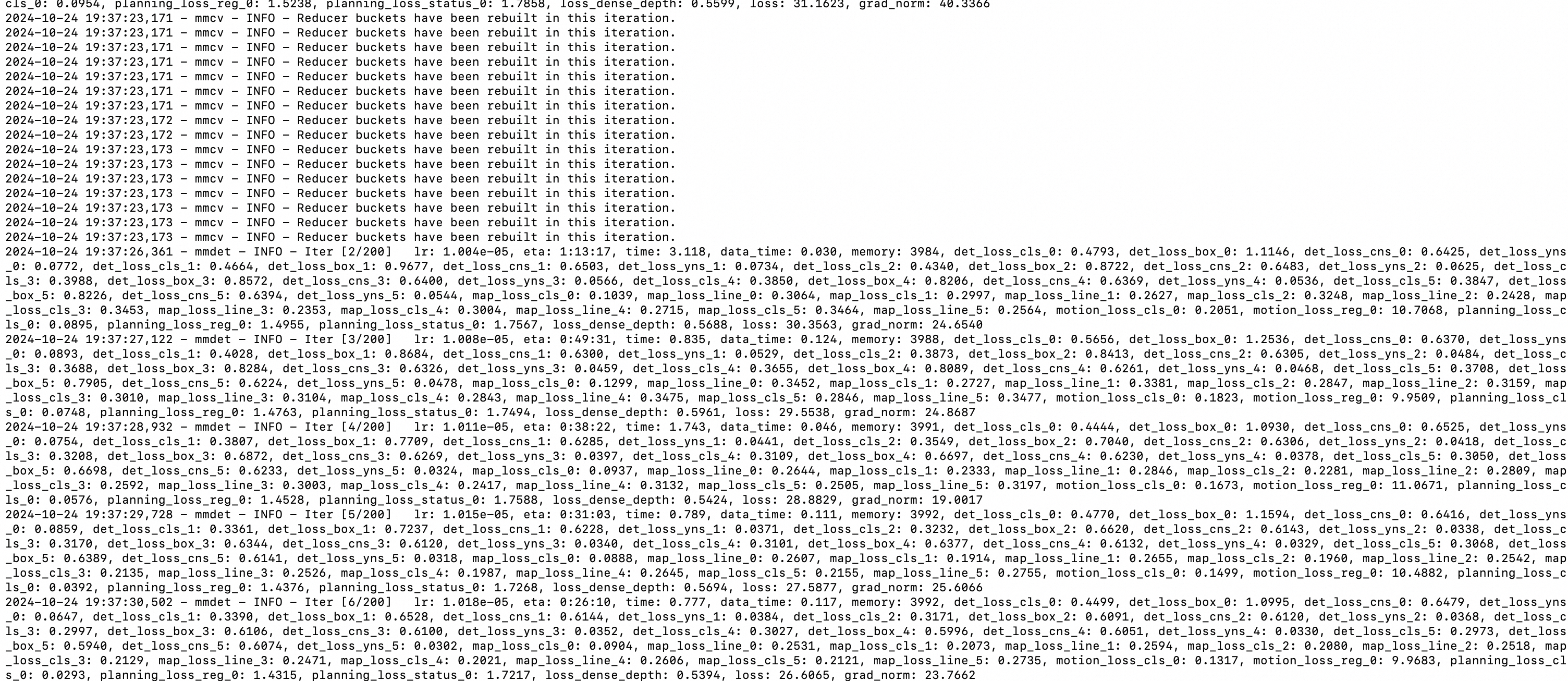
Check the logs to verify a successful run.
Known issues
This section describes the differences in usage, ecosystem support, and default behavior of the Zhenwu 810E compared to NVIDIA GPUs.
Modules requiring patches
The following modules require additional patches from PPU A910E. We recommend using the versions pre-installed in the image. Manually installing other versions may not function correctly.
ONNX Runtime
vLLM
xformers
CuPy
Grouped_Gemm
Transformer Engine
cutlass
Transformer Engine
The
test_fused_attn.pyunit test for Transformer Engine Fused Attention fails.FAILED test_fused_attn.py::test_dot_product_attention[False-None-True-False-base_1_0-model_configs0-dtype0] - RuntimeError: /root/TransformerEngine/transformer_engine/common/fused_attn/fused_attn_f16_max512_seqlen.cu:836 in function fused_attn_max_512_fwd_impl: CUDNN_BAC... FAILED test_fused_attn.py::test_dot_product_attention[False-None-True-False-base_1_0-model_configs0-dtype1] - RuntimeError: /root/TransformerEngine/transformer_engine/common/fused_attn/fused_attn_f16_max512_seqlen.cu:836 in function fused_attn_max_512_fwd_impl: CUDNN_BAC... FAILED test_fused_attn.py::test_dot_product_attention[False-None-True-False-base_1_1-model_configs0-dtype0] - RuntimeError: /root/TransformerEngine/transformer_engine/common/fused_attn/fused_attn_f16_max512_seqlen.cu:836 in function fused_attn_max_512_fwd_impl: CUDNN_BAC... FAILED test_fused_attn.py::test_dot_product_attention[False-None-True-False-base_1_1-model_configs0-dtype1] - RuntimeError: /root/TransformerEngine/transformer_engine/common/fused_attn/fused_attn_f16_max512_seqlen.cu:836 in function fused_attn_max_512_fwd_impl: CUDNN_BAC... ....Failure analysis: The xPU-compatible version of CuDNN does not currently support the FMA feature. As a result, the xPU-compatible Transformer Engine cannot use FusedAttention (CuDNN). As a workaround, prioritize FlashAttention by running:
export NVTE_FLASH_ATTN=1 && export NVTE_FUSED_ATTN=0;.The Transformer Engine numerics unit test fails.
FAILED test_numerics.py::test_gpt_checkpointing[126m-1-dtype0] - RuntimeError: /root/TransformerEngine/transformer_engine/common/gemm/cublaslt_gemm.cu:207 in function cublas_gemm: cuBLAS Error: an ...
FAILED test_numerics.py::test_gpt_checkpointing[126m-1-dtype1] - RuntimeError: /root/TransformerEngine/transformer_engine/common/gemm/cublaslt_gemm.cu:207 in function cublas_gemm: cuBLAS Error: an ...
FAILED test_numerics.py::test_gpt_checkpointing[126m-1-dtype2] - RuntimeError: /root/TransformerEngine/transformer_engine/common/gemm/cublaslt_gemm.cu:207 in function cublas_gemm: cuBLAS Error: an ...
FAILED test_numerics.py::test_gpt_checkpointing[126m-2-dtype0] - RuntimeError: /root/TransformerEngine/transformer_engine/common/gemm/cublaslt_gemm.cu:207 in function cublas_gemm: cuBLAS Error: an ...
.....
Failure analysis: The input data type combination for this test case is not currently supported.
FAILED test_numerics.py::test_gpt_full_activation_recompute[True-False-False-126m-1-dtype1] - AssertionError: Output mismatches in:
FAILED test_numerics.py::test_gpt_full_activation_recompute[True-False-False-126m-1-dtype2] - AssertionError: Output mismatches in:
FAILED test_numerics.py::test_gpt_full_activation_recompute[True-False-False-126m-2-dtype1] - AssertionError: Output mismatches in:
FAILED test_numerics.py::test_gpt_full_activation_recompute[True-False-False-126m-2-dtype2] - AssertionError: Output mismatches in:
......
Failure analysis: The corresponding test cases also produce output mismatches on A100 GPUs.
Bitsandbytes
Test | Pass/total (xPU) | Pass rate | Failure reason | Pass/total (GPU) |
test_functional.py | 142/632 | 23% | The | 620/632 (precision differences slightly exceed the threshold.) |
test_autograd.py | 2176/2240 | 97.1% | Precision issue. The operator library does not support int8 gemm for | 2239/2240 (precision differences slightly exceed the threshold.) |
CuPy
The PPU version of CuPy has not undergone full continuous integration (CI) testing. It has been primarily tested in three scenarios:
NVIDIA DeepLearning Examples for the TF1 NCF model.
vLLM 0.3.3.
API unit tests.
import cupy as cp

cp.cuda.Device(0).use()
x_gpu_0 = cp.array([1, 2, 3])
l2_gpu = cp.linalg.norm(x_gpu)
sorted_test = cp.sort(x_gpu_0)
sort_indices = cp.argsort(x_gpu_0)
x_gpu_1 = cp.asarray(x_gpu_0)
cp.repeat(x_gpu_1, 2)
cp.logical_not(x_gpu_0)

cp.random.permutation(2)
cp.random.randint(0, high=3, size=4)
cp.get_default_memory_pool().free_all_blocks()CuPy may call APIs in CUDA computation libraries such as CuDNN, CuBlas, and CuRand that are not currently supported by the xPU. This can result in errors.
ONNX Runtime
Unit test failures
test_parity_huggingface_gpt_attention.py
With TF32 precision, the Attention operator (unfused backend) produces
acblas gemmprecision errors that exceed the threshold. It meets precision standards with FP32 and FP16.test_flash_attn.py::TestGQA::test_gqa_no_past
The
test_gqa_no_pasttest sequentially evaluates the efficient backend and the FlashAttention backend. When run consecutively, the preceding test case affects the FlashAttention test, causing it to produce incorrect results. If the order is reversed or the FlashAttention test is run independently, the results are correct. No precision issues have been found with FlashAttention itself.onnxruntime_test_distributed.py::TestDistributed::test_slice_rs_axis1
PCCL does not currently support
mixing different streams within a group call.
SparseAttention is only implemented with TRT
cubinkernels and cannot be executed on the xPU.The standard FlashAttention has not yet been replaced with the xPU-specific FlashAttention, which may impact performance.
Grouped_Gemm
The
permuteandsinkhornoperators are not currently supported but will be added in a future update.