Billable items
Data Online Migration is free during its public preview. However, you are still charged for underlying resources, including network traffic from third-party storage services, API requests, and data restoration. The total migration cost varies depending on the source and destination.
Billable items
Overview
The following table lists the billable items for data migration between different sources and destinations.
|
Source |
Destination |
Source egress traffic |
Source requests |
Destination requests |
Transfer acceleration |
|
OSS |
OSS |
For billing details, see Migrate data between Alibaba Cloud OSS buckets. |
Charged |
Charged |
Charged (if enabled) Note
For cross-border migration, such as between the Chinese mainland and other regions, we recommend enabling transfer acceleration to improve migration speed. If this feature is enabled, acceleration fees are charged to the destination OSS. |
|
Third-party storage service (for example, AWS S3, Tencent COS, Huawei OBS, Volcano Engine TOS, or Qiniu Kodo) |
OSS |
Charged |
Charged |
Charged |
- |
|
HTTP/HTTPS |
OSS |
Charged |
Charged |
Charged |
- |
|
Local file system |
OSS |
- |
- |
Charged |
- |
|
Local file system |
Local file system |
- |
- |
- |
- |
|
OSS |
Local file system |
For detailed billing information, see Migrate data from OSS to a local file system. |
Charged |
- |
- |
Billing scenarios
Migrate between Alibaba Cloud OSS buckets
The figures below show the billable items for migrating data between OSS buckets. For detailed examples, see Migrate data from OSS.
Source and Data Migration service in the same region
If the source OSS bucket and the Data Migration service are in the same region, no egress traffic fees are charged.

Source and Data Migration service in different regions
If the source OSS bucket and the Data Migration service are in different regions, egress traffic fees are charged on the source OSS bucket.

For cross-border migration between OSS buckets, we recommend enabling transfer acceleration on the destination OSS bucket. The destination bucket is charged for the resulting fees.
Migrate from HTTP/HTTPS to OSS
The figure below shows the billable items for migrating data from an HTTP/HTTPS source to an OSS bucket:

Migrate from third-party storage to OSS
The figure below shows the billable items for migrating data from a third-party storage service to an OSS bucket: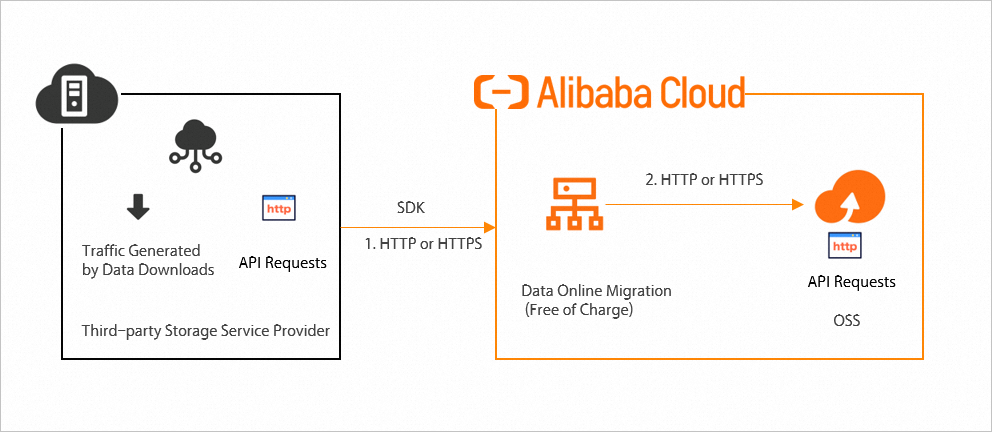
Migrate from local file system to OSS
The figure below shows the billable items for migrating data from a local file system to an OSS bucket:

Migrate from OSS to local file system
The figures below show the billable items for migrating data from an OSS bucket to a local file system:
Source and Data Migration service in the same region

Source and Data Migration service in different regions

Migrate between local file systems
The figure below shows the billable items for migrating data between local file systems:

API request fees
To complete a data migration, a Data Online Migration task scans the source data (ListObject), compares files between the source and destination (HeadObject), downloads the source files and uploads them to the destination, and finally verifies the metadata. All of these operations generate API requests.
The number of API requests for the ListObject operation depends on the number of files at the source, the data migration scenario, and the selected overwrite method. Each request returns up to 1,000 files. The following section explains how to calculate the number of requests for a single file.
When migrating data between OSS buckets, an appendable file larger than 150 MB is not split into shards. Instead, the system treats it as a single file when calculating API requests.
If a file is 150 MB or larger, the system splits it into 50 MB shards and then uploads them. The number of API requests depends on the number of shards. For example, a 159 MB file results in 4 shards, while a 150 MB file results in 3 shards. This 150 MB threshold is a guideline; refer to the actual number of API requests for the final count.
These instructions assume successful file migrations and do not cover API requests for failed migrations.
Do not overwrite
Source-only files
-
For files in the source address smaller than 150 MB:
Location
Pre-migration comparison
Migration request
Post-migration verification
API requests
source address
HeadObject × 1
GetObject × 1
-
2
destination address
HeadObject × 1
PutObject × 1
HeadObject × 1
3
-
For files in the source address 150 MB or larger:
Location
Pre-migration comparison
Migration request
Post-migration verification
API requests
source address
HeadObject × 1
GetObject × N
-
1 + N
destination address
HeadObject × 1
InitiateMultipartUpload × 1
UploadPart × N
ListParts × 1
CompleteMultipartUpload × 1
HeadObject × 1
5 + N
Files with the same name
-
For files smaller than 150 MB in the source address:
Location
Pre-migration comparison
Data migration
Post-migration verification
API requests
source address
HeadObject × 1
-
-
1
destination address
HeadObject × 1
-
-
1
-
For files 150 MB or larger in the source address:
Location
Pre-migration comparison
Data migration
Post-migration verification
API requests
source address
HeadObject × 1
-
-
1
destination address
HeadObject × 1
-
-
1
Overwrite method: Overwrite all
Files in source but not destination
-
When a source file is under 150 MB:
Location
Pre-migration comparison
Migration request
Post-migration verification
API requests
source address
HeadObject × 1
GetObject × 1
-
2
destination address
-
PutObject × 1
HeadObject × 1
2
-
When a source file is 150 MB or larger:
Location
Pre-migration comparison
Migration request
Post-migration verification
API requests
source address
HeadObject × 1
GetObject × N
-
1+N
destination address
-
InitiateMultipartUpload × 1
UploadPart × N
ListParts × 1
CompleteMultipartUpload × 1
HeadObject × 1
4+N
Same-named files at source and destination
-
When a source file is under 150 MB:
Location
Pre-migration comparison
Migration request
Post-migration verification
API requests
source address
HeadObject × 1
GetObject × 1
-
2
destination address
-
PutObject × 1
HeadObject × 1
2
-
When a source file is 150 MB or larger:
Location
Pre-migration comparison
Migration request
Post-migration verification
API requests
source address
HeadObject × 1
GetObject × N
-
1+N
destination address
-
InitiateMultipartUpload × 1
UploadPart × N
ListParts × 1
CompleteMultipartUpload × 1
HeadObject × 1
4+N
Overwrite by last modification time
Files that exist only at the source
-
When a file at the source address is smaller than 150 MB:
Location
Pre-migration comparison
Migration request
Post-migration verification
API requests
Source address
HeadObject × 1
GetObject × 1
-
2
Destination address
HeadObject × 1
PutObject × 1
HeadObject × 1
3
-
When a file at the source address is 150 MB or larger:
Location
Pre-migration comparison
Migration request
Post-migration verification
API requests
Source address
HeadObject × 1
GetObject × N
-
1+N
Destination address
HeadObject × 1
InitiateMultipartUpload × 1
UploadPart × N
ListParts × 1
CompleteMultipartUpload × 1
HeadObject × 1
5+N
Source file is newer
-
When a file at the source address is smaller than 150 MB:
Location
Pre-migration comparison
Migration request
Post-migration verification
API requests
Source address
HeadObject × 1
GetObject × 1
-
2
Destination address
HeadObject × 1
PutObject × 1
HeadObject × 1
3
-
When a file at the source address is 150 MB or larger:
Location
Pre-migration comparison
Migration request
Post-migration verification
API requests
Source address
HeadObject × 1
GetObject × N
-
1+N
Destination address
HeadObject × 1
InitiateMultipartUpload × 1
UploadPart × N
ListParts × 1
CompleteMultipartUpload × 1
HeadObject × 1
5+N
Destination file is newer
-
When a file at the source address is smaller than 150 MB:
Location
Pre-migration comparison
Migration request
Post-migration verification
API requests
Source address
HeadObject × 1
-
-
1
Destination address
HeadObject × 1
-
-
1
-
When a file at the source address is 150 MB or larger:
Location
Pre-migration comparison
Migration request
Post-migration verification
API requests
Source address
HeadObject × 1
-
-
1
Destination address
HeadObject × 1
-
-
1
Billing examples
A user migrates 1,000 files: 900 files at 500 KB each and 100 files at 160 MB each.
These examples assume that the migration task completes successfully without any errors.
Example 1: No same-name files at destination
Overwrite method: Do not overwrite
|
Description |
Source operations |
Number of source requests |
Destination operations |
Number of destination requests |
|
Small files |
HeadObject: 900 GetObject: 900 |
1,800 |
HeadObject: 900 × 2 PutObject: 900 |
2,700 |
|
Large files |
HeadObject: 100 GetObject: 100 × 4 |
500 |
HeadObject: 100 × 2 InitiateMultipartUpload: 100 UploadPart: 100 × 4 ListParts: 100 CompleteMultipartUpload: 100 |
900 |
|
Number of scans |
ListObject: 1 |
1 |
- |
- |
|
Total number of requests |
- |
2,301 |
- |
3,600 |
Overwrite method: Overwrite all
|
Description |
Source operations |
Number of source requests |
Destination operations |
Number of destination requests |
|
Small files |
HeadObject: 900 GetObject: 900 |
1,800 |
HeadObject: 900 PutObject: 900 |
1,800 |
|
Large files |
HeadObject: 100 GetObject: 100 × 4 |
500 |
HeadObject: 100 InitiateMultipartUpload: 100 UploadPart: 100 × 4 ListParts: 100 CompleteMultipartUpload: 100 |
800 |
|
Number of scans |
ListObject: 1 |
1 |
- |
- |
|
Total number of requests |
- |
2,301 |
- |
2,600 |
Example 2: Same-name files exist and source files are newer
Overwrite method: Do not overwrite
|
Description |
Source operations |
Number of source requests |
Destination operations |
Number of destination requests |
|
Small files |
HeadObject: 900 |
900 |
HeadObject: 900 |
900 |
|
Large files |
HeadObject: 100 |
100 |
HeadObject: 100 |
100 |
|
Number of scans |
ListObject: 1 |
1 |
- |
- |
|
Total number of requests |
- |
1,001 |
- |
1,000 |
Overwrite method: Overwrite all
|
Description |
Source operations |
Number of source requests |
Destination operations |
Number of destination requests |
|
Small files |
HeadObject: 900, GetObject: 900 |
1,800 |
HeadObject: 900, PutObject: 900 |
1,800 |
|
Large files |
HeadObject: 100, GetObject: 100 × 4 |
500 |
HeadObject: 100, InitiateMultipartUpload: 100, UploadPart: 100 × 4, ListParts: 100, CompleteMultipartUpload: 100 |
800 |
|
Number of scans |
ListObject: 1 |
1 |
- |
- |
|
Total number of requests |
- |
2,301 |
- |
2,600 |
Overwrite method: By last modification time
|
Description |
Source operations |
Number of source requests |
Destination operations |
Number of destination requests |
|
Small files |
HeadObject: 900, GetObject: 900 |
1,800 |
HeadObject: 900 × 2, PutObject: 900 |
2,700 |
|
Large files |
HeadObject: 100, GetObject: 100 × 4 |
500 |
HeadObject: 100 × 2, InitiateMultipartUpload: 100, UploadPart: 100 × 4, ListParts: 100, CompleteMultipartUpload: 100 |
900 |
|
Number of scans |
ListObject: 1 |
1 |
- |
- |
|
Total number of requests |
- |
2,301 |
- |
3,600 |
Example 3: Same-name files exist and destination files are newer
Overwrite method: Do not overwrite or by last modification time
|
Description |
Source operations |
Number of source requests |
Destination operations |
Number of destination requests |
|
Small files |
HeadObject: 900 |
900 |
HeadObject: 900 |
900 |
|
Large files |
HeadObject: 100 |
100 |
HeadObject: 100 |
100 |
|
Number of scans |
ListObject: 1 |
1 |
- |
- |
|
Total number of requests |
- |
1,001 |
- |
1,000 |
Overwrite method: Overwrite all
|
Description |
Source operations |
Number of source requests |
Destination operations |
Number of destination requests |
|
Small files |
HeadObject: 900 GetObject: 900 |
1,800 |
HeadObject: 900 PutObject: 900 |
1,800 |
|
Large files |
HeadObject: 100 GetObject: 100 × 4 |
500 |
HeadObject: 100 InitiateMultipartUpload: 100 UploadPart: 100 × 4 CompleteMultipartUpload: 100 |
800 |
|
Number of scans |
ListObject: 1 |
1 |
- |
- |
|
Total number of requests |
- |
2,301 |
- |
2,600 |
Fees for API requests are determined by your storage service provider. For OSS pricing, see Billing overview.
Restoration fees
You must restore data from the archive storage class before creating a migration task. When restoring data, note the following:
-
Create the source data address and the migration task only after the restoration is complete.
-
Ensure the restored data is available for a period long enough to complete the migration. This prevents the data from being archived again before the migration finishes.
-
Restoration incurs data retrieval fees. Some restoration services can be expensive. For more information about the billing rules, contact the service provider of your source bucket.
Data Online Migration does not restore source data. Migration fails for any files that are not fully restored.
Download and upload traffic fees
During data migration, Data Online Migration first downloads data from the source and then uploads it to OSS. The resulting traffic fees depend on the scenario.
This information on traffic fees applies only to successful migrations.
Source is a third-party storage provider
Your source storage provider charges download fees based on the amount of data transferred. Uploading data to OSS incurs no traffic fees within a specific bandwidth range. For more information, see Limits and performance metrics.
Source is OSS
Egress traffic fees for migrating data between two OSS buckets depend on the service region you select in the console before creating a task.
1. If the data source's region is the same as the selected service region, the source OSS does not incur internet egress fees.
For example, if both the source and destination are OSS buckets in China (Beijing) and you select China (Beijing) as the service region, the source OSS incurs no internet egress fees during migration.

2. If the data source's region is different from the selected service region, the source OSS incurs internet egress fees.
For example, if the source is an OSS bucket in China (Beijing) and the destination is in Singapore, and you select Singapore as the service region, the source OSS incurs internet egress fees during migration.

To minimize network latency, we recommend selecting a service region that matches your data source's region. If that region is unavailable, select one geographically close to the data source to ensure optimal migration performance.