Data Transport II is a physical device for offline data migration between an on-premises data center and Alibaba Cloud OSS, supporting both upload and download directions.
Data Transport II devices are available only in Chinese mainland regions. Both migration directions are limited to these regions.
Migrate data from on-premises to Alibaba Cloud
Steps marked (Alibaba Cloud) are performed by Alibaba Cloud. All other steps are yours.
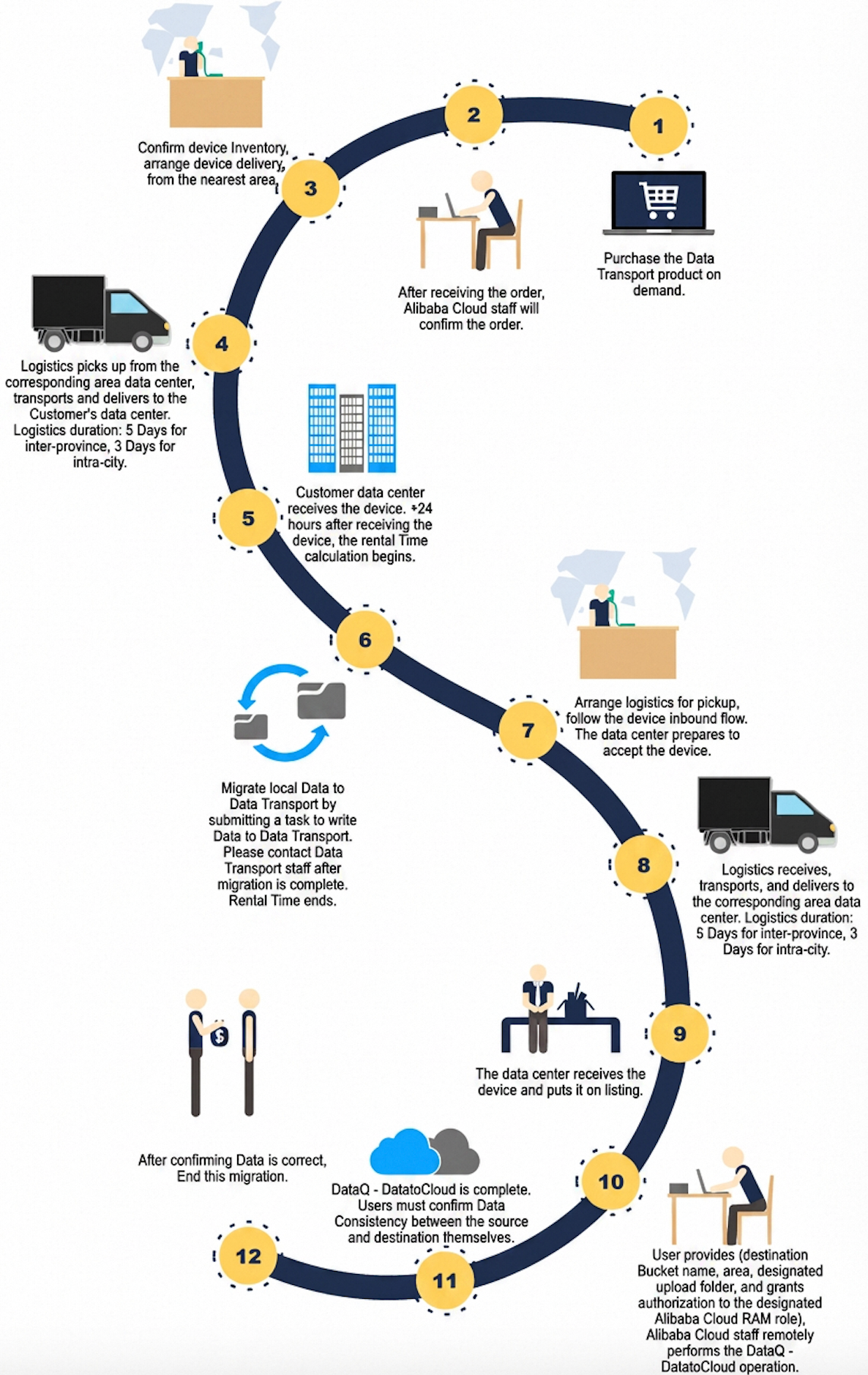
Procedure
-
Create an order and complete payment. Submit a Data Transport II device order in the Data Migration console. Create an order.
NoteAfter payment, Alibaba Cloud prepares and ships the device to your specified address.
-
Create an OSS bucket. Create the destination bucket for your migrated data. For more information, see Create a bucket.
-
Receive and install the device. After the device arrives, inspect the package and install the hardware. For more information, see Install hardware.
-
Mount the source file system. Connect on-premises storage to the Data Transport II device. Mount a source file system.
-
Copy data to the device. Create and run a data migration task to transfer on-premises data to the device's local NAS. For more information, see Copy on-premises data.
-
Power off the device and prepare it for return. After copying completes, power off the device and prepare it for pickup. Migrate data to the cloud and verify the result.
-
(Alibaba Cloud) Ship the device to the data center. Alibaba Cloud arranges a designated logistics provider to pick up and transport the device to an Alibaba Cloud data center.
-
(Alibaba Cloud) Upload data to OSS. Alibaba Cloud installs the device, starts the migration task, and transfers data to the specified OSS bucket.
-
(Alibaba Cloud) Deliver the migration report. Alibaba Cloud provides a migration report with the following details:
NoteThe migration report is for reference only.
-
Total number and volume of successfully uploaded files
-
File locations, including files that succeeded and files that failed
-
-
Verify data and revoke permissions. Verify data consistency between source and OSS data, then revoke the RAM role permissions.
Migrate data from Alibaba Cloud to on-premises
Use this workflow to download data from Alibaba Cloud OSS to your on-premises data center.
This direction is available only in Chinese mainland regions.
Billing
|
Item |
Details |
|
Data Transport fee |
USD 28.57 per TB with a minimum charge of 10 TB. |
|
OSS fees |
OSS data transfer and request fees also apply. OSS billing. |
Archive storage requirements
If the source data uses Archive storage class, restore it before migration:
-
Ensure data is fully restored before starting.
-
Set the availability duration based on total data volume to prevent data from freezing during migration.
-
Restoring Archive data incurs retrieval fees. Some restoration modes are expensive. OSS billing.
Procedure
-
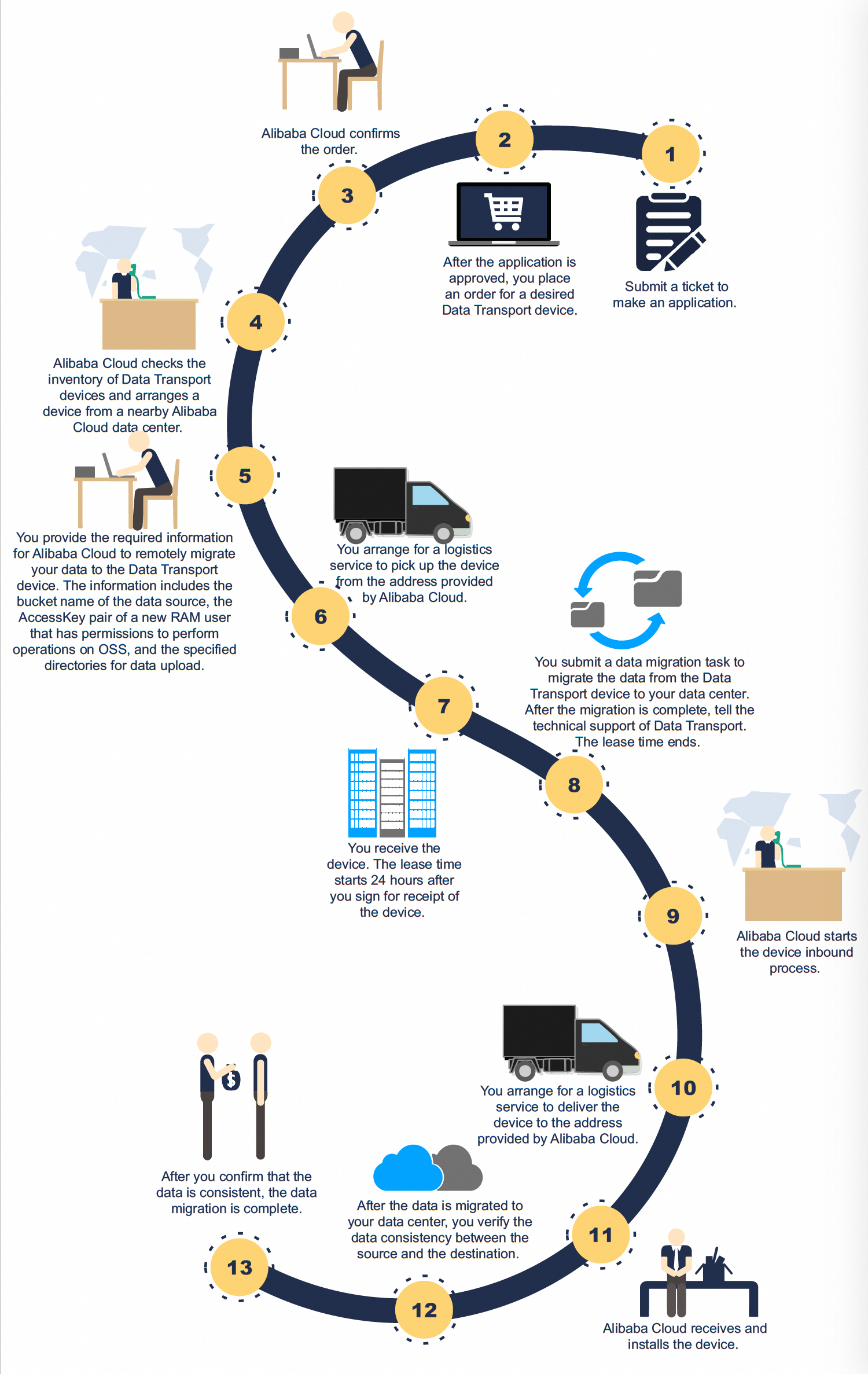
Submit a ticket for approval. Submit a support ticket with your UID and migration reason before ordering.
-
Create an order and complete payment. After approval, select Back up to On-premises IDC in the Data Migration console, create an order, and complete the payment.
-
Provide migration details to Alibaba Cloud. Provide the following information to Alibaba Cloud staff:
-
Source bucket name
-
AccessKey pair of a new RAM user with OSS permissions
-
Download directories
-
-
(Alibaba Cloud) Copy data and deliver the device. Alibaba Cloud copies the specified data to the Data Transport II device and provides a migration report with the following details:
NoteThe migration report is for reference only. After the report is ready, Alibaba Cloud arranges a logistics provider to ship the device to your specified address.
-
Total number and volume of files successfully copied to the device
-
File locations, including files that succeeded and files that failed
-
-
Receive and install the device. After the device arrives, inspect the package and install the hardware. For more information, see Install hardware.
-
Mount the destination file system. Mount the on-premises file system where you want to store the migrated data. Mount a source file system.
-
Copy data to your on-premises storage. Create and run a data migration task to copy data from the device to your on-premises file system. For more information, see Copy on-premises data.
NoteThe destination must be a supported file system (Windows, Linux, or NAS). For HDFS or other storage types, use other migration tools.
-
Power off the device and notify Alibaba Cloud. Power off the device and notify Alibaba Cloud to arrange pickup. Migrate data to the cloud and verify the result.
-
Verify data consistency. Verify that the downloaded data matches the source data in OSS.